

Is app development still expensive? No-code platforms let founders build functional mobile and web apps faster, reduce costs, skip long timelines, and validate MVPs without hiring large development teams early.
Can an exciting app idea suddenly send your budget into a panic?
That’s exactly what happens when founders think about building a mobile app.
Traditionally, launching an app meant hiring expensive developers, dealing with long timelines, and hoping the MVP actually works. Costs pile up quickly, and delays are almost guaranteed.
No code changes all of that. Using an app maker without coding lets you build mobile and web apps quickly and cost-effectively, while maintaining full functionality.
Let’s dive into how this works and why founders like us are jumping on no-code platforms.
Why Cutting Costs Matters for New Founders?
Being a new founder means juggling tight budgets. There’s rent, marketing, and office tools. And then there’s app development.
Paying traditional developers or outsourcing can cost tens of thousands of dollars just to create an MVP (minimum viable product).
So here’s the catch. With no code app builder platforms, you can:
- Skip expensive developer salaries
- Avoid long timelines
- Build yourself with drag and drop ease
- Launch mobile apps and web apps without code
That’s music to a founder’s ears. Plus, saving on development means you can spend more on marketing, customer research, or user support after launch.
How No-Code App Builders Reduce Expenses
No-code app builders save money by eliminating the most expensive layers of app development. Large teams, long timelines, and repeated technical work are no longer required. Founders get more control while spending far less.
Smaller Teams or Solo Building
Forget hiring a team of developers. A good no-code app builder lets one person create apps, set up screens, logic, and features. Teams aren’t needed to write endless lines of code app.
That saves money on salaries, contracts, and delays. Even part-time help becomes optional. You are basically your own team.
Rapid Launch with Templates and Drag + Drop
Most tools come with pre-made templates and drag-and-drop building blocks. This means you don’t start from zero.
Visual building lets you:
- Assemble screens fast
- Test ideas quickly
- Save time and labor costs
Easier Maintenance Means Lower Long-Term Costs
Once your mobile or web app is live, you need to update it, fix bugs, and add features. Traditional development means ongoing costs with developers or contractors.
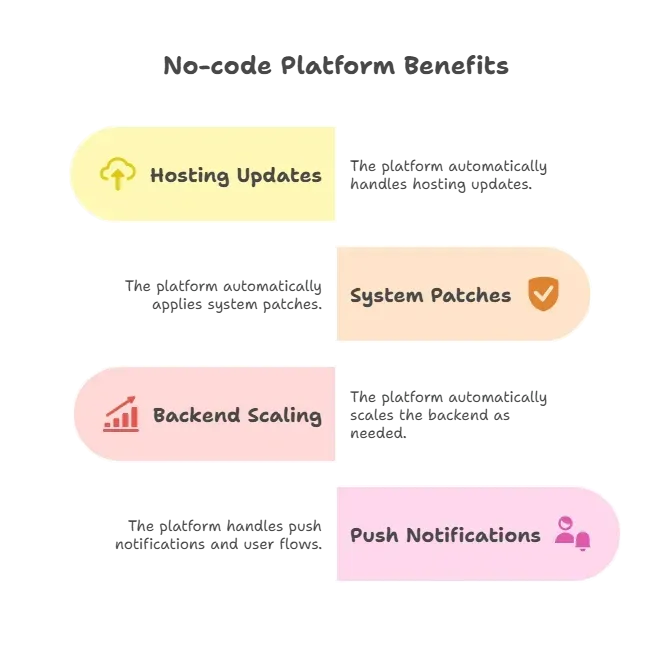
Behind the scenes, the platform manages infrastructure. That means less time and money spent on tweaks and technical headaches.
Cost Breakdown
Seeing the numbers side by side makes the savings obvious. Traditional app development can drain tens of thousands before the app even reaches users, while a no-code app builder keeps costs manageable and predictable.
| Expense Type | Traditional Coding | No Code App Builder |
|---|---|---|
| Initial App Build | $30,000 to $100,000 | Under $1,000 |
| Backend Dev & Setup | $10,000+ | Included |
| Maintenance (Year 1) | $5,000+ | Included/Low |
| Dev Team Salaries | $50,000+ | Not needed |
| Publishing Support | $2,000+ | Included/Low |
This table is a rough estimate but shows the scale. Using no code app builder tools can shift costs from huge to manageable.
Founded Without Coding? That’s the Power of No Code
Founders often start with no-code because it lets them test ideas quickly. You can create a mobile app, connect to data sources like Google Sheets, add push notifications, and launch on the Google Play Store or the Apple App Store without deep technical skills.
Here’s how no-code trims the fat:
- Tools handle backend work for you
- Platforms include built-in hosting
- You don’t need server admins
Every part you don’t pay a developer to do means money stays in your pocket.
Lower Risk and Fast Feedback
Spending big on development can be scary, especially if your app idea flops. Nothing stings worse than dropping tens of thousands on something users ignore.
With no code, you can:
- Launch a web app prototype fast: You don’t need months of coding. A basic web app or mobile app can go live quickly, letting you test the concept without heavy investment.
- Gather real app users feedback: Share your app with actual users early. See what works, what confuses them, and which features they love, all before committing serious resources.
- Refine before spending: Make changes on the fly. Add new screens, adjust workflows, or tweak logic without paying a developer for every update.
This fast feedback loop reduces risk and prevents burning tens of thousands on something your users might ignore.
When No Code Still Costs Less in the Long Run
Some no-code tools come with paid plans, but even then, they are far cheaper than hiring a full development team. Free mobile app builder options make it easy to start without spending anything upfront.
Subscriptions are generally less expensive than salaries, ongoing DevOps, and server management. The platform handles updates, servers, and API integrations automatically, so founders save both time and money.
Many tools also offer free plans to test ideas and grow before scaling. This way, you can launch, iterate, and improve your app without risking your budget.
Community Voices on No-Code Costs
Many makers online share real experiences with no-code platforms. Here’s one Reddit Comment.
“For free users, they give you 1M tokens … For $25 you get 5M tokens … quality of the generated apps and flow is good for rapid prototyping or spinning up an MVP.”
This kind of insight shows how no-code tools let folks build without big budgets. It’s not perfect, but it’s powerful and cheap by comparison.
What About Native Apps on App Stores?
Good news. Many no-code app builder platforms let you publish apps on the Google Play Store and Apple App Store. This means you can:
- Build mobile app without coding
- Get listed in official app marketplaces
- Send push notifications to real app users
That’s a huge deal. You reach your audience without an expensive development team.
How Rocket.new Helps Build Apps Faster
Rocket.new makes building apps faster and cheaper. Instead of spending weeks coding a mobile app or web app, you can describe your idea in one sentence and get a working app ready to test or launch.
The platform handles backend setup, authentication, database, and UI automatically, so you can focus on your idea instead of writing code.
Top Features
- AI-Powered App Generation – One prompt creates a full app with screens, logic, and data connections.
- Ready-to-Use Templates – Pick a template for marketplaces, productivity apps, or simple utility apps, then customize it in minutes.
- Automatic Backend & Auth – User accounts, permissions, and databases are all set up without coding.
- Web and Mobile Support – Apps are functional on both web and mobile devices, ready for real users.
Example: Food Truck Landing Page Template

Food Truck Landing Page Template is a warm artisan landing page built for a Tajik food truck. It combines a full-bleed hero, drag-slider before/after gallery, use-case bento cards, and a sticky booking bar to guide festival organizers, office managers, and wedding couples from first scroll to a confirmed booking, fast and on any device.
What you get with this template You get a complete, single-page layout with every section built and ready to populate with your own photos and dish details. The template is designed to guide visitors through a visual cooking story and deliver them to a booking calendar with intent.
- A full-bleed hero section with a fade-in tagline and a prominent booking button above the fold
- Six before/after drag-slider gallery tiles showing raw ingredients becoming finished food
- A use-case bento grid covering festival, office lunch, and wedding late-night scenarios
- A menu detail section with dish cards, ingredient stories, and nested booking calls to action
- A sticky booking bar with headcount and radius pre-qualification copy
App Maker Without Coding Cuts Costs for New Founders
Traditional app development is expensive and slow, often breaking early budgets before your idea reaches users. A no-code app builder allows founders to create apps themselves, test quickly, and handle infrastructure automatically.
Using an app maker without coding keeps the process simple, affordable, and low-risk. You can move from idea to live app while keeping your budget intact. Keep shiping!
Table of contents
- -Why Cutting Costs Matters for New Founders?
- -How No-Code App Builders Reduce Expenses
- -Smaller Teams or Solo Building
- -Rapid Launch with Templates and Drag + Drop
- -Easier Maintenance Means Lower Long-Term Costs
- -Cost Breakdown
- -Founded Without Coding? That’s the Power of No Code
- -Lower Risk and Fast Feedback
- -When No Code Still Costs Less in the Long Run
- -Community Voices on No-Code Costs
- -What About Native Apps on App Stores?
- -How Rocket.new Helps Build Apps Faster
- -Top Features
- -Example: Food Truck Landing Page Template
- -App Maker Without Coding Cuts Costs for New Founders

