
The right AI database schema design prompts turn plain-English app requirements into production-ready tables, relationships, and indexes in minutes. They cut hours of manual planning into a single, precise conversation with your AI tool.
What separates a schema that holds up in production from one that breaks under real load?
Specificity in the prompt. According to the Stack Overflow 2024 Developer Survey, 76% of developers are using or planning to use AI tools in their workflow. Additionally, 62% are actively using them right now.
The shift extends far past code completion into database design itself. The right AI database schema design prompt generates a normalized schema, suggests indexes for common queries, and flags missing foreign key constraints before you write a single migration file.
This blog covers the specific prompts that get you there. They work across PostgreSQL, MySQL, SQLite, and other popular databases.
Why Structured Prompts Matter for Database Planning
A vague request to "create a database" gives you a vague result. The quality of your schema generation depends almost entirely on the specificity of your prompt.
Natural language instructions work best when they include context about the application domain. Telling an AI tool that you are building a multi-tenant SaaS with role-based access produces a fundamentally different database schema than asking for "a user database." This context shapes everything from table structure to indexing strategies.
Prompts that reference specific database design patterns push AI models past generic template output. For example, mentioning normalization levels or soft-delete strategies gets you schemas that reflect real architectural decisions. As a result, you spend less time fixing structural errors later.
The goal of structured prompting is to front-load decisions. You define cardinality, data types, and naming conventions in the prompt itself. Consequently, the generated schema needs fewer revisions. That is why prompt structure matters more than prompt length.
When to Use AI for Schema Design
Not every schema task benefits equally from AI prompting. Here is a practical guide:
| Scenario | AI Prompting Value | Best Approach |
|---|---|---|
| Greenfield app, 5 or more entities | Very high | Full entity and relationship prompt upfront |
| Adding tables to existing schema | High | Describe existing schema plus new requirements |
| Complex many-to-many relationships | High | Explicit junction table prompt |
| Single-table CRUD app | Low | Manual is faster |
| Performance tuning existing schema | Medium | Index analysis prompt with query patterns |
| Multi-tenant SaaS data isolation | Very high | Row-level security and organization scoping prompt |
| Schema migration with rollback | High | Up and down migration prompt with backfill |
How Do You Prompt AI to Identify Entities and Relationships?
The first step in any database schema project is identifying what entities exist and how they connect. A well-crafted prompt makes this step fast and thorough.
Start your prompt by listing the core entities in your application. For example: "I am building a project management tool with users, teams, projects, tasks, and comments." This gives the AI model a clear set of tables to generate.
Specify the relationships explicitly. Tell the AI: "A user belongs to many teams. A team has many projects. Each task has one assignee and many comments." Ambiguity here creates wrong schemas.
Ask the AI to generate an entity relationship diagram description with columns for each table. Include the primary key format (UUID vs auto-increment), foreign key references, and created_at timestamps. Also include specific column requirements such as: "For the users table, include email (unique), hashed_password, display_name, role (enum: admin, member, viewer), and a boolean is_active flag."
For complex many-to-many relationships, explicitly state the junction table. For instance: "Create a team_members join table with user_id and team_id as a composite primary key with foreign key constraints on both columns."
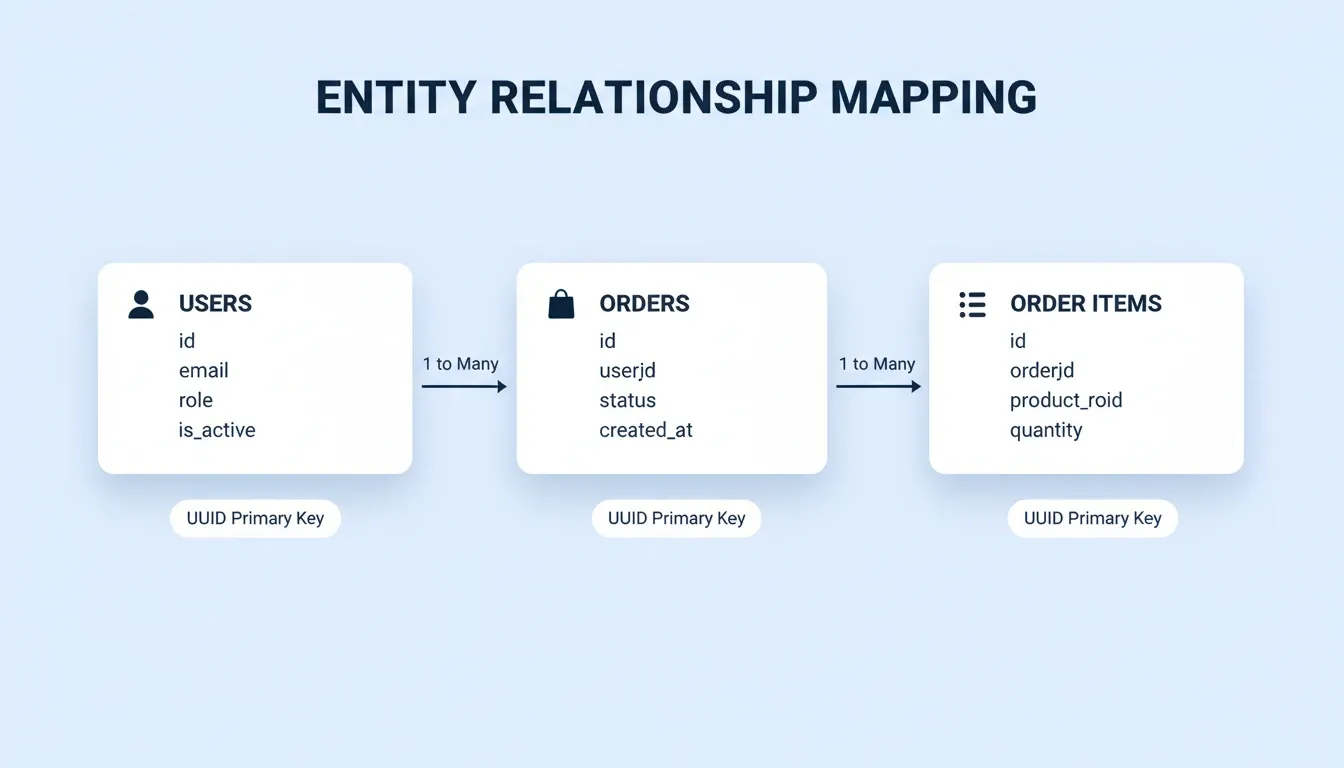
Entity Relationship Mapping — Users, Orders, and Order Items connected with one-to-many foreign key relationships.
Here is a sample prompt that works well for a PostgreSQL schema:
Design a PostgreSQL schema for an e-commerce platform. Entities: users, products, orders, order_items, categories, reviews. Each user can place many orders. Each order contains multiple order_items referencing products. Products belong to one category. Reviews link a user to a product with a rating column (integer 1 to 5) and text body. Use UUID for all primary key columns. Add foreign key constraints with ON DELETE CASCADE for order_items.
GitHub's 2024 developer survey found that 97% of respondents have used AI coding tools at some point. Writing code was the top use case at 82%. Applying that same approach to PostgreSQL schema planning saves hours of manual entity mapping.
Ready-to-Use Entity Prompt Templates
Copy and adapt these templates for your own projects:
SaaS with multi-tenancy:
Design a PostgreSQL schema for a B2B SaaS. Entities: organizations, users, memberships, subscriptions, audit_logs. Users belong to many organizations via memberships. Each membership has a role (owner, admin, member). Subscriptions belong to organizations with a plan (free, pro, enterprise) and a status (active, cancelled, past_due). Add row-level security so users only access data within their organization.
Content platform:
Design a schema for a content publishing platform. Entities: authors, articles, tags, article_tags, comments, likes. Articles have a status (draft, published, archived) and a published_at timestamp. Tags are many-to-many with articles via article_tags. Comments are threaded using a parent_id self-reference. Use UUID primary keys and add indexes on author_id and published_at.
Marketplace:
Design a PostgreSQL schema for a two-sided marketplace. Entities: buyers, sellers, listings, orders, order_items, reviews, payments. Listings belong to sellers with a price, quantity, and status (active, sold, paused). Orders connect buyers to multiple listings via order_items. Reviews can be buyer-to-seller or seller-to-buyer using a reviewer_type enum. Payments link to orders with a provider (stripe, paypal) and a status (pending, completed, refunded).
What Data Types and Constraints Should Your Prompt Specify?
Getting the right data types and constraints from the start prevents painful migrations later. Your prompt should spell out exactly what you expect at the database level.
Always specify the target database engine in your prompt. A schema for PostgreSQL uses different types than MySQL or SQL Server. Include a line like: "Generate this schema for PostgreSQL 15" or "Target MySQL 8.0 with InnoDB engine." This single detail eliminates an entire category of errors in schema generation.
Define constraints explicitly in your prompt. For example: "Add NOT NULL to all required columns. Add unique constraints on email in the users table and on slug in the products table. Add a CHECK constraint ensuring rating is between 1 and 5." For numeric precision, state it directly: "Use DECIMAL(10,2) for price columns, INTEGER for quantity, and BIGINT for high-volume ID sequences."
Request default values and indexes together. A prompt like "Set created_at to NOW() and is_active to TRUE by default. Add a composite index on (user_id, created_at) for the orders table" produces immediately deployable SQL. The more specific your prompt, the fewer errors you will find when running the generated SQL.
A strong prompt for complete table creation might look like this:
1- - Prompt: Generate CREATE TABLE statements for a blog platform
2- - with authors, posts, tags, and post_tags junction table.
3- - Use PostgreSQL types: UUID for IDs, VARCHAR(255) for short text,
4- - TEXT for content, TIMESTAMPTZ for dates, BOOLEAN for flags.
5- - Include foreign key references, unique constraints on author email,
6- - and a composite index on post_tags(post_id, tag_id).
7
8CREATE TABLE authors (
9 id UUID PRIMARY KEY DEFAULT gen_random_uuid(),
10 email VARCHAR(255) NOT NULL UNIQUE,
11 name VARCHAR(255) NOT NULL,
12 bio TEXT,
13 is_active BOOLEAN DEFAULT TRUE,
14 created_at TIMESTAMPTZ DEFAULT NOW()
15);
For a deeper look at how AI handles the full backend layer, read how AI in backend development improves API performance and speed.
Can AI Handle Normalization and Indexing From a Single Prompt?
Yes, but only if your prompt teaches the model what "normalized" means for your specific context. Generic prompts produce generic structures with obvious performance issues down the line.
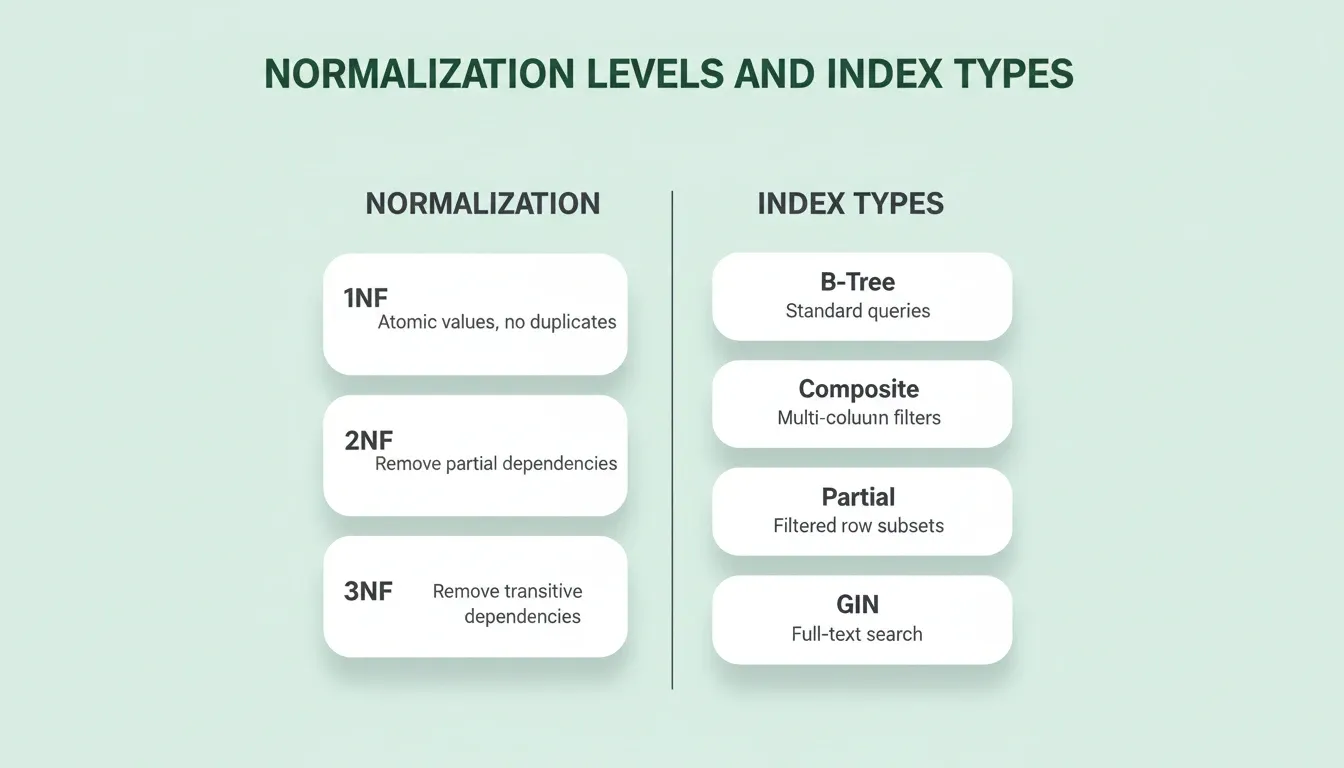
Include the normalization level you want. A prompt like "Normalize this schema to 3NF and eliminate transitive dependencies between non-key columns" gives the AI a clear target. Without this instruction, models often generate denormalized schemas with redundant data across tables.
For indexing strategies, describe your read patterns explicitly. For instance: "This app runs heavy read queries on the orders table filtered by user_id and created_at. Suggest composite indexes and explain the query plan impact for tables with over 1 million rows." Similarly, ask about slow query prevention: "Which indexes would prevent slow queries when filtering by status and date range on a table with 10 million rows?"
Request mock data generation alongside your schema. A prompt like "Generate 100 rows of realistic test data for users, orders, and products tables" validates your indexes under realistic load conditions. When you include mock data requirements, you also get test data that confirms your schema works correctly in practice.
Prompt Specificity vs. Output Quality
| Prompt Element | Vague Prompt Result | Specific Prompt Result |
|---|---|---|
| Target database | Generic SQL, may not run | Engine-specific DDL that executes immediately |
| Data types | VARCHAR everywhere | DECIMAL, BIGINT, TIMESTAMPTZ as appropriate |
| Constraints | Missing NOT NULL, no checks | Full NOT NULL, UNIQUE, CHECK constraints |
| Indexes | No indexes generated | Composite indexes for common query patterns |
| Relationships | Implicit, no foreign keys | Explicit foreign keys with ON DELETE behavior |
| Normalization | Denormalized, redundant data | 3NF-compliant, no transitive dependencies |
| Row-level security | Not considered | RLS policies scoped to user or organization |
Advanced Indexing Prompts for Scale
Once your base schema is solid, these prompts help you plan for production load:
Partial index for filtered queries:
Add a partial index on the orders table for rows where status = 'pending'. This table will have 50 million rows and the pending subset is queried every 30 seconds by the processing queue.
Full-text search index:
Add a GIN index on the articles table for full-text search across the title and body columns using PostgreSQL's tsvector. Include the trigger to keep the search vector updated on insert and update.
Covering index for dashboard queries:
The analytics dashboard runs this query every 5 seconds: SELECT user_id, COUNT(*), SUM(amount) FROM transactions WHERE created_at > NOW() - INTERVAL '30 days' GROUP BY user_id. Create a covering index that eliminates the table scan.
From Prompt to Production Schema on Rocket
Most database schema generator tools give you a SQL file and leave you to figure out the rest. Rocket connects your schema to the complete application stack from the moment you describe your app.
When you describe your application in Rocket's Build, the platform generates your PostgreSQL database schema alongside the Next.js frontend, API routes, and authentication layer. Your schema is wired to the routes that query it and the UI that displays the data from the first generation. It is not a separate file you manually connect later.
Supabase handles the PostgreSQL backend. Rocket connects to Supabase via OAuth and scaffolds your complete backend, including a PostgreSQL database, user authentication, file storage, and edge functions. Tell Rocket "add email sign-up and a products table with name, description, price, and image URL" and it generates the schema, the RLS policies, and the frontend in one pass. When you refine your schema through chat, Rocket generates SQL migration scripts you can push to your connected Supabase project to keep your tables and row-level security policies in sync.
Rocket's built-in Advisor Agent runs on Claude Opus in read-only mode. When the coding agent hits a schema-related error loop, the Advisor diagnoses the root cause and returns numbered implementation steps. This includes silent constraint failures, wrong ON CONFLICT clauses, and GoTrue versioning mismatches. The coding agent then executes the fix. This is how Rocket prevents the kind of silent migration failures that take hours to debug manually.
If you already have a Supabase project with a live schema, Rocket's Launchpad feature reads it directly. Connect your Supabase project and Rocket uses your existing schema as the foundation for the build. No prompt writing is required and no information is lost in translation. For more on how Rocket handles the full database integration layer, see AI app builder with database integration.
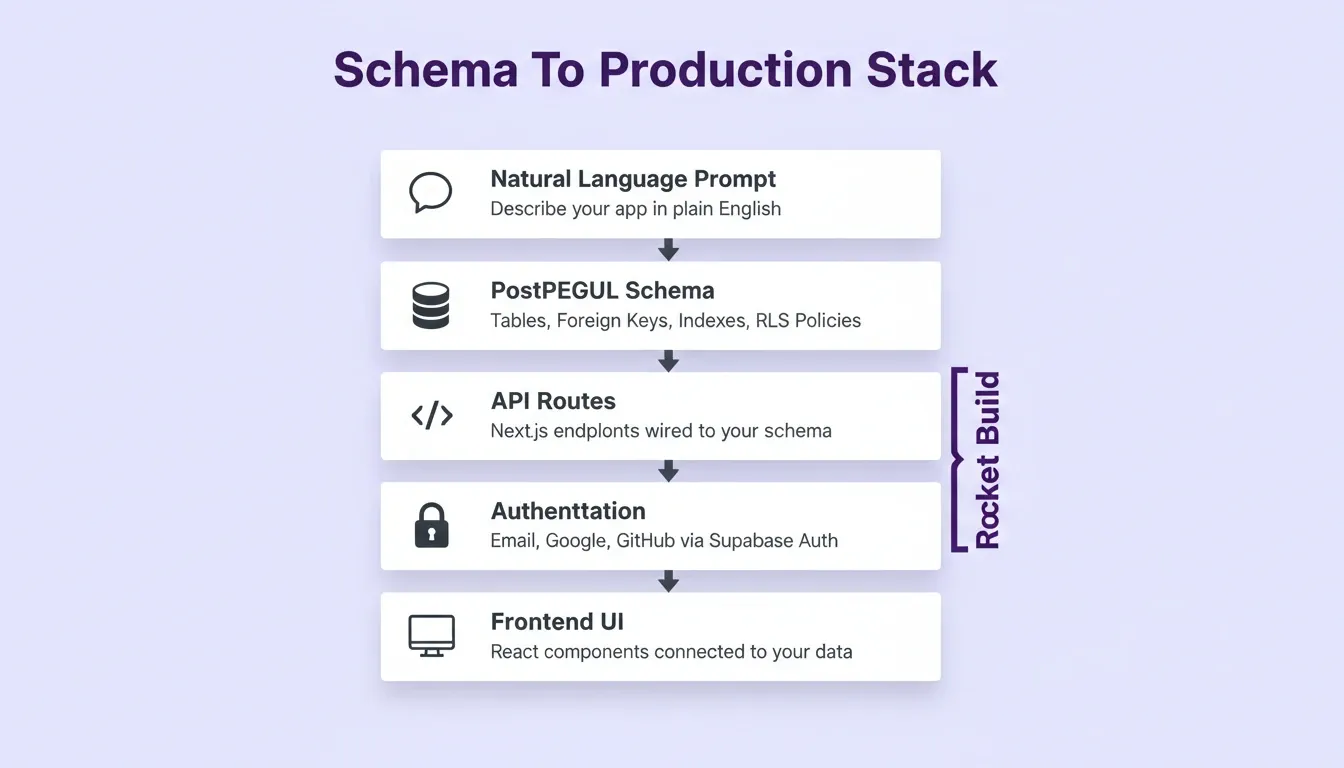
What Rocket Builds Alongside Your Schema
| Layer | What Rocket Generates |
|---|---|
| Database | PostgreSQL tables, foreign keys, indexes, and CHECK constraints via Supabase |
| Authentication | Email/password, social login (Google, GitHub), and protected routes |
| Row-level security | Per-user and per-organization RLS policies |
| API routes | Next.js API routes wired to your schema |
| Frontend | React UI components connected to your data model |
| Edge functions | Supabase Edge Functions for server-side logic |
| Migration scripts | SQL up and down migrations pushed to your Supabase project |
How Do Teams Review and Refine AI-Generated Schemas?
Generating a schema is the starting point, not the finish line. The real work is reviewing the output with your team and iterating toward production readiness.
Use follow-up prompts to audit your own output. After generating a schema, ask: "Review this schema for missing indexes, potential N+1 query patterns, and columns that should have NOT NULL constraints. List each issue with a fix." This turns the AI into your code reviewer for schema design.
Ask for alter table statements that handle schema evolution. For example: "Generate migration SQL to add a subscription_tier column to the users table and backfill existing rows with free as the default value. Include both the up and down migration for rollback." Also prompt for edge cases: "What happens to this schema if a user is deleted but has active orders? Show the cascade behavior for each foreign key."
Include access levels in your review prompt. A request like "Generate row-level security policies for a multi-tenant schema where users should only access data within their organization" produces secure schemas that protect data at the database level from day one.
A developer on Reddit shared a useful observation about AI-generated schemas: "I have noticed that prompting the AI to explain why it chose each data type forces it to produce more thoughtful schemas. When it has to justify decisions, the output quality jumps significantly." This matches what the JetBrains DevEcosystem 2023 survey found: developers who treat AI tools as collaborative partners get results they can actually maintain and build on.
Mock data generation during review catches problems early too. Ask: "Generate 1000 rows of mock data for the orders and users tables and identify any constraint violations or data integrity issues that surface."
Schema Review Prompt Checklist
Run these prompts against any AI-generated schema before committing it to production:
| Review Area | Prompt to Run |
|---|---|
| Missing indexes | "List every column used in WHERE clauses that lacks an index. Show CREATE INDEX statements for each." |
| N+1 patterns | "Identify relationships in this schema that will cause N+1 query problems. Suggest eager-loading strategies." |
| Cascade behavior | "For every foreign key with ON DELETE CASCADE, describe what data is destroyed when the parent row is deleted." |
| Soft delete gaps | "Which tables should use soft deletes instead of hard deletes? Add a deleted_at column and update the RLS policies." |
| Data type mismatches | "Are there columns where the data type will cause precision loss, overflow, or implicit casting at scale?" |
| Security gaps | "Which tables store user-generated content without RLS policies? Generate the missing policies." |
| Migration safety | "Generate the down migration for every ALTER TABLE in this changeset. Verify rollback is safe." |
Prompts That Plan Your Data Layer Save You Weeks of Rework
The difference between a mediocre schema and a production-ready one often comes down to the specificity of your initial prompt. When you describe entities, relationships, data types, normalization rules, and indexing strategies upfront, AI delivers drafts that need refinement rather than complete redesigns. As a result, you spend time reviewing and improving instead of starting from scratch.
Every prompt pattern in this guide is something you can run today. Whether you are planning a new project or restructuring an existing database, the process is the same. Start with entity identification, layer on constraints and types, add indexing and test data, then review with audit prompts.
The best teams treat AI database schema design prompts as a discipline, not a shortcut. The prompt is the spec. The more precise it is, the less you fix later.
The Schema Is Where Every App Begins
AI database schema design prompts have changed how developers approach the hardest part of any project: the data model. The patterns in this guide work today. As AI tooling matures, the gap between a well-structured prompt and a production-ready schema will only narrow further.
The developers who get the most from these tools bring the most context into the prompt itself. Domain knowledge, access patterns, and constraint requirements all matter. That discipline compounds over every project.
Rocket connects your schema to the full application stack. Describe your app, and Rocket generates the PostgreSQL database, API routes, authentication, and frontend together. Your data model and application logic stay in sync from day one. Start building on Rocket and go from requirements to a connected, production-ready schema in minutes.
Table of contents
- -Why Structured Prompts Matter for Database Planning
- -When to Use AI for Schema Design
- -How Do You Prompt AI to Identify Entities and Relationships?
- -Ready-to-Use Entity Prompt Templates
- -What Data Types and Constraints Should Your Prompt Specify?
- -Can AI Handle Normalization and Indexing From a Single Prompt?
- -Prompt Specificity vs. Output Quality
- -Advanced Indexing Prompts for Scale
- -From Prompt to Production Schema on Rocket
- -What Rocket Builds Alongside Your Schema
- -How Do Teams Review and Refine AI-Generated Schemas?
- -Schema Review Prompt Checklist
- -Prompts That Plan Your Data Layer Save You Weeks of Rework
- -The Schema Is Where Every App Begins