
Can AI really streamline internal workflows? Discover how AI-powered internal tool generators simplify tool creation, reduce repetitive tasks, and help teams work smarter, faster, and more efficiently in modern enterprises.
Tired of slow, repetitive workflows and looking for a better approach?
That’s exactly where I landed a few years back when managing multiple teams, drowning in spreadsheets and manual workflows.
Enter the AI internal tool generator. It’s like having a clever assistant that takes what your teams need and turns it into internal software, almost like magic.
Research shows enterprise AI budgets are set to reach $220 billion by 2026, highlighting how seriously companies are taking smarter, faster operations.
This blog will show how internal tool generators powered by AI simplify the creation of internal tools and make team workflows easier.
The Pain of Traditional Internal Tools
Internal tools often feel like a necessary evil. These behind-the-scenes apps and dashboards keep things running, but they can also slow teams down.
I’ve watched full engineering sprints spent building tools that hardly anyone uses. Hiring developers, waiting months, rewriting custom code, it’s exhausting.
Discovering AI Internal Tool Generators
AI internal tool generators can transform how teams create internal software, removing bottlenecks and speeding up processes.
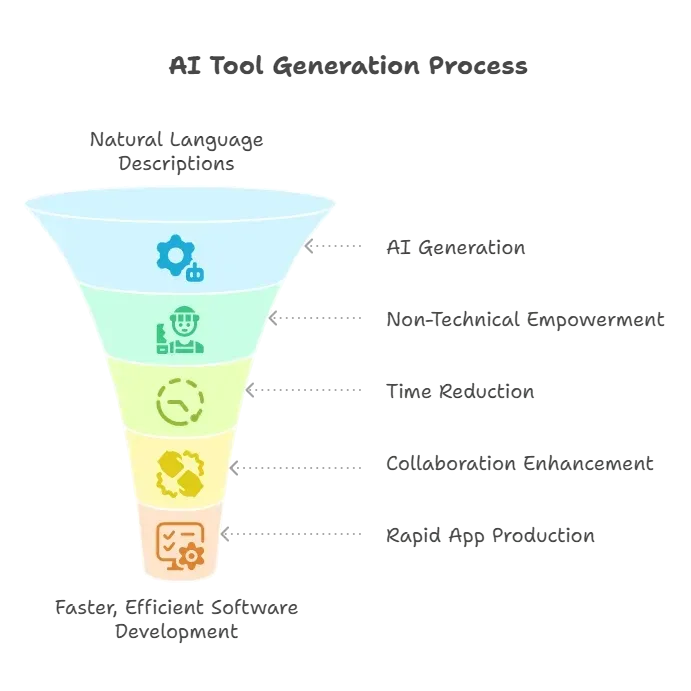
AI internal tool generators make creating internal software faster, more collaborative, and far less frustrating for teams.
Features That Make Life Easier
Most internal tool builders now offer features that feel almost playful.
Drag-and-drop interfaces, custom workflows, data connections, and audit logs make internal software creation less of a headache.
Here’s a quick overview:
| Feature | Why It Helps |
|---|---|
| Drag and drop interfaces | Makes building intuitive for non-technical users |
| Natural language prompts | Describe what you need, and the system understands |
| Custom workflows | Map internal processes visually |
| Data source connections | Hook up databases, Google Sheets, or APIs |
| Audit logs | Track actions for compliance |
| Version control | Keeps changes organized |
| Enterprise-grade security | Protect sensitive data |
| Custom code support | When full control is needed |
| Templates | Quick starting points for dashboards |
These are not just buzzwords. They translate to less frustration, faster updates, and more usable internal apps.
Non-Technical Teams Can Actually Help
Involving non-technical teams can make internal software creation more effective and practical, ensuring tools truly serve the people who use them every day.
- Boosts practical design: Non-technical teams ensure tools match real, day-to-day workflows.
- Empowers HR, finance, and ops: These teams can create workflows themselves using drag-and-drop and low-code platforms.
- No coding needed: Anyone can contribute, lowering the barrier to building internal software.
- Reduces IT bottlenecks: Less back-and-forth with technical teams speeds up tool deployment.
- Improves usability: Tools built with user input are more user-friendly and better aligned with business needs.
Including non-technical teams in the process ensures internal tools are practical, user-friendly, and aligned with real workflows, making adoption smoother and more effective.
Balancing Speed and Security
Rapid internal software creation doesn’t have to compromise security. With the right tools and permissions in place, teams can move fast while ensuring sensitive data stays protected and compliance requirements are met.
- Fast doesn’t mean risky: Rapid internal software development can remain secure when proper measures are in place.
- Enterprise-grade protection: Platforms with audit logs, granular permissions, and security features safeguard sensitive data.
- Compliance assured: Teams can build quickly without worrying about breaking regulations.
- Confidence to move fast: Proper security lets teams innovate internally while keeping information safe.
Teams can build internal tools quickly while keeping sensitive information secure.
AI Meets Workflow Automation
AI adds intelligence to workflow automation tools, helping teams design processes faster and smarter—without spending hours coding every single step.
- Smarter automation: AI guides workflow tools, helping teams design processes more efficiently.
- Less manual work: AI suggests logical structures and layouts, reducing the need to build everything from scratch.
- Enhanced low-code experience: Pairing AI with low-code tools makes app creation feel like brainstorming with a teammate who finishes your ideas.
- Faster, less tedious building: AI-assisted workflows speed up internal app creation while keeping it intuitive and efficient.
With AI-assisted workflow automation, teams can build internal apps faster, smarter, and more effortlessly, making internal software development much more enjoyable.
Insights from the Community
One Reddit user shared their experience.
“So I’ve been experimenting with rocket.new recently, and I think it’s worth sharing how it works… For free users, they give you 1M tokens, which sounds like a lot but honestly gets eaten up pretty fast if your app has more than 5 screens.” - Reddit
How Rocket.new Helps Build Internal Tools?
Rocket.new isn’t just another AI app builder; Rocket.new helps you build internal tools by letting you describe what you need in plain language and generating a fully functional, production-ready app from that description.
You simply describe the tool as if explaining it to a new hire, what data it should show, what actions users should take, and who uses it, and Rocket.new takes that prompt and generates a working app complete with frontend UI, backend logic, database schema, and API endpoints.
Its internal tools template is designed to work with live data from day one, creating dashboards that pull directly from APIs with a clean, reactive UI- no fragile glue code required. It also comes with 25+ native integrations, role-based access control, and the ability to connect databases, configure email sequences, set up Slack notifications, and build reporting dashboards, all from a single prompt.
The platform brings together natural language interfaces, low-code features, and clean components so teams can describe what they want, connect the right systems, and automate workflows without waiting on long development cycles.
Key Features:
- AI-generated internal tools: Turn descriptions into ready-to-use internal tool templates.
- Dashboards: Visual data views for tracking workflows and metrics.
- Data integrations: Connect to Google Sheets or databases for real-time updates.
- Web & mobile support: Internal tools work on browsers and devices.
👉Build Internal tool with Rocket 🚀
Choosing the Best Internal Tool Builder
Not all internal tool builders are the same. The right choice depends on your team’s skills, workflow needs, and the level of flexibility you require.
- Match the platform to your team: The best tool depends on team skills, workflow needs, and required flexibility.
- Low-code vs visual design: Some builders favor low-code development, while others offer full visual design options.
- Proven enterprise options: Tools like Microsoft Power Apps support low-code/no-code development, integrate with multiple data sources, and keep sensitive data secure.
- Maximize efficiency and security: Choose the right builder to let your team create internal software quickly, securely, and with minimal friction.
By picking the right internal tool builder, your team can build apps that are efficient, user-friendly, and secure, minimizing roadblocks and accelerating internal workflows.
Common Pitfalls
Even with great tools, teams can hit snags. Avoiding common mistakes keeps internal tools effective and secure.
- Skipping planning and jumping straight to app building
- Ignoring security and compliance
- Creating tools that only IT understands
- Forgetting version control or git sync
- Not deciding who maintains the app
Dodging these pitfalls ensures internal tools are useful, safe, and maintainable.
Why AI Internal Tool Generators Matter
Traditional internal software is slow, expensive, and often doesn’t meet teams' real needs. An AI internal tool generator lets teams build internal tools quickly, involve non-technical users, and maintain enterprise-grade security. It transforms internal apps from tedious projects to lightweight, helpful systems.
With the right tools, creating internal software feels less like a slog and more like a creative session. AI-assisted platforms and smart builders reduce coding friction, increase collaboration, and let teams focus on real work instead of wrestling with spreadsheets.
Table of contents
- -The Pain of Traditional Internal Tools
- -Discovering AI Internal Tool Generators
- -Features That Make Life Easier
- -Non-Technical Teams Can Actually Help
- -Balancing Speed and Security
- -AI Meets Workflow Automation
- -Insights from the Community
- -How Rocket.new Helps Build Internal Tools?
- -Choosing the Best Internal Tool Builder
- -Common Pitfalls
- -Why AI Internal Tool Generators Matter