Writing hero section copy that converts is one of the hardest problems in digital marketing. Most teams spend hours brainstorming and then wonder why their landing page is not performing. This blog gives you 15 battle-tested AI prompts for hero sections, organised by element, backed by verified conversion data, and ready to paste into any AI writing tool or directly into Rocket to generate a live, deployed page.
What is a Hero Section and Why Does It Decide Conversions?
A hero section is the first visible area of a webpage before a visitor scrolls. It includes your headline, subheadline, call-to-action, and primary visual. In short, it is the single most consequential piece of copy on any landing page.
According to roast.page's 2026 analysis of over 1,000 pages, the above-the-fold area accounts for 70% of a page's conversion outcome. Yet only 14% of landing pages pass a basic 5-second clarity test.
The 5-second test is straightforward. A new visitor should be able to answer three questions within five seconds of landing on your page. What is this product? Who is it for? What should I do next? Most hero sections fail all three.
Hero Section vs. Above-the-Fold: What Is the Difference?
These terms get used interchangeably, but they are not the same thing. The above-the-fold area is a viewport-dependent zone, meaning what appears without scrolling depends on the visitor's screen size. The hero section, on the other hand, is a design component that spans the full page width and holds your primary value proposition.
On most modern landing pages, the two overlap almost entirely. So optimising both at the same time is simply the right approach.
The Real Cost of a Weak Hero Section
A poorly written hero section does not just reduce conversions. It quietly destroys the value of every other marketing investment you make. Paid traffic, SEO rankings, referral links, all of it lands on your hero section first.
If that section fails the clarity test, the rest of the page becomes irrelevant.
| Metric | Top-Quartile Pages | Median Pages |
|---|---|---|
| 5-second test pass rate | 86% | 14% |
| Outcome-driven headline | 78% | 22% |
| Primary CTA above fold | 92% | 71% |
| CTA contrast ratio | 7.2:1 | 4.1:1 |
| Conversion rate | 10–15% | 2.5–6.6% |
Source: roast.page Hero Section Statistics, 2026 — analysis of 1,000+ landing pages
Here are three findings worth paying attention to:
- Pages with a single CTA above the fold convert at nearly 3x the rate of pages with competing actions (roast.page, 2026)
- Generic stock photos in hero sections reduce conversion by 6–14% in most A/B tests, compared to real product screenshots (roast.page, citing CXL, Unbounce, Optimizely, 2024)
- Outcome-driven headlines score 14 points higher on average than feature-driven alternatives (roast.page, 2026)
These numbers explain why building pages that actually convert starts with getting the hero right. Get the top section right, and the rest of the page becomes confirmation rather than persuasion.
What Makes an Effective AI Prompt for Hero Section Copy?
A prompt is only as good as the constraints it sets. Vague instructions like "write me a headline" produce generic output that sounds like every other SaaS page on the internet.
So what separates a prompt that generates filler from one that generates conversion-ready copy? Four structural elements.
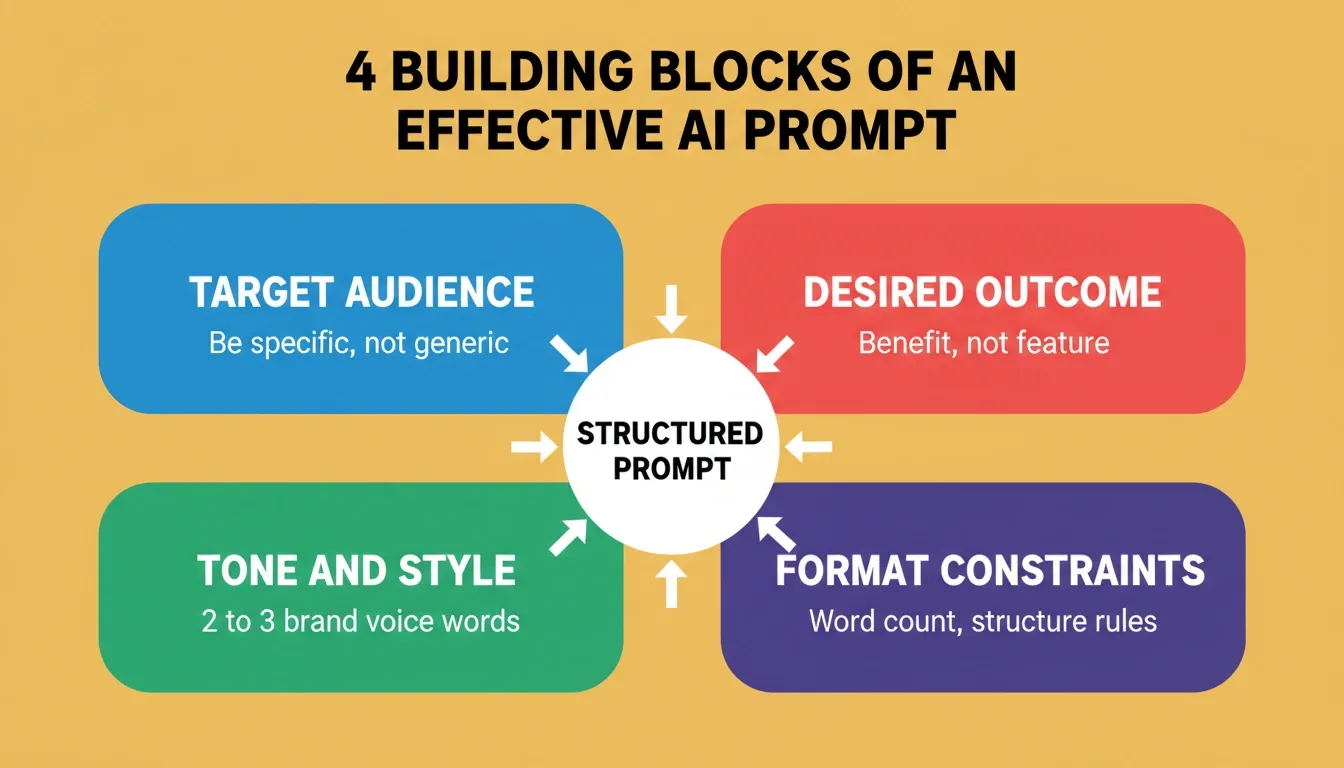
The four structural elements that separate conversion-ready prompts from generic AI output.
Target audience. Who lands on this page, stated in specific terms. "B2B marketing managers at mid-size SaaS companies" produces better output than "marketers." The more precisely you define the reader, the more precisely the AI writes for them.
Desired outcome. The benefit the visitor gets, not the feature you ship. "Cut onboarding time by 60%" produces better output than "onboarding automation." Outcomes are what visitors actually want. Features are simply what you built to deliver them.
Tone and style. Brand voice constraints that prevent generic output. "Conversational, slightly playful, no jargon" forces the AI away from the corporate defaults it has absorbed from millions of mediocre marketing pages.
Format constraints. Character limits, structure rules, and what to exclude. "Under 8 words, no questions, no superlatives" forces creative decisions. Unconstrained prompts produce unconstrained output.
The Anatomy of a High-Converting Hero Section
Before writing prompts, it helps to understand what you are prompting for. A complete hero section has five components, and each one has a distinct job.
| Component | Job | Optimal Length |
|---|---|---|
| Headline | State the primary outcome or transformation | 6–12 words |
| Subheadline | Explain how the outcome is delivered | 15–25 words |
| Primary CTA | Name the action and imply the result | 2–4 words |
| CTA Microcopy | Remove friction, set expectations | 8–15 words |
| Trust Indicators | Reduce risk perception | 3–5 items |
If you are new to writing structured prompts, this guide to natural language prompts covers the fundamentals of getting precise outputs from AI writing tools.
15 AI Prompts for Hero Sections (Organised by Element)
Prompts 1–5: Hero Section Headlines
Headlines carry the heaviest load in any hero section. According to HubSpot's analysis of 330,000+ CTAs, personalised CTAs convert 202% better than basic ones, and the headline is where personalisation begins.
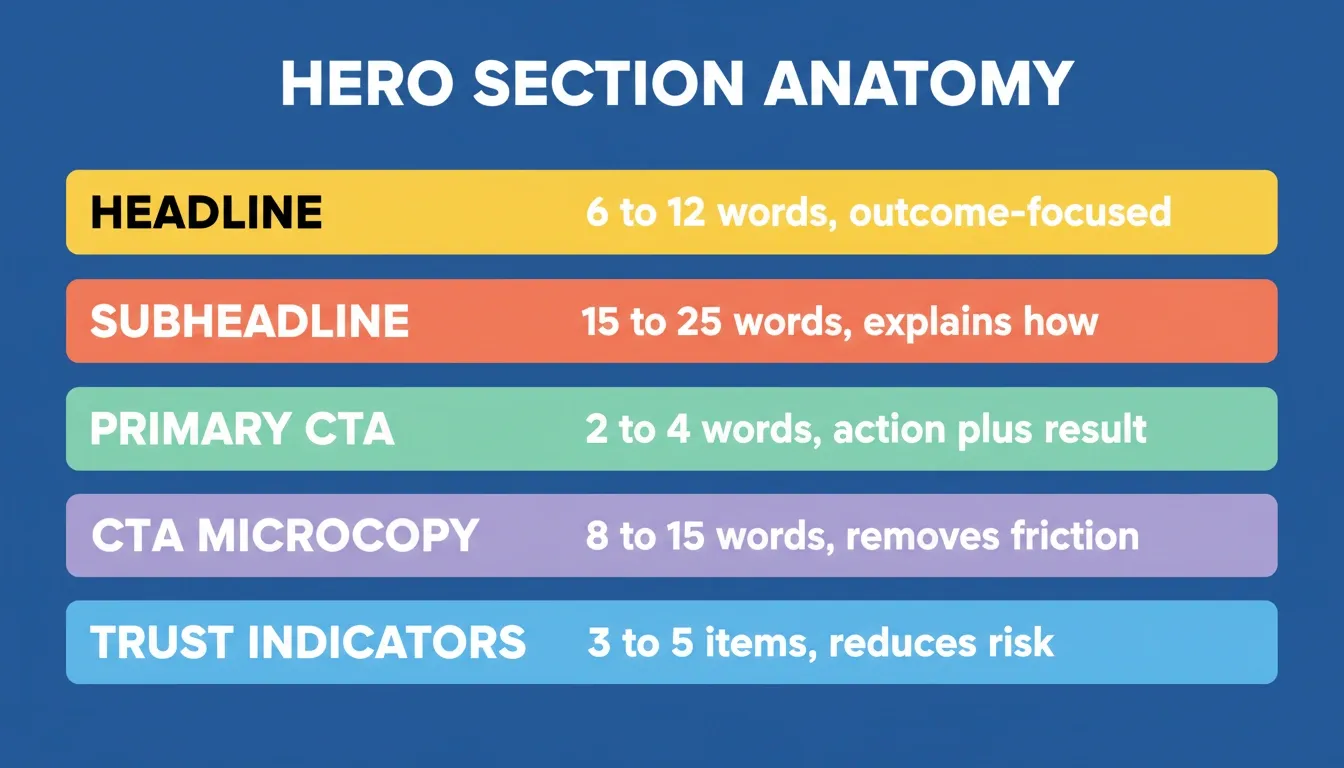
Each layer of a hero section has a distinct job. Prompts work best when they target one layer at a time.
Prompt 1 — Outcome-first headline
Write 5 hero headlines for [product]. Target audience: [audience]. Each headline must name a specific, measurable outcome the user achieves. Keep each under 8 words. Tone: confident but not hype-y.
When to use it: Your product has a clear, quantifiable result, such as time saved, revenue gained, or errors reduced. This pattern works best for productivity tools, SaaS platforms, and professional services.
Example direction: "Ship your landing page in 30 minutes" beats "The fastest way to build pages." The first names a specific outcome. The second makes a vague comparative claim.
Prompt 2 — For audience framing
Generate 3 headlines that start with "For [specific audience]" followed by the primary benefit. No feature names. No buzzwords. Maximum 10 words each.
When to use it: You serve a narrow, well-defined audience that responds to being directly addressed. This is particularly effective for B2B products, professional tools, and niche consumer apps.
Example direction: "For solo founders who need a live site today" immediately qualifies the reader and signals relevance before they read another word.
Prompt 3 — Numeric proof headline
Write 4 hero headlines for [product] that include a real metric or number, such as time saved, percentage improved, or users served. The number should appear in the first half of the headline. Under 12 words.
When to use it: You have verified data, whether customer results, internal benchmarks, or industry statistics. Numbers add credibility that generic claims simply cannot match.
Example direction: "Cut design-to-code time by 80% with one prompt" is more credible than "Design to code, faster than ever."
Prompt 4 — Problem-agitation headline
Create 3 headlines that name a specific pain point my audience ([audience]) faces daily, then hint at relief without naming the product. Tone: empathetic, not dramatic.
When to use it: Your audience is highly aware of their problem but not yet aware of your solution. This pattern meets them where they are and earns attention before making any product claim.
Example direction: "Still rebuilding your hero section every time the brief changes?" speaks directly to a lived frustration without overselling.
Prompt 5 — Contrast headline
Write 3 headlines using the structure "Stop [old painful way], start [new better way]." Both halves should be concrete and relatable. No abstract language.
When to use it: You are displacing an existing behaviour or tool. The contrast structure makes the switch feel obvious and low-risk.
Example direction: "Stop prompting chatbots and copy-pasting into Figma. Start publishing hero sections in one step."
Each of these five prompts encodes a principle that conversion data supports: specificity, audience targeting, and benefit-first language. Mix and match the patterns depending on where your visitors are in their awareness journey.
Want to see these prompts in action? Paste any of the five above into Rocket and get a fully designed, responsive hero section, live and deployed, in under a minute. No Figma, no dev handoff, no waiting.
Prompts 6–9: Hero Section Subheadlines
The subheadline is your second chance to keep the visitor. It expands the headline's promise without repeating it, adds a specific detail the headline could not fit, and bridges the gap between "this sounds interesting" and "I want to know more."
Prompt 6 — Clarifying subheadline
Write a subheadline (15–25 words) that explains how [product] delivers the outcome stated in this headline: [paste headline]. Include one specific detail. No repeating words from the headline.
When to use it: Your headline makes a bold claim and the subheadline needs to answer "how?" without turning into a feature list.
Prompt 7 — Social proof subheadline
Generate a subheadline that references a real customer result or user count. Format: [metric] + [timeframe] + [audience who achieved it]. Under 20 words.
When to use it: You have customer data, case study results, or user counts that add credibility. Social proof in the subheadline reduces scepticism before the visitor even reaches your testimonials section.
Prompt 8 — Objection-handling subheadline
Write 3 subheadlines that preemptively address this objection: [common objection]. Tone: reassuring, factual. No defensive language.
When to use it: Your product category has a known barrier to adoption, whether that is price sensitivity, complexity concerns, or integration worries. Addressing the objection above the fold removes a reason to leave before the visitor has finished reading.
Prompt 9 — Context-setting subheadline
Create a subheadline that names exactly who this product is for and one scenario where they would use it. Under 18 words. Conversational tone.
When to use it: Your headline is broad or aspirational and needs grounding. The context-setting subheadline answers "is this for me?" in one sentence.
The difference between a good and mediocre subheadline often comes down to specificity. Naming the headline, the objection, or the audience in the prompt forces the AI to produce copy that actually fits.
When thinking about what makes a page template drive real results, the subheadline is where most teams lose momentum. These prompts fix that.
Prompts 10–12: CTA Buttons and Microcopy
CTA buttons are the smallest text on the page with the biggest impact on action. Most teams default to "Get Started" or "Sign Up" without testing anything else, and in doing so, they leave significant conversion lift on the table.
As Chirag Tyagi noted in a breakdown on hero layouts: "Stop losing 8 out of 10 visitors — steal data-backed hero layouts to lift your conversion rates by 20% or more."
Prompt 10 — Action-outcome CTA
Write 5 CTA button labels for [product] that combine an action verb with the outcome the user gets. Format: [verb] + [outcome]. Max 4 words each. Avoid "Get Started" and "Sign Up."
When to use it: Any time. This is the default CTA prompt. "Build my landing page" is always better than "Get Started." The action-outcome format tells the visitor exactly what clicking does and what they get.
Prompt 11 — Low-commitment CTA
Generate 3 CTA options that reduce perceived effort. The visitor should feel like clicking costs them nothing. Include micro-text that appears below the button explaining what happens next.
When to use it: Your product requires sign-up, payment details, or a multi-step onboarding. The low-commitment CTA reduces the psychological cost of clicking, and the microcopy sets accurate expectations.
Prompt 12 — Urgency without pressure CTA
Write 2 CTA pairs: one primary button label and one line of supporting microcopy below it. Create natural urgency through specificity, such as limited spots or time to result, not artificial scarcity.
When to use it: You want to accelerate action without resorting to fake countdown timers or "only 3 spots left" tactics that damage trust. Specificity, like "Live in 30 minutes," creates genuine urgency because it makes the benefit concrete and immediate.
The CTA is where clarity matters most. If a visitor does not instantly understand what clicking does, they will not click. These prompts force the AI to produce labels that are specific, low-friction, and tied to a result.
Got your CTA copy ready? Take it further with Rocket. Describe your product and audience, and Rocket builds the full hero section around your CTA, with layout, typography, and mobile breakpoints included.
Prompts 13–15: Full Hero Section Layouts
Sometimes you do not want to prompt piece by piece. You want a complete hero section, headline, subheadline, CTA, supporting elements, all structured together and ready to publish.
Prompt 13 — Complete hero brief
Generate a full hero section for [product targeting audience]. Include: 1 headline (under 8 words, outcome-focused), 1 subheadline (under 20 words, explains how), 1 primary CTA (3 words, action-outcome), 1 line of microcopy below CTA, and 3 trust indicators. Tone: [brand voice].
When to use it: Starting from scratch on a new product or landing page. This prompt produces a complete, structured brief that a designer can implement directly or that you can paste into Rocket to generate a live page.
Prompt 14 — A/B test variant generator
Here is my current hero section: [paste current]. Generate 3 alternative versions. Each should change ONE variable: Version A changes only the headline, Version B changes only the CTA, Version C changes the visual hierarchy order. Keep everything else identical.
When to use it: You have a live hero section and want to run structured A/B tests. Changing one variable at a time is the only way to know which element drove the improvement. This prompt enforces that discipline.
Prompt 15 — Audience-segmented hero
Write 2 different hero sections for [product], one targeting [persona A] and one targeting [persona B]. Same product, different angles. Each hero must name the persona's specific pain point in the headline and their desired outcome in the subheadline.
When to use it: You serve multiple distinct audiences and want to test personalised landing pages. Audience-segmented heroes consistently outperform generic ones because they make each visitor feel the page was written specifically for them.
These full-section prompts work especially well when you are building pages designed to generate ROI from the first visit. They give the AI enough context to produce cohesive sections rather than disconnected fragments.
Hero Section Prompt Templates by Industry
The 15 prompts above are universal. That said, the same structural pattern produces different copy depending on the audience and context. Here is how to adapt them for specific industries.
SaaS and B2B Software
SaaS hero sections live or die on specificity. The most common mistake is leading with the product category, like "project management software," instead of the outcome, like "ship projects 40% faster." Start with Prompt 1 and Prompt 3, then layer in Prompt 8 to handle the "we already have a tool for that" objection.
Adapted Prompt 1 for SaaS: Write 5 hero headlines for [SaaS product]. Target audience: [job title] at [company size] companies. Each headline must name a specific workflow improvement or time saving. Avoid category names like "platform" or "solution." Under 8 words. Tone: direct, confident.
E-Commerce and DTC Brands
E-commerce hero sections need to balance aspiration with specificity. The visitor wants to see themselves using the product, not just read about its features. Use Prompt 2 and Prompt 4 to connect emotionally before converting.
Adapted Prompt 4 for E-Commerce: Create 3 hero headlines for [product] that name a specific frustration my customer ([describe customer]) has with existing alternatives. Each headline should make the customer feel understood without mentioning the product by name. Tone: warm, relatable.
Agencies and Service Businesses
Service businesses need to establish credibility fast. The visitor is evaluating whether to trust you with real money and real outcomes. Use Prompt 7 and Prompt 9 to establish authority and relevance before asking for any action.
Startups and MVPs
Startup hero sections often try to do too much. They explain the entire product, list every feature, and appeal to every possible user. Use Prompt 13 to force the hard decisions: one audience, one outcome, one CTA.
Campaign-Specific Landing Pages
Campaign landing pages need to match the message of the ad or email that drove the click. Use Prompt 15 to create variants that speak directly to each traffic source's intent.
How to Test and Iterate Hero Section Copy with AI
Writing the first version is only the beginning. The best hero sections are the result of structured iteration, testing one variable at a time, measuring the result, and improving based on data.
The Three-Step AI Iteration Loop
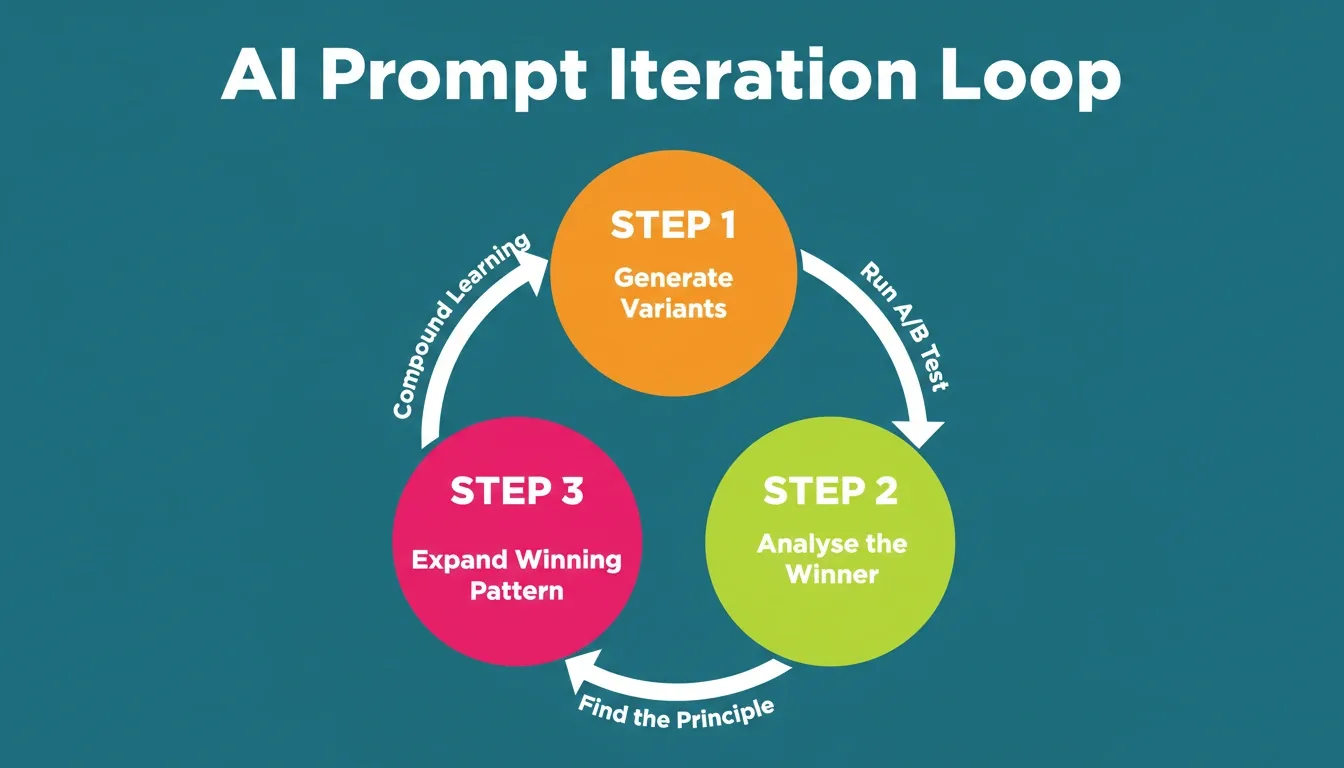
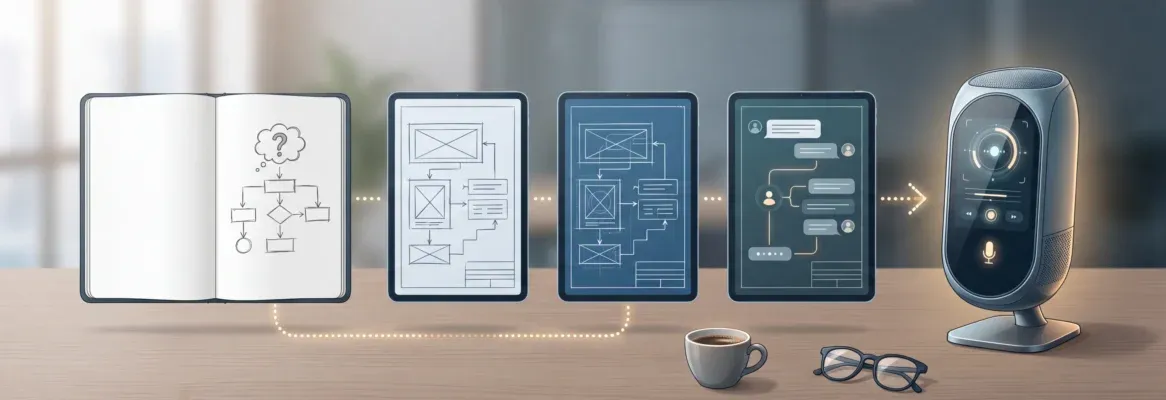
Structured iteration compounds learning. Each cycle produces better copy than starting from scratch.
Step 1 — Generate variants. Use Prompt 14 to create three versions that each change one element. Run them as a proper A/B test with a statistical significance threshold of at least 95%.
Step 2 — Analyse the winner. When a variant wins, use AI to understand why. Try this prompt: "This headline outperformed this alternative: [winner] vs [loser]. What copywriting principles explain the difference? Generate 3 more headlines that apply the same principles."
Step 3 — Expand the winning pattern. Once you know what works, use AI to generate more variations on the winning theme. This compounds your learning instead of starting from scratch each time.
When to Rewrite vs. When to Iterate
Not every underperforming hero section needs a complete rewrite. Use this decision framework to figure out where to focus first.
| Symptom | Likely Cause | Action |
|---|---|---|
| High bounce rate, low time on page | Headline fails clarity test | Rewrite headline with Prompt 1 or 2 |
| Good time on page, low CTA clicks | CTA is unclear or low-value | Rewrite CTA with Prompt 10 or 11 |
| High CTA clicks, low sign-ups | Post-click page mismatch | Align hero promise with landing page |
| Low traffic, decent conversion rate | Distribution problem, not copy | Fix traffic source before rewriting |
Common Hero Section Mistakes and the Prompts That Fix Them
Even with AI assistance, teams consistently make the same hero section errors. Here are the most common ones, along with the specific prompts that address each.
Feature-first headlines. Writing "AI-powered project management with real-time collaboration" instead of "Ship projects 40% faster with your existing team." Fix this with Prompt 1.
Audience-agnostic copy. Writing for everyone means writing for no one. "The best tool for modern teams" could describe anything. Fix this with Prompt 2 or Prompt 9.
Generic CTAs. "Get Started," "Learn More," and "Try It Free" tell the visitor nothing about what happens next. Fix this with Prompt 10 or Prompt 11.
Ignoring objections. The visitor has doubts. If your hero section does not acknowledge them, the visitor leaves to find answers elsewhere and often does not come back. Fix this with Prompt 8.
No trust signals. A headline and CTA alone ask the visitor to take a leap of faith. Trust indicators, such as user counts, logos, review scores, and guarantees, reduce the perceived risk of clicking. Include them in Prompt 13.
Can AI-Generated Hero Copy Outperform Manual Copywriting?
The data suggests yes, when used correctly. AI-generated copy with proper prompting consistently matches or beats manual first drafts in conversion tests.
- Personalised CTAs convert 202% better than basic ones, and AI handles personalisation at scale. Source: HubSpot, analysis of 330,000+ CTAs
- The key factor is not AI vs human. It is structured thinking, which prompts enforce, vs unstructured brainstorming, which most teams default to.
The prompts in this guide encode the same patterns that professional copywriters use. They name the audience, specify the outcome, constrain the format, and demand specificity. That is not a shortcut to quality. It is the method.
Where AI Prompts Excel vs. Where Human Judgment Wins
AI prompts are strongest at generating multiple variants quickly, maintaining structural consistency, and applying known copywriting frameworks without deviation.
Human judgment, on the other hand, is still essential for brand voice nuance, cultural sensitivity, and knowing which emotional register is appropriate for a specific audience at a specific moment.
The most effective workflow combines both. Use AI prompts to generate 5–10 variants fast, then apply human judgment to select and refine the best one. It is faster than writing from scratch and produces better output than AI alone.
How Rocket Turns One Prompt Into a Live Hero Section
Most AI tools generate text. After that, you still need to design the layout, pick fonts, add spacing, build the responsive grid, and deploy it. Rocket collapses that entire workflow into one step.
Here is what separates Rocket from copying prompts into a chatbot.
Full-stack output. Rocket does not just write headline copy. It generates a complete, responsive hero section with layout, typography, CTA placement, and mobile breakpoints built in.
Context-aware generation. Tell Rocket about your product, audience, and goals. It applies conversion principles like CTA contrast, visual hierarchy, and outcome-driven headlines without you needing to specify each one.
Instant deployment. The hero section Rocket builds is production-ready code in Next.js, not a mockup or a Figma frame. One click to publish.
Iteration without starting over. Change the headline angle, swap the CTA, adjust the layout. Rocket remembers your brand context and adjusts the entire section accordingly.
1.5 million people have tried Rocket across 180 countries, from solo founders validating ideas to enterprise teams running strategy and execution on the same platform.
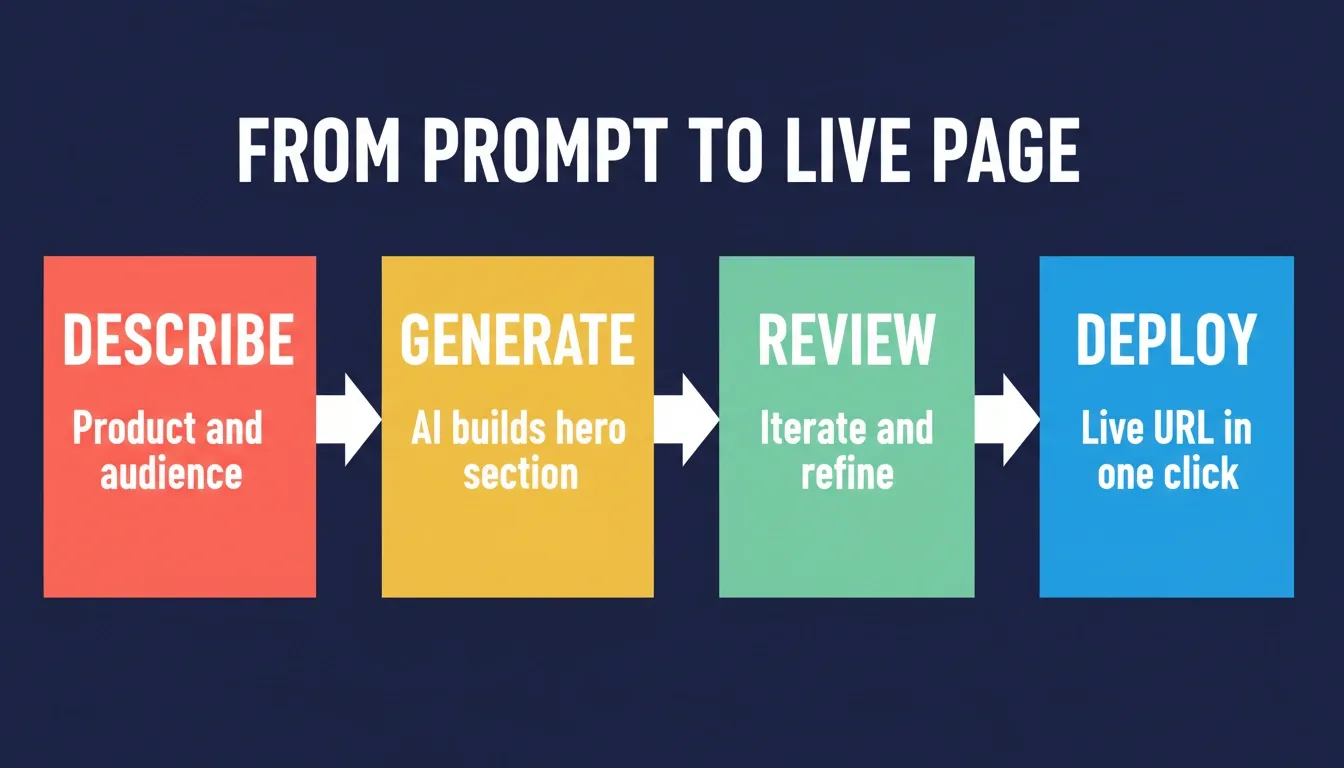
From description to deployed page: Rocket handles layout, code, and publishing in a single workflow.
Rocket Pricing
Rocket uses a credit-based system with no per-seat fees. All plans include unlimited team members.
| Plan | Monthly Fee | Monthly Credits | Best For |
|---|---|---|---|
| Free | $0 | 20 credits | Light, exploratory, personal use |
| Pro | $25 | 100 credits | Production-ready web and mobile apps |
| Rocket | $50 | 250 credits | Full suite for individuals and teams |
| Booster | $250 | 1,500 credits | Power users and fast-moving teams |
Credits never expire. Additional credits can be purchased on any plan.
You can also explore how to build a converting online store or create a full website with AI using the same prompt-first workflow.
What Changes Next for AI Prompts in Hero Sections
The role of AI prompts for hero sections will expand significantly over the next two to three years. Three trends are already reshaping how teams approach above-the-fold copy.
Personalisation at scale. AI tools are increasingly capable of generating hero section variants for individual visitor segments in real time. They can adjust headline, subheadline, and CTA based on traffic source, device, or behavioural data. The prompts in this guide are the foundation for that capability.
Multimodal generation. The gap between "write hero copy" and "build a live hero section" is closing. Tools that generate layout, typography, and code alongside copy are already available. Within two years, the standard workflow will be a single prompt that produces a fully deployed, conversion-optimised hero section.
AI-driven testing. Manual A/B testing is slow and statistically fragile. AI-driven multivariate testing, where the model generates, deploys, and learns from dozens of variants simultaneously, will replace most manual testing workflows. The structured prompts in this guide, especially Prompt 14, are the precursor to that automated loop.
Teams that build prompt discipline now will have a significant advantage as these capabilities mature.
Use AI Prompts for Hero Sections That Actually Ship
The 15 prompts in this guide cover every element of a high-performing hero section, from the first headline word to the microcopy under your CTA button. Whether you use them with ChatGPT, Claude, or another AI writing tool, the structure matters more than the platform.
The biggest gap in most teams' workflow is not the copy. It is the distance between copy and a live, deployed page. You can write the perfect headline with Prompt 1, craft the ideal CTA with Prompt 10, and still spend days getting it designed, coded, and published.
As AI search engines like ChatGPT, Perplexity, and Gemini increasingly surface landing pages in their answers, the quality of your hero section copy directly affects your visibility in AI-generated results. Pages that clearly answer "what is this, who is it for, and what should I do next" are the pages that get cited. The prompts in this guide are optimised for exactly that clarity.
Start building your hero section on Rocket — describe what you need in plain language and get a complete, conversion-focused page section ready to publish.
Table of contents
- -Hero Section vs. Above-the-Fold: What Is the Difference?
- -The Real Cost of a Weak Hero Section
- -What Makes an Effective AI Prompt for Hero Section Copy?
- -The Anatomy of a High-Converting Hero Section
- -15 AI Prompts for Hero Sections (Organised by Element)
- -Prompts 1–5: Hero Section Headlines
- -Prompt 1 — Outcome-first headline
- -Prompt 2 — For audience framing
- -Prompt 3 — Numeric proof headline
- -Prompt 4 — Problem-agitation headline
- -Prompt 5 — Contrast headline
- -Prompts 6–9: Hero Section Subheadlines
- -Prompt 6 — Clarifying subheadline
- -Prompt 7 — Social proof subheadline
- -Prompt 8 — Objection-handling subheadline
- -Prompt 9 — Context-setting subheadline
- -Prompts 10–12: CTA Buttons and Microcopy
- -Prompt 10 — Action-outcome CTA
- -Prompt 11 — Low-commitment CTA
- -Prompt 12 — Urgency without pressure CTA
- -Prompts 13–15: Full Hero Section Layouts
- -Prompt 13 — Complete hero brief
- -Prompt 14 — A/B test variant generator
- -Prompt 15 — Audience-segmented hero
- -Hero Section Prompt Templates by Industry
- -SaaS and B2B Software
- -E-Commerce and DTC Brands
- -Agencies and Service Businesses
- -Startups and MVPs
- -Campaign-Specific Landing Pages
- -How to Test and Iterate Hero Section Copy with AI
- -The Three-Step AI Iteration Loop
- -When to Rewrite vs. When to Iterate
- -Common Hero Section Mistakes and the Prompts That Fix Them
- -Can AI-Generated Hero Copy Outperform Manual Copywriting?
- -Where AI Prompts Excel vs. Where Human Judgment Wins
- -How Rocket Turns One Prompt Into a Live Hero Section
- -Rocket Pricing
- -What Changes Next for AI Prompts in Hero Sections
- -Use AI Prompts for Hero Sections That Actually Ship