25 structured vibe solutioning prompts covering every build stage, from problem discovery to production launch. Each prompt gives your AI the context it needs to generate production-ready code, not broken prototypes. Use them in sequence for best results.
Vague prompts produce vague results. A prompt like "build me an app" forces the AI to guess at your data model, user roles, business rules, and tech stack. It almost always guesses wrong.
These 25 vibe solutioning prompts eliminate that guesswork. Each one gives your AI assistant the specific context it needs for a different stage of building, from deciding what to build all the way to shipping code that handles real users.
Why Do Good Prompts Decide What Gets Built?
That gap between adoption and trust comes down to one thing: prompt quality. Why do 92% of US developers use AI coding tools daily, yet only 29% trust the code accuracy of what those tools generate? Vibe coding in 2026 means directing AI with natural language to build real software. The vibe solutioning prompts you write determine whether the AI generates a broken prototype or a production-ready application.
A CodeRabbit analysis of 470 GitHub pull requests found that AI-generated code contains 1.7x more major issues than human-written code. That number gets worse when the initial prompt lacks structure, context, and constraints. The 25 prompts below fix that problem.
If you need a deeper foundation on prompt engineering best practices, start there first. Otherwise, here is the full system at a glance before you dive in:
The Complete Vibe Solutioning System
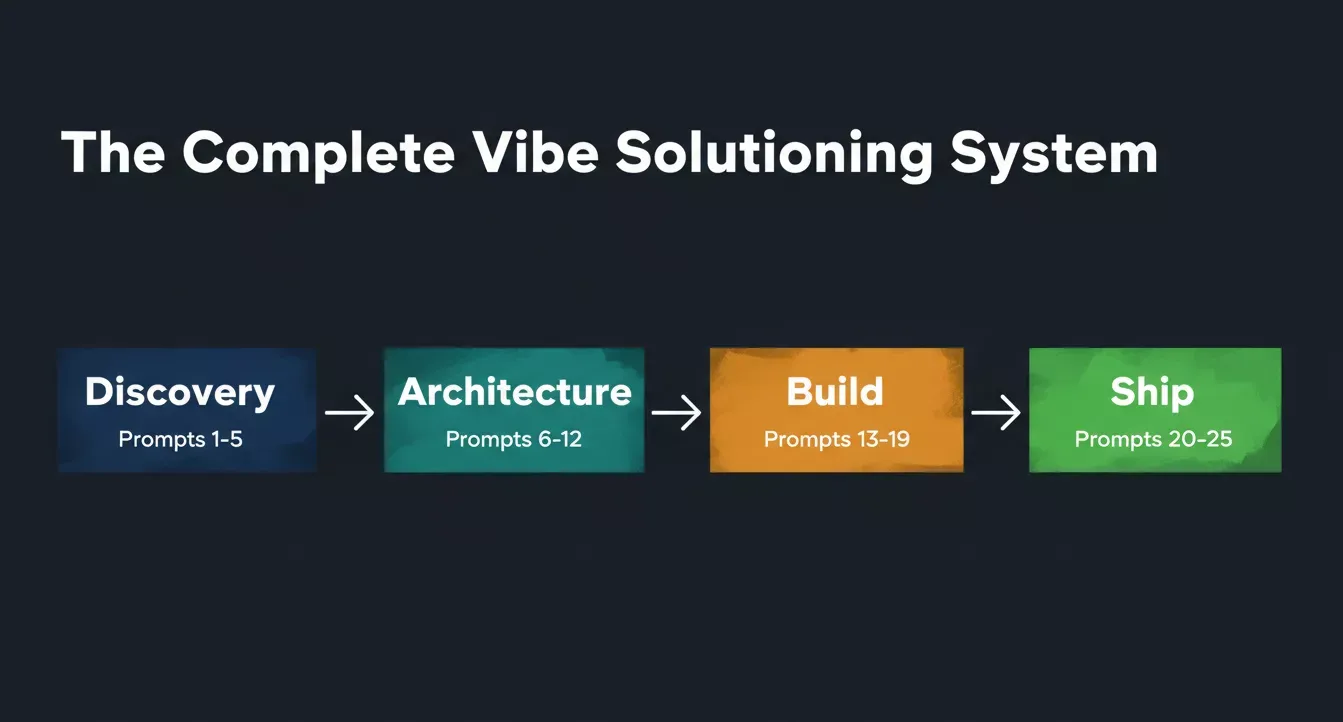
Four stages, 25 prompts: Discovery, Architecture, Build, and Ship, each stage feeds the next.
| Stage | Prompts | Output | Feeds Into |
|---|---|---|---|
| Discovery | 1-5 | Problem definition, market gaps, MVP scope | Architecture prompts as context |
| Architecture | 6-12 | Data model, auth, API routes, tech stack | Feature prompts as reference |
| Build | 13-19 | Working features with error handling | Security and performance audits |
| Ship | 20-25 | Hardened, tested, deployed application | Live production product |
Use this table as your roadmap. Each stage depends on the outputs of the one before it. Skipping Discovery means your Architecture prompts generate generic boilerplate. Skipping Architecture means your Build prompts produce inconsistent, unmaintainable code.
Prompts 1-5: Deciding What Problem to Solve
The first prompt you send should never be about code. It should be about the problem. These five vibe solutioning prompts help you define what to build before writing a single line, which is the stage where most vibe coders skip ahead and pay for it later.
Prompt 1: The Problem Validation Prompt
Use this prompt before writing a single line of code to confirm your idea solves a real pain point worth building for.
Example prompt:
"Act as a product strategist. I want to build [describe your idea in one sentence]. Before generating any code, identify the top 5 problems this product solves, who experiences each problem most acutely, and what existing solutions they currently use. For each problem, rate the severity from 1-10 and explain why current solutions fall short."
The AI will often produce:
- A ranked list of problems with severity scores and target user profiles
- A gap analysis of existing solutions and where they fall short
- A prioritized problem brief you can use as context for every subsequent prompt
Why this works: It forces the AI to think about market fit before architecture. You get a clear vision of whether your idea solves a real pain point, and the output becomes your reference for every prompt that follows.
Prompt 2: The Competitor Gap Prompt
Use this prompt to map the competitive landscape and find the exact gap your product can own before you commit to building.
Example prompt:
"Analyze the top 5 competitors in [your market space]. For each one, list their core features, pricing model, and the most common complaints from users on review sites. Identify 3 specific gaps where none of them serve users well. Format the output as a comparison table with a final column showing the opportunity for a new product."
The AI will often produce:
- A side-by-side competitor comparison table with features and pricing
- A ranked list of underserved user needs across the market
- A clear opportunity statement you can paste into your next architecture prompt
Why this works: 63% of vibe coding users are non-developers building products. This prompt gives them the market context that professional product managers use to make build decisions, without needing business school training.
Prompt 3: The User Story Generator
Use this prompt to turn your product idea into a prioritized feature specification before any code is written.
Example prompt:
"Generate 10 user stories for [your product idea] using this format: As a [user role], I want to [action] so that [benefit]. Group them by priority: must-have for launch, nice-to-have for version 2, and future roadmap. For each must-have story, describe one edge case that would break the feature if not handled."
The AI will often produce:
- Ten prioritized user stories grouped by launch readiness
- Edge cases for every must-have feature that prevent production failures
- A ready-to-use feature specification you can reference in Prompts 6-12
Why this works: This becomes your feature specification. The edge cases prevent the most common failure mode in AI-generated applications: code that works on the happy path but crashes when real users do unexpected things.
Prompt 4: The Revenue Model Prompt
Use this prompt to define the business rules your AI needs before it generates payment flows, subscriptions, or access control logic.
Example prompt:
"I am building [product description]. Propose 3 different revenue models that would work for this type of application. For each model, explain the pricing structure, what triggers a user to upgrade, what the free tier includes, and which model best fits a solo founder shipping an MVP with limited initial users. Include specific dollar amounts."
The AI will often produce:
- Three revenue model options with pricing tiers and upgrade triggers
- A recommendation for which model fits your stage and user volume
- The business rules your AI needs to generate correct payment and access logic later
Why this works: Building without a revenue model means you ship something nobody pays for. This prompt creates the business rules your AI needs later when generating payment flows, subscription logic, and access control based on user roles and plan tiers.
Prompt 5: The MVP Scope Prompt
Use this prompt to cut your feature list to the absolute minimum before scope creep kills your build momentum.
Example prompt:
"Given this product idea [paste your idea and user stories from Prompt 3], define the absolute minimum feature set needed to validate whether paying customers exist. Cut everything that is not required for a user to complete the core task and pay for it. List exactly which features make the cut, which get deferred, and explain the reasoning for each decision."
The AI will often produce:
- A trimmed feature list with clear in/out decisions and reasoning
- A deferred features backlog organized by priority for future sprints
- A focused MVP brief that prevents over-building in the architecture stage
Why this works: Scope creep kills AI-built projects faster than bad code does. This prompt gives you a clear boundary that prevents your next prompts from trying to build an entire project in one go. Teams that break tasks into focused chunks report dramatically better results from their AI assistant.
Ready to run Prompts 1-5? Paste any of them into Rocket and get a structured problem brief, competitor gap table, and MVP scope in minutes before you write a line of code. Start your discovery
Prompts 6-12: Defining Your Data Model and Architecture
Once you know what to build, the next prompts define how to build it. These seven vibe solutioning prompts give your AI assistant the structural context it needs to generate code with consistent patterns, proper database queries, and clean architectural decisions.
Common mistake: Builders who skip the Discovery stage and jump straight to architecture prompts get generic boilerplate. The AI has no problem definition to constrain its choices, so it invents one, usually the wrong one. Always paste your Prompt 5 output as context before running any prompt in this section.
Prompt 6: The Data Model Definition Prompt
Use this prompt to give your AI a precise database blueprint before it writes a single line of feature code.
Example prompt:
"Design a database schema for [your MVP from Prompt 5]. Include all tables, columns with data types, primary keys, foreign keys, and relationships. Add constraints for required fields and unique values. Specify which fields need indexes for common database queries. Output as SQL CREATE TABLE statements with inline comments explaining each design decision."
The AI will often produce:
- SQL CREATE TABLE statements with data types, keys, and constraints
- Index recommendations for the queries your app will run most often
- Inline comments explaining every design decision for future reference
Why this works: A well-defined data model prevents the most expensive refactors later. Every feature prompt in Prompts 13-19 will reference this output, so getting it right here saves hours of rework downstream.
Prompt 7: The Authentication Architecture Prompt
Use this prompt to design a complete auth system with user roles and permission logic before any protected routes are built.
Example prompt:
"Design the authentication system for [your app]. Include: signup flow with email verification, login with session management, password reset, and OAuth with Google. Define user roles [list your roles from Prompt 3], what each role can access, and how permissions are checked on every protected route. Specify where to store environment variables for auth secrets. Use [your framework] patterns."
The AI will often produce:
- A complete auth flow covering signup, login, reset, and OAuth
- A role-permission matrix showing what each user type can access
- Environment variable naming conventions for all auth secrets
Why this works: Authentication errors are the most common security vulnerability in AI-generated apps. Defining the full auth architecture upfront means every subsequent feature prompt inherits correct permission logic automatically.
Prompt 8: The API Route Structure Prompt
Use this prompt to map every endpoint your app needs before the AI starts generating feature code that calls them.
Example prompt:
"Create the complete API routing structure for [your app]. For each endpoint, specify: HTTP method, path, required authentication level, request body validation rules, success response format, and error response format. Group endpoints by resource. Include rate-limiting rules per endpoint and per user id. Use RESTful naming conventions."
The AI will often produce:
- A full endpoint map grouped by resource with HTTP methods and auth levels
- Request and response schemas for every route, including error formats
- Rate limiting rules per endpoint and per user to prevent abuse
Why this works: Without a defined API structure, feature prompts generate inconsistent endpoint naming, missing validation, and conflicting response formats. This prompt creates the contract every feature must follow.
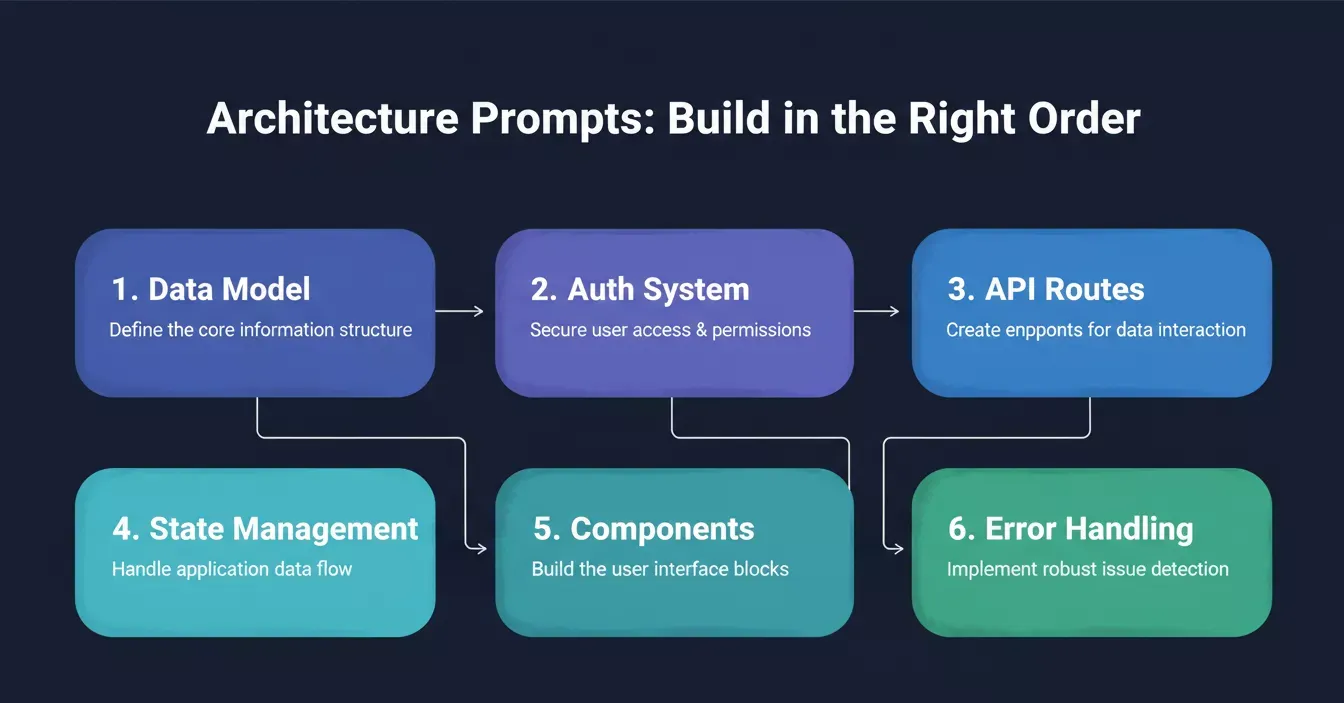
Define your architecture in order: each layer depends on the one before it.
Prompts 9 + 10: State Management and Component Architecture
These two prompts work as a pair: Run Prompt 9 first to define what data lives where, then run Prompt 10 to define the components that display it. Together, they give the AI a complete picture of your frontend before it generates a single UI element.
Prompt 9 - State Management:
"Define the frontend state management approach for [your app]. Identify which data is server state versus client state. For server state, specify caching strategy, refetch intervals, and optimistic update patterns. For client state, list each piece of UI state, where it lives, and what triggers changes. Use [React/Next.js] patterns with [your state library]."
Prompt 10 - Component Architecture:
"Plan the component hierarchy for [your app's main feature]. Break the UI into reusable components following atomic design principles. For each component, specify: props interface, internal state, data it fetches, events it emits, and accessibility requirements including keyboard navigation. Follow [your design system] naming conventions."
Running them together produces:
- A server vs. client state breakdown with caching and refetch rules
- A component tree from atoms to pages with props, interfaces and event contracts
- Accessibility requirements, including ARIA roles and keyboard navigation patterns
Why this works: Undefined state management leads to components that fetch the same data independently, causing redundant API calls, stale UI, and race conditions. Defining the component hierarchy alongside state prevents all three.
Prompt 11: The Error Handling Strategy Prompt
Use this prompt to define how your app behaves when things go wrong before the AI generates any feature that can fail.
Example prompt:
"Define a global error handling strategy for [your app]. Cover: API errors (network failures, timeouts, 4xx, 5xx), form validation errors, authentication errors, and unexpected runtime errors. For each category, specify: the error message shown to users, what gets logged for developers, retry logic if applicable, and fallback UI states. Never expose internal details in error messages."
The AI will often produce:
- An error taxonomy covering every failure category your app will encounter
- User-facing messages and developer log formats for each error type
- Retry logic rules and fallback UI states for graceful degradation
Why this works: AI-generated code defaults to silent failures or raw error dumps. Defining this strategy upfront means every feature prompt automatically inherits consistent, safe error handling that protects both users and your infrastructure.
Prompt 12: The Tech Stack Decision Prompt
Use this prompt to lock in a production-ready technology choice before the AI generates code that is hard to migrate later.
Example prompt:
"I am building [describe your app and its key requirements]. Recommend a production-ready tech stack covering: frontend framework, backend/API layer, database, authentication service, file storage, deployment platform, and monitoring. For each choice, explain the trade-offs versus alternatives and confirm the stack handles [your specific requirements: real-time, mobile responsiveness, high concurrency, etc.]."
The AI will often produce:
- A full stack recommendation with trade-off analysis for every layer
- Confirmation that the stack meets your specific performance and scale requirements
- A dependency list you can paste directly into your project setup prompt
Why this works: Stack mismatches discovered mid-build are the most expensive mistakes in AI-assisted development. This prompt locks in the right choices before a single line of feature code is written.
Using these prompts as part of a complete app-building strategy on a platform that retains context between sessions means each answer builds on the last. The data model from Prompt 6 feeds directly into the API routes in Prompt 8 and the component architecture in Prompt 10.
Have your architecture defined? Bring it into Rocket and start generating production-grade features. The platform retains your data model, auth rules, and API structure across every session. Start building your architecture
Prompts 13-19: Building Features With Production Quality
Now that your foundation is set, these prompts generate actual features. Each one follows best practices for iterative prompting: focused scope, explicit constraints, and clear success criteria. The key difference from vague prompts is that these reference your established data model, user roles, and error handling patterns.
Prompt 13: The Core Feature Build Prompt
Use this prompt to generate your app's primary feature with edge cases and tests baked in from the first generation.
Example prompt:
"Build [your core feature] using the data model from [reference Prompt 6 output]. The feature should: [describe what it does in 2-3 sentences]. Handle these edge cases: [list 3-5 from your user stories]. Follow the error handling strategy from [reference Prompt 11]. Include input validation for all user-submitted fields. Write tests that cover the happy path and each edge case."
The AI will often produce:
- A fully implemented core feature referencing your existing data model
- Input validation and error handling are wired to the strategy from Prompt 11
- Unit and integration tests covering the happy path and every edge case
Why this works: Referencing prior outputs forces the AI to stay consistent with your established architecture instead of inventing new patterns that conflict with existing code.
Prompt 14: The Dashboard Layout Prompt
Use this prompt to generate a data-rich dashboard that is mobile-responsive and wired to your existing API routes from the first pass.
Example prompt:
"Create a dashboard page that shows [describe key metrics and data]. Pull data from [reference your API routes from Prompt 8]. Include: a filter bar with date range and status filters, sortable columns, pagination with 20 items per page, loading states, and empty states. The dashboard must work on mobile with a stacked card layout below 768px. Use chart components for [specific visualizations]."
The AI will often produce:
- A fully wired dashboard pulling live data from your defined API routes
- Filter, sort, and pagination controls with loading and empty states
- A responsive layout that switches to stacked cards on mobile screens
Why this works: Dashboards built without API references generate placeholder data that requires complete rewiring. This prompt connects the UI to your real data layer from the start.
For a deeper look at how Rocket handles full-stack app generation from a single prompt thread, that guide covers the end-to-end process in detail.
Prompt 15: The Form Builder Prompt
Use this prompt to generate a multi-step form with validation, draft saving, and proper error display without writing a line of form logic yourself.
Example prompt:
"Build a multi-step form for [describe the workflow]. Step 1 collects [fields]. Step 2 collects [fields]. Step 3 shows a review summary. Implement input validation on each step before allowing progression. Save the draft state to local storage so users do not lose progress on page refresh. On submit, send data to [your endpoint] with proper error handling. Show clear error messages next to the relevant field."
The AI will often produce:
- A multi-step form with per-step validation and a final review summary
- Local storage draft saving that survives page refreshes
- Field-level error messages wired to your defined error handling strategy
Why this works: Forms are the highest-friction point in any app. Specifying draft saving and field-level errors upfront prevents the most common UX failures that cause users to abandon before completing the core task.
Prompt 16: The Real-Time Feature Prompt
Use this prompt to add live updates to any part of your app with reconnection logic and optimistic UI handled automatically.
Example prompt:
"Add real-time updates to [feature]. When [event happens], all connected users viewing [page/component] should see the update within 2 seconds without page refresh. Use [WebSocket/SSE/Supabase Realtime]. Handle reconnection after network loss. Show a connection status indicator. Implement optimistic updates for user actions with rollback on server rejection."
The AI will often produce:
- A real-time subscription wired to your chosen transport layer
- Automatic reconnection logic with a visible connection status indicator
- Optimistic UI updates with server-side rollback on rejection
Why this works: Real-time features added without reconnection logic and optimistic updates create apps that appear broken during normal network fluctuations. This prompt handles all three failure modes in one generation.
Prompt 17: The Search and Filter Prompt
Use this prompt to implement full-text search with shareable URL state so users can find and share filtered views without any extra work.
Example prompt:
"Implement search functionality for [your content type]. Include: full-text search across [specify fields], filter by [categories/tags/dates/status], sort by [relevance/date/name], and debounced input with 300ms delay. Show search results with highlighted matching text. Handle zero results with helpful suggestions. Implement URL-based filter state so users can share filtered views."
The AI will often produce:
- Full-text search with debounced input and highlighted match text
- Filter and sort controls with zero-results handling and helpful suggestions
- URL-synced filter state that makes every search result shareable
Why this works: Search built without URL state forces users to rebuild their filters on every visit. Debouncing prevents excessive API calls. Both are easy to miss when prompting without explicit constraints.
Prompt 18: The Notification System Prompt
Use this prompt to build a complete notification layer with in-app delivery, email fallback, and user preferences in a single pass.
Example prompt:
"Build a notification system for [your app]. Trigger notifications when: [list 3-5 events]. Deliver through: in-app toast messages, a notification dropdown with unread count, and optional email for critical events. Store notification history per user ID. Allow users to mark as read, dismiss, or configure which notifications they receive. Include a scheduled digest option."
The AI will often produce:
- In-app toast messages and a notification dropdown with an unread badge
- Per-user notification history with read, dismiss, and preference controls
- Email delivery for critical events and a scheduled digest configuration
Why this works: Notification systems built feature-by-feature accumulate inconsistent delivery logic. Defining all channels, storage, and user preferences in one prompt creates a unified notification layer that every future feature can hook into.
Prompt 19: The Integration Prompt
Use this prompt to connect any external API to your app with rate limiting, error handling, and credential security handled from the start.
Example prompt:
"Integrate [external API/service] with [your app]. The integration should: [describe what data flows where]. Handle: API rate limits with exponential backoff, authentication token refresh, webhook signature verification, and timeout after 10 seconds. Store API credentials in environment variables, never in code. Log all integration requests and responses for debugging. Build a health check endpoint that verifies the connection is working."
The AI will often produce:
- A complete integration with exponential backoff and token refresh logic
- Webhook signature verification and a 10-second timeout on all requests
- A health check endpoint and structured request/response logging for debugging
Why this works: Integrations without rate limit handling and credential security are the most common source of production outages in AI-built apps. This prompt enforces both from the first generation.
Each of these prompts references earlier decisions. That is the power of iterative prompting: the AI never starts from scratch. It builds on the detailed prompt context you established in Prompts 6-12.
Your features are taking shape. Bring your architecture context into Rocket and watch Prompts 13-19 generate production-quality features that stay consistent across every session. Build your features now
Prompts 20-25: Shipping, Security, and Scale
The final six prompts handle everything between "it works on my machine" and "it works in production." This is where most AI-generated applications fail. Code churn is up 41% and developer trust sits at just 29% in AI-built applications. These prompts address the specific gaps that cause production failures.
Common mistake: Builders who skip directly from feature prompts to launch treat security, performance, and monitoring as optional. They are not. The AI will never add them unless you ask. These six prompts make sure you always ask.
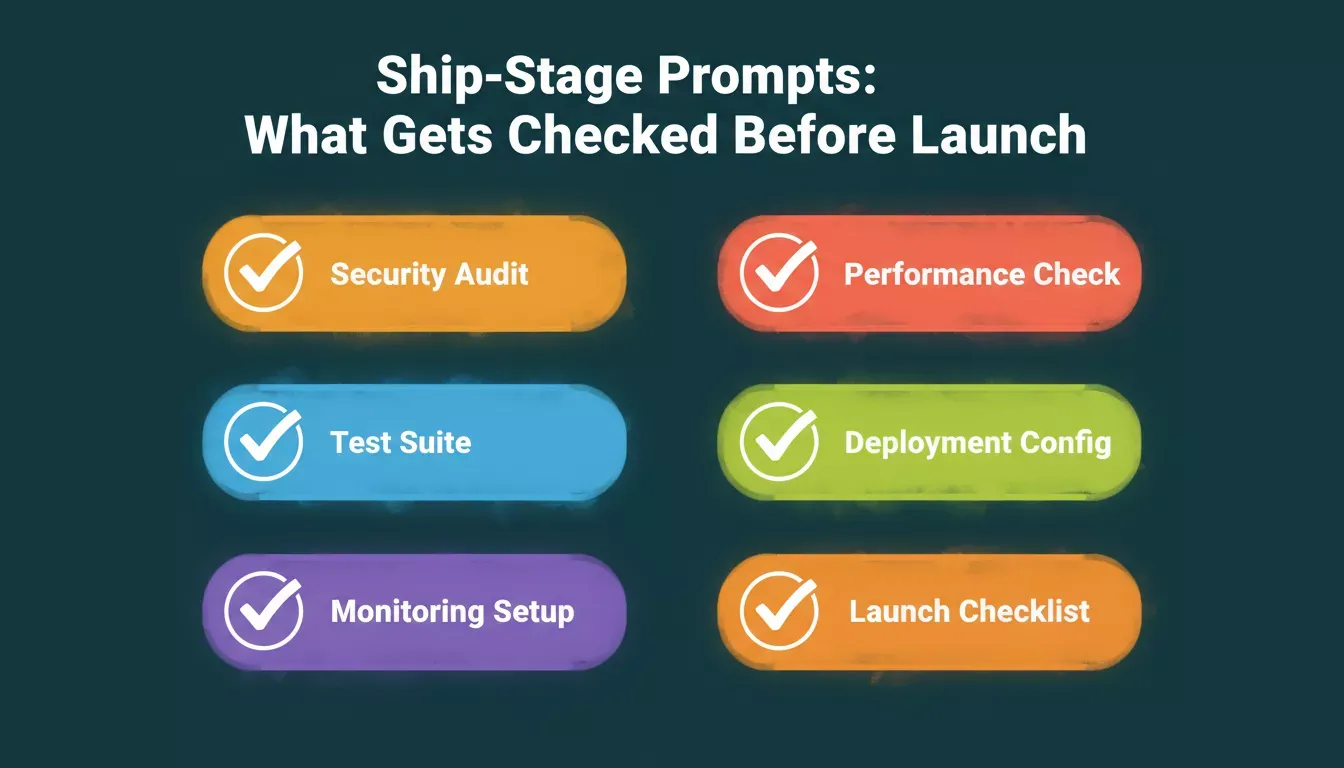
Run all six ship-stage prompts before going live: each covers a failure category AI skips by default.
Prompt 20: The Security Audit Prompt
Use this prompt to catch every common vulnerability in your AI-generated code before a single user touches your app in production.
Example prompt:
"Review all the code generated so far for security vulnerabilities. Check for: SQL injection in database queries, XSS in rendered user input, exposed API keys or secrets not using environment variables, missing authentication on protected routes, improper access control where users can access other users' data, and missing rate limiting on public endpoints. For each issue found, provide the fix with code."
The AI will often produce:
- A vulnerability report covering SQL injection, XSS, and access control gaps
- Specific code fixes for every issue found, ready to apply immediately
- A confirmation that all secrets are in environment variables and no routes are unprotected
Why this works: AI-generated code optimizes for functionality, not security. Running this audit before launch catches the six most exploited vulnerability classes before they reach real users.
Prompt 21: The Performance Check Prompt
Use this prompt to find and fix every performance bottleneck in your AI-generated code before slow load times cost you users.
Example prompt:
"Audit [your app] for performance issues. Check: database queries that lack indexes or run N+1 patterns, components that re-render unnecessarily, images not optimized or lazy-loaded, API responses not cached where appropriate, bundle size of JavaScript sent to client, and missing pagination on list endpoints. Provide specific fixes with before/after measurements where possible."
The AI will often produce:
- A performance report identifying N+1 queries, unnecessary re-renders, and missing caches
- Specific fixes with before/after measurements for every bottleneck found
- Bundle size analysis and image optimization recommendations
Why this works: Performance issues invisible in development become critical at real user volumes. This prompt surfaces the six most common bottlenecks in AI-generated apps before they affect retention.
Prompt 22: The Testing Suite Prompt
Use this prompt to generate a comprehensive test suite that covers your business logic, API endpoints, and critical user flows in one generation.
Example prompt:
"Generate a comprehensive test suite for [your app]. Include: unit tests for all utility functions and business logic, integration tests for API endpoints covering success and error cases, component tests for critical UI flows, and end-to-end tests for the signup-to-first-value path. Use [your test framework]. Mock external APIs. Target 80% code coverage on business logic files."
The AI will often produce:
- Unit tests for all utility functions and business logic with edge case coverage
- Integration tests for every API endpoint covering success, validation, and error paths
- End-to-end tests for the critical signup-to-first-value user journey
Why this works: AI-generated apps ship without tests by default. A single generation of this prompt adds the coverage needed to catch regressions before every deploy, turning a fragile prototype into a maintainable product.
Prompt 23: The Deployment Configuration Prompt
Use this prompt to generate a complete CI/CD pipeline with rollback and monitoring so your app ships safely every time.
Example prompt:
"Create the deployment configuration for [your app] on [platform]. Include: environment variable setup for production secrets, database migration strategy, CI/CD pipeline that runs tests before deploy, rollback procedure if deployment fails, health check endpoint, and monitoring setup for errors and performance. Configure proper CORS, CSP headers, and HTTPS."
The AI will often produce:
- A complete CI/CD pipeline that runs tests before every deployment
- Environment variable configuration and database migration strategy for production
- CORS, CSP, and HTTPS configuration with a health check endpoint and rollback procedure
Why this works: Deployment configuration built manually after the fact introduces inconsistencies between environments. This prompt generates a complete, repeatable pipeline that makes every future deploy as safe as the first.
Prompt 24: The Monitoring and Logging Prompt
Use this prompt to set up structured production monitoring with alerts before your app goes live so you know about problems before your users do.
Example prompt:
"Set up production monitoring for [your app]. Track: API response times per endpoint, error rates by category, database query performance, user signup and activation metrics, and infrastructure costs. Send alerts when: error rate exceeds 1%, response time exceeds 2 seconds, or disk usage exceeds 80%. Log structured JSON with request id, user id, timestamp, and action context."
The AI will often produce:
- Structured JSON logging with request id, user id, timestamp, and action context
- Alert rules for error rate, response time, and infrastructure thresholds
- A metrics dashboard covering API performance, user activation, and infrastructure costs
Why this works: Apps without monitoring discover production failures through user complaints. This prompt installs the observability layer that lets you detect and fix issues before they affect retention.
Prompt 25: The Launch Checklist Prompt
Use this prompt to generate a personalized pre-launch checklist that verifies every system in your app is production-ready before you go live.
Example prompt:
"Generate a pre-launch checklist for [your app]. Verify: all environment variables are set for production, the database is backed up and migration tested, authentication flows work end-to-end, payment integration processes test transactions, email sending works with real provider, mobile responsiveness passes on 3 device sizes, accessibility meets WCAG AA standards, SEO meta tags are configured, and error tracking captures and reports failures correctly."
The AI will often produce:
- A personalized checklist covering every system in your specific app
- Verification steps for auth, payments, email, mobile, accessibility, and SEO
- A pass/fail format you can work through systematically before every launch
Why this works: Generic launch checklists miss app-specific failure points. This prompt generates a checklist tailored to your exact stack and feature set, so nothing critical slips through before real users arrive.
For teams exploring how these fit into modern AI-driven development workflows, the pattern is the same: research first, structure second, build third.
How to Use These Prompts as a Complete System
These 25 prompts are not meant to be used in isolation. They form a sequential system where each output feeds the next input. Here is the framework for maximum effectiveness.
The critical best practices for using this system:
- Always paste relevant previous outputs as context in your next prompt. The AI assistant needs to reference your data model when building features.
- Never skip the discovery stage. Prompts 1-5 produce the constraints that make Prompts 6-25 generate production-ready code instead of generic boilerplate.
- Use small prompts within each stage. One feature per prompt conversation keeps the AI focused and prevents conflicting patterns.
- Review and verify at each stage boundary. Do not move from Architecture to Build until you have confirmed that the data model and API structure make sense.
The difference between a great starting point and a shipped product comes down to the discipline of following sequential steps rather than trying to generate an entire project from a single prompt. These 25 vibe solutioning prompts give you the complete system. Adapt them to your own context and start building.
How Rocket Turns These Prompts Into Shipped Products
Most vibe coding platforms start from a blank prompt. You type what you want, the AI generates code, and you hope the output is good enough to ship. Rocket.new works differently because it starts from research, not from a blank page.
Before you write a single prompt, Rocket runs competitive analysis through its Solve feature, identifies what similar products do well and where they fail, and creates a structured brief that feeds directly into the build process. This means the AI already knows the market context, the feature set that matters, and the architectural patterns that scale. Your prompt lands on a foundation of real data rather than assumptions.
Here is what sets Rocket apart from tools like Lovable and Bolt for building production applications.
- Research-to-build pipeline. Other platforms generate code from your description alone. Rocket generates code from your description plus competitive intelligence, market validation, and strategic context. The output reflects what the market needs, not just what you typed.
- Production-grade architecture by default. The platform generates Next.js web apps and Flutter mobile apps with proper error handling, authentication, database schema, API routes, rate limiting, and security patterns baked in from the first version.
- Shared context across sessions. When you iterate on your app over multiple days, Rocket retains the full context of previous decisions through its Projects system. Other tools like Lovable and Bolt have no pre-build intelligence layer and no shared memory architecture, which means you re-explain your project every time.
- 26+ connectors, one prompt. Rocket connects Stripe, Supabase, Notion, HubSpot, Google Analytics, and 20+ more services from a single chat prompt, with no manual API configuration.
- One-click deployment. The code Rocket generates deploys to a live URL with automatic HTTPS and global CDN, with proper environment variables and domain configuration ready to go.
Lovable and Bolt build what you tell them to build. Rocket figures out what is worth building, then builds it. If you want to get started without prior coding experience, the platform guides you through research before you touch the build interface.
The Rocket vibe solutioning workflow: research informs every build decision.
Your Prompts Shape What the World Gets to Use
The quality of your AI-generated application depends entirely on the quality of your prompts. These 25 prompts cover the full lifecycle from "what should I build" through "how do I ship it safely." Structured prompts with clear data models, explicit constraints, and defined user roles produce code that real people can rely on.
The teams building production software with AI in 2026 treat prompt writing as a skill worth practicing. They use systems like this, iterate in stages, and verify at every step. The tools keep getting smarter, but they still follow your lead.
Ready to put these prompts to work? Rocket starts from market research and competitive context before you write your first prompt. The result is production-ready code shaped by real data, not just what you remembered to type.
Sign up and try building your next app on Rocket.new and see how a research-backed platform turns these vibe solutioning prompts into shipped products.
Table of contents
- -Why Do Good Prompts Decide What Gets Built?
- -The Complete Vibe Solutioning System
- -Prompts 1-5: Deciding What Problem to Solve
- -Prompt 1: The Problem Validation Prompt
- -Prompt 2: The Competitor Gap Prompt
- -Prompt 3: The User Story Generator
- -Prompt 4: The Revenue Model Prompt
- -Prompt 5: The MVP Scope Prompt
- -Prompts 6-12: Defining Your Data Model and Architecture
- -Prompt 6: The Data Model Definition Prompt
- -Prompt 7: The Authentication Architecture Prompt
- -Prompt 8: The API Route Structure Prompt
- -Prompts 9 + 10: State Management and Component Architecture
- -Prompt 11: The Error Handling Strategy Prompt
- -Prompt 12: The Tech Stack Decision Prompt
- -Prompts 13-19: Building Features With Production Quality
- -Prompt 13: The Core Feature Build Prompt
- -Prompt 14: The Dashboard Layout Prompt
- -Prompt 15: The Form Builder Prompt
- -Prompt 16: The Real-Time Feature Prompt
- -Prompt 17: The Search and Filter Prompt
- -Prompt 18: The Notification System Prompt
- -Prompt 19: The Integration Prompt
- -Prompts 20-25: Shipping, Security, and Scale
- -Prompt 20: The Security Audit Prompt
- -Prompt 21: The Performance Check Prompt
- -Prompt 22: The Testing Suite Prompt
- -Prompt 23: The Deployment Configuration Prompt
- -Prompt 24: The Monitoring and Logging Prompt
- -Prompt 25: The Launch Checklist Prompt
- -How to Use These Prompts as a Complete System
- -How Rocket Turns These Prompts Into Shipped Products
- -Your Prompts Shape What the World Gets to Use