
Rocket.new eliminates the traditional Figma-to-developer handoff by turning design files directly into working apps. Its AI parses layouts, components, and tokens to generate full-stack, production-ready code. Teams can iterate, deploy, and scale instantly, no manual rebuild or developer dependency required.
Why the Traditional Handoff Still Fails?
And what actually happens after designers finish a Figma file and pass it to developers?
92% of designers and 91% of developers agree that the handoff process needs fixing.
Designers build screens, annotate specs, and share the file. Developers open dev mode, check spacing, and rebuild. The CSS code from the inspect panel rarely ships. Developers use it as a reference, not a production-ready start.
Figma designs include dimensions, colors, and typography, but a developer still interprets those manually. The development workflow loses days.
Effective collaboration during the design handoff can reduce misunderstandings, but the gap remains when the handoff is static. No plugin solves this because the design process is the bottleneck. A design-to-code path that eliminates developer handoff is the break teams need.
How the Figma to Code Pipeline Works in Rocket.new
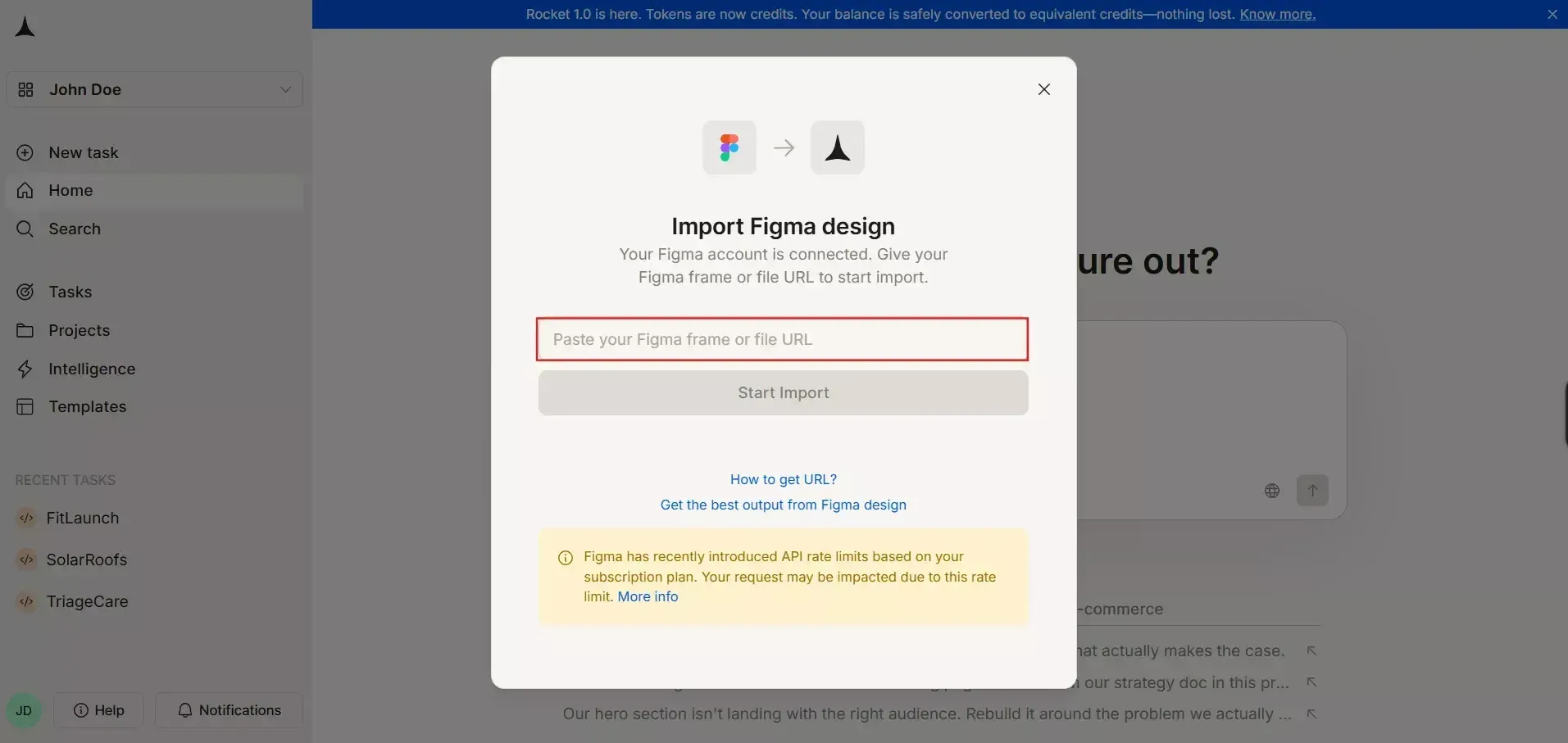
Instead of treating your Figma file as a reference, Rocket.new reads design files and generates an app that runs.
-
Connect your account: Rocket.new links via OAuth to import frames. No API key, no plugin.
-
Paste your URL: Copy the link, paste it, select frames and pages. Import up to 40 screens.
-
AI parses your structure: The AI reads hierarchy, auto layout rules, Figma components, tokens, and assets. It maps these without a style guide.
-
Production-ready output: Responsive pages, styled components, and clean architecture. Auto layout converts to responsive HTML and CSS.
-
Iterate via chat: User prompts through AI chat modify layout, add features, or update styles. Request auth, database tables, or payments.
Rocket adopts a "Build, Deploy" approach. Clickable prototypes become functional, multi-page apps with navigation across pages.
What Rocket.new Generates vs. Other Figma to Code Tools
Most Figma-to-code tools stop at static front-end snippets. They produce HTML fragments needing wiring. When evaluating any Figma-to-code tool, the key features to assess are code generation quality, component mapping, responsive behavior, and framework support.
Here is how Rocket compares:
| Capability | Typical Tools | Rocket.new |
|---|---|---|
| Front end | HTML fragments | Full React or Next.js with Tailwind CSS |
| Components | Partial mapping | Figma components preserved as reusable elements |
| Backend | None | Databases, auth, APIs via Supabase and Stripe |
| Deploy | Separate hosting | One-click with a custom domain via Netlify |
Consistent with Design and Full Stack Code:
Rocket translates component libraries, keeping consistency with the design system and design guidelines. The platform generates full-stack code using React and Tailwind CSS, applying utility-based styling throughout to maintain brand consistency across every screen.
Integration with Supabase and One-Click Deployment
On the backend, Rocket.new integrates directly with Supabase to set up database structures, authentication, and backend features from design inputs alone, no separate configuration needed. Combined with one-click deployment and custom domain connections, the platform delivers live, editable previews and production-ready code in minutes from a Figma file URL.
Clean, maintainable, and Scalable Code
The quality of generated code matters here. Rather than producing output that requires extensive rewriting, Rocket prioritizes clean, maintainable code that developers can immediately extend. Modern AI-driven automation significantly reduces manual HTML and CSS work, allowing teams to launch faster without sacrificing quality.
Rocket translates component libraries, keeping consistency with the design system and design guidelines. The platform uses Tailwind CSS. Over 65% of teams rely on AI-assisted code generation from Figma designs. The design process improves when users collaborate inside a tool that ships.
Who Ships Faster with Direct Figma Building
-
Design teams at startups who need MVPs. They convert Figma designs to working apps and test with real user feedback.
-
Agencies creating client demos. Import design files, connect a database, and present a live app. No developer handoff.
-
Product managers testing concepts. Validate assumptions with functional apps, not static Figma designs. Iterate before committing resources.
-
Solo creators. Design in Figma, ship without writing code. 1.5 million users use the platform.
Figma makes the creative workflow fast. Rocket makes the build match speed.
What the Community Says
"Design to developer handoff hasn't improved once. We've had more tools, more processes, more design systems... and developers are still left staring at a Figma file trying to reverse engineer what a designer meant." - Daine Mawer on LinkedIn
Rocket.new closes this gap. The design process no longer produces a static design handoff; developers collaborate closely, or designers ship.
How Rocket.new Handles Figma to Code at Scale
Rocket.new uses AI-powered "vibe-coding" agents to interpret design files, map them to structured output, and generate full-stack apps. It reads Figma designs and converts them to responsive HTML and React components. Code generation handles the backend, too.
Here is what the platform offers:
-
Vibe-solutioning platform from research to shipped app
-
25,000+ templates, free across web, mobile, and SaaS
-
Saves up to 80% tokens compared to other AI builders
-
Flutter for mobile, Next.js for web to create apps across platforms
-
Collaboration features for user teams
-
Three products: Solve, Build, and Intelligence
You can export source code on paid plans, link to GitHub with two-way sync, and access features. Code generation produces production-ready output. Deploy with custom domains for rapid development from design to live product.
Example use cases:
-
Import a landing page from frames, generate code for a responsive site, and deploy
-
Convert a SaaS dashboard Figma file into a working app with auth
-
Create a mobile app as a Flutter prototype
Turn your Figma designs into live, production-ready apps instantly with Rocket.new, no handoff, no delays.
Table of contents
- -How the Figma to Code Pipeline Works in Rocket.new
- -What Rocket.new Generates vs. Other Figma to Code Tools
- -Consistent with Design and Full Stack Code:
- -Integration with Supabase and One-Click Deployment
- -Clean, maintainable, and Scalable Code
- -Who Ships Faster with Direct Figma Building
- -What the Community Says
- -How Rocket.new Handles Figma to Code at Scale