
Context Window Management determines what your LLM sees on every request. This blog covers token budgets, RAG, compression, sliding windows, and monitoring so your AI applications stay sharp and cost-efficient at scale.
Why do well-built AI apps still give inconsistent answers as conversations grow longer?
The answer is almost always context window management. A context window defines how many tokens a language model can process in a single request. It is the model's working memory. Everything the model knows about your conversation, your system prompt, and any retrieved documents must fit within this fixed limit.
As AI applications grow more complex, context window management has become a first-class engineering concern. The median context window across 309 tracked models is 200K tokens (BenchLM, August 2026). Yet most production teams still treat context as an afterthought. This guide changes that.
What is a Context Window vs Context Length?
These two terms are often confused. Here is the precise distinction:
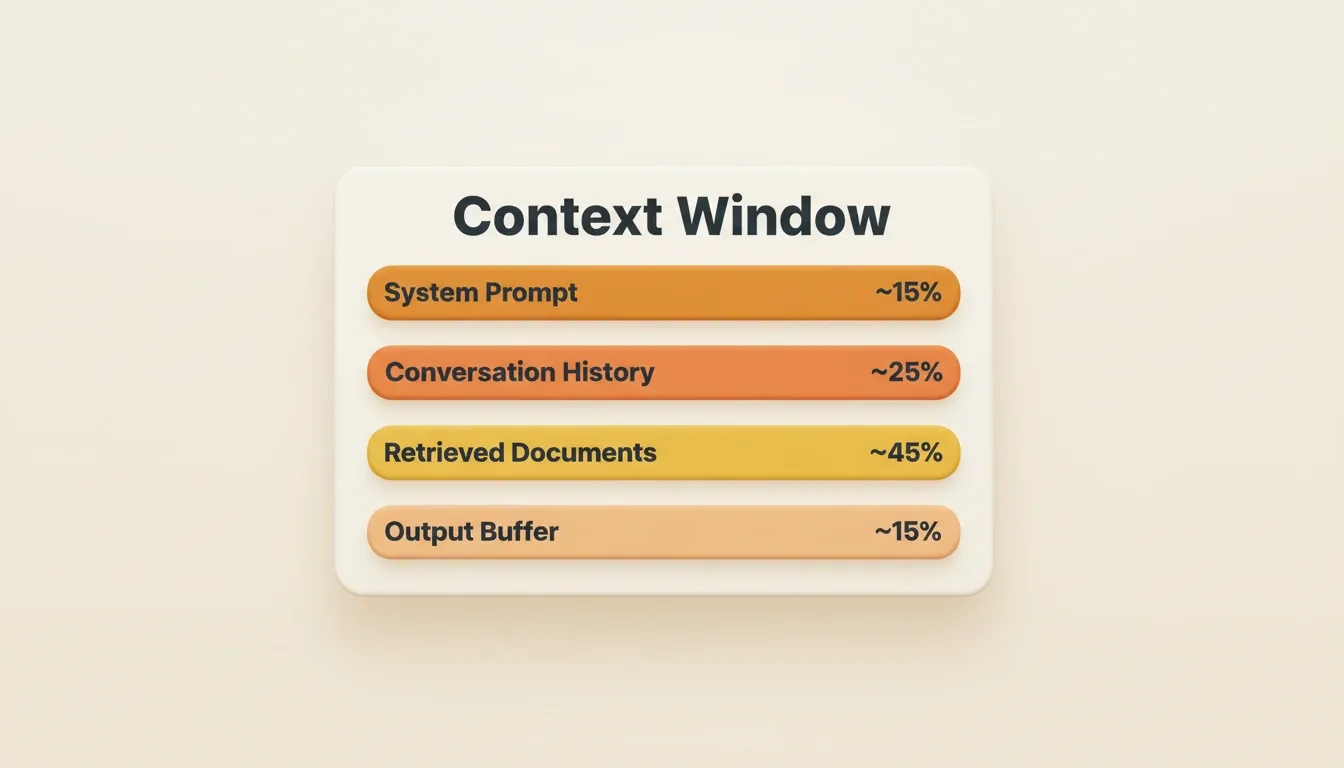
A context window divides into four functional zones. Each zone competes for the same fixed token limit on every LLM request.
| Term | Definition |
|---|---|
| Context window | The maximum number of tokens a model can accept in a single request |
| Context length | How many tokens are currently used within that window on a given call |
| Token budget | The deliberate allocation of available tokens across system prompt, history, retrieved docs, and output |
| Effective context | The portion of the context window that actually influences the model's response |
You can have a 1M-token context window and use only 8K tokens on most calls. The goal of context window management is to make every token count.
To understand why this matters at the architecture level, see context engineering vs prompt engineering for a full breakdown.
Here is a quick reference for current context window sizes across major providers:
| Model | Context Window | Max Output | Practical Use Case |
|---|---|---|---|
| GPT-5.2 Pro | 400K tokens | 128K tokens | Long-document analysis, multi-step agents |
| GPT-4.1 | 1,047K tokens | 32K tokens | Full codebase reasoning |
| Claude 4.5 Sonnet | 200K / 1M extended | 64K tokens | Long conversations, document QA |
| Gemini 2.5 Pro | 1,048K tokens | 64K tokens | Video, audio, and text multimodal |
| DeepSeek V3 | 64K tokens | 8K tokens | Cost-efficient standard tasks |
The gap between advertised context length and practical usable capacity is where most teams get tripped up.
Why Do Large Context Windows Still Lose Information?
Even when a model's context window technically fits your entire conversation history, performance on long contexts degrades in a well-documented pattern.
- The "lost in the middle" problem is real. Research from Liu et al. at Stanford found that language models recall information placed at the beginning or end of long contexts far better than information buried in the middle (arXiv:2307.03172). Relevant information positioned mid-document gets overlooked, even when it sits within the context window.
- Response quality drops as context grows. Filling a large context window with every conversation turn and retrieved document sounds smart. In practice, the model struggles to identify which parts carry the most value for the current question.
- Conversation history creates noise. In multi-turn conversations, older context often becomes irrelevant to the current query. Keeping raw messages from dozens of earlier turns adds latency, increases cost, and rarely improves the generated response.
Put critical context at the beginning of your prompt and near the end. The middle is where models perform worst. This pattern holds across different models and context window sizes.
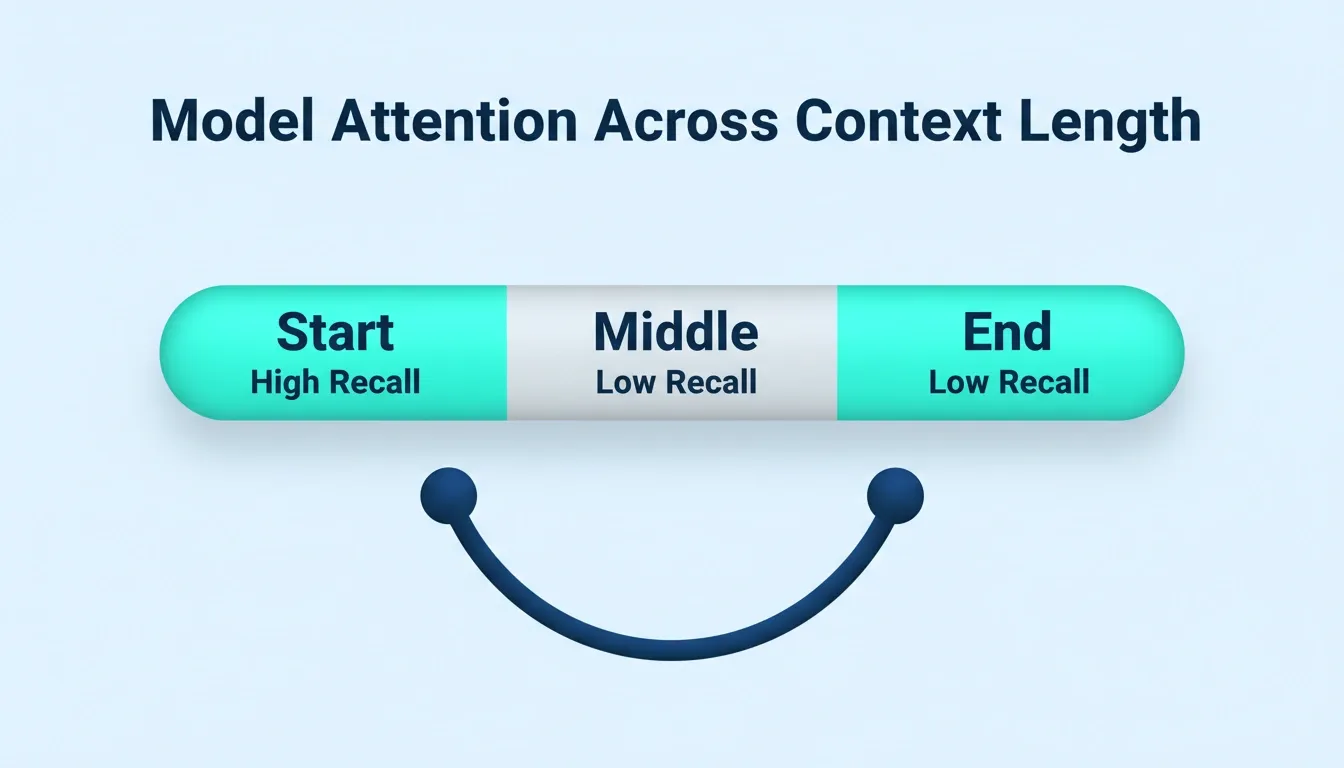
Model attention peaks at the start and end of a long context and drops sharply in the middle. Placing critical information there means the model is likely to overlook it.
The Real Cost of Poor Context Window Management
Poor context management compounds into a cost and reliability problem, not just a quality one:
| Failure Mode | Symptom | Root Cause |
|---|---|---|
| Context bloat | Costs spike unexpectedly | Accumulating full conversation history without pruning |
| Lost-in-the-middle | Model ignores key instructions | Critical info buried in long context |
| Retrieval noise | Irrelevant answers to specific questions | Low-relevance chunks filling the token budget |
| Latency creep | Response time grows with conversation length | Context window filling without management |
| Silent truncation | Model loses early instructions | Context exceeds limit; oldest tokens silently dropped |
Having large context windows does not solve the retrieval problem. You still need context strategies that surface the right information at the right time. Teams building AI applications with context-aware architecture consistently get better results than teams throwing everything into one massive prompt.
How Does Retrieval Augmented Generation Help?
Retrieval augmented generation (RAG) is the most widely adopted context management approach for production systems. Instead of stuffing the entire knowledge base into the context window, RAG retrieves only the relevant documents at query time.
- Semantic retrieval goes beyond keyword matching. Embedding models convert both the user query and stored documents into vectors. They then find the closest matches by semantic similarity. The system pulls relevant data even when the exact words differ from the search query.
- Chunk size directly impacts retrieval quality. Splitting documents into chunks of 256 to 512 tokens generally works well for most production systems. Too small and you lose context between sentences. Too large and you waste token budget on irrelevant surrounding text.
- RAG reduces token consumption and cost. Rather than maintaining a million-token context window for every request, RAG keeps the effective context focused. This typically holds total context to well under 32K tokens.
Where RAG fails: preserving key information across sessions. RAG works well for single-turn lookups but struggles with long-running conversations. See the production RAG checklist for the failure modes tutorial authors rarely cover.
RAG Implementation Checklist
Before deploying RAG in production, validate each of these:
- Chunk strategy defined: fixed-size, sentence-boundary, or semantic chunking chosen based on document type
- Embedding model selected: same model used for indexing and retrieval
- Similarity threshold set: minimum relevance score below which chunks are excluded
- Top-K tuned: number of retrieved chunks calibrated to your token budget
- Re-ranking layer added: cross-encoder re-ranker applied after initial retrieval for precision
- Metadata filtering enabled: filter by date, source, or category before semantic search
- Retrieval quality logged: similarity scores tracked per query in production
- Fallback defined: behavior when no chunks meet the relevance threshold
RAG pipeline with re-ranking: the re-ranker step significantly improves precision by re-ordering retrieved chunks before they enter the context window.
What Are Sliding Windows and Compression Strategies?
When conversations grow longer than the context window allows, you need a strategy for deciding what stays and what gets dropped. This is where production systems diverge from prototypes.
Strategy 1: Sliding Window
Keep the N most recent conversation turns and discard everything older. This approach works for short interactions but fails when users reference something from earlier in the conversation.
When to use: Customer support bots, single-session assistants, and short-form Q&A. When it breaks: Multi-session workflows, research assistants, and any app where users reference earlier decisions.
Strategy 2: Summarization
Instead of dropping older messages entirely, summarize them into a few key facts. The LLM itself generates these summaries, reducing hundreds of tokens from conversation history down to a focused paragraph while preserving key information.
When to use: Long-running conversations, multi-session agents, and any workflow where early decisions affect later ones. Tradeoff: Summarization introduces its own latency and credit cost. Run it asynchronously after each N turns.
Strategy 3: Context Compression
Techniques like LLM summarization, selective extraction, and structured metadata reduce token usage while preserving semantic meaning. Microsoft's LongRoPE research demonstrated extending context windows to over 2 million tokens through positional interpolation (Microsoft Research). Even so, compression strategies remain relevant for cost and latency.
Strategy 4: Token Budgeting
Divide the model's context window into zones with hard allocation limits. This approach prevents any single zone from consuming the entire context window and keeps token consumption predictable.
| Zone | Recommended Allocation | Notes |
|---|---|---|
| System prompt | 10-15% | Keep tight; audit regularly for bloat |
| Conversation history | 20-30% | Apply sliding window or summarization here |
| Retrieved documents | 40-50% | RAG output; apply relevance threshold |
| Output buffer | 10-20% | Reserve for generated response |
Strategy 5: Hybrid Approaches
Most production systems combine multiple strategies. A common production pattern:
- Recent turns (last 5 to 10) kept verbatim via sliding window
- Older turns compressed into a rolling summary
- Knowledge base accessed via RAG at query time
- System prompt audited monthly and trimmed to essentials
The goal is efficient context management: keeping response quality high while controlling cost and latency.
For practical patterns applied to real apps, context engineering examples walks through the four core strategies, write, select, compress, and isolate, with production code examples.
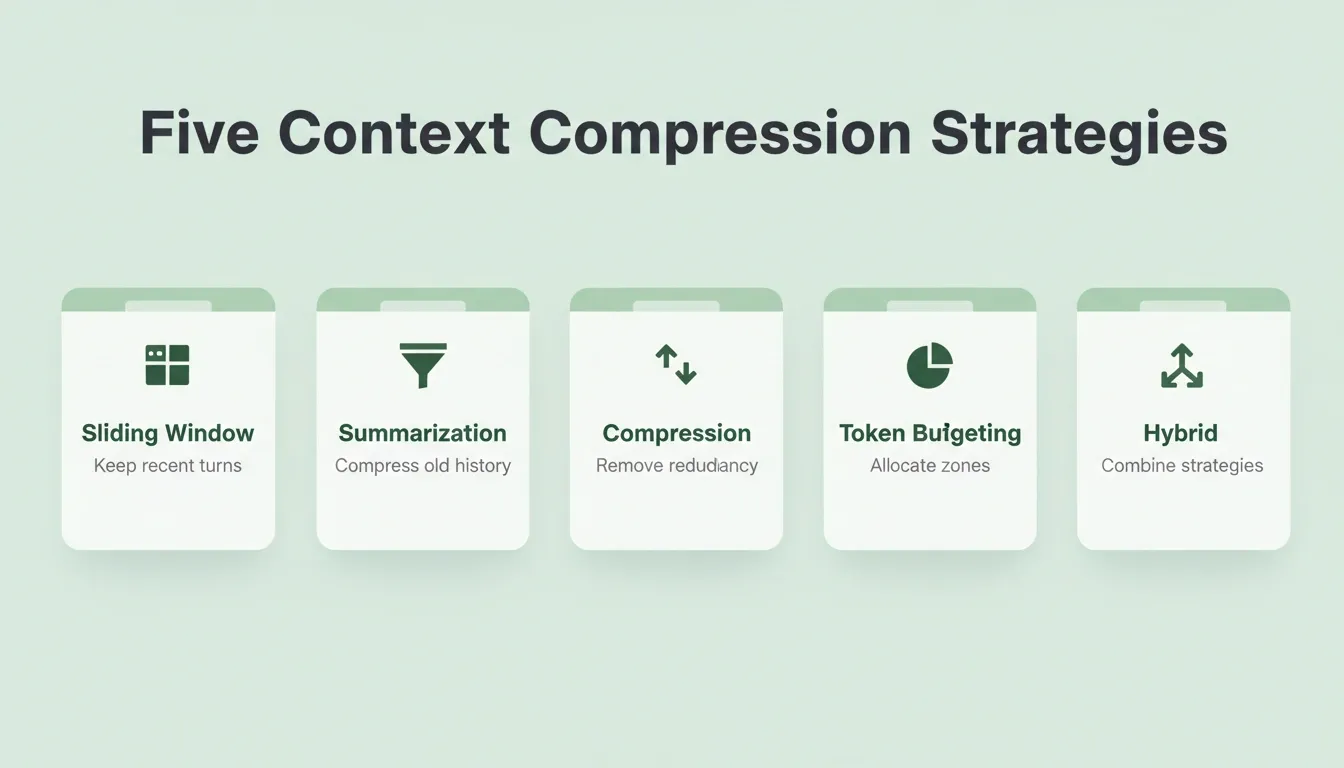
The five core context compression strategies, each suited to a different use case. Most production systems combine two or more of them.
How to Implement Context Window Management: A Practical Guide
Moving from theory to implementation requires a structured approach. Here is a step-by-step process for production systems.
Step 1: Measure Your Baseline
Before optimizing, measure what you have. Log these metrics for every LLM call:
- Total tokens sent (prompt tokens) and received (completion tokens)
- Breakdown by zone: system prompt, history, retrieved docs
- Response latency and cost per request
Most teams discover that 40 to 60% of their token budget is consumed by conversation history that has no bearing on the current query.
Step 2: Set Token Budget Limits
Implement hard limits per zone in your prompt assembly layer. Reject or truncate inputs that exceed zone limits before they reach the model API. This step prevents runaway costs from edge cases.
Step 3: Choose Your History Strategy
Based on your use case, select and implement one of:
- Sliding window for stateless or short-session apps
- Summarization for long-running or multi-session apps
- Selective retention: keep only turns flagged as important by a classifier, for complex agents
Step 4: Add Retrieval
If your app references a knowledge base, implement RAG. Start with a simple vector search before adding re-ranking. Measure retrieval relevance scores from day one.
Step 5: Monitor in Production
Context management is not a one-time setup. Implement ongoing monitoring and review token usage weekly during the first month of production.
How Rocket Handles Context Across Your Full Build Cycle
Most AI tools lose context the moment you switch from researching to building. You spend time crafting a prompt, get a response, start a new session, and the tool has forgotten everything about your project.
Rocket solves this through a compound context architecture. It is a Project-based persistent workspace where files, research decisions, and task outputs are added once and automatically inherited by every subsequent task.
- Projects hold everything. A Rocket Project is a persistent workspace containing pitch decks, strategy documents, competitive analyses, customer interview transcripts, brand guidelines, and technical architecture docs. Rocket understands files structurally. A financial model is read as a financial model, not flat text.
- Automatic inheritance across tasks. The first task opened inside a project already knows everything that has been shared. The tenth task knows everything the first nine established. No re-explaining, no re-uploading, no briefing each new task from scratch.
- Cross-task context compounds. Reference any previous task in a new one and Rocket picks up exactly where the thinking left off. The PRD generated by Solve is present when the developer opens the Build task. The competitive brief from Intelligence is present when the landing page is written. Every task makes the next one smarter.
- The handoff is eliminated, not improved. Without this architecture, the strategy team does research, produces a brief, hands it to product in a document, product reads 60% and writes a PRD from memory, then hands it to engineering in a ticket, and the engineer misses two nuances. Three handoffs, three context compressions. In Rocket, the market research, the strategy brief, the PRD, and the build task all live in the same project. Every step inherits the full context of every prior step.
This is the architectural difference between a tool and a system. Tools require you to carry context between them. Rocket is the system. Context lives inside it, compounds across every task, and never needs to be re-explained.
Important distinction: Rocket's context architecture is not conversation history in a sliding window. It is a structured, persistent workspace. Tasks opened outside a Project do not inherit shared context. Context is what you deliberately add to a Project: files, research, and decisions. It is not an automatic log of everything said.
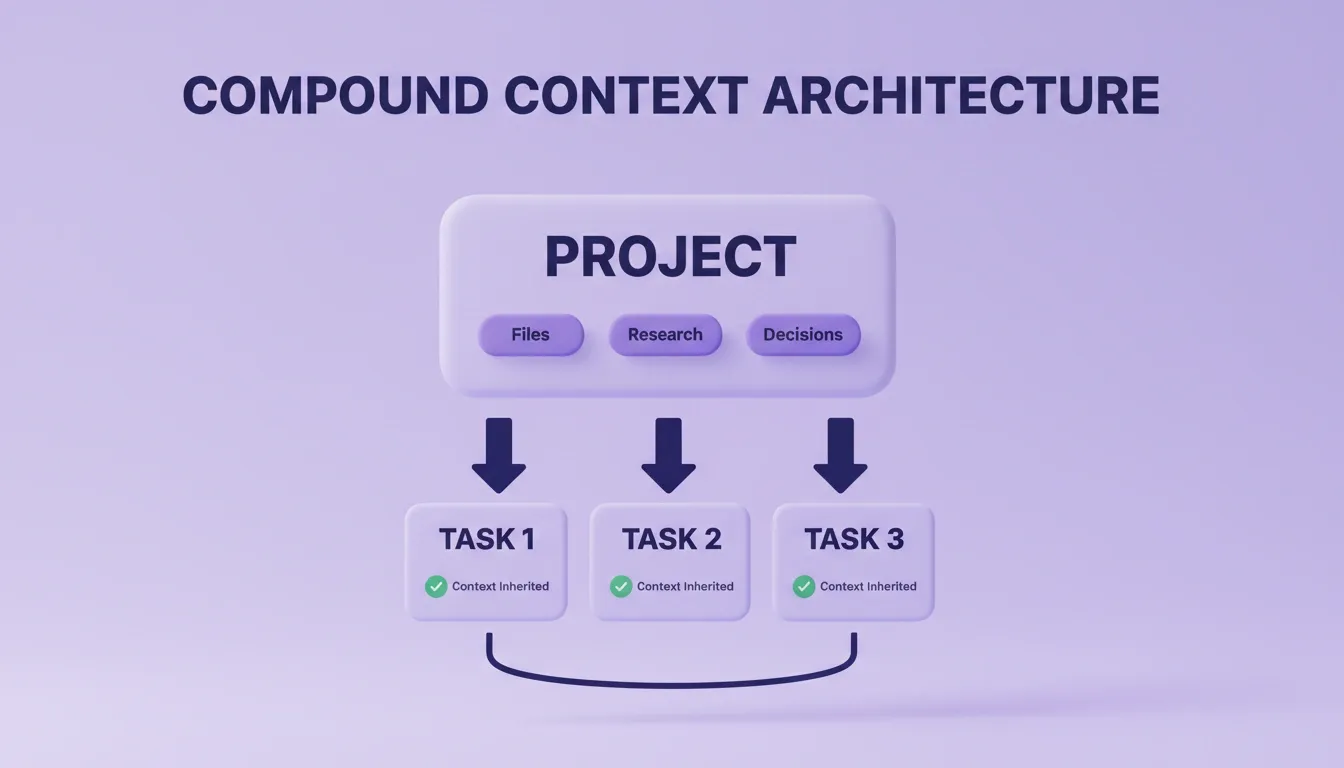
In Rocket, files, research, and decisions added to a Project are automatically inherited by every task. No re-explaining, no re-uploading, no context lost between steps.
Which Monitoring Patterns Catch Context Failures Early?
Once your context strategies are in production, you need systems that detect when things go wrong before users notice. Monitoring token usage and retrieval quality are the two most actionable signals for catching context window failures early.
- Track token usage per request. Log the total context sent to the model on every LLM call. When token count spikes unexpectedly, it usually signals context bloat from accumulated conversation history or redundant retrieved documents.
- Monitor response quality over conversation length. Set up automated evaluations that measure accuracy at turn 1, turn 5, and turn 20 of multi-turn conversations. If quality degrades after a specific number of exchanges, your context limits are being hit or your summarization is losing critical information.
- Watch for latency spikes correlated with context length. Longer inputs mean slower responses. If average response time increases linearly as the conversation progresses, the context window is filling up without proper management.
- Measure retrieval relevance scores. When using RAG, log the similarity scores of retrieved documents. Low relevance scores on queries that should have strong matches indicate problems with your embedding models, chunk boundaries, or the semantic retrieval configuration.
- Set hard token limits with graceful fallback. When context usage approaches the model's context window limit, trigger summarization of older content, prune low-relevance retrieved documents, or notify the user that the conversation needs a fresh start. Following solid context engineering best practices prevents silent failures.
Monitoring Dashboard: Key Metrics to Track
| Metric | Alert Threshold | Action |
|---|---|---|
| Prompt tokens per request | Above 80% of context window | Trigger summarization or pruning |
| Retrieval relevance score | Below 0.7 average | Review chunk strategy and embedding model |
| Response latency | Above 2x baseline | Check for context bloat |
| Quality score at turn 20 | Below 80% of turn 1 quality | Review history management strategy |
| Cost per conversation | Above 2x expected | Audit token zones for bloat |
"Since OpenAI won't just be cool and give us a max context and max output parameter in the OpenAI API-compatible models endpoint spec, I put together a quick reference for my own use that perhaps others can benefit from." — Taylor Wilsdon, llm-context-limits
Managing context effectively in production requires ongoing monitoring, not a one-time setup.
Context Window Management Is the Foundation of Reliable AI
Context window management is not a configuration detail. It is the architectural decision that determines whether your AI application scales or breaks. As models grow more capable and context windows expand, the discipline of deciding what enters them becomes more important, not less.
The teams shipping reliable AI products today are not the ones with the best prompts. They are the ones who treat context as infrastructure: measured, budgeted, compressed, retrieved, and monitored.
You describe the problem. Rocket researches it, assembles the context architecture, and builds the product, web or mobile, with intelligent context management handled automatically. Start building on Rocket and ship your next AI application from a foundation that actually holds.
Table of contents
- -What is a Context Window vs Context Length?
- -Why Do Large Context Windows Still Lose Information?
- -The Real Cost of Poor Context Window Management
- -How Does Retrieval Augmented Generation Help?
- -RAG Implementation Checklist
- -What Are Sliding Windows and Compression Strategies?
- -Strategy 1: Sliding Window
- -Strategy 2: Summarization
- -Strategy 3: Context Compression
- -Strategy 4: Token Budgeting
- -Strategy 5: Hybrid Approaches
- -How to Implement Context Window Management: A Practical Guide
- -Step 1: Measure Your Baseline
- -Step 2: Set Token Budget Limits
- -Step 3: Choose Your History Strategy
- -Step 4: Add Retrieval
- -Step 5: Monitor in Production
- -How Rocket Handles Context Across Your Full Build Cycle
- -Which Monitoring Patterns Catch Context Failures Early?
- -Monitoring Dashboard: Key Metrics to Track
- -Context Window Management Is the Foundation of Reliable AI