

Context engineering examples show how structuring the right information at the right time transforms unreliable AI demos into production-grade apps. This blog covers the four core patterns, real-world tools, and how to build pipelines that scale.
Does your AI app give inconsistent outputs? The problem is usually context, not the model.
Andrej Karpathy and Shopify CEO Tobi Lutke both declared prompt engineering obsolete in mid-2025. They pointed to context engineering as the real discipline behind reliable AI. According to Cognition, context engineering is "effectively the number one job of engineers building AI agents" today.
A single clever prompt impresses in a demo. Production AI systems need structured information pipelines. These pipelines feed models the right data, instructions, and history at each step.
This blog breaks down the patterns, real examples, and tools that make it practical.
What is Context Engineering and Why Does It Matter?
Context engineering means giving an AI model everything it needs for a specific task. It is not just a prompt. It is a full information environment assembled at runtime.
- The LLM context window acts like RAM. Karpathy describes LLMs as a new kind of operating system. The context window serves as working memory. Your job is to load it with the right code and data for the current step.
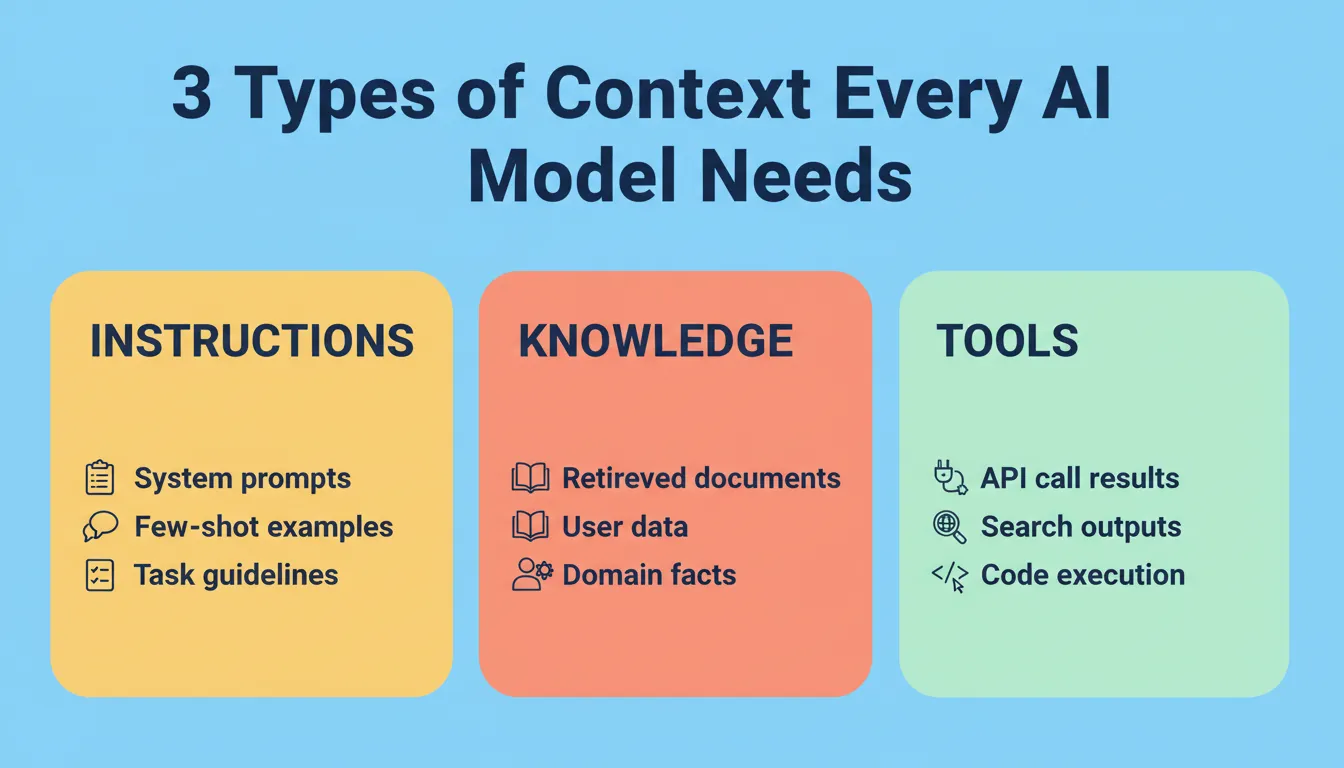
- Three types of context matter. Instructions (prompts, system messages, few-shot examples), knowledge (facts, documentation, retrieved data), and tools (feedback from API calls, search results, code execution outputs).
- It is adaptive, not static. Context assembly happens per request. The system responds to the current state. It pulls different information depending on the query, conversation history, or task phase.
- Format affects performance. How you structure information matters as much as what you include. Well-organized inputs with clear labels guide the model better than unstructured text dumps.
Understanding these fundamentals is the skill replacing prompt engineering for serious AI builders. The question now is how to apply them in practice.
How Does Context Engineering Differ from Prompt Engineering?
The terminology shift is not cosmetic. According to O'Reilly's analysis, prompt engineering focused on clever wording. Context engineering, in contrast, focuses on building entire information systems.
| Dimension | Prompt Engineering | Context Engineering |
|---|---|---|
| Scope | Single input phrasing | Full information pipeline |
| Approach | Static, one-shot | Adaptive, per-request assembly |
| Data sources | User query only | RAG, tools, memory, state |
| Focus area | Word choice | System architecture |
| Reliability | Demo-level | Production-grade |
| Skill required | Writing ability | Engineering discipline |
The table makes one thing clear: production AI demands systems thinking, not just writing skills. Context engineering treats the model as one component in a larger architecture.
Real-World Context Engineering Examples That Show the Patterns in Action
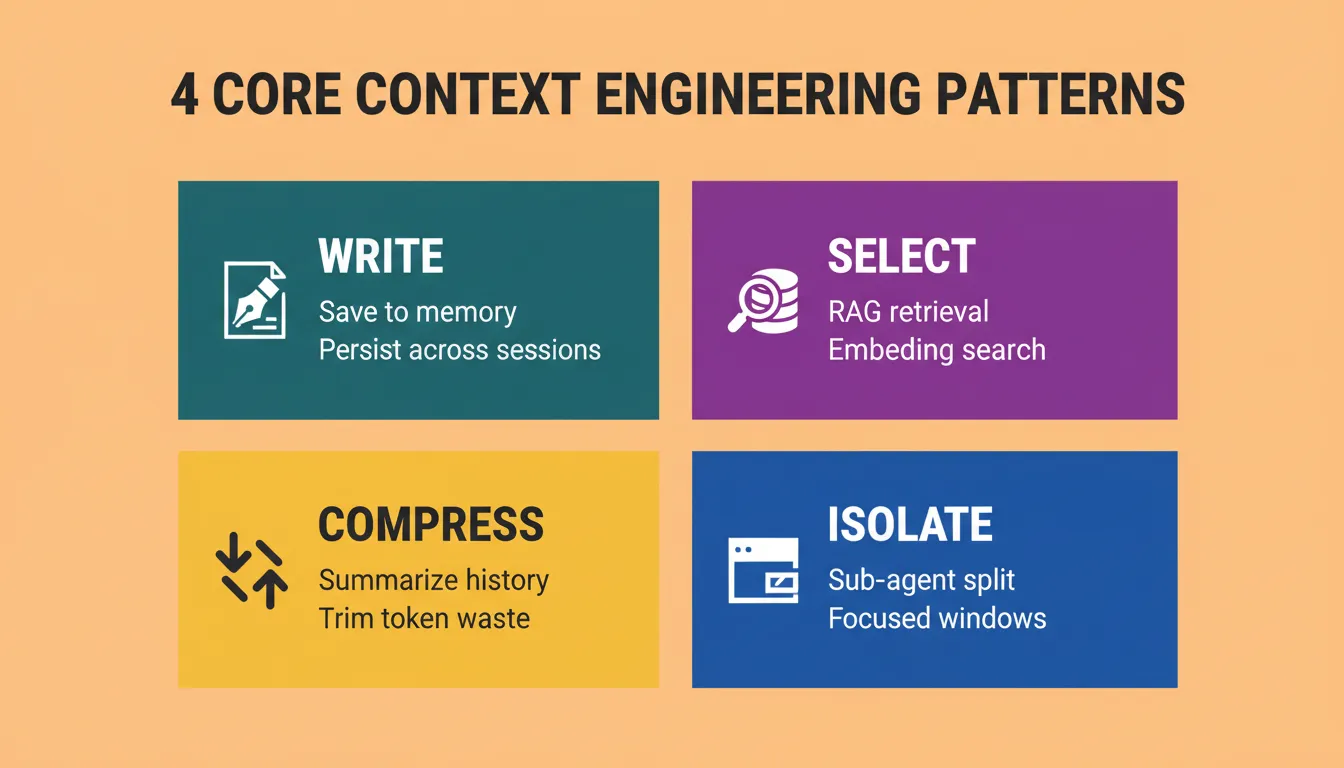
According to LangChain's research on agent context, agent context strategies fall into four categories: write, select, compress, and isolate. Each pattern solves a different problem when building smarter agent workflows.
Pattern 1: Write Context
Save information outside the context window for later retrieval. Scratchpads let agents take notes mid-task. Long-term memory stores facts across sessions. Claude Code, Cursor, and Windsurf all auto-generate persistent memories from user interactions.
Real example: Claude Code automatically writes a plan to its scratchpad before the context window fills. It then reads that plan back on the next turn. This maintains coherent multi-step reasoning across thousands of tokens.
Pattern 2: Select Context
Pull the right information into the window at the right moment. This includes fetching from rules files (like CLAUDE.md), retrieving memories via embeddings, or applying RAG to tool descriptions for better selection accuracy.
Real example: Windsurf combines AST parsing, embedding search, grep, knowledge graphs, and re-ranking to retrieve the right code context from large codebases. As Varun Mohan (Windsurf CEO) noted: "Indexing code is not context retrieval... we must rely on a combination of techniques like grep, file search, knowledge graph-based retrieval, and a re-ranking step where context is ranked in order of relevance."
Pattern 3: Compress Context
Retain only the tokens required for the current step. Claude Code runs "auto-compact" at 95% window capacity. Cognition uses a fine-tuned model for summarization at agent-to-agent boundaries.
Token budget math: Anthropic reported their multi-agent researcher used 15x more tokens than a standard chat interface. Without compression logic, a 10-turn agent conversation can consume 50,000 or more tokens per request. With summarization, the same workflow runs at 8,000 to 12,000 tokens.
Pattern 4: Isolate Context
Split work across sub-agents or sandboxes. Anthropic's multi-agent researcher outperformed single-agent approaches. Each sub-agent received a narrower, more focused context window for specific sub-tasks.
Real example: Assign each sub-agent a single responsibility with only the context it needs. Use message-passing between agents rather than shared context. This reduces noise and improves accuracy.
Most production agents combine two or three of these patterns depending on task complexity and token budget.
How Do Coding Assistants Use Context Windows?
Coding assistants offer the clearest context engineering examples at scale. Code agents represent some of the best production-grade retrieval and context management systems available today.
| Tool | Write | Select | Compress | Isolate |
|---|---|---|---|---|
| Claude Code | CLAUDE.md, scratchpad | Rules files, embeddings | Auto-compact at 95% | Sub-agent tasks |
| Cursor | Rules files | AST + grep | Conversation pruning | File-level isolation |
| Windsurf | Project memory | Knowledge graph + re-ranking | Sliding window | Module-level context |
All three treat the context window as a managed resource rather than a passive text box. The quality of retrieval and compression directly determines whether an AI assistant produces useful code or generates noise.
Building Your Own Context Pipeline Step by Step
Whether you are building a coding agent or a customer support bot, the pipeline structure stays consistent. Understanding prompt engineering best practices gives you the foundation before you layer in full context management.
Here is a practical framework based on the patterns above:
- Define your context sources. List every data type your model needs: user input, retrieved docs, conversation state, tool outputs, and system instructions.
- Build a retrieval layer. Choose between embedding search, keyword search, or hybrid approaches based on your data type and corpus size.
- Set token budgets. Decide how much window space each context type gets and add hard limits to prevent overflow. A practical starting split: 30% system instructions, 40% retrieved knowledge, 20% conversation history, and 10% tool outputs.
- Add compression logic. Summarize old messages, trim irrelevant tool outputs, and compact lengthy documents before injection.
- Write back results. Store useful outputs in memory for future turns. This creates a feedback loop that improves context quality over time.
This pipeline is not a one-time setup. It requires iteration based on observability data showing where context gaps cause failures or where irrelevant tokens waste budget.
Context Engineering for AI-Powered Web and Mobile Apps
Context engineering is not limited to chat agents. Every AI-powered web or mobile app has a context architecture, whether intentional or not. Rocket generates production-ready Next.js and Flutter apps. Both output formats have distinct context engineering requirements.
Context Engineering in Next.js Apps
When a Next.js app includes AI features, the context pipeline runs server-side through edge functions. The key patterns are:
- Server-side context assembly: Edge functions retrieve user history, fetch relevant documents, and assemble the context before the LLM call. This keeps sensitive data off the client.
- Streaming responses: Context is assembled once. The response then streams to the client, reducing perceived latency.
- Session-scoped memory: User preferences and conversation state persist across sessions without client-side storage.
Context Engineering in Flutter Mobile Apps
Flutter apps face a different constraint. Mobile devices have limited memory and unreliable connectivity. Context engineering patterns adapt accordingly:
- Offline-first context caching: Critical context is cached locally and synced when connectivity returns.
- Compressed context payloads: Mobile API calls use pre-compressed context to reduce bandwidth and latency.
- Progressive context loading: Start with minimal context and load additional context as the user engages.
Why Rocket Handles Context Architecture Automatically
Building a context pipeline from scratch takes weeks of architecture decisions, retrieval tuning, and token budget management. Rocket removes that overhead by handling context assembly inside its vibe solutioning platform.
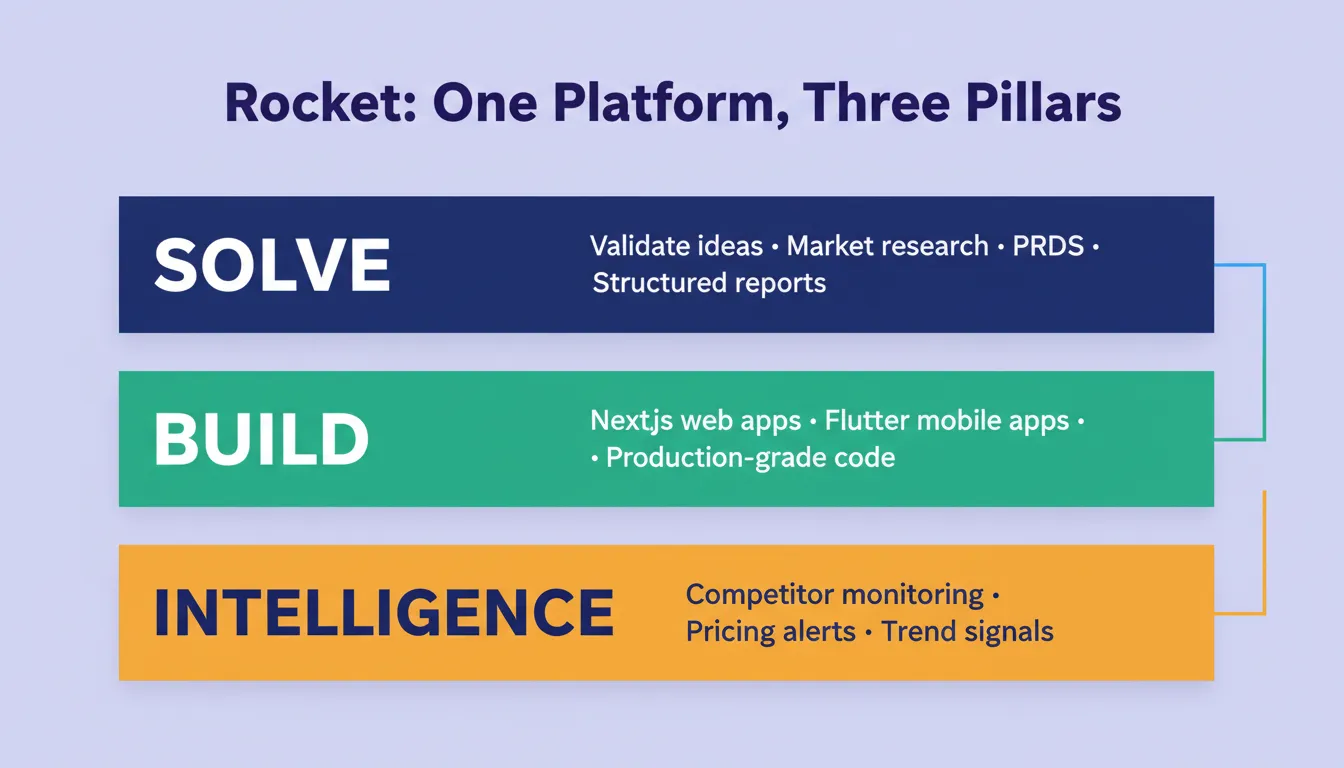
Rocket's three pillars, Solve, Build, and Intelligence, are themselves a context engineering system. Solve researches your market and user needs before you write a line of code. Build receives that context automatically. Intelligence continuously monitors your competitive environment and feeds fresh signals back into future decisions. This aligns with a solid production AI development checklist for teams shipping reliable apps.
- Automatic context assembly. Describe what you want in plain language. Rocket generates the retrieval, memory, and compression layers and outputs production-ready Next.js or Flutter code.
- Built-in memory management. Projects retain conversation state, user preferences, and session data without manual configuration.
- Production-ready defaults. Token budgets, retrieval strategies, and context isolation patterns ship as defaults. No custom engineering work is required.
- Supabase integration for persistent context. Rocket's native Supabase connector handles the database layer for context storage: user history, embeddings, and session state, without manual schema design.
The table below compares context management capabilities across platforms:
| Platform | Context Management | Cross-Session Memory | Retrieval Pipeline |
|---|---|---|---|
| Bolt | Manual prompt files | None | No structured retrieval |
| Lovable | Manual prompt files | None | No structured retrieval |
| V0 | UI-focused | None | None |
| Replit | Basic chat context | Limited | No structured pipeline |
| Rocket | Automated pipeline | Cross-session memory | RAG + compression built-in |
Common Mistakes When Designing Context Systems
Even experienced teams fall into predictable traps when building context pipelines. Understanding how Rocket compares to Cursor and Windsurf on context depth shows why context architecture decisions matter at the platform level, not just the feature level.
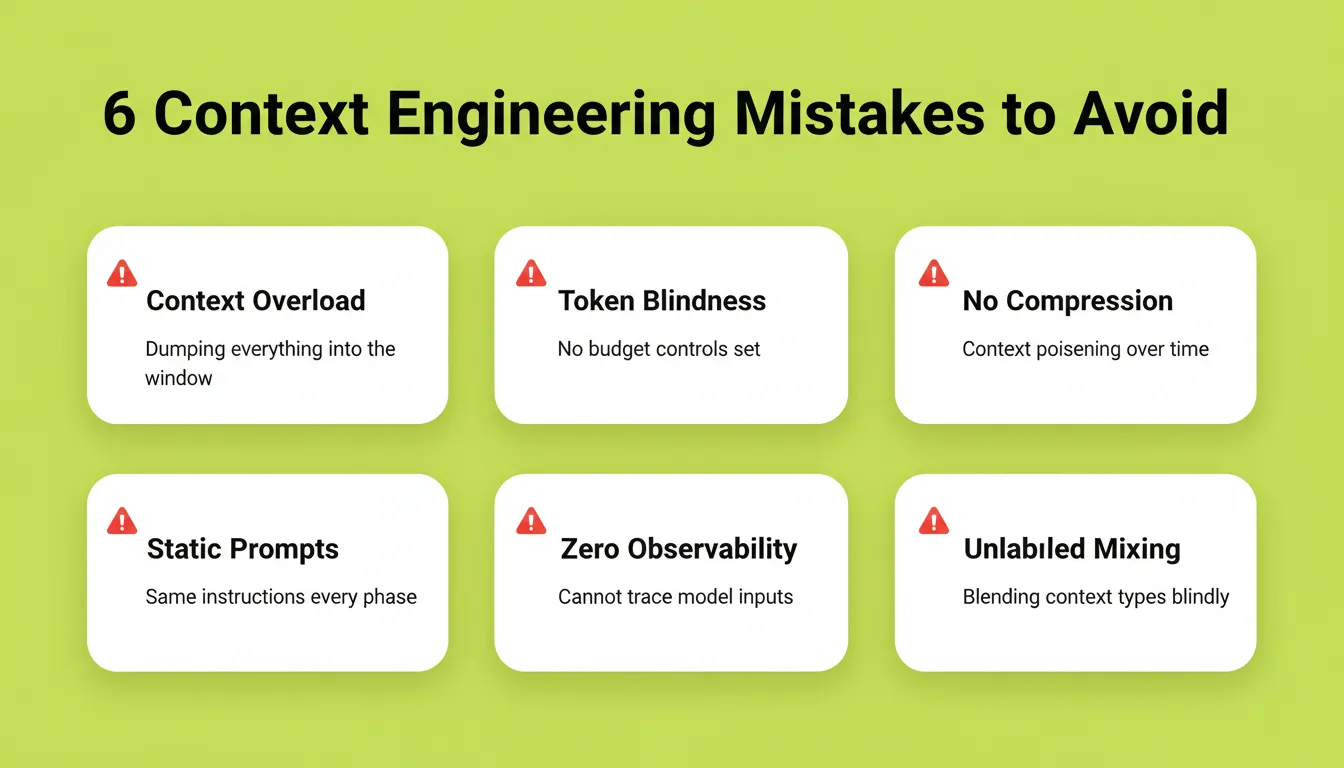
- Dumping everything into the window. More context is not always better. Irrelevant information dilutes the model's attention. It can cause "context distraction" where noise overwhelms the model's training signals.
- Ignoring token costs. Anthropic reported their multi-agent researcher used 15x more tokens than a chat interface. Without budget controls, costs balloon unpredictably.
- Skipping compression. Conversations spanning hundreds of turns without summarization lead to context poisoning. Early hallucinations persist and compound over time.
- Static prompts for adaptive tasks. Using the same instructions regardless of task phase gives the model the wrong guidance at critical decision points.
- No observability. If you cannot trace which context the model saw at each step, debugging failures becomes guesswork rather than engineering.
- Mixing context types without labeling. Injecting retrieved documents, user instructions, and tool outputs into a single unstructured block confuses the model about the source and reliability of each piece of information.
Each of these mistakes shares a root cause: treating the context window as a simple text field rather than a managed system resource.
The Future of Context Engineering in AI Development
Context engineering is becoming the defining skill for AI builders. As models grow more capable, they also become more sensitive to what they receive. Context windows are expanding: GPT-4o supports 128K tokens, Claude 3.5 Sonnet supports 200K tokens, and Gemini 1.5 Pro supports 1M tokens. As a result, the discipline of what to put in them becomes more important, not less.
The teams shipping reliable AI products today are not the ones with the best prompts. They are the ones who treat context as infrastructure.
Build AI Apps That Work From the First Generation
Context engineering examples make one thing clear: the teams shipping reliable AI products treat the context window as infrastructure, not an afterthought. The patterns exist, the tooling is mature, and the cost of ignoring them is measurable.
You describe the problem. Rocket researches it, assembles the context architecture, and builds the product, web or mobile, with intelligent context management handled automatically. 1.5 million people across 180 countries have tried Rocket. Start building at Rocket.new and ship your next AI application from a foundation that actually holds.
Table of contents
- -What is Context Engineering and Why Does It Matter?
- -How Does Context Engineering Differ from Prompt Engineering?
- -Real-World Context Engineering Examples That Show the Patterns in Action
- -Pattern 1: Write Context
- -Pattern 2: Select Context
- -Pattern 3: Compress Context
- -Pattern 4: Isolate Context
- -How Do Coding Assistants Use Context Windows?
- -Building Your Own Context Pipeline Step by Step
- -Context Engineering for AI-Powered Web and Mobile Apps
- -Context Engineering in Next.js Apps
- -Context Engineering in Flutter Mobile Apps
- -Why Rocket Handles Context Architecture Automatically
- -Common Mistakes When Designing Context Systems
- -The Future of Context Engineering in AI Development
- -Build AI Apps That Work From the First Generation


