
Five prompts cover the five core screens of any budget planner. Connect Supabase for a full Postgres backend with auth and storage. Flutter output means iOS and Android from one session. Most founders ship a working MVP in a weekend.
Build a budget planning app with AI in hours, not months. Rocket.new lets you describe each screen in plain language and ships a fully functional personal finance app with expense tracking, savings goals, and real-time charts. No coding required.
What Does A Budget Planner App Actually Need?
A budget planner app needs five core screens: a dashboard, expense tracker, budget categories, savings goals, and bill reminders. Each maps to a single AI prompt, so five prompts get you a working prototype.
Before opening any AI tool, you need clarity on what screens your budgeting apps require. Most personal finance apps that users love share a common set of features.
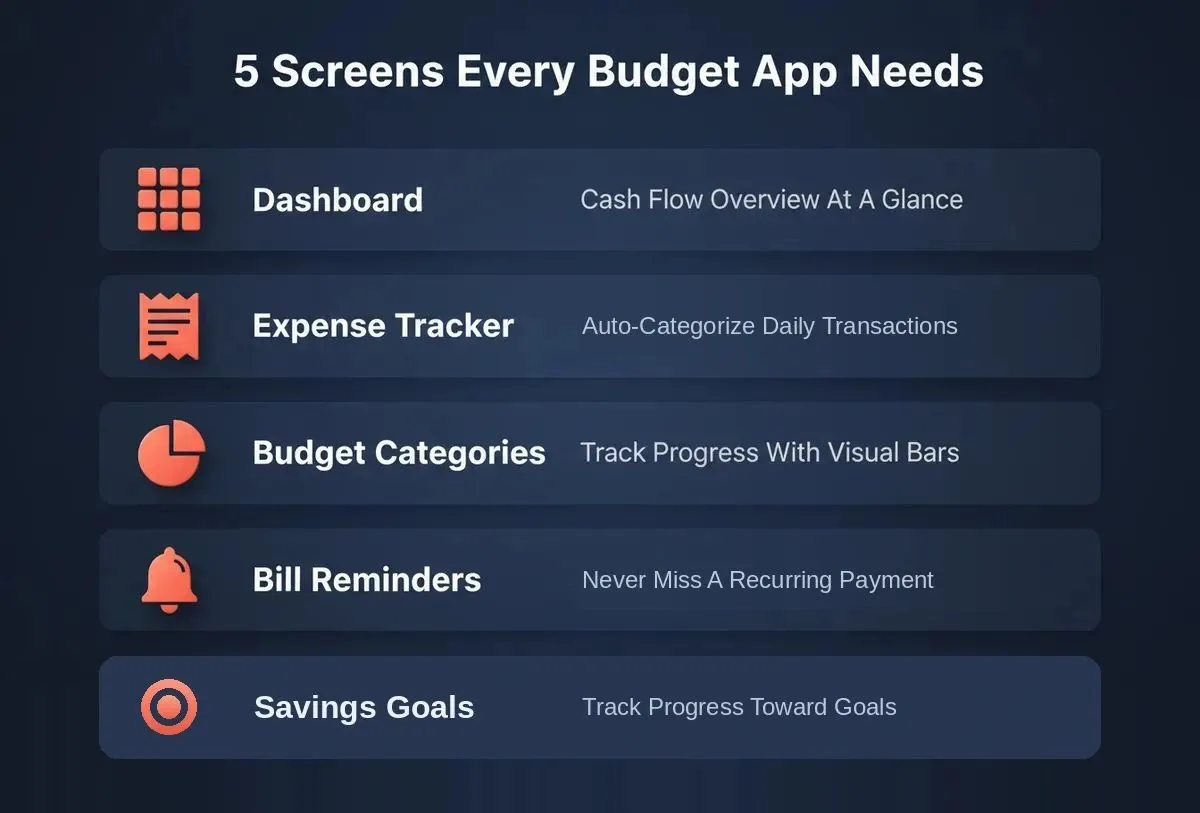
The five core screens every budget planning app needs, each mappable to a single AI prompt.
| Screen | Purpose | Key Features |
|---|---|---|
| Dashboard | Cash flow overview at a glance | Monthly budget summary, spending patterns, income vs expenses |
| Expense Tracker | Log and categorize daily transactions | Automatic categorization, spending categories, receipt capture |
| Budget Categories | Set spending limits per category | Groceries, rent, dining, subscriptions with visual indicators |
| Savings Goals | Track progress toward financial goals | Progress bars, target dates, emergency savings tracking |
| Bill Reminders | Never miss recurring expenses | Upcoming due dates, recurring bills, budget alerts |
Each screen maps to a single AI prompt, meaning five prompts get you a working prototype with expense tracking, budget categories, and savings goals built in. The financial data flows between screens automatically when you describe the connections in your prompt.
Think of each screen as a standalone module that connects through shared data. This modular approach works well with AI-powered app builders because you can iterate on one screen without breaking others.
How Can AI Prompts Replace Traditional Coding?
AI prompts replace traditional coding by letting you describe behavior in plain language. The AI generates the UI, logic, and data structures. You skip frameworks, state management, and deployment pipelines entirely.
Traditional coding requires you to know frameworks, state management, and deployment pipelines. AI budgeting tools built with prompts skip all of that. The AI reads your intent, maps it to components, and produces a working app you can test immediately.
This works because modern AI models have been trained on millions of apps. When you say "create a spending tracker with category breakdowns," the AI already knows what that looks like. The Build quick start guide at Rocket.new walks through how these prompts translate into production-ready code behind the scenes.
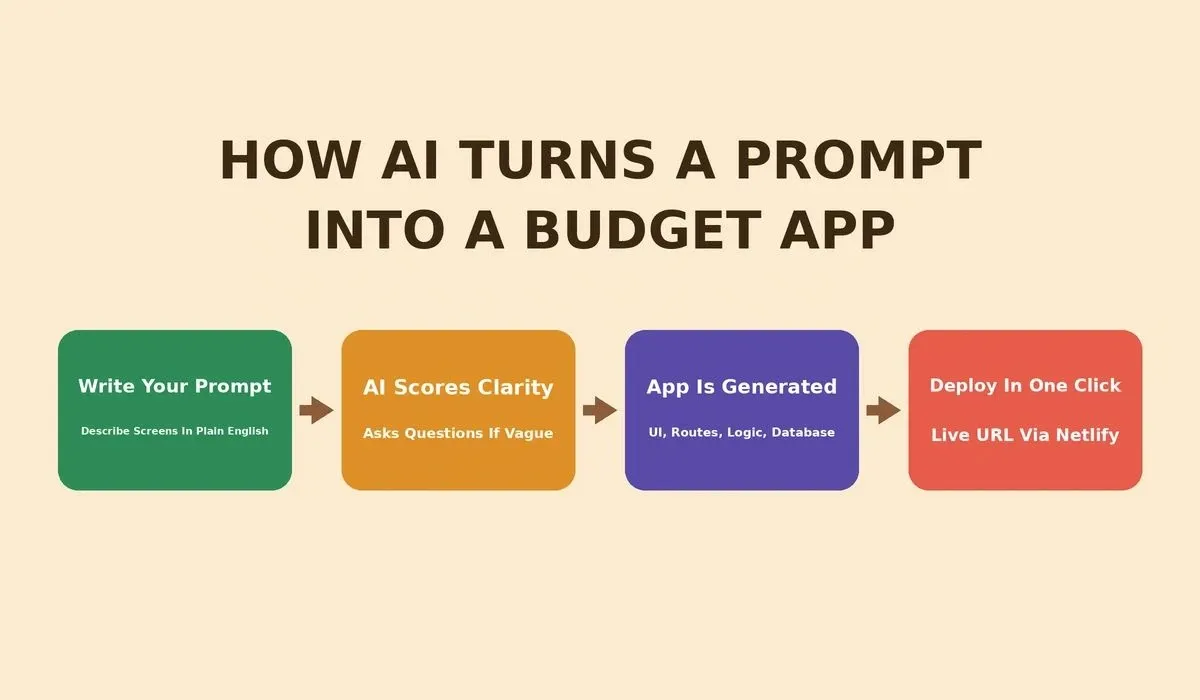
How Rocket.new scores your prompt, generates screens, and deploys your app in four steps.
Prompt For Expense Tracking And Categorization
The expense tracking screen is the foundation of any budget planner. One prompt covers data input, automatic categorization, and visual output. The AI handles the database schema for storing transaction data.
Your expense tracking screen needs to handle transactions coming in, automatically tag them, and show spending habits over time. Categories are customizable, so users can add specific spending categories based on their habits.
Sample prompt you can paste directly:
"Build an expense tracking screen that lets users add transactions manually or import them from a CSV file. Each transaction should include amount, date, merchant name, and category. The app should automatically categorize transactions into spending categories like groceries, dining, transportation, utilities, and entertainment. Show a running total for each category this month with a bar chart comparing actual spend vs budget. Include a search bar to filter transactions by date range or category."
Prompt For Savings Goals And Progress Bars
A savings goals screen keeps users engaged by making financial goals visual and measurable. One prompt generates progress bars, target dates, preset templates, and a growth chart.
55% of US consumers already use AI for financial tasks, and the apps that retain them are the ones that go beyond displaying data to actively help users achieve financial goals. Templates for emergency savings, vacation fund, and debt payments reduce setup friction for new users.
Sample prompt:
"Create a savings goals section where users can set multiple financial goals with a target amount and target date. Each goal should show a progress bar with percentage complete, amount saved so far, and estimated monthly contribution needed to hit the target. Include preset templates for emergency savings, vacation fund, and debt payments. Allow users to mark a goal as priority, which moves it to the top. Add a simple line chart showing savings growth over the past six months."
Prompt For Recurring Bills And Budget Alerts
A recurring bills screen prevents missed payments by surfacing upcoming due dates and sending budget alerts before spending limits are hit.
Budget alerts at 80% of a spending limit give users time to adjust before overspending. Showing committed vs discretionary spending limits gives a complete financial picture that most spreadsheet tools simply cannot match.
Sample prompt:
"Build a recurring bills manager that lets users add monthly subscriptions and fixed expenses like rent, insurance, and streaming services. Display upcoming due dates in a calendar view for the next 30 days. Send budget alerts when spending in any category exceeds 80% of the set spending limit. Include a section that shows total committed recurring expenses vs monthly income so users can see remaining discretionary budget. Flag any subscriptions that have increased in price since last month."
Can AI Handle Charts, Visualizations, And Mock Bank Data?
Yes. Modern AI app builders generate interactive charts, realistic mock financial data, and customizable dashboards from a single prompt. The AI handles the analysis layer that traditionally requires the most coding effort.
Most no-code tools can handle forms and lists but struggle with data visualization and dashboard layouts. Customizable dashboards mean users can drag and rearrange widgets based on what matters to them, and mock bank data lets you demo the app to investors without needing real API connections.
Here is a prompt that handles the hard stuff:
"Generate a financial dashboard with a donut chart showing spending by category, a line chart showing cash flow over the past 12 months, and a bar chart comparing monthly income vs total expenses. Pre-populate the dashboard with realistic mock transaction data for a user earning $5,500/month with typical spending patterns. Include real time insights like 'You spent 23% more on dining this month' and 'Your savings rate improved by 4% since last quarter.' Add a section showing connected bank accounts with masked account numbers and last sync timestamp."
The diagram below shows how a single prompt generates an entire data pipeline. Inputs flow through the AI engine for categorization and trend detection, then render as interactive dashboard views.
Inputs flow through the AI engine and render as three interactive dashboard views.
According to industry research**, 74% of solo founders abandon their personal finance app idea before writing a single line of code.** Not because the market is wrong, but because the technical gap feels too wide. Prompt-first building closes that gap entirely.
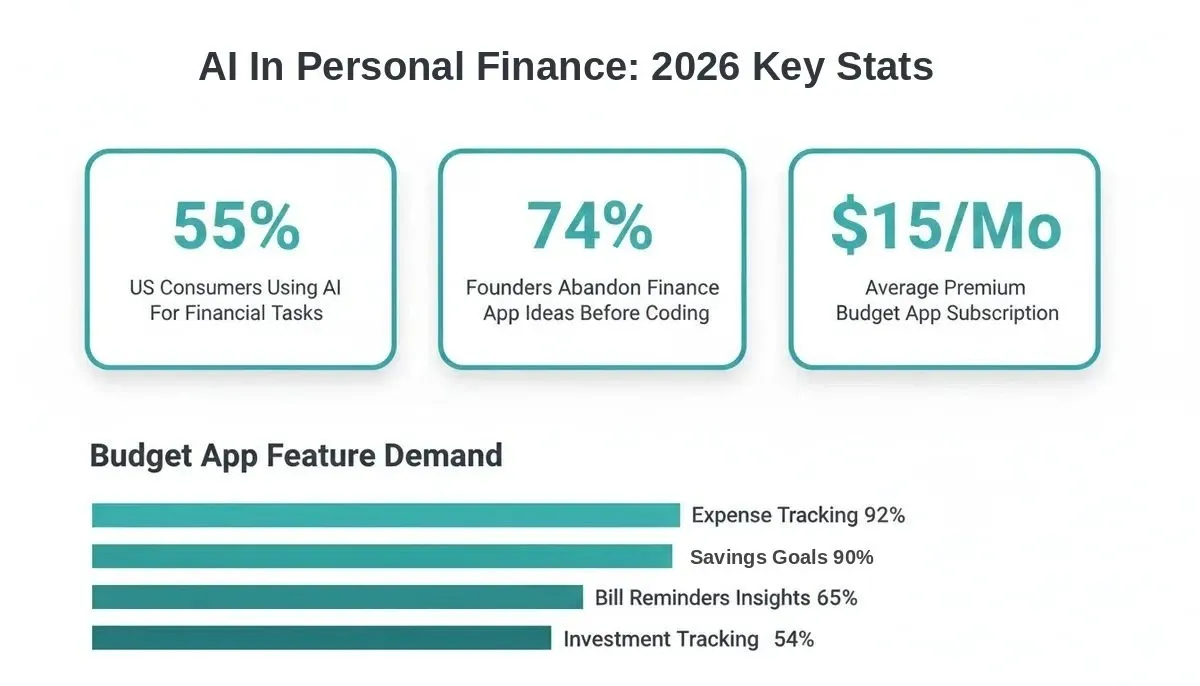
Key demand signals for budget planning apps in 2026, based on consumer finance research.
Why Rocket.new is The Best AI Tool For Budget App Builders
Rocket.new generates full-stack apps from prompts, not just mockups. It connects to Supabase for a complete Postgres backend with auth and storage, outputs Flutter for iOS and Android, and deploys to Netlify with one click.
While tools like Bolt or Lovable produce front-end prototypes, Rocket.new connects to Supabase to scaffold a complete backend with a Postgres database, user authentication, file storage, and edge functions. All wired from chat. Budget planner apps need real-time updates, and Rocket.new handles this through Supabase's built-in real-time subscriptions.
Verified capabilities confirmed in Rocket.new docs:
-
Describe your app idea in plain language, and Rocket.new generates the UI, routes, and logic automatically
-
Full version history and rollback: every build is saved, compare diffs, and redeploy any previous version from chat
-
One-click deployment to Netlify with automatic HTTPS and global CDN hosting
-
Add Stripe payments for freemium billing, subscriptions, and one-time checkout flows
-
Multi-turn, context-aware iteration: refine screens through conversation without losing prior context
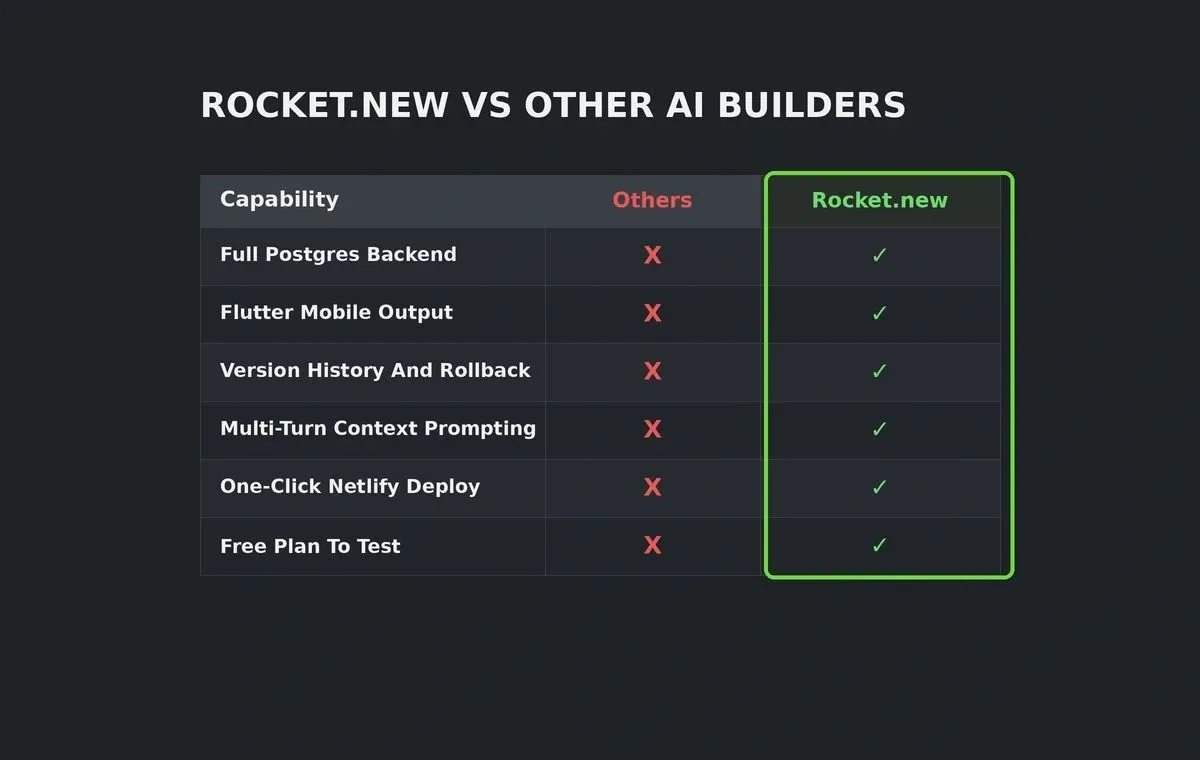
Rocket.new vs Bolt and Lovable across the capabilities that matter for a production-grade budget planning app. Based on Rocket.new's assessment of publicly available information.
| Capability | Others | Rocket.new |
|---|---|---|
| Full Backend From Prompts | Front-end only | Yes, via Supabase connector |
| Flutter Mobile Output | No | Yes, iOS and Android |
| Version History And Rollback | Minimal | Full project versions |
| Multi-Turn Context Prompting | Basic | Context-aware iteration |
| One-Click Deployment | Partial | Netlify with automatic HTTPS |
| Free Plan To Test | Limited free tiers | No-credit-card-required (20 credits) |
One prompt session can produce a fully functional budgeting app with expense tracking, savings goals, charts, and alerts. Building a full SaaS product follows the same prompt-first workflow, making it easy to scale from MVP to production.
You can also build the app directly from your idea using a single descriptive prompt. No wireframes, no design files, no developer handoff required.
What Monetization Model Works For AI Budget Apps?
The most effective model for a budget planning app is freemium: a free tier covering basic budgeting features, with a paid tier unlocking investment tracking, custom reports, and AI-powered insights.
AI is accelerating a future where startups can leverage unique strengths to drive efficiencies, and your pricing should reflect that AI-driven value. A paid version with investment tracking, custom reports, and detailed insights justifies premium pricing. Start with a free app that solves one problem well, then upsell the paid version once users depend on your savings tracking.
Three revenue models that work for budget apps, with realistic price ranges based on current market data.
| Model | How It Works | Revenue Range |
|---|---|---|
| Freemium | Free basic budgeting; paid tier adds investment tracking, custom reports, scenario modeling | $5 to $15/month per user |
| Premium Insights | Free app with optional AI-powered spending insights, bill negotiation tips, personalized recommendations | $3 to $10/month |
| Family Plans | Free for individuals; paid for household budgeting with shared accounts and couples sync | $8 to $20/month |
The most successful budgeting apps offer a generous free version that covers core features and charge for advanced financial planning. Connecting Stripe for subscription billing is a single prompt in Rocket.new. No payment integration code required.
Your Budget App Is One Prompt Away
The gap between "I want to build a budgeting app" and "I have a working app on my phone" has collapsed. AI prompt-first tools have made it possible for anyone with a clear idea to ship a real product in days, not quarters.
Every screen in a budget planner maps to a describable outcome. If you can write what you want in plain English, the AI can generate it. 55% of US consumers already use AI for financial tasks. The demand for smart, personalized budget planning apps has never been stronger.
Rocket.new is the fastest way to build a budget planning app with AI that works on real devices, connects to a real Postgres backend, and ships in a weekend. Start building your budget app for free and paste your first prompt to see your expense tracker come to life in minutes.
Table of contents
- -What Does A Budget Planner App Actually Need?
- -How Can AI Prompts Replace Traditional Coding?
- -Prompt For Expense Tracking And Categorization
- -Prompt For Savings Goals And Progress Bars
- -Prompt For Recurring Bills And Budget Alerts
- -Can AI Handle Charts, Visualizations, And Mock Bank Data?
- -Why Rocket.new is The Best AI Tool For Budget App Builders
- -What Monetization Model Works For AI Budget Apps?
- -Your Budget App Is One Prompt Away