
An agentic app builder turns a plain-English description into a production-ready application with working code, backend APIs, a database, and deployment in minutes, without writing a single line of code.
Can AI really build a full app from a single prompt?
Yes, and the gap between that claim and reality has closed significantly. An agentic app builder uses AI to plan architecture, generate code, connect integrations, and deploy a complete application. The system makes decisions, tests output, and produces working software users can interact with immediately.
A 2025 survey by MIT Sloan and Boston Consulting Group found that 35% of organizations had already adopted AI agents—another 44% planned to deploy them in the near term. As a result, these tools are no longer experimental. They are becoming the default way teams turn ideas into working software.
Traditional AI vs Agentic AI App Builder
| Feature | Traditional AI | Agentic AI App Builder |
|---|---|---|
| Interaction model | Single-turn Q&A only | Multi-step autonomous workflows |
| Memory and context | No session persistence | Retains context across tasks and builds |
| Tool use | None | Calls external APIs, databases, third-party services |
| Planning ability | User directs every action manually | AI plans, reasons, and executes project goals |
| Output quality | Text or code snippets only | Complete applications with working code and deployment |
| Team collaboration | Solo use only | Shared workspaces with role-based access control |
| Deployment | Manual configuration required | One-click deploy to production environments |
| Learning over time | Static responses every session | Improves with accumulated project context |
For a deeper look at how agentic AI vs AI agents differ in practice, the distinction shapes every architectural decision when you build agentic apps.
How Agentic Apps Handle Complex Workflows
Most users want to understand how these systems go from a text prompt to a working app. The answer lies in orchestration, specialization, and automated workflows. Together, these elements eliminate the handoffs between research, design, and development.
Workflow Decomposition and Orchestration
When you describe your app, the system breaks your description into discrete tasks. One agent handles UI generation. Another manages database schema. A third connects backend APIs and handles authentication logic. Each component uses AI models optimized for its specific role.
Automated workflows run without user intervention between steps. You describe what you want in natural language. The system then generates code, tests it, connects integrations, and deploys the complete application. It reports back only when decisions need human input.
According to McKinsey's research on AI agents, agentic systems can reduce review cycle times by 20 to 60 percent in complex workflows like loan underwriting and code modernization. That same speed advantage applies when an agentic app builder handles the entire development cycle.
The Context Problem Most Builders Ignore
Every other AI tool starts from zero each session. You re-explain your project, re-upload your files, and re-brief the system every time.
The most expensive mistake in any build is not bad execution. It is good execution of the wrong thing. A product nobody wanted. A feature that moved no metric. The agentic platforms that win solve this with persistent shared context. Add your research, brand guidelines, and competitive intelligence once, and every subsequent task inherits everything automatically.
The PRD generated from market research is present when the developer opens the build task. Similarly, the competitive brief is present when the landing page is written. Nothing is re-explained. Everything compounds.
How an agentic app builder orchestrates from prompt to production, with research context informing every step
Key Features to Look for in an Agentic App Builder
Not every app builder claiming AI capabilities delivers the same value. The differences between a basic no-code tool and a full agentic platform are significant. These differences matter most when you start building real products for real users.
Pre-Build Intelligence: Research Before You Build
The best agentic app builders do not start at the prompt. They start at the question: is this worth building, and what should it actually do?
Look for platforms that let you run market research, competitive analysis, and PRD generation before the first line of code is written. These findings should then flow directly into the build task. When your market research, competitive brief, and product requirements live in the same workspace as your code, the handoff between thinking and building is eliminated entirely.
Teams building production-ready apps with AI consistently find that output quality depends on the quality of thinking that precedes it.
Code Generation and Natural Language Input
Natural language to working code: The best agentic app builder platforms let users describe their app in plain English and receive production-grade output. There are no drag-and-drop limitations or low-code workarounds that trap you in a visual builder.
Full-stack code generation: Look for an app builder that generates both frontend and backend APIs. This includes database schemas, API key management, authentication, and deployment configuration. Partial code generation forces manual configuration for the gaps.
Multiple starting points: The strongest platforms support more than just a text prompt. Look for Figma file imports, existing GitHub repository support, image or PDF attachments, templates for common patterns, and URL-based redesign of existing websites.
Three Iteration Modes
After the first generation, you need precise control over changes. Look for platforms that offer:
-
Chat iteration: Natural language instructions applied in context, with no change limit
-
Visual editing: Click any element in the live preview to change text, style, spacing, or layout directly
-
Code access: Browse and modify source files directly, and download for local development
Collaboration, Version Control, and Team Features
Version control is non-negotiable. Any serious app builder should include full version history so team members can track changes, roll back errors, and work together without conflicts.
For teams, the app builder needs different permission levels. Admins deploy to production and manage billing. Editors build and iterate. Viewers review output. In addition, look for inline comments, per-user credit allocation, and unified billing across team members.
Integration, External APIs, and Deployment
Agentic apps connect to third-party services, payment gateways, CRMs, analytics platforms, and other tools in your existing stack. The app builder should handle API key storage securely and offer pre-built connectors for popular services.
Look for built-in deployment to live URLs, staging environments, custom domains, and automatic HTTPS. For mobile apps, look for web preview for instant sharing, APK download for Android testing, and App Store submission support for both Google Play and Apple App Store.
After launch, you should not need a separate analytics tool. Built-in tracking of visitors, conversions, Core Web Vitals, and device breakdowns, with automatic performance issue detection, is the baseline, not a premium add-on.
Compliance and Quality Defaults
Production-grade output means shipping with SEO-ready structure, WCAG accessibility compliance, GDPR coverage, and performance optimization by default. These should be the baseline, not optional extras you configure after the fact.
The best AI app builder platforms combine all of these features into a single environment. Users go from idea to live product without switching tools.
Why Rocket Stands Out as an Agentic App Builder
Rocket is the world's first Vibe Solutioning platform. It is the first platform where business thinking and building happen in the same place. 1.5 million people have tried Rocket across 180 countries, from solopreneurs to enterprise teams, reached primarily through organic product-led growth. Rocket is backed by Salesforce Ventures and Accel.
Where Lovable, Bolt, and v0 build what you tell them to build, Rocket figures out what is worth building, then builds it.
Three Pillars, One Platform
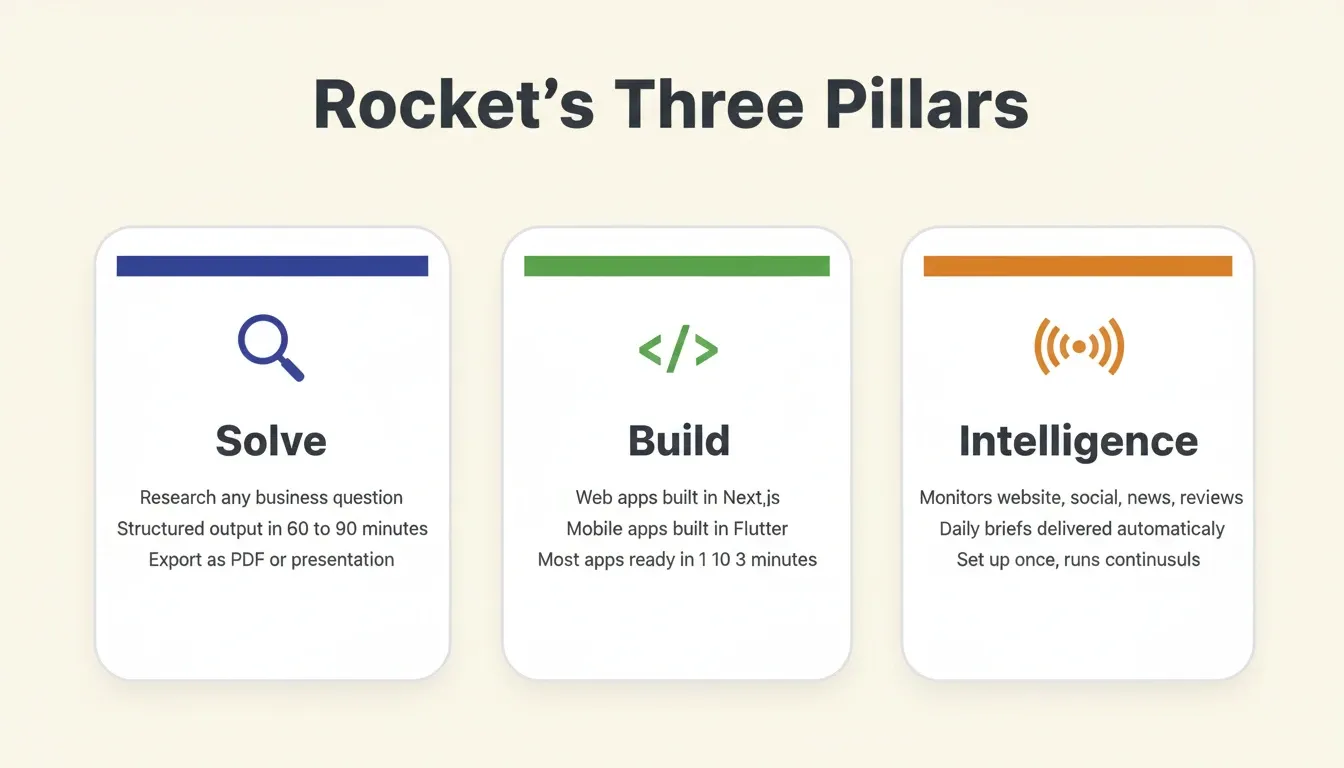
Rocket ships with three core pillars that work independently or together:
Solve** — Decision Intelligence** Solve takes any business question and delivers a complete, structured solution. Describe your situation in plain language. Rocket then identifies every dimension, including market dynamics, competitive landscape, risks, opportunities, and financial implications. It runs queries across 150+ sources simultaneously and produces a structured analytical deliverable in 60 to 90 minutes. Output includes the verdict, key findings with evidence, competitive landscape, risk matrix, and execution path. Export as PDF or PPT.
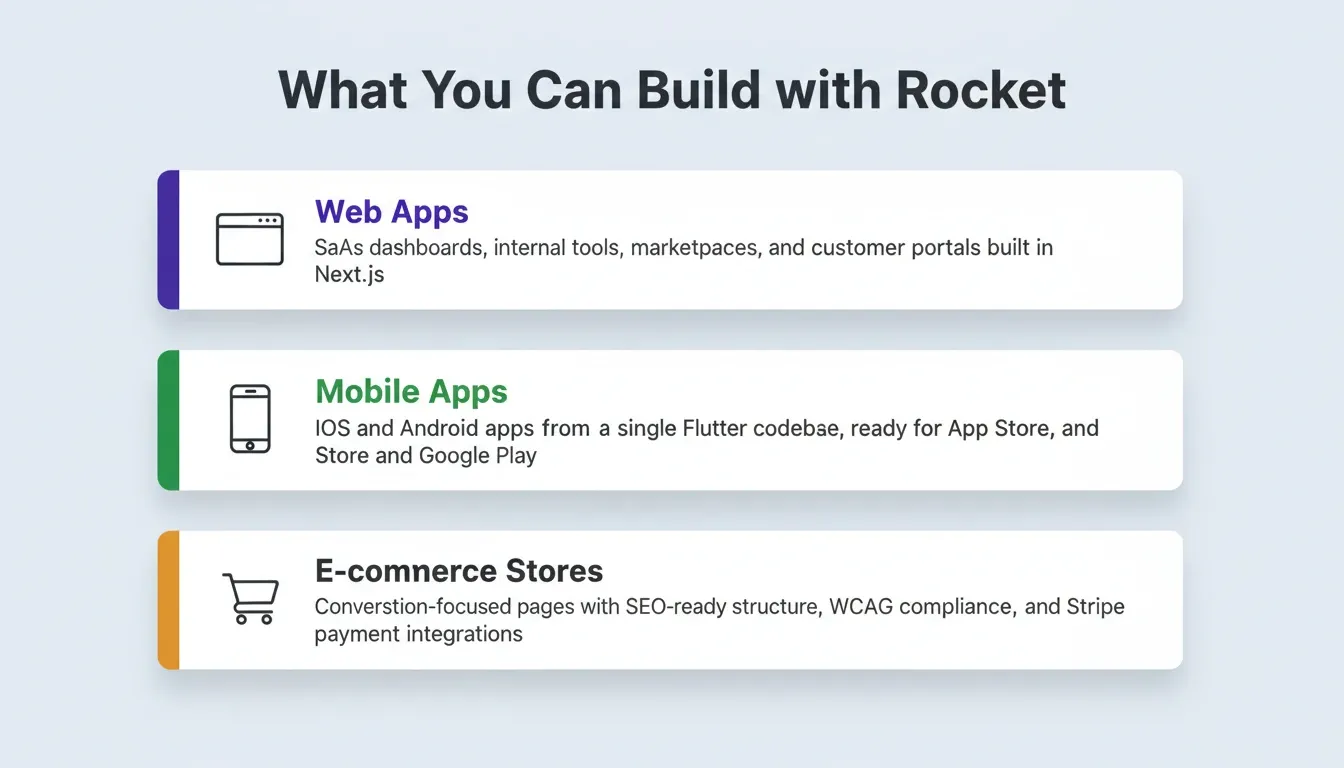
Build** — Production-Grade Generation** Build generates production-ready applications from natural language descriptions, Figma files, or existing GitHub repositories. Most apps generate in 1 to 3 minutes. Web apps ship in Next.js. Mobile apps ship in Flutter with real design systems, dark and light theming, fluid navigation, and staggered animations. Every build ships with SEO-ready structure, WCAG accessibility compliance, GDPR coverage, and performance optimization by default.
Intelligence** — Continuous Competitive Monitoring** Intelligence monitors every public platform a competitor operates on, including website, social, news, reviews, people, and advertising. It interprets what signals mean for your business. Set up once per workspace, and it runs automatically. It delivers daily briefs, weekly digests, and real-time alerts. No other agentic app builder includes built-in competitive intelligence alongside research and building.
How the Pillars Connect
The three pillars share context and feed into each other:
-
Research informs building: Run a Solve task to validate your idea and understand the market. Use those insights to scope your Build task with full context already in place.
-
Monitoring triggers action: Intelligence surfaces a competitor change, such as a pricing shift, a new feature, or a hiring spike. Use that signal to start a Solve analysis or update your product in Build.
-
Building reveals research needs: While building, you realize you need data on user preferences or market sizing. Create a Solve task, get structured findings, and apply them directly.
Six Ways to Start a Build
| Starting Method | Best For |
|---|---|
| From an idea (plain language) | Starting fresh with a description |
| From an attachment (image, PDF, CSV) | Have a screenshot or spreadsheet to build from |
| From Figma | Completed designs ready to become code |
| From GitHub | Existing Next.js TypeScript codebase to enhance |
| From a template (zero credits) | Common patterns, such as SaaS, landing page, or e-commerce |
| Redesign (from a URL) | Rebuilding or redesigning an existing website |
Full Code Ownership and Complete Flexibility
Unlike other tools that lock users into proprietary systems, Rocket gives full control of source code. Download your source, push to GitHub repositories, or customize in your existing stack. There is no vendor lock-in. Complete flexibility means you can self-host, modify, or extend anything the AI builds.
Context Architecture: The Compound Intelligence Moat
Every other AI tool starts from zero each session. Rocket, however, is built on the opposite architecture. Add your context once, including pitch decks, financial models, market research, brand guidelines, and customer interview transcripts. Every task that follows already knows everything.
The first task opened inside a project already knows everything that has been shared. The tenth task knows everything the first nine established. This inheritance is automatic. Work compounds across a project, not just within a session, but across every action the entire team takes inside it.
Competitors can match individual features. They cannot, however, replicate accumulated context.
25+ Integrations, Authenticated Once
Rocket connects to 25+ third-party services that flow directly into every build: Stripe, Supabase, Google Analytics, AdSense, OpenAI, Anthropic, Gemini, Perplexity, PayPal, Postman, Cal.com, Google, Linear, Notion, Airtable, Mailchimp, Mixpanel, Typeform, Strapi, Directus, Tally, Brevo, Calendly, MailerLite, SendGrid, Twilio, and Resend. Authenticate once, and they flow into every build.
Human Help When AI Reaches Its Limit
Rocket's Success team steps in inside the platform, with user permission, when the AI reaches its limit. No tickets. No email chains. Real help that finishes the job. This is the Support pillar. It is the only agentic app builder that acknowledges where AI stops and human expertise begins.
Rocket Pricing Overview
Rocket uses a credit-based model. One balance covers everything: Solve research, Build generation, and Intelligence monitoring. There is no separate billing for compute, storage, or hosting.
| Plan Type | What It Covers | Notes |
|---|---|---|
| Individual plans | Solopreneurs and solo builders | Solve, Build, or both |
| Team plans | Growing teams | Shared workspace, role-based access |
| Enterprise contracts | Larger organizations | Named accounts, dedicated support |
| Intelligence add-on | Competitive monitoring | $100/month per competitor tracked (500 credits/month) |
Unused subscription credits roll over month-to-month on monthly plans. Yearly plans roll over within the 12-month term.
What Should Teams Consider Before Adopting Agentic AI?
Adopting agentic AI for app development is not just a technical decision. Teams need to think about governance, security, readiness, and how the organization handles automated workflows before building agentic apps at scale.
Governance, Access Control, and Audit Trails
Any app builder handling business data needs role-based access control for every team member. Define who can deploy to production, who can edit the project, and who can view output only. Look for audit trails that track every change.
Deloitte's 2026 State of AI report found that only 1 in 5 companies has a mature governance model for autonomous AI agents. Before deploying agentic apps at scale, therefore, teams need clear policies on data access, automated decisions, and manual configuration overrides.
Learning Curve, Community Support, and Onboarding
The best app builder platforms minimize onboarding time for new users. If a team member can describe what they want in natural language, they can build agentic apps. Community support channels, documentation, tutorials, and live preview features reduce the learning curve significantly.
AI agents can produce unpredictable outputs in edge cases when handling complex workflows. For this reason, look for platforms with automated testing, version control rollbacks, and human review steps before production deployment.
Cost Management and Scaling
Worker access to AI tools rose by 50% in 2025 according to the Deloitte study. Agentic AI usage is projected to surge in the next two years across industries. Teams that start building agentic apps with clear governance frameworks now will have a significant advantage when scaling.
Understanding how a platform's credit or usage model works before you commit matters. Look for transparent rollover policies, per-member credit limits, and the ability to downgrade or cancel without losing your work.
How to Get Started Building Agentic Apps Today
Getting started with an agentic app builder is simpler than most users expect. The process removes the typical barriers of traditional app development.
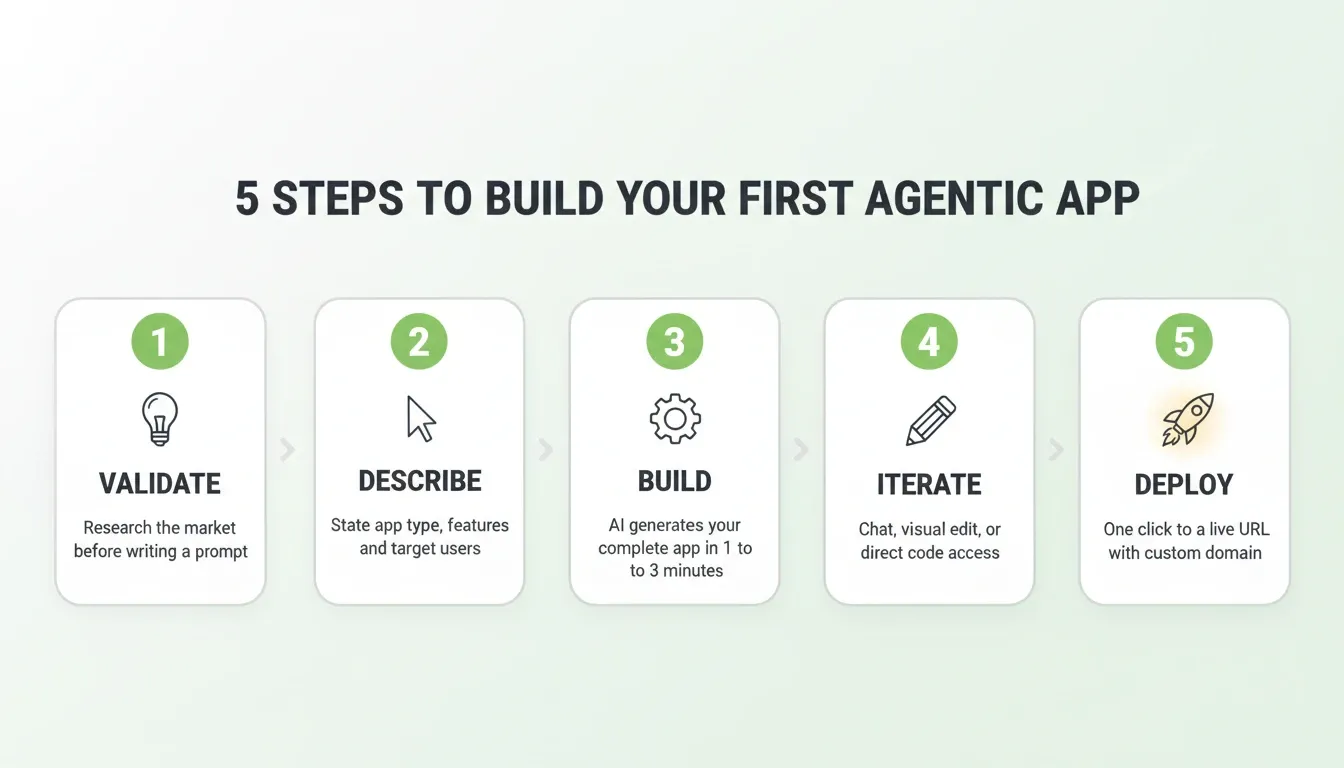
Step 1: Validate your idea first. Before writing a single prompt, run a research task to validate your idea and understand the market. Identify what your users actually need. This research becomes the foundation of your build, not something you do separately and then forget.
Step 2: Describe your app. Next, write what you want to build in natural language. Include the type, such as web app, mobile app, or internal tool, along with key features and target users. Use the 3-5 feature rule: list the most important features upfront, then add more through chat after the first generation.
Step 3: Let the AI build. The app builder breaks your description into tasks, generates code for the complete application, and shows a live preview. Most apps complete in 1 to 3 minutes.
Step 4: Iterate using natural language. Once the first version is ready, use chat, visual editing, or direct code access to request changes. Add features, adjust design, connect to external APIs, or modify business logic. Each iteration builds on context without starting over.
Step 5: Deploy and share with users. Finally, click deploy. Your app goes live immediately with a shareable URL. Connect a custom domain, configure staging environments, or download the source code.
Common Use Cases for Agentic Apps
Understanding what you can build helps teams evaluate whether an agentic app builder fits their needs.
SaaS Applications and Web Apps
Build complete SaaS products with user authentication, subscription billing via Stripe, admin dashboards, and customer portals. The builder generates the full application, including backend APIs, database models, and payment processing.
Internal Tools and Admin Panels
Create dashboards, reporting systems, and workflow automation tools for your team. These agentic apps connect to your existing stack, including Mixpanel, Airtable, Linear, and Notion. They pull data from multiple sources and present it in custom interfaces.
OKR trackers, customer health monitors, GDPR compliance tools, investor data rooms, and ROI calculators all fall in this category. Teams that build internal tools with AI consistently reduce the time from requirement to deployment from weeks to hours.
Mobile Apps for iOS and Android
Generate production-ready mobile applications from a single Flutter codebase that works on iOS and Android. Share instantly via web preview, distribute as an APK for Android testing, or submit to the App Store and Google Play for public release.
AI-Powered Applications
Build applications that use AI models for content generation, data analysis, chatbot interfaces, and recommendation engines. Connect to OpenAI, Anthropic, Gemini, or Perplexity directly from the build. Authenticate once, and these integrations are available in every task.
Landing Pages and Marketing Sites
Generate conversion-focused landing pages built from your project context. The hero speaks directly to the specific customer problem. Every page holds the same quality standard, with intentional typography, real hierarchy, and visual identity specific to the product.
Each of these use cases demonstrates how agentic apps go beyond simple prototypes. The output is production-ready apps that real users interact with daily.
Build Smarter, Not Just Faster
The agentic app builder category is moving from novelty to necessity. As AI agents handle more of the development cycle autonomously, the teams that win will be the ones who pair fast execution with rigorous thinking before the build begins.
The tools exist today to go from a validated idea to a deployed, production-ready application in a single session. That shift, from weeks of development to hours of directed AI work, is already changing how products get built across every industry.
If you are ready to build an agentic app that starts from research, not just a prompt, start building on Rocket and see how thinking and building work together from day one.
Table of contents
- -Traditional AI vs Agentic AI App Builder
- -How Agentic Apps Handle Complex Workflows
- -Workflow Decomposition and Orchestration
- -The Context Problem Most Builders Ignore
- -Key Features to Look for in an Agentic App Builder
- -Pre-Build Intelligence: Research Before You Build
- -Code Generation and Natural Language Input
- -Three Iteration Modes
- -Collaboration, Version Control, and Team Features
- -Integration, External APIs, and Deployment
- -Compliance and Quality Defaults
- -Why Rocket Stands Out as an Agentic App Builder
- -Three Pillars, One Platform
- -How the Pillars Connect
- -Six Ways to Start a Build
- -Full Code Ownership and Complete Flexibility
- -Context Architecture: The Compound Intelligence Moat
- -25+ Integrations, Authenticated Once
- -Human Help When AI Reaches Its Limit
- -Rocket Pricing Overview
- -What Should Teams Consider Before Adopting Agentic AI?
- -Governance, Access Control, and Audit Trails
- -Learning Curve, Community Support, and Onboarding
- -Cost Management and Scaling
- -How to Get Started Building Agentic Apps Today
- -Common Use Cases for Agentic Apps
- -SaaS Applications and Web Apps
- -Internal Tools and Admin Panels
- -Mobile Apps for iOS and Android
- -AI-Powered Applications
- -Landing Pages and Marketing Sites
- -Build Smarter, Not Just Faster