
Want a website without coding skills? Learn how Rocket.new lets anyone quickly build professional sites using prompts. Create blogs, portfolios, or stores with ease. No coding required.
How to create your own website without touching a single line of code? Well, it’s possible today with a prompt-based builder like Rocket.new.
According to Siteefy, there are over 1.2 billion websites worldwide in 2025, and the number keeps growing daily.
Having your own website isn’t just fancy, it’s key to staying visible and competitive online. Whether you want a personal blog, a portfolio, or a full online store, building a website has never been simpler.
Let's see how to create a professional website using Rocket.new, even with no coding experience.
Why Use a Website Builder?
Creating a website from scratch can feel overwhelming, especially if coding isn’t your thing.
A website builder simplifies the process, letting you get online quickly and professionally. With the right site builder, even beginners can create a fully functional website without stress.
Benefits of using a website builder:
- Professionally designed templates: Give your site a polished look from the start.
- Drag and drop editor: Easily move elements, add content, and customize layouts.
- AI-powered features: Automate design suggestions and content creation.
- Web hosting included: No need to worry about separate hosting setups.
- Add pages and an online store: Create a blog, portfolio, or sell products without coding.
In short, a website builder saves time, removes technical headaches, and helps you launch your own website quickly and efficiently.
How to Build Your Website: Step by Step
Creating your own website might seem like a big task, but it doesn’t have to be. With the right website builder, you can go from zero to a fully functional site in just a few hours.
Below is a clear roadmap that walks you through every stage, from selecting a website builder to customizing your pages, setting up a professional domain, optimizing for search engines, and adding advanced features.
Step 1: Pick the Right Website Builder
Not all website creators are made equal. Rocket.new is considered one of the best website builders for beginners and small businesses. Other popular free website builders include Wix, Squarespace, and WordPress.
When choosing, think about:
- Ease of use
- Templates available
- AI tools for site creation
- Built in marketing tools
- Web hosting included
Step 2: Sign Up and Choose a Template
Once you’ve decided to use Rocket.new, creating an account is super simple. You can start with a free website option, which provides access to most of the features you need.
After signing up, you’ll see professionally designed website templates.
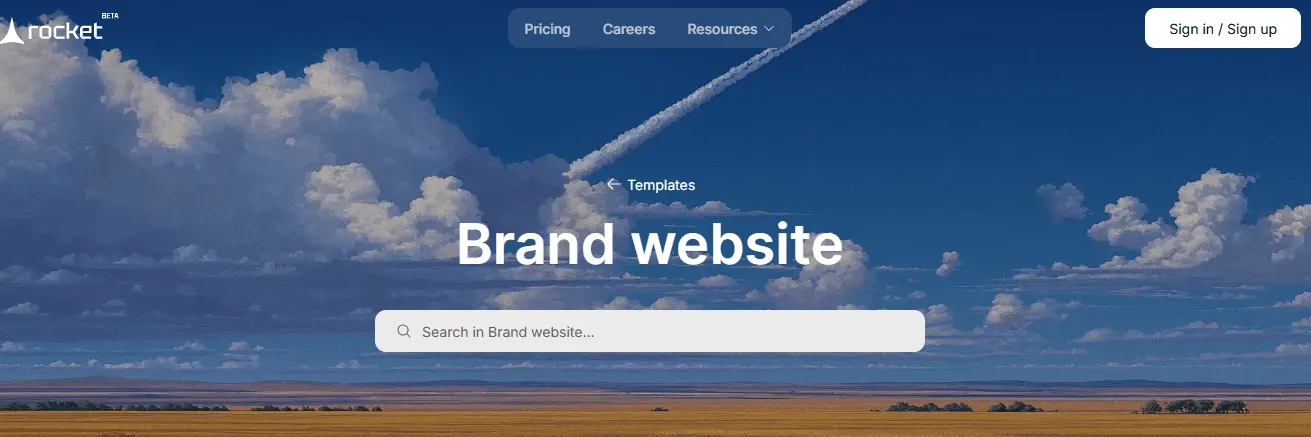
Whether you want a blog, portfolio, or online store, pick a template that matches your style and content.
Start with a template close to what you imagine. It saves time and keeps things looking professional without a designer.
Step 3: Customize Your Site
Here’s where Rocket.new shines.
Rocket.new’s AI-powered tools can help adjust layouts, suggest colors, and even assist with page content so you don’t have to guess what looks good.
Tips for customization:
- Use a custom domain name to make your site feel professional
- Optimize images for faster loading and better mobile experience
- Keep page content clear and concise
- Let AI suggestions guide font, layout, and design tweaks
Step 4: Add Pages and Online Store
No site is complete with just a homepage. Rocket.new makes adding pages simple: Home, About, Services, Blog, Contact, you name it.
If you’re running a business, Rocket.new allows you to add an online store easily.
You can:
- Create product descriptions
- Set prices and manage inventory
- Showcase products with images and categories
- Run a store without writing a single line of code
The best part? All of this works on your free website or upgraded plan.
Step 5: Set Up a Custom Domain
A professional website deserves a custom domain name. Free website builders sometimes give a subdomain (like yoursite.rocket.new), but connecting your own domain looks much better.
supports:
- Buying a new domain directly through the platform
- Connecting an existing domain you already own
This makes your site memorable, professional, and more likely to rank well in search results.
Step 6: Optimize for SEO
No matter how great your site looks, it won’t matter if nobody finds it. Rocket.new comes with built-in SEO tools that help you get noticed by search engines.
You can:
- Add meta titles and descriptions for each page
- Link your site to Google Search Console and Google Analytics for traffic insights
- Adjust headings, keywords, and page content for better search visibility
Even beginners can enable advanced SEO features without additional plugins.
Step 7: Mobile Optimization
Most visitors will check your site on a mobile device. Rocket.new automatically adapts your website for mobile screens, so everything looks clean.
Check that:
- Buttons, forms, and menus are easy to tap
- Images resize properly without losing quality
- Online store pages are fully functional on small screens
Mobile-friendly design isn’t just for looks; it also improves search engine rankings and keeps visitors happy.
With these steps done, your website is ready to go live. Rocket.new makes it easy to build a professional-looking site, add pages, connect a custom domain, optimize for SEO, and ensure mobile-friendliness all without coding.
Simple, fast, and effective.
Community Insight
A Reddituser shared their real experience using Rocket.new:
“I have tested it with a sample template they give you. At this point they are too new, it just wasted 1M tokens to fix a simple issue with the template itself... Rocket.new has a long way to go before becoming usable.”
This shows people are trying Rocket.new to build sites without coding, but it’s still evolving, so manage your expectations.
Tips for a Smooth Website Creation Experience
Creating a website can get tricky if you don’t have a plan. These tips will help you stay organized, save time, and make the process more enjoyable.
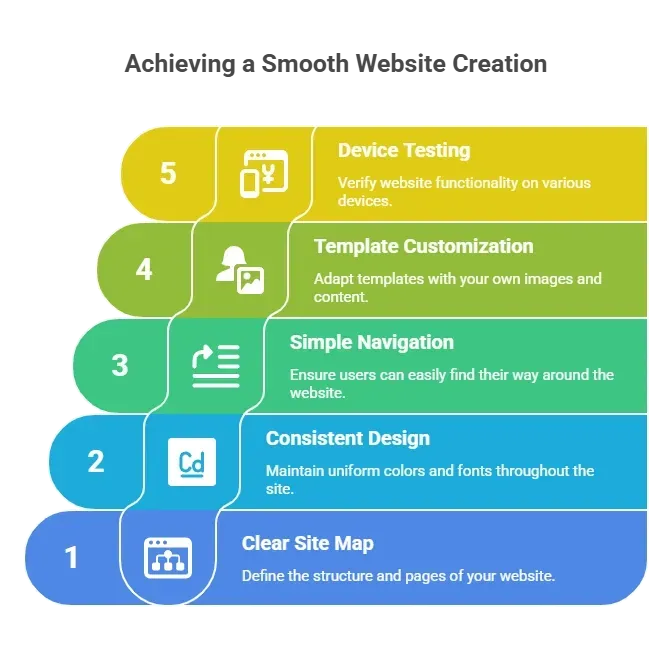
Following these tips keeps your website creation smooth and stress-free. You’ll end up with a professional, user-friendly site that looks great and functions perfectly on any device.
Build a Website the Smart Way
Creating a website from scratch can be intimidating and time-consuming, especially without coding knowledge.
Rocket.new and similar website builders make it easy. From choosing templates to adding pages and online store features, you can create a fully functional site in hours. Mobile-friendly, SEO-ready, and even AI powered features are included. You can have a free website or go professional with a custom domain name.
Using a website builder lets anyone create their own website without coding. With Rocket.new, the entire process is streamlined, fun, and beginner-friendly. Whether it’s a personal blog or a fully functional online store, the platform provides all the tools to get your site online quickly.
Table of contents
- -Why Use a Website Builder?
- -How to Build Your Website: Step by Step
- -Step 1: Pick the Right Website Builder
- -Step 2: Sign Up and Choose a Template
- -Step 3: Customize Your Site
- -Step 4: Add Pages and Online Store
- -Step 5: Set Up a Custom Domain
- -Step 6: Optimize for SEO
- -Step 7: Mobile Optimization
- -Community Insight
- -Tips for a Smooth Website Creation Experience
- -Build a Website the Smart Way