

Vercel is fastest to production, Netlify suits static-first sites, Docker gives full control. Rocket.new builds your Next.js app and deploys it via Netlify with one click, automatic HTTPS, and custom domain support with no config files needed.
Choosing how to deploy a Next.js app shapes your monthly costs, scaling path, and team workflow from day one. This guide compares Vercel, Netlify, AWS, and Docker so you can get started with the right hosting provider for your project and shows how Rocket.new eliminates the decision for teams that want to go from idea to live app in one step.
What Makes Each Hosting Provider Different?
Not every platform handles a Next.js app the same way. Some prioritize serverless functions and edge computing, while others give you full control over your Node.js server and runtime configuration.
The four main options each solve a different problem:
- Vercel is built by the creators of Next.js and offers the smoothest default deployment experience, with automatic image optimization, API routes support, and built-in ISR for your pages
- Netlify works well for static site generation and simple server-side rendering, offering a free tier that covers personal projects and a build process that connects directly to your GitHub repo
- AWS (ECS/EC2) gives full infrastructure control, running your application in Docker containers with nginx as a reverse proxy, but requires manual configuration of environment variables, port mapping, and security groups
- Docker (self-hosted on any VPS) offers maximum flexibility, where you copy your standalone output to a container image and deploy it anywhere a Node.js runtime is installed
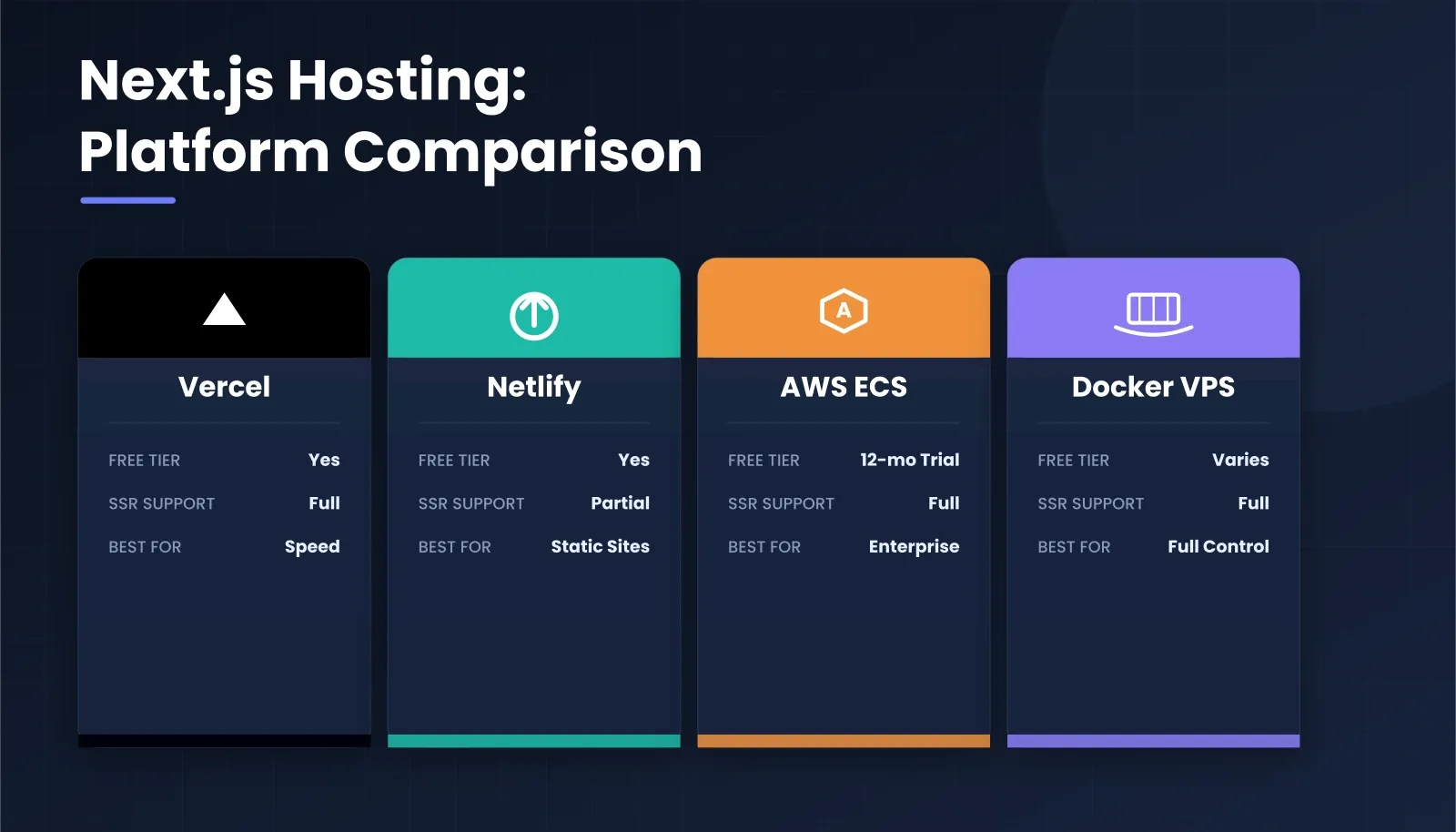
Platform comparison: Vercel, Netlify, AWS ECS, and Docker with key specs at a glance
| Platform | Best For | Free Tier | SSR Support | Serverless Functions |
|---|---|---|---|---|
| Vercel | Speed to production | Yes (non-commercial) | Full | Native |
| Netlify | Static-first sites | Yes | Partial | Limited |
| AWS ECS | Enterprise scale | 12-month trial | Full | Via Lambda |
| Docker VPS | Full control | Varies by host | Full | Manual setup |
Pricing and limits verified as of mid-2026. Always check each platform's pricing page before committing.
Rocket.new generates production Next.js code with deployment configuration already set, so teams skip the platform comparison entirely and start with a running app from day one.
How Does Vercel Handle Production Deployments?
Vercel is the default hosting provider for most Next.js projects because the same company maintains both the framework and the platform. The deploy process is easy to follow: connect a GitHub repo, select your project, and Vercel handles the rest automatically.
- Pricing catches people off guard. Vercel Pro charges $20 per user monthly, so a five-person team pays $100/month before serving a single user request
- Function execution limits are capped at 60 seconds on the Pro plan, meaning heavier API routes and data processing tasks simply time out without showing any useful error message
- Cold starts affect serverless functions that are not frequently running, creating inconsistent response times for people using your app in production
- Build time is fast with Turbopack enabled by default, but bandwidth overages at $0.15 per GB add up during traffic spikes and product launches
- Environment variables are managed through the Vercel dashboard and injected at build time, which enables a smooth workflow until you need runtime configuration changes
For teams running a small project on Vercel's free tier, the experience is genuinely helpful and easy to follow. But as applications grow and user counts expand, the per-seat pricing model creates budget pressure that most people do not anticipate when starting out.
Teams that want a more cost-efficient setup should explore the best AI app deployment tools that handle the heavy lifting automatically. For a deeper look at how deployment automation reduces overhead, see application deployment automation best practices.
Can Netlify Match Vercel for Server-Side Rendering?
Netlify started as a static site host and later added server-side rendering support, and the gap shows in production. This is especially true for applications that rely on API routes and dynamic pages served at request time.
- Static pages and static files deploy quickly to a global CDN, with content served from the location nearest each user for better performance
- The build process connects to your GitHub repo and runs npm run build on every push, showing detailed deploy log entries in real time through the dashboard
- Server-side rendering works through Netlify Functions with a 26-second execution limit, falling short of Vercel's already-tight 60-second cap for running complex operations
- Configuration requires a netlify.toml file in your root directory, adding one more config file to set up and maintain alongside your next.config.js
- The free tier includes 100GB bandwidth and 300 build minutes monthly, which covers most new projects and personal sites comfortably
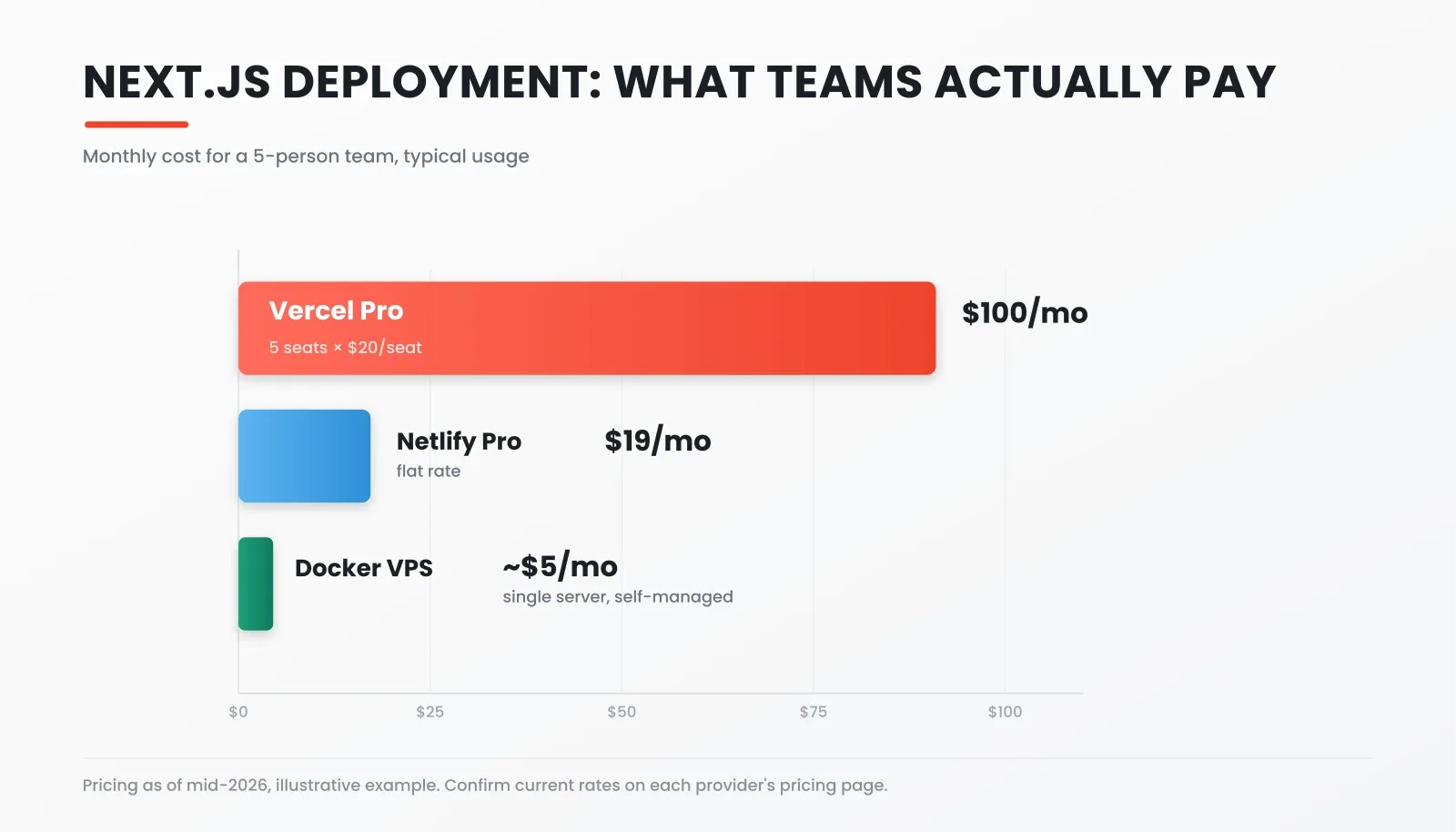
Monthly cost for a 5-person team: Vercel Pro vs. Netlify Pro vs. Docker VPS (mid-2026 pricing)
Netlify is a strong choice when your site is mostly static with occasional dynamic routes. For fully dynamic Next.js apps with heavy API routes, the 26-second function limit becomes a real constraint. Teams building full-stack apps with AI tools often find Netlify's SSR limits a bottleneck before they outgrow the free tier.
When Should You Self-Host With Docker or AWS?
Self-hosted deployments make sense when you need full control over your server, want to avoid per-user fees, or have compliance requirements demanding specific infrastructure in a particular region.
- Docker setup starts with setting output: 'standalone' in your next.config.js, then running npm run build to generate a minimal standalone directory, which you copy into a container image
- nginx sits in front of your application as a reverse proxy, forwarding requests to your Node.js server running on port 3000 while handling SSL termination and load balancing
- A basic Dockerfile copies your .next/standalone directory and static files, installs only production dependencies, and sets the start command for running the server process
- AWS ECS or a $5/month VPS can host this Docker container image, with the app running continuously rather than spinning up per request, like Vercel's serverless approach
- Scaling requires you to configure load balancers, health checks, and auto-scaling rules manually, things Vercel handles by default
The self-hosted path gives you full control over every detail, but it also means you own every failure mode, every update, and every security patch. For teams building serverless architecture patterns, containerized workflows offer a reproducible process that works the same way across any cloud provider.
Rocket vs. Vercel vs. Netlify vs. Docker: Which Should You Choose?
Use this decision guide to pick the right path for your project:
| Situation | Best Choice |
|---|---|
| Fastest path from repo to live URL | Vercel |
| Mostly static site with occasional SSR | Netlify |
| Full infrastructure control or compliance needs | Docker on AWS ECS |
| Avoid per-seat pricing at scale | Docker on a VPS |
| Haven't built the app yet, want research + build + deploy in one flow | Rocket.new |
Vercel, Netlify, and Docker all assume you arrive with a finished Next.js codebase. Rocket.new is different because it is a three-pillar platform: Solve (market research and PRDs), Build (production Next.js web apps and Flutter mobile apps), and Intelligence (competitor monitoring). None of the hosting platforms above do any of that.
Here is how Rocket.new's deployment flow actually works, based on the documented mechanism:
- Build your app in chat. Describe what you want to build, and Rocket.new generates a production-ready Next.js project with UI, routing, and logic included.
- Connect a full backend via Supabase. Add database, auth, file storage, and edge functions through the Supabase connector in a single prompt, scaffolded from chat and not bundled automatically.
- Click Launch to Staging. Rocket.new publishes your app to a temporary Netlify URL for testing and sharing with no configuration needed.
- Click Launch to Production. Connect your Netlify account via OAuth, select your version, and Rocket.new builds and deploys to a live URL with automatic HTTPS and global CDN.
- Add a custom domain. Rocket.new can configure DNS automatically for supported providers or give you the exact records to add manually via the custom domain setup.
- Iterate from chat. Change your app through natural language prompts and redeploy to the same Netlify URL with build settings handled automatically between deploys.
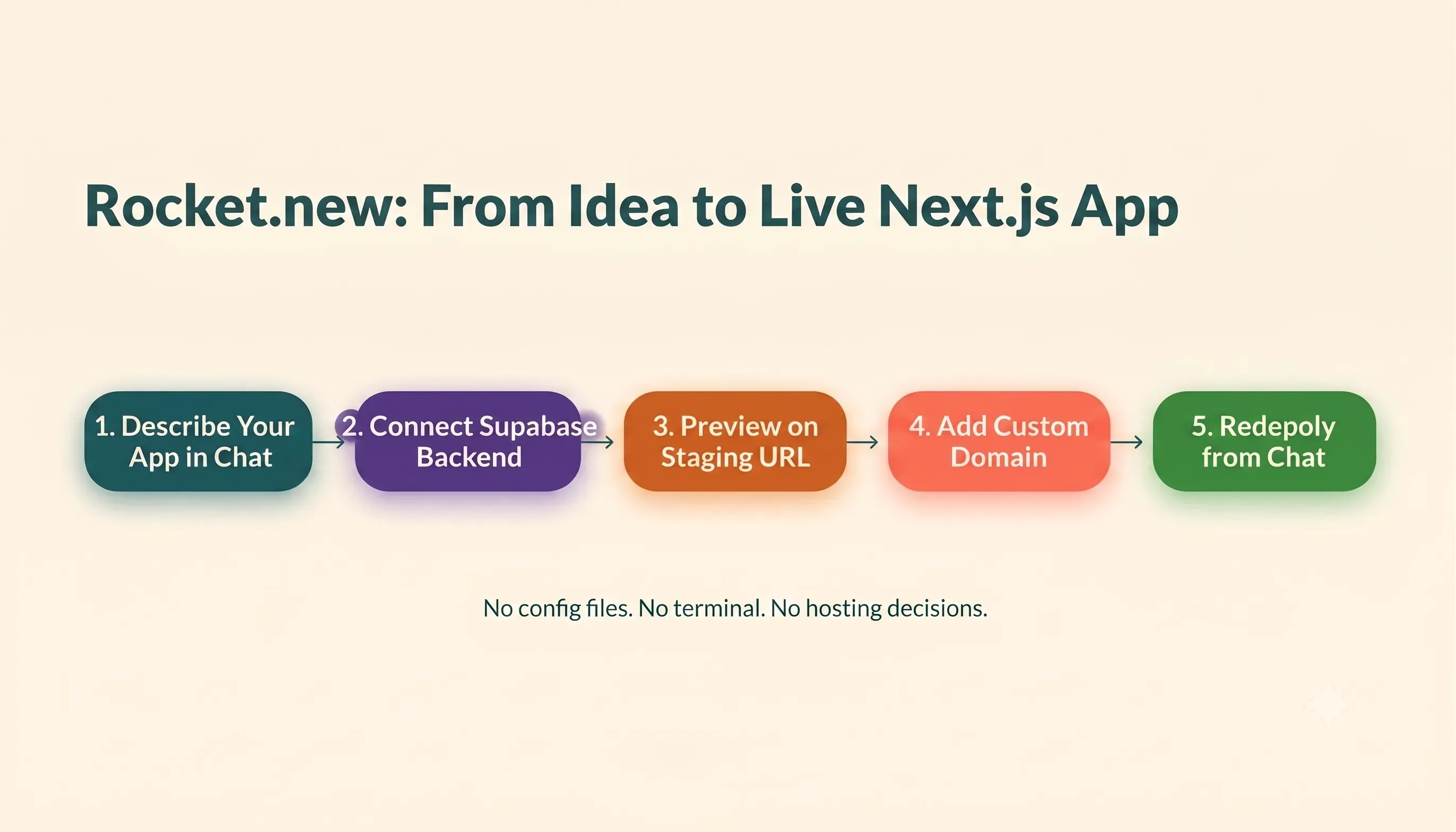
Rocket.new: describe your app, connect a backend, and go live via Netlify in six steps
For teams creating new projects under time pressure, the difference is weeks of saved work. Researching platforms, writing config files, and deploying manually versus describing what you need and getting a running app is a fundamentally different workflow. Teams that want to understand how Rocket.new positions against other AI builders can read the Rocket.new vs. Replit comparison and the Rocket.new vs. Lovable breakdown.
If you want to see what Rocket.new can build before committing, the Build page shows live examples across web and mobile. For teams that need competitive context before choosing a stack, Rocket.new's Intelligence feature tracks competitor moves across nine signal types, something no hosting platform offers.
What Does a Production-Ready Deployment Checklist Look Like?
Before shipping any Next.js app to real users, run through these steps regardless of which platform you use.
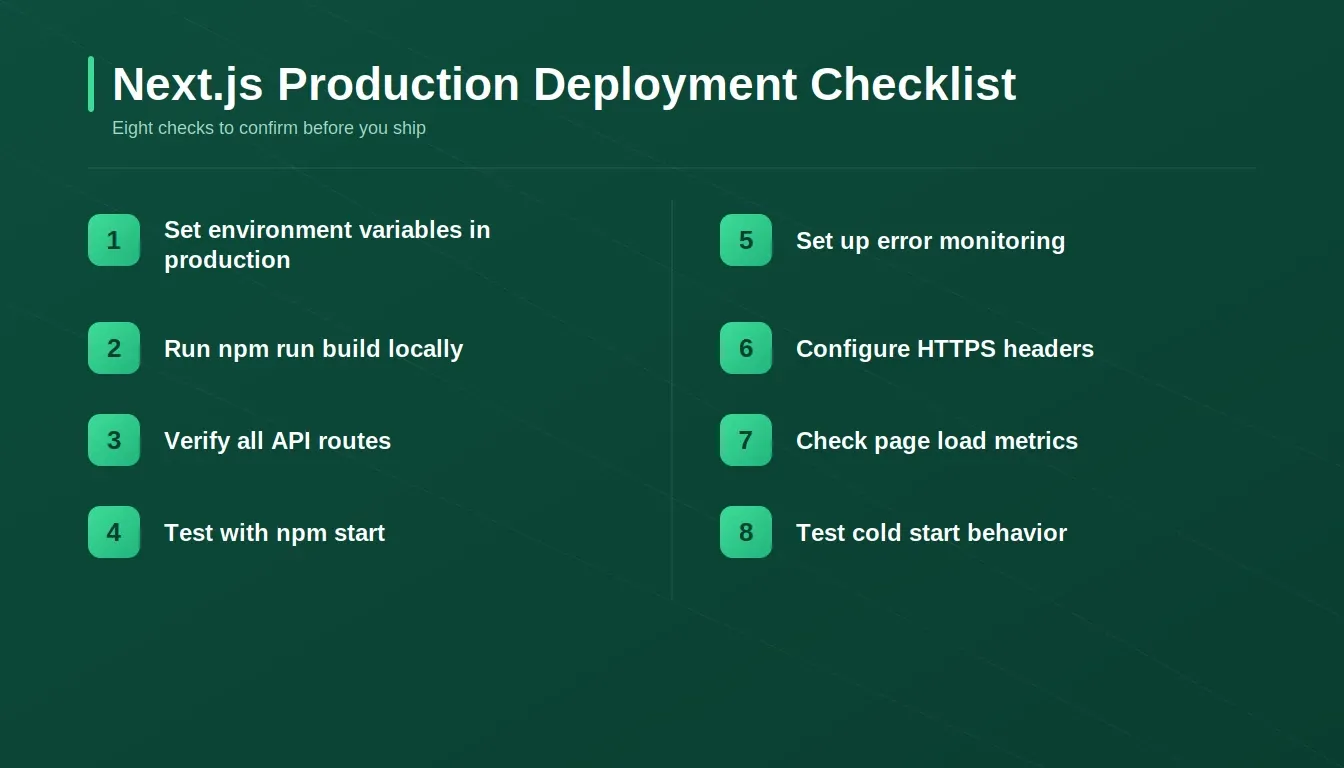
Eight checks before you ship: the Next.js production deployment checklist
- Verify environment variables are set in production and not just locally, since missing a single variable is the most common deploy error people encounter
- Run npm run build locally first and confirm there are no TypeScript or build errors before pushing to your hosting provider
- Run npm run dev to confirm local behavior, then test in production mode with npm start to find issues that only appear outside the dev server
- Check that all API routes return expected responses at the production URL and not just on localhost, where everything works by default
- Set up monitoring and error log collection so you can view failures before users report them through support channels
- Configure security headers and HTTPS since most managed platforms enable this by default, but self-hosted setups need explicit configuration
- Review page load metrics in your browser, as server-side rendering should produce fast initial loads with content visible before JavaScript runs
- Test cold start behavior if you are on a serverless platform, since local development never simulates the delay or memory constraints of a running serverless function
"Next.js on dev env is slow and resource-hungry. Plus, on every route visit, it generates the build and takes 4-5 seconds on it." — Ashish Prajapati, DEV Community (Feb 2026)
This community insight shows exactly why testing in production mode matters. The dev server behaves differently from a production build, and assuming one mirrors the other leads to surprises after you deploy. Teams building vibe-coded apps should specifically test cold start behavior, since local development never simulates that delay.
Ship Your Next.js App Without the Infrastructure Tax
The deployment platform you select shapes everything coming after: monthly costs, your scaling path, and your team's daily workflow. Vercel offers simplicity at a premium, Docker offers control at the cost of maintenance, and Netlify sits between with tradeoffs on both sides.
For builders who want the deployment question answered before writing a single line of code, Rocket.new makes the choice irrelevant. Your app is built, connected to a backend via Supabase, and deployed to a live Netlify URL, all from chat with no infrastructure decisions along the way.
Ready to skip the platform research entirely?
Start building on Rocket.new and go from a product idea to a live, deployed Next.js app without configuring a single hosting platform or writing any deployment scripts.
Table of contents
- -What Makes Each Hosting Provider Different?
- -How Does Vercel Handle Production Deployments?
- -Can Netlify Match Vercel for Server-Side Rendering?
- -When Should You Self-Host With Docker or AWS?
- -Rocket vs. Vercel vs. Netlify vs. Docker: Which Should You Choose?
- -What Does a Production-Ready Deployment Checklist Look Like?
- -Ship Your Next.js App Without the Infrastructure Tax

