
Deploying full-stack apps with AI now covers the entire arc from code generation to live production. Platforms handle environment setup, DNS, SSL, and monitoring automatically. This removes the manual steps that slow most teams down. This blog covers the full workflow, what to look for in a platform, real use cases, and a step-by-step path from prompt to production.
Why do 76% of developers still resist using AI for deployment and monitoring, even as they rely on it for almost everything else?
According to the Stack Overflow 2025 Developer Survey, only 6.2% of developers currently use AI mostly for deployment tasks. The gap between writing code with AI and shipping code with AI remains wide.
Most teams still piece together separate tools for frontend builds, backend configuration, database setup, and hosting. Each handoff introduces friction, errors, and delays. The result is a deployment process that feels stuck in a pre-AI era, even when the code itself was generated in seconds.
This blog covers how modern AI platforms close that gap, from automated pipelines to one-click production launches.
The Core Failure Points
Configuration drift between environments is one of the most common causes of deployment failures. Code works in staging but crashes in production. Manual infrastructure provisioning creates bottlenecks, especially for small teams without dedicated DevOps engineers.
Version mismatches across frontend, backend, and database layers lead to silent failures that surface only after launch. Secret management and environment variable handling remain error-prone when spread across multiple tools and dashboards. Rollback procedures, when they exist at all, often require manual intervention that costs hours of downtime.
Teams exploring deployment automation best practices often discover the real issue is architectural, not procedural. The fix is not a better YAML file. It is a platform that removes the need for one entirely.
| Challenge | Impact | Traditional Fix | AI-Powered Fix |
|---|---|---|---|
| Environment config | Deployment failures | Manual YAML files | Auto-detected settings |
| Secret management | Security leaks | Vault and scripts | Built-in env variables |
| Version conflicts | Silent bugs | Lock files | Unified generation |
| Rollback | Extended downtime | Git revert and redeploy | One-click restore |
| SSL and DNS setup | Launch delays | Manual DNS records | Automatic HTTPS |
| CI/CD maintenance | Engineering overhead | Dedicated DevOps | Platform-managed |
How AI Changes the Full-Stack Deployment Workflow
The shift is not about replacing one tool with another. When you deploy full-stack apps with AI, the platform collapses multiple steps into a single connected process. This is a structural change in how software reaches users.
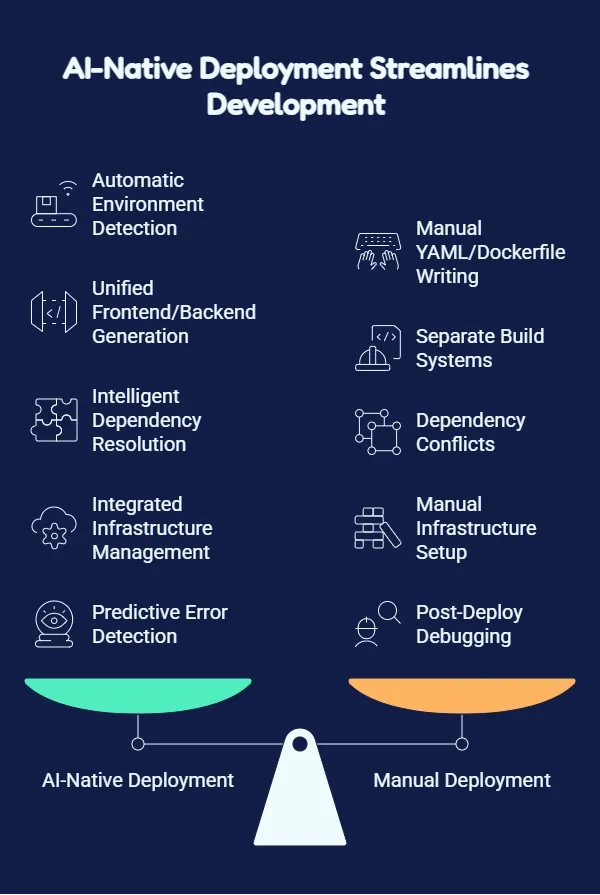
What AI-Native Deployment Actually Does
Automatic environment detection means the platform reads your codebase and configures production settings without manual YAML or Dockerfile writing. Unified frontend and backend generation eliminates the handoff between separate build systems. Both layers ship from the same source of truth.
Intelligent dependency resolution catches conflicts before they reach production. AI platforms handle DNS, SSL, and CDN configuration as part of the deployment step. Predictive error detection flags potential issues during the build phase, reducing post-deploy debugging time.
The Stack Overflow 2025 Developer Survey found that 52% of developers report AI tools have had a positive effect on their productivity. That advantage extends directly into deployment when the platform handles both generation and shipping.
The survey also confirms the scale of adoption: 84% of respondents are using or planning to use AI tools in their development process, up from 76% the year before. Teams adopting AI deployment platforms today hold a structural speed advantage over those still managing pipelines manually.
What to Look for in an AI Deployment Platform
Not every AI tool that generates code can ship it to production reliably. The gap between code generation and production deployment is where many platforms fall short. Choosing the wrong tool means you get a working preview that requires significant manual work to actually launch.
Must-Have Capabilities
End-to-end ownership from code generation through hosting means the platform that writes the code also deploys it. No export-and-hope workflow. Built-in staging and production environments with version history let you test before going live and roll back if something breaks.
Automatic HTTPS and custom domain support removes the need for manual DNS configuration. One-click deployment that does not sacrifice control lets you inspect code, modify it, and push updates without starting over.
Post-launch analytics covering visitors, performance metrics, and Core Web Vitals turn deployment into an ongoing quality signal. Native integrations with tools like Supabase, Stripe, and GitHub should flow into the build without manual API wiring.
Teams building mobile products also need iOS and Android deployment support alongside web. The same workflow should cover every platform.
Platforms at a Glance
Several platforms offer parts of this workflow. The key distinction is how much of the arc each one covers.
| Platform | Code Generation | Deployment | Custom Domains | Analytics | Mobile |
|---|---|---|---|---|---|
| Bolt | Yes | No | No | No | No |
| Lovable | Yes | Partial | Manual | No | No |
| v0 | Yes | No | No | No | No |
| Replit | Yes | Yes | Manual | No | No |
| Rocket | Yes | Yes | Automatic | Yes | Yes |
Each platform has its strengths. Bolt and v0 are useful for rapid prototyping. Replit suits developers who want a cloud IDE. Platforms with end-to-end deployment built in suit teams that need to go from prompt to production without switching tools.
For a deeper look at how these tools compare on deployment, this breakdown of AI app deployment tools covers the key differences.
Real-World Use Cases
Understanding who uses AI deployment platforms, and how, helps you evaluate whether the approach fits your context.
Solo Founders Shipping MVPs
A solo founder building a SaaS product needs to move from idea to paying users fast. With an AI-native platform, they describe the app in plain language, generate production-ready code, and deploy to a live URL in a single afternoon. No DevOps hire. No infrastructure setup.
Result: MVP shipped in hours instead of weeks. Validation happens with real users, not mockups.
Small Teams Without DevOps
A startup with two or three engineers cannot afford to dedicate one person to infrastructure. AI deployment platforms abstract away environment configuration, SSL, DNS, and CI/CD entirely. Engineers focus on product logic while the platform handles operations.
Result: Engineering capacity doubles because no one is managing pipelines.
Agencies Building Client Projects
A digital agency building web apps for clients needs repeatable, fast deployment workflows. AI platforms let them generate and deploy client apps with consistent quality. The handover includes a live URL with analytics already running.
Result: Project delivery time drops. Client handoff includes a working product, not a zip file.
Non-Technical Founders
A founder with a product vision but no coding background can describe what they want, iterate through natural language conversation, and deploy to production without writing a single line of code. The platform handles everything from database schema to custom domain.
Result: Technical co-founder dependency eliminated for early-stage product validation.
Enterprise Teams Prototyping
Large organizations often struggle to move fast because internal infrastructure approval processes slow everything down. AI deployment platforms let product teams prototype and deploy internal tools without waiting for IT provisioning.
Result: Prototype-to-production cycle shrinks from months to days.
From Prompt to Production: How Rocket Handles the Full Arc
Most AI builders stop at code generation. You describe what you want, they produce a working preview, and then you are on your own for hosting, DNS, environment variables, and ongoing updates.
Rocket is built differently. It covers the complete arc from the first prompt to a live, monitored production app. Everything is connected through shared context. Research done in Solve informs what gets built. What gets built deploys with one click. What deploys gets monitored from day one.
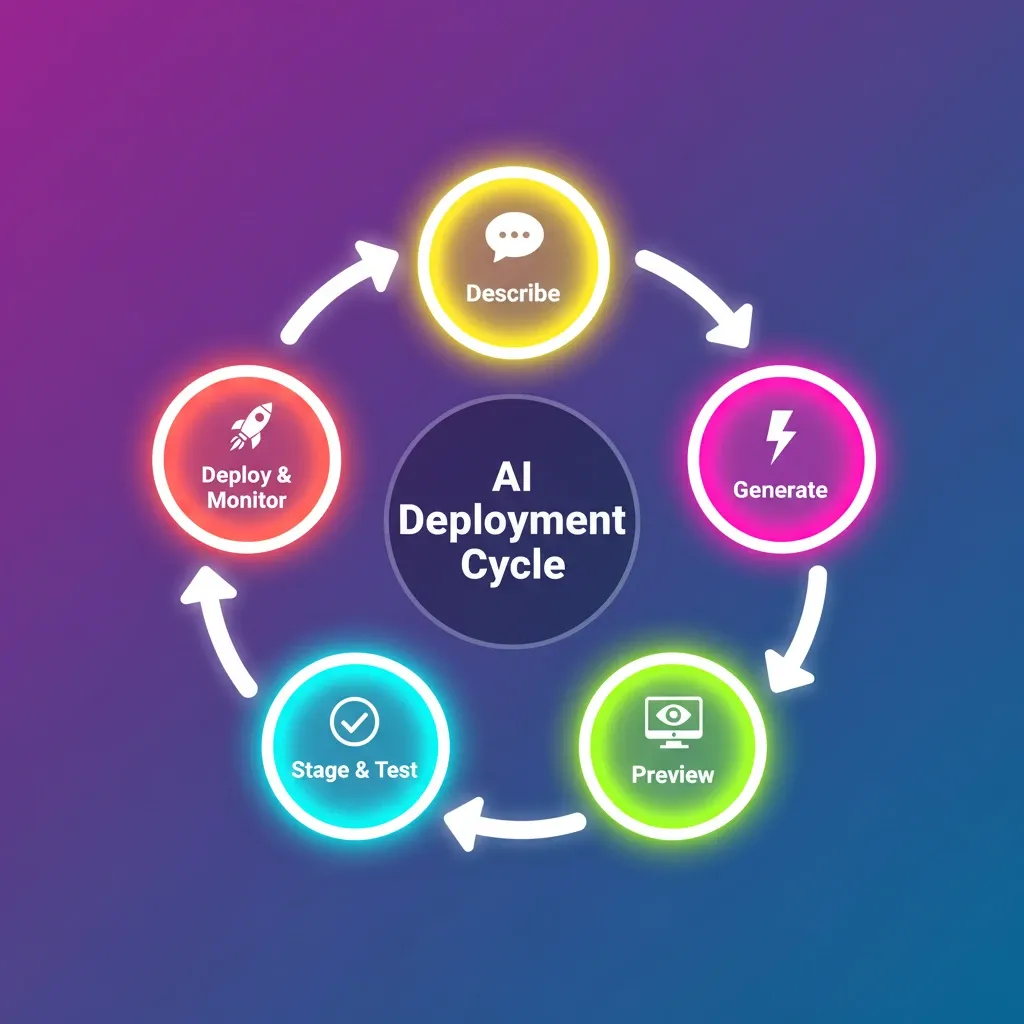
What the Build Workflow Covers
You describe your app in plain language and Rocket generates production-ready code in Next.js (web) or Flutter (mobile) with real design systems, not generic templates. One-click staging deployment lets you share a live URL with teammates for feedback before pushing to production.
Production with custom domains configures DNS automatically when you connect your domain provider. You can also buy a domain directly inside the platform. Full version history with one-click rollback means you can ship confidently knowing nothing built is ever gone.
Built-in analytics track visitors, conversions, and Core Web Vitals after launch without additional tool setup. 25+ native integrations including Stripe, Supabase, Google Analytics, and Mailchimp connect directly into the build, not as afterthoughts.
For teams with existing codebases, Rocket's Codebase Pickup capability picks up any existing Next.js project and continues it without losing what is already built. For teams starting from a design, Figma import converts designs directly into production code, preserving typography, spacing, and visual hierarchy.
Every build ships with SEO-ready structure, WCAG accessibility compliance, and GDPR coverage by default. These are the baseline, not optional extras.
Pricing
Rocket uses a credit-based model with no per-seat fees. All team members are included at every plan level. Annual billing saves 20% across all paid plans.
| Plan | Monthly Price | Credits Included | Best For |
|---|---|---|---|
| Free | $0 | 20 one-time credits | Exploration and personal use |
| Pro | $25/month | 100 credits/month | Production websites and web apps |
| Rocket | $50/month | 250 credits/month | Full suite for individuals and teams |
| Booster | $250/month | 1,500 credits/month | Power users and fast-moving teams |
Additional credits can be purchased at any time and never expire. Intelligence monitoring costs \$100/month per competitor tracked.
1.5 million people have tried Rocket across 180 countries, from solopreneurs to enterprise teams.
Step-by-Step: Deploying a Full-Stack App with AI
The actual process looks different on an AI-native platform than it does with traditional toolchains. Here is exactly what the workflow looks like in practice.
Step 1: Describe Your App
Write a clear description of what you want to build. Include key features, target users, design preferences, and integrations you need. Mention your platform preference (Next.js for web, Flutter for mobile), your primary user action, and any data you need to store.
Step 2: AI Plans the Architecture
The platform analyzes your description and plans the data model, navigation structure, UI components, and API routes before writing a single line of code. This planning step separates AI-native platforms from simple code generators.
Step 3: Code Generation
Production-ready code is generated in one to three minutes. This includes frontend components, backend API routes, database schema, authentication flows, and environment configuration. Everything is connected from the start.
Step 4: Interactive Preview
Review your app in a live preview environment. Test user flows, check responsive behavior, and identify anything that needs adjustment.
Step 5: Iterate Through Conversation
Refine your app through natural language. Changes apply in real time without breaking existing functionality. Iterate until the app reflects your best thinking, not just your first prompt.
Step 6: Deploy to Staging
With one click, deploy to a staging URL. Share it with teammates or early users for feedback before going live. The staging environment mirrors production exactly.
Step 7: Connect Your Domain and Go Live
Connect your custom domain and the platform configures DNS automatically. HTTPS is provisioned without any manual certificate management. Deploy to production with one click.
Step 8: Monitor After Launch
Built-in analytics track visitors, user behavior, Core Web Vitals, and conversion events from day one. No additional setup required.
For teams building mobile products, Rocket also supports Android APK distribution and App Store submission, covering the full mobile deployment arc alongside web.
"The future of full stack development is not about knowing more tools. It is about using fewer tools more intelligently." — Ines Partners, LinkedIn
The entire cycle, from description to deployed production app, can happen in a single afternoon.
Common Mistakes When Using AI for Deployment
AI-powered deployment is not foolproof. Knowing where things break helps you avoid the most expensive mistakes before they reach your users.
Treating Generated Code as a Black Box
Always review critical logic before shipping. Authentication flows, payment processing, and data handling deserve a human review even when AI generates them correctly most of the time. Use the code editor to inspect any feature that handles sensitive user data.
Skipping Staging
"It works in preview" is not the same as "it works in production." Environment-specific behavior, third-party API responses, and real user data patterns all behave differently in production. Always deploy to staging first and test with realistic data.
Over-Relying on a Single Prompt
Your first prompt reflects your first thought, not your best thought. Iterating through conversation produces significantly better results. Start with a core description, deploy to staging, and refine based on what you see.
Ignoring Post-Launch Analytics
The Stack Overflow 2025 survey found that 66% of developers report that AI solutions are "almost right, but not quite." That last mile of refinement matters most for deployment, because production issues affect real users immediately. Review analytics within the first 48 hours after launch.
Choosing Platforms Without Backend Integration
Platforms that only generate frontend code leave you managing backend infrastructure manually. This removes most of the speed advantage. Choose platforms with native backend integration so your database, API routes, and authentication are generated and deployed together.
Security and Compliance in AI-Deployed Apps
Shipping fast does not mean shipping insecure. Platforms that take security seriously build compliance into the generation process rather than treating it as a post-launch checklist.
What Good Platforms Handle Automatically
HTTPS by default on every deployment, with automatic certificate renewal. Environment variable management keeps secrets out of code repositories. WCAG accessibility compliance is built into generated UI components.
GDPR-ready data handling patterns are included in authentication and user data flows. SQL injection prevention through parameterized queries is standard in generated database interactions. Rate limiting on API routes prevents abuse.
Teams that choose platforms with compliance built in ship faster and more safely. For a practical look at how AI handles security across the build lifecycle, this guide to full-stack code automation covers the key patterns.
The Future of Deploying Full-Stack Apps with AI
The trajectory is clear. AI deployment platforms are not a temporary trend. They are the new baseline for how software gets shipped.
Autonomous deployment agents will monitor production apps, detect performance degradation, and deploy fixes without human intervention. The developer reviews and approves. The agent executes.
Multi-cloud deployment from a single prompt will become standard. Describe your app once, and the platform decides the optimal hosting configuration based on cost, latency, and compliance requirements.
AI-driven scaling will replace manual infrastructure planning. Platforms will predict traffic patterns and provision resources proactively rather than reactively.
Integrated observability will close the loop between user behavior and code changes. When analytics show a drop-off at a specific step, the platform will suggest and implement the fix.
The teams that build fluency with AI deployment platforms today are building a compounding advantage. Every project shipped faster creates capacity for the next one. Every deployment that does not require a DevOps specialist is a cost that does not accumulate.
The AI Deployment Advantage Is Compounding
The distance between an idea and a live product has never been shorter. AI platforms now handle architecture planning, code generation, and production deployment as one connected workflow. The traditional handoffs that slowed teams down for years are gone.
The teams shipping fastest in 2026 are not the ones with the biggest engineering budgets. They are the ones using tools that collapse complexity into single steps. That advantage compounds with every project launched.
Start Shipping: Deploy Full-Stack Apps with AI
The era of spending days on deployment infrastructure before a single user sees your product is over. Whether you are a solo founder validating an idea, a small team building a SaaS product, or an agency delivering client work at scale, the ability to deploy full-stack apps with AI is now the fastest path from concept to production.
You describe the problem. Rocket researches it, recommends a direction, builds from that direction, and deploys it. Web apps, mobile apps, landing pages, internal tools. Production-grade from the first generation. No export step. No separate hosting account. No CLI commands.
Start building on Rocket for free and go from idea to live production app today.
Table of contents
- -The Core Failure Points
- -How AI Changes the Full-Stack Deployment Workflow
- -What AI-Native Deployment Actually Does
- -What to Look for in an AI Deployment Platform
- -Must-Have Capabilities
- -Platforms at a Glance
- -Real-World Use Cases
- -Solo Founders Shipping MVPs
- -Small Teams Without DevOps
- -Agencies Building Client Projects
- -Non-Technical Founders
- -Enterprise Teams Prototyping
- -From Prompt to Production: How Rocket Handles the Full Arc
- -What the Build Workflow Covers
- -Pricing
- -Step-by-Step: Deploying a Full-Stack App with AI
- -Step 1: Describe Your App
- -Step 2: AI Plans the Architecture
- -Step 3: Code Generation
- -Step 4: Interactive Preview
- -Step 5: Iterate Through Conversation
- -Step 6: Deploy to Staging
- -Step 7: Connect Your Domain and Go Live
- -Step 8: Monitor After Launch
- -Common Mistakes When Using AI for Deployment
- -Treating Generated Code as a Black Box
- -Skipping Staging
- -Over-Relying on a Single Prompt
- -Ignoring Post-Launch Analytics
- -Choosing Platforms Without Backend Integration
- -Security and Compliance in AI-Deployed Apps
- -What Good Platforms Handle Automatically
- -The Future of Deploying Full-Stack Apps with AI
- -The AI Deployment Advantage Is Compounding
- -Start Shipping: Deploy Full-Stack Apps with AI