
Rocket.new’s AI research tool helps teams assemble evidence before creating board presentations, ensuring data-backed narratives, aligned insights, and faster decision-making with stronger strategic clarity from the very first draft overall process.
How do teams actually build strong board presentations before opening PowerPoint?
They focus on research first, not slides. The AI Board Presentation Research Tool on Rocket.new helps teams collect data, track competitors, and organize insights before a single slide is created.
AI adoption is rising fast. Around 78% of organizations used AI in 2024, up from 55% the year before. The market is expected to cross $2.4 trillion by 2032. This shift shows how teams now rely on AI tools for research, data, and decisions.
So, what changes when research becomes the starting point? It brings clarity, stronger insights, and better storytelling.
This blog explains how Rocket.new Solve builds research, connects data, tracks competitors, and turns insights into solid board presentations.
Why Research Comes Before Slides?
Most teams rush into PowerPoint and start designing slides right away. It feels productive, but without a clear structure, the story often falls flat. The result is a deck that looks fine but lacks depth and direction.
What should happen instead? With AI and better tools, the flow shifts from design-first to research-first.
-
Start with research, not slides
-
Collect relevant data from reliable sources
-
Track competitors to understand the market clearly
-
Build logic and connect ideas step by step
-
Then move to creating the final deck
This is where a vibe solutioning platform like Rocket makes a difference. It keeps everything in one place, from research and data to product thinking, web inputs, and app flow. You don’t just make slides. You build a solid foundation before the presentation even begins.
The Problem With Traditional Board Prep
Let’s be real for a second. Traditional workflows are messy.
-
Data sits in different tools
-
Research happens in isolation
-
Teams struggle to track competitors
-
Slides get built without context
And then someone asks a question in the board meeting. Everyone freezes. Because the research wasn’t strong enough. That’s the gap.
What Makes Rocket.new Different?
Rocket is not just another app. It’s a vibe solutioning platform that connects research, code, and product thinking.
You don’t just create slides. You build understanding.
Here’s how it stands out:
| Area | Traditional Tools | rocket |
|---|---|---|
| Research | Scattered docs | Structured research dashboard |
| Data | Hard to connect | Linked across pages |
| Competitor tracking | Manual | Continuous track competitors system |
| Slides | Built early | Built after evidence |
| Collaboration | Basic | Comment, chat, and connect deeply |
This shift keeps everything clear and connected. Teams build with research first, not guesswork, which leads to stronger insights and better presentations.
How Solve Works on Rocket.new?
Now let’s talk about Solve.
Solve is where the real work starts. It is the AI powered research layer inside Rocket.new, built to help teams gather evidence before they even open PowerPoint. Instead of jumping into slide design too early, teams can first build a clear base of facts, insights, and direction.
Step-by-Step Flow
1. Start with a question
Every strong board presentation begins with a clear question. Solve helps teams define that starting point so the research has direction from the beginning.
2. Run AI research
Next, Solve pulls insights from the web, connects relevant sources, and starts building context around the topic.
3. Collect data and insights
After that, the focus shifts from reading to organizing. Teams gather the data, sort the findings, and shape useful insights.
4. Track competitors
Then comes competitor tracking. Solve helps teams track competitors on an ongoing basis, not just as a one-time task.
5. Connect findings
Once the information is collected, teams can link pages, product insights, strategy points, and supporting evidence together.
6. Build structure
Then the deck starts to take shape. The structure comes from real research, not random guesses or rushed assumptions.
7. Export to PowerPoint
Finally, when the evidence base is ready, the work can be exported into PowerPoint and turned into a polished presentation.
So, Solve changes the usual workflow in a smart way. Instead of building slides first and filling in gaps later, it helps teams build the thinking first. That makes the final presentation clearer, stronger, and much easier to defend in the room.
Features That Actually Matter
Let’s keep it simple. These are the features that actually change how teams work day to day. Instead of juggling multiple tools, everything comes together in one smooth workflow.
Key features
-
Research dashboard: All your research lives in one place. You can read, organize, and comment on insights easily.
-
Continuous competitor tracking: You don’t just track competitors once. You keep tracking competitors over time, so your insights stay fresh.
-
Version control: Every change is tracked clearly. No confusion, no lost updates.
-
Comment and chat: Teams can comment directly on research. You can also chat inside the app for quick discussions.
-
Data linking: You can link pages, sources, and insights. Everything stays connected and easy to follow.
-
Code generation: You can generate code for dashboards or product ideas. Yes, code inside a research workflow.
-
Export options: You can export insights into PowerPoint or other structured formats when needed.
These features work together to keep research, data, and collaboration in sync. Instead of switching between tools, teams can focus on building clear insights and better presentations from one place.
Where Rocket.new Comes in?
The title talks about building evidence before the deck. That’s exactly what Rocket.new focuses on. It shifts the workflow from slide-first to research-first.
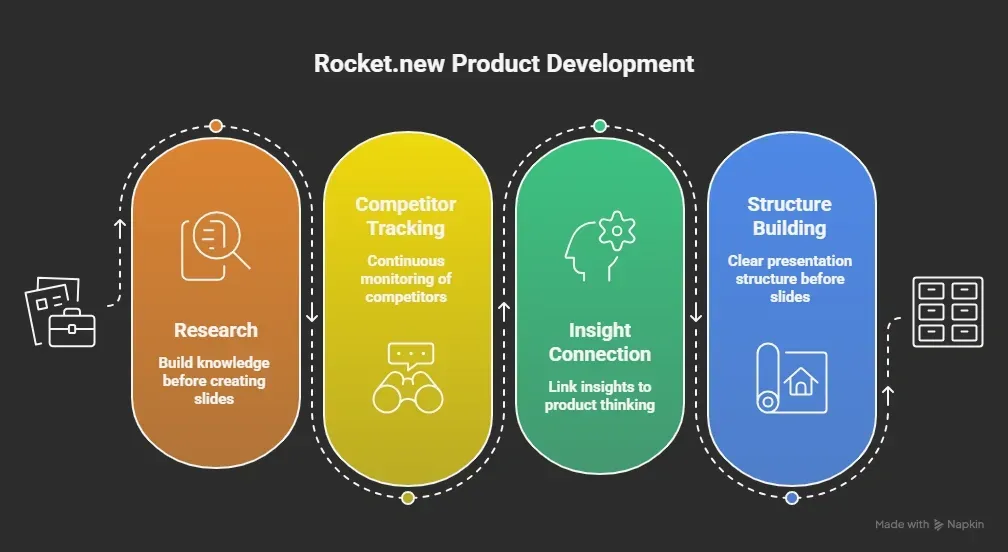 So instead of starting with PowerPoint, you start with logic. And that changes how strong your final presentation feels.
Rocket Solve Overview
Based on the official documentation, Solve is designed to run AI powered workflows across research, product, and development in a connected way.
Core capabilities
-
AI powered research
-
Code generation
-
Data connection across pages
-
Product thinking support
-
API and tech stack alignment
How it works
-
Start with a prompt or question
-
Solve runs AI tools to gather research
-
It builds structured outputs
-
You can connect these outputs to product or web pages
-
Then you continue building from there
Key idea: Everything happens in one place.
That includes: Research, Data, Code, Product, Web app building
This connected setup helps teams move from ideas to structured outcomes without switching between tools.
Where Competitors Fall Short
Let’s compare things quickly. Most AI tools focus on just one part of the workflow.
Common limitations
-
Some tools focus only on slides
-
Some focus only on research
-
Some focus only on code
What’s missing
-
Research stays disconnected
-
Data is not properly linked
-
Teams struggle to track competitors efficiently
-
Product thinking is often missing
Rocket removes these gaps by connecting everything into one flow, making the process smoother and more complete.
Why This Approach Matters
Board presentations are not really about slides. They are about clarity and strong thinking.
What actually matters
-
Clear data that supports decisions
-
Well-organized research
-
Up-to-date insights from competitors
-
A connected story that makes sense
When you build research first, your slides become stronger. When you track competitors continuously, your insights stay fresh. And when everything is connected, your final story becomes clear and easy to present.
AI Board Presentation Research Tool on Rocket.new
Teams often jump straight into building slides without enough research. Data is scattered across tools, and competitor insights are either outdated or incomplete. This leads to weak storytelling and decisions that lack strong backing. When the foundation is missing, even well-designed slides fail to deliver impact.
The AI Board Presentation Research Tool on Rocket.new helps teams build research first. It connects data, tracks competitors continuously, and builds a clear structure before slides. Start with research, not slides, and use tools that bring everything together. That’s how better board presentations are built.
Table of contents
- -Why Research Comes Before Slides?
- -The Problem With Traditional Board Prep
- -What Makes Rocket.new Different?
- -How Solve Works on Rocket.new?
- -Step-by-Step Flow
- -1\. Start with a question
- -2\. Run AI research
- -3\. Collect data and insights
- -4\. Track competitors
- -5\. Connect findings
- -6\. Build structure
- -7\. Export to PowerPoint
- -Features That Actually Matter
- -Key features
- -Where Rocket.new Comes in?
- -Rocket Solve Overview
- -Where Competitors Fall Short
- -Why This Approach Matters
- -AI Board Presentation Research Tool on Rocket.new