
What makes Rocket.new stand apart? Building on Rocket.new feels uniquely fluid, combining intuitive AI collaboration, faster iteration, and creator-focused workflows that make developing products feel natural and genuinely empowering today.
Is building on Rocket.new really different from any other AI tool out there?
Yes, it is. Most AI tools are built to handle small, focused tasks like writing content, doing quick code generation, or helping with simple workflows. Rocket.new goes further. It supports the full journey, from idea to working apps, in one place. That shift changes how people build and think about products.
According to a report by McKinsey over 55% of companies now use AI in at least one business area, which shows how quickly AI tools are becoming part of everyday work.
This blog will help you understand how rocket.new stands apart and how you can use it to build faster, smarter, and with less friction.
The Growth of AI Tools and the Unique Position of Rocket.new
AI tools are everywhere right now. You open your laptop, and there are AI assistants, AI coding tools, AI app builders, and even AI productivity tools waiting for you. Many of these tools are free AI tools with a free tier, and some are even completely free.
But here’s the thing. Most AI tools focus on specific tasks. One tool helps you write code. Another helps with video generation. Another helps generate images. You end up juggling multiple tools.
Rocket.new takes a different approach. It tries to bring everything into one place. That includes code editor access, AI-powered workflows, and support for multiple files and even audio files.
So instead of switching between tools, you stay in one environment.
What Makes Rocket.new Stand Out
So, what actually makes Rocket.new different from the crowd of AI tools out there? Let’s keep it simple and break it down step by step.
1. It’s Built Around Vibe Coding
Vibe coding is becoming popular in 2026. Instead of manually typing everything, you use natural language to generate code.
With Rocket.new, vibe coding feels natural. You don’t need complex prompts. Simple prompts work well. You describe what you want, and the system helps you write code, generate code, and even refine it.
Other AI coding tools do this too, but Rocket.new keeps the flow smoother inside the same code editor.
2. Multiple AI Agents Working Together
Most AI tools give you a single AI assistant. Rocket.new brings multiple AI agents into the picture.
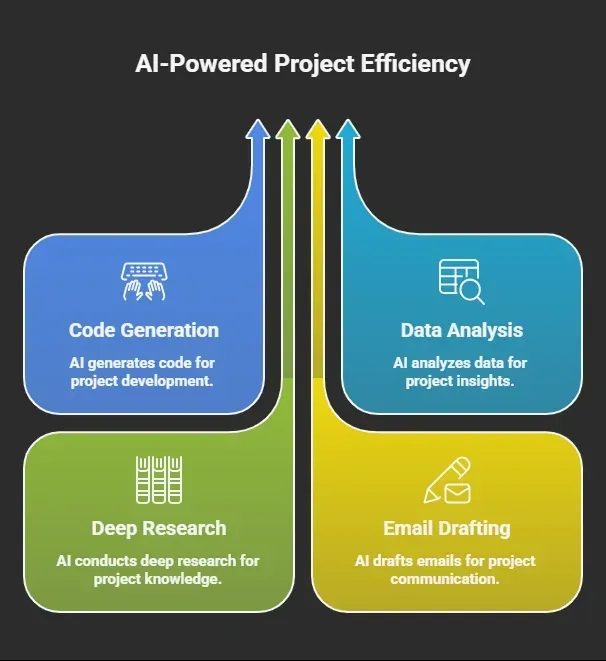 This idea of multiple AI agents working together changes how you build AI app projects.
3. A Focus on Working Apps, Not Just Code
Many AI tools stop at generating code. You still need to connect everything. Rocket.new focuses on building working apps.
That means:
-
You can go from idea to landing pages
-
You can manage your tech stack
-
You can handle version control
-
You can test the entire codebase
It feels closer to building a real product, not just writing snippets.
So, when you look at it as a whole, Rocket.new is not just another AI assistant or one of many AI tools. It brings coding, planning, and execution into a single flow, which makes building feel more complete and less scattered.
How Rocket.new Actually Works
Based on the official documentation, Rocket.new follows a clear and structured flow. It is not random generation. It is a guided process that moves from idea to launch in a loop.
Step-by-Step Workflow
- Describe your idea
You start by explaining your idea using natural language. It can be a rough concept, a design, or even something basic. Rocket.new understands your intent and begins shaping the app structure.
- Build automatically
Once your idea is clear, the platform starts building. It can generate code for UI, backend logic, and database setup. You do not have to manually write code or configure your tech stack at this stage.
- Refine through conversation
Next, you improve your app by interacting with the AI assistant. You can ask for changes, fix issues, or add new features. You can also jump into the code editor if you want more control over the source code.
- Integrate services
Then, you connect external tools like APIs, payments, or databases. Rocket.new handles API keys and setup based on your instructions, so you don’t need to manage everything manually.
- Ship your app
Finally, you deploy your app. You can publish it as a web app, connect domains, and prepare it for real users. At this point, you are not just testing ideas. You have working apps ready to go.
So, instead of using multiple AI tools for different specific tasks, Rocket.new gives you a continuous flow. You move from idea to execution without breaking your focus, and that is what makes the experience feel complete..
What You Get in the Workflow
Rocket.new does more than just generate code. It creates a complete system:
-
Full working apps with frontend and backend
-
Entire codebase with source code ownership
-
Built-in version control and preview testing
-
Support for web and mobile apps using frameworks like Next.js and Flutter
It also supports:
-
command line style actions
-
cloud storage handling
-
API keys integration
-
working with audio files, image generation, and video generation
So instead of piecing together different AI tools, Rocket.new gives you a continuous build loop: describe → build → refine → integrate → ship..
Key Features of Rocket.new
Before jumping into details, let’s quickly look at what Rocket.new brings to the table. These features give you a clear idea of how it handles everything from building to managing your AI app in one place.
| Feature | What It Does |
|---|---|
| AI agents | Handle different parts of your workflow |
| Code editor | Edit and manage source code easily |
| Version control | Track changes in your entire codebase |
| Video generation | Create content inside the platform |
| Image generation | Use built-in image generators |
| Audio overview | Summarise audio files |
| Deep research | Pull insights from web searches |
| Google workspace support | Connect with google docs and tools |
So, when you look at all these features together, it becomes clear that Rocket.new is not just one of many AI tools. It acts more like a complete system where building, editing, and managing your entire project happens in one smooth flow.
Rocket.new vs Other AI Tools
Let’s make this easier to understand with a quick comparison. This will help you see how Rocket.new stacks up against other AI tools without overthinking it.
| Feature | Rocket.new | Other tools |
|---|---|---|
| Multiple AI agents | Yes | Rare |
| Full app builders | Yes | Limited |
| Vibe coding tools | Strong | Basic |
| Free tier | Yes | Yes |
| Enterprise features | Yes | Sometimes |
| AI powered features | Unified | Fragmented |
So, when you look at this side by side, the difference becomes pretty clear. Most AI tools handle parts of the process, while Rocket.new tries to bring everything together into one smooth workflow.
The Role of Free Plans and Free Tier
A big reason AI tools are growing fast is the free plan model. Rocket.new offers a free tier, and that matters because:
-
People can try building AI app ideas
-
Students can experiment with free AI
-
Creators can build landing pages without cost
There are also paid plans for advanced models and enterprise features, but the free tier is strong enough to get started.
Many free AI tools exist, but not all give access to this level of code generation and app builders support.
Integration with Google and Other Systems
One of the nice things about Rocket.new is how easily it connects with tools people already use in their daily work. You don’t have to change your workflow completely. Instead, it fits right in.
Works With Familiar Tools
Rocket.new supports:
-
Google workspace
-
Google docs
-
Google gemini
These integrations make it easier to bring your existing data and content into your projects without extra steps.
What This Means for You
With these connections, you can:
-
Pull data directly from documents
-
Use an AI assistant inside your workflow
-
Manage research papers and notes in one place
So, instead of switching between different AI tools and platforms, you keep everything connected. This is especially helpful for data science, machine learning projects, and even content creation, where you often need both data and creativity working together.
User Insight
Here’s a real perspective from conversations on LinkedIn.
“Building actually differentiated, scalable AI platforms that clients are willing to pay for is hard.” Linkedin
This shows that the real challenge today is not just using AI tools, but building complete, scalable systems something platforms like Rocket.new are aiming to simplify.
Rocket.new and Enterprise Teams
Rocket.new is not limited to solo builders. It also supports enterprise teams that need structure, speed, and collaboration in one place. Based on the official docs, the platform is designed to handle full-scale projects, not just small experiments.
Built for Team Workflows
Rocket.new includes:
-
version control to track changes across the entire codebase
-
cloud storage to manage project files
-
API keys management for secure integrations
-
collaboration tools so teams can work together
This setup helps teams build AI app systems without switching between multiple tools. It also supports advanced models and machine learning workflows, which is useful for data science and larger projects.
So, whether it’s a startup or a bigger team, the platform fits into structured development work.
Why It Feels Different in Real Use
So, what actually changes when you sit down and build?
With most AI tools:
-
You switch between platforms
-
You copy paste code
-
You manage different tools for different tasks
With Rocket.new:
-
You stay in one place
-
You use natural language to guide development
-
You manage the entire project from idea to deployment
This difference comes from how the platform connects everything into one flow. You are not just generating code. You are building and managing a full system.
The Role of Generative AI
Generative AI tools are now part of everyday workflows. They help with writing, image generation, and video generation.
Rocket.new uses generative AI in a more connected way:
-
It helps generate code for full applications
-
It helps write code and refine it
-
It helps improve quality through iteration
-
It helps fine tune outputs based on your needs
Instead of using separate generative AI tools, everything happens inside one system, guided by your inputs.
Challenges You Should Know
Let’s keep it honest. Even with strong AI tools, there are still a few limits.
-
You still need to understand some technical details
-
Debugging is still part of the process
-
Not everything works perfectly with simple prompts
Rocket.new reduces the effort, but it does not remove the need for thinking and testing. You still guide the process, while the system helps you move faster.
What This Means for an AI Tool in 2026
Most AI tools still focus on small, separate tasks. You switch between platforms, manage different workflows, and spend time connecting things manually instead of building your AI app.
Rocket.new brings AI agents, code generation, and app builders into one place. It connects everything, from natural language prompts to working apps, so you can manage the entire project without breaking your flow.
This shift shows where things are heading. If you are looking at an AI tool in 2026, the difference is clear. Tools like Rocket.new are not just helpers anymore. They act like full environments where ideas turn into real products faster and with less friction.
Table of contents
- -The Growth of AI Tools and the Unique Position of Rocket.new
- -What Makes Rocket.new Stand Out
- -1\. It’s Built Around Vibe Coding
- -2\. Multiple AI Agents Working Together
- -3\. A Focus on Working Apps, Not Just Code
- -How Rocket.new Actually Works
- -Step-by-Step Workflow
- -What You Get in the Workflow
- -Key Features of Rocket.new
- -Rocket.new vs Other AI Tools
- -The Role of Free Plans and Free Tier
- -Integration with Google and Other Systems
- -Works With Familiar Tools
- -What This Means for You
- -User Insight
- -Rocket.new and Enterprise Teams
- -Built for Team Workflows
- -Why It Feels Different in Real Use
- -The Role of Generative AI
- -Challenges You Should Know
- -What This Means for an AI Tool in 2026