
A vibe coding workflow lets you describe what you want to build in plain language and get production-ready code back in minutes. This blog covers every stage, the mistakes that derail it, how to pick the right platform, and why thinking before building matters most.
What is a vibe coding workflow?
A vibe coding workflow is an AI-powered development process where you describe what you want to build in plain language and the AI generates production-ready code, interfaces, and logic, compressing weeks of traditional development into hours. It puts product creation in the hands of founders, designers, and operators, not just engineers.
According to the GitHub Octoverse 2024 report, developers created over 70,000 new generative AI projects in 2024 alone, with a 98% year-over-year growth in total AI projects on the platform.
This blog covers every stage of the workflow, the mistakes that derail it, how to choose the right platform, and why the thinking before the build matters more than the build itself.
The Origin of Vibe Coding
The term "vibe coding" was coined by AI researcher Andrej Karpathy in early 2025. He described a new mode of software development where the programmer states intent in natural language and the AI generates the implementation. The concept spread quickly because it named something already happening.
A generation of builders was shipping real products without writing every line of code. What started as a developer shortcut became a structural shift in who gets to build.
Who Uses a Vibe Coding Workflow?
The vibe coding workflow is used across a wide range of builder profiles:
- Founders building MVPs before hiring a development team
- Product managers prototyping features without waiting for engineering capacity
- Designers turning Figma files into working products directly
- Marketers building landing pages, dashboards, and campaign tools
- Operators creating internal tools for their teams
- Developers accelerating parts of the build they find repetitive
The common thread is not technical skill level. It is the desire to move from idea to working product faster than traditional development allows.
Why the Vibe Coding Workflow is Changing Development
The Stack Overflow 2024 Developer Survey found that 76% of all respondents are currently using or planning to use AI tools in their development process, up from 70% the year before. Among professional developers, 62% are already using AI tools actively. That kind of adoption does not happen unless the tools are genuinely changing how work gets done.
The traditional development cycle is slow. You write a spec, hand it to a developer, wait for a build, review it, request changes, and repeat. A vibe coding workflow compresses that loop. You describe your idea, see a working product in minutes, and iterate from there.
This is not about replacing good engineering judgment. It is about removing the friction between having an idea and seeing it work.
The Speed Advantage
| Development Approach | Time to First Working Product | Team Required |
|---|---|---|
| Traditional development | 4 to 12 weeks | Developer, designer, QA |
| Freelance or agency | 2 to 6 weeks | External team and PM |
| Low-code platforms | 1 to 3 weeks | Non-technical builder |
| Vibe coding workflow | 1 to 4 hours | One person |
The gap is not marginal. It is the difference between testing an idea this afternoon and testing it next quarter.
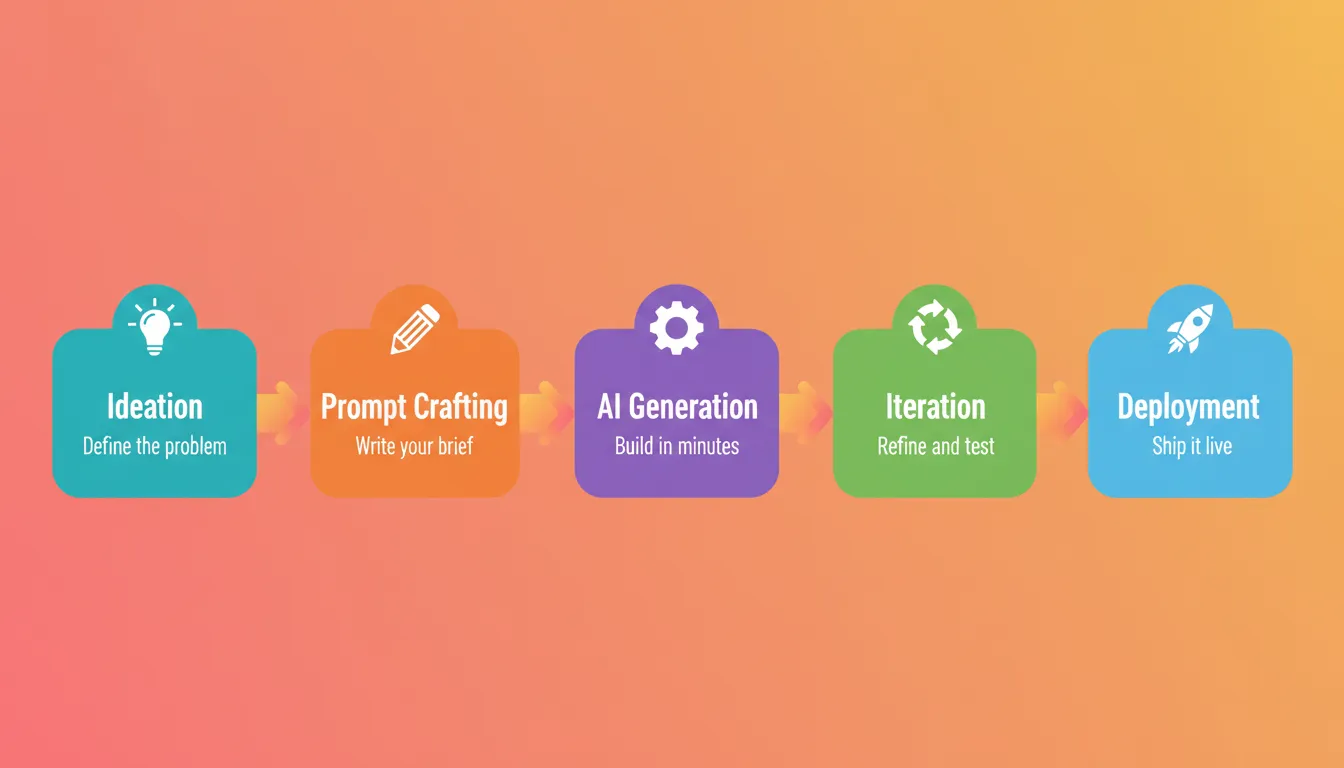
The 5 Stages of an Effective Vibe Coding Workflow
A strong vibe coding workflow follows a clear sequence. Each stage builds on the last. Skipping any one of them tends to produce messy results.
Stage 1: Ideation and Scoping
Before you write a single prompt, you need to know what you are building and who it is for. This is the stage most people rush past, and it causes the most problems later.
Ask yourself: What problem does this product solve? Who is the primary user? What are the three to five core features needed on day one? What does success look like in the first 30 days?
The most expensive mistake in any product build is not a bad execution. It is a good execution of the wrong thing. Spending two hours building a product nobody wants is still two hours wasted, even if the build was fast.
Stage 2: Prompt Crafting
Your prompt is your brief. Think of it the way a product manager thinks about a spec: specific, purposeful, and grounded in user needs.
A good prompt includes the type of product, the primary purpose and target user, the key screens or features named explicitly, any design preferences, and the data model if relevant. For a deeper reference on writing effective prompts, Rocket's build best practices guide covers prompt structure, iteration patterns, and anti-patterns in detail.
Prompt quality matters more than most builders expect:
| Prompt Quality | Example | Likely Output |
|---|---|---|
| Vague | "Build me a booking app." | Generic form with no real logic |
| Moderate | "Build a booking app for a hair salon with a calendar." | Basic calendar, missing key flows |
| Strong | "Build a booking system for a hair salon. Calendar view for stylists, client-facing booking page, confirmation emails, admin dashboard to manage availability." | Working product with all core flows |
The 3-5 feature rule: List the most important features upfront. Add more through chat after the foundation is solid. Front-loading every feature in one prompt is the most common mistake in a vibe coding workflow.
Stage 3: AI Generation
You submit your prompt and the AI generates a working product with UI, navigation, logic, and code. Most modern AI builders produce a live preview in one to three minutes.
Do not expect perfection on the first generation. Expect a solid foundation. Review the output critically: Does the structure match your intent? Are the key screens present? Is the data model sensible? Does the design fit the use case?
If the answer to most of those is yes, you are in good shape. If not, regenerate with a more specific prompt before moving to iteration.
Stage 4: Iteration and Refinement
This is where most of your time in a vibe coding workflow gets spent. Iteration moves you from a working foundation to a polished product.
Modern AI builders give you three ways to iterate. Chat lets you describe changes in natural language. Visual edit lets you click elements directly in the preview and change text, style, or layout. Code gives you direct access to source files for precise control.
Start with chat for structural changes. Use visual edit for design tweaks. Drop into code when you need something very specific. Make one change, test it, then move to the next.
Stage 5: Deployment
A vibe coding workflow is not complete until the product is live. Deployment should be a single action, not a project in itself.
Good AI platforms handle hosting and infrastructure automatically, HTTPS and SSL by default, custom domain connection, staging and production environments, and version history with rollback. Once live, share the URL, gather feedback, and continue iterating. Real user feedback is more valuable than another round of internal polish.
Vibe Coding Workflow vs. Traditional Development
The gap between vibe coding and traditional development is not just about speed. It is about who gets to build. A vibe coding workflow removes the technical barrier to product creation without removing the need for good thinking.
| Dimension | Traditional Development | Vibe Coding Workflow |
|---|---|---|
| Code writing | Manual, requires deep expertise | AI-generated from natural language |
| Time to first working product | Weeks to months | Minutes to hours |
| Team required | Developer, designer, QA | One person or small team |
| Feedback loop | Long, sequential | Tight, real-time |
| Deployment | Requires DevOps setup | Automated, one-click |
| Iteration speed | Slow, requires code changes | Fast, via chat or visual edit |
| Context retention | Lost between handoffs | Persistent in AI platform |
| Cost to first prototype | Tens of thousands of dollars | Near zero |
Vibe Coding Workflow Use Cases by Industry
The vibe coding workflow applies across virtually every industry. Here are the most common use cases by sector.
SaaS and Technology: Founders ship MVPs before raising funding. Developer teams build internal dashboards and admin panels. Product teams prototype new features before committing engineering resources.
E-commerce and Retail: Product catalog apps with filtering, search, and checkout flows. Inventory management tools connected to Airtable or Supabase. Customer portals for order tracking and account management.
Professional Services: Client portals for agencies and consultancies. Project tracking dashboards for operations teams. CRM-connected sales tools for outbound teams.
Healthcare and Wellness: Appointment booking systems for clinics and practitioners. Patient intake forms with compliant data handling. Wellness tracking apps with habit and progress logging.
Education and Training: Course enrollment pages with payment integration. Student progress dashboards for instructors. Quiz and assessment tools with scoring logic.
Rocket's guide on building internal tools with AI covers the professional services and operations use case in more detail.
Common Vibe Coding Workflow Mistakes to Avoid
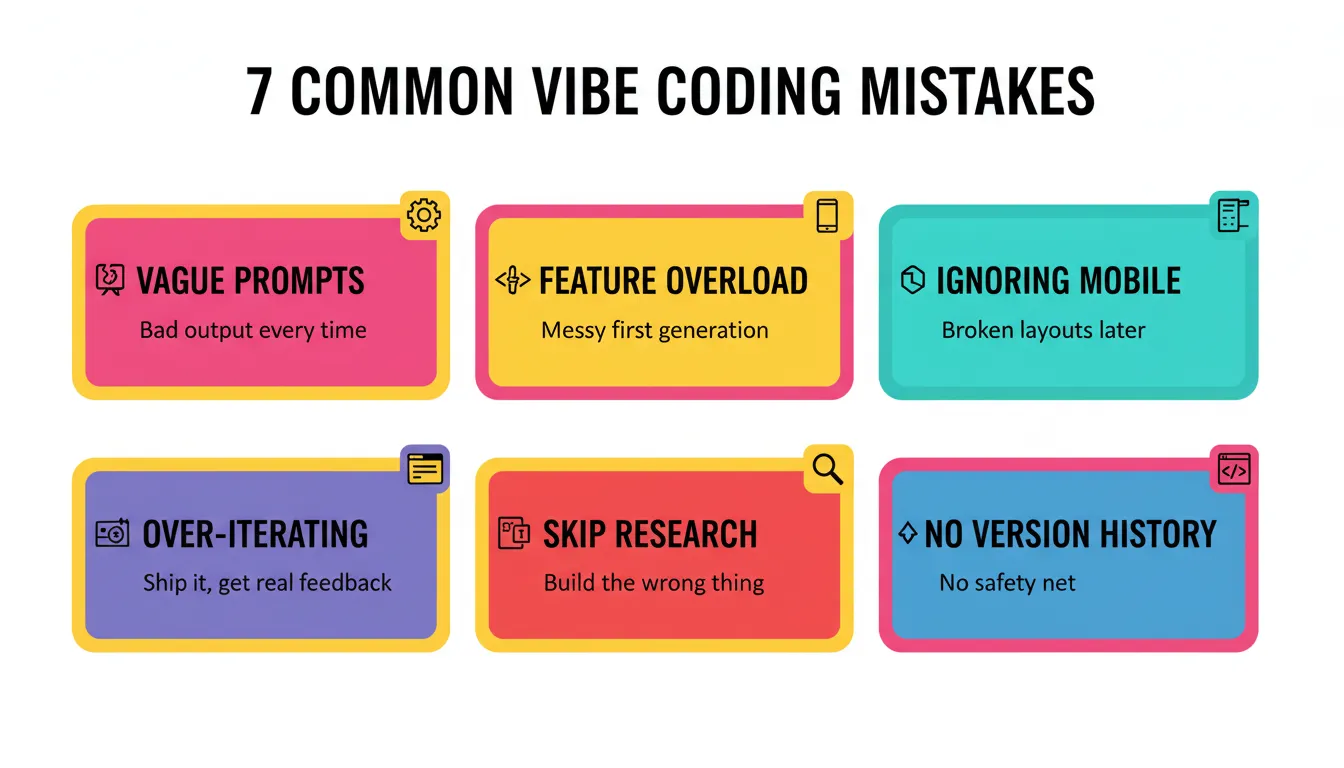
Most problems in a vibe coding workflow come from a small set of repeatable mistakes.
Front-loading every feature in one prompt produces a bloated, inconsistent first generation. Start with three to five core features. Add more through chat after the foundation is solid.
Making many changes without testing makes bugs hard to trace. Test after every significant change. If something breaks and you have made five changes since the last test, you have no idea which one caused the problem.
Vague iteration prompts produce vague results. "Make it better" tells the AI nothing. Be specific: "Change the font to Inter, increase the heading size to 32px, and add more whitespace between sections."
Ignoring mobile until the end creates rework. If your product needs to work on mobile, specify that from the start. Include "mobile-first" or "responsive design" in your initial prompt and test mobile at every iteration.
Over-iterating instead of shipping slows you down. At some point, the product is good enough to get in front of real users. Ship it. The vibe coding workflow is designed for speed. Use that speed to get real signal, not to perfect something in isolation.
Skipping the thinking before the build is the most expensive mistake. A fast build of the wrong product is still the wrong product. The vibe coding workflow amplifies the quality of your thinking. If the thinking is weak, the output will be too.
Not using version history removes your safety net. Every significant change should be checkpointed. Good AI platforms maintain full version history with one-click rollback. Use it every time.
Rocket's post on common vibe coding mistakes covers each of these with specific examples and fixes.
Vibe Coding vs. Vibe Solutioning: The Difference That Matters
Vibe coding answers "how do I build this?" Vibe Solutioning answers "what should I build?" That distinction sounds simple. Its consequences are enormous.
Vibe coding is real and it matters. The ability to describe what you want to build and have AI generate a working product is a genuine shift. The cost of building dropped. The speed from idea to prototype compressed from months to hours.
What vibe coding does not solve: it assumes the thinking has already happened. It assumes the idea is worth building, the market is understood, and the competition is mapped. It starts at execution and goes fast from there. For most builders, that assumption is wrong.
| Dimension | Vibe Coding | Vibe Solutioning |
|---|---|---|
| Starting point | The prompt | "Is this worth building?" |
| Pre-build intelligence | None | Market research and competitive analysis |
| Context between tasks | Lost between sessions | Persistent and compound across every task |
| Platform management | You manage it | The platform manages itself |
| Output | Working product | Working product built on validated thinking |
Coding was never the bottleneck. Deciding what to code was. Vibe coding solves the last mile. Vibe Solutioning solves the first mile. Rocket's post on vibe solutioning for smarter product growth explains the full arc in detail.
How Rocket Takes the Vibe Coding Workflow Further
Rocket is where the vibe coding workflow starts before the first prompt. It is the world's first Vibe Solutioning platform. It covers the complete arc from strategic intelligence to execution to ongoing business operation in a single workspace. 1.5 million people have tried Rocket across 180 countries.
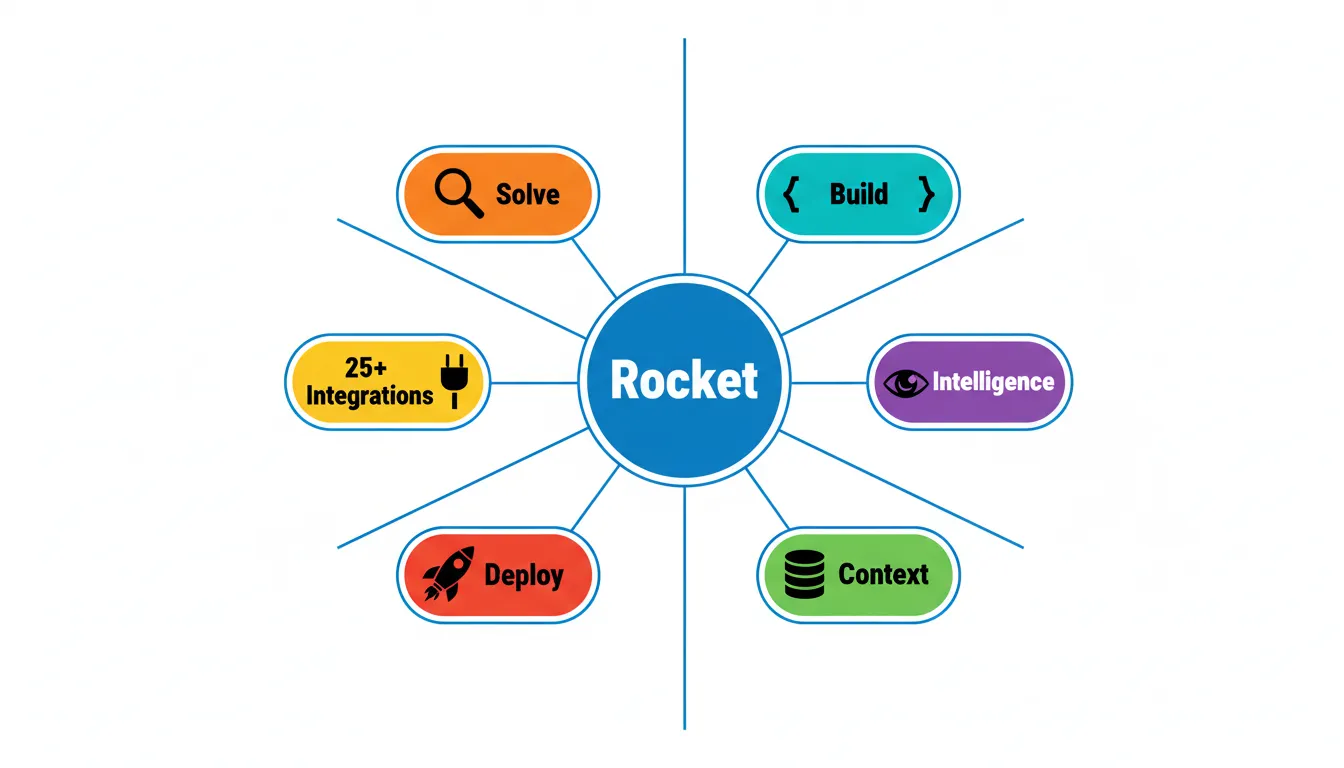
Solve answers the questions that matter before you build. Is this worth building? Who is already in this market? What should the first version include? The output is a structured analysis with findings, evidence, and clear recommendations. That thinking carries forward into every build task.
Build generates production-grade web apps in Next.js and mobile apps in Flutter. The design decisions are intentional: considered typography, real visual hierarchy, and identity specific to the product. Nothing reads as AI-made. Most apps generate in one to three minutes.
Context means every task in a Rocket project inherits the full context of everything the team has done. The market research from Solve is present when the developer opens the build task. Every task makes the next one smarter.
Intelligence provides continuous competitive monitoring across every public platform a competitor operates on. Not just what changed, but what it means for your product decisions.
Deploy is one click to staging, one click to production. Custom domain connection, automatic HTTPS, full version history, and one-click rollback. Built-in analytics track visitors, conversions, and Core Web Vitals from day one.
25 or more integrations including Stripe, Supabase, Google Analytics, Notion, Linear, Airtable, Mailchimp, and Mixpanel authenticate once and flow into every build.
The difference between Rocket and other vibe coding tools is not just speed. It is the foundation the build starts from. Other tools start at line one. Rocket starts before it.
For a closer look at how Rocket handles the build step, the Rocket build overview covers creation methods, iteration modes, and deployment in full detail.
The Vibe Coding Workflow in Practice: Real Examples
Example 1: SaaS Operations Dashboard
A 10-person operations team needs a dashboard to track tasks, team calendar, KPIs, and reporting. They have no developer on the team.
Prompt: "Build an operations dashboard for a 10-person team. Key screens: task tracker, team calendar, KPI overview, and a simple reporting page. Connect to Airtable for data. Dark theme."
Rocket generates a working Next.js app with all four screens, Airtable integration, and dark theme in under three minutes. The team iterates via chat to add a notification bell, resize KPI cards, and fix the mobile layout. The product is live in under two hours.
Example 2: E-commerce Store for a Small Retailer
A boutique clothing retailer wants to move online. No technical team. Budget is tight.
Prompt: "Build an e-commerce store for a women's boutique clothing brand. Product catalog with categories, shopping cart, Stripe checkout, order confirmation emails, and a simple admin panel to manage products. Clean, minimal design with a warm color palette."
Rocket generates a working storefront with all flows in under five minutes. The team connects Stripe in live mode, tests the checkout flow, and connects a custom domain. Total time from idea to live store: under four hours.
Example 3: Internal Tool for a Marketing Agency
A marketing agency needs a client reporting dashboard that pulls data from multiple sources and presents it in a branded format.
Prompt: "Build a client reporting dashboard for a marketing agency. Key screens: overview with traffic and conversion metrics, campaign performance breakdown, and a report export page. Connect to Google Analytics. Professional, branded design."
Rocket generates a working dashboard with all screens and Google Analytics connector. The team adds agency branding, adjusts metric cards, and adds a date range selector. Total time from idea to client demo: under three hours.
The Future of the Vibe Coding Workflow
The Stack Overflow 2024 Developer Survey found that 81% of developers expect AI tools to be more integrated into how they document code, 80% in how they test code, and 76% in how they write code within the next year. The direction is clear.
Several forces are accelerating this shift. AI model quality is improving every quarter. The gap between AI-generated code and human-written code is narrowing. The builder profile is expanding beyond technical founders to marketing teams, operations leaders, and business analysts. Platform sophistication is increasing, with pre-build intelligence, persistent context, and team collaboration becoming standard expectations.
The teams that figure out how to use the vibe coding workflow well will ship faster, iterate more, and build products that are actually worth building. The tools are here. The question is whether you are using them with a foundation or without one.
For a broader view of where AI-powered development is heading, Rocket's post on how AI is changing product development covers the structural shifts in detail.
Your Complete Vibe Coding Workflow Reference
Quick-Start Checklist
Before you open any AI builder, answer these questions:
- What problem am I solving and who has it?
- What are the three to five core features for day one?
- Who are the competitors and what are they missing?
- What does success look like in 30 days?
- What integrations does this product need on day one?
Iteration Checklist
After every significant change:
- Does the change work as expected?
- Did it break anything that was working before?
- Does the mobile layout still hold?
- Are all integrations still connected?
- Is this good enough to ship, or is another round needed?
The Vibe Coding Workflow Is the New Default
The vibe coding workflow has permanently changed how products get built. The teams that master it will ship faster, iterate more, and reach users before competitors still waiting for their first sprint to finish.
Speed without direction is waste. The builders who win combine the speed of the vibe coding workflow with the thinking that makes the build worth doing. That combination is what separates products that ship and grow from products that ship and stall.
Rocket.new is where that combination lives. It is the world's first Vibe Solutioning platform. Research what to build, build it with production-grade AI, and monitor what matters, all in one place with shared compound context. No tool switching. No context lost between steps. No starting from zero.
The vibe coding workflow starts before the first prompt. Start building for free on Rocket and see what it looks like when the thinking and the build happen in the same place.
Table of contents
- -The Origin of Vibe Coding
- -Who Uses a Vibe Coding Workflow?
- -Why the Vibe Coding Workflow is Changing Development
- -The Speed Advantage
- -The 5 Stages of an Effective Vibe Coding Workflow
- -Stage 1: Ideation and Scoping
- -Stage 2: Prompt Crafting
- -Stage 3: AI Generation
- -Stage 4: Iteration and Refinement
- -Stage 5: Deployment
- -Vibe Coding Workflow vs. Traditional Development
- -Vibe Coding Workflow Use Cases by Industry
- -Common Vibe Coding Workflow Mistakes to Avoid
- -Vibe Coding vs. Vibe Solutioning: The Difference That Matters
- -How Rocket Takes the Vibe Coding Workflow Further
- -The Vibe Coding Workflow in Practice: Real Examples
- -Example 1: SaaS Operations Dashboard
- -Example 2: E-commerce Store for a Small Retailer
- -Example 3: Internal Tool for a Marketing Agency
- -The Future of the Vibe Coding Workflow
- -Your Complete Vibe Coding Workflow Reference
- -Quick-Start Checklist
- -Iteration Checklist
- -The Vibe Coding Workflow Is the New Default