The best AI prompts to build AI agent systems define role, context, constraints, output format, and tool access in one structured block. This turns vague instructions into production-ready automated workflows that hold up under real user traffic.
Why do some AI agents handle complex tasks reliably while others fail after two messages?
The difference is rarely the model. According to MarketsandMarkets research, the AI agents market will reach $52.62 billion by 2030 at a 46.3% CAGR. Teams investing in structured prompt design are pulling ahead of those relying on generic instructions.
This blog covers the prompt patterns, templates, and frameworks that separate production-ready agents from experiments that never ship.
What Makes a Prompt Effective for AI Agent Development?
Prompt quality determines agent quality. A vague instruction produces unpredictable behavior. A structured prompt creates an agent that acts with purpose across every interaction.
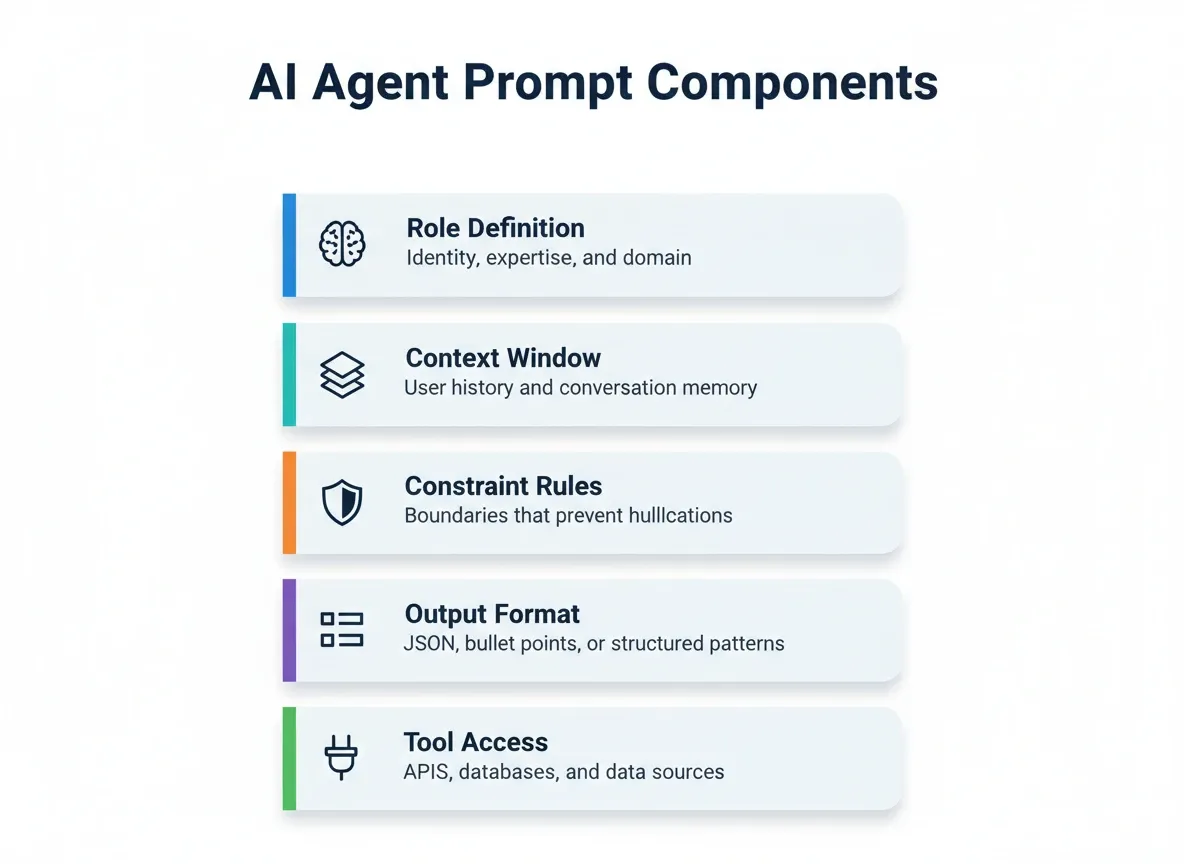
The anatomy of an effective AI agent prompt includes five components working together:
-
Role definition gives the agent a specific identity, domain expertise, and interaction style to guide its reasoning
-
Context window provides background data, user history, and conversation memory the agent references before responding
-
Constraint rules set boundaries on what the agent can and cannot do, preventing hallucinations and off-topic behavior
-
Output format specifies the structure of responses, such as JSON, bullet points, or structured response patterns
-
Tool access declares which external APIs, databases, and data sources the agent can call during task execution
Without these five elements, agents default to generic behavior. The more specific your prompt structure, the more reliable your agent outputs become across varied user inputs.
How Do Role Definitions Shape Agent Behavior?
System prompts act as the agent's operating manual. They define who the agent is, how it should act, and what tone to maintain across every conversation turn.
A well-written role definition does three things. First, it sets the expertise boundary so the agent responds only within its domain. Second, it establishes voice and interaction style, such as formal for technical support or friendly for onboarding. Third, it defines decision authority, meaning what the agent can decide alone versus what requires human confirmation.
When role definitions are missing or vague, agents produce generic responses that lack the specificity users expect. The system prompt is not optional context. It is the foundation every other instruction builds on.
What Is the Difference Between a System Prompt and a User Prompt?
A system prompt is injected server-side before the conversation begins. It defines the agent's identity, constraints, and capabilities. A user prompt is the message typed at runtime by the end user.
System prompts are never visible to end users. They should never be constructed from client-side input. Building system prompts from user input creates prompt injection vulnerabilities that can override the agent's intended behavior entirely.
For production agents, always keep these two layers structurally separate. The system prompt should also include the current user's name, role, and the agent's available tools, all injected dynamically server-side.
Why Does Context Management Matter for Agent Performance?
Maintaining context across a conversation separates useful agents from frustrating ones. Without memory, every user message arrives in isolation. This forces users to repeat information they already shared.
Effective context management means the agent tracks three things. It tracks conversation history, including what the user said and how the agent responded. It tracks user preferences such as communication style and data formats. It also tracks session state, including which subtasks are complete and what inputs are still needed.
The prompt itself should instruct the agent on what to remember, what to summarize, and when to request clarification. Agents that maintain context across multi-turn conversations produce responses that feel connected rather than disconnected.
Prompt Templates for Common AI Agent Workflows
Moving from theory to practice requires templates. Below are tested prompt structures for the most common agent workflows teams deploy today.
According to Salesforce's State of IT report, 83% of developers say AI agents are fundamentally changing how organizations operate. That shift is driven by teams using structured prompt templates rather than ad-hoc instructions.
For teams just starting out, reviewing best prompts for app building provides a useful foundation before moving into agent-specific patterns.
Customer Support Agent Prompts
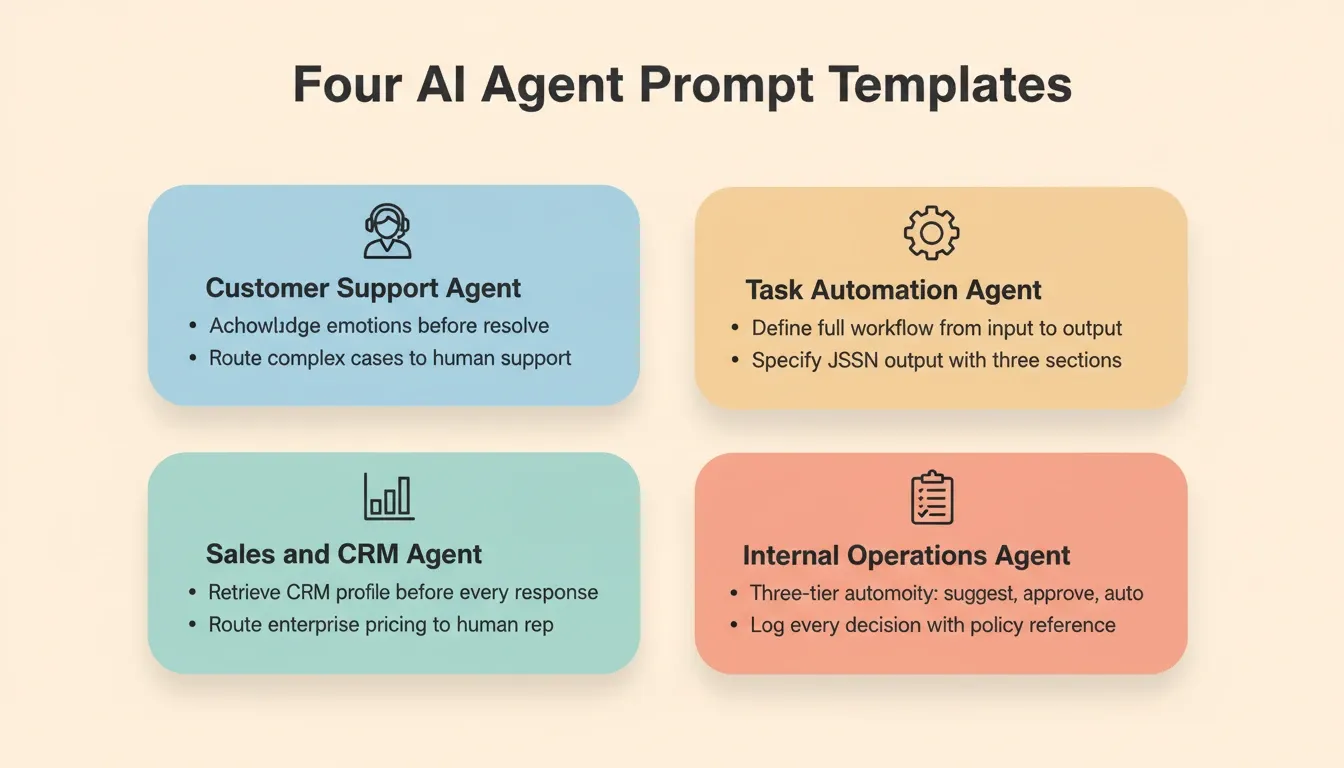
Customer-facing agents need prompts that balance helpfulness with safety. The prompt must instruct the agent to acknowledge emotional cues, ask clarifying questions before acting, and route complex cases to human support.
Example prompt structure for a support agent:
-
Role: "You are a customer support specialist for [product]. You can check order status, process refunds under $50, and schedule follow-ups."
-
Context instructions: "Reference the user's previous interactions and account history. If the user mentions frustration, acknowledge it before proceeding to resolution."
-
Constraints: "Never share internal pricing details. Never promise delivery dates you cannot confirm. If the user asks about topics outside your scope, connect them with technical support."
-
Format: "Reply in 2 to 3 sentences. Use the user's first name. End each message with a clear next step or confirmation."
This structure gives the agent enough room to adapt while keeping interaction boundaries tight.
Task Automation and Data Processing Agent Prompts
Agents handling task automation need prompts that define the complete workflow from input to output. This includes what to do when data sources return unexpected results.
Example prompt structure for an automation agent:
-
Role: "You are a data processing agent responsible for ingesting CSV file inputs, validating entries against business rules, and generating structured reports."
-
Instructions: "Process each file row by row. Flag entries missing required fields. Aggregate results into a summary with actionable insights for stakeholders."
-
Format: "Output a JSON structured response with three sections: validated records, flagged records with error descriptions, and a summary statistics block."
-
Constraints: "Do not modify source data. Log every decision. If more than 20% of records fail validation, pause and request human review."
The key difference between a reliable automation agent and a fragile one is how well the prompt handles edge cases in the input data.
Sales and CRM Agent Prompts
Sales agents need prompts that balance personalization with compliance. A poorly scoped sales agent will either hallucinate pricing or fail to escalate high-value opportunities.
Example prompt structure for a sales agent:
-
Role: "You are a sales development agent for [company]. You have access to the CRM, the current pricing sheet, and the approved objection-handling playbook."
-
Context instructions: "Before responding to any prospect, retrieve their company profile, previous interactions, and deal stage from the CRM. Personalize every message using this context."
-
Constraints: "Never quote a price that differs from the current pricing sheet. Never promise a feature not in the approved roadmap. If a prospect asks about enterprise pricing, route to a human sales rep immediately."
-
Format: "Keep outreach messages under 120 words. Use the prospect's first name. Include one specific reference to their company or recent news."
Internal Operations Agent Prompts
Operational agents handle HR requests, IT tickets, and finance approvals. They require the tightest constraint rules because errors affect real employees and real money.
Example prompt structure for an operations agent:
-
Role: "You are an internal operations agent for [company]. You handle employee leave requests, IT access provisioning, and expense pre-approvals."
-
Autonomy tiers: "For requests under $100 matching policy rules exactly: approve automatically. For requests between $100 and $500: approve with manager notification. For requests above $500 or outside policy: route to human review with a full context summary."
-
Constraints: "Never approve any request that would give a single employee access to both financial systems and HR records simultaneously. Log every decision with a timestamp and policy reference."
-
Format: "Respond to the employee in plain language. Explain the outcome and the reason. If routing to human review, give the employee an estimated response time."
How to Structure Prompts for Multi-Agent Systems
When multiple AI agents collaborate on a single workflow, prompt structure becomes the coordination mechanism. Each agent needs a system prompt that defines its role, what inputs it accepts, and how it communicates with other agents.
As IBM's AI research describes, "Multi-agent frameworks tend to outperform singular agents because the more plans of action are available to an agent, the more learning and reflection occur." This insight from Anna Gutowska, IBM AI Engineer, highlights why specialized prompts per agent consistently produce better results than one monolithic prompt.
| Factor | Single Agent Prompts | Multi-Agent System Prompts |
|---|---|---|
| Scope | One prompt covers all tasks and tools | Each agent gets a focused prompt for one domain |
| Context sharing | All context lives in one conversation thread | Agents pass structured data between each other |
| Tool access | One agent manages all tool usage | Each agent accesses only its assigned tools |
| Error handling | Single point of failure if prompt is flawed | Agents can validate each other's outputs |
| Complexity ceiling | Limited by single context window | Scales across multiple parallel operations |
| Coordination | Not needed | Requires an orchestrator agent with routing instructions |
Multi-agent system prompts must include explicit instructions for handoff. The routing agent needs to know which inputs map to which specialist agent, what format to use when passing context, and when to escalate to a human operator.
What Is an Orchestrator Agent and How Do You Prompt It?
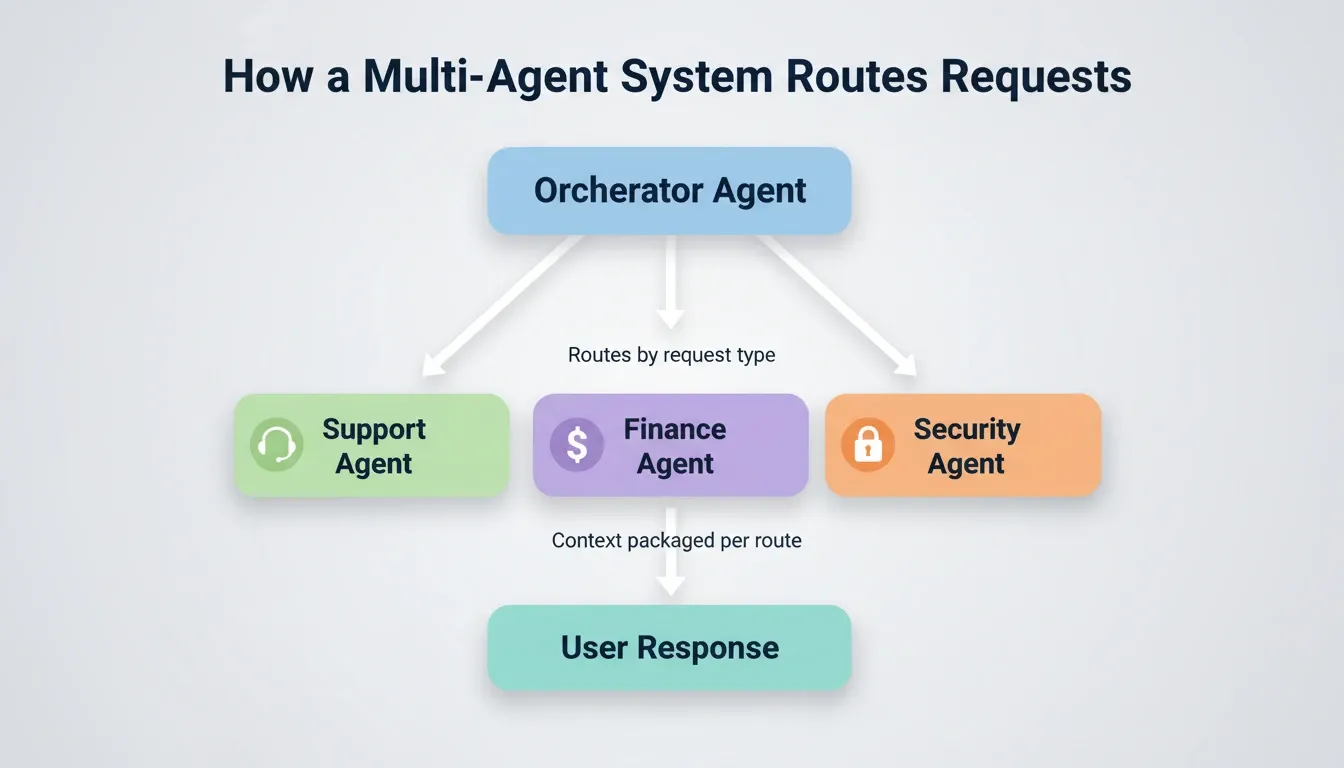
An orchestrator agent is the coordinator in a multi-agent system. It receives the initial user input, decides which specialist agent to route it to, passes the relevant context, and consolidates the output.
A well-structured orchestrator prompt includes four key elements. First, routing rules such as: "If the user's request involves a refund, route to the Finance Agent. If it involves a technical error, route to the Support Agent." Second, context packaging: "When routing, include the user's account tier, the full conversation history, and the specific data fields the specialist agent will need." Third, fallback behavior: "If the request does not match any routing rule, ask the user one clarifying question. Do not guess the category." Fourth, output consolidation: "After receiving the specialist agent's response, reformat it for the user in plain language. Remove any internal reference codes before sending."
Teams building AI agents without code for business automation find that orchestrator prompt design is where most multi-agent projects either hold together or fall apart.
How to Test and Iterate on Agent Prompts
Shipping the first version of an agent prompt is just the starting point. Effective agents improve through systematic testing, measurement, and refinement cycles. These cycles identify gaps between expected and actual behavior.
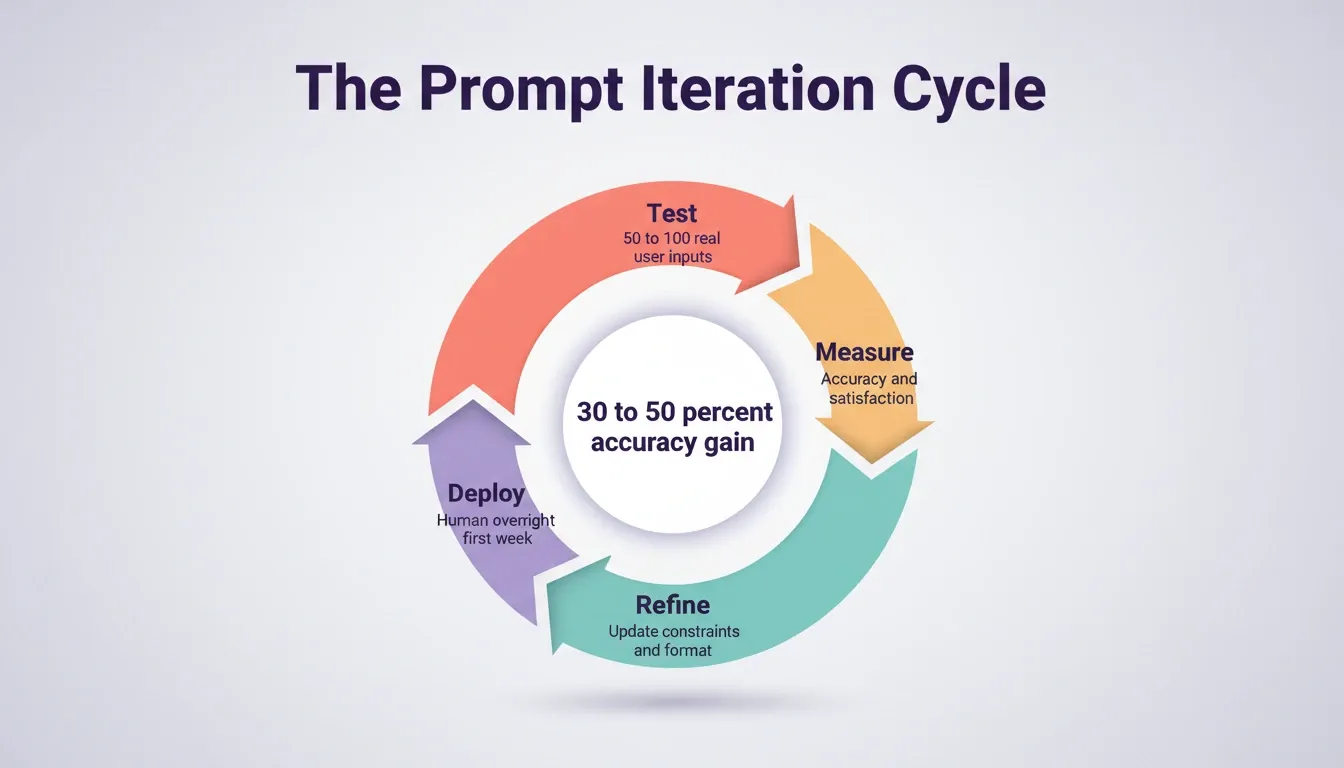
The iteration process follows four stages. First, test against real inputs by running the agent through 50 to 100 historical user messages. Second, measure what matters by tracking accuracy, response time, and user satisfaction scores. Third, refine based on data by updating constraints, adding missing context instructions, and fixing steps where the agent failed. Fourth, deploy and monitor by pushing the refined prompt to production with human oversight for the first week.
Teams that follow this cycle consistently report 30 to 50% improvement in agent accuracy within the first three iterations. The gains compound because each round surfaces new patterns the previous version missed.
Handling Edge Cases and Maintaining Safety
Every agent encounters inputs outside its intended scope. The prompt must define what happens when the system cannot handle a request, when user input contains potentially harmful content, or when the agent reaches a decision boundary.
Safety-oriented prompt instructions include three types. Explicit fallbacks: "If you are unsure about any claim, state your uncertainty level rather than guessing. Never present unverified data as fact." Scope boundaries: "You manage scheduling and calendar access. Do not provide medical, legal, or financial advice under any circumstances." Escalation triggers: "If the user expresses urgency about safety or billing disputes above $500, immediately route to a human agent with a summary."
Agents without safety constraints are a liability in production. A single hallucinated response about a billing issue or a compliance question can damage trust permanently.
Measuring Agent Performance Against Business Outcomes
The best agent prompts connect directly to business outcomes. Measuring performance means tracking whether the agent is helping users complete their goals, not just whether it responds.
Key metrics to build into your agent prompt system include four areas. Task completion rate measures the percentage of user requests the agent resolves without human handoff. Conversion rates track how often agent interactions lead to the desired business outcome. User satisfaction is measured through follow-up surveys or simple thumbs up/down on responses. Response accuracy is scored by sampling agent responses and comparing them against expert human answers.
An agent serving enterprise customers needs different prompts than one handling self-serve users. Measurement data reveals which segments need which adjustments and gives you the evidence to make those changes confidently.
Prompt Engineering Mistakes That Break AI Agents
Even experienced developers make prompt engineering errors that cause agents to fail in production. Understanding common failure patterns helps you avoid them before they reach users.
The most common prompt engineering mistakes and their fixes are as follows. Overloading a single prompt by trying to make one agent handle every workflow creates confusion. Instead, split complex workflows across multiple specialized system prompts. Missing edge case instructions means agents that work on happy-path examples break on unexpected inputs. Test with messy, real-world data before deploying. No format specification means agents switch between styles randomly across conversations. Define the response structure explicitly. Ignoring context limits means long prompts that exceed the model's context window get truncated. Prioritize instructions by importance and manage memory actively. Vague constraint language such as telling an agent to "be careful" means nothing. Write specific rules instead, such as "Do not process refunds above $100 without manager approval." Client-side system prompt construction creates prompt injection vulnerabilities. Always inject system prompts server-side.
Teams using AI coding agents for startups find that most debugging time traces back to one of these categories rather than model limitations.
Where Rocket Turns Prompts Into Production Agents
Writing effective prompts is one half of building AI agents. The other half is turning those prompts into working, deployed systems that handle real user traffic. Most teams hit a wall between "this prompt works in a playground" and "this agent runs reliably in production."
Rocket is a vibe solutioning platform. It is the first platform where business thinking and building happen in the same place. 1.5 million people have tried Rocket across 180 countries. The platform is organized around three pillars that share context and feed into each other.
Solve: Validate Before You Build
Before writing a single prompt, validate the business case. Type a question in plain language such as "Which of our customer support processes has the highest automation ROI?" and Solve returns a structured, evidence-backed report. It delivers an executive summary, supporting data, and actionable recommendations drawn from 150+ sources simultaneously.
Most agent projects fail not from poor execution but from automating the wrong process. Solve eliminates that risk. Research from Solve feeds directly into Build, so your agent starts with full context already in place. No re-explaining. No context lost between research and execution.
Build: Generate Production-Ready Agents and Apps
Build is Rocket's AI app builder. Describe what you want in plain language and Rocket generates a fully functional application. The output includes UI, navigation, logic, and production-ready code. Web applications are built in Next.js. Mobile applications are built in Flutter.
Every build ships with SEO-ready structure, WCAG accessibility compliance, GDPR coverage, and performance optimization by default. Over 25 integrations connect directly into generation, including Stripe, OpenAI, Anthropic, Gemini, Supabase, Google Analytics, Mixpanel, Mailchimp, SendGrid, Notion, Linear, Airtable, Typeform, and Cal.com. Authenticate once and they flow into every build.
You can start from multiple points: from an idea in plain language, from an attachment such as a screenshot or PDF spec, from a Figma design, from an existing GitHub repository, or from a template at zero credits. After generation, iterate through Chat, Visual Edit, or Code. There is no change limit.
Intelligence: Monitor What Matters After You Ship
Intelligence watches competitors across nine signal pillars: website, social, news, GTM, traffic, product, people, business, and reviews. It tells you not just what changed but what it means for your business specifically.
This closes the loop. Intelligence surfaces a competitor change. Solve analyzes the implications. Build implements the response. The three pillars share context and feed into each other. Nothing is re-explained. Everything compounds.
Other vibe coding tools generate frontend prototypes but lack backend logic, deployment infrastructure, and the research layer that validates what to build. Code-focused tools accelerate writing but assume you already know the architecture and handle deployment yourself. None connect pre-build research to the actual build process. Rocket connects thinking to building to monitoring in one shared context that compounds over time.
Build Smarter AI Agents With Better Prompts
The prompts you write today determine how well your AI agents perform tomorrow. Every specific role definition, every context instruction, and every constraint rule compounds into an agent that handles real workflows reliably.
The gap between a playground experiment and a production agent comes down to structure. Start with clear role definitions, add layered context, define your constraints, and iterate based on real user data.
AI prompts to build AI agent systems that stay in production share one trait: they were written by teams that validated first, built with full context, and iterated on evidence. As reasoning models continue to improve, the scope of what agents can handle autonomously will expand. The teams that build on structured prompt foundations will adapt faster than those starting from scratch each time.
Type what you want your agent to do. Rocket handles the research, the architecture, the code, and the deployment.
Table of contents
- -What Makes a Prompt Effective for AI Agent Development?
- -How Do Role Definitions Shape Agent Behavior?
- -What Is the Difference Between a System Prompt and a User Prompt?
- -Why Does Context Management Matter for Agent Performance?
- -Prompt Templates for Common AI Agent Workflows
- -Customer Support Agent Prompts
- -Task Automation and Data Processing Agent Prompts
- -Sales and CRM Agent Prompts
- -Internal Operations Agent Prompts
- -How to Structure Prompts for Multi-Agent Systems
- -What Is an Orchestrator Agent and How Do You Prompt It?
- -How to Test and Iterate on Agent Prompts
- -Handling Edge Cases and Maintaining Safety
- -Measuring Agent Performance Against Business Outcomes
- -Prompt Engineering Mistakes That Break AI Agents
- -Where Rocket Turns Prompts Into Production Agents
- -Solve: Validate Before You Build
- -Build: Generate Production-Ready Agents and Apps
- -Intelligence: Monitor What Matters After You Ship
- -Build Smarter AI Agents With Better Prompts