
20 build-order AI prompts to generate test cases, from Vitest config and auth smoke tests through Playwright E2E flows and IDOR security scans. Copy, adapt stack references, and ship a production-ready test suite.
These 20 structured AI prompts to generate test cases follow a five-phase build order, from Vitest config through IDOR security scans. Copy them into your AI tool, adapt the stack references, and ship a production-ready test suite. Rocket is the fastest way to go from prompt to deployed, tested app.
Quick Reference: All 20 Prompts by Phase
| Phase | Prompt Focus | Key Testing Area |
|---|---|---|
| Foundation | Vitest/Jest config | Environment setup |
| Foundation | File structure | Project structure |
| Foundation | Auth smoke tests | Login and session |
| Foundation | Route smoke tests | HTTP status codes |
| Unit | Component render | UI output |
| Unit | Form validation | Edge cases |
| Unit | Utility boundaries | Numeric limits |
| Unit | API failure states | Error handling |
| Integration | DB query with seed | Test data |
| Integration | Auth vs unauth routes | API testing |
| Integration | Multi-step form | Data persistence |
| Integration | RBAC | Access control |
| E2E | Signup and login | User flow |
| E2E | Checkout | Cart to confirmation |
| E2E | Admin CRUD | Dashboard operations |
| E2E | Flutter mobile layout | Responsive UI |
| Advanced | Regression from bug | Bug report to test |
| Advanced | Query performance | Response time |
| Advanced | WCAG 2.1 AA | Accessibility |
| Advanced | IDOR and SQL injection | Security testing |
Why Prompt Order Determines Test Suite Quality
How much of your sprint gets consumed rewriting the same auth and routing tests for every new feature? According to Stack Overflow's 2024 developer survey, 76% of developers already use or plan to use AI tools in their development process, yet only 27% apply those tools to testing code. That gap is where good prompts make the biggest difference.
The distance between throwaway AI output and production-ready test code comes down to prompt quality. When you specify your framework, file conventions, and expected result format, the output shifts from generic boilerplate to something a senior QA engineer would review and merge. This article delivers 20 prompts in build order, from the first config file to the last security scan, each with an expected output, a what-to-check note, and a follow-up refinement prompt.
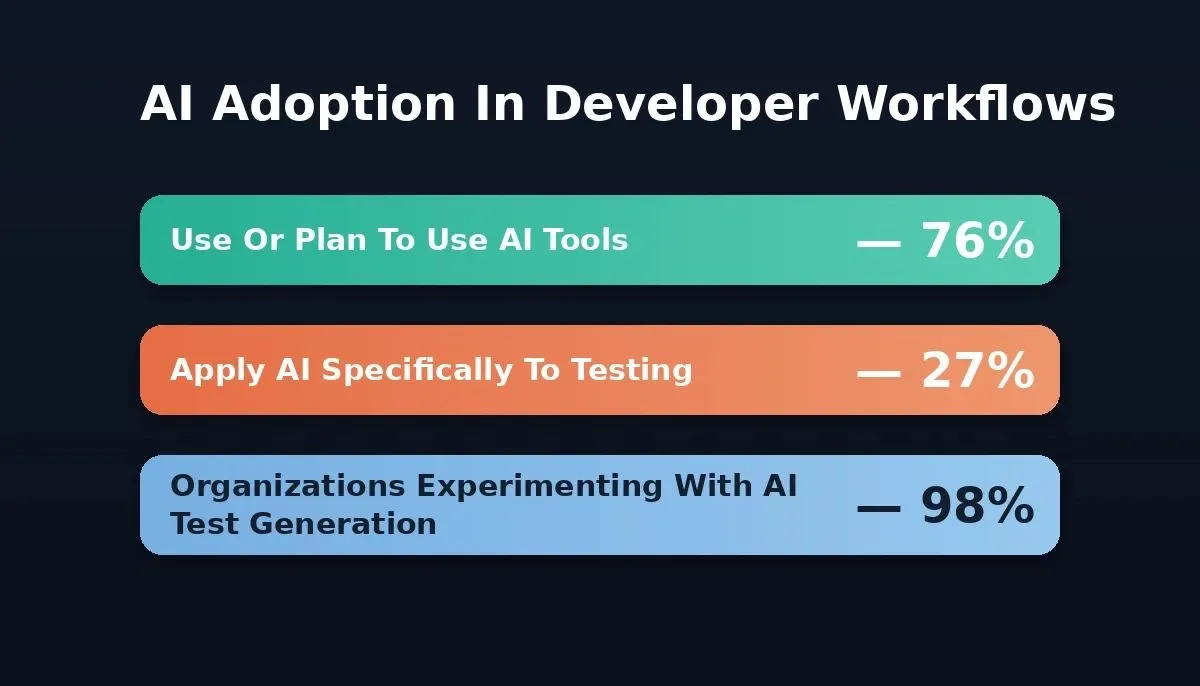
AI adoption in software testing remains far behind general developer tool usage, creating a significant opportunity gap.
Why Does the Order of Your Testing Prompts Matter?
Prompt order matters because each testing phase depends on the outputs of the phase before it. Most testing guides dump a flat list of prompts with no sense of build sequence. That approach leads to test suites with coverage gaps, broken imports, and flaky runs that nobody trusts.
A structured test strategy follows the same order a QA team would use during a real software testing cycle. You set up the environment first, write small isolated checks next, then layer on broader test scenarios until the full system is covered.
Each phase feeds the next: foundation configs are imported by unit tests, unit patterns feed integration tests, and integration state feeds E2E flows.
How Do Testing Phases Build on Each Other?
Each phase produces the shared fixtures, configs, and patterns that the next phase imports. Foundation prompts create the environment details and project structure that every later test references. Unit prompts depend on that structure to isolate components. Integration prompts combine those units with real databases and API routes.
End-to-end prompts replay full user journeys across the assembled system. Advanced prompts then target the coverage gaps that remain: regressions, performance bottlenecks, and security flaws.
When your prompt engineering best practices follow this build order, each phase produces test data and patterns that feed the next one.
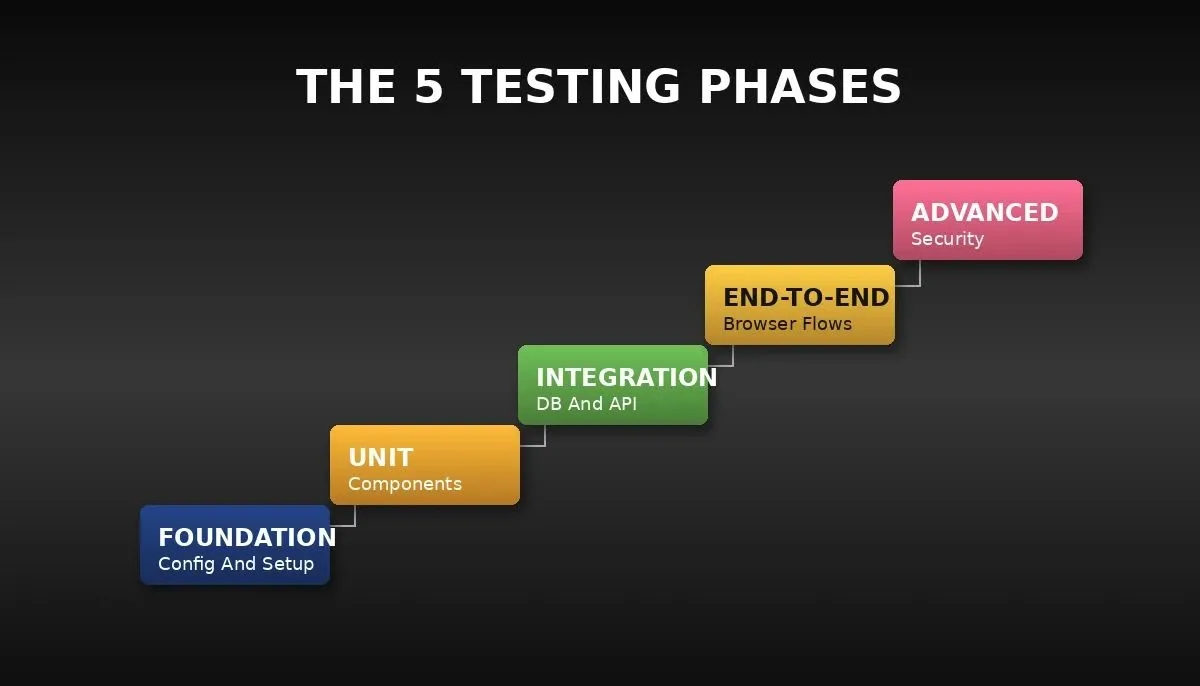
The five testing phases build on each other sequentially. Skipping a phase creates gaps that surface as broken imports or flaky runs.
Foundation Prompts: Setting Up Your Testing Environment
Foundation prompts establish the shared config, file structure, and smoke tests that every subsequent prompt in this guide depends on. Before writing a single assertion, your AI tool needs the testing environment, framework versions, and file naming conventions your project uses. These four prompts create that foundation.
Prompt 1 - Vitest and Jest Environment Configuration
"Act as a senior QA engineer specializing in JavaScript testing. Generate a Vitest config for a Next.js 14 project using TypeScript, path aliases mapped to@/, and a jsdom test environment. Include setup files for global mocks of next/navigation and next/image. Output as a complete vitest.config.ts with inline comments."
-
Expected output: A ready-to-paste config file with resolve.alias, globals: true, and setup file references
-
What to check: Confirm path aliases match your tsconfig.json and the test environment aligns with your rendering model
-
Follow-up: "Add coverage thresholds of 80% for branches, functions, lines, and statements"
Prompt 2 - Test File Structure for Next.js Projects
"Generate a test file naming convention and folder structure for a Next.js App Router project. Place unit tests in__tests__folders alongside source files. Place integration and E2E tests in a top-level tests/ directory. Include example file paths for aLoginFormcomponent, an API route handler, and a Playwright spec."
-
Expected output: A tree-style directory listing with six to eight example paths
-
What to check: Verify the structure avoids test file duplication and matches your linter rules
-
Follow-up: "Add a shared fixtures/ folder inside tests/ for reusable seed data and test case templates"
Prompt 3 - Auth Baseline Smoke Tests
"Write four smoke test cases in Vitest for a Supabase auth module. Test thatsignUpreturns a user object with a valid session,signInwith correct credentials returns a 200,signInwith wrong credentials returns 401, andsignOutclears the session token. Use describe and it blocks."
-
Expected output: Four passing test stubs with assertions on status codes and login state
-
What to check: Confirm the test suite mocks the Supabase client rather than calling the live API during test execution
-
Follow-up: "Add a fifth test for expired session token handling that expects a redirect to the login page"
Prompt 4 - Routing Smoke Tests
"Generate smoke tests for five Next.js App Router routes: /, /dashboard, /settings, /api/health, and /login. Each test should verify the correct HTTP status code and confirm the page renders the expected heading. Use a fetch-based approach, not a full browser."
-
Expected output: Five concise test blocks with status assertions and body content checks
-
What to check: Confirm routes requiring auth return a redirect rather than 200 for unauthenticated users
-
Follow-up: "Add a test scenario for a 404 response on /nonexistent-path"
With the foundation locked, every remaining prompt can import shared configs and reference known file paths. That test design consistency prevents the broken-import errors that plague AI generated test suites. Understanding how to generate an authentication system using AI can also help you write stronger auth smoke tests from the start.
What Unit Testing Prompts Catch Bugs Others Miss?
Unit testing prompts catch bugs others miss by targeting specific boundary values and edge cases that manual testing skips. A vague prompt like "write tests for my form" produces shallow coverage. Specifying component names, prop shapes, and exact boundary values shifts the output from generic boilerplate to structured test cases worth keeping.
Here is a concrete example of the difference prompt specificity makes: a prompt that says "test the discount function" returns two or three happy-path tests. A prompt that names the function signature, lists seven boundary conditions, and specifiesexpect().toBeCloseTo()for floating-point returns nine targeted tests that catch real rounding bugs.
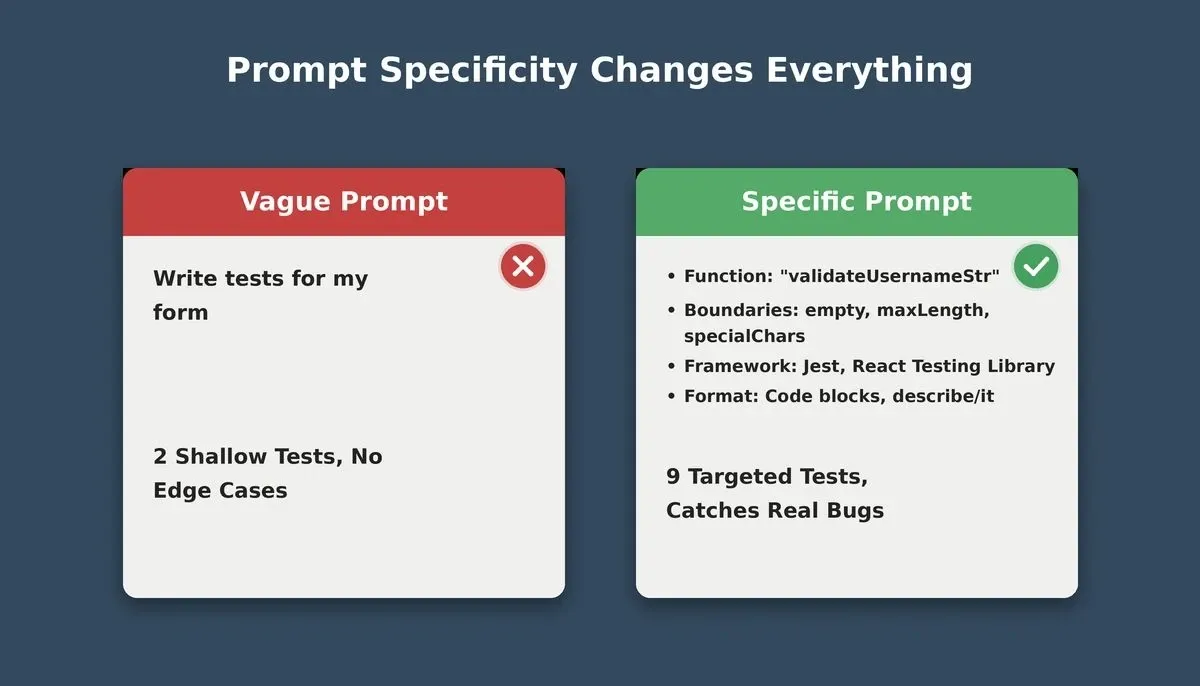
Prompt specificity is the single biggest lever for improving AI-generated test quality.
Prompt 5 - Component Render Verification
"Write Vitest tests using React Testing Library for a UserProfileCard component that accepts name (string), avatar (URL string), and role (enum: admin, editor, viewer). Test that it renders all three props, displays a fallback avatar when the URL is empty, and applies the correct CSS class per role."
-
Expected output: Three or four it blocks covering happy path, empty avatar fallback, and role-based class assignment
-
What to check: Verify queries use accessible selectors like getByRole, not fragile class selectors
-
Follow-up: "Add negative test cases for null name and an invalid URL as avatar"
Prompt 6 - Form Validation Edge Cases
"Generate comprehensive test cases for an email and password validation function. Cover: valid email format, missing @ symbol, domain without TLD, email exceeding 254 characters, empty string, special characters. For passwords: min length 8, max 128, missing uppercase, missing digit. Output as a table with columns: input, expected result, boundary tested."
-
Expected output: A markdown table with 12 to 15 rows covering every invalid input combination
-
What to check: Confirm output includes boundary values (exactly 8 chars, exactly 129 chars), not just round numbers
-
Follow-up: "Convert this table into Vitest test.each parametrized tests with assertions"
Prompt 7 - Utility Function Boundary Conditions
"Act as a test engineer focused on identifying edge cases. Given `calculateDiscount(price: number, discountPercent: number), write tests for: zero price, negative price, 0% discount, 100% discount, above 100%, fractional cents (19.99 with 15%), and Number.MAX_SAFE_INTEGER. Use Vitest with expect().toBeCloseTo() for floating point."
-
Expected output: Seven to nine test blocks each targeting a specific boundary condition
-
What to check: Confirm floating-point assertions use tolerance values and overflow tests handle JavaScript number limits
-
Follow-up: "Add test data for currency rounding to two decimal places and verify no negative results"
Prompt 8 - API Failure Error State
"Generate Vitest tests for a useFetchUser React hook calling /api/users/:id. Test loading state, successful data return, 404 handling, 500 server error, and network timeout. Mock the fetch call withvi.fn(). Each test should assert the correct UI state: spinner during load, user card on success, error message on failure."
-
Expected output: Five it blocks with mock setup, cleanup, and UI state assertions
-
What to check: Confirm tests clean up mocks in
afterEachto prevent state leakage between runs -
Follow-up: "Add a test for retry logic: verify the hook retries once on 503 before showing the error"
These unit prompts focus on identifying edge cases and boundary values that manual testing often skips. When you hit this detail-level in your prompts, the AI produces test suites a QA team would review and merge. For broader context on how AI improves code quality at every stage, see how AI code refactoring tools improve code quality.
Which Prompts Build Reliable Integration Test Suites?
Integration test prompts build reliable suites by connecting real database queries, API routes, and multi-module flows instead of mocked stand-ins. The prompts here connect code to real test data, database queries, and API endpoints.
| Test Type | Scope | Mocking Level | Typical Runtime |
|---|---|---|---|
| Unit | Single function or component | Fully mocked | Milliseconds |
| Integration | Multiple modules plus real DB/API | Partial mocks | Seconds |
| End-to-End | Full user journey in browser | No mocks | Seconds to minutes |
For more scenarios beyond what fits here, Rocket has a dedicated API testing prompt guide.
Prompt 9 - Supabase Query with Seed Data
"Write an integration test for a getActiveUsers Supabase query. Create seed data with five user rows: three active, one suspended, one deleted. Assert the function returns exactly three rows with status active. Include beforeAll seed insert and afterAll cleanup using a test-specific Supabase instance."
-
Expected output: A complete test file with seed logic, query assertion, and teardown
-
What to check: Verify seed data uses realistic datasets with proper UUIDs, not placeholder strings
-
Follow-up: "Add a pagination test: seed 50 active users and verify the function returns only the first 20 with a nextCursor"
Prompt 10 - Authenticated vs Unauthenticated API Routes
"Generate integration tests for a Next.js API route at /api/projects. Test an authenticated request with a valid JWT that returns 200 and a JSON array, and an unauthenticated request without a token that returns 401 with an error message. Use real HTTP requests against the dev server."
-
Expected output: Two test blocks with real HTTP calls, one passing a Bearer token and one omitting it
-
What to check: Confirm response body shape validation happens, not just status code checks, and credentials stay in env vars
-
Follow-up: "Add a third test for an expired token returning 403 with a descriptive error"
Prompt 11 - Multi-Step Form Submission
"Write integration tests for a three-step onboarding form. Step 1 collects company name and industry, Step 2 collects billing address and payment method, Step 3 shows a confirm button. Test data persistence between steps, skipping Step 2 triggers validation, and final submission creates a record in the organizations table."
-
Expected output: Three or four test blocks simulating step transitions with assertions on persistence and DB writes
-
What to check: Verify test scenarios cover both the happy path and incomplete submissions
-
Follow-up: "Add a browser back-button test: verify data is not lost navigating from Step 3 to Step 1"
Prompt 12 - Role-Based Access Control Verification
"Generate integration tests for three user roles: admin, editor, viewer. For each role, test access to GET, POST, PUT, DELETE on /api/projects. Admins get full access. Editors get 403 on DELETE. Viewers get 403 on POST, PUT, and DELETE. Output as a parametrized test matrix."
-
Expected output: A parametrized test covering 12 role-endpoint combinations
-
What to check: Confirm separate auth tokens per role and that business rules match your actual RBAC policy
-
Follow-up: "Add a super-admin role that can also access audit logs at GET /api/audit"
Integration prompts require more context about your database schema and API contracts. That extra detail pays off: AI-generated integration tests catch broken joins and incorrect permission checks that unit tests miss entirely. You can also explore web application security best practices to make your integration layer more resilient from the start.
How Do End-to-End Prompts Simulate Real User Journeys?
End-to-end prompts simulate real user journeys by driving a full browser through signup, checkout, CRUD, and responsive layout flows without any mocks. According to the JetBrains Dev Ecosystem 2024 report, 48% of developers include E2E tests in their projects, making it the third most common testing type after unit tests (78%) and integration tests (63%).
These prompts use Playwright for web flows and Flutter test frameworks for mobile layouts. Teams building cross-platform apps can also benefit from understanding cross-device testing strategies to ensure coverage across screen sizes.
Prompt 13 - Signup and Login Flow With Playwright
"Write a Playwright E2E test for the signup-to-login flow. Navigate to /signup, fill email, password (min 8 chars), and display name, click Register. Assert the confirmation page appears. Then navigate to the login page, enter the same credentials, click Sign In, assert the dashboard loads with the display name visible."
-
Expected output: A Playwright test block with page.goto, page.fill, page.click, and expect assertions
-
What to check: Verify the test uses page.waitForURL for async navigation rather than arbitrary timeouts
-
Follow-up: "Add a negative path: attempt login with wrong password and verify the error reads Invalid credentials"
Prompt 14 - Checkout Flow End-to-End
"Generate a Playwright E2E test for a checkout flow. Add two products to the cart, navigate to cart, verify both items with correct prices, proceed to checkout, fill test shipping address, select Standard Shipping, submit order. Assert the confirmation page shows an order ID and correct total."
-
Expected output: A multi-step test with assertions after cart add, during checkout, and on confirmation
-
What to check: Confirm dynamic prices are read from the page, not hardcoded
-
Follow-up: "Add a promo code step and verify the discounted total before submission"
Prompt 15 - Admin Dashboard CRUD Operations
"Write Playwright E2E tests for an admin dashboard. Create: fill new project form, assert it appears in the list. Read: verify the list shows at least one project with title, date, status. Update: click Edit, change title, save, assert new title. Delete: click Delete, confirm dialog, assert project removed."
-
Expected output: Four test blocks, one per CRUD operation, each with setup and assertions
-
What to check: Verify tests run in sequence or use independent seed data so create precedes delete
-
Follow-up: "Add a bulk delete test: select three projects with checkboxes and delete all at once"
Prompt 16 - Mobile-Responsive Flutter Layout Test
"Generate a Flutter widget test for ResponsiveDashboard. Test three viewports: 375px mobile, 768px tablet, 1440px desktop. Mobile: navigation drawer behind hamburger menu. Tablet: sidebar visible but collapsed. Desktop: sidebar fully expanded. Use tester.binding.window.physicalSizeTestValue."
-
Expected output: Three test blocks with viewport setup and widget assertions for layout differences
-
What to check: Confirm the test resets window size in tearDown to prevent cross-test contamination
-
Follow-up: "Add a landscape orientation test on mobile verifying a two-column grid layout"
E2E prompts take longer to run but catch the regression bugs that surface only when the full system is assembled. The manual effort of writing these automation scripts from scratch is where AI-assisted test creation saves teams the most hours.
What Advanced Prompts Close the Remaining Coverage Gaps?
Advanced prompts close the remaining coverage gaps by targeting regression from past bugs, query performance under load, accessibility compliance, and authorization security flaws. The first 16 prompts cover the core testing pyramid. These final four target what standard coverage leaves behind.
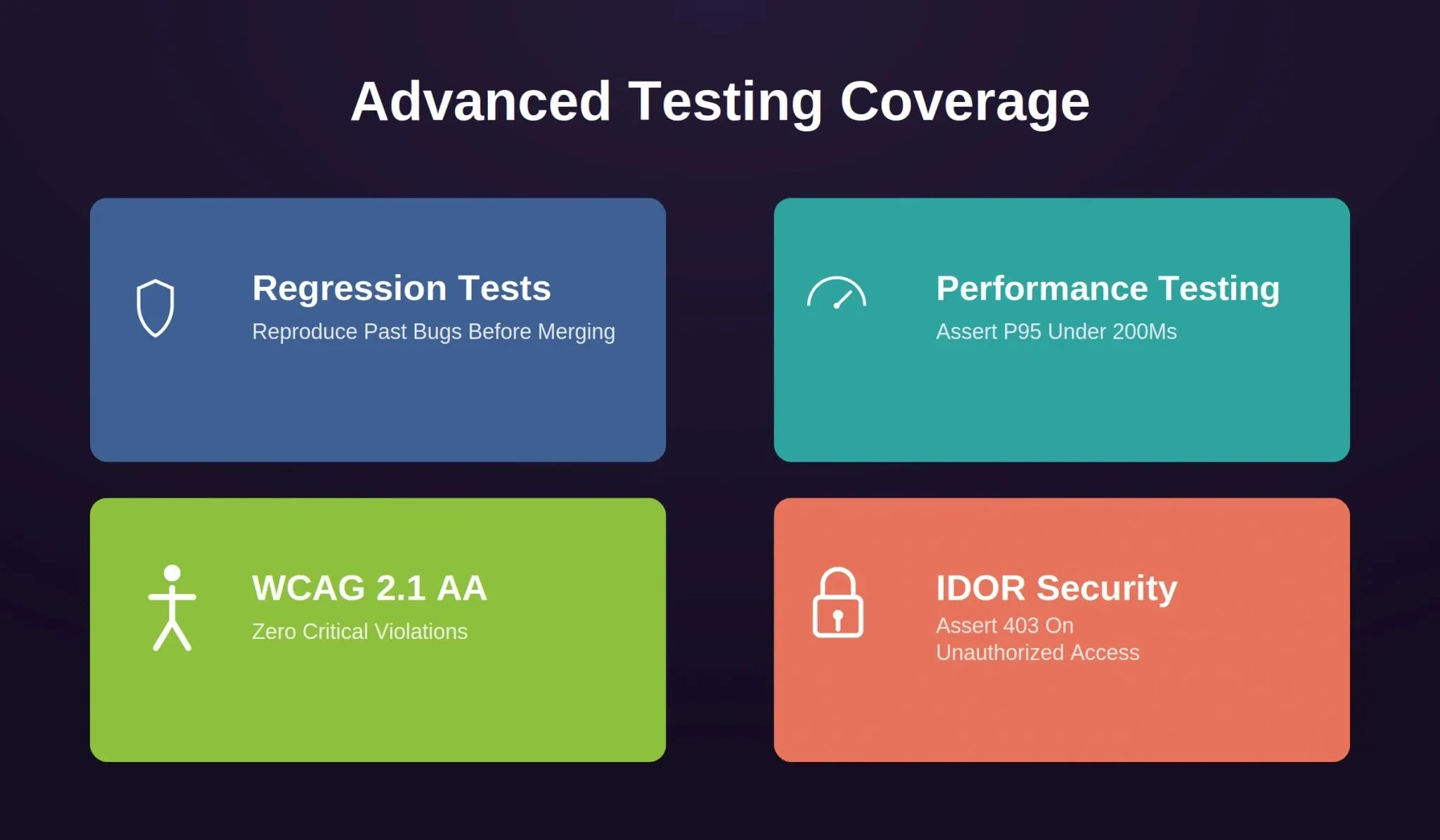
Advanced prompts address the four coverage gaps that standard unit and integration suites consistently miss in production systems.
Prompt 17 - Regression Test From Bug Report
"Act as a test engineer writing a regression test from a bug report. Bug: users with special characters in display names (O'Connor, Mueller) see a broken profile page because the name is not HTML-escaped. Write a Vitest test reproducing this by rendering ProfilePage with those names and asserting no raw HTML entities appear. Include a comment citing the bug report ID."
-
Expected output: A test injecting names with quotes, umlauts, and angle brackets, then asserting clean rendered output
-
What to check: Verify the test fails against the old buggy code and passes against the fix, confirming it catches the root cause
-
Follow-up: "Generate regression tests for emoji in names, names exceeding 255 characters, and empty strings"
Prompt 18 - Supabase Query Performance Test
"Write a performance testing script measuring response time for getProjectsByTeam. Seed the database with 10,000 project rows across 50 teams. Run the query 100 times and assert p95 response time stays below 200ms. Log min, max, mean, and p95. Use Node.js with performance.now() timers."
-
Expected output: A runnable Node.js script with seed logic, loop execution, and statistical output
-
What to check: Confirm the script targets a staging database and cleanup runs in teardown
-
Follow-up: "Run the same query with and without a team_id index and log the performance difference"
Prompt 19 - WCAG 2.1 AA Accessibility Test
"Generate a Playwright test running axe-core accessibility checks on five pages: homepage, login page, dashboard, settings, and pricing. Each test should assert zero critical or serious WCAG 2.1 AA violations. Output the violation summary as JSON. Include setup for the @axe-core/playwright package."
-
Expected output: A Playwright test file importing axe-core, scanning each page, and failing on serious violations
-
What to check: Verify scans run against server-rendered pages, not static HTML, so dynamic content is also covered
-
Follow-up: "Add a focused scan of the checkout form testing label associations, color contrast, and keyboard navigation"
Prompt 20 - IDOR Vulnerability on Mutation Endpoints
"Write security testing scripts for IDOR vulnerabilities on PUT /api/projects/:id, DELETE /api/projects/:id, and POST /api/projects/:id/invite. Authenticate as User A, attempt to modify resources owned by User B, assert 403 Forbidden. Also test SQL injection on the :id parameter with 1; DROP TABLE projects;-- and assert 400."
-
Expected output: Six test blocks: three IDOR checks and three SQL injection checks with auth setup
-
What to check: Confirm two separate user accounts with distinct tokens, and SQL injection tests do not modify the actual database
-
Follow-up: "Add horizontal privilege escalation: viewer-role User A tries admin-role User B's token on DELETE /api/admin/users/:id"
Advanced prompts require the most context about your application architecture, user roles, and data models. The more relevant details you provide, the closer AI generated test output matches what a security or performance specialist would write. For a broader security checklist to accompany your test suite, see the web application security checklist.
Ship Tests That Match Your Build Confidence
A test suite built in the right order tracks the same confidence curve your team follows when shipping a feature. Start with the small, fast checks. Layer on broader scans. Finish with the targeted probes that catch what standard coverage missed.
These 20 AI prompts to generate test cases give your AI tool the context, structure, and detail it needs to produce test code worth merging. Copy them, adapt the framework references, and start building from Prompt 1.
A GitHub survey of 2,000 developers found that 98% of organizations have experimented with AI tools for test case generation. Kyle Daigle, COO at GitHub, put it plainly: "AI doesn't replace human jobs - it frees up time for human creativity." QA professionals who reclaim that time reinvest it in writing comprehensive test cases, reviewing AI generated outputs, and catching the edge cases that automation scripts miss on their own.
Build and deploy your tested app with Rocket.* Rocket.new generates production-ready Next.js web apps and Flutter mobile apps from a single prompt. Connect Supabase to scaffold a Postgres database, user authentication, and file storage from chat. Push your generated code to GitHub with two-way sync for Next.js TypeScript projects.*
Deploy to a live URL with one click via Netlify. Start building on Rocket and put these test creation patterns to work before your first deployment.
Table of contents
- -Quick Reference: All 20 Prompts by Phase
- -Why Prompt Order Determines Test Suite Quality
- -Why Does the Order of Your Testing Prompts Matter?
- -How Do Testing Phases Build on Each Other?
- -Foundation Prompts: Setting Up Your Testing Environment
- -Prompt 1 - Vitest and Jest Environment Configuration
- -Prompt 2 - Test File Structure for Next.js Projects
- -Prompt 3 - Auth Baseline Smoke Tests
- -Prompt 4 - Routing Smoke Tests
- -What Unit Testing Prompts Catch Bugs Others Miss?
- -Prompt 5 - Component Render Verification
- -Prompt 6 - Form Validation Edge Cases
- -Prompt 7 - Utility Function Boundary Conditions
- -Prompt 8 - API Failure Error State
- -Which Prompts Build Reliable Integration Test Suites?
- -Prompt 9 - Supabase Query with Seed Data
- -Prompt 10 - Authenticated vs Unauthenticated API Routes
- -Prompt 11 - Multi-Step Form Submission
- -Prompt 12 - Role-Based Access Control Verification
- -How Do End-to-End Prompts Simulate Real User Journeys?
- -Prompt 13 - Signup and Login Flow With Playwright
- -Prompt 14 - Checkout Flow End-to-End
- -Prompt 15 - Admin Dashboard CRUD Operations
- -Prompt 16 - Mobile-Responsive Flutter Layout Test
- -What Advanced Prompts Close the Remaining Coverage Gaps?
- -Prompt 17 - Regression Test From Bug Report
- -Prompt 18 - Supabase Query Performance Test
- -Prompt 19 - WCAG 2.1 AA Accessibility Test
- -Prompt 20 - IDOR Vulnerability on Mutation Endpoints
- -Ship Tests That Match Your Build Confidence