
Use AI prompts to build newsletter content that drives opens and clicks. This blog covers ready-to-use prompt templates for subject lines, body sections, CTAs, and welcome sequences.
Why do most newsletters fail to grow past a few hundred subscribers? The answer is rarely the platform. It is the content.
According to HubSpot's 2026 State of Marketing report, 80% of marketers now use AI for content creation, and 61% call it marketing's biggest disruption in twenty years.
The question is not whether to use AI for your newsletter. It is whether you are giving AI the right instructions to produce content your subscribers actually want to read. That starts with better prompts.
Why Newsletters Still Deliver the Highest ROI
Newsletters remain one of the strongest channels for building an audience you actually own.
-
Email marketing returns $10–$36 for every $1 spent for 35% of companies, according to Litmus's State of Email research. Another 30% report returns between $36–$50.
-
Newsletters drive the highest ROI for D2C brands and agencies. Unlike social algorithms that change overnight, your email list stays yours.
-
Only 21% of marketing leaders still skip ROI measurement for email, down from 36% in 2023. The channel is proving itself quarter after quarter.
"Content will move to gated spaces that AI hasn't overrun, like newsletters, podcasts, and YouTube. Learning to craft content is a timeless skill." : Kieran Flanagan, SVP of Marketing at HubSpot
Despite these numbers, most newsletter creators still write every edition from scratch, burning hours on drafts that could take minutes with the right AI prompts to build newsletter content efficiently.
AI Prompts vs Manual Writing: What Actually Changes
Before diving into the prompts, it helps to understand what shifts when you switch from manual writing to AI-assisted newsletter creation.
| Dimension | Manual Writing | AI Prompts |
|---|---|---|
| Time per edition | 3–6 hours | 30–60 minutes |
| Subject line variations | 1–3 | 10–20 in seconds |
| Voice consistency | Varies by energy level | Locked via prompt instructions |
| A/B testing options | Limited by time | Unlimited variations |
| Welcome sequence setup | Days | One session |
| Blank page problem | Always present | Eliminated |
The shift is not about removing the writer. It is about removing the friction between the idea and the first draft. Your judgment still determines what gets sent. The AI handles the mechanical work of generating options.
Looking at AI prompt examples across different content types reveals a consistent pattern: specificity in the prompt produces specificity in the output.
How AI Prompts Help You Write Better Newsletters
AI prompts work like creative briefs for a writing assistant that never gets tired.
-
They remove the blank page problem. Instead of staring at an empty draft, you give the AI your topic, tone, and audience. It returns a structured first draft in seconds.
-
Prompts keep your voice consistent. By specifying tone markers like "casual," "data-driven," or "witty," every edition sounds like the same person wrote it.
-
They let you batch-produce content. A single prompt session can generate a month of subject lines, intro hooks, and call-to-action variations.
-
Quality scales without extra effort. The more specific your prompt, the less editing you do afterward.
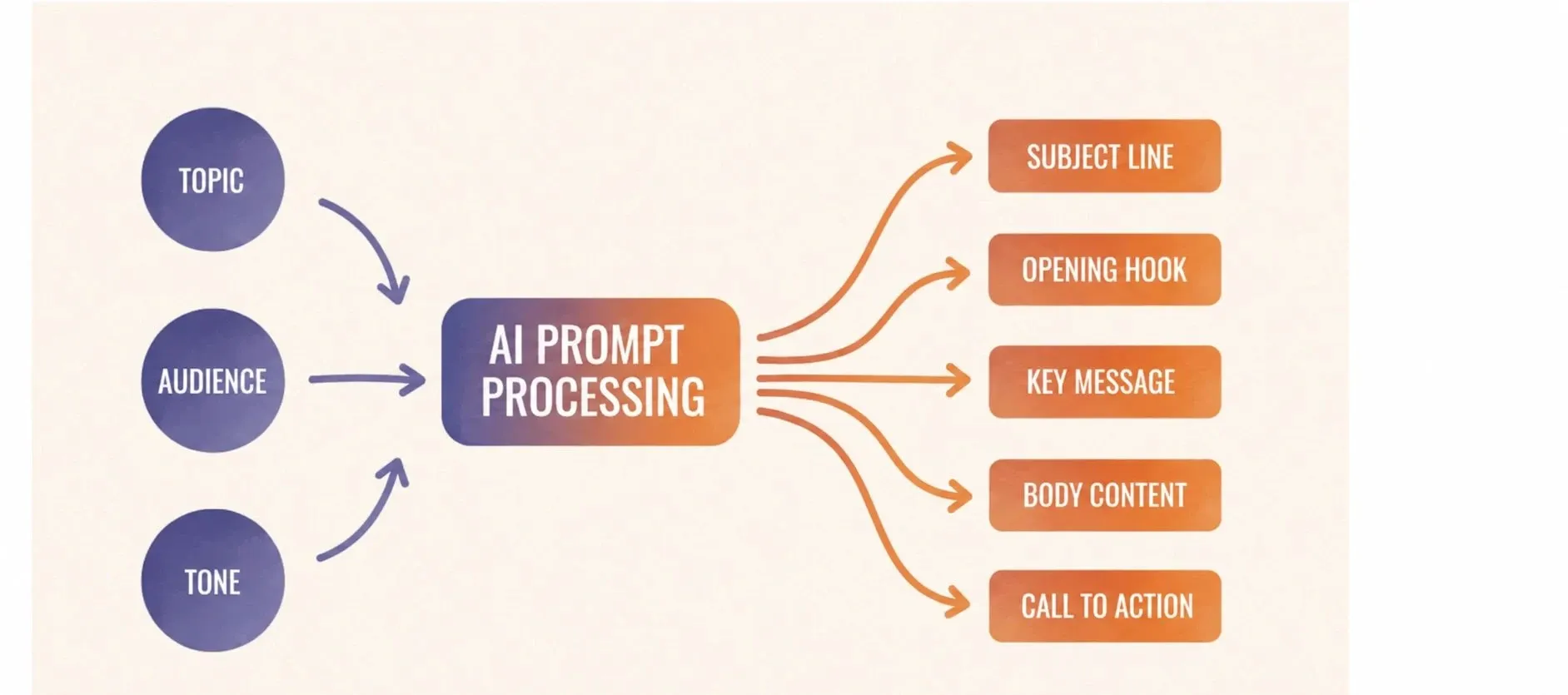
The key insight: prompt engineering best practices apply directly to newsletter writing. Clear context, defined audience, and specific output format produce dramatically better results than vague one-liners.
The Anatomy of a High-Performing Newsletter Prompt
Not all prompts produce usable output on the first try. The difference between a weak prompt and a strong one follows a clear, repeatable structure.
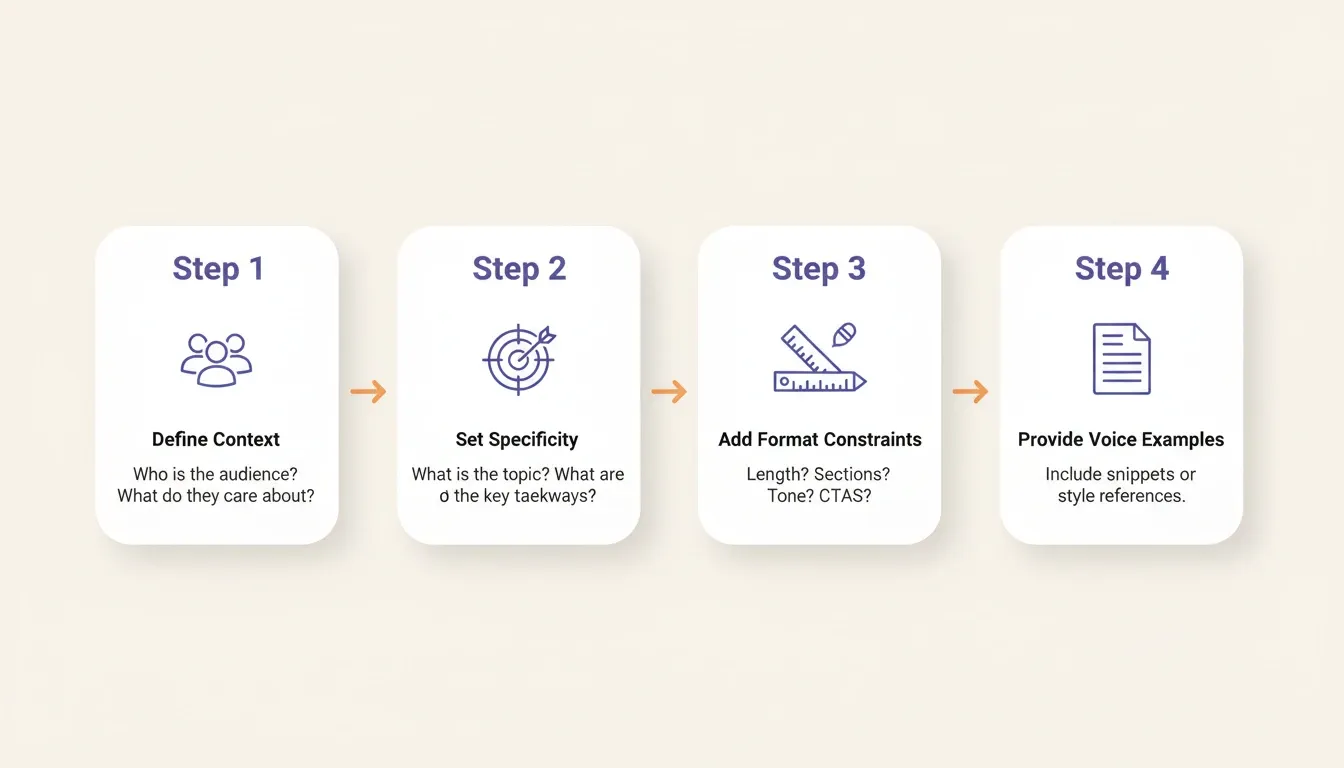
Every high-performing newsletter prompt contains four components:
1. Role and context: Tell the AI who you are and who your audience is. "You are writing for a weekly newsletter for B2B SaaS founders who are post-product-market-fit and scaling their first sales team." This single sentence eliminates generic output.
2. Specific topic angle: "Write about email marketing" produces filler. "Write about why most SaaS founders ignore email until Series B, and what they miss by waiting" produces insight. The narrower the angle, the more useful the output.
3. Format and length constraints: "Write a 150-word opening hook that starts with a counterintuitive statement and ends with a question." Constraints are not limitations. They are instructions.
4. Voice examples: Paste two or three sentences from your best past editions. Ask the AI to match that style. This step alone cuts editing time significantly.
Understanding context engineering: the practice of structuring everything the AI needs to know before it writes: is what separates newsletter creators who get consistent output from those who spend more time editing than writing.
Subject Line Prompts That Drive Opens
Your subject line determines whether everything else you wrote gets read. These four prompt templates cover the most effective subject line strategies.
Prompt 1: The Curiosity Prompt
Write 10 subject lines for a [niche] newsletter about [topic]. Each line should be under 50 characters, use curiosity gaps, and avoid clickbait. Tone: [your tone].
Prompt 2: The Urgency Prompt
Generate 5 time-sensitive subject lines for my weekly [niche] roundup. Include a reason to open today, not tomorrow. My audience is [description].
Prompt 3: The Personal Touch Prompt
Create subject lines that feel like a text from a friend. Topic: [topic]. Keep them between 4–7 words. No caps lock.
Prompt 4: The A/B Testing Prompt
Give me 3 pairs of subject lines testing different hooks for the same content: [topic]. Pair 1 tests question vs statement. Pair 2 tests short vs medium length. Pair 3 tests benefit vs curiosity.
Pro tip: Always include your audience context and goals in every subject line prompt. Generic prompts produce generic subject lines that blend into crowded inboxes.
Subject Line Prompt: Before and After
Prompt 5: Weak prompt
Write subject lines for my marketing newsletter.
Prompt 6: Strong prompt
Write 8 subject lines for a weekly newsletter for e-commerce founders doing $500K–$2M in annual revenue. Topic: why most founders underinvest in email until they hit a growth plateau. Tone: direct, data-driven, no hype. Keep each under 45 characters.
The strong prompt produces lines like "The channel you're ignoring at $1M." The weak prompt produces lines like "This week in marketing."
Body Content Prompts for Every Newsletter Section
Great newsletters follow a predictable structure, and each section needs a different prompt approach.
According to Campaign Monitor's email benchmarks, the average click-through rate sits at 2.3% across industries. Strong body content with clear calls to action pushes that number significantly higher.
Prompt 7: Opening Hook
Write a 2-sentence opener connecting [current event] to [topic]. Make readers feel seen.
Prompt 8: Main Insight
Explain [concept] in 100 words using a metaphor from [everyday domain]. Audience: [level].
Prompt 9: Curated Links
Summarize these 3 articles in one sentence each. Add why my [niche] audience should care.
Prompt 10: CTA Section
Write a soft CTA for [offer]. Frame it as helping, not selling. Max 2 sentences.
You have 10 prompts in hand. Put them to work. Describe your newsletter concept to Rocket and get a live, conversion-ready signup page: with your email integrations already connected: in one session.
Prompt 11: Sign-off
Create a personal closing that references [running theme]. Warm, brief, human.
Each of these templates works best when you feed the AI your existing newsletter voice as context. Paste a previous edition into the prompt and ask it to match that style.
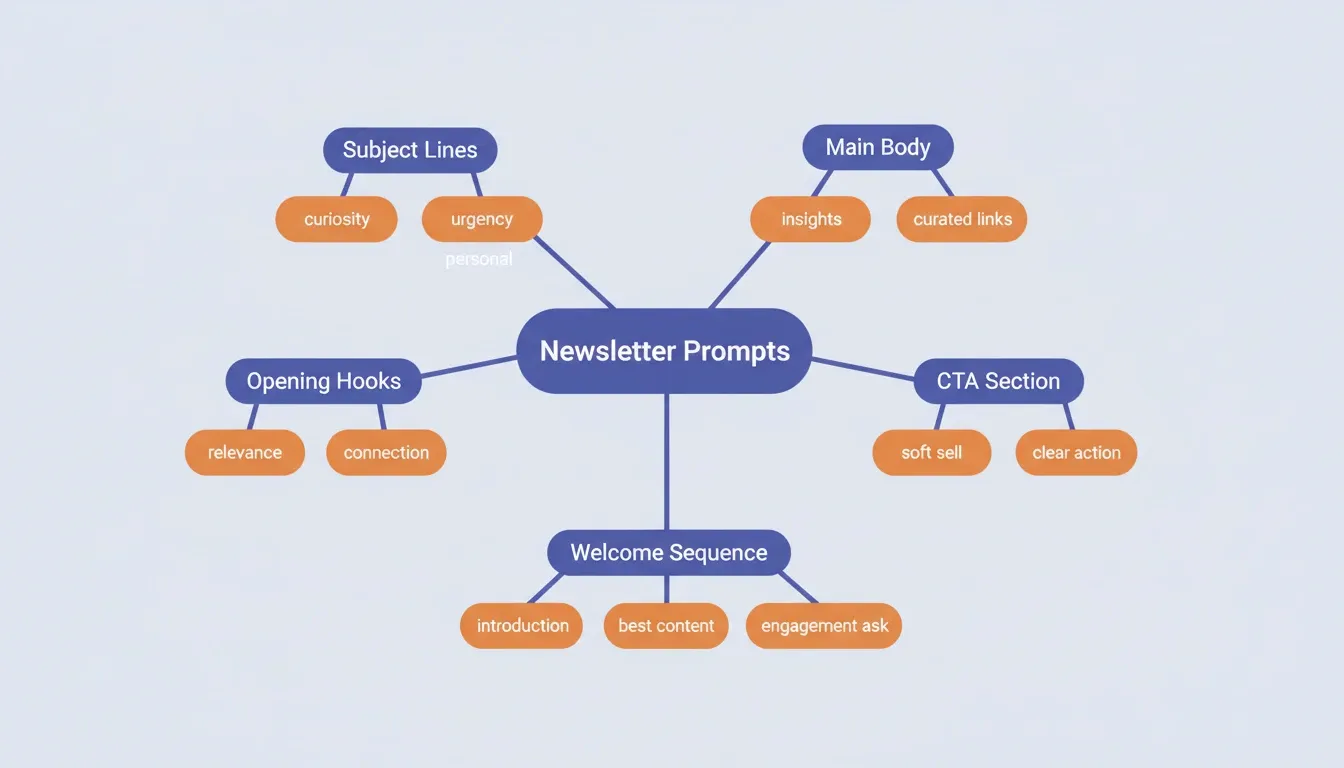
| Newsletter Section | Prompt Number | Best For |
|---|---|---|
| Opening hook | Prompt 7 | Building immediate relevance |
| Main insight | Prompt 8 | Teaching without lecturing |
| Curated links | Prompt 9 | Saving reader time |
| CTA section | Prompt 10 | Converting without pressure |
| Sign-off | Prompt 11 | Building connection |
Welcome Sequence Prompts
Your welcome sequence sets the tone for every email that follows. These three prompts build a complete onboarding flow.
Prompt 12: Email 1: Introduction
Write a welcome email for new subscribers of [newsletter name]. Tell them what to expect, how often, and give one immediate value item. Tone: [your tone]. Under 150 words.
Prompt 13: Email 2: Best Content
Create an email highlighting my 3 best past newsletters for [niche] subscribers. Frame each with a one-line hook explaining why it matters.
Prompt 14: Email 3: Engagement Ask
Write a reply-focused email asking new subscribers one question about their biggest challenge with [topic]. Keep it conversational and short.
These three prompts build a natural language workflow that turns cold subscribers into engaged readers within the first week.
Re-engagement Prompts
Even strong newsletters lose subscribers over time. These prompts help recover inactive readers before they unsubscribe.
Prompt 15: The Win-Back Prompt
Write a re-engagement email for subscribers who haven't opened in 60 days. Acknowledge the silence without guilt-tripping. Remind them of the value they signed up for. Give them an easy reason to stay. Under 120 words.
Prompt 16: The Feedback Prompt
Write a short email asking inactive subscribers what would make this newsletter worth opening again. One question only. No pressure.
16 prompts. A complete newsletter system. Type your newsletter idea into Rocket and go from concept to live signup page: with Mailchimp, Brevo, or SendGrid already wired in: in one session.
Which Prompt Mistakes Kill Newsletter Engagement?
Even experienced writers fall into patterns that produce flat, forgettable newsletter copy from AI. Prompts fail when they ask AI to guess instead of giving it enough information to perform well.
| Mistake | What Happens | Fix |
|---|---|---|
| No audience context | AI writes for everyone, resonates with no one | Add subscriber demographics, interests, and reading level |
| Vague topic | Output is generic and surface-level | Narrow to one specific angle or question |
| Skipping tone instructions | Content sounds robotic or off-brand | Include 2–3 adjectives describing your voice |
| Asking for too much at once | Long, unfocused drafts that need heavy editing | Break into smaller, section-specific prompts |
| Never iterating | First output becomes final draft | Treat AI output as a starting point, then refine |
| No voice examples | AI defaults to generic newsletter style | Paste 2–3 sentences from your best past edition |
Every vague instruction forces the model to fill gaps with generic assumptions. The same principle applies whether you are writing newsletters or building a marketing automation workflow: the output is only as good as the thinking that went into the input.
How to Build Your Newsletter Prompt Library
The strongest newsletter creators treat prompts as reusable assets, not one-time tools. A prompt library is a collection of tested, refined prompts organized by newsletter section and use case.
Step 1: Start with the sections you write every week. If every edition has a subject line, an opening hook, a main insight, and a CTA, build one prompt for each. Four prompts cover 80% of your writing.
Step 2: Test each prompt on three consecutive editions. Track which outputs needed the least editing. Those are your baseline prompts.
Step 3: Save the prompt plus the output that worked. The output becomes a style reference for future prompts. Paste it as a "match this style" example.
Step 4: Build variations for different content types. A prompt for a data-heavy edition differs from one for a personal story edition. Build both.
Step 5: Add a voice check prompt. After generating any section, run: "Does this sound like someone who [your voice description]? If not, rewrite it to match."
Build Your Newsletter System on One Platform
Most newsletter creators piece together five or six different tools: one for writing, another for design, a third for landing pages, something else for analytics. The result is a fragmented workflow where context gets lost between every tab.
Rocket is a vibe solutioning platform that combines research, building, and monitoring in a single workspace. Here is how its three pillars map directly to newsletter creation:
Solve**: Research your niche before you write.**
Before writing a single edition, use Solve to run structured research on your niche. Ask it: "What topics are gaining traction in the [your niche] newsletter space?" Solve runs parallel research across 150+ sources and returns a structured report with findings, evidence, and recommendations. That report becomes the editorial foundation for your next ten editions.
Build**: Go from description to live signup page.**
Describe your newsletter concept in plain language and Rocket generates a conversion-focused landing page with signup forms, social proof sections, and optimized copy. Every page ships with SEO-ready structure, WCAG accessibility compliance, and GDPR coverage by default. Mailchimp and Brevo connect as workspace-level integrations: authenticate once and they flow into every build. SendGrid, MailerLite, Resend, and Twilio are also available for transactional and automation flows.
Intelligence**: Monitor what your niche is publishing.**
Rocket's Intelligence pillar monitors competitor newsletters and content creators continuously. Instead of manually checking what others are publishing, you get automated signals when a competitor launches a new content direction or gains traction on a new topic. That intelligence feeds directly into your next Solve task: and from there, into your next edition.
1.5 million people have tried Rocket across 180 countries, from solo founders validating their first newsletter idea to content teams running full media operations on the platform.
Building an email marketing tool from scratch used to require a developer, a designer, and weeks of setup. With Rocket, you describe what you want and the first generation is live in minutes.
Start Writing Newsletters That Actually Get Read
AI prompts to build newsletter content give creators a repeatable system for producing copy that sounds human, reads well, and converts subscribers into an engaged audience. The gap between a stale newsletter and a growing one is not talent. It is the quality of direction you give the AI before it writes.
As AI writing tools become standard across every niche, the creators who build structured prompt libraries and research-backed editorial systems will compound their advantage over time. The prompt is the thinking. The newsletter is the result.
You have the prompts. The next step is building the platform around them. Sign up on Rocket.new and go from newsletter concept to live signup page: with your email integrations already connected: in one session.
Table of contents
- -Why Newsletters Still Deliver the Highest ROI
- -AI Prompts vs Manual Writing: What Actually Changes
- -How AI Prompts Help You Write Better Newsletters
- -The Anatomy of a High-Performing Newsletter Prompt
- -Subject Line Prompts That Drive Opens
- -Subject Line Prompt: Before and After
- -Body Content Prompts for Every Newsletter Section
- -Welcome Sequence Prompts
- -Re-engagement Prompts
- -Which Prompt Mistakes Kill Newsletter Engagement?
- -How to Build Your Newsletter Prompt Library
- -Build Your Newsletter System on One Platform
- -Start Writing Newsletters That Actually Get Read