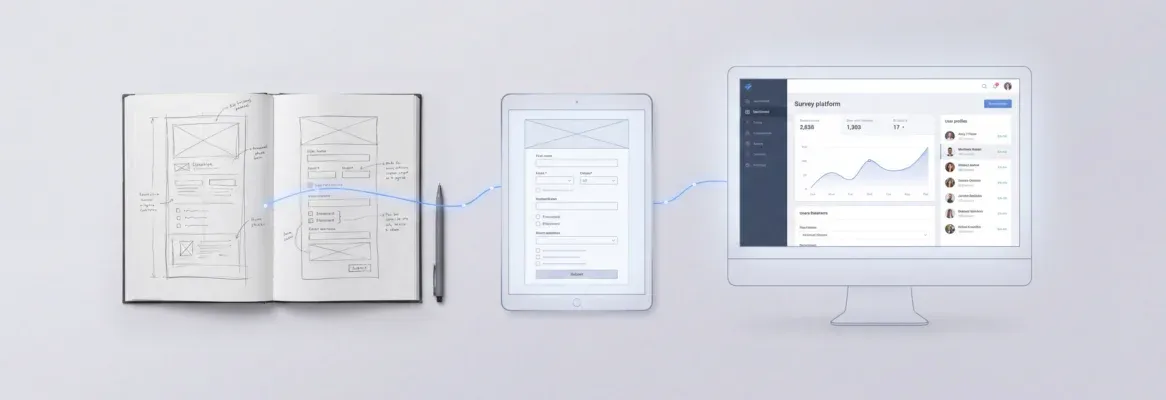
21 structured AI prompts for agencies covering strategy, content, design, development, reporting, and competitor monitoring. Each includes role context, output format, and constraints. Built for multi-client environments and ready to paste into any AI tool.
The best AI prompts for agencies building client work share three traits: role context, explicit output format, and built-in constraints. This guide delivers 21 production-ready prompts across strategy, content, design, development, and reporting, each structured for multi-client agency environments.
Table of Contents
| # | Category | Prompts |
|---|---|---|
| 1 | Strategy and Research | Prompts 1-5 |
| 2 | Content and Copy | Prompts 6-10 |
| 3 | Design and Development | Prompts 11-15 |
| 4 | Client Communication | Prompts 16-18 |
| 5 | Reporting and Analysis | Prompts 19-20 |
| 6 | Competitive Intelligence | Prompt 21 |
What Makes a Prompt Work for Agency Client Deliverables?
Before the list, a quick note on structure. Every effective prompt for agency work shares three traits that separate it from a generic one-liner.
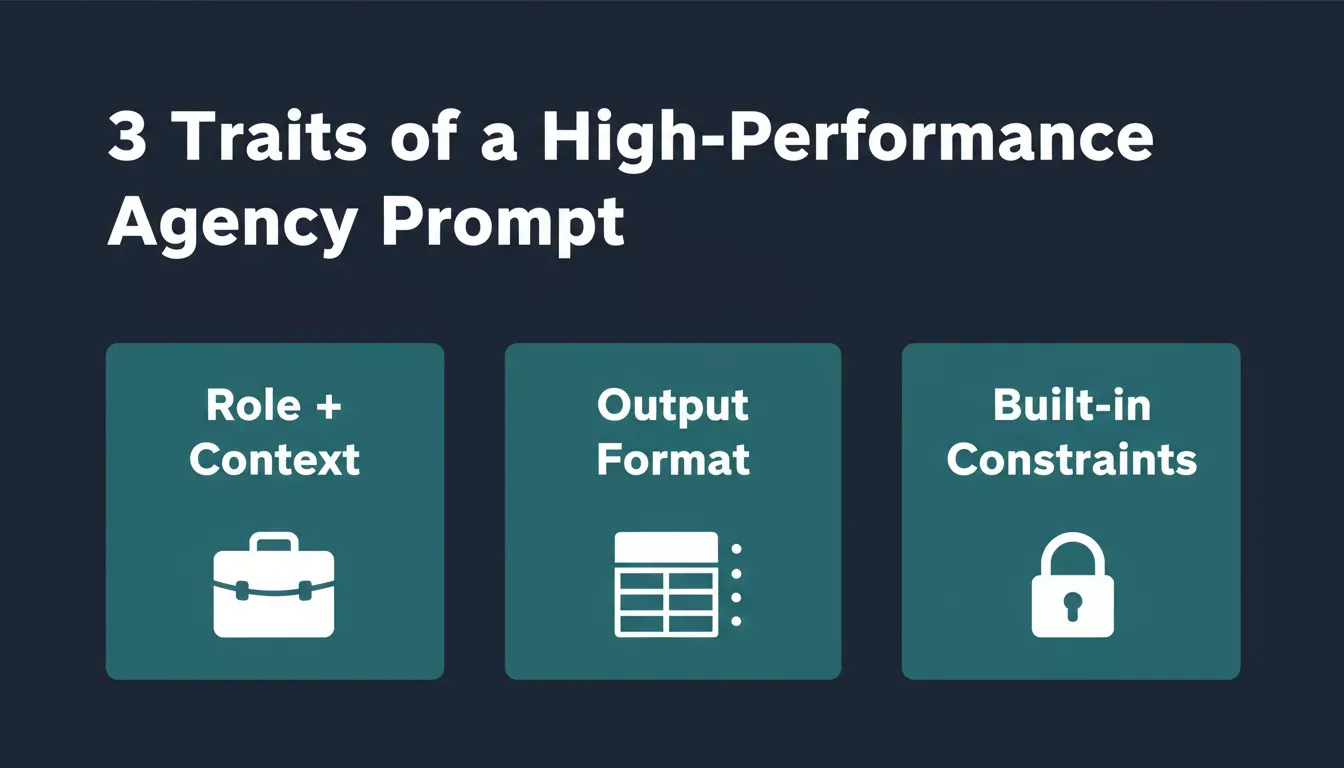
Three pillars that separate agency-grade prompts from generic one-liners.
- Role and context up front. Tell the AI who it is acting as and give it the client's industry, audience, and project constraints. A system prompt with this data produces output that sounds like it came from someone who actually knows the account.
- Explicit output format. Specify whether you want a table, bullet list, JSON object, email draft, or document outline. When the format is left open, you get whatever the model defaults to, and that default rarely matches what your client expects.
- Built-in constraints that prevent bad output. Word limits, tone rules, topics to avoid, and compliance language all belong inside the prompt itself. The model respects constraints it knows about and ignores ones you forget to mention.
With that framework in mind, here are 21 prompts organized by the work agencies actually do for clients.
Category 1: Strategy and Research Prompts
5 prompts | Use case: Client presentations, market analysis, campaign planning
Best tools: Rocket Solve, ChatGPT, Claude
These prompts help your team gather information, analyze markets, and stress-test plans before presenting to clients. They turn hours of manual research into structured analysis in minutes.
| Prompt | What It Does | Time Saved |
|---|---|---|
| 1 | Competitive positioning table from 3 URLs | 2-3 hours |
| 2 | 90-day campaign plan from a client brief | 3-4 hours |
| 3 | Pain point extraction from feedback data | 1-2 hours |
| 4 | Market entry executive summary | 3-4 hours |
| 5 | Quarterly review talking points | 30-45 min |
Prompt 1: Competitive Positioning Analysis
What it's for: Building a client-ready competitor comparison table from three URLs in one pass.
"Act as a senior market analyst with 10 years of experience in [client industry]. Analyze these three competitor websites: [URL 1], [URL 2], [URL 3]. For each competitor, identify their pricing model, primary audience segment, unique value proposition, and biggest weakness. Present findings in a comparison table with columns for Company, Price Point, Target Buyer, Key Differentiator, and Vulnerability. Keep each cell under 20 words."
Why it works: The role assignment and table format prevent wandering paragraphs. The word limit per cell forces the AI agent to be precise, giving you something you can paste directly into a client deck.
Prompt 2: Campaign Planning From Brief
What it's for: Turning a raw client brief into a structured 90-day multi-channel campaign plan.
"Using this client brief [paste brief], generate a 90-day campaign plan across email, social, and paid channels. Structure the plan as a weekly timeline. For each week, include: channel, action item, estimated resource hours, and success metric. Format as a table. Constraints: budget cannot exceed [amount], all messaging must align with [brand voice description], exclude [competitor name] mentions."
Prompt 3: Audience Pain Point Extraction
What it's for: Converting raw customer feedback data into a ranked, actionable pain point list.
"Review this customer feedback data [paste CSV or key quotes]. Identify the top five pain points ranked by frequency. For each pain point, provide: a one-sentence summary, the number of times it appeared, one content piece that could address it, and one product feature suggestion. Return as a numbered list with sub-bullets."
Prompt 4: Market Entry Research Brief
What it's for: Generating a structured executive summary before a client enters a new market or region.
"Act as a market research consultant. My client is a [company type] considering expansion into [new market/region]. Summarize the current market size, growth rate, top three existing players, regulatory considerations, and customer acquisition channels available. Include at least two data points with sources for each section. Format as an executive summary under 500 words."
For agencies that run this type of research repeatedly, Rocket's Solve feature runs thousands of queries across 150+ sources simultaneously and delivers structured market intelligence in 60-90 minutes.
Prompt 5: Client Meeting Talking Points
What it's for: Preparing eight ready-to-use talking points for a quarterly client review in under two minutes.
"I have a quarterly review meeting with [client name] in [industry]. Their campaign data from the past 90 days shows [paste key metrics or summary]. Generate a list of 8 talking points I can use in the meeting. Include: 3 wins to highlight, 2 areas that need improvement with suggested fixes, 2 forward-looking recommendations, and 1 question to ask the client about their priorities for the next quarter. Keep each talking point under 2 sentences."
Category 2: Content and Copy Prompts
5 prompts | Use case: Blog posts, email sequences, social calendars, ad copy, case studies
Best tools: ChatGPT, Claude
Writing prompts produce the highest volume of agency output, so getting these right saves the most hours per week. Each prompt below includes audience context and format constraints because those two elements determine whether the first draft is usable or a throwaway.
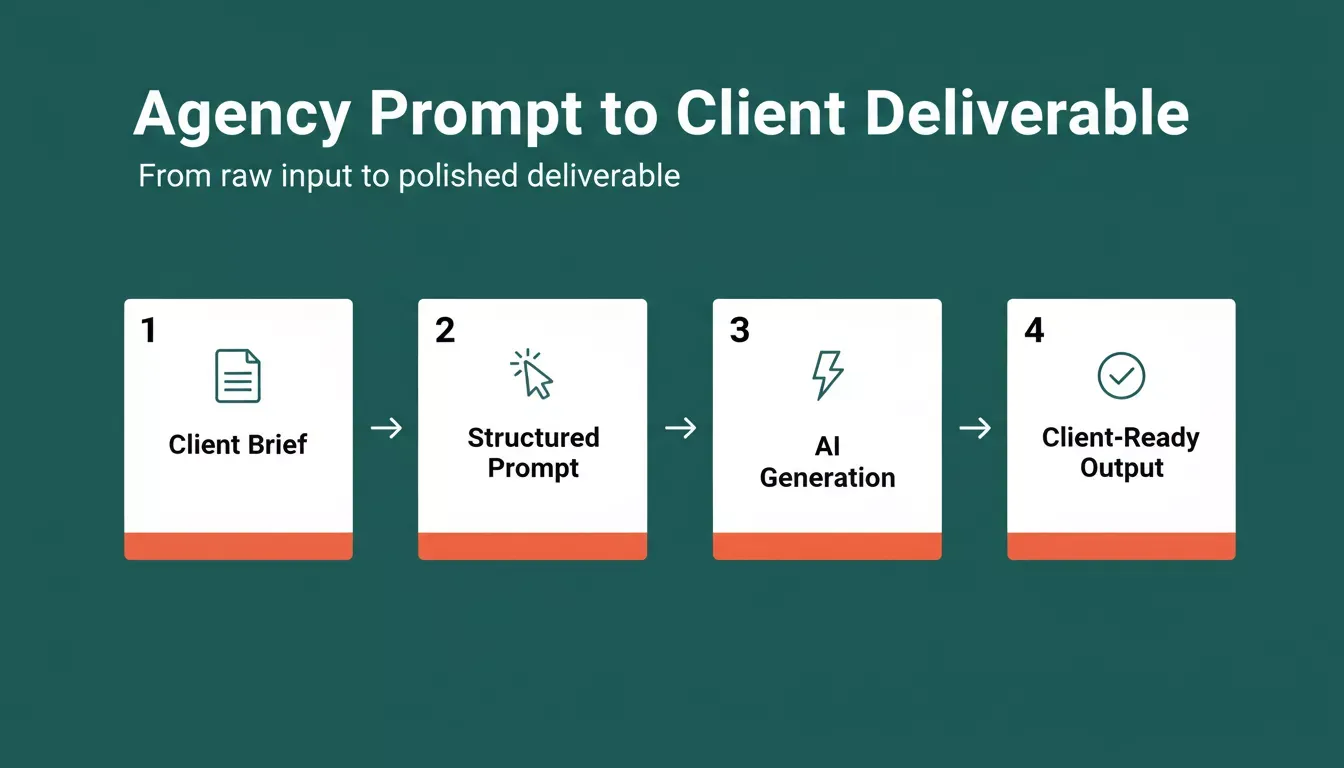
From raw client brief to polished deliverable in four structured steps.
| Prompt | What It Does | Time Saved |
|---|---|---|
| 6 | SEO blog post outline with H1, H2s, and CTA | 1-2 hours |
| 7 | 4-email nurture sequence from awareness to decision | 2-3 hours |
| 8 | 2-week LinkedIn and Instagram content calendar | 2-3 hours |
| 9 | Google Search ad copy in 5 headline and 4 description variants | 1-2 hours |
| 10 | 400-word case study from raw project data | 2-3 hours |
Prompt 6: Blog Post Outline With SEO Structure
What it's for: Producing a complete, SEO-structured blog outline that skips the blank-page problem.
"Write a detailed outline for a 1,800-word blog post targeting [audience persona] about [topic]. Include: an H1 headline (under 60 characters), 5 H2 sections with 3 bullet points of content ideas under each, a recommended internal link placement, and a CTA at the end. Tone: conversational but informed. Avoid jargon. Do not use the words [list banned terms from brand guidelines]."
Prompt 7: Email Nurture Sequence
What it's for: Building a four-email awareness-to-decision sequence with every field spec'd out.
"Create a 4-email nurture sequence for [product/service] targeting [persona]. Each email must include: subject line (under 50 characters), preview text (under 90 characters), body copy (under 150 words), and one CTA button text. Tone: friendly and direct. The sequence should move the reader from awareness to consideration to decision. Email 4 should include a limited-time offer angle."
Prompt 8: Social Media Content Calendar
What it's for: Generating a two-week, dual-platform content calendar with hooks, copy, and hashtags.
"Generate a 2-week content calendar for [client brand] on LinkedIn and Instagram. Produce 10 posts total (5 per platform). Each post needs: a hook sentence, body text (under 200 words for LinkedIn, under 100 for Instagram), relevant hashtags (3-5), and a suggested image description. Themes to cover: [list 3-4 themes]. Brand voice: [describe voice]. Never mention competitors by name."
Prompt 9: Ad Copy Variations for A/B Testing
What it's for: Generating five headlines and four description variations for Google Search, each using a different persuasion angle.
"Generate 5 headline options and 4 description options for a Google Search ad campaign targeting [keyword]. Headlines must be under 30 characters. Descriptions must be under 90 characters. Include one variation that leads with a statistic, one that leads with a question, one with social proof, one with urgency, and one with a benefit statement. Target audience: [describe]."
Prompt 10: Case Study Draft From Raw Data
What it's for: Turning project metrics and timeline notes into a structured 400-word case study.
"Using these project results [paste metrics, timeline, and client context], write a 400-word case study following this structure: Challenge (what the client faced), Solution (what we did), Results (quantified outcomes), and Client Quote placeholder. Tone: professional but approachable. Include a one-sentence summary at the top suitable for use as a meta description. Do not fabricate any statistics."
Category 3: Design and Development Prompts
5 prompts | Use case: Wireframes, onboarding flows, API specs, GPT agents, landing pages
Best tools: Claude, Rocket Build, ChatGPT
When agencies build custom tools, client portals, or automated workflows, the prompts need to define functionality alongside aesthetics. These prompts work in AI coding tools like ChatGPT, Claude, or directly in Rocket's Build for instant deployment.
| Prompt | What It Does | Time Saved |
|---|---|---|
| 11 | Full wireframe spec for a client-facing project dashboard | 4-6 hours |
| 12 | Automated onboarding workflow from intake to kickoff | 3-4 hours |
| 13 | Next.js API route spec with Supabase and email confirmation | 4-6 hours |
| 14 | Custom GPT system prompt with escalation rules | 2-3 hours |
| 15 | Full landing page copy and section structure | 3-4 hours |
Prompt 11: Client Dashboard Wireframe
What it's for: Producing a complete wireframe specification for a client-facing project dashboard, ready to hand to a developer.
"Generate a detailed wireframe specification for a client-facing project dashboard. The dashboard must include: a sidebar navigation with 4 sections (Projects, Invoices, Messages, Files), a main content area displaying project status cards with progress bars, a notification bell with an unread count, and a top bar with the client logo and user avatar. Describe the layout, component hierarchy, and responsive behavior for mobile. Output as a structured document with sections for each page."
Prompt 12: Automated Client Onboarding Workflow
What it's for: Designing a step-by-step automated onboarding sequence from intake to kickoff call.
"Design an automated client onboarding workflow for a [type] agency. Include these steps in the following order: intake form submission, welcome email trigger, internal Slack notification, project board creation (with default columns: Backlog, In Progress, Review, Done), kickoff call calendar invite, and access credentials email. For each step, specify: trigger condition, action, responsible party, and estimated time to complete. Format as a numbered process flow."
Agencies that need to build a client portal with AI can go from this prompt output to a deployed portal the same day using Rocket's Build.
Prompt 13: API Integration Specification
What it's for: Writing a technical spec for a Next.js API route that validates, stores, and confirms client project data.
"Create a technical specification for a Next.js API route that accepts a POST request with client project data. The route should: validate required fields (client name, project type, deadline, budget), write validated data to a Supabase database table (connected via the Supabase connector), send a confirmation email via [email service], and return a JSON response with the created record ID or validation errors. Include error handling for missing fields and database connection failures."
Prompt 14: Custom GPT System Prompt for Client Support
What it's for: Writing a production-ready system prompt for a client-facing support agent with escalation rules.
"Write a system prompt for a custom GPT that acts as a first-line support agent for [company name]. It should: answer questions about [product/service] using only the attached knowledge base, maintain a [friendly/professional] tone, never make promises about pricing or timelines without checking, escalate to a human when confidence is below 70% or when the user mentions billing disputes, and always end responses with a follow-up question to confirm the issue is resolved."
Prompt 15: Landing Page Copy and Structure
What it's for: Generating full copy and section structure for a conversion-focused landing page from a single prompt.
"Generate the full copy and section structure for a landing page promoting [service/product] for [target audience]. Include: hero section (headline under 10 words, subheadline under 25 words, CTA button text), problem section (3 pain points as short paragraphs), solution section (4 feature bullets with descriptions), social proof section (3 testimonial placeholders with guidance on what to include), and final CTA section. Conversion goal: [book a call / start trial/request quote]."
For agencies that need to go beyond copy and ship a live page, building a high-converting landing page with AI is covered in detail with step-by-step guidance.
Category 4: Client Communication Prompts
3 prompts | Use case: Status emails, proposal scopes, feedback responses
Best tools: Any model
These prompts handle the repetitive communication tasks that eat agency hours without generating revenue. They work best when you paste actual project data into the bracketed sections.
Agency prompt workflow: from brief to approved deliverable in five steps.
| Prompt | What It Does | Time Saved |
|---|---|---|
| 16 | Weekly status update email under 200 words | 20-30 min |
| 17 | Proposal scope of work with phases and assumptions | 1-2 hours |
| 18 | Professional client feedback response under 150 words | 20-30 min |
Prompt 16: Weekly Status Update Email
What it's for: Drafting a sub-200-word client status email from raw bullet points in under 30 seconds.
"Draft a weekly status update email for [client name]. Project: [project name]. This week's progress: [paste bullet points of what was completed]. Next week's plan: [paste upcoming tasks]. Blockers: [list any blockers or none]. Format: keep the email under 200 words, use bullet points for progress and next steps, open with a one-sentence summary of overall project health (on track / at risk / ahead of schedule). Tone: professional, concise, confident."
Prompt 17: Proposal Scope Section
What it's for: Writing a clear, phase-structured scope of work section that leaves no room for misinterpretation.
"Write the scope of work section for a proposal to [client name] for [project type]. The project includes: [list deliverables]. Timeline: [X weeks]. Organize into phases with clear deliverables per phase. Include what is explicitly out of scope. Add a short assumptions section listing 3-4 things the client must provide (access, content, feedback turnaround). Keep total word count under 400. Tone: clear and professional with no ambiguity."
Prompt 18: Client Feedback Response
What it's for: Drafting a professional, non-defensive response to difficult client feedback in under 150 words.
"The client sent this feedback on our deliverable: [paste client feedback]. Write a professional response that: acknowledges their concerns specifically, explains what changes we will make, provides a timeline for revisions, and asks one clarifying question about [specific unclear point]. Keep the response under 150 words. Tone: collaborative, not defensive. Do not apologize more than once."
Category 5: Reporting and Analysis Prompts
2 prompts | Use case: Monthly performance reports, customer feedback analysis
Best tools: Rocket Solve, ChatGPT, Claude
Reporting prompts turn raw data into client-ready insights. Paste your actual campaign numbers into these and get presentation-quality analysis back.
| Prompt | What It Does | Time Saved |
|---|---|---|
| 19 | Monthly performance report with exec summary and comparison table | 2-3 hours |
| 20 | Customer feedback pattern analysis with themes and sentiment | 2-3 hours |
Prompt 19: Monthly Performance Report Summary
What it's for: Turning a raw metrics dump into a structured monthly report with an executive summary, a comparison table, and an outlook.
"Using this campaign data [paste metrics: impressions, clicks, conversions, spend, revenue], write a monthly performance report summary for [client name]. Include: an executive summary (3 sentences), a key metrics table comparing this month to last month with percentage change, top 3 wins with brief explanations, 2 areas for improvement with recommended actions, and a one-paragraph outlook for next month. Total length: under 500 words. Do not fabricate or round numbers."
Prompt 20: Customer Feedback Pattern Analysis
What it's for: Extracting the top five themes, sentiment breakdown, and representative quotes from a batch of customer feedback.
"Analyze this collection of customer feedback [paste reviews, survey responses, or support tickets]. Identify: the top 5 recurring themes ranked by frequency, sentiment breakdown (positive/negative/neutral) for each theme, 3 direct quotes that best represent each major theme, and 2 actionable recommendations based on the patterns. Format as a structured report with clear section headers. Include a summary table at the top."
Category 6: Competitive Intelligence Prompt
1 prompt | Use case: Always-on competitor monitoring for pricing, messaging, hiring, and review signals
Best tools: Rocket Intelligence
Most agencies run competitor research once per quarter. The agencies that win will run it continuously. Rocket.new Intelligence monitors nine signal pillars continuously across every public surface a competitor operates on.
| Prompt | What It Does | Time Saved |
|---|---|---|
| 21 | Continuous competitor monitoring brief with weekly digest and critical alerts | Ongoing |
Prompt 21: Continuous Competitor Monitoring Setup
What it's for: Configuring an always-on competitor intelligence system that surfaces pricing changes, messaging shifts, and hiring signals before they hit your client's sales floor.
"I need to set up continuous monitoring for [client name]'s top three competitors: [Competitor A], [Competitor B], [Competitor C]. For each competitor, I want to track: (1) pricing page changes and packaging updates, (2) product announcement and feature launch signals, (3) key hire and leadership changes, (4) ad copy and messaging pivots, (5) customer review sentiment shifts on G2 and app stores. Deliver findings as a weekly brief with: a Highlights section (the 2-3 most significant changes), a By Competitor breakdown, a 'So what' interpretation for each signal, and a Recommended Actions list. Flag any critical signals immediately rather than waiting for the weekly digest."
Why it matters for agencies: Research shows 66% of AI users now spend more time on high-value work while agents handle execution. Competitive monitoring is exactly the kind of continuous, multi-source execution that belongs to an agent, not a human refreshing tabs.
Rocket's Intelligence pillar monitors every public surface a competitor operates on across nine pillars simultaneously, and delivers ranked, personalized Intel to your feeds. It detects not just what changed but what it means, including absence signals (when a competitor goes quiet) and cross-pillar patterns (when several signals together imply a strategy shift).
Learn more about how competitive intelligence connects to product strategy.
Full Prompt Reference Table
| Prompt | Category | What It's For | Time Saved | Works Best In |
|---|---|---|---|---|
| 1 | Strategy | Competitive positioning table | 2-3 hours | ChatGPT, Claude, Rocket Solve |
| 2 | Strategy | 90-day campaign plan | 3-4 hours | ChatGPT, Claude |
| 3 | Strategy | Pain point extraction | 1-2 hours | ChatGPT, Claude, Rocket Solve |
| 4 | Strategy | Market entry brief | 3-4 hours | Rocket Solve, ChatGPT |
| 5 | Strategy | Meeting talking points | 30-45 min | Any model |
| 6 | Content | SEO blog outline | 1-2 hours | ChatGPT, Claude |
| 7 | Content | Email nurture sequence | 2-3 hours | ChatGPT, Claude |
| 8 | Content | Social content calendar | 2-3 hours | ChatGPT, Claude |
| 9 | Content | Ad copy A/B variations | 1-2 hours | ChatGPT, Claude |
| 10 | Content | Case study draft | 2-3 hours | ChatGPT, Claude |
| 11 | Design/Dev | Dashboard wireframe spec | 4-6 hours | ChatGPT, Claude, Rocket Build |
| 12 | Design/Dev | Onboarding workflow | 3-4 hours | ChatGPT, Claude, Rocket Build |
| 13 | Design/Dev | API integration spec | 4-6 hours | Claude, Rocket Build |
| 14 | Design/Dev | GPT system prompt | 2-3 hours | ChatGPT, Claude |
| 15 | Design/Dev | Landing page copy + structure | 3-4 hours | ChatGPT, Claude, Rocket Build |
| 16 | Communication | Weekly status email | 20-30 min | Any model |
| 17 | Communication | Proposal scope section | 1-2 hours | ChatGPT, Claude |
| 18 | Communication | Client feedback response | 20-30 min | Any model |
| 19 | Reporting | Monthly performance report | 2-3 hours | ChatGPT, Claude, Rocket Solve |
| 20 | Reporting | Feedback pattern analysis | 2-3 hours | Rocket Solve, ChatGPT |
| 21 | Intelligence | Competitor monitoring setup | Ongoing | Rocket Intelligence |
How to Build a Shared Prompt Library Your Entire Team Can Use
Having 21 good prompts is a start. Scaling them across your agency is what produces real ROI. Research shows 88% of organizations now use AI in at least one business function, but fewer than 10% have scaled AI agents across multiple functions. The gap exists because most teams never systematize their prompts.
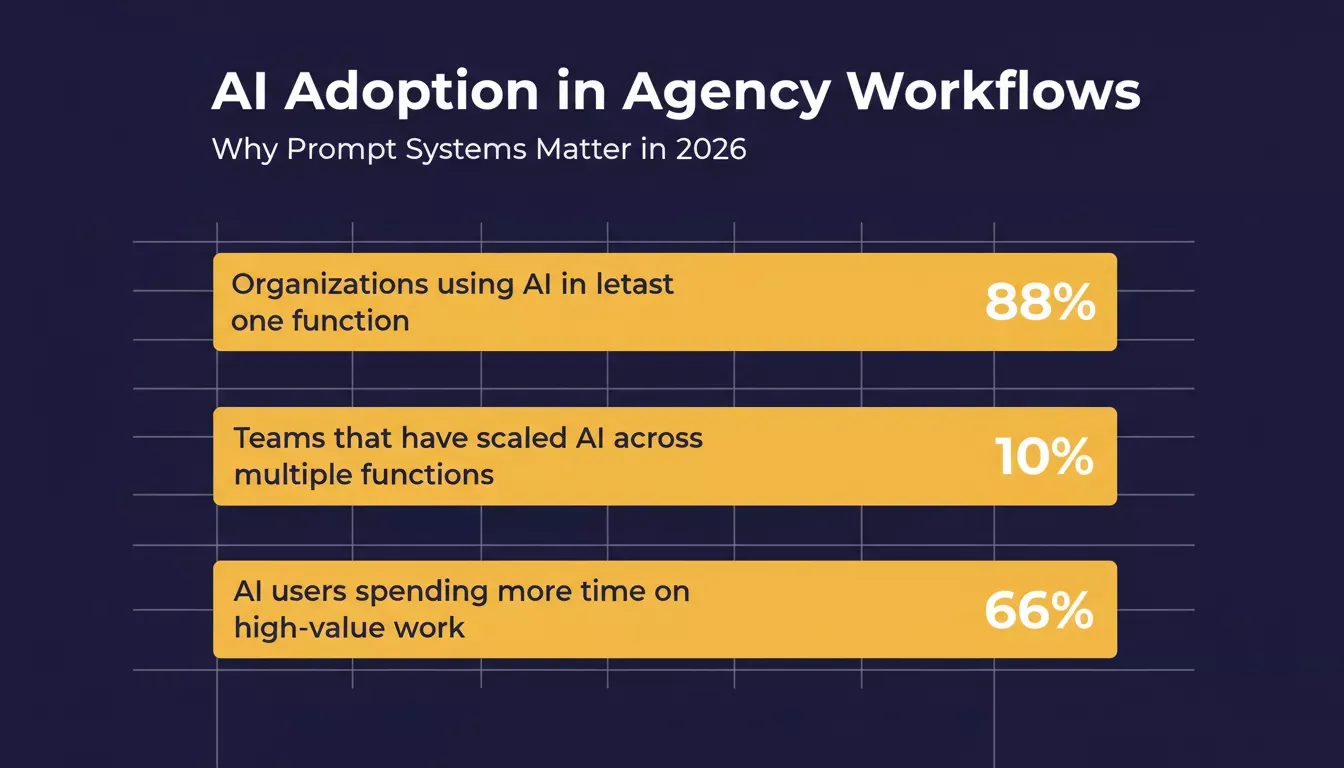
The adoption gap: most organizations use AI in one function, but fewer than 1 in 10 have scaled it across teams.
- Store prompts in a shared prompt library with tags. Every prompt that produces good results gets saved, tagged by category and client type, and shared with the entire team. What one person discovers should benefit everyone.
- Assign prompt owners per service line. One person maintains strategy prompts, another owns content prompts, and a third handles development. This prevents duplication and keeps the library current.
- Review prompt performance monthly. AI models change. Prompts that worked in January may not produce the same quality by June. Regular review prevents drift and maintains consistency across projects.
- Connect prompts to client onboarding. When a new client starts, pull the matching prompt collection and customize bracketed fields with their data. This cuts setup time from days to hours.
As Jaydip Parikh, founder of Tej SolPro, shared on LinkedIn:
"The most useful AI workflow at our agency is not 'write me a post.' It is 'give me the structural scaffolding for this kind of post.' AI builds the bones. Humans fill the body."
That distinction between generation and scaffolding is exactly what these 21 prompts deliver. They give your AI agent the structure and context to produce agency-quality output on the first pass, so your team spends time refining rather than rewriting from scratch.
Prompt Systems That Scale Client Delivery
The agencies winning in 2026 are not the ones with more AI tools. They are the ones with better prompt engineering practices and systems that turn one good prompt into a repeatable workflow across every client.
The shift from individual prompts to a prompt system is what separates agencies that save 2 hours per week from those that save 20. A system means every prompt is versioned, owned, and connected to a client onboarding flow. Start with these 21, customize them for your accounts, and build from there.
Agencies that want to go further can explore how to build internal tools with AI without a developer to turn their prompt library into a full internal knowledge and delivery system.
Why Agencies Using Rocket Ship Client Work Faster
These 21 prompts produce strategy docs, content, wireframes, code, and competitor intelligence. But prompts alone still leave you juggling separate platforms for research, generation, deployment, and monitoring. Rocket removes that friction by combining all four in one workspace as the world's first Vibe Solutioning platform, covering the complete arc from strategic intelligence to execution to ongoing business operation.
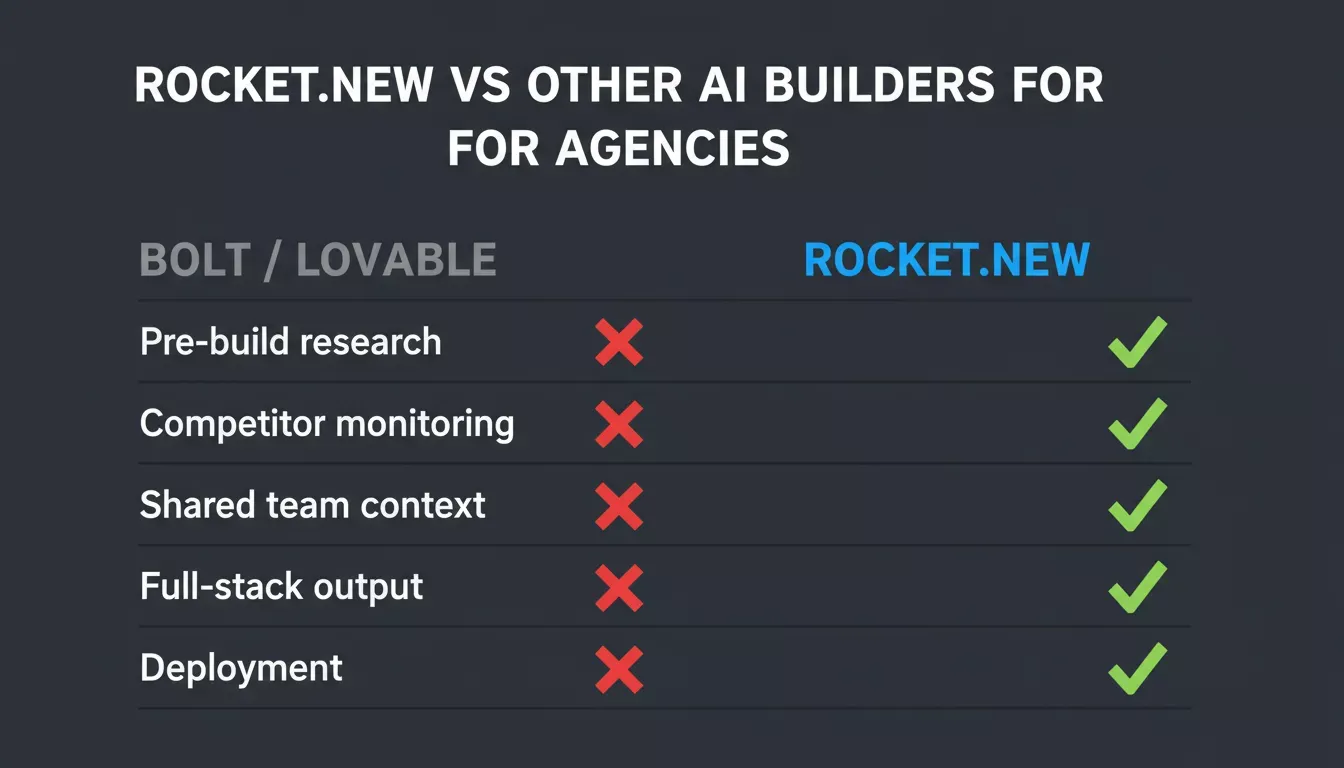
Rocket.new delivers what other AI builders don't: pre-built research, competitor monitoring, and full-stack output in one platform.
How Rocket compares to other AI builders for agency use
| Capability | Bolt / Lovable | Rocket |
|---|---|---|
| Prompt-to-app generation | Frontend only | Full-stack (Next.js + Flutter) |
| Pre-build market research | Not available | Solve: structured reports in 60-90 min |
| Continuous competitor monitoring | Not available | Intelligence: nine signal pillars, always on |
| Shared team context across tasks | Not available | Projects: everything compounds |
| Supabase backend (via connector) | Varies | Authorize once, flows into every build |
| One-click deployment | Available | Deploy to live URL or custom domain |
| Client portals and internal tools | Limited | Customer portals, dashboards, compliance tools |
- Prompt-to-app in a single workflow. Describe what you need in natural language, and Rocket generates a production-ready Next.js or Flutter application. No separate prototyping tool, no developer handoff, no waiting for sprint capacity.
- Research feeds directly into the build. The Solve feature lets your team run competitive analysis and market validation before writing code. That context flows into the build step automatically through shared project memory, so nothing gets lost between tools.
- Full-stack output, not just frontend. Unlike Bolt or Lovable, which focus on the UI layer, Rocket generates full-stack apps with backend logic, Supabase database integration (authorized via connector), and user authentication included. You can read more about how Rocket generates Next.js and Flutter apps and why those frameworks were chosen.
- Deployment with minimal DevOps overhead. Ship client projects to a live URL or custom domain with one action. Staging and production environments, version history, and one-click rollback are included.
- Competitor intelligence built in. Intelligence monitors every public surface a competitor operates on continuously and delivers ranked, personalized Intel to your feeds. For agencies managing multiple client accounts, this replaces the fragmented tab-refreshing that currently eats analyst hours.
Your agency does not need a dev team to ship production-grade client apps. Try Rocket and go from prompt to deployed product in one sitting.
Ready to put these prompts to work?
Rocket.new takes you from prompt to live product and from live product to ongoing competitive intelligence in one platform. Sign up and start building client work faster today.
Table of contents
- -Table of Contents
- -What Makes a Prompt Work for Agency Client Deliverables?
- -Category 1: Strategy and Research Prompts
- -Prompt 1: Competitive Positioning Analysis
- -Prompt 2: Campaign Planning From Brief
- -Prompt 3: Audience Pain Point Extraction
- -Prompt 4: Market Entry Research Brief
- -Prompt 5: Client Meeting Talking Points
- -Category 2: Content and Copy Prompts
- -Prompt 6: Blog Post Outline With SEO Structure
- -Prompt 7: Email Nurture Sequence
- -Prompt 8: Social Media Content Calendar
- -Prompt 9: Ad Copy Variations for A/B Testing
- -Prompt 10: Case Study Draft From Raw Data
- -Category 3: Design and Development Prompts
- -Prompt 11: Client Dashboard Wireframe
- -Prompt 12: Automated Client Onboarding Workflow
- -Prompt 13: API Integration Specification
- -Prompt 14: Custom GPT System Prompt for Client Support
- -Prompt 15: Landing Page Copy and Structure
- -Category 4: Client Communication Prompts
- -Prompt 16: Weekly Status Update Email
- -Prompt 17: Proposal Scope Section
- -Prompt 18: Client Feedback Response
- -Category 5: Reporting and Analysis Prompts
- -Prompt 19: Monthly Performance Report Summary
- -Prompt 20: Customer Feedback Pattern Analysis
- -Category 6: Competitive Intelligence Prompt
- -Prompt 21: Continuous Competitor Monitoring Setup
- -Full Prompt Reference Table
- -How to Build a Shared Prompt Library Your Entire Team Can Use
- -Prompt Systems That Scale Client Delivery
- -Why Agencies Using Rocket Ship Client Work Faster
- -How Rocket compares to other AI builders for agency use