
Structured prompts replace entire teams. Indie hackers who write context-rich prompts ship in days, not months. Rocket.new validates ideas, builds production apps, and tracks competitors in one platform. No credit card needed.
Key takeaways:
-
Vague prompts produce generic output. Structured prompts with audience, stack, and constraints produce shippable products.
-
The best indie hacker AI workflow has five phases: validate, plan, build, launch, and monitor.
-
Rocket.new combines all three pillars: Solve, Build, and Intelligence in one platform. No credit card required to start.
Why Most Indie Hackers Still Ship Slowly
The best AI prompts for indie hackers shipping solo are structured, context-rich prompts that replace entire teams, helping one person validate, plan, build, launch, and monitor a product with enough precision actually to ship. Most solo builders ship slowly because they treat AI tools like search engines instead of development partners. The technology is not the bottleneck. The prompt is.
Here is the thing most people miss: 51% of professional developers now use AI tools daily, yet many indie hackers still spend weeks building what should take a weekend. This is for solo indie hackers and solo builders who want to move faster with AI, especially if vague prompts keep producing generic output, bad scope, or work you still have to redo by hand.
Pieter Levels noted that many builders built incredible AI factories but almost none had money or traffic. The gap between indie hackers who ship fast and those who stay stuck comes down to prompt precision, not just for generating code, but for validating ideas, planning execution, building production-ready features, launching effectively, and monitoring what happens after release.
AI tool adoption among professional developers continues to accelerate, yet most indie hackers still underuse structured prompting.
The prompts below are designed to fix both problems: shipping the product and getting people to use it.
Why Standard Prompts Fail Solo Builders
Standard prompts fail because they lack the context a human collaborator would bring to a conversation. Without that context, the AI has no idea who your users are, what your stack looks like, or what "done" means for your project.
Three patterns cause most prompt failures for solo builders:
-
Missing project context leads to generic output. The AI has no idea who your users are, what your best stack looks like, or which coding skills you bring to the table.
-
Vague instructions produce vague results. A prompt without constraints is like giving a contractor a budget with no blueprint.
-
No iteration plan means no momentum. Most indie hackers write one prompt, get disappointed, and go back to writing code line by line.
The real challenge is learning to choose the right AI stack for building alone before refining how you communicate with those tools. Understanding why your AI coding tool does not do what you asked is the first step toward fixing it.
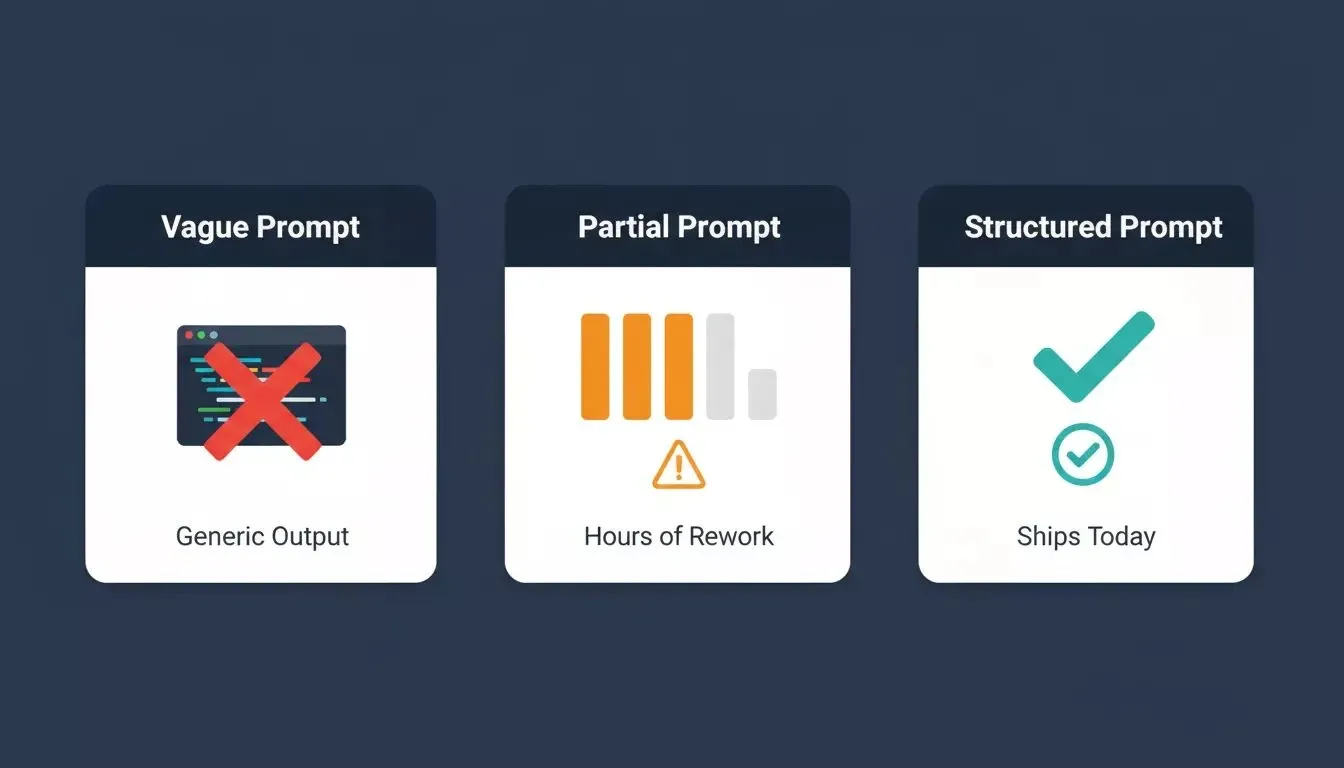
Vague prompts generate generic scaffolds. Structured prompts generate shippable products.
What Makes a Prompt Production-Ready?
A production-ready prompt defines scope, audience, intent, stack, and constraints before asking for any code. This single shift separates prompts that generate throwaway scaffolds from prompts that generate shippable products.
Four elements every production-ready prompt needs:
-
Define scope and audience first. Tell the AI who pays for this product, what problem it solves, and which features are in the MVP.
-
Specify your tech stack explicitly. Clarity here means less time refining and more time shipping.
-
Set constraints that match reality. Include your timeline, coding skill level, and deployment target.
-
Break tasks into specific steps. Work through data model, then auth, then user flows, review the underlying logic, then frontend.
This is the jump from prompt novice to prompt-driven engineering, a shift that OpenAI's prompt engineering guide describes as moving from instructions to specifications.
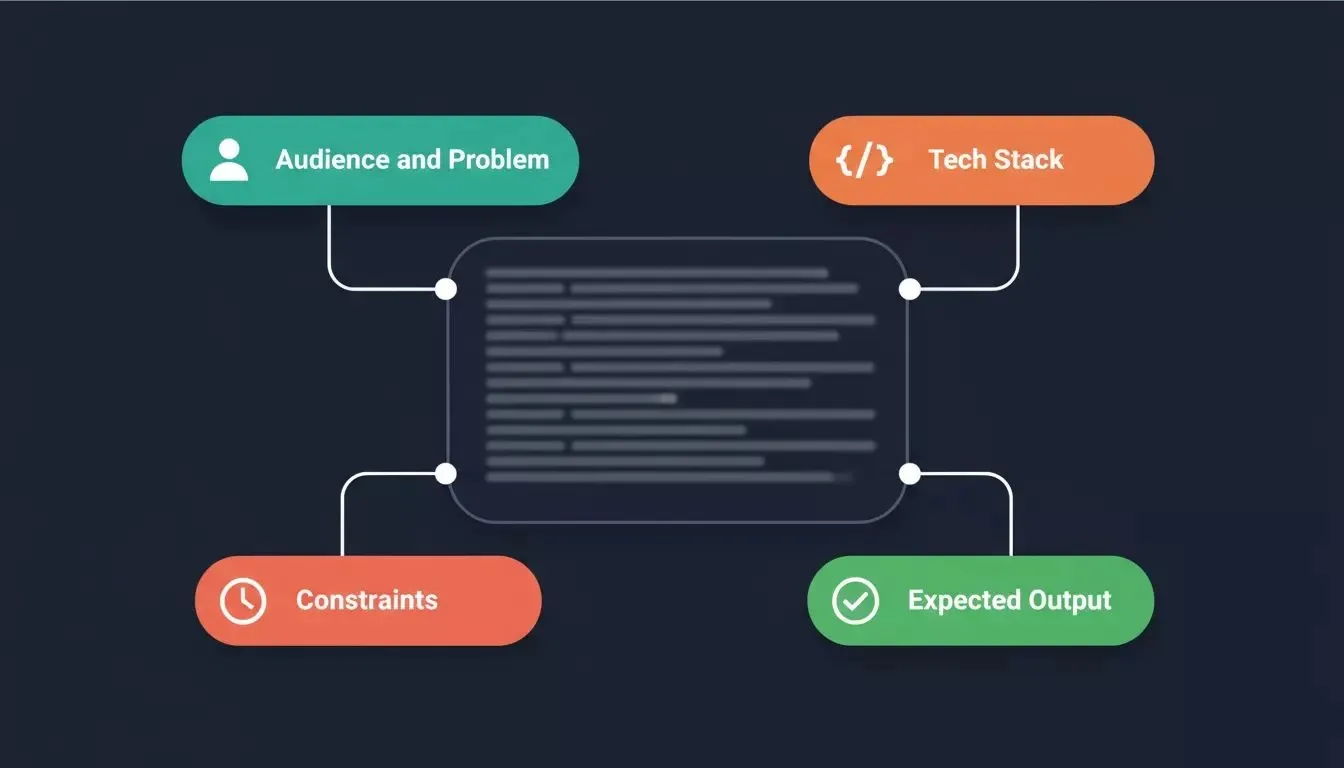
Every production-ready prompt has four components. Missing any one of them degrades the output.
Category 1: Validate Your Idea Before Writing Code
Shipping fast only matters if you are shipping something people want. Most indie hackers skip validation and spend weeks building a product nobody asked for. These three prompts compress weeks of market research into hours, and many founders validate demand first with a simple landing page set up in hours using Rocket.new's Solve pillar.
Run these prompts in Rocket.new's Solve before you open the Build editor. Solve turns complex business questions into structured, evidence-backed reports covering market data, competitive analysis, and actionable recommendations, which is useful when you are starting lean with AI subscriptions and a $20 domain.
One strong validation signal can also matter more than it seems, because a single prompt with clear demand can later support multiple revenue streams.
Prompt 1: Market Validation
Use this prompt to find out if your idea has a real market before writing a single line of code.
1Analyze this product idea: [your idea in one sentence].
2
3Identify:
41. The primary target audience (specific: job title, company size, or life situation)
52. The three strongest direct competitors and their pricing
63. The biggest gap in the current market I can build around
74. The fastest way to validate demand without writing code
85. The top three reasons this idea could fail
9
10Format as a structured report with a clear recommendation: build, pivot, or kill.
Example:
Analyze this product idea: a Notion-style workspace for freelance designers to manage client projects, feedback, and invoices in one place.
How it works: Rocket.new's Solve pillar searches live market data, competitor positioning, and customer signals to produce a structured research report. Some indie hackers use that output to test business ideas and even earn $10K with just a prompt and a landing page before building the full product. Instead of spending a weekend on manual research, you get a competitor map, a gap analysis, and a go/no-go recommendation in minutes. The "build, pivot, or kill" framing forces a decision rather than a list of observations.
Prompt 2: Competitor Teardown
Use this prompt to understand exactly how your competitors are positioned and where they are weak.
1Run a competitive teardown for [your product category].
2
3For each of the top three competitors ([Competitor A], [Competitor B], [Competitor C]):
41. Core value proposition (one sentence)
52. Pricing model and entry price
63. Top three features
74. Top three customer complaints (from reviews on G2, Product Hunt, or Reddit)
85. The biggest gap they leave open
9
10End with a positioning recommendation: what angle should I own that none of them cover?
Example:
Run a competitive teardown for AI writing tools for solo content creators. Compare Jasper, Copy.ai, and Writesonic.
How it works: This prompt pulls structured competitive intelligence from live sources: review sites, product pages, and community discussions. The customer complaint section is the most valuable output: it surfaces the exact pain points your competitors' users are already expressing, which becomes your positioning. The final positioning recommendation gives you a differentiated angle before you write a word of copy.
Prompt 3: Pricing Strategy
Use this prompt to set a price that converts before you build a pricing page.
1Analyze pricing strategy for a [product type] targeting [audience].
2
3Include:
41. What the top three competitors charge and their pricing model
52. What customers in this category say they are willing to pay
63. The pricing model that best fits my product: [describe in 2 sentences]
74. A recommended entry price and a recommended growth price
85. One pricing risk I should watch for
9
10Format as a pricing recommendation I can act on immediately.
Example:
Analyze the pricing strategy for a project management tool targeting freelance developers. My product has a Kanban board, client portal, and time tracking. It is a web app with no mobile version yet.
How it works: Pricing is the decision most indie hackers get wrong by guessing. This prompt grounds the recommendation in live competitor data and real customer willingness-to-pay signals. The two-tier output of entry price and growth price gives you a launch price and a natural upgrade path without needing a pricing consultant.
Ready to validate your next idea in minutes?
Start for free on Rocket.new, no credit card required. Run a Solve task, get a structured market report, and decide whether to build before you write a single line of code.
Category 2: Plan and Architect Before You Build
The difference between a prompt that generates throwaway code and one that produces a shippable product is structure. Most indie hackers jump straight to building and spend days untangling architecture decisions they should have made in an hour, especially if you're a solo founder making product, technical, and workflow calls alone.
These three prompts define your data model, your tech stack, and your risk surface before you generate a single component. Run these after validation and before your first Build task.
Assigning specialized AI roles during planning, such as researcher, architect, and reviewer, can create meaningful productivity gains for a solo founder.
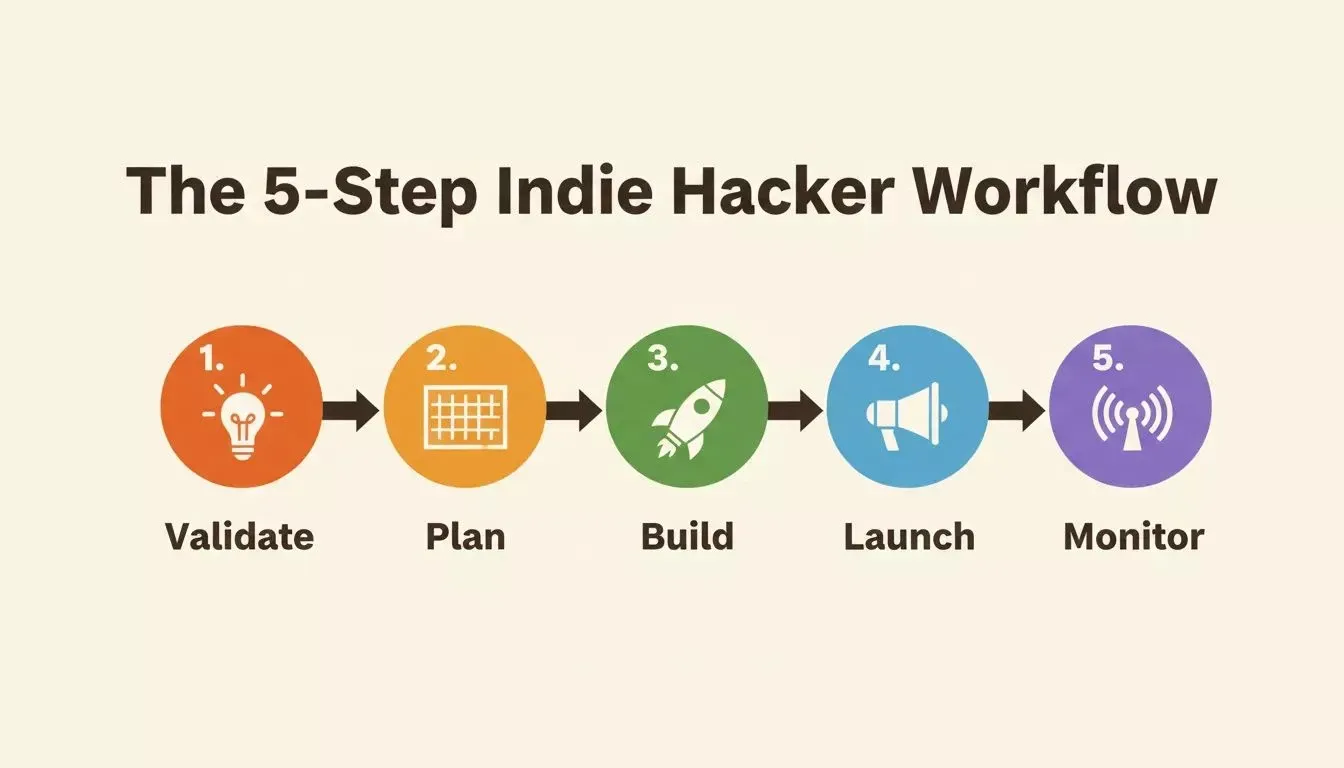
The five-phase workflow that separates indie hackers who ship from those who stay stuck.
Prompt 4: Project Vision and Scope
Use this prompt to define exactly what you are building, what the product is supposed to do, and what you are not building before the AI writes any code.
1I am building [product name], a [product type] for [target audience].
2
3The core problem it solves: [one sentence].
4The MVP includes only these features: [Feature 1], [Feature 2], [Feature 3].
5Out of scope for MVP: [Feature A], [Feature B].
6Tech stack: Next.js, Tailwind CSS, Supabase.
7Deployment target: Netlify.
8
9Start by building [first screen or flow].
10[Describe what should appear on the first screen in 1-2 sentences.]
Example:
I am building Clientflow, a client portal for freelance developers. The core problem: clients have no visibility into project status without emailing the developer. MVP includes: project status board, file sharing, and invoice view. Out of scope for MVP: time tracking, team collaboration. Tech stack: Next.js, Tailwind CSS, Supabase. Deployment: Netlify. Start by building the project status board: show a list of projects with name, status badge, and last updated date.
How it works: The "out of scope" clause is the most important line in this prompt. Without it, the AI expands the scope on every iteration, and you end up with a half-built product that does too many things poorly. Naming the first screen forces the AI to start with something concrete and shippable rather than generating a full architecture that takes hours to review.
Prompt 5: Data Model Design
Use this prompt to design your database schema before you build, catching structural mistakes before they cost you hours of refactoring.
1Design the data model for [product name].
2
3The app needs to support:
4- [Core user action 1]
5- [Core user action 2]
6- [Core user action 3]
7
8For each table, provide:
91. Table name
102. Fields with data types
113. Relationships to other tables
124. Any indexes or constraints worth noting
13
14Then identify the top two data model risks for this product and how to avoid them.
15Do not generate any code yet, just the schema design.
Example:
Design the data model for Clientflow. The app needs to support: clients viewing their project status, developers uploading files per project, and clients viewing and downloading invoices. For each table, provide name, fields with types, relationships, and constraints. Then identify the top two data model risks.
How it works: Running this prompt before building means your database schema is intentional, not accidental. The "do not generate code yet" instruction is critical: it forces a design review step that most solo builders skip. The risk identification at the end surfaces problems like missing foreign keys or N+1 query patterns before they become debugging sessions at 2am. You can learn more about how to generate a database schema with AI to go deeper on this step.
Prompt 6: Architecture Risk Audit
Use this prompt to find the three biggest technical risks in your plan before you write a line of code.
1I am building [product name] for [audience].
2
3Architecture plan:
4- Frontend: [framework]
5- Backend: [approach]
6- Database: [database]
7- Auth: [auth method]
8- Payments: [payment provider, if any]
9- Deployment: [platform]
10
11Before I build, identify:
121. The three biggest technical risks in this architecture
132. The most likely failure point under real user load
143. One security concern I should address before launch
154. One thing I should build differently if I expect to scale past 1,000 users
16
17Do not write any code. Just the risk analysis.
Example:
I am building Clientflow for freelance developers. Frontend: Next.js. Backend: Next.js API routes plus Supabase Edge Functions. Database: Supabase (Postgres). Auth: Supabase Auth with email/password. Payments: Stripe. Deployment: Netlify. Identify the three biggest technical risks, the most likely failure point under load, one security concern, and one scaling consideration.
How it works: This prompt is the architecture equivalent of a pre-flight checklist. It forces the AI to think adversarially about your plan, finding the weak points before users do. Solo builders who run this prompt before building consistently catch issues like missing Row Level Security on Supabase tables that would have taken hours to debug post-launch.
Ready to go from idea to architecture in one session?
Start for free on Rocket.new, use Solve to validate, then carry that context directly into your Build task. No context is lost between research and code.
Category 3: Build the Product Fast
This is where the code gets written. With validation done and architecture planned, these four prompts generate the core product: landing page, authentication, backend, and mobile app using Rocket.new's Build pillar. Building against a live preview improves development feedback at speed, so each iteration takes less effort.
Rocket.new's Build pillar generates production-ready Next.js web apps and Flutter mobile apps, e-commerce stores, SaaS dashboards, and landing pages from natural language. Each prompt below is structured to produce production-ready output on the first generation.
| Prompt Type | Context Given | Output Quality | Time to Ship |
|---|---|---|---|
| Vague | None | Generic, unusable | Days of rework |
| Partial | Minimal | Partially usable | Hours of rework |
| Structured | Full | Production-ready | Ship same day |
| Iterative | Full + incremental | Shippable MVP | Ship this weekend |
Prompt 7: Landing Page That Converts
Use this prompt to generate a high-converting landing page that speaks directly to your target user.
1Build a landing page for [product name] targeting [specific audience].
2
3Sections:
41. Hero: headline addressing [core pain point], subheadline explaining the mechanism,
5 and a CTA button: "[CTA text]"
62. Features: three benefit cards framed as outcomes, not features
73. Social proof: two to three placeholder testimonials from [user type]
84. Final CTA: repeat the primary CTA with a trust line below it
9
10Tech stack: Next.js, Tailwind CSS.
11Tone: [professional / conversational / bold].
12Do not use stock phrases like "streamline your workflow" or "all-in-one solution."
Example:
Build a landing page for Clientflow targeting freelance developers. Hero: headline addressing "clients who ghost you after sending invoices," CTA: "Get Your First Client Portal Live Today." Features: three outcome cards. Social proof: two testimonials from freelance developers. Tone: direct and confident. No stock phrases.
How it works: The "outcomes not features" instruction is what separates a landing page that converts from one that describes. Users buy outcomes. The "no stock phrases" constraint forces the AI to write copy that sounds human. For more on this approach, see how to build a high-converting landing page using AI tools.
Prompt 8: Authentication System
Use this prompt to generate a complete, secure authentication flow, the feature that blocks most side projects from launching.
1Create a complete authentication system for [product name].
2
3Include:
4- Sign up: email, password, confirm password, and "Create account" button
5- Login: email, password, "Sign in" button, and "Forgot password?" link
6- Password reset: request and reset via email
7- Protected routes: redirect unauthenticated users to /login
8- User session: maintain login state and show user email in the header
9- Logout: button that clears session and redirects to /
10
11Connect to Supabase Auth. Handle loading states and inline error messages.
12Do not change any existing screens or navigation.
Example:
Create a complete authentication system for Clientflow. Sign up with an email and password. Log in with email and password, and a forgot password link. Password reset via email. Protected routes redirect to /login. Show the user's email in the top navigation. Connect to Supabase Auth. Handle all error states inline.
How it works: Authentication is the feature that kills the most side projects, not because it is hard, but because it is tedious. This prompt generates the entire auth flow in one pass by specifying every state (loading, error, success) and every edge case. The "do not change existing screens" instruction prevents the AI from accidentally breaking navigation you already built. Explore AI app generator with user authentication for more patterns.
Prompt 9: Backend and Database
Use this prompt to generate a full backend with database CRUD, API routes, and error handling from a single prompt.
1Build the backend for [product name] using Next.js API routes and Supabase.
2
3Data models (already designed, use these exactly):
4- [Table 1]: [fields and types]
5- [Table 2]: [fields and types]
6
7Build:
81. API routes for full CRUD on [primary resource]
92. Row Level Security policies so users can only access their own data
103. Input validation on all POST and PUT routes
114. Error handling that returns consistent JSON error responses
125. Environment variable setup for Supabase URL and anon key
13
14Do not build any frontend yet. Backend only.
Example:
Build the backend for Clientflow using Next.js API routes and Supabase. Data models: projects (id, name, status, client_id, developer_id, created_at) and files (id, project_id, file_url, file_name, uploaded_at). Build CRUD for projects, RLS so developers only see their own projects, input validation on POST routes, consistent JSON error responses, and environment variable setup.
How it works: The "backend only" instruction at the end is critical. Even well-structured generated code still needs review, especially around backend logic, auth, and error handling. Without it, the AI generates both frontend and backend simultaneously, producing code that is harder to review and iterate on. Building the backend first with RLS already in place means your data is secure from the first deploy, not patched in later, and that review matters before real users hit production.
Prompt 10: Mobile App
Use this prompt to generate a production-ready Flutter mobile app for iOS and Android from a single prompt.
1Build a Flutter mobile app for [product name] targeting [iOS / Android / both].
2
3Core screens:
41. [Screen 1 name]: [what it shows and what the user can do]
52. [Screen 2 name]: [what it shows and what the user can do]
63. [Screen 3 name]: [what it shows and what the user can do]
7
8Navigation: bottom tab bar with icons for each screen.
9Design: consistent design system using [primary color name] as the brand color,
1016px base spacing, and rounded corners throughout.
11Data: use placeholder data for now.
12
13Do not add any screens beyond the three listed above.
Example:
Build a Flutter mobile app for Clientflow targeting both iOS and Android. Screen 1: Projects, a list of projects with name, status badge, and last updated date. Screen 2: Files, a grid of uploaded files for the selected project with file name and download button. Screen 3: Invoices, a list of invoices with amount, due date, and paid/unpaid status. Navigation: bottom tab bar. Brand color: deep blue. Use placeholder data.
**How it works: **Rocket.new's Build pillar generates production-ready Flutter apps with reusable ui components that can be submitted directly to the App Store and Google Play. The "do not add screens beyond the three listed" constraint prevents scope creep, the most common reason mobile side projects never ship. Starting with placeholder data and connecting Supabase in the next step keeps each prompt focused on one thing, which produces cleaner code and faster iteration, while helping you design the three screens so users can interact with them cleanly before adding more scope.
**Ready to build your product this weekend? **Start for free on Rocket.new, describe your app, and Rocket.new generates production-ready Next.js web apps and Flutter mobile apps with real code you can download or sync to GitHub.
Category 4: Launch and Get Your First Users
Building the product is only half the work. Distribution is where most indie hackers lose momentum. These three prompts generate a complete launch sequence: hero copy, a Product Hunt launch post, and a cold outreach template so you can go from shipped to first users in the same weekend.
Prompt 11: Hero Copy That Converts
Use this prompt to write landing page copy that speaks directly to your target user's pain, not your product's features.
1Write hero section copy for [product name] targeting [specific audience].
2
3The core pain point this product solves: [one sentence].
4The mechanism (how it solves it): [one sentence].
5The outcome the user gets: [one sentence].
6
7Produce:
81. Five headline options (under 10 words each, lead with the outcome or the pain)
92. Two subheadline options (under 25 words each, explain the mechanism)
103. One CTA button label (under 5 words, action-oriented)
11
12Do not use: "streamline," "all-in-one," "powerful," "seamless," or "next-level."
13Rank the five headlines from most to least likely to convert.
Example:
Write hero copy for Clientflow targeting freelance developers. Pain: clients ghost you after you send invoices. Mechanism: a client portal that shows project status, files, and invoices in one link. Outcome: clients pay on time and stop emailing you for updates. Five headlines, two subheadlines, one CTA. No stock phrases. Rank by conversion likelihood.
How it works: Asking for five options forces the AI to explore the full range: pain-led, outcome-led, and mechanism-led headlines. The "rank by conversion likelihood" instruction makes the AI reason about which framing is strongest, not just generate options, and because the first message shapes how the market understands the product over time, it also influences its future positioning. The banned phrases list eliminates the generic SaaS copy that makes every landing page sound the same.
Prompt 12: Product Hunt Launch Post
Use this prompt to write a Product Hunt launch that gets upvotes, not a press release nobody reads.
1Write a Product Hunt launch post for [product name].
2
3Product: [one sentence description]
4Target user: [specific audience]
5The problem it solves: [one sentence]
6The key differentiator: [one sentence]
7Founding story (optional): [one sentence about why you built it]
8
9Produce:
101. Tagline (under 60 characters)
112. First comment (200-300 words: story of why you built it, what it does,
12 and what you want feedback on, conversational, not salesy)
133. Three hunter questions to ask the community
14
15Tone: founder-to-founder, honest, and direct. No hype.
Example:
Write a Product Hunt launch for Clientflow. Product: a client portal for freelance developers. Target user: freelancers who lose clients because of poor communication. Problem: clients feel out of the loop and delay payments. Differentiator: built specifically for developers, not agencies, no bloat, no per-seat pricing. Founding story: I built it because I lost a client over a miscommunication about project status.
How it works: The founding story is the most important input in this prompt. Product Hunt rewards authenticity: a real story about why you built something consistently outperforms polished marketing copy. The three hunter questions are a distribution tactic: they give community members a specific reason to comment, which drives the algorithm.
Prompt 13: Cold Outreach Template
Use this prompt to write a cold outreach message that gets replies, not one that gets deleted.
1Write a cold outreach message for [product name] targeting [job title] at [company type].
2
3Context:
4- The recipient's pain point: [specific pain, not generic]
5- What my product does for them specifically: [one sentence]
6- The ask: [low-friction CTA, demo, free trial, feedback, or a single question]
7
8Constraints:
9- Under 100 words
10- No opener like "I hope this finds you well"
11- Lead with the recipient's pain or a relevant observation, not your product
12- One sentence about the product maximum
13- End with a single yes/no or one-click CTA
14
15Write three versions: one for email, one for LinkedIn DM, and one for Twitter/X DM.
Example:
Write cold outreach for Clientflow targeting freelance developers at agencies with 2-10 person teams. Pain: clients emailing for status updates kills focus. Product: a client portal that eliminates status update emails. Ask: a 15-minute demo or a free trial signup. Under 100 words per version. Three versions: email, LinkedIn DM, Twitter/X DM.
How it works: The "lead with the recipient's pain, not your product" constraint is the single most important rule in cold outreach. Most cold messages open with "I built a tool that..." which is immediately about the sender. This prompt forces the AI to open with something the recipient cares about. The three-version output means you have channel-appropriate copy ready to go without rewriting.
**Ready to ship and get your first users this weekend? **Start for free on Rocket.new, build your product, generate your launch copy, and go live. No credit card required.
Category 5: Monitor, Iterate, and Stay Ahead
Shipping is not the finish line. It is the starting line. The indie hackers who build sustainable products are the ones who watch their market continuously, use post-launch signals to optimize the product and go-to-market over time, and iterate faster than their competitors.
These two prompts use Rocket.new's Intelligence pillar to set up automated competitor monitoring and generate a structured iteration plan from real user signals. Understanding how to build a competitive intelligence program gives you the strategic foundation for this phase.
Prompt 14: Competitor Monitoring Setup
Use this prompt to set up automated competitor monitoring so you never miss a pricing change, a new feature, or a customer complaint.
1Set up competitor monitoring for [your product category].
2
3Track these competitors: [Competitor 1], [Competitor 2], [Competitor 3].
4
5For each competitor, monitor:
61. Pricing changes (any change to their pricing page)
72. New feature announcements (product updates, changelog posts, release notes)
83. Hiring signals (new job postings that indicate product direction)
94. Customer sentiment (new reviews on G2, Product Hunt, or Reddit)
105. Website messaging changes (shifts in their headline or positioning)
11
12Deliver a weekly summary organized by competitor with a "what this means for me"
13interpretation for each signal.
14Format: structured Intel cards, one per signal, ranked by strategic importance.
Example:
Set up competitor monitoring for freelance project management tools. Track Bonsai, HoneyBook, and Dubsado. Monitor pricing changes, new features, hiring signals (especially product and engineering roles), customer sentiment on G2 and Reddit, and website messaging changes. Weekly summary with strategic interpretation for each signal.
How it works: Rocket.new's Intelligence pillar watches companies across nine signal types: product, pricing, hiring, GTM, reviews, social, news, business, and website, and delivers structured Intel cards to your dashboard daily. The "what this means for me" interpretation is what separates intelligence from noise: instead of a raw feed of competitor activity, you get a strategic read on what each signal means for your positioning and roadmap. Set it up once and it runs automatically.
Prompt 15: Iteration Plan from User Feedback
Use this prompt to gather feedback from early users across support, usage data, and user interviews, then turn those signals into a prioritized iteration plan, so you build the right next feature, not just the loudest request.
1I have collected the following signals from my first [number] users of [product name]:
2
3User feedback: [paste 3-5 key pieces of feedback or complaints]
4Most-used features: [list the features users engage with most]
5Drop-off points: [where users stop or churn]
6Support tickets: [top 2-3 recurring issues]
7User interviews: [top 2-3 patterns or quotes]
8
9Based on these signals:
101. Identify the single highest-leverage improvement I can make this week
11 (under 4 hours of build time)
122. Identify the one feature request I should build next month
133. Identify one thing I should remove or simplify
144. Flag any signal that suggests a positioning problem
155. Suggest one experiment I can run in the next two weeks
16
17Format as a prioritized action list, not a feature backlog.
Example:
I have collected signals from my first 40 users of Clientflow. Feedback: "I can't figure out how to invite my client," "the invoice view is confusing," "love the file sharing." Most-used: file sharing, project status. Drop-off: after creating the first project, 60% of users never invite a client. Support tickets: client invite flow broken on mobile, invoice PDF not loading. Produce a prioritized action list.
How it works: The "format as a prioritized action list, not a feature backlog" instruction is what makes this prompt useful. Feature backlogs grow indefinitely. Action lists force a decision about what to do this week, which matters most when you are still learning from real users and are interested in continuous improvement. The drop-off point analysis is the most valuable input: a 60% drop-off after creating the first project is a product problem, not a marketing problem, and this prompt surfaces that distinction explicitly.
**Ready to monitor your market and iterate faster than your competitors? **Start for free on Rocket.new, set up Intelligence to watch your competitors automatically, and use Solve to turn user signals into a structured iteration plan. No credit card required.
How Rocket.new Connects All Five Phases
The Rocket.new vibe solutioning loop: validate with Solve, build with Build, monitor with Intelligence.
Most AI app builders focus on code generation alone. Rocket.new adds strategic research (Solve) that validates your idea before you build, and competitive intelligence (Intelligence) that monitors your market after you launch. All three pillars share context on one platform.
Here is what each pillar produces for a solo builder:
-
Solve: Structured reports with market data, competitive analysis, and actionable recommendations. Export as PDF, HTML, or PowerPoint.
-
Build: Production-ready Next.js web apps and Flutter mobile apps, e-commerce stores, SaaS dashboards, and landing pages. Real code you can download or sync to GitHub.
-
Intelligence: A live dashboard with daily briefs, pricing change alerts, hiring signals, and competitor move notifications across nine signal types.
No credit card required to start.
Rocket.new vs Other AI Builders
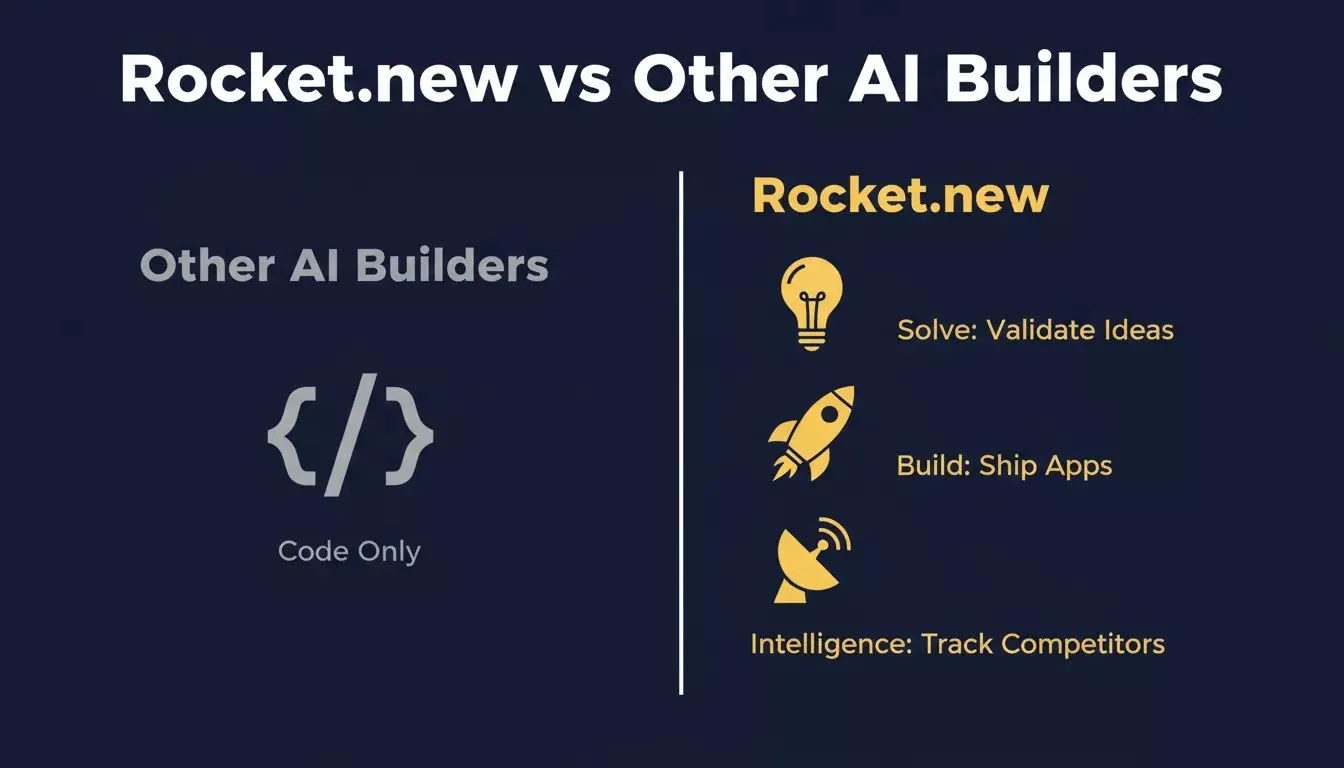
Rocket.new is the only platform that combines idea validation, app building, and competitor monitoring in one workflow.
| Feature | Rocket.new | Lovable | Bolt.new | v0 | Cursor |
|---|---|---|---|---|---|
| Idea validation (Solve) | Yes | No | No | No | No |
| Web app generation | Next.js | Yes | Yes | React | No |
| Mobile app generation | Flutter | No | No | No | No |
| E-commerce stores | Yes | No | Partial | No | No |
| Competitor monitoring | Yes | No | No | No | No |
| One-click deployment | Netlify | Yes | Yes | No | No |
| No credit card to start | Yes | Yes | Yes | Yes | No |
| GitHub sync | Yes | Yes | Yes | No | Yes |
Some builders may also compare Rocket.new with Replit Agent for prompt-to-app workflows, but Rocket.new adds validation and monitoring around code generation.
Rocket.new is the complete vibe solutioning platform. Validate ideas with Solve, build web and mobile apps with Build, and monitor competitors with Intelligence. Start free, no credit card required.
Table of contents
- -Why Most Indie Hackers Still Ship Slowly
- -Why Standard Prompts Fail Solo Builders
- -What Makes a Prompt Production-Ready?
- -Category 1: Validate Your Idea Before Writing Code
- -Prompt 1: Market Validation
- -Prompt 2: Competitor Teardown
- -Prompt 3: Pricing Strategy
- -Category 2: Plan and Architect Before You Build
- -Prompt 4: Project Vision and Scope
- -Prompt 5: Data Model Design
- -Prompt 6: Architecture Risk Audit
- -Category 3: Build the Product Fast
- -Prompt 7: Landing Page That Converts
- -Prompt 8: Authentication System
- -Prompt 9: Backend and Database
- -Prompt 10: Mobile App
- -Category 4: Launch and Get Your First Users
- -Prompt 11: Hero Copy That Converts
- -Prompt 12: Product Hunt Launch Post
- -Prompt 13: Cold Outreach Template
- -Category 5: Monitor, Iterate, and Stay Ahead
- -Prompt 14: Competitor Monitoring Setup
- -Prompt 15: Iteration Plan from User Feedback
- -How Rocket.new Connects All Five Phases
- -Rocket.new vs Other AI Builders