
Model Context Protocol gives AI agents one standardized layer to reach every tool, database, and API they need, cutting connector overhead and shipping full-stack products faster.
Most teams building with AI agents hit the same wall. Every tool needs its own connector, its own auth logic, and its own schema mapping. MCP solves that by defining how AI applications talk to external systems in a consistent way.
Anthropic released MCP in late 2024. Within 18 months, the standard reached 97 million monthly SDK downloads. Developers want a universal interface for AI-to-tool communication. The adoption curve confirms it.
Understanding what is Model Context Protocol and how it powers AI apps is the first step to unlocking its full potential. For a direct comparison with traditional approaches, MCP vs API breaks down where each fits in a modern AI development workflow.
- Standardized tool access: one protocol replaces dozens of bespoke API wrappers
- Bidirectional communication: agents read context and trigger actions through the same connection
- Model-agnostic design: works across Claude, ChatGPT, open-source LLMs, and any compliant client
- Ecosystem portability: build a server once, and every MCP-compatible host can use it
Think of it as a USB-C port for AI: one standard that eliminates the cable drawer of proprietary connectors.
| Dimension | Traditional API Connector | MCP-Based Connector |
|---|---|---|
| Setup per tool | Custom auth and schema mapping | Standardized server definition |
| Agent compatibility | Single vendor lock-in | Any MCP client works |
| Context sharing | Manual prompt injection | Native protocol-level exchange |
| Maintenance | N connectors to update | One server, many consumers |
| Discovery | Documentation hunting | Registry-based lookup |
| Security model | Per-tool implementation | Unified auth layer |
MCP acts as a single hub connecting AI agents to every external service through one standardized protocol layer.
How Are Enterprises Adopting the Protocol Today?
Enterprise teams are not waiting for the standard to mature. They are deploying it now across real production workflows.
- 72% of current adopters expect their protocol usage to increase over the next 12 months, according to Zuplo's State of MCP report
- Over 80% of Fortune 500 companies now run active AI agents in production workflows
- Around 14,000 MCP servers and 300 clients are cataloged across the ecosystem
- 49% measure ROI through developer productivity and time savings
- 70% of consumers already have 2-7 MCP servers configured in their environments
The data source pattern dominates early adoption. 63% connect version control systems like GitHub and GitLab, while 62% link documentation platforms like Confluence and Notion. API connectors follow at 58%, with development tools at 53%.
What separates production-ready teams from experimental ones is infrastructure maturity. Teams building TypeScript-based protocol servers and hosting them behind API gateways report smoother scaling than those running everything locally.
What Results Has Block Achieved With MCP?
Block (the parent company of Square and Cash App) represents one of the most thorough enterprise deployments documented publicly.
- 60+ internal MCP servers built entirely by Block engineers
- 50-75% time savings on common tasks reported by most employees using Goose, their MCP-powered agent
- Company-wide rollout across engineering, design, security, compliance, support, and sales teams
- Work that previously took days now completes in hours
Block's CTO Dhanji R. Prasanna noted that open technologies like MCP "are the bridges that connect AI to real-world applications." Block's approach validates a key principle: protocol-first architecture scales better than point-to-point connectors when AI agents need to operate across every department.
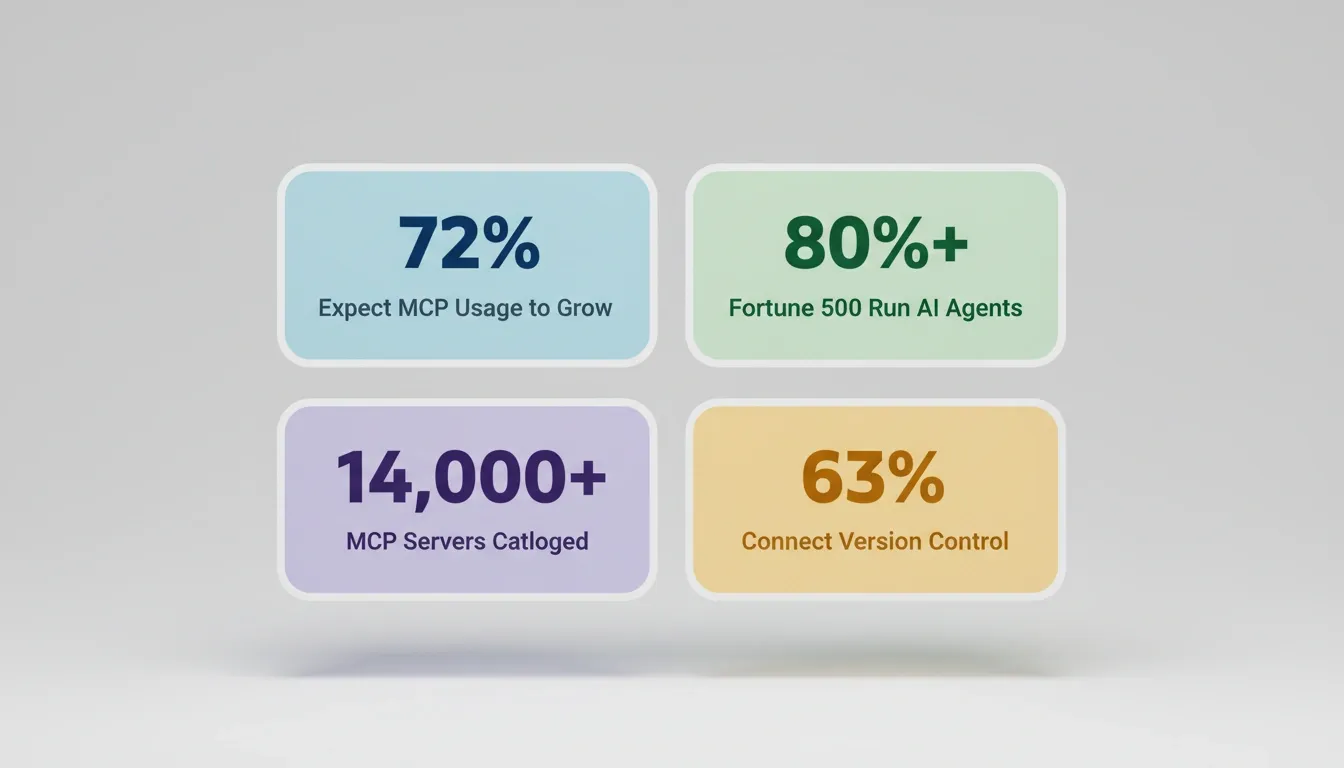 Key MCP adoption metrics across enterprise teams: growth expectations, Fortune 500 deployment, ecosystem size, and version control integration rates.
The Core MCP Use Cases in Full-Stack Development
For teams building full-stack apps, the protocol slots into every layer of the development stack. These MCP use cases cover the full spectrum from frontend generation to DevOps automation.
How Model Context Protocol connects AI agents across every layer of a full-stack development stack.
Frontend: Context-Aware UI Generation
AI agents connected via MCP query live design systems, pull component libraries, and generate UI based on real-time context. Instead of guessing design tokens, agents read the actual system state before generating code.
Practical examples:
- Agent reads a Figma connector to extract spacing, typography, and color tokens before generating a component
- Agent queries a Notion connector for product requirements and generates UI that matches the actual spec
- Agent reads a Linear ticket to understand feature scope before writing frontend code
Backend and API Layer: Wrapping Existing Logic
MCP servers wrap existing REST APIs, letting agents call business logic without custom connector code per endpoint. This is one of the highest-ROI MCP use cases for teams with existing API infrastructure.
Practical examples:
- Wrap a payment API as an MCP server so agents process transactions without per-integration code
- Expose internal microservices through a protocol-compliant interface so any agent can call them
- Connect CRM data through MCP so agents read customer context during build tasks
For a complete guide on how MCP for AI agents works across multi-agent architectures, the patterns apply directly to both backend wrapping and cross-service orchestration.
Database Layer: Schema-Aware Queries
Agents read schemas, run queries, and manage migrations through protocol-compliant database servers. This removes the pattern of hardcoding database logic into prompts.
Practical examples:
- Agent reads a Supabase schema via MCP before generating a data model
- Agent runs a migration check before proposing schema changes
- Agent queries row-level security policies to generate compliant data access patterns
DevOps: Agent-Accessible Infrastructure
CI/CD pipelines, deployment services, and monitoring tools become agent-accessible through standard MCP definitions. Agents trigger deployments, check build status, and read monitoring data without custom tooling.
Practical examples:
- Agent checks deployment status before generating release notes
- Agent reads error logs from a monitoring tool to diagnose and fix issues
- Agent triggers a staging deployment after generating code changes
Third-Party Services: One Protocol, Many Providers
Payment processors, email providers, analytics platforms, and CRMs expose capabilities through a single protocol layer. Teams authenticate once and agents access all connected services.
Practical examples:
- Agent reads Google Analytics data to inform landing page copy decisions
- Agent connects to Mailchimp to generate email sequences matching existing audience segments
- Agent reads Mixpanel event data to understand user behavior before proposing feature changes
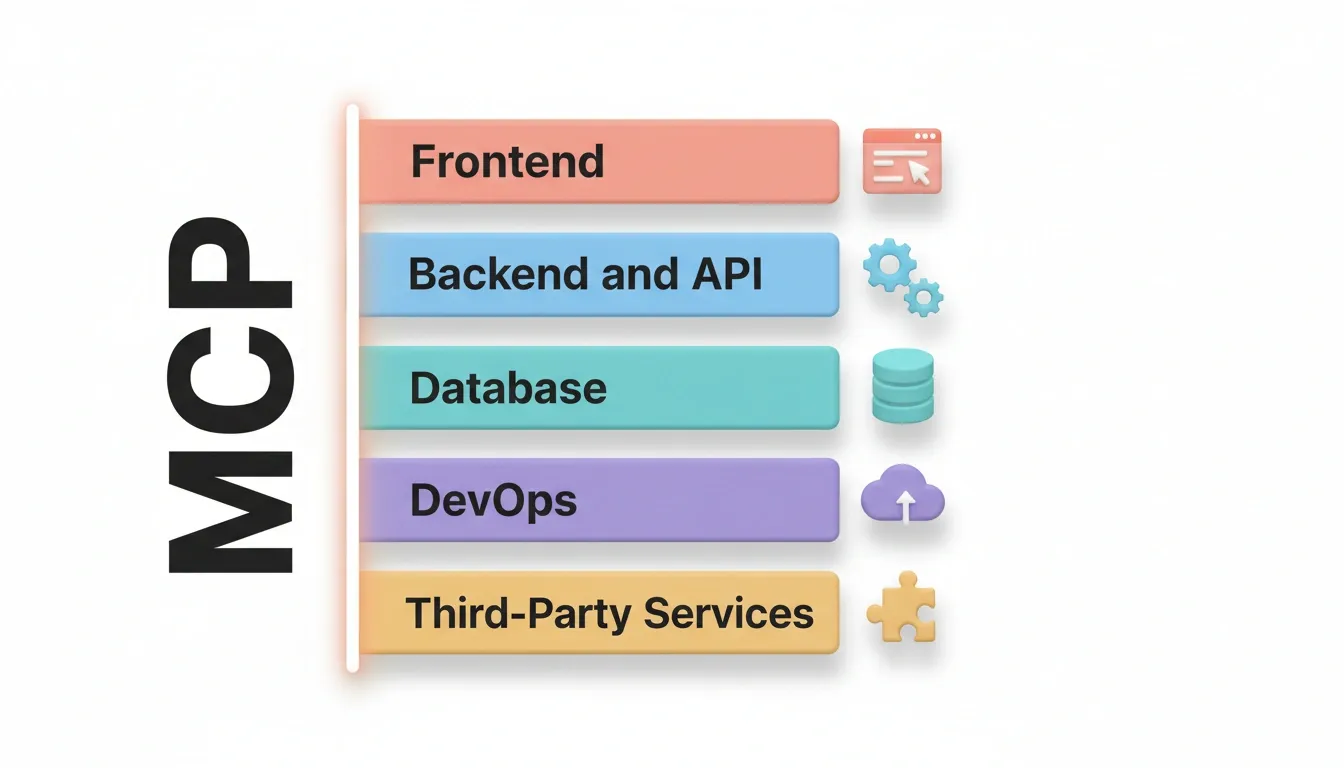 MCP connects AI agents to all five layers of a full-stack project through a single vertical protocol line.
When the protocol handles connectivity, the builder focuses on product logic rather than plumbing. That distinction defines the gap between shipping in days versus months.
MCP Use Cases by Team Role
Different teams extract different value from the same protocol infrastructure.
| Team | Primary MCP Use Case | Outcome |
|---|---|---|
| Product | Read Notion PRDs and Linear tickets into build context | First generation reflects actual spec |
| Engineering | Wrap existing APIs as MCP servers | Agents call business logic without custom connectors |
| Data | Connect database schemas via protocol | Schema-aware queries, migration-safe changes |
| Marketing | Read analytics and CRM data during content generation | Copy informed by real audience data |
| DevOps | Expose CI/CD and monitoring as MCP servers | Agents trigger and verify deployments |
| Security | Centralize auth through protocol layer | One access control model for all agent connections |
What Are the Security and Scaling Challenges?
The protocol's rapid adoption has outpaced its security tooling. Teams deploying at scale face real gaps.
- 50% of MCP server builders cite security and access control complexity as their biggest challenge
- 24% of servers operate without any authentication, suitable for local use but dangerous for production
- 40% rely on API keys alone for access control, inheriting all the weaknesses of static credentials
- 43% of tested deployments carry command injection vulnerabilities according to security researchers
- 38% of organizations say security concerns block them from increasing their protocol usage
Authentication methods are maturing. 32% now use OAuth, JWT, or SSO. Teams building Supabase-powered backends with protocol support benefit from row-level security that protects data at the query layer. The Supabase MCP guide covers the setup in detail.
Security Checklist for Production MCP Deployments
Before exposing any MCP server in a production environment, verify these six requirements:
| Requirement | Standard | Risk if Skipped |
|---|---|---|
| Authentication | OAuth 2.0 or JWT, not static API keys | Credential theft, unauthorized agent access |
| Database security | Row-level security enabled | Data exposure across tenant boundaries |
| Rate limiting | Configured on all server endpoints | Denial-of-service, cost overruns |
| Input validation | Prevents command injection at server boundary | Remote code execution |
| Audit logging | All agent actions captured | No visibility into what agents did |
| Network exposure | No server accessible without auth | Open attack surface |
Teams building MCP server dashboards to monitor these requirements can follow the step-by-step MCP server dashboard guide to get visibility across all connected servers.
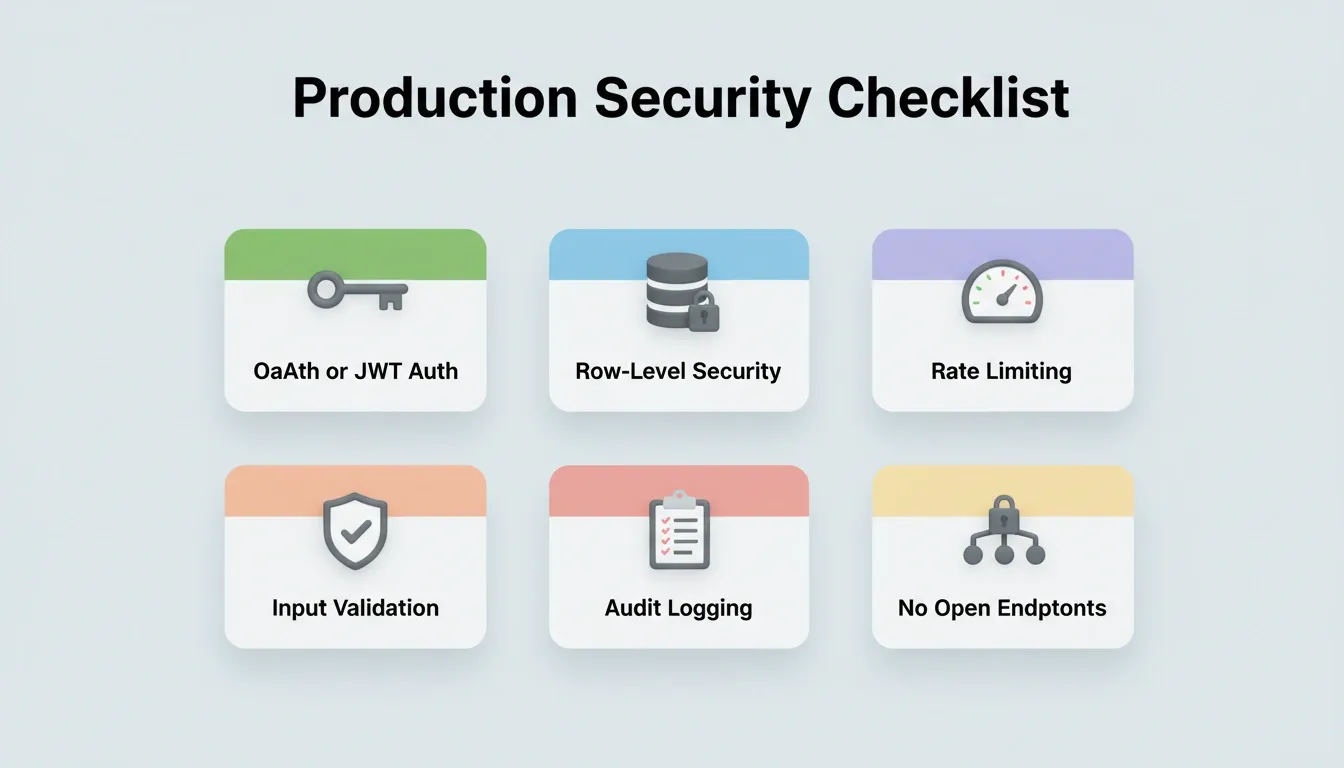 Six non-negotiable security requirements before exposing any MCP server in a production environment.
The pattern is clear: protocol adoption is production-ready, but teams need infrastructure that handles auth, observability, and access control as first-class concerns rather than afterthoughts.
Why Rocket Is Built for Protocol-First Development
Most AI builders start from a blank prompt and generate code in isolation. Rocket starts from context. That context includes protocol-aware infrastructure built into the platform from the first generation.
Rocket is a vibe solutioning platform that combines strategic research, AI app building, and competitive intelligence in a single product. The three pillars share context automatically. Solve handles research and decisions. Build generates production-grade apps. Intelligence monitors competitors continuously. The thinking before the build and the build itself happen in the same place.
What Rocket Actually Connects
Rocket's connector system operates at two levels:
Workspace-level connectors (OAuth, connect once, available across all projects): Notion, Google Workspace (Docs, Sheets, Calendar), GitHub, Supabase, Figma, Netlify, Airtable, Linear, Mailchimp, Typeform, Calendly
Task-level connectors (API keys, per-task in Build): Stripe, PayPal, AdSense, SendGrid, Twilio, Resend, Brevo, MailerLite, OpenAI, Anthropic, Gemini, Perplexity, Supabase, Strapi, Directus, Google Analytics, Mixpanel, Postman, Typeform, Tally, Cal.com, Notion, Linear, Airtable, Figma, GitHub
That is the complete list of 26+ integrations that flow directly into generation. Authenticate once and they are available in every build.
The Shared Context Architecture
Every other AI tool starts from zero each session. Rocket is built on the opposite architecture. Add your context once, and every task that follows already knows everything.
The first task opened inside a project already knows everything that has been shared. The tenth task knows everything the first nine established. This inheritance is automatic. There is no re-explaining, no re-uploading, and no briefing each new task from scratch.
In practice: the Solve research that validated your direction becomes the foundation of the Build. The Supabase schema connected at the project level is present when the developer opens the build task. The competitive intelligence from last week informs this week's product decision. Nothing is re-explained. Everything compounds.
Rocket's production-grade output includes by default:
| Output | Standard | Notes |
|---|---|---|
| Web apps | Next.js with SEO-ready structure | WCAG accessibility and GDPR coverage by default |
| Mobile apps | Flutter with real design systems | Dark/light theming, fluid navigation |
| Deployment | Staging and production environments | Full version history, one-click rollback |
| Analytics | Visitors, conversions, Core Web Vitals | Built-in, no additional tools needed |
Other builders like Bolt, Lovable, and v0 generate what you tell them to build. They have no shared memory architecture, no pre-build intelligence layer, and no managed platform for protocol-first workflows. You manage API keys, configurations, and error handling yourself.
Rocket figures out what is worth building, generates it with production-quality output, and keeps your context alive across every task.
Protocol-First Development Is Already Here
With 72% of adopters expecting growth and Fortune 500 companies running agents in production, the Model Context Protocol has moved past experimentation. Full-stack teams that adopt the standard now spend less time on connector plumbing and more time shipping products that matter.
The gap between teams building on protocol infrastructure and those still wiring custom connectors grows wider each quarter. The standard is set, the tools exist, and the results from early adopters speak for themselves.
The Protocol Standard Is Set. Build From It.
MCP use cases have moved from experimental to production across every major industry. The teams shipping fastest are not the ones with the most engineers. They are the ones whose AI agents already have access to every tool, database, and service they need through a single, standardized layer.
The protocol removes the connector tax. What you do with that time is the actual product decision.
Rocket is built for exactly this moment: a vibe solutioning platform where Solve, Build, and Intelligence share context so the thinking and the building happen in the same place. 1.5 million people across 180 countries have tried Rocket. Start building your next protocol-connected full-stack app at Rocket.new.
Table of contents
- -How Are Enterprises Adopting the Protocol Today?
- -What Results Has Block Achieved With MCP?
- -The Core MCP Use Cases in Full-Stack Development
- -Frontend: Context-Aware UI Generation
- -Backend and API Layer: Wrapping Existing Logic
- -Database Layer: Schema-Aware Queries
- -DevOps: Agent-Accessible Infrastructure
- -Third-Party Services: One Protocol, Many Providers
- -MCP Use Cases by Team Role
- -What Are the Security and Scaling Challenges?
- -Security Checklist for Production MCP Deployments
- -Why Rocket Is Built for Protocol-First Development
- -What Rocket Actually Connects
- -The Shared Context Architecture
- -Protocol-First Development Is Already Here
- -The Protocol Standard Is Set. Build From It.