
Use these AI prompts to build social media scheduler 2026 with multi-platform posting, approval workflows, analytics, and auto-repost logic, all in one production-ready app, no backend code required.
Quick Answer: How Do You Structure AI Prompts to Build a Social Media Scheduler?
Structure your AI prompts across five sequential phases: Foundation (auth + API connectors), Content Creation (composer + queue), Approval Workflow (review + notifications), Analytics (dashboards + best-time recommendations), and Automation (evergreen repost + alerts). Each phase produces a testable module before you prompt the next.
Why Most Scheduler Tutorials Fall Short of Production
Why do most social media scheduler tutorials produce a basic post queue and nothing else? 73% of marketers now depend on scheduling tools daily, up from 61% in 2024. That growth signals a clear opportunity for founders who can ship a full-featured social media management app rather than a prototype.
The gap between a tutorial demo and a tool worth paying for is large. Most AI tools generate a simple content calendar with a single post queue, then stop. They skip multi-role authentication, ignore per-platform character limits for each social media post, and leave out notification systems entirely.
This guide delivers a complete, build-order AI prompt library across five phases that produces a scheduler founders can actually monetize. Each prompt includes the expected output, a what-to-check note, and a follow-up refinement prompt so your social media management workflow stays production-grade from day one.
What Gets Left Out of a Basic Post Queue?
Generic AI prompts produce generic apps. Here is what typically gets skipped when you ask an AI tool to build a social media scheduler without enough context.
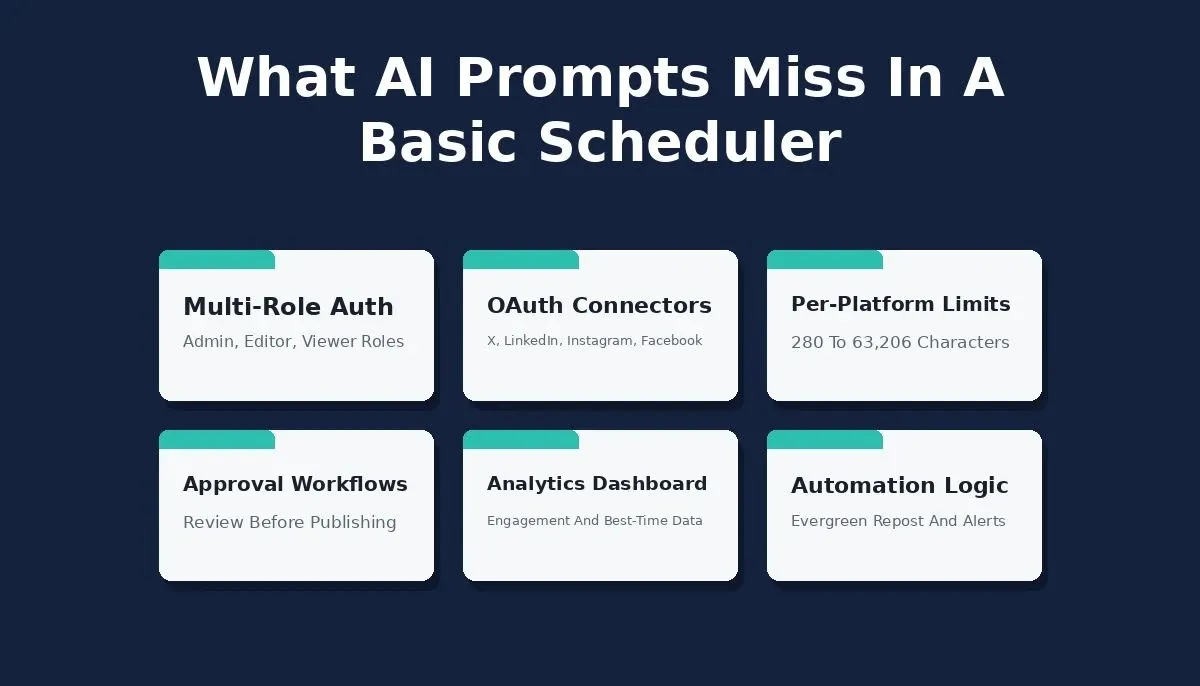
Six layers that separate a demo scheduler from a production-grade social media management app
-
Multi-role authentication: most outputs lack admin, editor, and viewer roles that small teams need for brand consistency
-
Social account connectors: connecting to X, LinkedIn, Instagram, and Facebook APIs requires OAuth flows that vague prompts never specify
-
Per-platform formatting: an Instagram caption has different limits than a LinkedIn post or Facebook post, and scheduling tools must respect those constraints
-
Approval workflows: content creation for social media without a review step produces quality drift, especially for agencies managing multiple platforms
-
Analytics and social listening: posting times, engagement signals, and follower growth tracking are what turn a scheduler into a social media management platform
-
Automation logic: evergreen auto-repost, failed post alerts, and monthly content calendar generation are the features that justify a paid plan
When your AI prompt skips these layers, you get a demo. When your prompt covers them, you get a product people will pay for.
How Should You Structure Prompts for a Full Scheduler?
The best AI prompt strategy for a social media scheduler follows build-order phasing. You prompt for foundational infrastructure first, then layer content creation, then add team workflows, then analytics, then automation. This mirrors how a social media manager would prioritize features for their target audience.
Here is the five-phase approach that works with AI tools like Rocket to generate ideas and ship a production app.
| Phase | Focus Area | Key Prompt Topics | Expected Output |
|---|---|---|---|
| 1. Foundation | Auth and Connectors | Multi-role auth, social API connections, brand profiles | Working login, connected social media channels, brand voice settings |
| 2. Content Creation | Composer and Queue | Post composer, character counter, media upload, drag-and-drop queue, CSV import | Platform-specific post editor with content ideas and scheduling |
| 3. Approval | Team Workflow | Draft submission, approve/reject with comment, Twilio SMS notifications | Approval pipeline with status-change alerts for small teams |
| 4. Analytics | Dashboards | Engagement per platform, best-time-to-post, follower growth | Social media analytics dashboard with posting times recommendations |
| 5. Automation | Repost and Alerts | Evergreen repost, failed-post alert via Resend, monthly calendar | Autopilot content calendar with error handling |
Each phase builds on the previous one. Your social media strategy becomes testable at every step because you can verify each module before prompting the next. For deeper guidance on structuring AI prompts for app generation, Rocket's prompt engineering guide covers the pattern in detail.
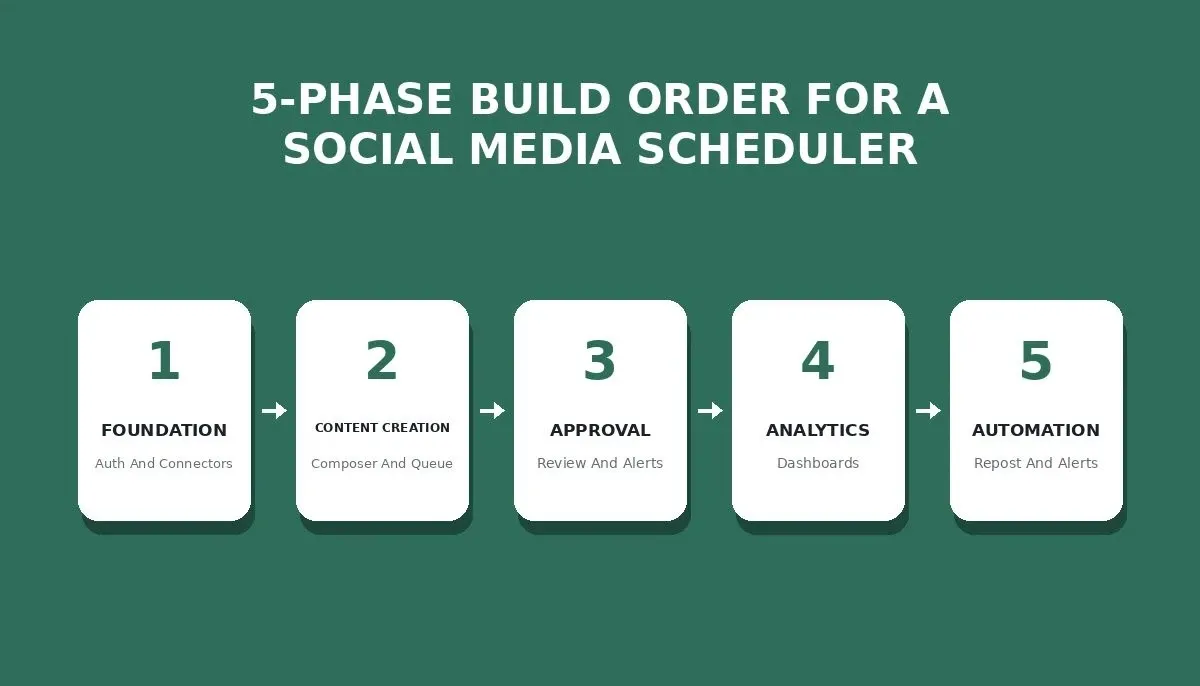
Five-phase build order, each phase is independently testable before moving to the next
Five-phase AI prompt sequence: each phase is independently testable before moving to the next
Foundation Phase: Auth, Connectors, and Brand Profiles
The foundation phase covers multi-role auth, social API connectors, and brand profiles, skipping it breaks every later feature.
Rocket.new has 26+ native one-click connectors (Stripe, Supabase, Resend, Twilio, Instagram, GitHub, and more) plus a universal REST API importer. For social platforms like X, LinkedIn, and Facebook that are not in the native connector list, you import their API specs via Postman, cURL, or OpenAPI, Rocket then generates the UI, backend logic, and error handling around them automatically. Instagram is available as a native OAuth connector for displaying feeds and social proof content.
-
Auth prompt example: "Generate a multi-role authentication system with admin, editor, and viewer roles."
-
Connector prompt example: "Add API connections for X (Twitter), LinkedIn, Instagram, and Facebook. Import each platform's API spec via the API importer. Store access tokens securely in environment variables."
-
Brand profile prompt: "Create a brand profile setup page where users define their brand voice, brand tone, brand style guidelines, and target audience demographics."
What to check: verify that role-based access works across all routes, that OAuth tokens refresh automatically, and that brand consistency settings persist across sessions.
Content Creation Phase: Composer, Media, and Queue
After foundation, the content creation phase gives your social media manager users the tools to actually create content and schedule it across social media channels. This is where most tutorials stop, but a production scheduler needs three more phases.
-
Composer prompt: "Build a post composer with a per-platform character counter that adjusts limits for X (280 chars), LinkedIn (3000 chars), Instagram caption (2200 chars), and Facebook post (63,206 chars)."
-
Media prompt: "Add media upload with image crop tool, aspect ratio presets for Instagram post (1:1, 4:5, 9:16), LinkedIn post (1.91:1), and Facebook post (1:1). Support short form video upload up to 60 seconds."
-
Queue prompt: "Generate a drag-and-drop content calendar with weekly and monthly views. Support bulk CSV import for batch scheduling."
What to check: character counters update in real-time, media crops match each platform's required dimensions, and the content calendar displays all scheduled social media posts correctly across time zones.
What About Approval Workflows and Team Notifications?
For small teams and agencies, social media workflows without approval gates are a liability. One wrong post goes live, and brand consistency collapses. This is a separate job from content creation, and your AI prompt should treat it that way.
-
Approval prompt: "Create an approval workflow where editors submit draft social media posts for review. Reviewers can approve with one click or reject with a required comment. Track all approval history with timestamps."
-
Notification prompt: "Integrate Twilio for SMS notifications on status changes. When a post is approved, notify the author via SMS. When rejected, send both an SMS and an email with the reviewer comment."
-
Follow-up prompt: "Add a batch approval view where reviewers can approve or reject multiple social media posts at once. Include a filter for posts by platform, author, and date range."
This is how AI social media app tools handle team collaboration in production.
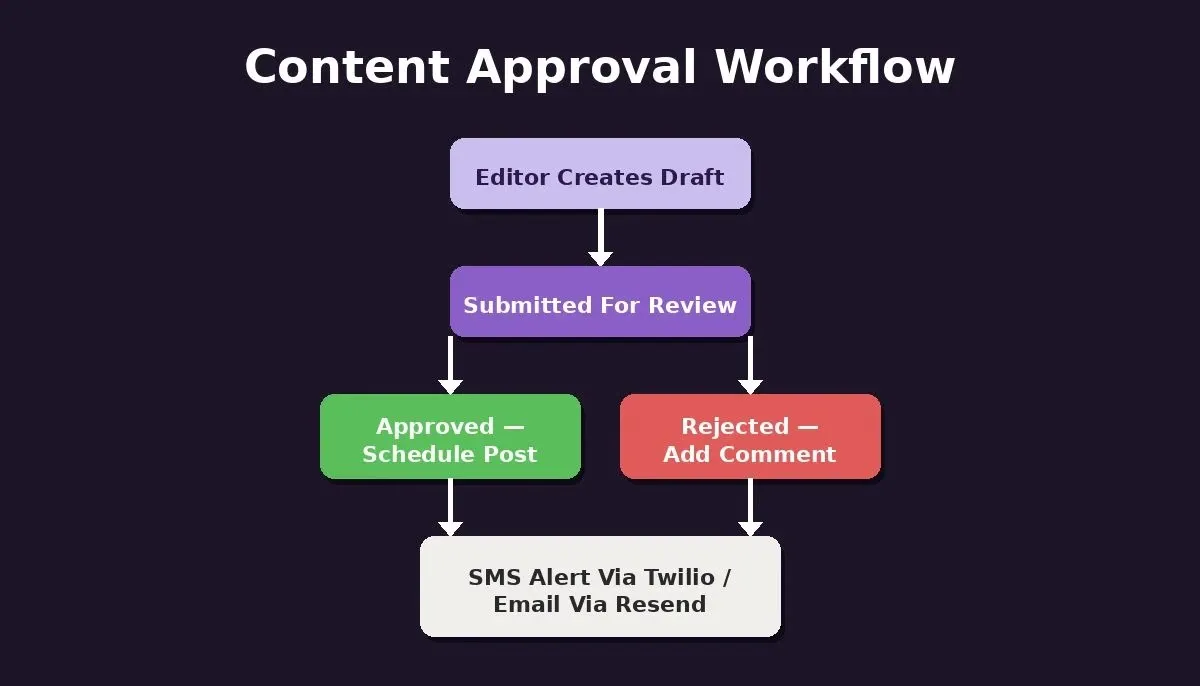
Approval workflow for social media post review, Twilio handles SMS alerts, Resend handles email
Analytics Prompts: Dashboards and Best-Time Recommendations
Social media analytics turn your scheduler from a publishing tool into a social media strategy platform. 94% of marketers plan to use AI tools in their content creation processes this year, and the primary reason is data-driven decision making.
-
Dashboard prompt: "Build an engagement analytics dashboard showing likes, comments, shares, and reach per social media post grouped by platform. Include a date range picker and comparison mode for week-over-week performance."
-
Best-time prompt: "Analyze historical posting times and engagement data to generate best-time-to-post recommendations per social media channel. Display as a heatmap showing optimal posting windows."
-
Growth prompt: "Add a follower growth chart per connected platform. Show daily net followers, track performance trends, and flag unusual drops. Include analytics export to CSV."
Automation Phase: Evergreen Reposts, Alerts, and Calendar
The automation phase transforms your scheduler into an all-in-one social media management platform that works without constant manual input. This is what separates a free plan MVP from a paid tool that generates recurring revenue.
-
Evergreen prompt: "Create an evergreen repost system. Let users mark social media posts as evergreen. The system automatically reshares evergreen content on a configurable schedule with slight caption variations."
-
Alert prompt: "Build a failed-post alert system using Resend email API. When a scheduled social media post fails to publish, immediately email the account owner with error details and a one-click retry button."
-
Calendar prompt: "Generate a monthly content calendar template pre-populated with content ideas based on the brand profile, upcoming event dates, and trending topics in the target audience niche."
These AI prompts give your social media planning tool the automation layer that Sprout Social and Hootsuite charge premium prices for.
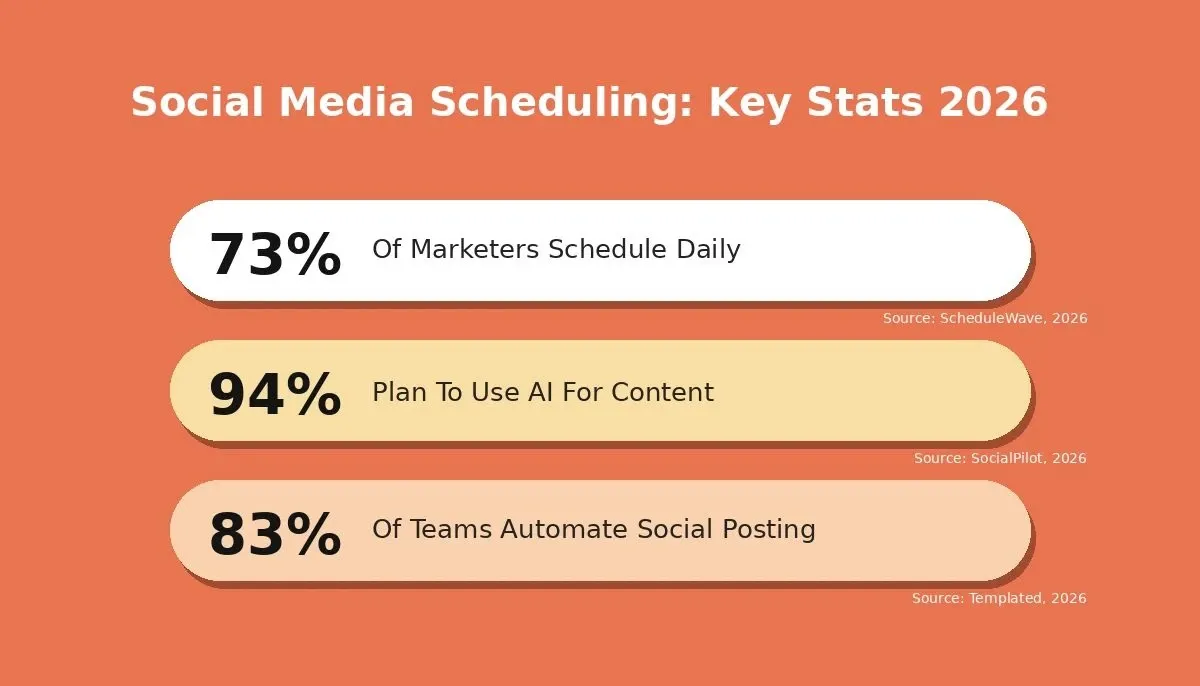
Key 2026 statistics on social media scheduling adoption and AI usage in content creation
Why Rocket Ships Your Scheduler Faster Than Manual Coding
So here is the real question. After seeing five phases of structured AI prompts, where do you actually run them to get a production app and not just code snippets? This is where the best AI tool choice matters.
Rocket is a vibe solutioning platform, it combines Solve (market research), Build (full-stack web and mobile app generation), and Intelligence (competitor monitoring) in one place. When you use the Build pillar to describe your social media scheduler, Rocket generates complete Next.js or Flutter applications with working backends, database schemas, authentication, and API connections.
26+ Native Connectors: Plus Any REST API
-
Twilio: native connector for SMS notifications on approval status changes
-
Resend: native connector for failed-post email alerts with one-click retry
-
Supabase: native connector for your Postgres database, user auth, and file storage
-
Instagram: native OAuth connector for displaying Instagram feeds and social proof content
-
Stripe: native connector when you are ready to add paid plan billing
For social platforms not yet in the native connector list, X (Twitter), LinkedIn, and Facebook, Rocket's universal API importer lets you paste a Postman collection, cURL command, or OpenAPI spec, and Rocket generates the UI, backend logic, and error handling around those endpoints automatically.
How Rocket Compares to the Alternatives
| Capability | Rocket | Buffer/Hootsuite | Manual Coding | No-Code (Bubble) |
|---|---|---|---|---|
| Full-stack app output | Next.js + Flutter | Fixed SaaS product | Any stack | Visual-only, no real code |
| Custom approval workflows | Prompt-driven | Not customizable | Build yourself | Limited logic |
| Native Twilio SMS | One-click connector | Not available | Manual integration | Requires plugin |
| Native Resend email | One-click connector | Not available | Manual integration | Requires plugin |
| Custom analytics dashboard | Prompt-driven | Fixed reports only | Build yourself | Limited |
| Free plan to start | $0, no credit card | Limited free tiers | Open source | Free tier limited |
| Iterative AI refinement | Chat-based | No | Manual | No |
Rocket versus the alternatives: capability comparison for building a social media scheduler
Sprout Social costs $249/month per seat and still does not let you customize workflows for your specific social media strategy. With Rocket, you describe your scheduler in plain English AI prompts and get a deployed app.
What Does the Reddit Community Say About Building With AI?
Real builders share what actually works. Across Reddit's r/SocialMediaMarketing community, the consensus on AI tools for social media is clear: no single AI tool does everything well, and the most effective practitioner stacks work in layers, which is exactly the phased approach this guide follows.
83% of marketing departments automate their social media posting process, confirming that the market expects production-grade scheduling automation. The best AI tool is not the one that does everything in one generic prompt, but the one that handles structured, layered instructions and produces AI generated content and code that actually connects.
Your Scheduler is Five Prompts Away From Deployment
Building a social media scheduler that people will pay for requires more than a single AI prompt. It requires five structured phases covering foundation, content creation, approval workflows, analytics, and automation. The AI prompt library in this guide gives you the exact instructions to produce each layer with the right level of detail for production quality.
The social media management market is projected to reach $39.14 billion in 2026. Founders who ship now, using AI tools that generate full-stack apps from structured prompts, capture the gap between basic tutorials and what paying users actually need.
Ready to turn these AI prompts to build social media scheduler workflows into a working product this week? Open Rocket.new, paste your first foundation prompt, and watch it generate authentication, social connectors, and brand profiles in one session. No dev team required. Start building for free today.
Table of contents
- -Why Most Scheduler Tutorials Fall Short of Production
- -What Gets Left Out of a Basic Post Queue?
- -How Should You Structure Prompts for a Full Scheduler?
- -Foundation Phase: Auth, Connectors, and Brand Profiles
- -Content Creation Phase: Composer, Media, and Queue
- -What About Approval Workflows and Team Notifications?
- -Analytics Prompts: Dashboards and Best-Time Recommendations
- -Automation Phase: Evergreen Reposts, Alerts, and Calendar
- -Why Rocket Ships Your Scheduler Faster Than Manual Coding
- -26+ Native Connectors: Plus Any REST API
- -How Rocket Compares to the Alternatives
- -What Does the Reddit Community Say About Building With AI?
- -Your Scheduler is Five Prompts Away From Deployment