Using the right AI prompts to refine and iterate an AI-built app is the difference between a rough prototype and a production-ready product. This blog gives you 20 copy-paste prompts covering structure, UI, debugging, features, and real-data testing, so you can ship faster and iterate with precision on any AI app builder.
Why do AI-built apps fall apart the moment you try to change something?
According to GitHub's 2024 developer survey, over 97% of developers have used AI coding tools at work. Kyle Daigle, COO of GitHub, noted that "AI doesn't replace human jobs, it frees up time for human creativity." Yet the biggest challenge most builders face today is prompt clarity.
The gap between a working prototype and a production-ready app is not about code generation speed. It comes down to knowing how to talk to your AI app builder after the initial build is done. Vague instructions produce vague results, and most people hit a wall right after the first generation step.
This blog gives you 20 copy-paste prompts that cover every stage of app refinement. From defining data structure to testing edge cases with real data, these prompts help you iterate with precision and build apps that actually work for your customers.
What Makes an AI App Iteration Prompt Actually Work?
Before diving into the prompts, it helps to understand what separates effective iteration instructions from vague ones. Most builders treat prompts as simple commands. The best builders treat them as precise specifications: scoped, testable, and side-effect-aware.
Scope isolation is the first property. Every prompt should target exactly one component, screen, or function. When you say "improve the app," the AI has no boundary and will touch files you did not intend. When you say "add input validation to the email field on the signup screen," the AI has a precise target.
State awareness is the second property. Effective iteration prompts reference the current state of the app. Phrases like "the existing Users model," "the current dashboard layout," or "without changing the tasks system" tell the AI what to preserve. This prevents regression, which is the most common failure mode in AI-assisted development.
Expected output definition is the third property. A strong prompt describes what success looks like. "Show an inline error message below the field" is testable. "Make it better" is not. When you define the expected output, you give yourself a clear pass/fail criterion after each iteration.
Side-effect constraints are the fourth property. Explicitly stating what should not change is just as important as stating what should. Adding "do not touch any other logic or code on this page" dramatically reduces unintended regressions across your codebase.
Why Does Prompt Quality Shape Your App's Final Output?
AI generates code based on what you describe. When your instructions lack scope or specificity, the app output reflects that ambiguity across every file, every screen, and every component in your project.
-
Specificity controls accuracy. A prompt that says "make the app better" produces random changes nobody needed. A prompt that says "add form validation to the email field on the signup page" produces a targeted edit with predictable output. The model works best when it knows exactly which fields and screens you mean.
-
Context carries forward. Most AI app builders maintain conversation history. Each prompt builds on prior context, so clarity at one step compounds into better results at the next stage of your project. This makes your builder smarter over time.
-
Iteration is not repetition. Writing better prompts means giving the AI new information each time. Point to specific screens, describe expected behavior, reference prior changes, and define roles clearly when you iterate on existing features.
-
Vague prompts create rework. When your prompt lacks clear boundaries, the AI might rewrite files you did not want touched. Being explicit about which components to edit helps you find the right outcome faster and saves hours of debugging down the line.
The pattern holds across every AI app builder on the market today: clear input produces predictable output. The prompts below follow this principle at every stage of app building, from structure to deployment.
| Prompt Category | What It Controls | When to Use | Typical Outcomes |
|---|---|---|---|
| Structure and Data | Database schema, user roles, page architecture, entities | Start of project, before any UI design work | Stable foundation, defined relationships, clear navigation |
| UI and Workflows | Screens, dashboards, approval flows, visual editor, templates | After data models are stable | Complete user journeys, working status flows |
| Debugging and Fixes | Bug resolution, validation, error handling, logic fixes | After testing reveals issues | Targeted code changes, no side effects |
| Features and Scale | Integrations, export, payments, access control, workflows | Once core app works correctly | Production-ready features, connected systems |
| Real Data Testing | Edge cases, load scenarios, content replacement, demo data | Before deploying to live customers | Confidence the app handles real-life conditions |
Prompts for Defining App Structure and Data Models
Getting your app's foundation right matters more than any visual polish. These prompts help you define roles, set up database relationships, establish entities, and plan pages before the builder generates a single line of logic.
Skipping the structure phase is the single most expensive mistake in AI-assisted app development. When you generate UI before your data model is defined, every subsequent iteration fights against an unstable foundation. A well-structured data model prompt defines your entities, specifies their relationships, and establishes the fields each entity needs, producing internally consistent code from the first build.
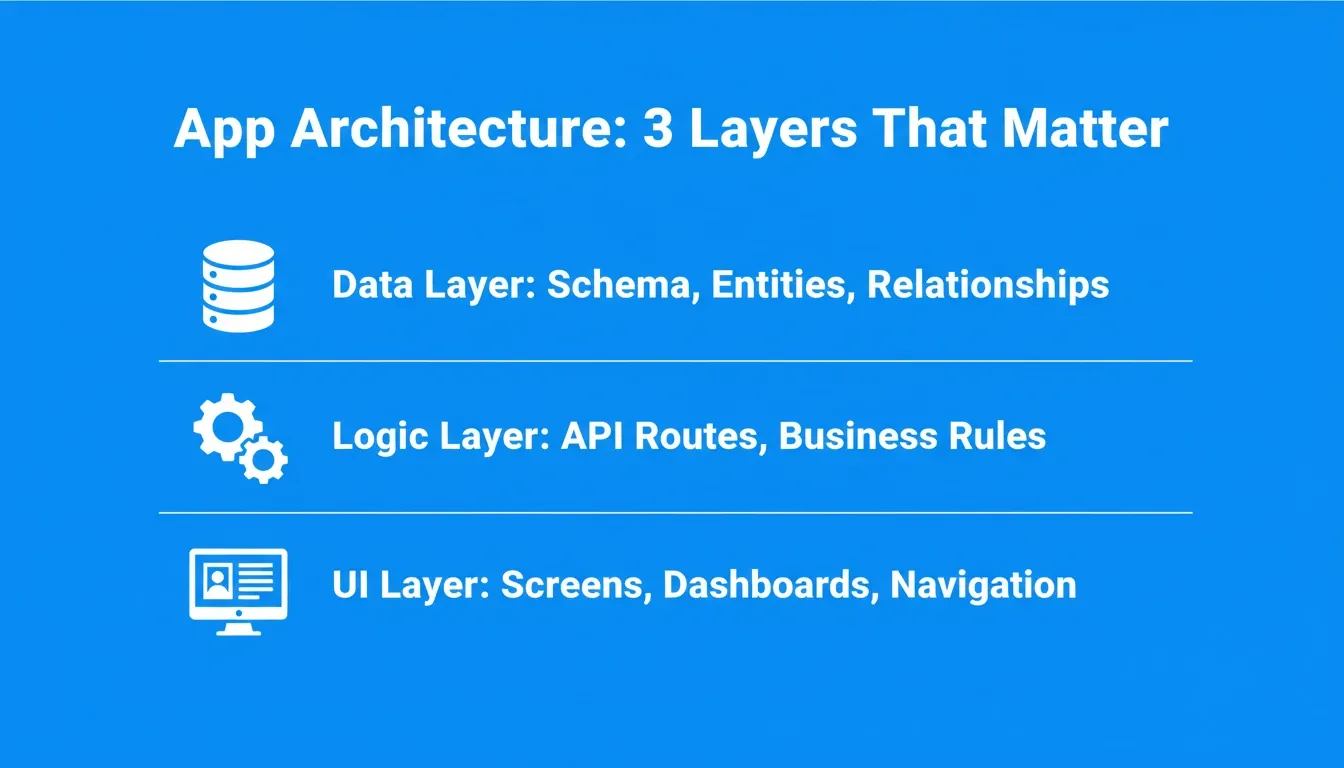
A well-defined data architecture is the foundation every subsequent prompt builds on
The Structure and Data Prompts
-
Prompt 1: "Create a project structure with three user roles: admin, editor, and viewer. Define permissions for each role so admin has full access, editor can create and edit content, and viewer can only read pages. Generate a roles table in the database that connects to the Users model."
-
Prompt 2: "Set up a database schema for a project tracker with these entities: Projects (name, status, owner, due date), Tasks (title, description, assigned user, priority, status), and Comments (text, author, timestamp). Define relationships so each project has many tasks, and each task has many comments. Add fields for created date and last updated."
-
Prompt 3: "Generate navigation for a five-page app: Dashboard, Projects, Team, Settings, and Reports. The dashboard should show summary cards for key metrics, and the sidebar should highlight the active page. Make the navigation responsive for mobile screens."
-
Prompt 4: "Add a data model for customer subscriptions with fields: plan name, billing cycle, start date, renewal date, payment status, and invoice history. Connect it to the existing Users entity with a one-to-many relationship so each user can view their subscription details on the Settings page."
When you define structure early, every later prompt builds on a stable foundation instead of fighting against inconsistent architecture. This step alone eliminates half the debugging that most people need later.
How Should You Write Prompts for UI and Workflows?
Once the data model is in place, the next step is shaping how users interact with your app through screens, dashboards, and workflows. According to McKinsey's 2025 workplace AI report, 92% of companies plan to increase their AI investments over the next three years. This is largely because AI tools now handle complex design workflows that previously needed full development teams.
Good workflow prompts describe the user journey from trigger to outcome, not isolated screens. A complete workflow prompt includes the triggering action, each decision point, status transitions, and the end state the user reaches. When all elements are present, the AI generates a complete, testable workflow rather than a disconnected set of screens.
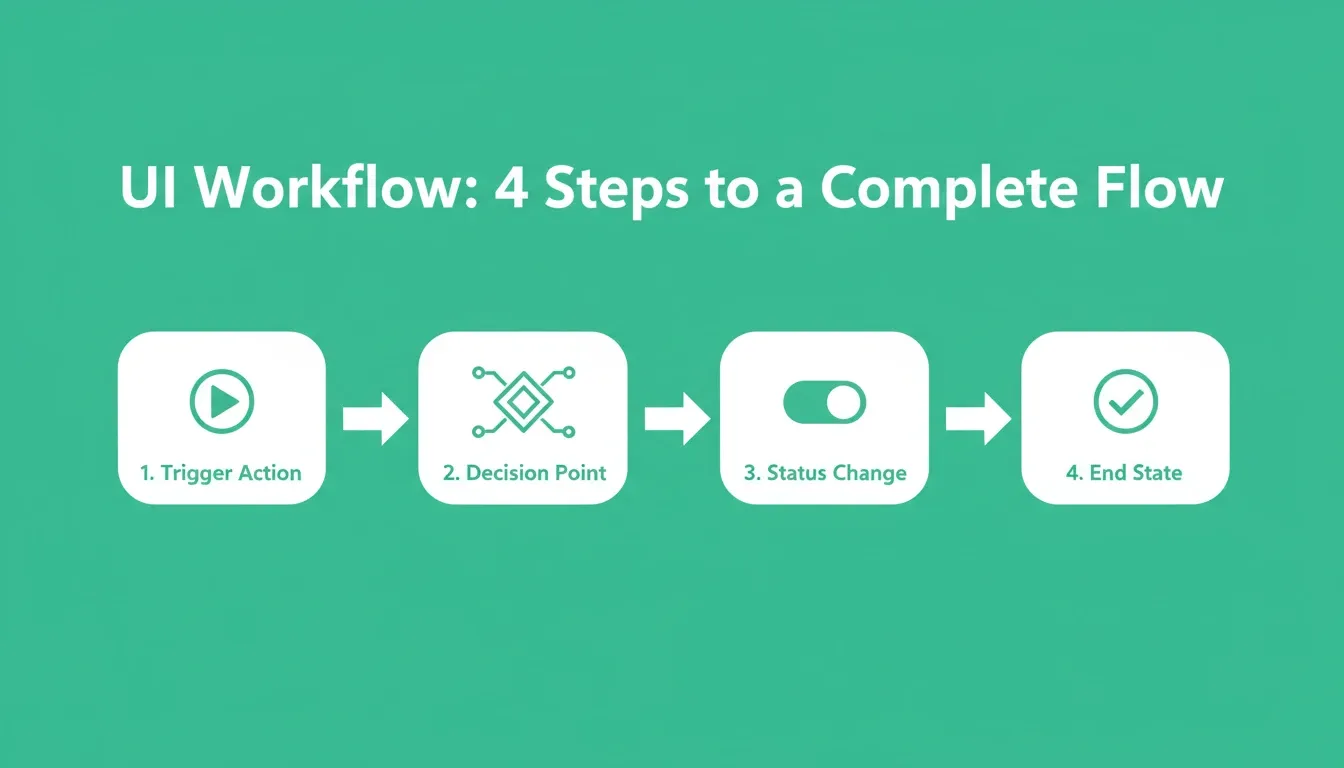
Workflow prompts that define every step from trigger to end state produce complete, production-ready flows
The UI and Workflow Prompts
- Prompt 5: "Redesign the dashboard screen to show a grid of four stat cards at the top (total users, active projects, pending tasks, revenue this month), followed by a table of recent activity below. Use a clean layout with consistent spacing. Add a date filter so users can view dashboards for different time ranges."
Prompts 1 to 5 covered structure, data models, and UI screens. If you want to apply these prompts to a real app without losing context between sessions, Rocket retains your full project history across every iteration, so each prompt builds on the last without re-explaining your architecture. Start building on Rocket and put these prompts to work today.
-
Prompt 6: "Build an approval workflow for content publishing. When an editor submits a post, it moves to 'pending review' status. An admin can approve or reject with comments. On approval, the post status changes to 'published' and appears on the public pages. Log each action with timestamps."
-
Prompt 7: "Add a multi-step onboarding flow for new users: Step 1 collects company name and team size, Step 2 lets them select their role from templates, Step 3 asks about their primary use case. Show a progress indicator and allow going back to previous steps without losing entered data."
-
Prompt 8: "Create a visual editor for email templates. Users should drag sections (header, text block, image, button, footer), edit content inline, preview the result on desktop and mobile screens, and save templates for reuse. Add the ability to paste HTML directly for advanced users."
For more guidance on structuring these instructions, see this guide on prompt engineering best practices.
Comparing Workflow Prompt Approaches
| Prompt Style | What the AI Produces | Output Quality |
|---|---|---|
| "Add an approval flow" | Basic status field, no logic | Incomplete, requires manual fixes |
| Full trigger-to-outcome prompt | Complete state machine with transitions | Production-ready on first iteration |
| "Make publishing better" | Random UI changes, no workflow logic | Unusable, creates rework |
Prompts for Debugging, Fixing, and Iterating Faster
This is where most builders get stuck with their AI app. The first version works for the happy path. Then you test a different scenario and things break. These prompts help you fix issues without losing prior progress, keeping your app building cycle moving forward.
The key mindset for iteration: one fix per prompt. When you batch multiple unrelated changes, the builder has less control over side effects. Teams that build apps reaching production learn this lesson early. For more iteration strategies, see this guide to building full-stack apps with a single AI prompt.
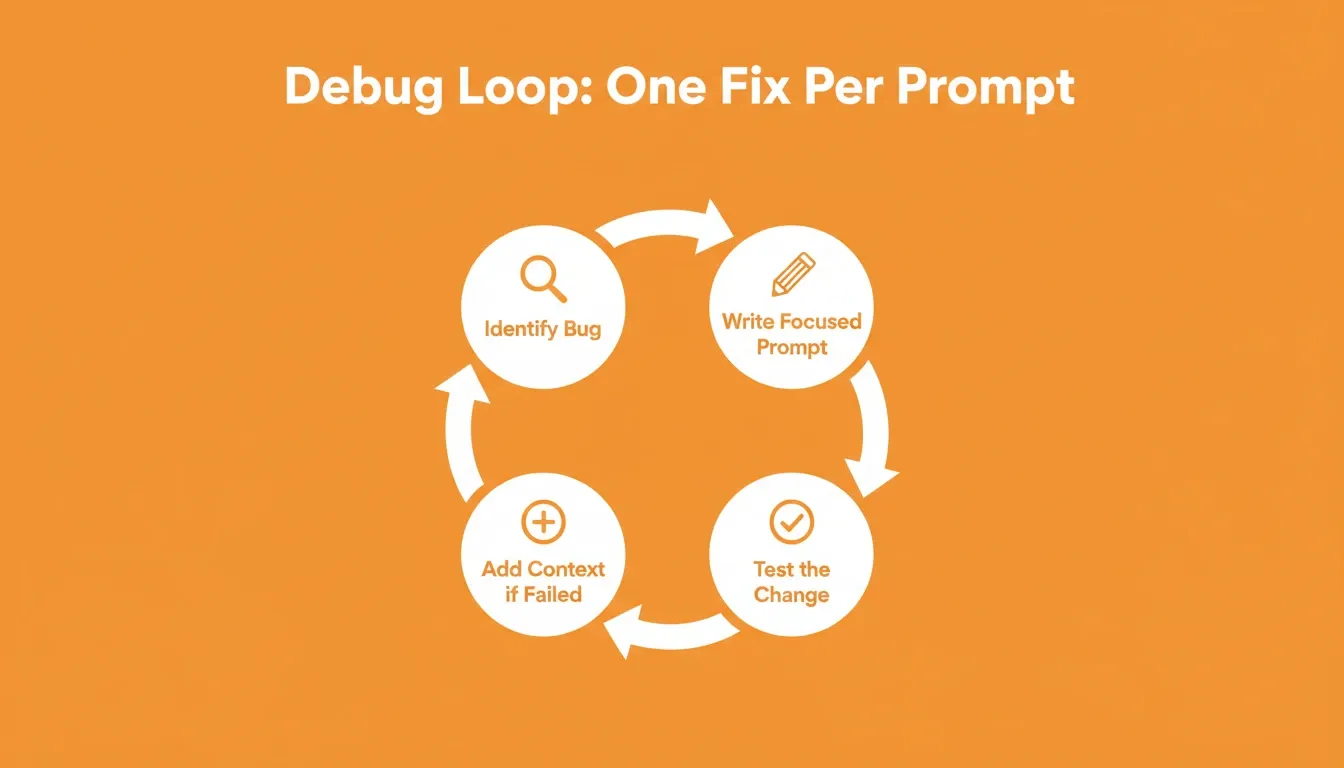
The one-fix-per-prompt loop: identify, write, generate, test, and repeat until production-ready
The Debugging and Fix Prompts
-
Prompt 9: "The login form accepts blank email fields. Add validation that checks for a valid email format before submission. Show an inline error message below the field if validation fails. Do not change any other logic or code on this page."
-
Prompt 10: "The task list page breaks when a project has zero tasks. Add an empty state that shows a friendly message and a 'Create First Task' button. Preserve all existing list behavior and design for projects that have tasks."
Prompts 6 to 10 covered workflows, onboarding flows, and the first debugging fixes. Rocket's editor reads your full codebase before applying any change, so debugging prompts like these target the exact file and function without touching unrelated systems. Try Rocket free and see how scoped iteration feels in practice.
-
Prompt 11: "Find and fix the issue where editing a user profile does not save changes to the database. Check the update function, verify the API route is correct, and confirm the form passes the right fields on submit. Tell me what was wrong."
-
Prompt 12: "Refactor the notification system so it does not send duplicate alerts. Add a check that prevents the same notification from being created twice within a 60-second window for the same user and event type. This fix should not touch the comments or tasks systems."
-
Prompt 13: "Run through the complete sign-up, login, create project, add tasks, and delete project flow. List any steps where the app produces unexpected output or throws errors in the console. Then fix each issue one at a time without touching unrelated files."
Debugging Prompt Patterns by Bug Type
| Bug Type | Prompt Pattern | Key Constraint to Include |
|---|---|---|
| Form validation missing | "Add validation that checks [condition]. Show [error message]. Do not change other logic." | Scope to specific field and page |
| Empty state crash | "Add empty state showing [message] and [action]. Preserve existing behavior for non-empty state." | Preserve existing behavior explicitly |
| Data not saving | "Find and fix [specific save issue]. Check [function], verify [route], confirm [fields]. Tell me what was wrong." | Ask for explanation of root cause |
| Duplicate events | "Add a check that prevents [event] twice within [time window] for [scope]. Do not touch [unrelated systems]." | Isolate the fix from adjacent systems |
| Multi-step flow audit | "Run through [complete flow]. List unexpected outputs. Fix each issue one at a time without touching unrelated files." | Sequential fix order, no batching |
Where Does Rocket Fit in Your Prompt-Driven Build Cycle?
Most AI app builders start you with a blank prompt and generate everything in one shot. When you need to iterate, you find yourself describing your entire app again because the tool lost context between sessions. That frustration compounds as your project grows in complexity.
Rocket is designed differently. Before code generation begins, it maps your app idea to a validated structure, including database models, user workflows, dashboards, and page architecture. This means the first version is already closer to what you actually needed, and your iteration prompts refine rather than rebuild.
Every iteration retains full project context. When you write prompts to refine or fix something, Rocket reads your entire codebase, all files, and the full project history. You can say "fix the checkout page" and it knows which screens, data models, and components are involved, without you re-explaining the architecture.
Plain language turns into production code. Rocket generates Next.js or Flutter code with proper file structure, API routes, and database connections without you touching code manually. Non-technical founders use this to build apps in minutes rather than weeks. The free tier gives you enough to validate an app idea, test user flows with real content, and decide if the project is worth scaling before spending money on a full development team.
Prompts for Adding Features and Scaling to Production
Once your core app works, these prompts help you add features, connect integrations, and prepare for real customers at scale. According to the Stack Overflow 2024 developer survey, 82% of developers currently using AI tools apply them specifically to writing code. This makes feature addition the most common use case for builders working with AI app development workflows.
Feature prompts work best when sequenced in dependency order. Add authentication before access control. Add the data model before the UI that displays it. Add the API integration before the UI that triggers it. Each prompt then builds on stable, tested code rather than speculative scaffolding.
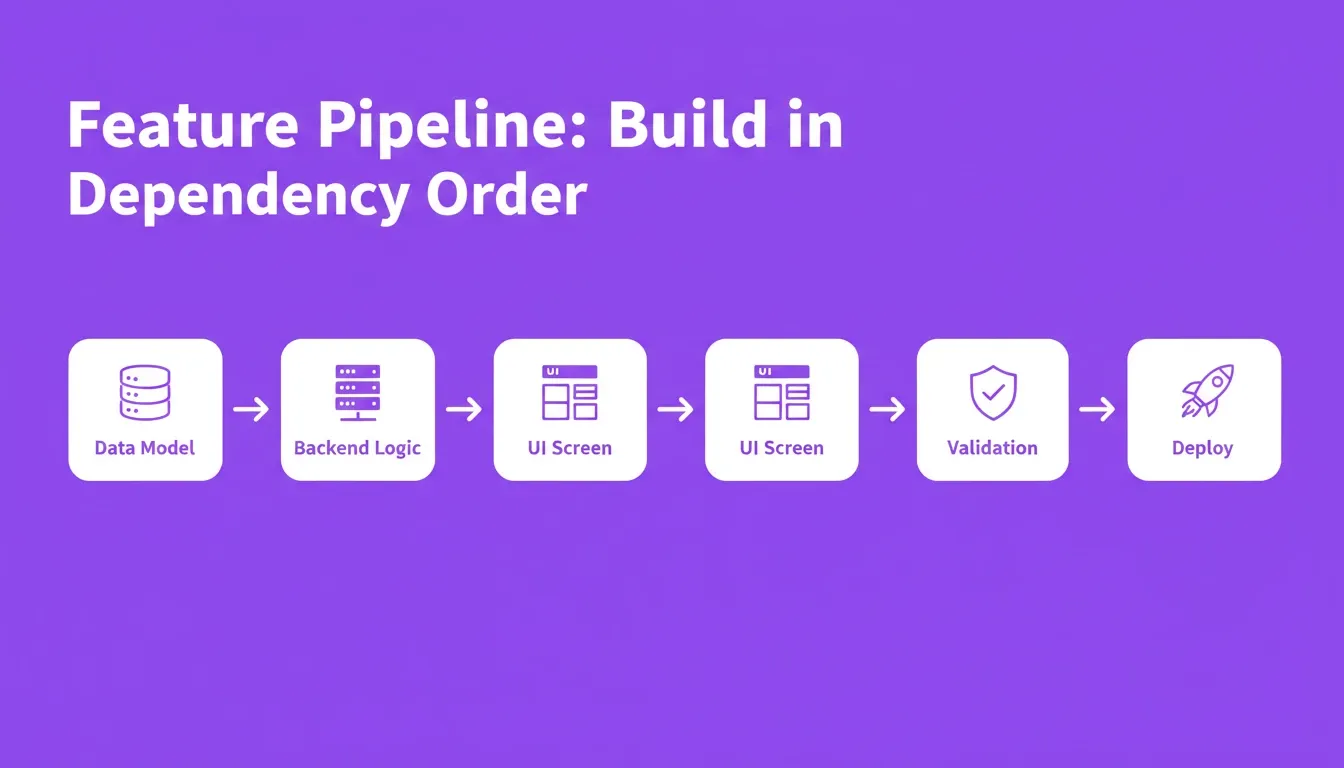
Feature addition works best when prompts follow dependency order: data model, backend logic, UI, then validation
The Feature and Scale Prompts
-
Prompt 14: "Add Stripe payment integration to the subscription page. When a user selects a plan and clicks subscribe, create a Stripe checkout session. On successful payment, update the user's subscription status in the database and store the invoice ID. Show a confirmation screen with the order details."
-
Prompt 15: "Add CSV export functionality to the Reports page. Users should click an 'Export' button that downloads all report data as a .csv file with column headers matching the visible table fields. Include a date range filter so they can export data for specific time periods."
Prompts 11 to 15 covered advanced debugging and the first production features. When you add integrations like Stripe or CSV export, Rocket isolates each change to the relevant files and preserves the rest of your codebase, so your stable screens stay intact while new features go live. Build your next feature on Rocket without the risk of breaking what already works.
-
Prompt 16: "Connect a third-party email API so the app sends a welcome email when a new user signs up and a reminder email three days before their subscription renews. Log each sent email with timestamp and delivery status in a separate database table."
-
Prompt 17: "Set up role-based access control for the API routes. Admin routes should reject requests from non-admin users with a 403 status. Editor routes should accept both admin and editor tokens. Viewer routes should be read-only for all authenticated users. Update the navigation to hide pages users cannot access."
Each prompt describes one feature with clear boundaries and expected outcomes. When you deploy to production, the AI can isolate changes and avoid overwriting stable code from prior iterations. For more examples of complete build workflows, see how to choose the right AI app builder for scaling your apps.
Prompts for Testing With Real Data and Edge Cases
The final iteration stage makes sure your app handles real-life conditions, not just demo scenarios with placeholder content. These prompts simulate the messy situations actual customers create when they interact with your live product day after day.
Most AI-generated apps are built and tested with clean, idealized data. In practice, real users have names with apostrophes, email addresses with plus signs, missing profile photos, and usage patterns that stress-test pagination and filtering in ways demo data never reveals. Running real data testing prompts before launch surfaces layout breaks, data type mismatches, and performance degradation that clean data always hides.
The Real Data Testing Prompts
-
Prompt 18: "Replace all placeholder content with real data. The project tracker should have five sample projects with varied statuses (active, completed, on hold), each containing three to seven tasks with different priority levels and assigned users. Add realistic comments on at least three tasks."
-
Prompt 19: "Test the app with a user who has no profile photo, a name with special characters, and an email containing a plus sign. Identify any UI breaks or data handling errors in these edge case scenarios and generate targeted fixes for each one without changing unrelated code."
-
Prompt 20: "Generate a load test scenario: create 50 users, 200 projects, and 1,000 tasks in the database. Check if the dashboard summary cards still update correctly, if the project list pages handle pagination at speed, and if filters work on large data sets."
Prompts 16 to 20 covered email integrations, access control, and real-data testing. Running these final prompts on Rocket means every fix targets the right component, every test scenario runs against your actual schema, and your app ships with confidence rather than crossed fingers. Sign up for Rocket and take your app from tested prototype to live product today.
Edge Case Testing Checklist
Before deploying any AI-built app to live customers, verify these scenarios using the prompts above:
| Scenario | What to Check | Prompt to Use |
|---|---|---|
| Empty states | Every list, table, and dashboard with no data | Prompt 18 |
| Special characters | Names, emails, and text fields with apostrophes, hyphens, plus signs | Prompt 19 |
| Missing media | Profile photos, cover images, and attachments when absent | Prompt 19 |
| Long content | Titles and descriptions at 200+ characters | Prompt 19 |
| Pagination | List pages with 100+ records | Prompt 20 |
| Load performance | Dashboard aggregations at 1,000+ records | Prompt 20 |
When you test with real content instead of generic filler, you find layout breaks, truncation issues, and data type mismatches before your customers do. This step takes minutes with the right prompts but saves days of post-launch firefighting. Teams that build apps with this discipline can learn more testing patterns from this complete prompt library for app building.
Common Mistakes When Using AI Prompts to Iterate an App
Understanding what goes wrong is just as valuable as knowing what works. These are the most frequent errors builders make when using AI prompts to refine an AI-built app.
Mistake 1: Describing Symptoms Instead of Causes
"The dashboard looks broken" is a symptom. "The stat cards overflow their container on screens narrower than 768px" is a cause. The AI can fix a cause; it can only guess at a symptom. Before writing a debugging prompt, reproduce the issue and describe exactly what you observe: which screen, which element, and which condition triggers it.
Mistake 2: Iterating Without Versioning
Every iteration changes your codebase. Without versioning, a bad prompt can overwrite working code with no way to recover. Before running any significant iteration prompt, create a checkpoint or save a version of your current state. Many AI app builders include version history or rollback features for exactly this reason.
Mistake 3: Skipping the Structure Phase
Builders who jump straight to UI prompts without defining their data model spend three times as long on debugging. The UI reflects the data structure. When the structure is wrong, every screen built on top of it is wrong too. Always run at least one structure prompt before generating any UI. For a deeper look at this pattern, see the guide on iterating on an MVP with AI tools.
Mistake 4: Using Relative Descriptions
"Make the button bigger" is relative. "Change the primary CTA button on the signup page from 40px to 52px height" is absolute. Relative descriptions produce inconsistent results because the AI has no reference point. Use specific values, component names, and screen names whenever possible.
Mistake 5: Ignoring the Side-Effect Constraint
The most common cause of regressions in AI-assisted development is failing to tell the AI what not to change. End every iteration prompt with an explicit constraint: "Do not change any other files," or "This fix should not affect [adjacent system]." This single habit prevents the majority of unintended regressions. For a broader list of patterns that slow down iteration, see common vibe coding mistakes to avoid.
AI App Builder Comparison: How Iteration Works Across Platforms
Different AI app builders handle iteration differently. Understanding the key differences helps you choose the right tool and set the right expectations for your prompt-driven workflow.
Iteration Capability Comparison
| Capability | Context-Retaining Builders | Blank-Prompt Builders | Code Editors with AI |
|---|---|---|---|
| Session context retention | Full codebase across sessions | Within session only | File-level context |
| Prompt targeting | Specific component or file | Whole-app regeneration | Function or block level |
| Side-effect risk | Low with scoped prompts | High — full regeneration | Medium — file scope |
| Non-technical usability | High — natural language | Medium — requires precision | Low — requires code knowledge |
| Version history | Built-in rollback | Varies by platform | Git-based |
| Best for | Iterating on complex apps | Initial generation | Developer-led refinement |
Context-retaining builders are better suited for the 20 prompts in this guide. They apply scoped changes without regenerating the entire app. Blank-prompt builders are faster for initial generation but require more re-explanation during iteration. Code editors with AI assistance give developers the most control, though they require technical knowledge to use effectively.
Pricing Overview
Pricing for AI app builders varies significantly. The table below reflects publicly available information as of mid-2026. Always verify current pricing on each platform's official pricing page before making a decision.
| Platform | Free Tier | Entry Paid Plan | Notes |
|---|---|---|---|
| Rocket | Available | Check rocket.new/pricing | Generates Next.js and Flutter |
| Replit | Available | ~$25/month (Replit Core) | Source: replit.com/pricing |
| Lovable | Limited | ~$20/month (Starter) | Source: lovable.dev/pricing |
| Bolt | Limited | ~$20/month | Source: bolt.new/pricing |
| Base44 | Available | ~$29/month | Source: base44.com/pricing |
Pricing is subject to change. Verify on each platform's official website before subscribing.
How to Build a Prompt Iteration System That Scales
Individual prompts are powerful. A systematic approach to prompt iteration, however, is transformative. The builders who ship the fastest are not writing more prompts. They are building a repeatable system that makes every prompt more effective than the last.
The Prompt Iteration Loop
The most effective teams treat AI app iteration as a closed feedback loop with four phases. First, specify the prompt with all four properties: scope isolation, state awareness, expected output definition, and side-effect constraints. Second, generate and review the output against your expected outcome in the preview environment, not in production.
Third, verify the specific change the prompt targeted and check that adjacent systems were not affected. If the output passes, commit it. Fourth, if it fails, add the missing context. This is typically the exact file or component name, the specific condition that triggers the bug, or an explicit constraint on what should remain unchanged. Then return to the first phase.
Prompt Iteration Benchmarks
| Stage | Typical Prompts Required | Time per Iteration | Common Failure Mode |
|---|---|---|---|
| Structure and data | 3 to 6 | 2 to 5 minutes each | Skipping relationship definitions |
| UI and workflows | 4 to 8 | 3 to 8 minutes each | Describing screens instead of journeys |
| Debugging and fixes | 5 to 15 | 1 to 4 minutes each | Batching multiple fixes in one prompt |
| Feature addition | 4 to 10 per feature | 5 to 15 minutes each | Adding features before core is stable |
| Real data testing | 3 to 5 | 5 to 10 minutes each | Testing only happy path scenarios |
| Total to production | 15 to 40 | 2 to 8 hours total | Skipping testing stage entirely |
Your Prompt Library Is Your Competitive Edge
The difference between a rough prototype and a shipped product comes down to iteration quality. These 20 prompts give you a repeatable system for refining any AI-built app, from defining structure and data models to testing production-ready features with real users and real data.
The builders who ship faster are not writing more prompts. They write clearer ones, focusing on one specific change at a time, keeping context tight, and testing after every edit cycle.
AI Prompts to Refine and Iterate an AI-Built App: The Path Forward
AI prompts to refine and iterate an AI-built app will become the core skill of software development over the next few years. As AI app builders grow more capable, the bottleneck shifts entirely to the human side: the quality of your instructions determines the quality of the software you ship.
Several trends are accelerating this shift. Longer context windows mean AI builders can hold more of your codebase in memory during each iteration, making prompts that reference specific files and functions more reliable than before. Additionally, multi-agent architectures mean a single iteration prompt can trigger coordinated changes across frontend, backend, and database layers simultaneously.
Prompt intelligence features analyze your prompt before execution and suggest refinements that improve precision and reduce side effects. Furthermore, automated testing integration means the AI can run your test suite after each iteration and report failures before you review the output, closing the feedback loop to near-zero latency.
For builders who invest in learning precise, scoped, context-aware iteration prompts today, the compounding advantage over the next two to three years will be substantial. The prompt library you build now becomes the foundation of a development practice that scales with every improvement in AI capability.
Rocket is built for exactly this kind of prompt-driven iteration. Every build retains full context, every prompt targets the right file, and you go from research to deployment in one workspace without starting over. Start building your app today and turn your next idea into a live product this week.
Table of contents
- -What Makes an AI App Iteration Prompt Actually Work?
- -Why Does Prompt Quality Shape Your App's Final Output?
- -Prompts for Defining App Structure and Data Models
- -The Structure and Data Prompts
- -How Should You Write Prompts for UI and Workflows?
- -The UI and Workflow Prompts
- -Comparing Workflow Prompt Approaches
- -Prompts for Debugging, Fixing, and Iterating Faster
- -The Debugging and Fix Prompts
- -Debugging Prompt Patterns by Bug Type
- -Where Does Rocket Fit in Your Prompt-Driven Build Cycle?
- -Prompts for Adding Features and Scaling to Production
- -The Feature and Scale Prompts
- -Prompts for Testing With Real Data and Edge Cases
- -The Real Data Testing Prompts
- -Edge Case Testing Checklist
- -Common Mistakes When Using AI Prompts to Iterate an App
- -Mistake 1: Describing Symptoms Instead of Causes
- -Mistake 2: Iterating Without Versioning
- -Mistake 3: Skipping the Structure Phase
- -Mistake 4: Using Relative Descriptions
- -Mistake 5: Ignoring the Side-Effect Constraint
- -AI App Builder Comparison: How Iteration Works Across Platforms
- -Iteration Capability Comparison
- -Pricing Overview
- -How to Build a Prompt Iteration System That Scales
- -The Prompt Iteration Loop
- -Prompt Iteration Benchmarks
- -Your Prompt Library Is Your Competitive Edge
- -AI Prompts to Refine and Iterate an AI-Built App: The Path Forward