
B2B contact records decay at 22.5% annually. Firmographic, technographic, and contact enrichment fix stale data by appending verified details from external sources. Enriched profiles sharpen segmentation and power smarter sales outreach.
What if your CRM looked completely reliable today, but nearly a third of its records were pointing at the wrong job titles by next quarter? That is not a theoretical concern. According to Apollo.io, B2B contact data decays at 2.1% per month, compounding to around 22.5% annually. Reps working from stale raw data spend hours chasing dead phone numbers and bounced emails rather than booking calls.
Enrichment fills those gaps by appending verified details from external sources to your existing records. A single thin entry can grow into a full profile: current job title, direct-dial number, company revenue range, technology stack, and recent funding activity. That context is what turns a list of names into a targeting asset your sales teams actually want to use.
What Is the Real Cost of Outdated Records?
Stale CRM data is not just inconvenient. It carries a measurable price tag that shows up in wasted budget, missed connections, and pipeline that looks healthy on paper but converts poorly.
-
A guide from Datamatics Business Solutions, citing Gartner, reports that poor data quality costs organizations an average of $12.9 million per year
-
Sirius Decisions research puts B2B data decay at 30% to 70% per year, depending on the industry
-
Around 30% of professionals change jobs annually, immediately voiding their contact details across every database that holds them
Sales reps working from inaccurate data generate higher bounce rates, damaged sender domains, and CRM data that distorts forecasting and territory planning. The data enrichment process changes the outcome by adding verified, current attributes to existing records.
-
Data enrichment helps tailor marketing messages to specific user preferences and improves customer experience.
-
Data enrichment reduces bounce rates on email marketing campaigns and helps maintain accurate CRM data.
-
Enriched data improves lead quality and marketing personalization, which can lead to higher conversion rates and increased customer loyalty.
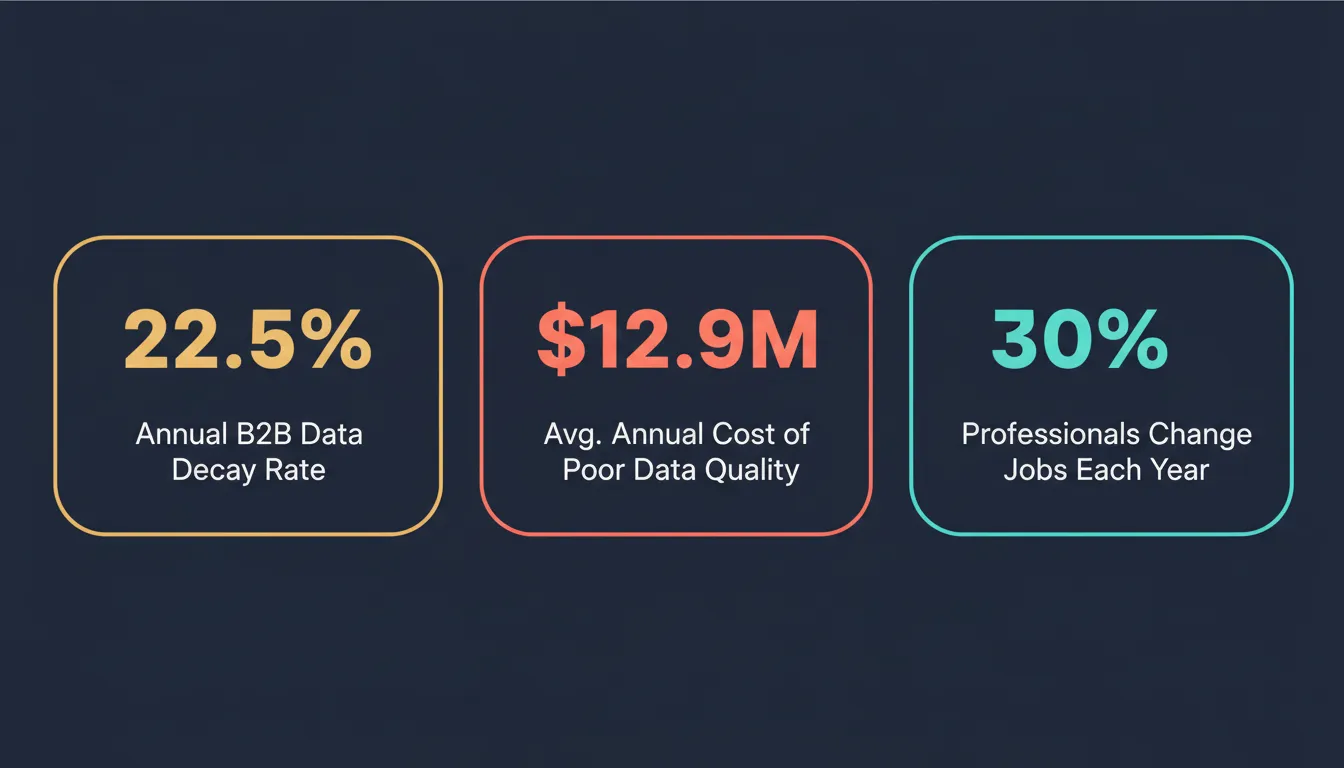 Three key statistics that show why stale B2B data is a commercial liability, not just an IT problem.
Enrichment at this depth also addresses a subtler problem: customer records that look complete but are many months out of date. A contact name and company domain are rarely enough. Missing context around seniority and buying authority means sales reps make decisions on partial information every single time.
Data enrichment is not a one-time project. Data starts decaying the moment it enters your system. Running periodic data cleansing without a plan for adding verified new information only delays the problem; it does not solve it.
Firmographic, Technographic, and Contact Enrichment
Not all enrichment looks the same. Data enrichment allows for the division of audiences into hyper-targeted groups for niche marketing campaigns.
The type of enriched data your team needs depends on what you are trying to accomplish: broad market segmentation, account-level prioritization, or individual contact outreach.
Here is how the three main types of b2b data enrichment break down:
| Enrichment Type | What It Adds | Primary Use Case |
|---|---|---|
| Firmographic | Industry, company size, revenue, location, employee count | Market segmentation, ICP scoring, and territory planning |
| Technographic | Tech stack, tools in use, platform dependencies | Competitive positioning, fit scoring, timing triggers |
| Contact | Job title, seniority, direct phone, work email | Outreach personalization, decision-maker targeting |
Each type draws from different external databases and data enrichment tools. Firmographic data typically comes from business registries, proprietary company databases, and news monitoring. Technographic signals are built from web crawls, job postings, and partner ecosystem data.
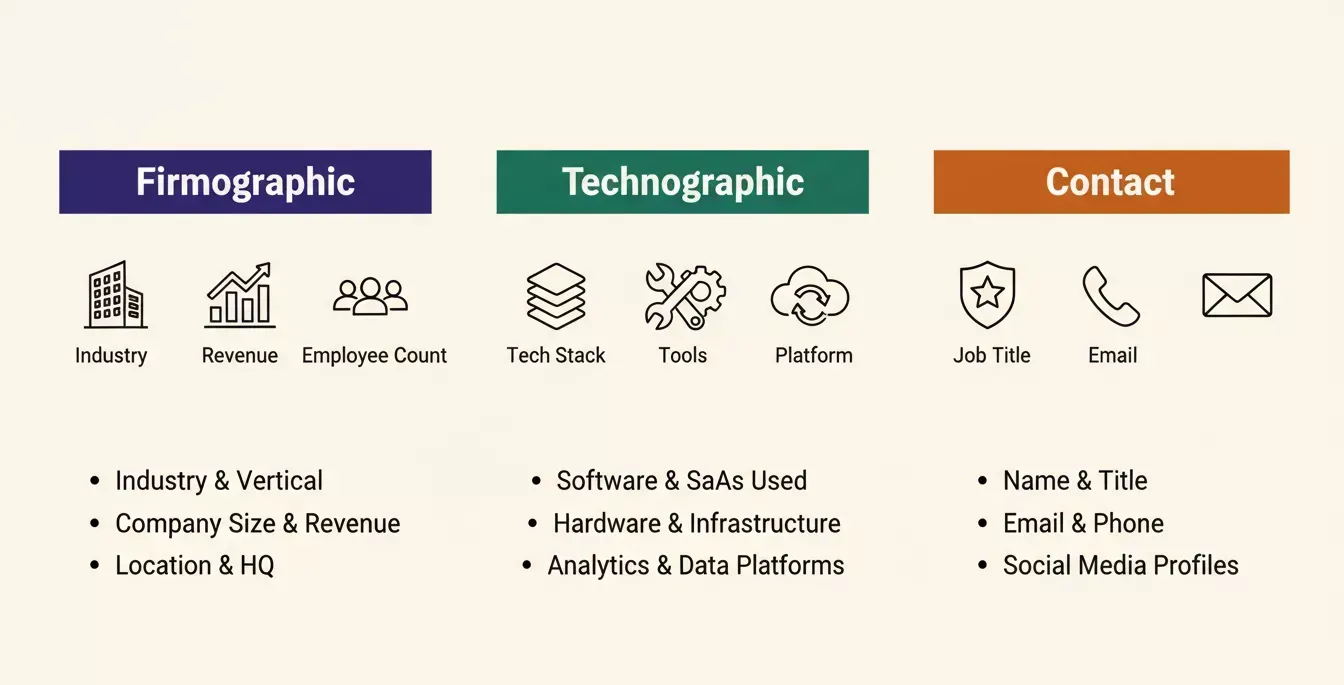 Firmographic, technographic, and contact enrichment each serve a distinct purpose in building a complete B2B account profile.
Which Enrichment Type Matters Most for B2B Teams?
It depends on where your pipeline breaks down. If reps consistently reach people at the wrong seniority level, contact-level enrichment is the fix. If segmentation pulls in companies outside your revenue band, firmographic data is the gap.
Most mature B2B teams layer all three over time. Demographic data fills the basic fields. Technographic signals sharpen prioritization. Behavioral enrichment adds the right timing cue. Teams running all three together typically see far more precise lead scoring than those relying on any single type alone.
One practical approach for smaller teams: pick the enrichment type that addresses your biggest gap first. A phased enrichment process, adding one layer at a time and measuring the result, keeps the project manageable and makes the ROI visible at each stage.
Where Enrichment Data Comes From
Accurate enrichment does not come from one place. It comes from layering multiple external sources, cross-checking results, and refreshing the output on a regular cycle.
-
Third-party data providers: Companies like Datamatics and Apollo maintain external databases of verified records built from public filings, business registries, and professional networks.
-
First-party data from internal systems: Data from your CRM, marketing platform, and product usage logs captures what a contact has already done. Combined with external data sources, it produces a richer, more complete profile than either alone.
-
Web crawls, job boards, and professional networks: Technographic signals and hiring data surface through automated crawls of company websites and job listing boards.
-
Public registries and financial filings: For firmographic enrichment, company registries and regulatory filings provide authoritative revenue, headcount, and corporate structure data.
Adding to existing datasets on a rolling basis, rather than treating enrichment as a one-time import, is what keeps the accuracy gap from widening. Understanding how business data is sourced and maintained is essential before choosing a provider.
How Do Data Providers Keep Records Fresh?
Good external data providers combine automated monitoring with human verification cycles. When a signal appears, a profile updates, or a company files a document, the provider flags relevant records for re-verification.
The key question to ask any provider: What is the average record age at the point of delivery? A provider with external databases updated monthly is meaningfully different from one running quarterly batch updates.
"B2B data decays quickly (around 30% per year) as people change jobs and companies evolve. If real-time isn't possible, you should aim to refresh your entire database at least once per quarter to maintain its accuracy and effectiveness." Semir Jahic, CEO and Co-Founder at Salesmotion, B2B Data Enrichment: Better Data, Better Pipeline
Third-party sources also vary significantly by geographic coverage. A provider with deep North American records may have thin data for APAC or EMEA markets. Match rates by segment are a practical number to request before committing.
Below is a simplified flow showing how a raw signal moves through verification and into an enriched record:
A raw signal is verified against external sources before being pushed to the CRM or held for review.
How to Build a Lean Enrichment Workflow
Knowing where your enrichment data comes from is half the equation. The other half is building a repeatable process that keeps records current without burning ops time on manual updates.
A four-stage enrichment workflow keeps your database accurate without requiring a full manual refresh every cycle.
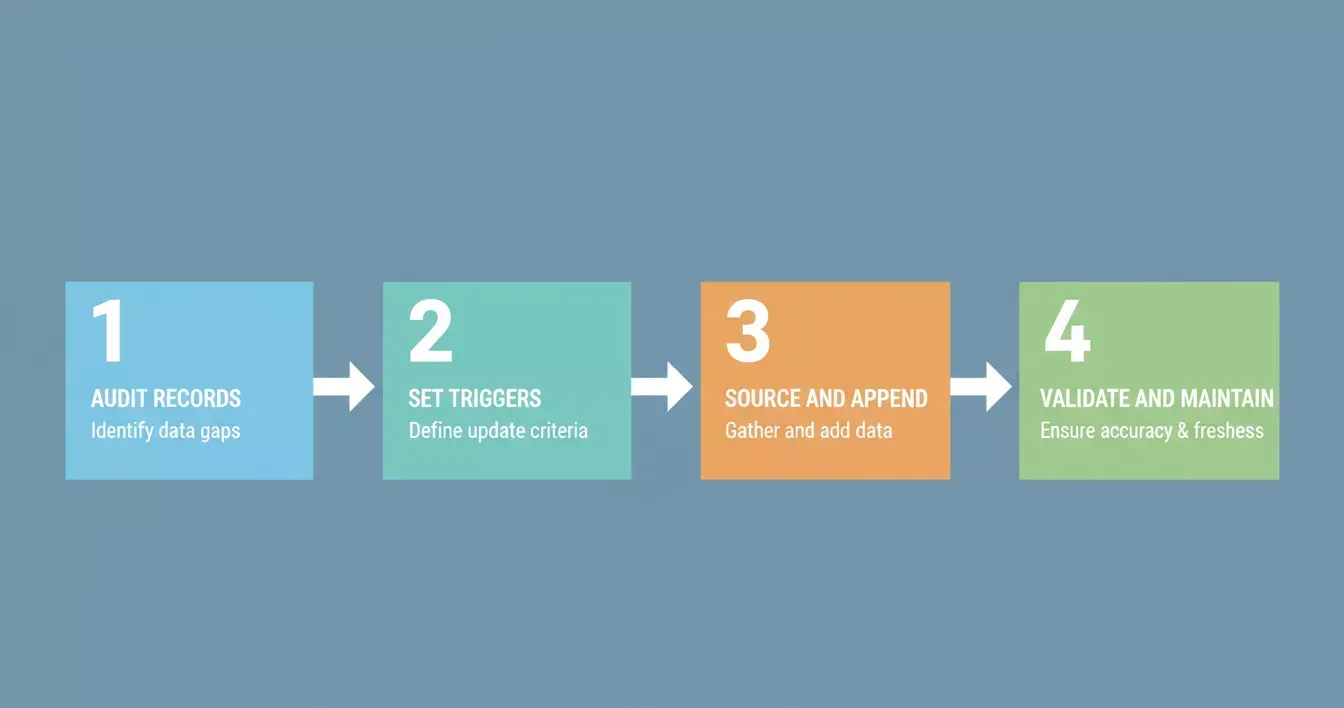 Stage 1: Audit your existing records. Before appending anything new, run a completeness check against the fields your team relies on most: job title, phone number, company size, revenue, and technology stack. Identify which segments carry the widest gaps.
Stage 2: Define triggers and frequency. Not all records need the same refresh rate. Active prospects in your pipeline need more frequent verification than cold accounts. A solid enrichment process ties re-enrichment to specific events: a new lead enters the CRM, a deal moves to a new stage, a domain starts showing intent signals.
Stage 3: Source and append. Connect to a provider that matches your coverage needs by segment and geography. Run the enrichment pass. Check match rates per field type. For fields with low confidence scores, flag them for a secondary verification pass.
Stage 4: Validate and maintain. Data accuracy does not stay high on its own. Set up ongoing monitoring for high-priority accounts. Run data cleansing passes on a quarterly cycle to catch corrupted fields, remove duplicates, and correct formatting inconsistencies. Treat data integrity as a recurring responsibility across the team.
Pairing enrichment with AI integration strategies that connect your CRM and marketing platform reduces manual research time significantly.
When Should You Trigger Re-Enrichment?
-
A new inbound lead arrives with only basic contact details
-
A prospect moves to a new deal stage, and the rep needs the current firmographic context before the next call
-
A key account shows no outreach activity for 60 to 90 days
-
A quarterly audit flags degraded data completeness across a priority segment
-
An intent signal spike surfaces on a previously cold account, signaling an in-market shift
-
A competitive move or market change requires requalifying accounts against updated ICP criteria
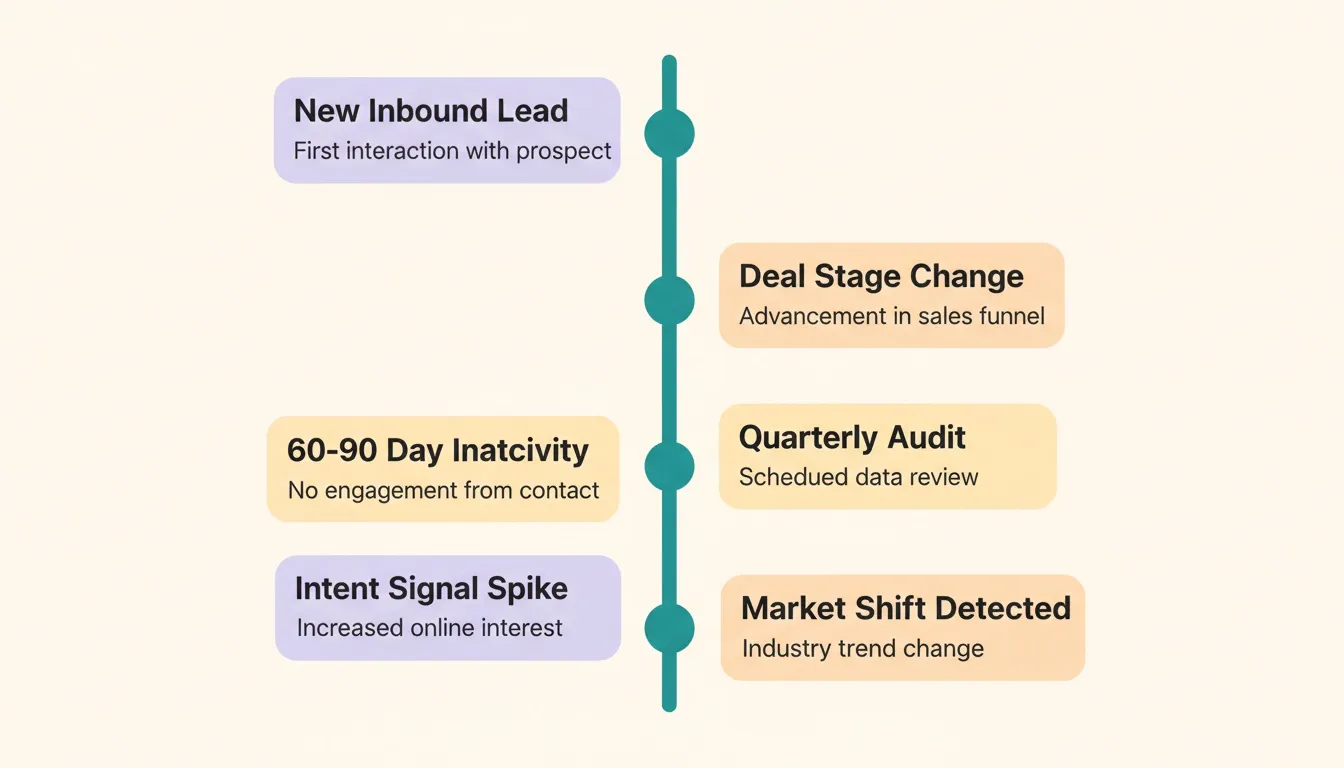 Trigger-based re-enrichment keeps priority records current without running a full database refresh every month.
Data management works best when built into existing workflows rather than run as a separate project. Monitoring social media signals alongside enrichment data adds a real-time layer that static records cannot provide.
The goal is a consistent enrichment practice, not a perfect setup from day one.
How Rocket.new Turns Funding Signals Into Sales-Ready Accounts
Standard enrichment tools do a solid job on contact fields. Job titles, phone numbers, verified work emails: the core of any outbound stack. Most enrichment solutions stop there. A flat profile with contact attributes and maybe a firmographic snapshot from the last quarterly batch update is often as deep as they go.
Rocket Intelligence takes a different approach. Rather than appending fields to a record on a schedule, it watches companies across ten data pillars simultaneously and interprets what the changes mean for your business specifically. Those pillars cover website changes, social media signals, news coverage, GTM moves, traffic shifts, product and technology updates, people and hiring patterns, business and finance events, and customer reviews.
The result is enriched data that goes well past contact depth. A Rocket Intelligence account profile includes:
-
Funding and investment activity: Series rounds, investor changes, valuation signals, and capital deployment patterns are tracked continuously through the Business and Finance pillar.
-
Hiring signals: A new VP of Sales, a cluster of SDR postings, or sudden engineering headcount growth. All read as GTM strategy signals rather than isolated job listings.
-
Pricing and business model shifts: Changes in how a company charges, tier restructuring, or free tier removal. These surface through the Business pillar before a press release confirms them.
-
GTM and messaging changes: Copy rewrites, new landing pages, and shifted value propositions. Signals that an account is repositioning, which changes how you should approach the conversation.
This is the intelligence layer that sits above standard firmographic data. A CRM enriched with contact details tells you who to call. Rocket's account intelligence tells you why to call now, and what has changed since the last time you did.
Sales teams using Rocket spend less time on manual account research because the customer data platform handles continuous monitoring across all ten pillars. Reps walk into calls with the current context: last funding round, current tech stack, latest hiring signal, and most recent GTM move. That depth of enriched data translates into better conversations and higher win rates on targeted outreach.
The Rocket Intelligence overview walks through how the full pillar system works and where to get started. Teams that also need competitive intelligence built into their product strategy will find that Rocket handles both simultaneously from a single workspace.
| Capability | Standard Contact Tools | Rocket Intelligence |
|---|---|---|
| Contact enrichment | Yes | Yes |
| Firmographic snapshots | Yes | Yes |
| Funding event monitoring | Limited | Full, real-time |
| Cross-pillar behavioral signals | No | Yes, 10 pillars |
| Hiring as a strategy signal | No | Yes |
| Personalized ranked Intel | No | Yes |
Tools like ZoomInfo and Apollo are strong on contact enrichment volume and database scale. They are not built to interpret cross-pillar behavioral signals or surface the funding events and business data shifts that Rocket Intelligence delivers as ranked, personalized Intel. If your enrichment needs go past email addresses and phone numbers, that gap matters.
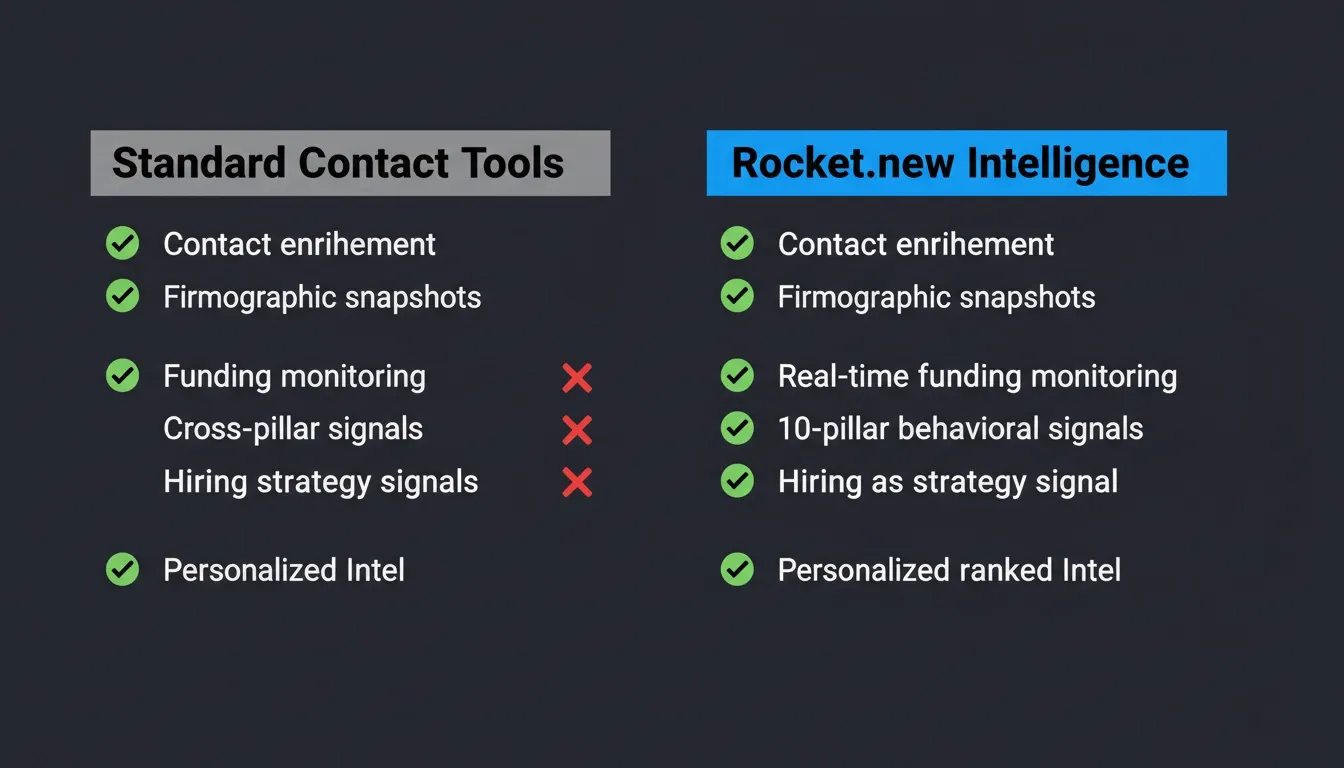 Rocket.new Intelligence covers capabilities that standard contact enrichment tools were never designed to deliver.
Where Good Data Takes You
Good contact records are not an IT project; they are a commercial asset. When your CRM reflects how the market actually looks today: who runs what, what is funded, what has changed, your team has the context to prioritize, personalize, and reach the right people at the right time.
The teams consistently winning on outreach are not the ones with the biggest databases. They are the ones with the most accurate, most current customer profiles. Start with clean records, add firmographic context, layer in behavioral signals. That is the full picture.
Rocket is the only platform that combines real-time account intelligence across ten data pillars with the tools to act on it immediately. If your CRM is running on stale firmographic snapshots and missed funding signals, you are leaving deals on the table.
Start building smarter account profiles with Rocket today and see what your pipeline looks like when the data is actually current.
Table of contents
- -What Is the Real Cost of Outdated Records?
- -Firmographic, Technographic, and Contact Enrichment
- -Which Enrichment Type Matters Most for B2B Teams?
- -Where Enrichment Data Comes From
- -How Do Data Providers Keep Records Fresh?
- -How to Build a Lean Enrichment Workflow
- -When Should You Trigger Re-Enrichment?
- -How Rocket.new Turns Funding Signals Into Sales-Ready Accounts
- -Where Good Data Takes You