
Claude Code is Anthropic's AI coding agent for developers. Vibe coding is a workflow style, fast but unstructured. Senior engineers apply specs, tests, and review gates around AI generation. Rocket.new combines research, AI app building, and competitor intelligence in one platform.
Claude Code is an AI coding agent that works inside a developer's environment. Vibe coding is a development approach, not a product, where developers rely on AI to generate and modify software without necessarily applying formal specifications, tests, or review gates.
Understanding how senior engineers use Claude Code vs vibe coding reveals why engineering discipline, not prompt speed, determines whether AI-assisted software ships reliably.
Key Takeaways
-
Vibe coding is a development style, not a specific tool. It describes prompt-driven, iterative AI building without structured review.
-
Claude Code is Anthropic's AI coding agent, designed to work inside a developer's existing workflow with terminal access and code context.
-
Disciplined AI-assisted development generally involves defining requirements, giving the agent context, generating changes, testing them, inspecting the diff, and reviewing before shipping.
-
AI coding tools work best when developers provide clear requirements and objective feedback loops, a principle Anthropic documents explicitly in Claude Code's own best-practices guide.
-
Rocket.new is a vibe solutioning platform that combines strategic research (Solve), AI app building (Build), and competitive intelligence (Intelligence) in one connected workflow.
What is Vibe Coding?
Vibe coding entered the software engineering vocabulary when developers started describing their workflow as just vibing with the AI. A vibe coder prompts the tool, watches code appear, runs it, and if it works, ships it. The entire development cycle collapses into prompt-accept-deploy.
Vibe coding is a development approach, not a product. Any AI coding tool, Claude Code, Cursor, GitHub Copilot, or a chat interface, can be used in a vibe coding style. The approach is defined by what the developer does not do: write a formal specification, review the diff carefully, run a test suite, or apply architectural oversight.
This works well in specific contexts. Vibe coding is a reasonable fit for rapid prototypes, hackathon projects, personal experiments, simple landing pages, and throwaway tools where the cost of failure is low. The problems surface when vibe coding meets production software requirements.
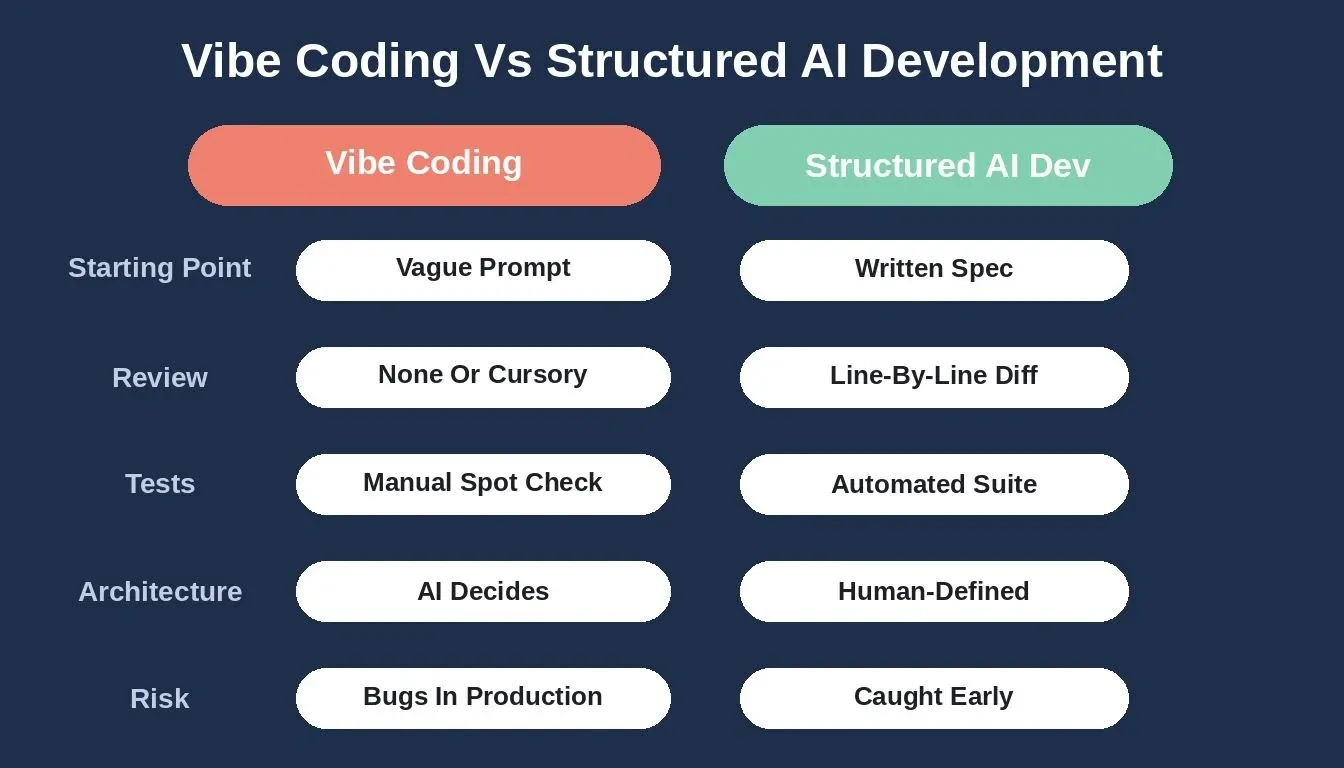
Vibe coding vs. structured AI development: five dimensions that separate them
The core risks of unstructured AI development are consistent:
-
No specification means no verification, without a clear definition of what the code should do, there is no objective way to confirm it does it correctly
-
No diff review means subtle bugs can ship silently, AI-generated code can introduce security vulnerabilities, race conditions, and edge cases that look correct on first glance
-
No test coverage means regressions can stack, each new generation risks breaking previous functionality without detection until users report failures
-
No architectural oversight means technical debt can accelerate, AI tools generate code that solves the immediate prompt but may conflict with the broader system design
What Is Claude Code?
Claude Code is Anthropic's AI coding agent. Unlike chat-based AI tools, Claude Code operates directly in a developer's terminal, reads the actual codebase, and can make changes across multiple files. It understands project context rather than working from a blank conversation window.
Claude Code is designed for developers who want AI assistance inside their existing engineering workflow. It can read and modify files across a codebase, run shell commands, tests, and build scripts, understand existing code structure and patterns, and work through multi-step implementation tasks with full project context.
Claude Code can be used in a vibe coding style, prompt, accept, ship. It can also be used in a structured engineering workflow with specifications, tests, code review, and human approval gates. The tool supports both; the workflow is the developer's choice.
Claude Code vs Vibe Coding: What's the Difference?
The short answer: Claude Code is a tool. Vibe coding is a workflow style. You can use Claude Code as part of a vibe coding approach, or as part of a disciplined engineering workflow. The distinction is what happens around the code generation, not the generation itself.
| Dimension | Vibe Coding Approach | Structured AI Development |
|---|---|---|
| Definition | Prompt-driven AI building without formal process | AI-assisted development with specs, tests, and review |
| Starting point | A vague prompt | A written specification or clear requirement |
| Context given to AI | Minimal | Full: codebase context, constraints, acceptance criteria |
| Review process | None or cursory | Line-by-line diff review |
| Test coverage | Manual spot checks or none | Automated tests after every meaningful change |
| Architecture | Whatever the AI decides | Human-defined boundaries and patterns |
| Security handling | Implicit | Explicit: reviewed for auth, validation, data access |
| Failure modes | Discovered in production | Caught in review and testing |
| Ownership | The AI made it | I approved every change |
| Best for | Prototypes, experiments, personal projects | Production software, multi-developer codebases |
| Technical skill required | Low | Moderate to high |
Structured ai assisted coding fits broader software development because it preserves engineering principles instead of relying only on natural language prompts.
According to Stack Overflow's 2024 Developer Survey, 45% of professional developers considered AI tools bad or very bad at handling complex tasks. That helps explain why experienced developers tend to emphasize verification, context, and review rather than treating generated code as finished software.
How a Disciplined AI Development Workflow Actually Works
Anthropic's own Claude Code best-practices documentation recommends a specific workflow pattern: explore first, then plan, then code. The core principle is giving the AI something concrete to evaluate its work against, tests, builds, or screenshots, rather than relying on the developer deciding that output looks done.
As Anthropic's best-practices guide puts it: give Claude a check it can run. Without an objective feedback loop, the only signal available is whether the output looks correct, and you become the verification loop for every mistake.
1. Write the Specification First
Define what the code needs to do before generating any of it. This is the core of spec driven development: a clear description of inputs, outputs, edge cases, and constraints before generation starts. The more specific the specification, the closer the first generated result will be to what is actually needed.
2. Give the AI Enough Context
AI coding tools work best when they understand the existing system, and the project manager role still stays with the developer supplying context and constraints. Provide relevant code context, explain the architectural patterns already in use, and specify any constraints the generated code must respect.
3. Generate Small, Reviewable Changes
Generate changes in small, focused increments rather than asking for large sweeping rewrites, because small increments make it easier to inspect ai code and catch issues before they spread across the codebase. Smaller changes are easier to review, easier to test, and easier to roll back if something goes wrong.
4. Test Generated Code
Run tests immediately after generation, before reading the code carefully, to confirm the first draft is actually working code before deeper review. AI-generated code can appear correct while containing subtle edge-case or integration failures. A test, build, or visual check gives the AI an objective signal about whether its output actually works.
5. Review the Diff and Ship
Read every change before accepting it, and perform due diligence through normal engineering controls, including linting, CI/CD pipelines, human review, and human approval gates before shipping. The speed of AI generation means mistakes can happen faster and at greater volume, which is an argument for more review discipline, not less.
What Senior Engineers Actually Review in AI-Generated Code
Experienced engineering teams commonly place tests, linting, review, and CI checks between AI-generated changes and production. Simply saying review the code understates what that review actually covers. Here is what a thorough review of AI-generated code addresses:
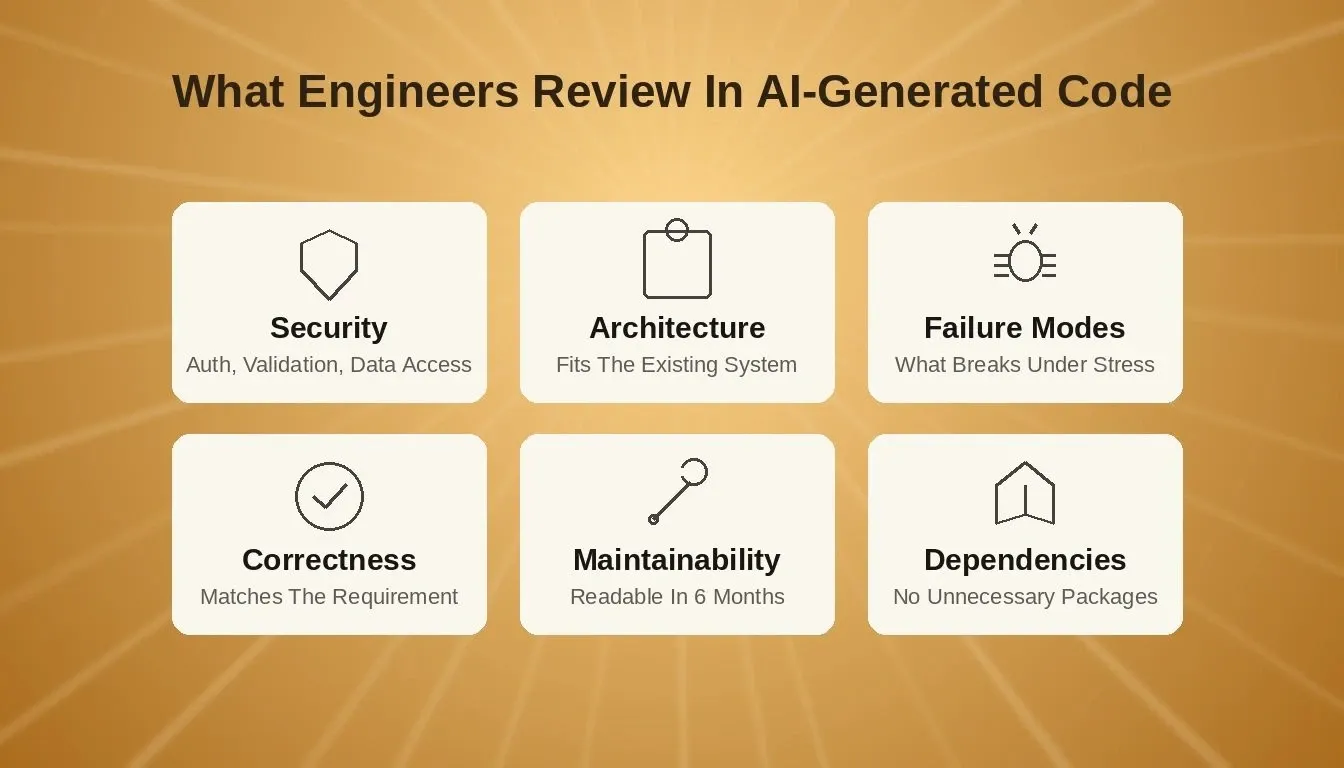
Six dimensions experienced teams check before AI-generated code reaches production
-
Correctness: does the implementation actually satisfy the requirement as written?
-
Architecture: does it fit the existing system's patterns and avoid circular dependencies?
-
Security: are authentication, authorization, secrets, validation, and data access handled correctly?
-
Failure modes: what happens when APIs fail, inputs are malformed, or services time out?
-
Maintainability: will another developer understand this six months later?
-
Dependencies: did the AI introduce unnecessary packages or outdated patterns?
Security logic, authentication flows, database schema changes, and cross-service integration contracts generally warrant separate review. These are areas where AI-generated code can introduce issues that are difficult to detect through functional testing alone.
Key Developer Statistics on AI Coding Tools
The adoption of AI coding tools is already widespread. In a 2023 GitHub survey of 500 U.S.-based developers at companies with 1,000 or more employees, 92% said they had used AI coding tools at work or in their personal time. A 2024 follow-up study across 2,000 enterprise software professionals found that figure had grown to over 97%.
The question is no longer whether developers use AI coding tools, it is how they use them. The same Stack Overflow survey found that 45% of professional developers considered AI tools bad or very bad at handling complex tasks, which points directly to the gap between generation and validation.
Survey data also suggests AI can increase development speed by 30%, and senior developers report a 30% increase in development speed; 26% of senior developers say it makes them a lot faster. They also ship 2.5x more AI-generated code than junior developers, and 32% of senior developers ship over half AI-generated code. At the same time, nearly 1 in 3 developers offset time savings fixing AI-generated code.
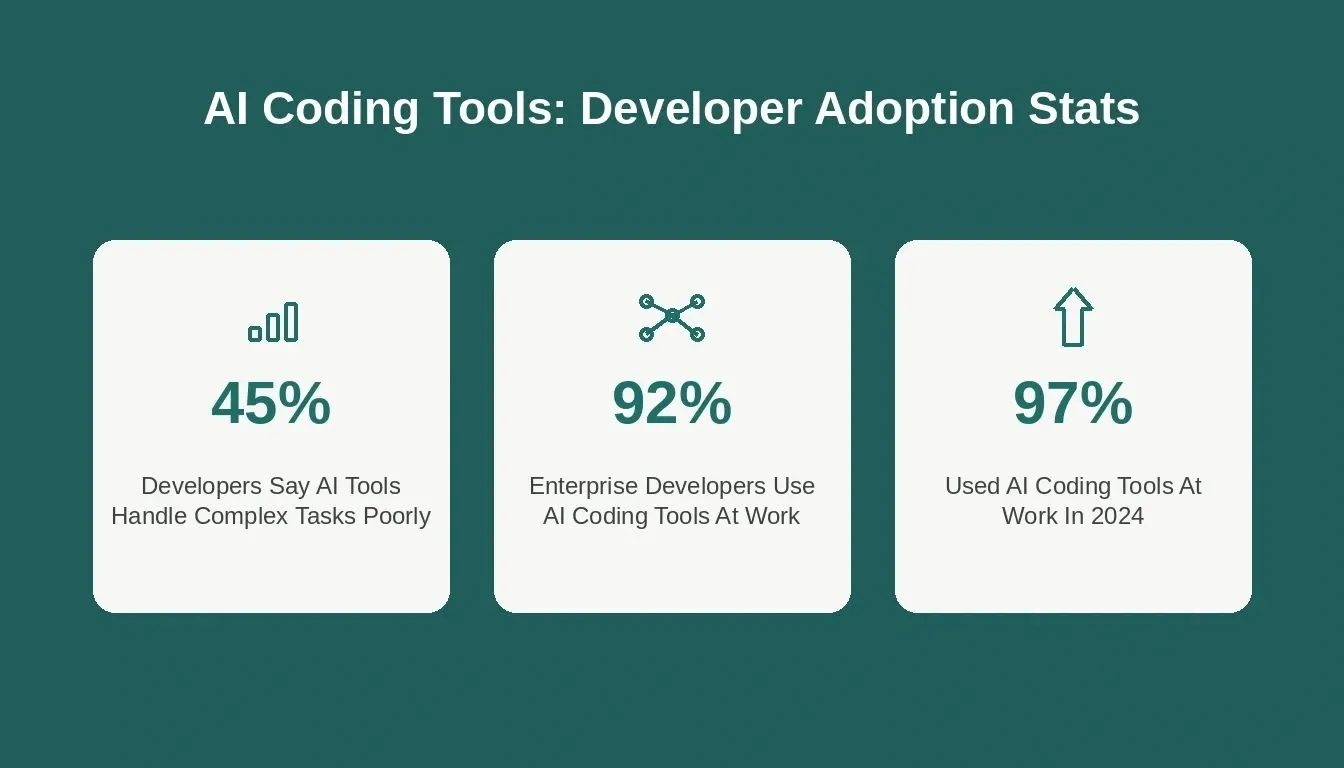
Developer survey data on AI coding tool adoption and perceived limitations
Where Vibe Coding Works Well and Where It Breaks Down
Vibe coding is not inherently bad. It is a reasonable approach when the cost of failure is low and the goal is speed over reliability, especially because it cuts down on repetitive work and some of the usual grunt work that teams want out of the way when speed matters more than durability. The problem is applying it to software that needs to be maintainable, secure, and scalable.
Vibe coding tends to break down at three predictable points, which is also why teams that call vibe coding a useful abstraction still need skilled engineers once the work starts moving toward production-ready software. First, no shared memory across sessions: starting a new AI session means re-explaining the same architectural constraints, data models, and business rules every time. Code generated in later sessions can contradict decisions made in earlier ones. Second, no architectural review before generation: a new API endpoint might work in isolation but conflict with the existing authentication pattern, break rate limiting, or introduce a circular dependency. Third, security blind spots at scale: AI-generated code can introduce issues, particularly when security requirements and threat models are not explicitly considered and the output is not reviewed.
For common vibe coding mistakes and how to avoid them, the patterns are consistent across projects of every size. The common thread is oversight: vibe coding works when the cost of failure is low, and breaks when software needs to be maintainable, secure, and scalable. Beginner enthusiasm can also hide the learning curve, because rapid prompting feels easier than writing code, but that does not remove the need for review.
Claude Code vs Vibe Coding vs Rocket.new
These three are not equivalent categories. Claude Code is a tool. Vibe coding is a workflow style. Rocket.new is a platform. Understanding the distinction helps clarify which is right for a given situation.
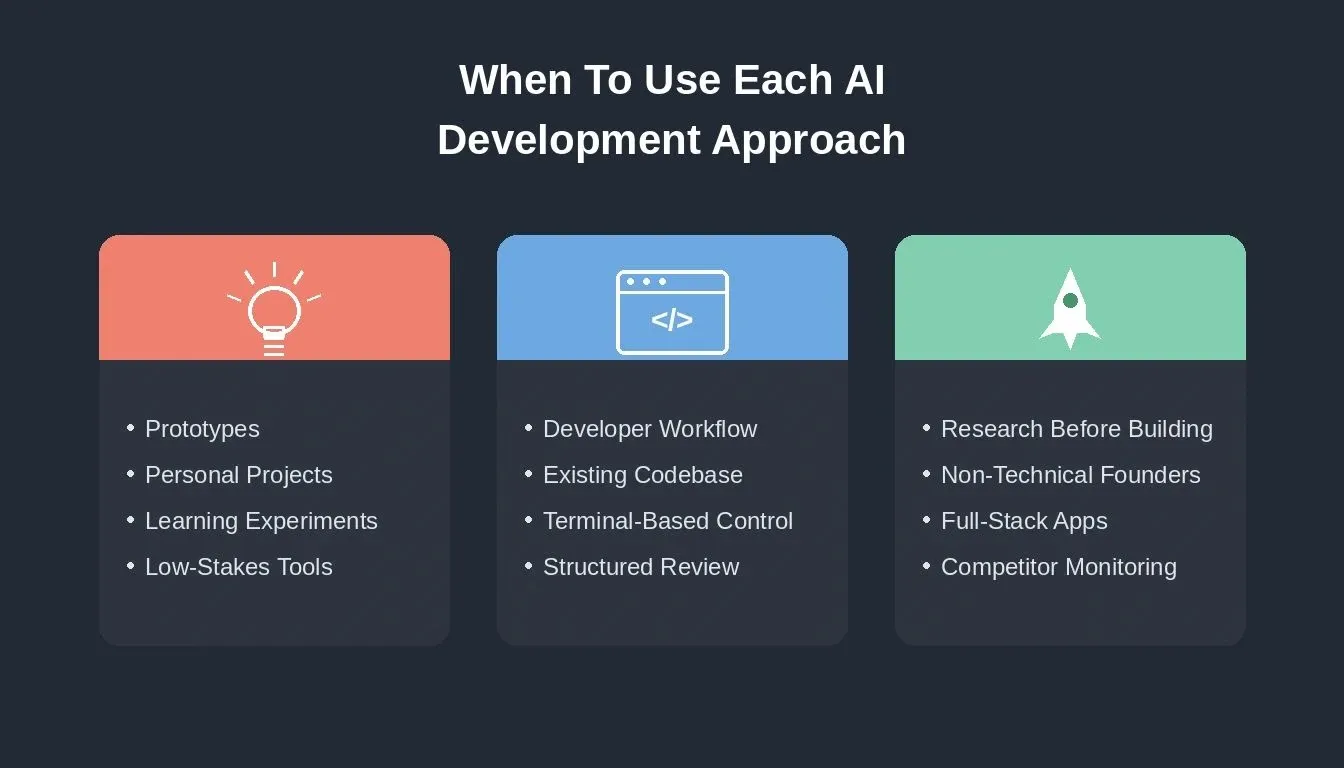
Choosing the right AI development approach depends on your project's stakes, team size, and workflow needs
| Claude Code | Vibe Coding | Rocket.new | |
|---|---|---|---|
| What it is | AI coding agent by Anthropic | Development approach/style | Vibe solutioning platform |
| Primary user | Developers with coding workflow | Anyone using AI to build | Builders, founders, product teams |
| Starting point | Developer's existing codebase | A prompt | Research and validation via Solve |
| Code output | Yes: terminal-based, full codebase access | Yes: via any AI tool | Yes: Next.js web apps and Flutter mobile apps |
| Research/validation | No | No | Yes: Solve produces structured reports |
| Competitor monitoring | No | No | Yes: Intelligence across 9 signal pillars |
| Requires technical setup | Yes: install, configure, manage | Varies | No: managed platform |
| Built-in architectural review | No | No | Yes: Advisor Agent (Claude Opus, read-only) |
| Best for | Developers who want AI in their coding workflow | Experiments, prototypes, personal projects | Builders who want research, building, and intelligence together |
How Rocket.new Connects Research, Building, and Intelligence
Rocket.new is a vibe solutioning platform that combines strategic research, AI app building, and competitive intelligence into a single product. The three pillars work independently or together, use one, two, or all three depending on what you need.
Solve
Solve is Rocket's research engine. It turns complex business questions into structured, evidence-backed reports: market data, competitive analysis, and recommendations in one place. Solve produces complete research deliverables rather than links or summaries, with an executive summary, supporting evidence, and actionable recommendations.
Solve has two modes: Light Solve for fast, conversational research, and Full Solve for deeper, longer-form analysis that takes approximately 45 minutes. Full Solve decomposes a question into research streams, runs parallel agent research across each stream, and synthesizes findings into a structured report. For teams that want to validate ideas before building, Solve provides the structured foundation that prevents building the wrong thing.
Build
Build is Rocket's AI app builder. Describe what you want, and Rocket generates a fully functional app with UI, navigation, logic, and production-ready code. Build produces Next.js web apps and Flutter mobile apps, so it can also spin up new features quickly while the Advisor helps keep those additions reviewable. The editor supports chat-based iteration, visual editing, and direct code access. You can also start from a Figma file, a GitHub repository, a template, or an attachment.
Build also includes the Advisor Agent, a senior architect sub-agent built into the code generation pipeline. The Advisor runs on Claude Opus, operates in read-only mode, and is invoked specifically when the coding agent's reasoning is not enough: error loop resolution, architectural decisions, large-scale refactoring, and code review before finalizing complex generated code. It's there so human engineers are not replaced by automation when generated changes need architectural judgment. The Advisor never writes code; it returns structured analysis, root causes, a recommendation, numbered implementation steps, and a trade-off table. Teams exploring full-stack AI app building benefit directly from this separation of reasoning and execution.
Intelligence
Intelligence monitors competitors continuously across nine signal pillars: website, social, news, GTM, traffic, product, people, business, and reviews. It delivers personalized Intel cards to your feeds, ranked and scoped to your role, company, and strategic questions. Intelligence is an interpretation layer, not an alerting system. When a signal appears, it is evaluated against everything else happening across every surface simultaneously.
Intelligence replaces the manual work of refreshing competitor websites, scanning social media for sentiment, watching LinkedIn for hiring moves, and piecing together signals from multiple tools. It also detects absence, when something stops happening, and cross-pillar patterns, when several signals together imply a strategy. For product teams tracking competitive intelligence signals, this continuous monitoring feeds directly into build and research decisions.
How the Pillars Connect
The three pillars share context and feed into each other. A Solve report can scope a Build task with full research context already in place. An Intelligence signal, a competitor pricing change, a new feature launch, a hiring spike can trigger a Solve analysis or a Build update. Projects group-related Solve and Build tasks together with shared context, uploaded files, and connected services.
Which AI Development Approach Should You Use?
| Situation | Recommended Approach |
|---|---|
| Exploring an idea quickly | Vibe coding: speed matters, stakes are low |
| Building a personal project | Vibe coding or Claude Code with light process |
| Prototyping for stakeholder feedback | Vibe coding or Rocket Build |
| Validating a market before building | Rocket Solve first, then Build |
| Building a production SaaS product | Structured AI development with Claude Code or Rocket Build |
| Multi-developer codebase | Structured AI development with review gates |
| Anything involving auth, payments, or sensitive data | Structured AI development: explicit security review required |
| Tracking competitors while building | Rocket (Solve + Build + Intelligence) |
| Non-technical founder building an app | Rocket Build |
| Developer who wants AI in their existing workflow | Claude Code with a structured workflow, using coding assistants as support rather than a replacement |
For teams comparing AI app builder options across different use cases, the decision usually comes down to whether you need a coding agent inside your existing workflow or a full platform that handles research, building, and monitoring together. Senior engineers rarely use AI-assisted development tools like beginners do; they use them more selectively and with stronger review discipline.
AI Makes App Building Faster
Engineering discipline, whether applied manually or built into the platform, determines whether that speed produces software you can trust. Research before you build. Build from context. Iterate with AI. Launch when you are ready.
Start building on Rocket.new and bring your next idea from research to a working app in one connected workflow.
Table of contents
- -Key Takeaways
- -What is Vibe Coding?
- -What Is Claude Code?
- -Claude Code vs Vibe Coding: What's the Difference?
- -How a Disciplined AI Development Workflow Actually Works
- -1\. Write the Specification First
- -2\. Give the AI Enough Context
- -3\. Generate Small, Reviewable Changes
- -4\. Test Generated Code
- -5\. Review the Diff and Ship
- -What Senior Engineers Actually Review in AI-Generated Code
- -Key Developer Statistics on AI Coding Tools
- -Where Vibe Coding Works Well and Where It Breaks Down
- -Claude Code vs Vibe Coding vs Rocket.new
- -How Rocket.new Connects Research, Building, and Intelligence
- -Solve
- -Build
- -Intelligence
- -How the Pillars Connect
- -Which AI Development Approach Should You Use?
- -AI Makes App Building Faster