
SaaS performance optimization determines whether your AI-powered app retains users or loses them before the first interaction. This blog covers backend, caching, frontend, and scaling decisions that keep response times under two seconds.
Does a one-second delay really cost you users?
Yes, and the data is unambiguous. Portent's research across 100 million page views found that B2B sites loading in one second convert at 3x the rate of sites loading in five seconds. For AI-powered applications handling inference requests and real-time data pipelines, that gap widens dramatically.
AI workloads are heavier than traditional web apps. They demand more compute, more memory, and faster network throughput. So, this blog breaks down the architecture decisions, caching strategies, and rendering approaches that keep AI-driven SaaS products responsive and scalable.
Why Speed Defines the Success of AI-Powered SaaS Products
Speed is not a feature request. It is the product experience itself.
-
Users abandon slow apps fast. A site loading in one second has a conversion rate 5x higher than one loading in ten seconds, according to the same Portent study.
-
AI features amplify latency. When your product calls a large language model, processes embeddings, or runs inference pipelines, each step adds milliseconds that compound into noticeable delays.
-
Churn correlates directly with response time. SaaS products competing for attention have roughly three seconds before a user decides whether to stay or leave. That window shrinks further on mobile.
-
Search engines penalize slow pages. Google's Core Web Vitals directly factor into search rankings, meaning slow SaaS landing pages lose both traffic and conversions.
What are the Core Metrics That Matter for SaaS Speed?
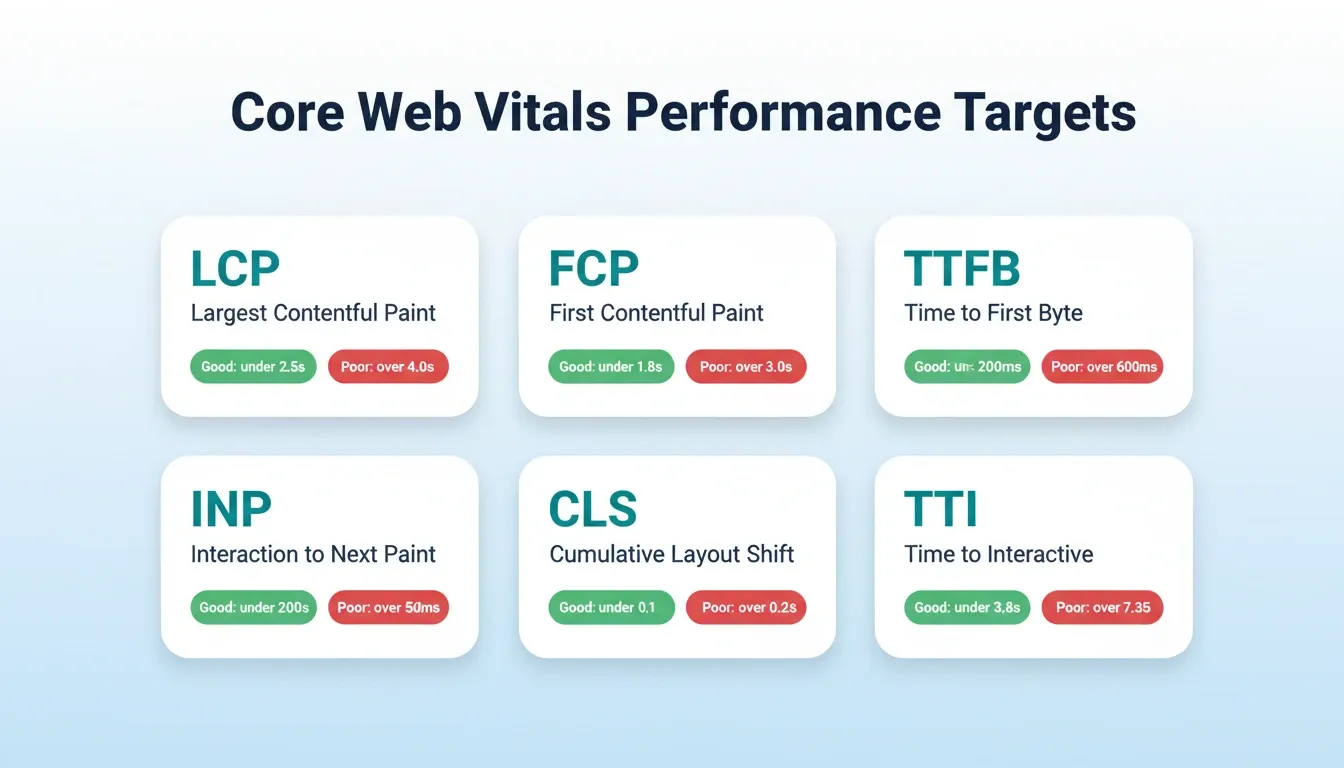
Not all speed metrics carry equal weight. Here is what to track and where to aim for effective SaaS performance optimization.
LCP is your north star. Largest Contentful Paint tells you when the main content becomes visible. For SaaS dashboards, this is usually the primary data table or chart.
TTFB reveals server-side bottlenecks. Time to First Byte exposes slow database queries, unoptimized API routes, and cold-start penalties.
INP replaces FID as the interaction standard. Interaction to Next Paint measures how quickly your app responds to every click or tap. This is critical for AI-powered dashboards with real-time data.
| Metric | What It Measures | Good Target | Poor Threshold |
|---|---|---|---|
| FCP (First Contentful Paint) | First visual element rendered | Under 1.8s | Over 3.0s |
| LCP (Largest Contentful Paint) | Main content fully visible | Under 2.5s | Over 4.0s |
| TTFB (Time to First Byte) | Server response start | Under 200ms | Over 600ms |
| TTI (Time to Interactive) | Page fully interactive | Under 3.8s | Over 7.3s |
| CLS (Cumulative Layout Shift) | Visual stability | Under 0.1 | Over 0.25 |
| INP (Interaction to Next Paint) | Input responsiveness | Under 200ms | Over 500ms |
The HTTP Archive tracks these metrics across millions of sites. It reveals that median FCP has improved only marginally since 2020 despite hardware advances. The bottleneck is software architecture, not bandwidth.
Teams focused on improving AI backend performance consistently find that architectural decisions, not hardware upgrades, move the needle on these numbers.
How Does Backend Architecture Affect Application Response Times?
Every millisecond of backend processing adds directly to what your users experience. For AI-powered SaaS, the backend is where most latency lives. It is also where SaaS performance optimization delivers the highest ROI.
-
Database queries are the silent killer. Unindexed queries on growing datasets can spike response times from 50ms to 2,000ms overnight as data scales.
-
API gateway overhead compounds. Each middleware layer, authentication check, and rate-limit evaluation adds 5 to 20ms. Stack six of them and you have lost 100ms before business logic runs.
-
Model inference is the heaviest operation. A single GPT-4 class API call can take 800 to 3,000ms depending on token count and provider load. Structuring async responses or streaming partial results is non-optional.
-
Connection pooling prevents cold-start waste. Reusing database connections instead of opening new ones per request can reduce TTFB by 40 to 60 percent.
Caching Strategies That Cut Latency in Half
The fastest request is one that never reaches your origin server. Here is how to build that advantage layer by layer.
-
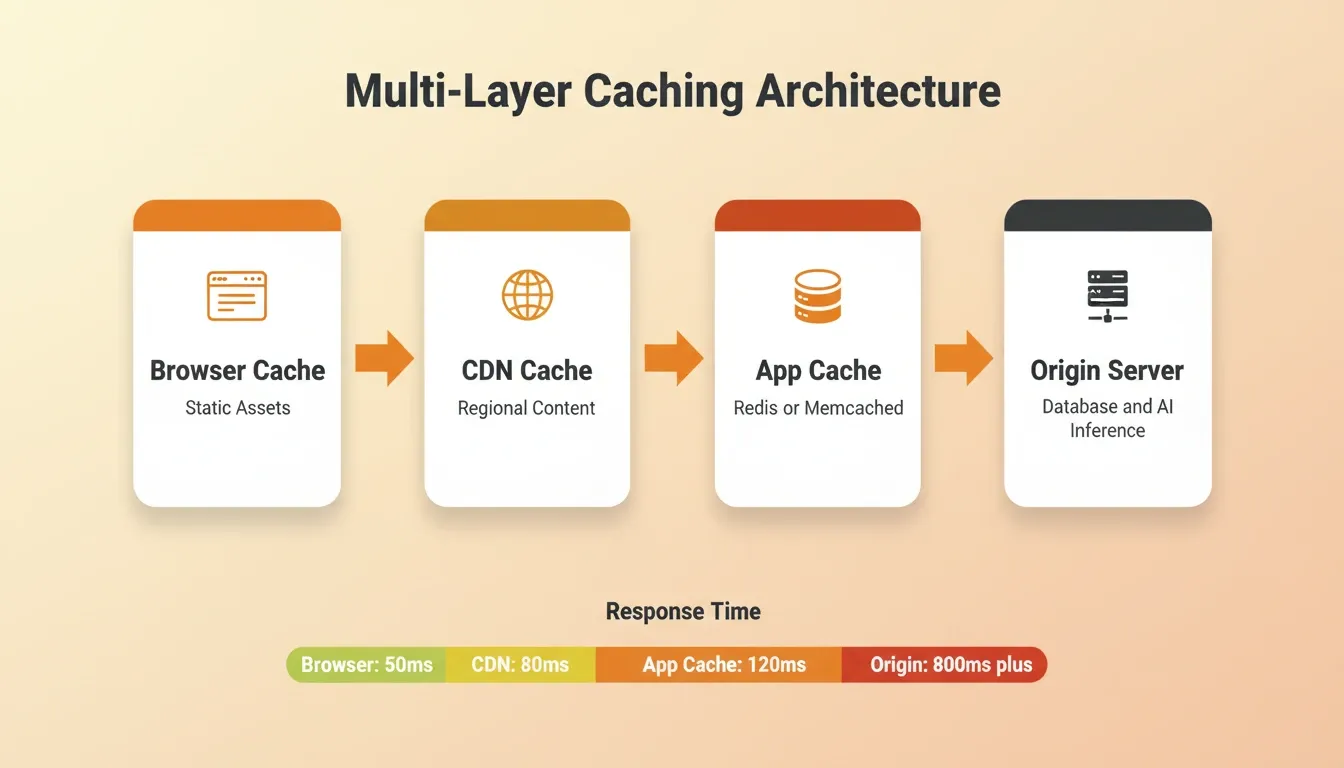
Multi-layer caching is the standard. Browser cache handles static assets. CDN cache handles regional content. Application cache such as Redis or Memcached handles dynamic data. Each layer intercepts requests before they hit slower systems.
-
Cache invalidation matters more than cache creation. Stale data in a SaaS dashboard is worse than slow data. Use event-driven invalidation tied to data mutations rather than time-based TTLs alone.
-
AI response caching is underused. If the same prompt generates the same output, store it. Many SaaS products repeat identical or near-identical inference calls for common user actions.
-
Edge caching for API responses works. GraphQL and REST responses with predictable patterns can be cached at the edge with short TTLs of 30 to 60 seconds. This dramatically reduces P95 latency.
The difference between a 200ms response and a 50ms response often comes down to whether the answer was already computed and stored one network hop away.
Teams that scale SaaS products built with AI tools treat caching as a first-class architectural concern, not a performance afterthought added when things get slow.
Frontend Rendering and Load Time Reduction Tactics
Backend speed means nothing if the frontend wastes it. Frontend rendering choices are among the highest-leverage SaaS performance optimization decisions you can make.
-
Server-side rendering (SSR) gives users content instantly. Instead of shipping a blank HTML shell and waiting for JavaScript to hydrate, SSR delivers fully rendered HTML on first paint.
-
Static generation with incremental regeneration (ISR) is ideal for SaaS marketing pages. Generate pages at build time and revalidate in the background. Users always get a fast cached page while fresh data regenerates.
-
Code splitting prevents loading unused JavaScript. A SaaS dashboard with 15 feature modules should not load all 15 on initial page view. Route-based splitting loads only what the current view requires.
-
Image formats and lazy loading run on autopilot with modern frameworks. Next.js handles responsive sizing, lazy loading, and WebP conversion automatically.
Cloudflare's performance research confirms that page weight remains a significant factor, especially for mobile users on constrained connections. Minification, compression, and tree-shaking are baseline requirements, not advanced techniques.
Mobile Performance: The Overlooked Half of SaaS Speed
Most SaaS performance guides focus on web. But with mobile accounting for over 60 percent of global web traffic, mobile performance is not optional. It is existential.
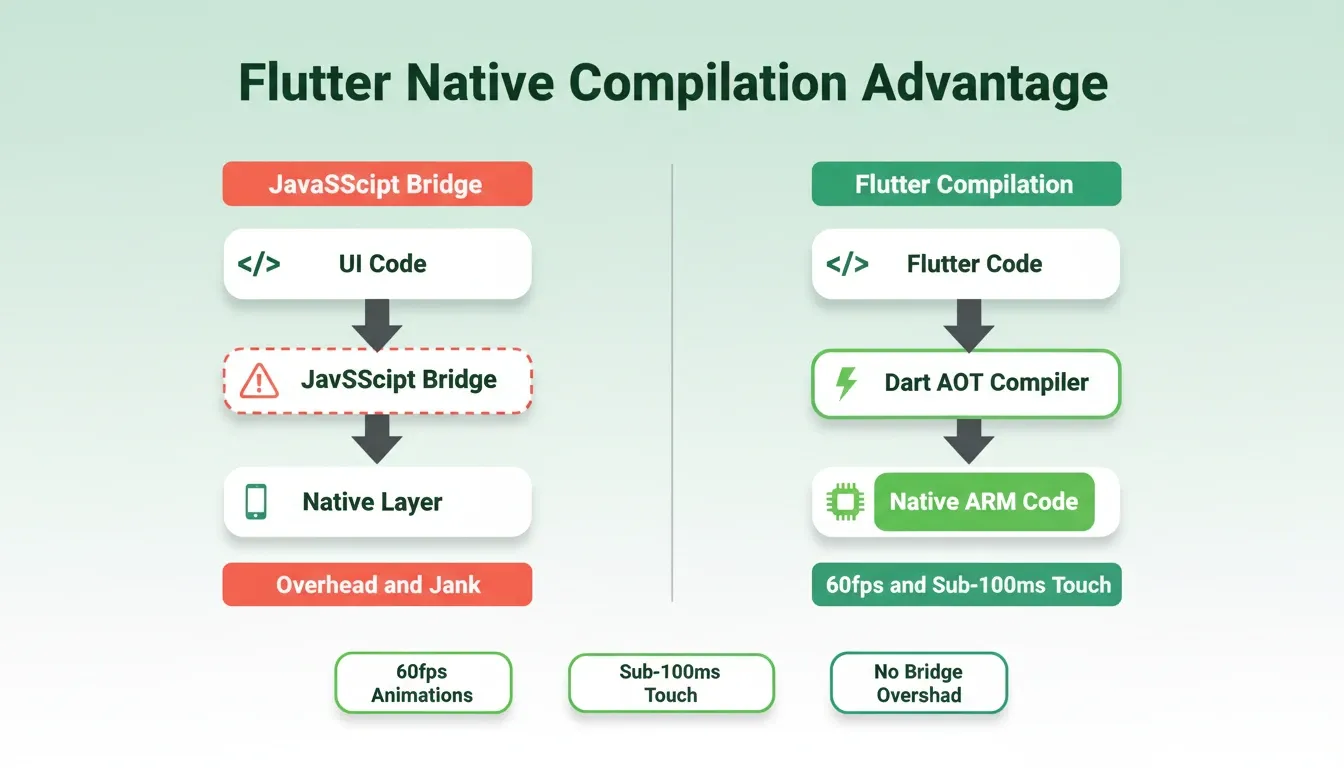
Flutter's compiled-native advantage changes the equation. Unlike JavaScript bridge-based approaches, Flutter compiles directly to native ARM code. This eliminates bridge overhead that causes jank in complex UI interactions. The result is 60fps animations and sub-100ms touch response on mid-range devices.
Offline-first architecture also reduces perceived latency. Caching frequently accessed data locally means users see content immediately, even on poor connections. Sync happens in the background without interrupting the experience.
App store performance scores affect discoverability too. Both the App Store and Google Play factor crash rates and ANR (Application Not Responding) rates into search ranking. A performant app is also a discoverable app.
Teams building mobile-native applications that prioritize compiled performance from the start avoid the costly refactoring that comes from bolting on optimization later.
Why Rocket Ships AI Apps That Load in Under Two Seconds
Building a fast AI-powered SaaS app traditionally requires weeks of infrastructure work. You need to set up CDNs, configure caching layers, tune database indices, and manage serverless cold starts. Rocket removes that entire burden.
-
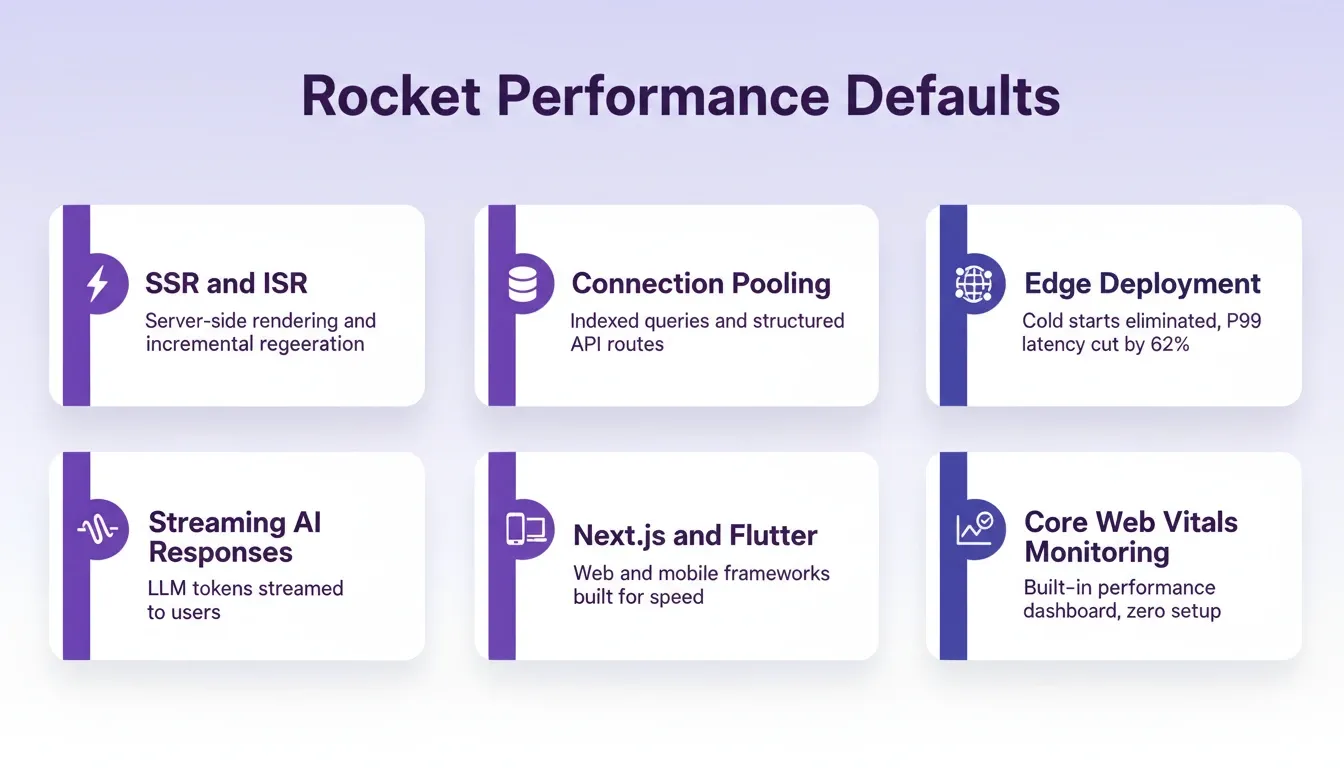
Production-grade architecture from the first prompt. Rocket generates Next.js frontend with SSR and Flutter mobile apps with compiled-native performance. Both frameworks are selected specifically for speed.
-
Backend performance is built into code generation. Connection pooling, indexed database queries, and structured API route patterns are defaults, not afterthoughts.
-
Cold start latency is a solved problem. Rocket's generated infrastructure eliminates cold starts and reduces P99 latency by 62 percent through warm-pool strategies and edge deployment.
-
AI features ship with streaming responses. When your app calls an LLM, Rocket structures the integration to stream tokens to the user immediately rather than waiting for full completion.
Other builders generate functional code that works. Rocket generates performant code that scales. The difference shows in load times, in Lighthouse scores, and in user retention metrics.
Scaling Cloud Infrastructure Without Sacrificing Response Times
Growth breaks performance. The architecture that handles 100 users elegantly often collapses at 10,000 concurrent sessions. Here is how to build for scale from day one.
-
Horizontal scaling needs stateless services. If your API server stores session data locally, scaling to multiple instances creates inconsistencies. Move state to a shared cache layer.
-
Auto-scaling with predictive triggers outperforms reactive thresholds. By the time CPU hits 80 percent and triggers a new instance, your existing users have already felt the slowdown. AI workloads with bursty inference patterns need pre-warming.
-
Edge deployment reduces geographic latency. A user in Singapore hitting a server in Virginia adds 200 to 300ms of network latency that no code change can fix. Deploy to edge regions.
-
Database read replicas handle read-heavy SaaS patterns. Most SaaS products are 90 percent reads. Route those to replicas and reserve the primary for writes.
Teams that build smarter full-stack solutions account for scale from day one. Their infrastructure configurations are already tuned for production traffic patterns rather than retrofitted after the first traffic spike.
AEO, GEO, and Structured Data: Performance for AI Search
Traditional SEO is no longer the only discovery channel. AI assistants like ChatGPT and Perplexity now answer user queries directly. They favor sources that are fast, structured, and authoritative.
Structured data (JSON-LD) makes your content machine-readable. FAQ, HowTo, Article, and SoftwareApplication schemas help AI search engines understand and cite your content accurately.
Page speed is an AI search ranking factor. Perplexity and similar tools crawl and index pages continuously. Slow pages get crawled less frequently, reducing freshness and citation probability.
Answer questions directly and early. AI search engines extract answers from the first substantive paragraph of a section. Front-load the answer, then provide supporting detail.
Rocket ships every generated app with SEO-ready structure and clean semantic HTML. The/Generate GEO And AEO Reportcommand audits and optimizes for AI search engines specifically.
Speed Is Your Strongest Competitive Advantage
Every second of load time you shave translates directly into higher conversions, lower churn, and better search rankings. The SaaS products winning market share today are not just smarter. They are measurably faster.
The gap between a slow prototype and a production-ready app is architecture. CDN configuration, caching layers, SSR, streaming responses, and edge deployment are not optional extras anymore. They are table stakes for any AI-powered product competing for user attention.
Build Faster, Ship Smarter
SaaS performance optimization is not a one-time fix. It is an ongoing architectural discipline that compounds over time. As AI workloads grow heavier and user expectations rise, the gap between performant and slow products will only widen.
Rocket gives you production-grade performance from the first prompt. SSR, streaming responses, connection pooling, edge deployment, and built-in Core Web Vitals monitoring are all defaults, not configurations you spend weeks setting up. Start building on Rocket.new and ship the AI-powered SaaS product your users deserve.
Table of contents
- -Why Speed Defines the Success of AI-Powered SaaS Products
- -What are the Core Metrics That Matter for SaaS Speed?
- -How Does Backend Architecture Affect Application Response Times?
- -Caching Strategies That Cut Latency in Half
- -Frontend Rendering and Load Time Reduction Tactics
- -Mobile Performance: The Overlooked Half of SaaS Speed
- -Why Rocket Ships AI Apps That Load in Under Two Seconds
- -Scaling Cloud Infrastructure Without Sacrificing Response Times
- -AEO, GEO, and Structured Data: Performance for AI Search
- -Speed Is Your Strongest Competitive Advantage
- -Build Faster, Ship Smarter