

Rocket.new generates a full-stack Next.js or Flutter site with CMS, auth, and Stripe in under an hour. Connect Supabase, Strapi, or Directus from a single prompt. No coding required.
Can you build a live website with a CMS in under an hour? Yes, and more people are doing it than you'd think. As early as 2020, MarketsandMarkets was already forecasting the low-code platform market to grow from USD 13.2 billion to USD 45.5 billion by 2025, a signal of how decisively the industry was moving away from hand-coded everything.
That shift has only accelerated since. Builders no longer need coding expertise, design skills, or a technical background to ship something production-ready. This post covers why traditional website builders with CMS are slowing teams down, what a modern AI website builder actually does differently, and how Rocket gets you from idea to live site in an hour without writing a single line of code.
Why Traditional Website Builders with CMS Are Slowing You Down
Traditional website builders were a genuine step forward when they launched. Drag and drop interfaces, pre-designed templates, and a visual editor made it possible for non-technical users to get something online. But they were designed for a different era, one where "fast" meant weeks instead of months.
The typical build process with most website builders looks like this:
- Pick a template and spend hours customizing it away from looking like a template
- Configure the CMS manually: content types, fields, relationships, all set up by hand
- Handle server configuration yourself, or pay someone to do it
- Add backend logic through plugins, third-party tools, or custom code
- Test responsive layouts across devices and hope nothing breaks
That is not a workflow. That is a project. For small businesses, freelancers, and startup teams without a technical background, it eats up weeks before a single user visits the site.
The deeper problem is that most traditional website builders stop at the surface. They cannot handle dynamic content, user authentication, payment gateways, or API endpoints without significant extra work. You end up stitching together five different tools just to build one product, and none of them share context with each other.
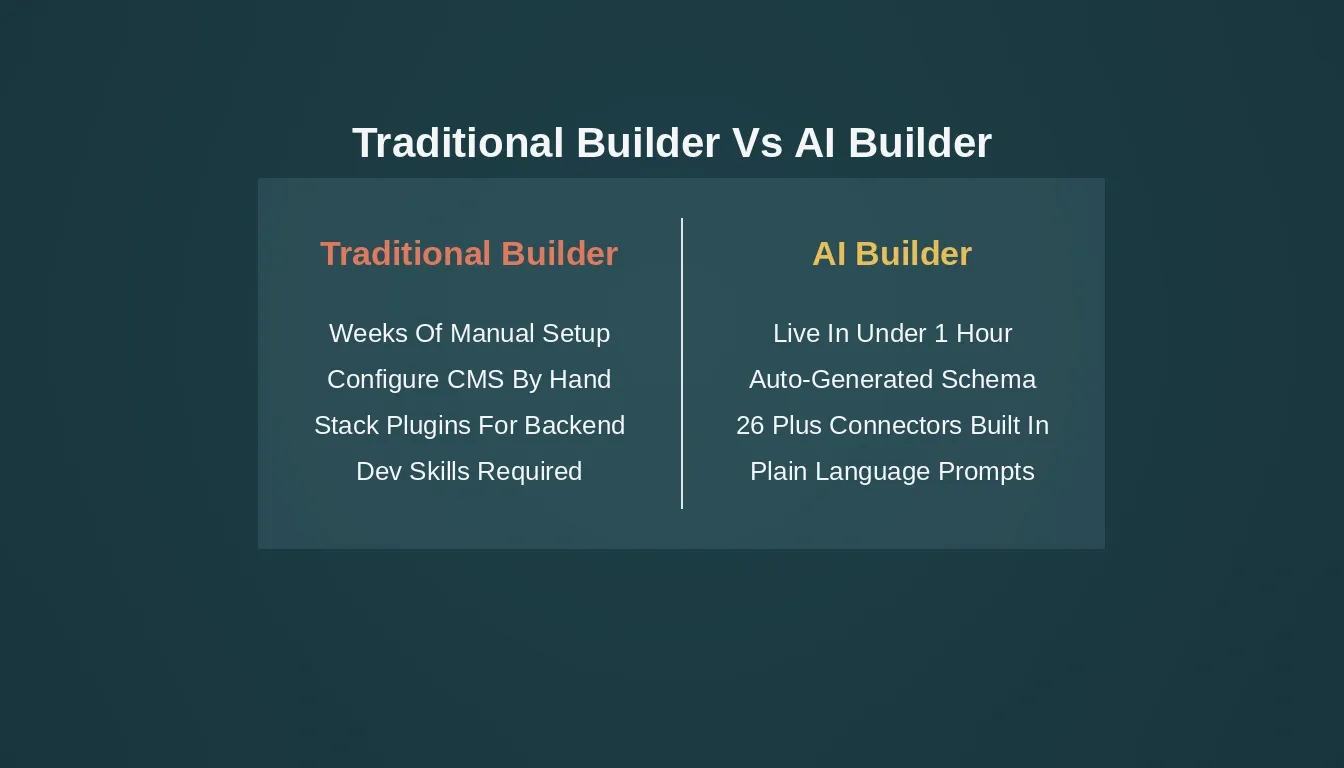
Traditional builders require weeks of manual setup. AI-powered full-stack builders generate everything from a single prompt.
CMS vs Website Builder: Understanding the Gap
The CMS vs website builder debate has always come down to control versus convenience. A traditional CMS like WordPress offers extensive customization and a huge library of premium plugins, but requires technical knowledge to configure and maintain. Most website builders offer user-friendly drag and drop editors and pre-designed templates, but lack the advanced features needed for complex websites.
Neither approach solves the full problem. Traditional CMS platforms have a steeper learning curve and require custom development for advanced functionality. Most website builders limit flexibility and scalability. The result: small businesses and non-technical users are stuck choosing between tools that are too complex or too limited.
What the Shift to AI-Powered Website Building Actually Means
Artificial intelligence changed the equation. Instead of configuring tools manually, you describe what you want in natural language, and the platform plans the architecture, writes production-ready code, and shows a live preview the moment generation finishes.
This is not just about speed. It is about what becomes possible for people without coding skills or design skills. Most AI builders today fall into two categories: frontend-only generators that produce polished landing pages with no backend logic, and full-stack AI platforms that generate the frontend, backend, database schema, and deployment in one go.
The gap between those two categories is exactly where most teams get stuck. They start with a no-code tool, hit the ceiling, and end up needing custom development anyway. Content management systems power over 60% of all websites globally, yet most CMS platforms still require significant technical expertise to deploy and maintain.
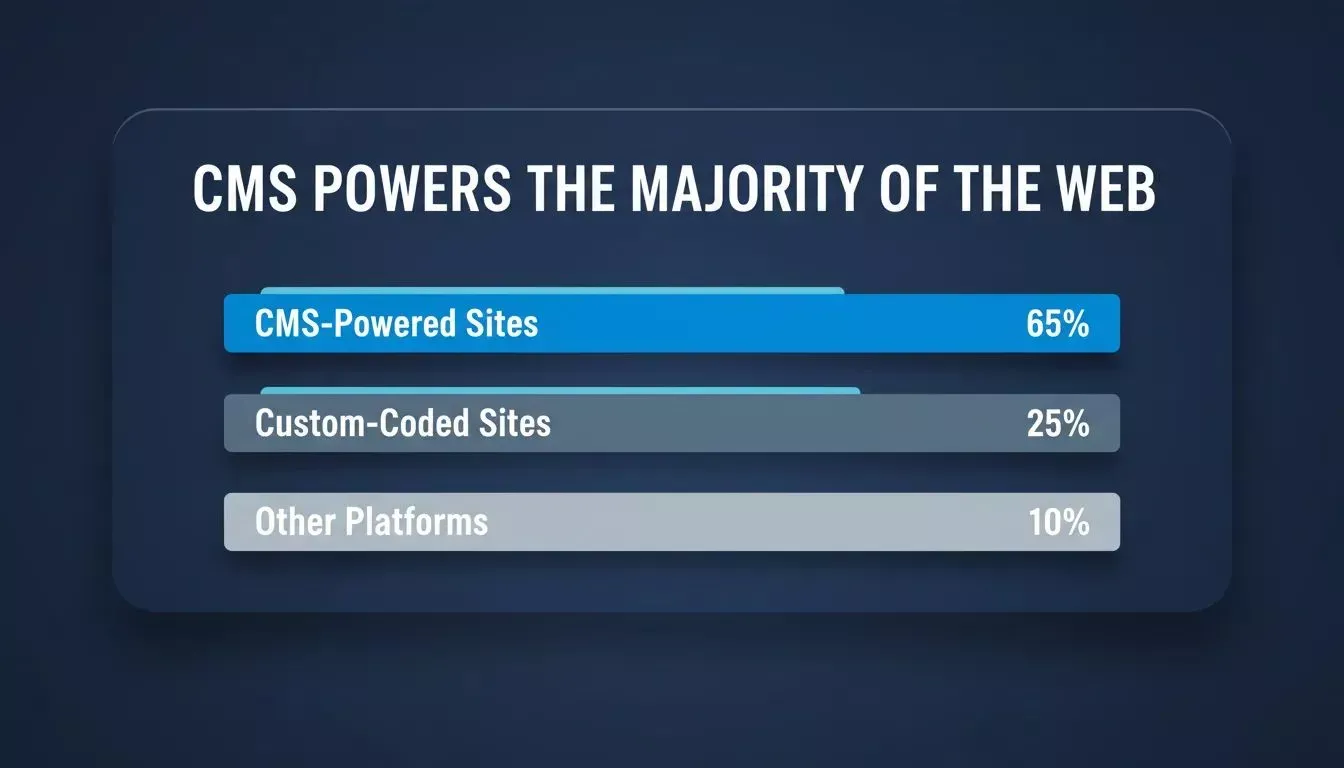
Over 60% of all websites run on a CMS, yet most still require developer expertise to set up and maintain.
What "From Prompt to Live Site" Actually Covers
The phrase "live site in an hour" only means something if you know what is included. Here is a direct comparison of what you are actually getting:
| What Gets Built | Traditional Builder | AI Builder (Full Stack) |
|---|---|---|
| Frontend UI | Manual drag and drop | Generated from a single prompt |
| Tech Stack | You configure it | Next.js (web) or Flutter (mobile) |
| CMS / Content Types | Manual setup | Connect Strapi, Directus, or Supabase; schema and UI auto-generated |
| Backend Logic | Plugins or custom code | Built-in, production-ready |
| Database | Separate setup | Supabase Postgres, included and connected |
| User Authentication | Third-party integration | Built-in via Supabase |
| Payments | Third-party plugin | Stripe connected from a single prompt |
| Deployment | Manual server configuration | One-click |
| Custom Domain | Separate DNS setup | Guided, automatic SSL |
| SEO Optimization | Manual meta descriptions | Auto-generated |
For non-technical users and small business owners, the traditional path requires either coding skills or money to hire someone. The AI path requires a clear idea and a good prompt.
If you want to understand how AI is reshaping web development more broadly, the AI in web development guide covers the full picture.
The Real Cost of Staying with Traditional Builders
It is worth being direct about what staying with traditional website builders actually costs, beyond the subscription fee. Time, money, and speed to market are the three things most teams cannot afford to waste.
- Time: weeks of initial setup, configuration, and troubleshooting before anything is live
- Money: developer fees, premium plugins, web hosting costs, and ongoing maintenance
- Speed to market: every day spent building is a day not spent learning from real users
- Complexity: backend logic, user authentication, and API endpoints all require separate tools that do not talk to each other
- Scalability: most traditional builders hit a ceiling the moment your product needs to grow beyond a basic website
The AI website builder market exists because those costs are real and people are tired of paying them. The question is which platform actually solves the full problem, not just the frontend. For a deeper look at how no-code and low-code development has evolved, the lowcode/nocode development guide is a useful starting point.
What the Community Is Saying
The shift is not just happening in product roadmaps. It is showing up in how real users talk about building online.
"I've been trying out every no-code AI website/app builder you can think of for months, and Rocket is 100x better than anything else."- Solopr11, via Rocket
"I just one shotted a prompt using @rocketdotnew and I can't put into words how astronomically better it is than any other no code AI tool. Actually made me question why I ever paid for Bolt, Lovable, V0, a0 etc. when this tool puts them all to shame. Incredibly impressed, wow." -Mia Williams (@miatravls), via Rocket
These are not edge cases. They reflect a broader pattern: people who have used multiple no-code tools are landing on AI-powered full-stack builders and not going back.
Rocket.new: The AI Builder That Handles the Full Job
More Than a Website Builder
Rocket is the world's first Vibe Solutioning platform. That covers the full arc of how a business operates, from the first question to a live product to continuous competitive intelligence, in one system, with one shared context that compounds over time.
For building specifically, Rocket's Build capability handles the complete stack from a single prompt. Here is what that looks like in practice:
- You describe your idea in plain language: no coding skills, no technical jargon required
- Rocket plans the architecture and generates production-ready Next.js (web) or Flutter (mobile) code
- You connect your CMS or database with one prompt, and Rocket generates the schema, UI, and API logic around it
- You get production-ready output: clean code, responsive layouts, and a working website, not a prototype
- You refine with follow-up prompts without losing context or starting over
The same project carries your full context from the first prompt to the last deployment. That is what makes the one-hour timeline real, not just a marketing claim.
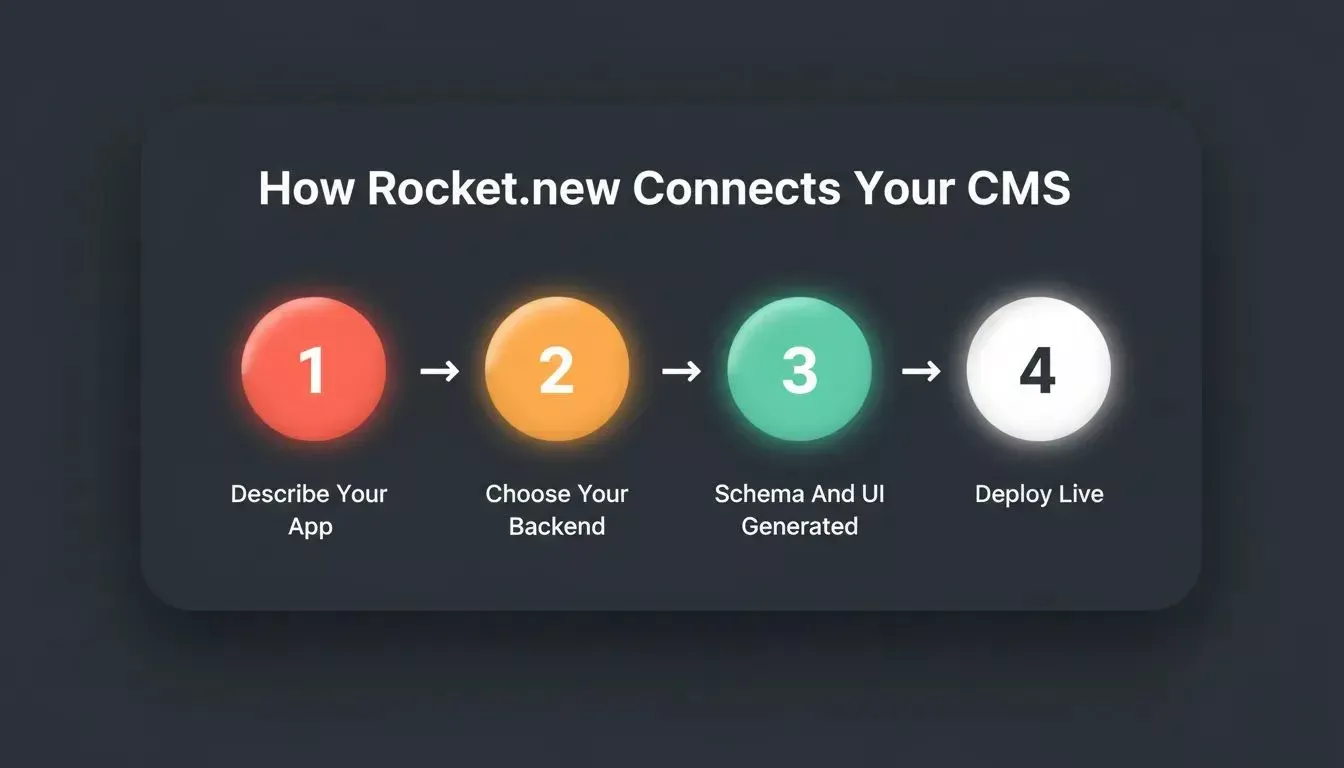
Rocket.new takes you from a plain-language description to a fully connected, live CMS website in four clear steps.
Key Features That Set Rocket Apart
AI-Powered Full-Stack Generation in Next.js and Flutter
Rocket generates clean, production-ready code in Next.js for web apps and Flutter for iOS and Android, from a single prompt. No drag and drop editor required. The output is real code that developers can extend, version-control via GitHub sync, and deploy immediately.
- Next.js for web: SaaS products, dashboards, content sites, e-commerce, landing pages
- Flutter for mobile: iOS and Android from a single codebase, ready for the App Store and Google Play
- Full GitHub sync so generated code lives in your own repository
- Production-ready from the first output, not a demo that needs a developer to finish it
For teams building mobile-first, the no-code mobile app builder guide explains how Rocket handles native app generation end to end.
CMS and Database Integration: Connected in One Prompt
Unlike most AI builders that stop at static pages, Rocket connects to your choice of backend or headless CMS provider and generates the entire data layer around it. The supported options are:
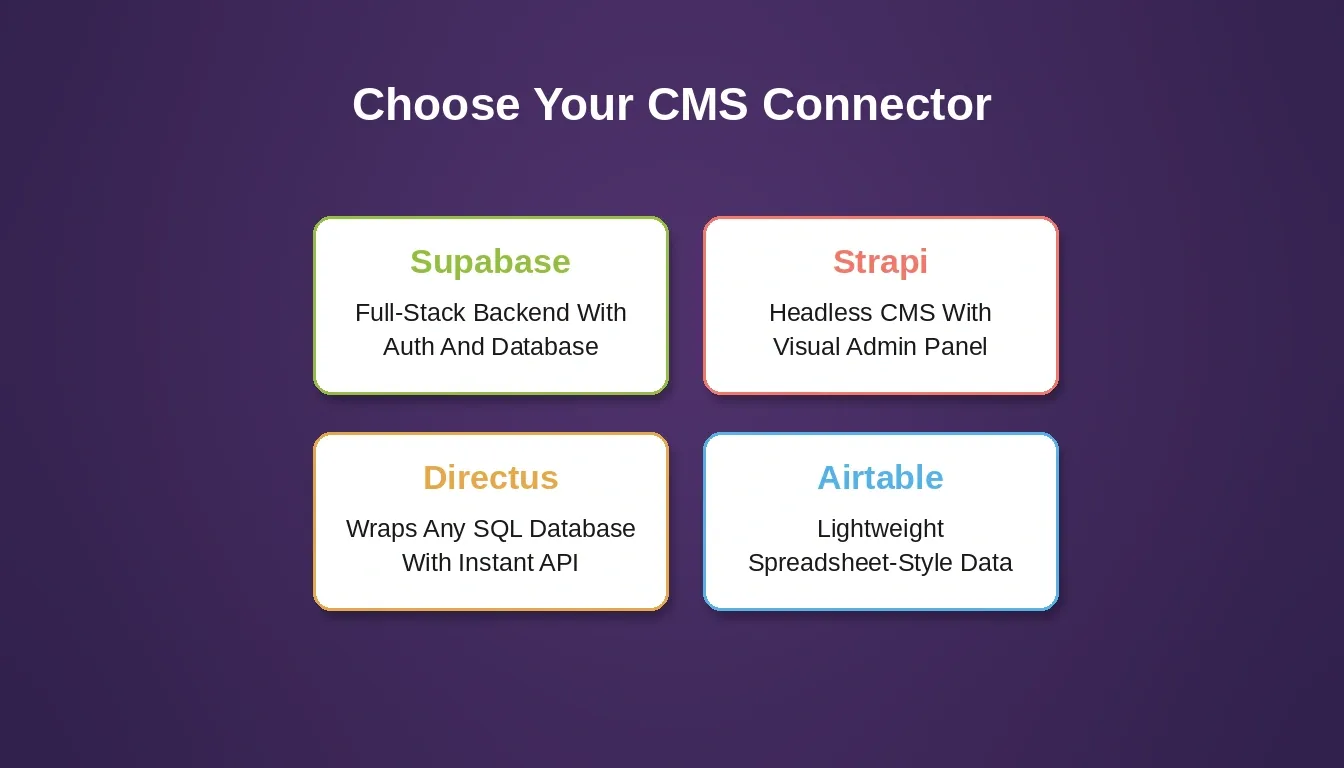
Rocket.new supports four CMS and database connectors. Choose based on your content needs and existing infrastructure.
| Connector | Best For | Connection Method |
|---|---|---|
| Supabase | Full-stack backend with auth, database, storage, and edge functions | OAuth |
| Strapi | Blog, docs site, or content-heavy website with a visual admin panel | API token plus URL |
| Directus | Wraps any existing SQL database with an instant API and GraphQL | Access token plus URL |
| Airtable | Lightweight CRM, content calendars, and internal tools | Personal access token |
Describe what you need in a prompt: "Connect Strapi and pull blog posts with categories, author pages, and featured images" and Rocket generates the schema, UI components, and API calls. The connection step is fast; the configuration work is eliminated.
Stripe Payments: Connected from a Single Prompt
Rocket connects to Stripe for payments, handling one-time checkout, recurring subscriptions, and donation flows. Add payments by describing what you need in chat; Rocket wires the Stripe integration, checkout sessions, and webhooks without manual API setup. See the full payments tutorial in the Rocket docs for the step-by-step walkthrough.
One-Click Deploy to Staging and Production
Server configuration is handled automatically. Rocket manages the infrastructure, including Netlify hosting, automatic HTTPS, and global CDN, so you can focus on the product, not the plumbing.
- Staging environment included for safe testing before going live
- One-click production deployment, no DevOps knowledge needed
- Custom domain connection is guided and fast: Rocket handles SSL and DNS automatically
- Version control built in so you can roll back without losing work
For teams who want to understand SEO defaults that ship with every Rocket build, the SEO-ready by default guide covers what is included out of the box.
25,000+ Templates as Intelligent Starting Points
Pre-designed templates cover web apps, marketing sites, dashboards, and internal tools. These are not rigid layouts. They are starting points that Rocket adapts to your brand, stack, and goals. Browsing and remixing templates consumes zero credits.
To explore what these templates look like in practice, see the features of an AI website builder guide.
How Rocket Compares to the Alternatives
Most AI builders have a ceiling. Here is where they typically fall short, and where Rocket goes further:
- Wix / Squarespace / Webflow: Excellent for marketing sites. Weak on backend logic, user authentication, and complex web app functionality. You hit the wall fast when your needs grow beyond a brochure site.
- Bubble: More capable for complex web app builds, but has a steeper learning curve and requires significant time investment. Not a one-hour solution for most users.
- Bolt.new / Lovable / v0: Good for frontend generation. Limited on full-stack output, backend generation, and production readiness. Most produce code that still needs significant cleanup before it is deployable.
"We had a web design ready for months but deployment was dragging. We tried a mock on Rocket recently, and it honestly blew our minds. It has opened up so many new doors." - Kshitij Mishra, GTM Engineer | AI Sales Systems, via Rocket
Rocket is built around the belief that the work is only as good as the thinking before it. That is why it connects market research, build, and competitive intelligence in one system, with one shared context across every step.
Who Gets the Most Out of Rocket
Rocket is well suited for a wide range of users, not just developers or technical founders.
- Solo founders who need to ship an MVP fast without hiring a development team
- Small businesses who want a professional website with real functionality, not just a template
- Freelancers and agencies who need to deliver client projects faster without sacrificing quality
- Product teams who want to prototype and test ideas in hours, not weeks
- Non-technical builders who have a clear idea but no coding skills or design skills
For solo founders specifically, the best AI tools for solo founders guide covers how to get the most from Rocket across research, build, and intelligence.
Building Your First Website on Rocket: A Practical Flow
Getting from zero to live site in an hour follows a clear, repeatable sequence. No prior experience needed.
- Sign up at Rocket: free account, no credit card required to start
- Describe your site: what it does, who it is for, what pages and features it needs
- Connect your CMS or database: tell Rocket which backend you want and it generates the schema and logic
- Review and refine: adjust colors, layouts, content, and features in plain language via chat
- Connect your custom domain: or use the provided Rocket subdomain to go live fast
- Deploy to production: one click, fully hosted, no server configuration required
No premium plugins to hunt for. No separate CMS setup. No server configuration. Rocket generates the architecture and you ship.
Everything you need to go live: generated code in Next.js or Flutter, Stripe payments wired in, and one-click deployment.
Is There a Free Plan on Rocket?
Yes. You can sign up and start building for free without a credit card. Paid plans unlock higher usage limits and advanced features.
Stop waiting for the right moment to build. Rocket takes you from a website builder with CMS to a fully live, production-ready site in under an hour, with Next.js or Flutter code generation, headless CMS connectors, Stripe payments, and zero coding required. Sign up for free and launch your site today.
Table of contents
- -Why Traditional Website Builders with CMS Are Slowing You Down
- -CMS vs Website Builder: Understanding the Gap
- -What the Shift to AI-Powered Website Building Actually Means
- -What "From Prompt to Live Site" Actually Covers
- -The Real Cost of Staying with Traditional Builders
- -What the Community Is Saying
- -Rocket.new: The AI Builder That Handles the Full Job
- -More Than a Website Builder
- -Key Features That Set Rocket Apart
- -AI-Powered Full-Stack Generation in Next.js and Flutter
- -CMS and Database Integration: Connected in One Prompt
- -Stripe Payments: Connected from a Single Prompt
- -One-Click Deploy to Staging and Production
- -25,000+ Templates as Intelligent Starting Points
- -How Rocket Compares to the Alternatives
- -Who Gets the Most Out of Rocket
- -Building Your First Website on Rocket: A Practical Flow
- -Is There a Free Plan on Rocket?


