
19 prompts across 5 phases to build a full AI sales assistant in Rocket.new covering auth, lead scoring, cold outreach, deal tracking, and pipeline reporting. No backend setup needed. Paste, generate, deploy.
Why Your Sales Team Needs a Custom-Built AI Assistant Now?
How many prompts does it take to build a working sales assistant that scores leads, drafts follow-ups, flags stalled deals, and sends weekly pipeline reports without writing backend code?
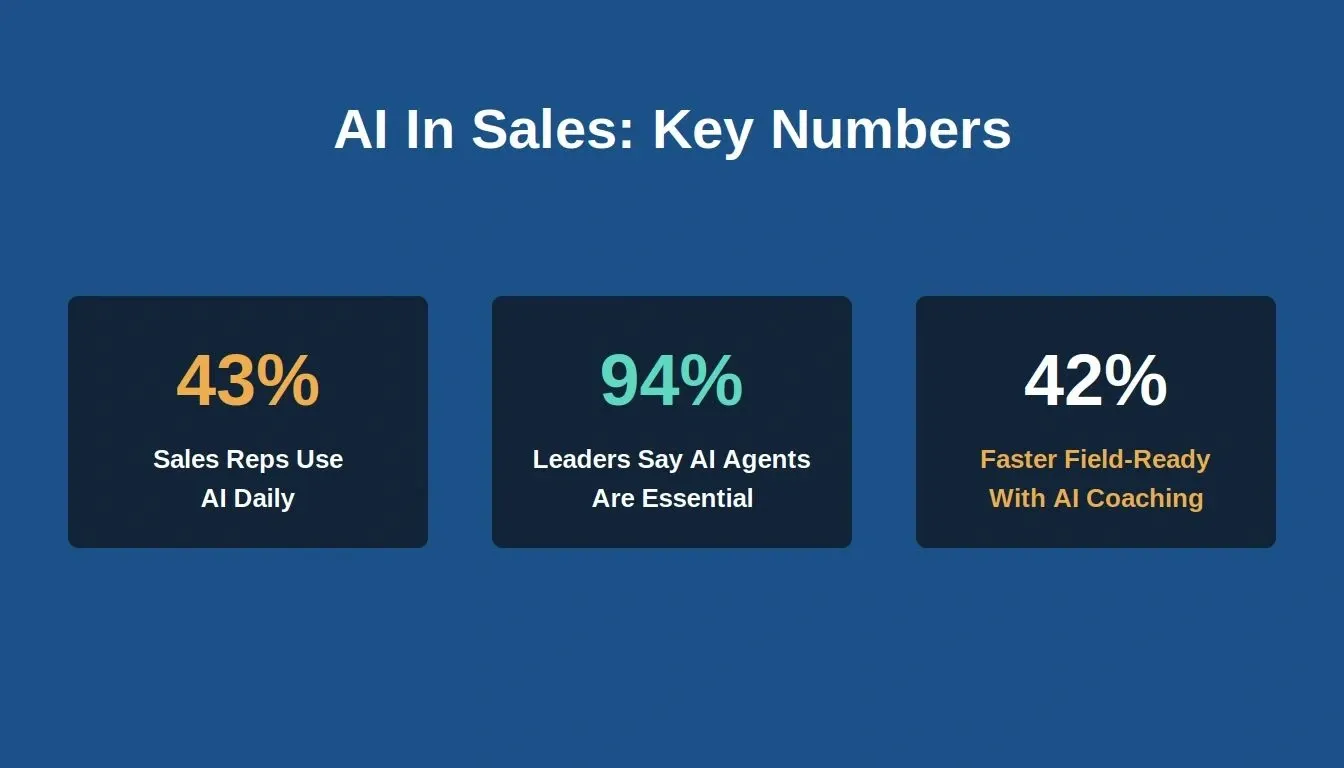
Key AI in sales benchmarks that make the case for building your own assistant
43% of sales reps now use AI tools in their daily workflow, up from 24% just a year earlier. The sales teams getting ahead are not waiting for enterprise CRM vendors to ship features. They are building their own AI sales agents, prompt by prompt, using AI app builders that generate full-stack applications from plain English descriptions.
This article gives you the exact prompts organized in build order across five phases so your sales team can go from zero to a deployed AI sales assistant app by the end of this week. Each prompt includes the expected output, a "what to check" note, and a follow-up refinement prompt you can paste immediately after the first generation.
What Does a Good AI Sales Prompt Actually Do?
Before you paste your first prompt into an AI tool, it helps to understand what separates a good AI prompt from a generic request that produces generic output.
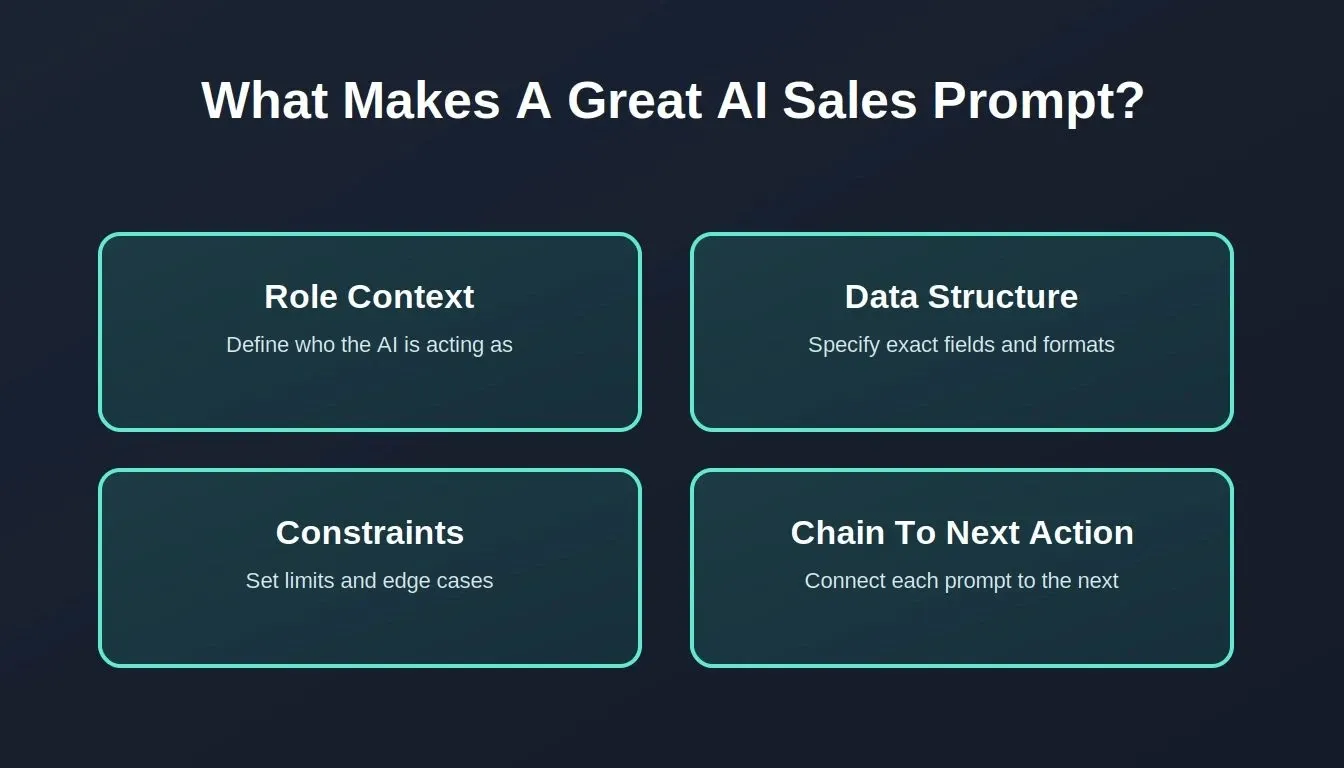
Four principles that separate a high-output AI sales prompt from a generic one
-
A good prompt provides role context. It tells the AI agent who it is acting as, a RevOps analyst, an SDR, or a sales manager, so the output matches real workflows your sales reps actually follow day to day.
-
It specifies the data structure. The best AI sales prompts define exact fields, column names, scoring criteria, and output formats. Vague prompts produce vague apps.
-
It includes constraints and edge cases. Good prompts mention what to skip, what to prioritize, and what the desired outcome looks like when the feature is complete.
-
It chains to the next action. Each prompt in a well-designed sales assistant connects to the one before it. Auth feeds into lead intake. Lead scoring feeds into outreach. Outreach feeds into follow-up sequences that run automatically.
The prompts in this article follow all four principles. Each one includes context, structure, constraints, and a chaining point so your AI sales assistant works as a connected system, not a collection of disconnected screens. If you are new to writing prompts for sales tools, start with the best prompts for app building guide and come back here when you are ready to build something specific.
Foundation Prompts: Auth, Lead Intake, and CRM Schema
Phase one sets the foundation that all other features depend on. Without multi-role auth, a clean CRM deal schema, and ICP-scored lead intake, later prompts will not have the data they need to produce useful output.
What Rocket generates automatically in this phase: login page, role detection logic, three dashboard layouts with RLS policies, lead intake form with scoring, Kanban board with drag-and-drop, and activity log. These are all generated from chat with no manual backend configuration needed.
Prompt 1: Multi-Role Authentication System
Prompt 1 builds role-based auth with Supabase RLS so sales reps, managers, and admins each see a different dashboard, generated from a single description.
"Build a sales assistant app with role-based auth supporting three user types: sales rep (can view assigned leads, log calls, update deal stages), sales manager (can view all team activity, approve discounts, reassign leads), and admin (full CRM configuration, pipeline stage editing, user management). Use Supabase for auth with Row Level Security. Each role sees only their permitted views on login."
Expected output: Login page, role detection, three separate dashboard layouts, RLS policies in the database.
What to check: Can a sales rep see another rep's deals? If yes, refine the RLS policies by adding a follow-up prompt specifying the row-level filter on the assigned_rep field. See the Rocket security checklist for RLS debugging steps.
Follow-up refinement: "Add an onboarding wizard that asks new users their name, team, territory, and manager's email, then auto-assigns them to the correct pipeline view based on their role."
Prompt 2: Lead Intake with ICP Scoring
Prompt 2 generates a lead intake form that auto-scores each submission against your ICP criteria and displays a color-coded badge on the lead card.
"Create a lead intake form that captures company name, prospect name, job title, company size, industry, annual revenue estimate, pain point (dropdown: slow pipeline, low engagement, manual outreach, pricing pressure), and source channel. Auto-score each lead against our ICP criteria: 40 points for company size 50-500 employees, 30 points for industry match (SaaS, fintech, healthtech), 20 points for director-level or above title, 10 points for inbound source. Display the score as a color-coded badge on the lead card."
Expected output: A form page, score calculation logic, lead list with color badges, sort-by-score functionality.
What to check: Does the scoring formula handle edge cases where company size is unknown? It should assign a neutral 20 instead of zero so partial data does not penalize legitimate prospects.
Prompt 3: CRM Deal Schema and Pipeline Configuration
Prompt 3 builds a Kanban pipeline board with a full deal schema, drag-and-drop stage updates, and a timestamped activity log.
"Build a CRM deals table with these fields: deal name, contact info, company, contract value, close date, pipeline stage (Discovery, Qualification, Demo, Proposal, Negotiation, Closed Won, Closed Lost), assigned rep, last activity date, next steps, deal source, and competitor mentioned. Add a Kanban board view where each stage is a column. Let sales reps drag deals between stages. Log each stage change with a timestamp in an activity feed."
Expected output: A Kanban pipeline board, deal detail drawer, activity log per deal with timestamps.
What to check: Drag-and-drop should update the database record immediately. Confirm the activity feed captures who moved it, from which stage, and when the change happened.
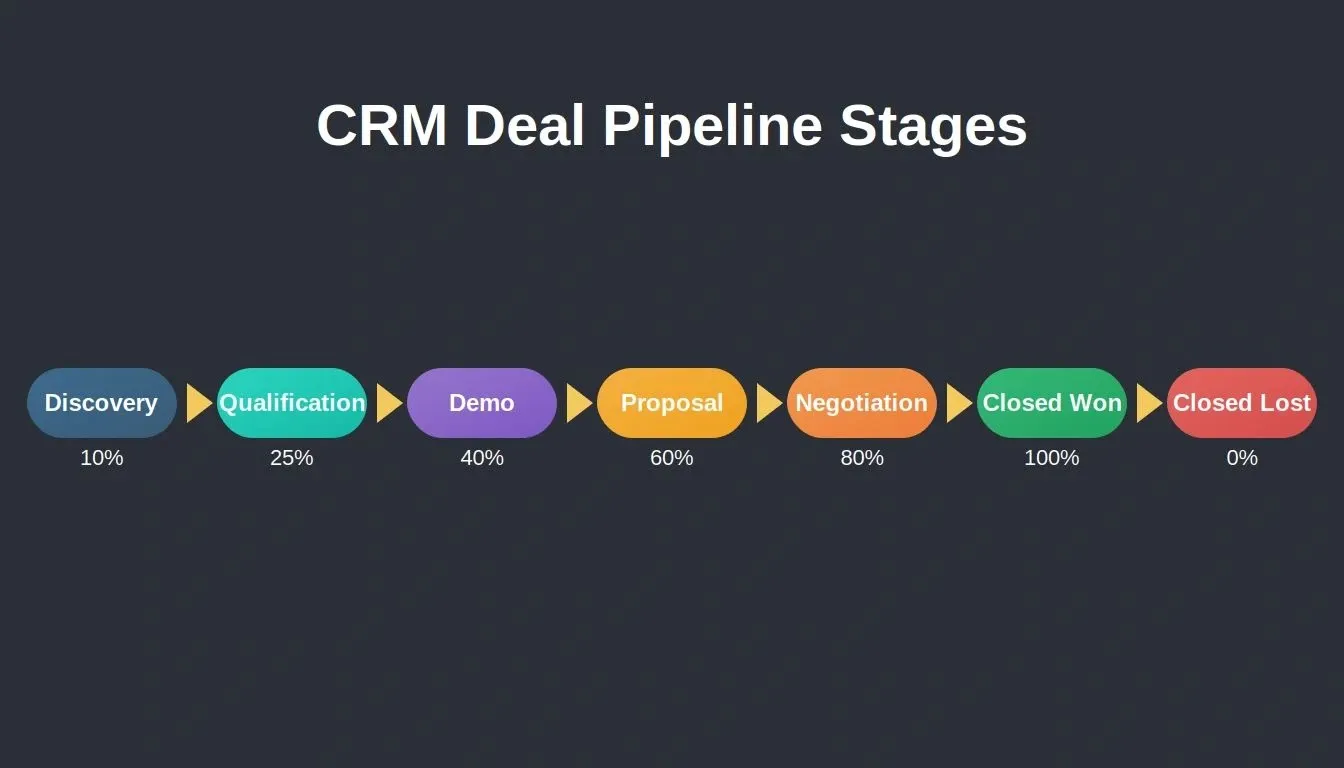
Seven CRM pipeline stages with weighted forecast probabilities used in Prompt 12
94% of sales leaders say AI agents are now a requirement for revenue growth. These foundation prompts create the data layer that makes AI agent features possible in the phases that follow. You can also explore how Rocket handles AI app development for operations teams to see how the same pattern applies beyond sales.
How Do You Prompt for Lead Qualification and Outreach?
Once your foundation captures and scores leads, the next phase turns that data into action. These AI agent prompts help your sales team reach the right prospects with personalized cold outreach at the right time without typing each message from scratch.
What Rocket generates automatically in this phase: engagement score column with badge logic, email composer with pre-filled fields, automated sequence engine with pause/resume controls, call prep brief. Email delivery uses Rocket's Resend connector for transactional sends.
Prompt 4: AI Lead Scorer with Engagement Signals
Prompt 4 adds an engagement scoring layer that auto-promotes hot leads and sends an email alert to the assigned rep via Resend.
"Add an AI lead scoring layer that analyzes: email open rate (tracked via a status field updated by the rep or a webhook from your email provider), website visits tracked via a simple pixel, form submissions, and days since last interaction. Weight recent engagement higher than older signals. Any lead with a score above 75 and activity in the past 48 hours should automatically move to 'Hot' status and trigger an email notification to the assigned sales rep via Resend."
Expected output: Engagement score column, 'Hot' badge auto-assignment, Resend email alert trigger.
What to check: Rocket's Resend connector handles transactional email delivery. If you need real-time open-rate data pulled automatically from your email provider, configure a webhook from that provider and store the result in a Supabase field via a Supabase Edge Function.
Follow-up refinement: "Create a Supabase Edge Function that receives a webhook POST from my email provider when a prospect opens an email, updates the lead's open_count field in the database, and recalculates their engagement score."
Prompt 5: Personalized Cold Email Generator
Prompt 5 builds a cold email composer that pre-fills from the lead record and sends via Resend with one click.
"Build a cold email generator that accepts: prospect name, prospect role, company name, pain point from their lead record, and one relevant case study link. Generate a short email (under 120 words) with a subject line referencing their specific industry. Tone should be casual and friendly, not corporate. Include a single CTA to book a 15-minute discovery call. Store each generated cold email in the contact's activity feed. Send via Resend."
Expected output: Email composer with pre-filled fields, generated draft, send button via Resend, activity log entry.
Follow-up refinement: "Add A/B subject line testing. Generate two variants per cold email. Track which one gets a higher open rate over 50 sends and recommend the winning pattern for future outreach."
"Generative AI is a game-changer for our team. We use it to craft personalized email outreach that grabs attention. AI analyzes customer data and suggests email content tailored to each lead's needs. It is like having a super-powered research assistant for each salesperson, freeing them up to focus on building relationships and closing deals." Pat Schirripa, CEO of People 2U (via HubSpot)
Prompt 6: Follow-Up Sequence via Resend
Prompt 6 creates a three-step automated follow-up sequence with pause/resume controls and a visual status indicator on the deal card.
"Create a three-step follow-up email sequence triggered when a lead does not reply within 3 days. Step 1: friendly check-in referencing the original message. Step 2 (day 6): share a relevant data point about their industry and a brief value proposition. Step 3 (day 10): breakup email offering to reconnect next quarter. Each follow-up email should auto-send via Resend unless the rep manually pauses the sequence. Show sequence status on the deal card."
Expected output: Automated sequence engine, pause and resume controls, visual status indicator on the deal.
What to check: Does the sequence stop if the prospect replies? Confirm the reply detection logic works and pauses the automation before the next message fires.
Prompt 7: Call Prep Brief from CRM History
Prompt 7 auto-generates a one-page call prep brief from all CRM history, ICP score, and deal stage, accessible directly from the deal card.
"Generate a one-page call prep brief before any scheduled sales call. Pull: all previous interactions (emails sent, calls logged, meetings), the prospect's ICP score, their stated pain point, competitor mentions from deal notes, and the current deal stage. Format as: 'Key context for [Prospect Name] - [Company]' with bullet points. Include three suggested talking points and one question to ask based on where they are in the sales process."
Expected output: Auto-generated brief accessible from the deal card, prepping the rep for the next call with all context in one view.
Follow-up refinement: "Add a 'share brief with manager' button so the sales manager can review prepping notes before a high-stakes deal meeting and add their own suggestions."
Outreach sequence logic: from ICP scoring through automated follow-up steps
Conversation Intelligence Prompts That Close More Deals
After your sales team starts conversations, the app needs to capture what happens during those interactions and surface patterns that help close more deals faster. These prompts for sales intelligence turn raw call notes into structured insights your AI sales agent can act on.
What Rocket generates automatically in this phase: objection tag selector with AI response suggestions, competitor comparison card, meeting summary parser with action item extraction, deal risk badge with Kanban indicators.
Prompt 8: Objection Response Suggester
Prompt 8 builds an objection handling module that generates three tailored responses per objection tag and stores them in a searchable team knowledge library.
"Build an objection-handling module. When a sales rep logs a sales call and tags an objection (pricing, timing, competitor preference, authority, need), the AI agent generates three response suggestions based on: the specific objection type, the prospect's industry, and their deal stage. Responses should acknowledge the concern first, then pivot to value. Store all objection-response pairs in a team knowledge library that improves over time."
Expected output: Objection tag selector, three AI-generated responses per tag, searchable knowledge base page.
What to check: Are the generated responses too generic? Refine by feeding in your actual product differentiators and historical win patterns from closed deals.
Prompt 9: Competitor Comparison Generator
Prompt 9 auto-generates a side-by-side comparison card when a rep tags a competitor, pulling from a stored competitor profiles table.
"Create a competitor comparison view that auto-generates when a rep tags a competitor on a deal. Pull from a stored competitor profiles table (name, pricing tier, known strengths, known weaknesses, target market). Output a side-by-side comparison card showing where we win, where they differentiate, and suggested talking points for the next call. Let reps add notes about what the prospect specifically mentioned about the competitor."
Expected output: Auto-generated comparison card on the deal detail view, editable notes section for field observations.
Follow-up refinement: "Add a cross-sell suggestion when the comparison shows the competitor lacks a feature we offer. Display as a 'Related offering' callout on the comparison card."
Prompt 10: Meeting Summary with Action Items
Prompt 10 parses pasted meeting notes into three structured sections: decisions, objections, next steps, and auto-populates the deal record.
"After each meeting, let the rep paste a transcript or typed notes. The AI agent should summarize in three sections: (1) Key decisions made, (2) Objections raised with category tags, (3) Next steps with assigned owners and deadlines. Auto-populate the deal's 'next steps' field and schedule a follow-up reminder for the owner. Flag any meetings where the prospect mentioned a specific close date and push that date to the forecast view."
Expected output: Meeting summary form, auto-parsed action items, forecast date extraction from conversation context.
Prompt 11: Deal Risk Scoring System
Prompt 11 adds a risk badge to every Kanban card and sends a weekly email digest to the manager via Resend listing all at-risk deals.
"Add a deal risk scoring system. Flag any deal as 'at risk' if: no activity logged in 7 or more days, the close date is within 14 days but the stage is still pre-Proposal, or the deal value dropped between updates. Display risk flags as a red indicator on the Kanban card. Generate a weekly email alert to the manager via Resend listing all at-risk deals with suggested next steps for each one."
Expected output: Risk badge on Kanban cards, automated manager email alerts via Resend, suggested recovery actions per stalled deal.
What to check: Is the 7-day threshold too aggressive for your sales cycle? Enterprise deals with longer cycles might need 14 days. Test both and see which produces fewer false flags.
AI-powered coaching scores reps across 1,400+ behavioral dimensions and helps them get field-ready 42% faster than traditional sales training methods. The conversation intelligence prompts above apply that same principle to your deals, catching patterns a human reviewer would miss across dozens of active conversations.
Deal risk detection: three flag types that trigger a Resend email alert to the manager
Deal Management Prompts for Pipeline and Forecasting
Your sales pipeline becomes useful when the app surfaces pipeline health signals automatically, not when a RevOps analyst manually reviews spreadsheets every Friday afternoon.
What Rocket generates automatically in this phase: Kanban with weighted forecast header, health score badges, win/loss close-out form with analytics charts, time-bucketed forecast table with drill-down.
Prompt 12: Pipeline Kanban with Stage Analytics
Prompt 12 adds a weighted forecast header to the Kanban board, with real-time recalculation when deals move between stages.
"Build a pipeline Kanban board showing total deal value per stage column. Add a summary row at the top: total pipeline value, weighted forecast (multiply deal value by stage probability: Discovery 10%, Qualification 25%, Demo 40%, Proposal 60%, Negotiation 80%), average days in current stage per deal, and conversion rates between stages. Let managers filter by rep, territory, or date range."
Expected output: Kanban with header metrics, filterable views, weighted pipeline forecast that updates when deals move.
What to check: Does the weighted forecast recalculate in real time when you drag a deal to a new stage? If not, add a follow-up prompt to trigger recalculation on the stage-change event.
Prompt 13: Deal Health Score
Prompt 13 adds a circular health score badge (0-100) to each deal card with color-coded thresholds and AI-suggested actions for low-scoring deals.
"Add a deal health score (0-100) calculated from: days since last activity (recency), number of stakeholder contacts identified (breadth), whether a next call is scheduled (momentum), and if pricing has been discussed (progression). Display as a circular progress indicator on each deal card. Deals below 40 get a yellow warning. Below 20 gets a red flag with a suggested action from the AI agent."
Expected output: Health score badge on cards, color indicators by threshold, sortable list view by score.
Prompt 14: Win/Loss Tracker
Prompt 14 generates a close-out form on deal completion and aggregates win/loss data into charts by source, reason, and market segment.
"Create a win/loss analysis page. When a deal moves to Closed Won or Closed Lost, prompt the rep to select: primary reason (from a dropdown list: pricing, timing, competitor, champion left, product fit, no budget), the competitor who won (if lost), and deal cycle length in days. Aggregate this data into charts showing win rate by source, loss reasons by quarter, and average deal cycle by market segment."
Expected output: Close-out form, analytics dashboard with charts, exportable reports for the sales team review.
Follow-up refinement: "Add a late-stage deals review section that shows all deals in Negotiation for 30 or more days with their health scores. Help managers identify which ones need executive intervention before they go cold."
Prompt 15: Contract Value Forecast by Close Date
Prompt 15 builds a time-bucketed forecast view with quarter-over-quarter comparison and drill-down into individual deal cards.
"Build a forecast view that groups deals by expected close date (this week, next week, this month, next quarter). Show: number of deals, total value, weighted value, and the highest-risk deal in each time bucket. Include a comparison to last quarter's actuals so sales leaders can see whether the current pipeline supports quota attainment. Allow drilling into any bucket to see individual deal cards."
Expected output: Time-bucketed forecast table, risk highlights per bucket, quarter-over-quarter comparison view.
| Phase | Prompts | Key Capabilities | Connector | Outcome |
|---|---|---|---|---|
| Foundation | Auth, Lead Intake, CRM Schema | Role detection, ICP scoring, activity logging | Supabase | Clean data layer |
| Qualification | Lead Scorer, Email Gen, Sequences, Call Prep | Engagement scoring, cold outreach, follow-up | Resend, Supabase Edge Functions | More meetings booked |
| Intelligence | Objections, Comparisons, Summaries, Risk Flags | Pattern recognition, competitor tracking, risk alerts | OpenAI/Anthropic, Supabase | Fewer deals lost |
| Deals | Kanban, Health Score, Win/Loss, Forecast | Weighted forecasting, health scoring, loss analysis | Supabase | Accurate revenue predictions |
| Reporting | Leaderboard, Weekly Summary, Conversions, Mobile | Automated reporting, source attribution, mobile | Resend, Supabase | Hours saved weekly |
For teams building internal tools beyond sales, Rocket's internal tool builder follows the same prompt-driven approach across any department.
Reporting Prompts for Weekly Summaries and Leaderboards
Sales leaders spend hours each week compiling data that your AI sales assistant should produce automatically. These prompts for sales reporting save your sales team those hours and surface the metrics that actually drive decisions.
What Rocket generates automatically in this phase: sortable leaderboard with sparklines, scheduled weekly email via Resend, funnel chart by lead source, mobile-responsive layout with empty states.
Prompt 16: Rep Activity Leaderboard
Prompt 16 builds a sortable leaderboard with sparkline trend charts and a team pulse section comparing this month to last.
"Build a leaderboard dashboard showing each sales rep ranked by: deals closed this month, total pipeline value, activities logged (calls plus emails plus meetings), and average response time to new leads. Display as a sortable table with sparkline charts for trending performance over the past four weeks. Add a 'Team Pulse' section showing aggregate team metrics compared to last month."
Expected output: Sortable leaderboard table, sparkline mini-charts, team comparison section with up or down indicators.
What to check: Are inactive reps showing zero values or are they hidden from the view? They should show with zeros to flag low engagement to the manager.
Prompt 17: Scheduled Weekly Pipeline Summary via Resend
Prompt 17 generates a weekly HTML pipeline summary email to the manager via Resend, triggered by a Supabase Edge Function on a pg_cron schedule.
"Every Monday at 8am, auto-generate a pipeline summary email sent to the sales manager via Resend. Include: total pipeline value change (up or down from last week), new deals added, deals moved to Closed Won or Closed Lost, at-risk deals requiring attention, and the top rep by activity volume. Format as clean HTML with distinct data sections. Include a link back to the app dashboard for quick access."
Expected output: Scheduled email generation, HTML template, Resend connection, weekly trigger.
Implementation note: Rocket generates the email template and Resend integration from chat. The Monday 8am schedule requires a Supabase Edge Function triggered via pg_cron. Ask Rocket: "Create a Supabase Edge Function that runs every Monday at 8am UTC, queries the deals table for pipeline changes, and sends the summary email via Resend." This is fully achievable but involves two prompts rather than one.
Follow-up refinement: "Add a personalized version for each rep showing only their own deals, wins this week, and AI-suggested focus areas for the coming days."
Prompt 18: Conversion Rate by Lead Source
Prompt 18 generates a horizontal funnel chart showing drop-off at every pipeline stage by lead source, with below-average flagging.
"Create an analytics page showing conversion rates by lead source (inbound, cold outreach, referral, event, paid ad). Track from lead created through each pipeline stage, showing drop-off at every point. Display as a horizontal funnel chart. Add filters for date range and assigned rep. Flag any source with below-average conversion so the sales team knows where to reallocate their budget and time."
Expected output: Funnel chart by source channel, filters for drilling down, below-average flagging with visual indicators.
Prompt 19: Empty States and Mobile-Responsive Layout
Prompt 19 adds context-aware empty states to every page and switches the Kanban to a vertical list on screens under 768px.
"Review every page in the app and add helpful empty states. If a rep has zero deals, show 'No deals yet, import your first lead or create one manually' with action buttons. If the forecast has no data for a quarter: show 'Add close dates to your deals to see forecasts here.' Make all views mobile-responsive with a bottom navigation bar on screens under 768px. Switch the Kanban board to a vertical list view on mobile devices."
Expected output: Context-aware empty states on every page, mobile layout with bottom nav, list-view fallback for the Kanban on small screens.
Rocket's mobile app builder handles the responsive output automatically, so the same codebase works on desktop and mobile without a separate build.
Why Rocket Ships Your Sales Assistant Faster Than Stitching Tools
You now have 19 prompts covering every layer of a production-grade AI sales assistant. The question is where you paste them. Most people try stitching together three or four other tools, a frontend builder here, a database setup there, an email service somewhere else. That approach breaks down fast when your sales process needs all the pieces talking to each other.
Rocket.new generates auth, database, UI, and API routes together from a single prompt
| Capability | Rocket.new | Stitching Tools |
|---|---|---|
| Auth + DB + UI from one prompt | Yes, generated together | No, each layer is separate |
| Shared context across prompts | Yes, prior generations inform new ones | No, re-explain on every tool |
| Built-in AI model access | Yes, OpenAI/Anthropic connected in chat | No, separate API key management |
| Transactional email | Yes, Resend/SendGrid native connectors | Varies, manual integration |
| Production defaults (WCAG, SEO, themes) | Yes, shipped by default | No, it requires manual polish |
| One-click deployment | Yes, Netlify via Rocket | Varies |
| CRM connector | Yes, HubSpot native connector | Varies |
-
Rocket.new takes a single prompt and generates auth, database schema, UI, and API routes together. Other tools like Bolt or Lovable build what you tell them to build. Rocket figures out what the prompt needs and ships the full stack, including Supabase for your CRM data, Resend for email sequences, and role-based views, without manual configuration of each service.
-
Your sales stack stays connected through shared context. Every prompt you paste on Rocket builds on the previous generation. The lead intake form knows about the auth roles. The deal risk flag knows about the pipeline stages you defined in phase one.
-
AI features come built-in, not bolted on. The AI agent generating objection responses, meeting summaries, and forecast analyses runs inside the same app. You do not manage a separate API key, handle token limits yourself, or debug why the AI connection broke after a deployment.
-
You ship production-grade apps, not prototypes. The first generation includes accessibility compliance, dark and light theming, SEO-ready structure, and performance defaults. A sales assistant built on Rocket in minutes is ready for your whole sales team on day one.
-
Building apps with AI prompts means you can iterate without starting over. Changed your qualification criteria? Paste a refinement prompt. Need to add a cross-sell module? Describe it in the chat. Rocket retains all previous context, so adding features to an existing app takes minutes, not a rebuild.
For teams evaluating alternatives, the Rocket vs Bolt comparison covers how the full-stack generation approach differs from prompt-to-frontend tools.
What Rocket Won't Do Out of the Box
Naming limitations is part of honest technical documentation, and it helps you plan your build correctly.
| Feature | Status | Path Forward |
|---|---|---|
| Slack notifications | Not a native connector | Use Resend/SendGrid email alerts (native), or add a custom Slack webhook via environment variables and the API importer |
| Scheduled cron jobs | Not a one-prompt native feature | Achievable via Supabase Edge Function + pg_cron, requires a second prompt to set up the scheduler |
| Real-time email open-rate tracking | Not documented in Resend connector | Configure a webhook handler from your email provider via a Supabase Edge Function |
| Native Salesforce or Pipedrive sync | Not a listed connector | Use the API importer with your CRM's REST API, or use HubSpot (native connector) as your CRM layer |
| Multi-database joins across Supabase projects | One project per task | Use a single project with well-structured tables and RLS policies |
Five features Rocket.new generates automatically from a single prompt, no manual backend setup needed
Your Next Sales Quarter Starts With One Prompt
The gap between "we need better sales tooling" and "our team uses it daily" used to be months of development time and thousands in contractor fees. These 19 prompts compress that gap into a single focused build session where each output feeds the next.
Your sales team does not need another dashboard they will not open. They need an assistant built around their actual pipeline, their qualification criteria, their follow-up cadence, their reporting rhythm. That starts with one prompt, one platform, and the decision to build instead of buying another subscription that collects dust.
Start with the CRM foundation prompts and grow from there. If you want to see how other teams have approached this, the sales app development guide covers real-world patterns worth reviewing before you start.
Sign up for Rocket and paste the multi-role auth prompt from Phase 1. Have your foundation live in minutes. No backend setup, no stitching tools together, no waiting for a dev team. Every prompt in this article works on Rocket.new out of the box.
Table of contents
- -What Does a Good AI Sales Prompt Actually Do?
- -Foundation Prompts: Auth, Lead Intake, and CRM Schema
- -Prompt 1: Multi-Role Authentication System
- -Prompt 2: Lead Intake with ICP Scoring
- -Prompt 3: CRM Deal Schema and Pipeline Configuration
- -How Do You Prompt for Lead Qualification and Outreach?
- -Prompt 4: AI Lead Scorer with Engagement Signals
- -Prompt 5: Personalized Cold Email Generator
- -Prompt 6: Follow-Up Sequence via Resend
- -Prompt 7: Call Prep Brief from CRM History
- -Conversation Intelligence Prompts That Close More Deals
- -Prompt 8: Objection Response Suggester
- -Prompt 9: Competitor Comparison Generator
- -Prompt 10: Meeting Summary with Action Items
- -Prompt 11: Deal Risk Scoring System
- -Deal Management Prompts for Pipeline and Forecasting
- -Prompt 12: Pipeline Kanban with Stage Analytics
- -Prompt 13: Deal Health Score
- -Prompt 14: Win/Loss Tracker
- -Prompt 15: Contract Value Forecast by Close Date
- -Reporting Prompts for Weekly Summaries and Leaderboards
- -Prompt 16: Rep Activity Leaderboard
- -Prompt 17: Scheduled Weekly Pipeline Summary via Resend
- -Prompt 18: Conversion Rate by Lead Source
- -Prompt 19: Empty States and Mobile-Responsive Layout
- -Why Rocket Ships Your Sales Assistant Faster Than Stitching Tools
- -What Rocket Won't Do Out of the Box
- -Your Next Sales Quarter Starts With One Prompt