
These AI prompts to build a car marketplace app cover five phases: auth, listings, trust, payments, and reporting. Each prompt includes expected output, a quality check, and a follow-up refinement so your first generation ships production-ready code.
A car marketplace app needs four core systems: multi-role auth, listing and search, trust and verification, and payment flows. These AI prompts to build a car marketplace app give you a working, production-ready prompt for each system across five structured phases, with expected output, a quality check, and a follow-up refinement for every step.
Why Structured Prompts Matter for Marketplace Development
Building a car marketplace platform without a clear prompt structure is like asking a dealership salesperson to sell cars without an inventory list. You will get vague output, miss features, and waste hours going back and forth.
AI prompts work best when they follow a specific format. Good prompts define the user role, describe the data model, name the service connections, and specify the output format. Plain language alone often produces unusable output because the AI has no context about your specific business rules or data structure.
-
Be role-specific: Tell the AI whether you are building for a buyer, seller, dealer, or admin
-
Name your tech stack: Mention Flutter, Supabase, Stripe, or Twilio explicitly when you write your prompt
-
Include acceptance criteria: Write out what "done" looks like so the tool can self-check its response
-
Ask for the database schema first: Starting with data structure gives every later prompt better output and fewer errors
-
Define the output format clearly: Request specific files, API routes, and UI components to create a usable result
When you write prompts using this structure, the AI can generate usable output from the very first generation. Check out these prompt engineering best practices for a deeper look at how prompt structure changes your results.
The global online used car market hit $578 billion in 2025 and is growing at 8.5% annually. The 2025 Cox Automotive Car Buyer Journey Study found that 71% of all vehicle buyers were highly satisfied with the process, with AI-powered tool users reporting the highest satisfaction scores of any group.
The market demand is proven, the customer behavior is shifting, and AI tools can now handle the heavy lifting of writing production-grade code. What you actually need is the right set of prompts.
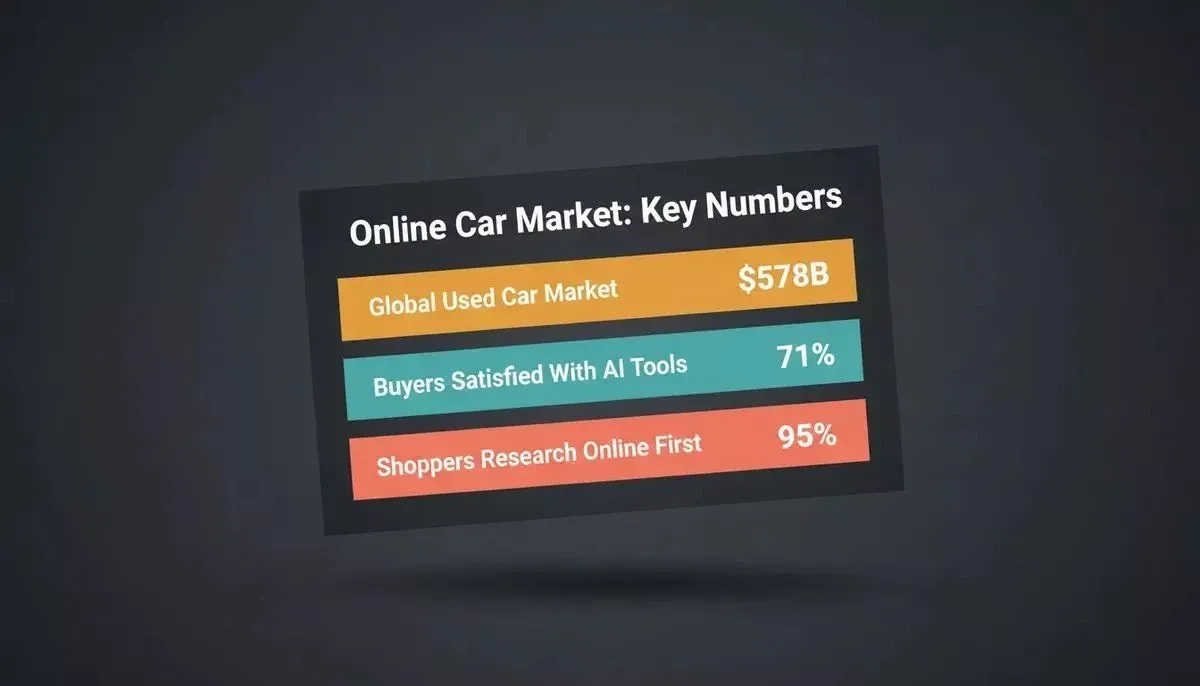
Key market stats driving the shift to online car marketplaces
Prerequisites Before You Start
Before running any prompt, have these four accounts ready. Rocket generates the integration code; you supply the credentials.
| Account | Used For | Connector Type |
|---|---|---|
| Supabase | Postgres database, auth, storage, edge functions | Pre-wired named connector |
| Stripe | Payments, featured listing fees, Connect payouts | Pre-wired named connector |
| Twilio | SMS OTP verification, deal alerts, status updates | Pre-wired named connector |
| Vehicle history API | VIN-based accident and title data | Bring-your-own credentials |
Supabase is the foundational backend for most Rocket apps. It handles Postgres, user authentication, file storage, and edge functions from a single connection. Stripe routes through Supabase Edge Functions for webhook and checkout logic, and Twilio is a documented named connector specifically for SMS OTP codes, order alerts, and appointment reminders.
Phase Overview: Five-Stage Build Pipeline
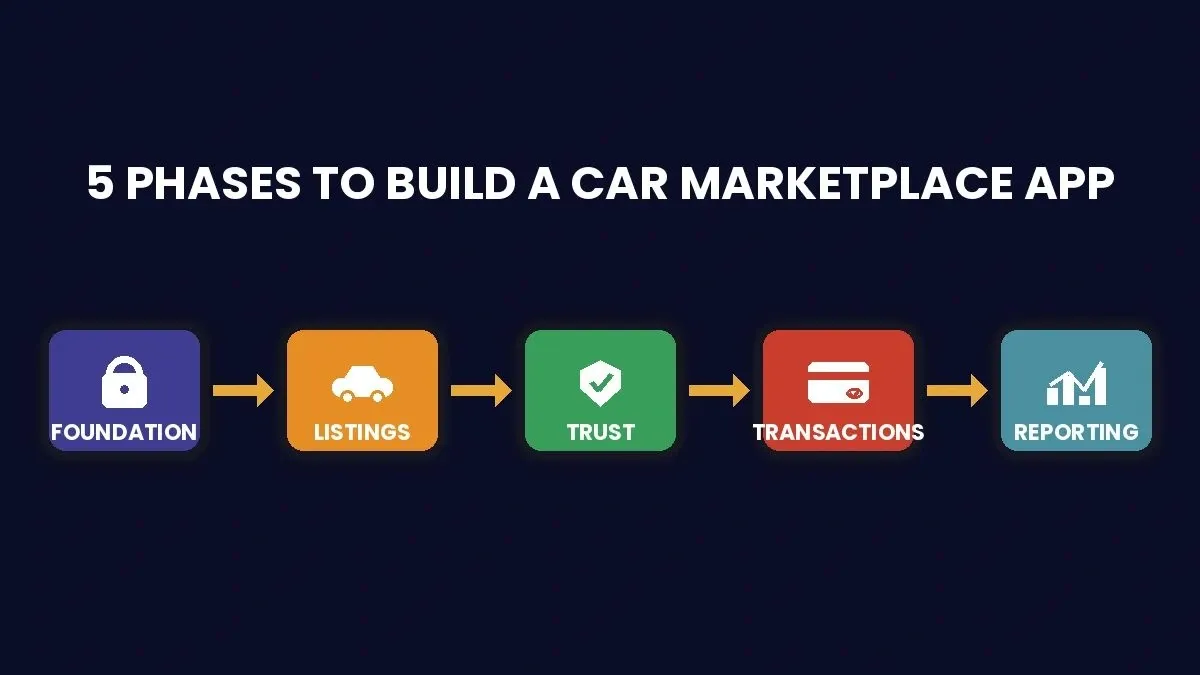
The five-phase build pipeline from foundation to reporting
How Should You Set Up Foundation Features First?
The foundation phase covers your app's core identity: who can log in, what each role can do, and how dealers manage their presence on the platform. Most dealers and car dealerships today expect multi-role access right out of the box.
Prompt 1: Multi-Role Authentication System
"Build a Flutter app with Supabase auth that supports four user roles: Buyer, Seller, Dealer, and Admin. Each role should see a different dashboard after login. Include email and Google OAuth sign-in options via Supabase social auth. Apply Supabase Row Level Security policies so each role can only read and write its own data."
What to check: Confirm that role-based routing works and that a buyer cannot access the dealer dashboard. Verify RLS policies block cross-role data access in the Supabase dashboard.
Follow-up prompt: "Add phone number OTP verification via Twilio for dealer accounts, and send a Twilio SMS confirmation when a new dealership account is approved."
Prompt 2: Car Dealerships Profile with Inventory Management
"Create a dealer profile page where car dealerships can add their business name, logo, location, operating hours, and a text description. Include an inventory management section that shows all listed vehicles with status tags: Active, Sold, and Pending. Add bulk import via CSV for dealers with large stock. Store all data in Supabase with Supabase Storage for logo uploads."
What to check: Make sure the inventory count updates in real time and the CSV import handles common data errors gracefully.
Follow-up prompt: "Add a messaging inbox to the dealer profile so buyers can send direct conversations about specific vehicles."
Prompt 3: Buyer Saved Search and Alert Configuration
"Build a saved search feature where buyers can store search filters like make, model, year range, price range, and location radius. Let buyers toggle email alerts or Twilio SMS notifications when new matching listings post to the marketplace."
What to check: Confirm alerts fire only for genuinely matching listings and do not miss new inventory during off-hours.
Follow-up prompt: "Add a frequency setting so buyers can choose instant, daily, or weekly alert digests."
Prompt 4: Admin Moderation Queue
"Create an admin dashboard with a moderation queue that shows flagged listings, reported sellers, and new dealer applications awaiting approval. Include one-click approve, reject, and escalate actions. Add analytics cards showing pending items, average response time, and resolved cases this month."
What to check: Verify that rejected dealers receive a Twilio SMS notification with a clear reason and that the queue sorts by priority.
With these four foundation prompts done, your car marketplace already has a structured prompt library for app building for identity, roles, and dealership management that most competitors skip entirely.
What Prompts Generate Listing and Discovery Features?
Listing and discovery is where car sales happen. This phase turns your platform from an empty dealership lot into a searchable, browsable marketplace where buyers and sellers connect over real inventory.
Prompt 5: Vehicle Listing Form with Photo Upload
"Build a vehicle listing creation form with fields for make, model, year, trim, mileage, VIN, price, and a rich-text description. Include a multi-photo upload section that supports drag-and-drop, auto-compresses images, and lets sellers reorder photos. Store listing data in Supabase Postgres with proper foreign keys to the seller profile, and store photos in a Supabase Storage bucket with public read access."
What to check: Test that image compression does not destroy quality on mobile uploads. Confirm the VIN field validates the correct format.
Follow-up prompt: "Add AI-powered auto-fill that pre-populates car model specs when the seller enters the VIN."
Prompt 6: Advanced Search with Filters
"Create an advanced search page with filters for make, brand, car model, year range, price range, mileage, location radius, fuel type, and transmission. Results should load with infinite scroll and display a card layout showing the first photo, price, key specs, and days on market."
What to check: Verify that combining multiple filters returns accurate results and the search performs well with thousands of listings.
Follow-up prompt: "Add a sort option for newest, lowest price, highest price, and closest distance."
Prompt 7: Featured Listing via Stripe
"Build a featured listing feature where sellers and car dealers can pay to pin their vehicle at the top of search results. Use Stripe Checkout for payment, with the webhook logic handled in a Supabase Edge Function. Featured listings should display with a highlighted badge and appear for 7 or 30 day periods. Show sellers their views and lead data for each featured listing."
What to check: Confirm Stripe Checkout works on both web and mobile. Verify the Supabase Edge Function webhook correctly updates the listing status after payment.
Follow-up prompt: "Add a comparison table on the checkout page showing the value difference between 7-day and 30-day featured promotions."
Prompt 8: Side-by-Side Comparison Tool
"Create a vehicle comparison tool where buyers can select up to three listings and compare them in a side-by-side table. Include columns for price, mileage, year, fuel economy, safety ratings, and seller reputation score. Let users share the comparison via a unique link."
What to check: Verify that the compare feature works when a listing has missing data fields. Test the share link on messaging apps.
Follow-up prompt: "Add a 'winner highlight' that auto-bolds the best value in each row."
One helpful reference for building an ecommerce app with AI shows commerce platform patterns that translate directly to marketplace car sales. According to Invoca's automotive research, 95% of car shoppers rely on online resources before they ever contact a dealership, so your listing and discovery features need to respond to that behavior fast.
Which Prompts Handle Trust and Verification?
Trust is the gap that kills most dealership marketplaces. Buyers worry about hidden damage, sellers worry about scam offers, and car dealerships worry about brand reputation online. These four prompts address each pain point directly.
Prompt 9: Vehicle History Report via API Connector
"Integrate a vehicle history report service into each listing detail page. When a buyer taps 'View History,' call the third-party vehicle history API using the VIN and display results including accident records, title status, odometer readings, and service history. Cache results in Supabase for 24 hours to reduce API costs."
Important: Vehicle history providers are not pre-wired Rocket connectors. You will need to supply your own API credentials as environment variables. Rocket generates the integration code once you have API access.
What to check: Confirm the API connection handles invalid VINs gracefully with a clear error message. Verify that cached data refreshes properly after the window closes.
Follow-up prompt: "Add a trust badge that appears on listings where the seller has pre-loaded the vehicle history report."
Prompt 10: Seller Verification Badge System
"Build a seller verification system where individual sellers submit government ID and car dealers submit their dealership license number. An admin reviews submissions in the moderation queue. Verified sellers receive a visible badge on their profile and all listings. Send a Twilio SMS to the seller when their verification status changes."
What to check: Make sure unverified sellers can still create listings but with a visible 'Unverified' label. Test the review workflow from submission to approval.
Follow-up prompt: "Add a secondary verification tier for dealers who upload a physical dealership inspection certificate."
Prompt 11: Buyer Review and Rating System
"Create a review system where buyers can leave a star rating and a written review after completing a deal. Show average rating and total review count on the seller profile. Include a response option so sellers can publicly answer customer feedback."
What to check: Confirm that only buyers who completed a purchase can leave reviews. Verify the response feature preserves the original conversation context.
Follow-up prompt: "Add a report button on reviews that flags suspicious content for admin review."
Prompt 12: Fraud Detection and Admin Review Queue
"Build a fraud detection layer that automatically flags listings with duplicate VINs, prices significantly below market value, or photos that match other active listings. Route flagged items to the admin review queue with a risk score and suggested action."
What to check: Test with real-world edge cases like legitimately low-priced vehicles from motivated sellers. Make sure the flag system does not create too many false positives that slow down legitimate car sales.
Follow-up prompt: "Add a stolen vehicle database check that runs automatically when a new listing is created."
These trust features are what separate a weekend project from a real business. A related post on Stripe payment integration with an AI app builder shows how Rocket handles financial trust on the backend using Supabase Edge Functions for secure webhook processing.
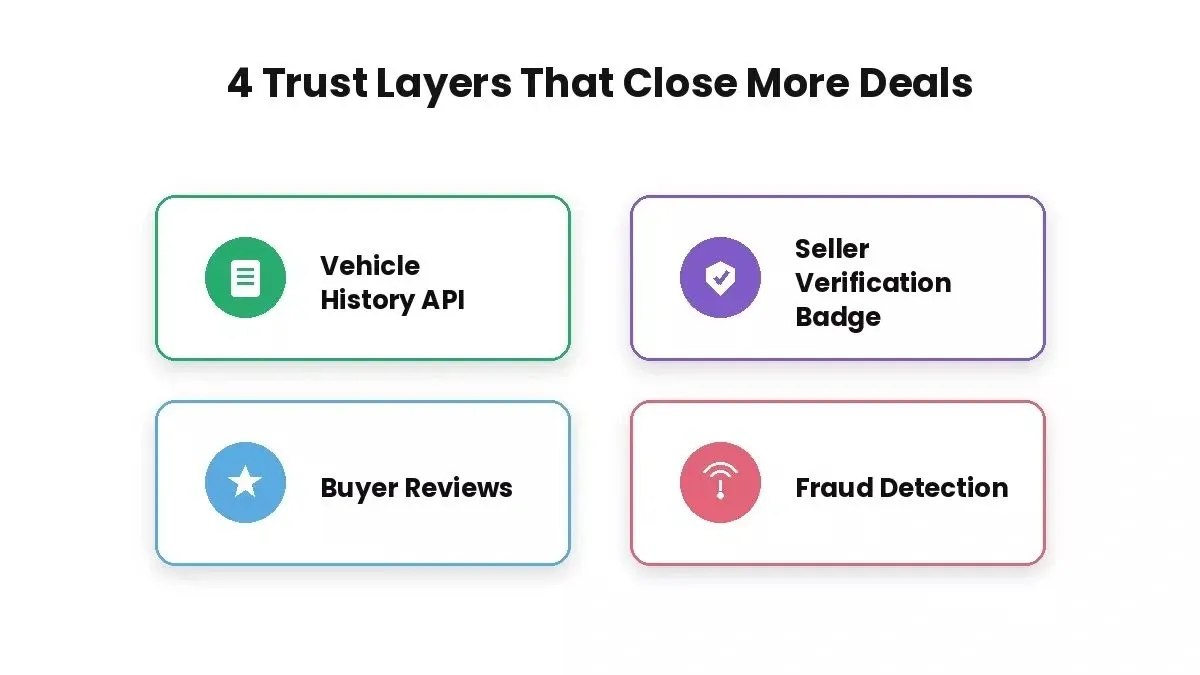
Four trust layers every car marketplace needs to close deals with confidence
Can Prompts Build Transaction and Financing Flows?
This is where money changes hands. Most dealerships handle transactions through back-and-forth messaging that drags on for days. These prompts turn that into a structured, trackable digital flow that keeps both parties moving toward a deal.
Prompt 13: Offer and Counter-Offer Negotiation
"Build a negotiation flow where buyers can submit an offer on a listing with a proposed price and an optional message to the seller. Sellers can accept, reject, or counter-offer. Track the full conversation history so both parties can review all previous offers. Send email and Twilio SMS notifications at each step of the negotiation. AI prompts can reduce generic follow-up messages in negotiation workflows."
What to check: Confirm the counter-offer flow works on both web and mobile. Test that conversations display in the correct chronological order.
Follow-up prompt: "Add an expiration timer so offers auto-expire after 48 hours if the seller does not respond, and generate a follow-up text message under 30 words for expired or unanswered offers."
Prompt 14: Financing Calculator with Trade In Value and Monthly Payment Estimator
"Create a financing calculator widget on each listing page. Inputs: vehicle price, down payment, trade-in value, interest rate, and loan term in months. Output: estimated monthly payment, total cost over the loan, and total interest paid. Include a slider UI for the down payment amount."
What to check: Verify the math against known auto loan calculators. Test edge cases like zero down payment, maximum loan terms, and very high trade-in amounts.
Follow-up prompt: "Add a pre-qualification form that captures buyer income and credit score range, then shows approximate rates from partner lenders."
Prompt 15: Stripe Connect Payout Flow for Private Sales
"Build a payment flow for private car sales using Stripe Connect. The buyer pays through Stripe Checkout; the funds are held in the platform account and released to the seller's connected Stripe account after the buyer confirms vehicle delivery and a 48-hour inspection window closes. Handle the hold and release logic in a Supabase Edge Function triggered by buyer confirmation. Include dispute handling that routes to admin."
Important: Stripe does not offer native escrow as a product. This prompt implements a delayed manual payout using Stripe Connect and Supabase Edge Functions, which is the standard pattern for peer-to-peer marketplace platforms. The seller must complete Stripe Connect onboarding before receiving payouts.
What to check: Confirm that the payout hold and release logic works correctly in the Supabase Edge Function. Test cancellations, timeouts, and disputes.
Follow-up prompt: "Add a purchase confirmation page with a PDF receipt and transaction ID for both parties."
Prompt 16: Purchase Agreement PDF Generator
"Generate a legally formatted purchase agreement PDF after a successful deal. Include: buyer name, seller name, vehicle details including VIN, make, model, year, and mileage, agreed price, payment method, and date. Store the PDF in a Supabase Storage bucket and send download links via email to both parties."
Important: E-signature functionality requires a third-party provider such as DocuSign or HelloSign. These are not pre-wired Rocket connectors. You will need to supply API credentials as environment variables, and Rocket generates the integration code once you have access.
What to check: Make sure the PDF renders correctly on both desktop and mobile. Verify that all deal data pulls accurately from the Supabase database.
Follow-up prompt: "Add e-signature fields using a third-party e-signature API so both parties can sign directly within the app."
After completing the transaction phase, your marketplace can handle the full lifecycle from browsing to buying. The financing calculator alone addresses a common question that most dealers hear daily from interested customers. For a deeper look at how car rental app development follows a similar build pattern, that post covers the booking and payment flow in detail.
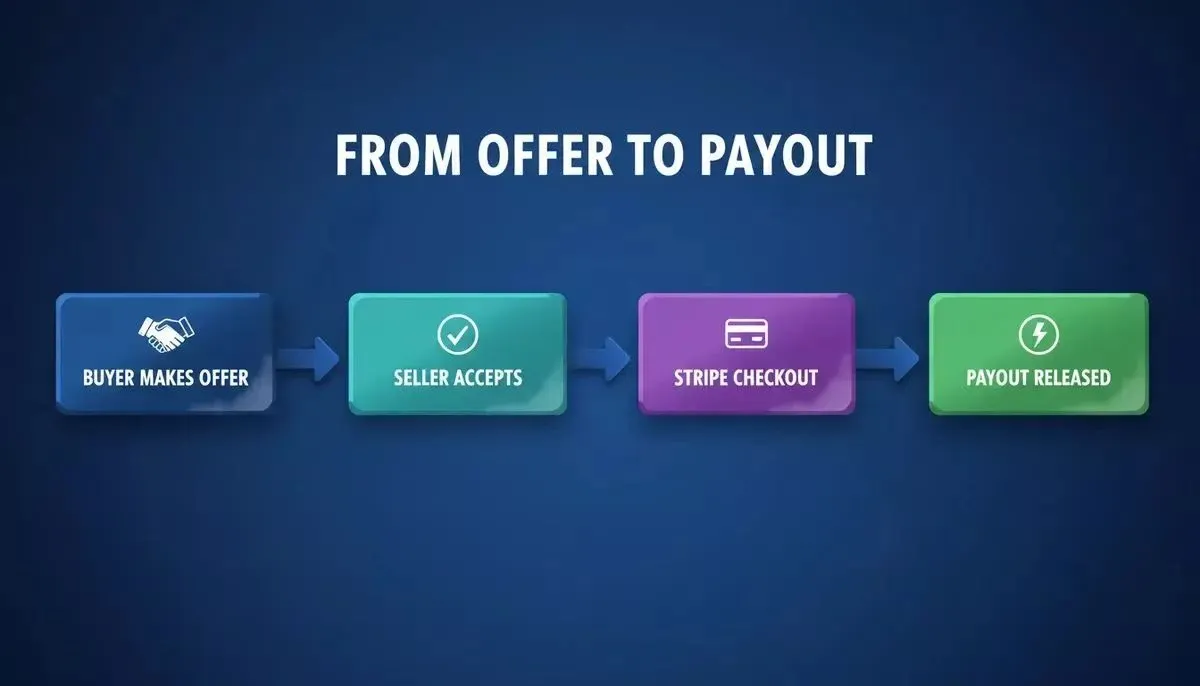
How a private car sale moves from offer to payout using Stripe Connect and Supabase Edge Functions
What About Reporting and Analytics Prompts?
Most dealers ask the same question once their marketplace app is live: "Is it working?" These last four prompts answer that question through data dashboards and mobile-ready deployment.
Prompt 17: Dealer Inventory Performance Dashboard
"Build a dealer dashboard that shows inventory performance metrics: total active listings, average days on market, views per listing, leads generated, and conversion rate from view to inquiry. Include a time filter for last 7 days, 30 days, and 90 days. Use charts for trend visualization. Pull all data from Supabase with queries scoped to the authenticated dealer's listings via Row Level Security. Add a custom staff-performance view so dealerships can track commission and bonuses with custom dashboards, and let AI track commission and bonus structures for dealership staff."
What to check: Verify data accuracy by comparing dashboard numbers to raw Supabase database queries. Test performance with dealers who have hundreds of listings.
Follow-up prompt: "Add an automated weekly report that emails a PDF summary to each dealer every Monday morning, and use AI prompts to identify high-intent shoppers who didn't convert by flagging website visitors who used payment calculators or trade-in tools, or viewed listings repeatedly, but never became leads."
Prompt 18: Marketplace GMV Report
"Create an admin-level report showing Gross Merchandise Value across the marketplace. Include total sales volume, average deal price, revenue from featured listings, Stripe Connect fees collected, and new user registrations. Break down data by week and month."
What to check: Confirm revenue numbers include all fee types. Test that the report loads quickly even with months of transaction data.
Follow-up prompt: "Add a year-over-year comparison view and an export to CSV button for long-term reporting."
Prompt 19: Price Trend Chart by Make and Model
"Build a price trend chart that tracks average listing prices over time, filterable by make and model. Display data as a line chart with monthly data points. Show national averages alongside the marketplace average so dealers and buyers can compare market value."
What to check: Verify the chart handles car brands with limited data gracefully. Test with at least four different makes to confirm the visualization stays readable.
Follow-up prompt: "Add a predicted price range based on historical trends and the vehicle condition."
Prompt 20: Empty States and Mobile-Responsive Flutter Deployment
"Audit every screen for empty states and create helpful placeholder messages with call-to-action buttons. For example, an empty inventory screen for a new car dealer should say 'Start by adding your first vehicle' with a button to the listing form. Then prepare the full Flutter app for deployment to iOS and Android with proper app icons, splash screen, and responsive layouts for phone and tablet."
What to check: Walk through the entire app as a brand new user with zero data. Every screen should guide the customer to their next action point.
Follow-up prompt: "Add an onboarding tutorial that walks first-time dealers through creating their first listing in under five prompts."
The 2024 Stack Overflow Developer Survey found that 76% of developers now use AI tools in their workflow, with 82% specifically using them to write code. Generating complex dashboard queries and chart components by hand takes hours, while a focused prompt produces a working version in minutes. If you want to see how building a mobile app with AI works end-to-end, that walkthrough covers the deployment steps in detail.
Quick Reference: All Prompts by Phase
| Phase | Number | Feature | Expected Output |
|---|---|---|---|
| Foundation | 1 | Multi-role auth | Login, OAuth, RLS policies, role routing |
| Foundation | 2 | Dealer profile | Profile page, inventory view, CSV import |
| Foundation | 3 | Saved search | Filter storage, email and Twilio SMS alerts |
| Foundation | 4 | Admin queue | Moderation dashboard, action buttons |
| Listing | 5 | Vehicle form | Create listing, photo upload, VIN validation |
| Listing | 6 | Advanced search | Filters, infinite scroll, card layout |
| Listing | 7 | Featured listings | Stripe Checkout, Edge Function webhook, badge |
| Listing | 8 | Comparison tool | Side-by-side table, share link |
| Trust | 9 | Vehicle history | Bring-your-own API, Supabase cache, trust badge |
| Trust | 10 | Seller verification | ID upload, admin review, badge, Twilio SMS |
| Trust | 11 | Buyer reviews | Star rating, written review, seller response |
| Trust | 12 | Fraud detection | Auto-flag, risk score, admin queue |
| Transaction | 13 | Negotiation | Offer, counter, history, Twilio SMS notifications |
| Transaction | 14 | Financing calc | Monthly payment, slider, total cost |
| Transaction | 15 | Stripe Connect payout | Hold and release via Edge Function, dispute handling |
| Transaction | 16 | Purchase PDF | Agreement document, Supabase Storage, e-sign ready |
| Reporting | 17 | Dealer dashboard | RLS-scoped metrics, charts, time filter |
| Reporting | 18 | GMV report | Volume, Stripe Connect fees, registrations |
| Reporting | 19 | Price trends | Line chart, make filter, averages |
| Reporting | 20 | Deploy and polish | Flutter build, empty states, onboarding |
Why Rocket Turns These AI Prompts Into Production Apps
Plenty of AI tools accept prompts and generate code snippets. But a marketplace app with multi-role auth, Stripe Connect payouts, messaging conversations, and dealer dashboards needs more than fragments. It needs a complete, deployable product that works from day one. Dealerships also need unified messaging across their website and other platforms to improve AI visibility.
-
Full-stack in one platform: Rocket generates Next.js for the web frontend and Flutter for mobile, both connected to a Supabase backend with Postgres schemas, RLS policies, and Supabase Edge Functions wired in by default.
-
Start small, ship fast: Paste any of these prompts directly into Rocket, review the generated output, refine with the follow-up prompt, and deploy. Most dealerships on the platform go from idea to working app in a single weekend.
-
Marketplace-ready named connectors: Stripe, Supabase, and Twilio are pre-wired named connectors. Describe them in your prompt and Rocket generates the integration code and environment variable setup automatically.
-
Mobile-native from day one: Since Rocket generates Flutter code, your car marketplace runs natively on iOS and Android without wrapper apps or compromised performance on any phone.
As Lori Wittman, President of Retail Solutions at Cox Automotive, noted in their 2025 study: "When dealers deliver intelligent, seamless experiences, it works: 84% of shoppers who lean into AI-powered online tools report high satisfaction." Some car shoppers now start on ai assistants, which raises the bar for structured, consistent marketplace content.
Competing approaches like hiring an agency or using a drag-and-drop builder either cost tens of thousands of dollars or limit you to basic templates that cannot handle negotiation flows, Stripe Connect payout logic, or dealer analytics.
Rocket fills that gap because it generates production-ready Next.js and Flutter code you own, from a single prompt session. Since 73% of dealer content is generic and ignored by AI, implementation also needs room for more differentiated listing and profile output.
Video content can also be a useful next extension for listings or dealer profiles, especially since it generates 1,200% more engagement than text. You can also explore how AI app builders save development costs for a detailed cost comparison.
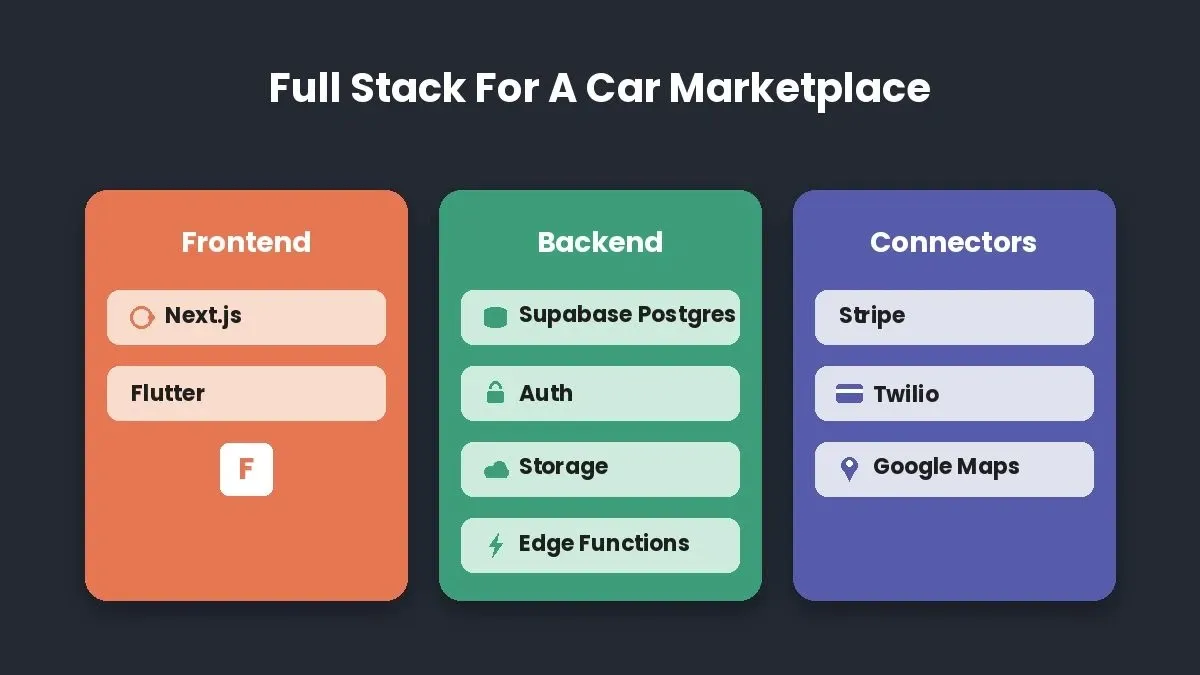
The full tech stack powering a production car marketplace built on Rocket
Your Next Car Marketplace Is a Few Prompts Away
The car marketplace space is growing fast, and the technology to build one has never been more accessible. These prompts give you a production-ready blueprint that covers everything from foundation authentication to dealer reporting dashboards, and each one is designed to generate working code on its first pass.
Pick the phase that matches where you are today and start building on Rocket. Whether you run a dealership looking to sell cars online or a founder launching a new marketplace platform, your app is closer than you think.
Ready to turn these AI prompts to build a car marketplace app into a live product? Sign up for Rocket.new and go from prompt to deployed app in a single sitting.
Table of contents
- -Why Structured Prompts Matter for Marketplace Development
- -Prerequisites Before You Start
- -Phase Overview: Five-Stage Build Pipeline
- -How Should You Set Up Foundation Features First?
- -Prompt 1: Multi-Role Authentication System
- -Prompt 2: Car Dealerships Profile with Inventory Management
- -Prompt 3: Buyer Saved Search and Alert Configuration
- -Prompt 4: Admin Moderation Queue
- -What Prompts Generate Listing and Discovery Features?
- -Prompt 5: Vehicle Listing Form with Photo Upload
- -Prompt 6: Advanced Search with Filters
- -Prompt 7: Featured Listing via Stripe
- -Prompt 8: Side-by-Side Comparison Tool
- -Which Prompts Handle Trust and Verification?
- -Prompt 9: Vehicle History Report via API Connector
- -Prompt 10: Seller Verification Badge System
- -Prompt 11: Buyer Review and Rating System
- -Prompt 12: Fraud Detection and Admin Review Queue
- -Can Prompts Build Transaction and Financing Flows?
- -Prompt 13: Offer and Counter-Offer Negotiation
- -Prompt 14: Financing Calculator with Trade In Value and Monthly Payment Estimator
- -Prompt 15: Stripe Connect Payout Flow for Private Sales
- -Prompt 16: Purchase Agreement PDF Generator
- -What About Reporting and Analytics Prompts?
- -Prompt 17: Dealer Inventory Performance Dashboard
- -Prompt 18: Marketplace GMV Report
- -Prompt 19: Price Trend Chart by Make and Model
- -Prompt 20: Empty States and Mobile-Responsive Flutter Deployment
- -Quick Reference: All Prompts by Phase
- -Why Rocket Turns These AI Prompts Into Production Apps
- -Your Next Car Marketplace Is a Few Prompts Away