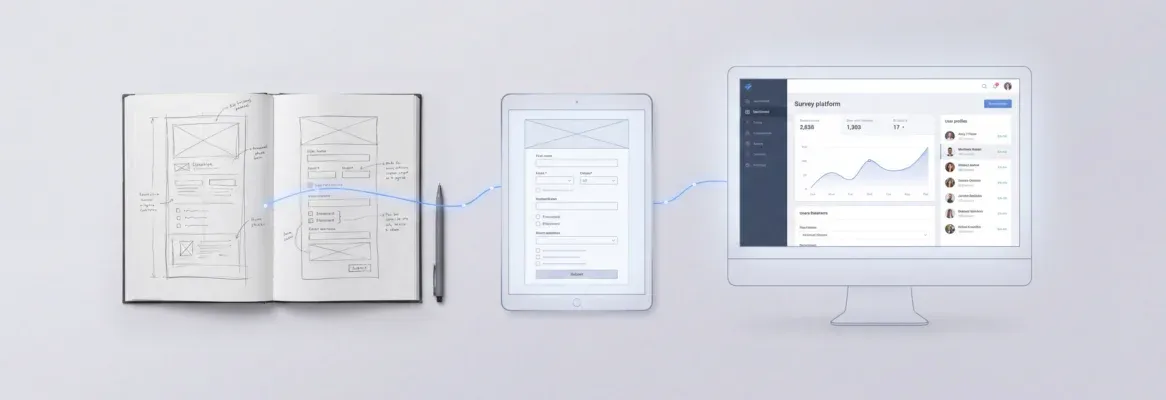
100 tested prompts to build apps, websites, and tools with AI builders. Covers web apps, mobile apps, SaaS, internal tools, and enterprise software. Copy, paste, and ship.
These are the 100 best AI prompts to build apps, websites, and tools, tested across web apps, mobile apps, SaaS platforms, internal tools, and enterprise software. Structured, context-rich prompts separate a broken prototype from a shipped product. Copy any prompt below, paste it into an AI app builder, and get a deployable first version.
What Makes a Good AI Prompt for App Generation?
The structure of your prompt determines the quality of generated code. A vague request produces generic output. A structured prompt with context, constraints, and clear intent produces production-ready applications.
Specificity is the single biggest lever you have. Per Rocket's official prompting documentation, the more context you give, the more targeted the output.
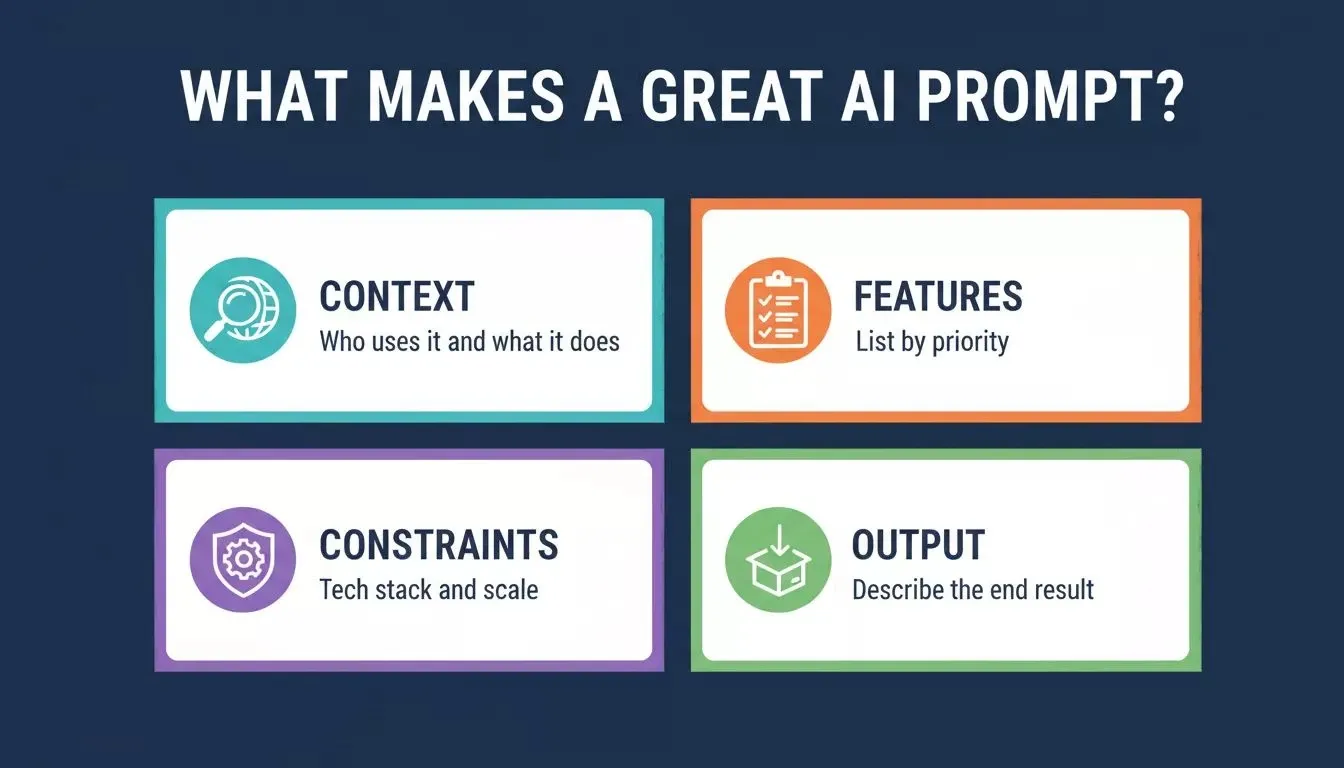
Four elements that separate a great AI prompt from a vague one: context, features, constraints, and a clear output description.
Here is what separates effective prompts from ones that waste time and credits:
| Element | Vague Prompt | Structured Prompt |
|---|---|---|
| Context | "Make me an app" | "Build a SaaS dashboard for a marketing team of 12 people" |
| Features | "Add login" | "Add email/password auth with OAuth Google sign-in and role-based permissions" |
| Constraints | None stated | "Next.js frontend, Supabase backend, deploy on Netlify" |
| Output | Unclear | "Full stack app with code export, responsive for desktop and mobile" |
| Technical limits | Missing | "Support 500 concurrent users with sub-200ms response time" |
Write prompts that describe outcomes, not steps. Tell the AI app builder what you want the finished product to do, who uses it, and what technical constraints matter.
Prompt anti-patterns to avoid
These are the most common mistakes that produce weak output, drawn from Rocket's tips documentation:
-
Starting too broad: "Build me an app" with no screens, users, or data model specified
-
Asking for everything at once: One prompt requesting auth, payments, dashboards, and admin panels simultaneously
-
Skipping structure: Adding features before defining pages, navigation flow, and data model
-
Ignoring follow-ups: Creating a new task every time instead of iterating in the same thread
The fix for all of them is the same: define structure first, then add features one at a time.
How Do Web App Prompts Differ From Website Prompts?
Web apps and websites serve different purposes, and your prompts should reflect that distinction. A website displays information. A web app handles user interactions, stores data, processes logic, and manages state across sessions.
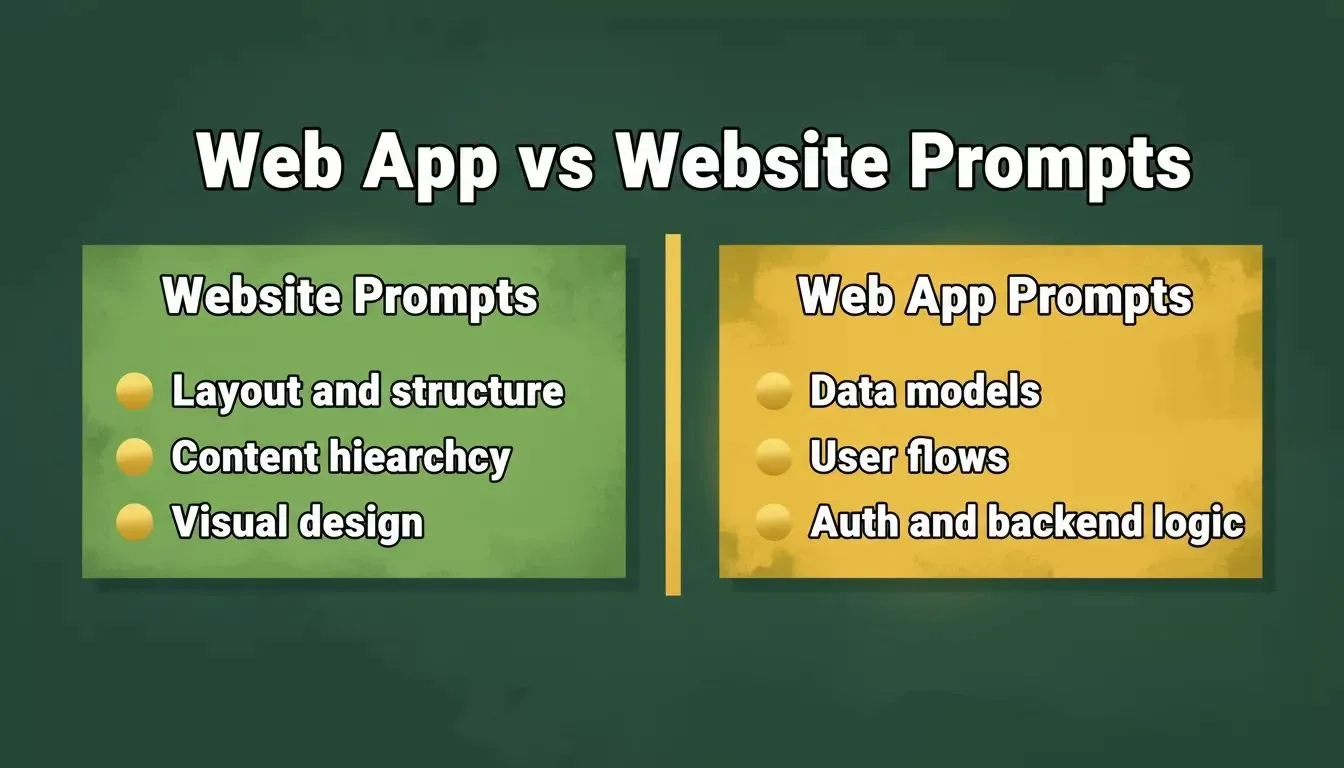
Website prompts focus on layout and content structure. Web app prompts must specify data models, user flows, and backend logic.
When writing prompts for web apps, you need to specify data models, user flows, authentication requirements, and backend logic. For websites, the focus shifts toward layout, content structure, and visual design. Here are 20 prompts for building full-stack web apps and AI prompts for building web apps that actually produce real web app output:
Web App Prompts (1–20):
-
"Build a project management web app with kanban boards, team member assignment, due dates, file attachments, and real-time notifications. Include user accounts with admin and member roles."
-
"Create a customer support ticketing system with priority levels, auto-assignment rules, SLA timers, and a customer-facing portal where users can track their open tickets."
-
"Generate a booking and scheduling web app for a dental clinic. Include patient profiles, appointment slots with 15-minute increments, SMS reminders via Twilio, and a waitlist system."
-
"Build an invoice generator web app. Users create clients, add line items, apply tax rates, send invoices via email, and track payment status with overdue alerts."
-
"Create a real-time collaborative document editor with version history, commenting, user presence indicators, and export to PDF. Support multiple workspaces."
-
"Build an AI-powered recipe web app. Users input available ingredients, and the app suggests recipes with nutritional breakdowns, shopping lists, and meal planning for the week."
-
"Generate a freelancer time-tracking web app with project-based timers, weekly reports, client billing integration via Stripe, and exportable CSV timesheets."
-
"Create a habit tracker web app with daily check-ins, streak counting, data visualization charts, goal setting, and weekly email summary reports."
-
"Build an event management web app where organizers create events, sell tickets with Stripe payments, manage attendee lists, and send bulk email updates."
-
"Generate a job board web app with employer and candidate dashboards, resume uploads, application tracking, saved searches, and email notifications for new matches."
-
"Build a social media analytics dashboard that connects to Instagram APIs, displays engagement metrics, and generates weekly performance reports."
-
"Create a personal finance tracker web app with bank account linking simulation, expense categorization, monthly budgets, and spending trend charts."
-
"Generate an online course platform with video hosting, progress tracking, quizzes after each module, completion certificates, and student-instructor messaging."
-
"Build a restaurant ordering web app with menu management, table reservations, order queue for kitchen staff, and customer loyalty points."
-
"Create a real estate listing web app with property search filters, map view, saved favorites, mortgage calculator, and agent contact forms."
-
"Generate a feedback collection web app where product teams create surveys, share public links, collect responses, and view sentiment analysis dashboards."
-
"Build a URL shortener web app with click analytics, geographic tracking, custom branded domains, and API access for bulk shortening."
-
"Create a team retrospective web app with anonymous card submission, voting, action item tracking across sprints, and archived session history."
-
"Generate a multi-vendor marketplace web app with seller storefronts, product listings, order management, review system, and commission tracking."
-
"Build a weather-based activity recommendation web app that uses location data to suggest outdoor activities, indoor alternatives, and gear checklists."
These prompts work because they specify the data model, user roles, and core interactions upfront. The AI app builder can generate the full stack, including database schemas, API endpoints, and responsive frontend components, from a single well-crafted request.
Which Prompts Work for Internal Tools and Dashboards?
Internal tools are where AI app builders deliver the fastest ROI. Non-technical users in operations, HR, finance, and sales teams build apps they actually need without waiting months for engineering bandwidth.
The key difference with internal tools: you already know your data sources, user count, and workflows. Your prompts should reference existing data structures directly. Explore how vibe coding is changing software workflows for more context on how teams are adopting this approach.
Internal Tools and Dashboard Prompts (21–40):
-
"Build an employee onboarding checklist app. HR creates task templates, assigns them to new hires, tracks completion, and generates readiness reports. Support user accounts for managers and new employees."
-
"Create an inventory management dashboard connected to Airtable. Display stock levels, reorder alerts, supplier contact info, and monthly usage trends."
-
"Generate a sales pipeline tracker with deal stages, probability scoring, team leaderboards, and automated follow-up reminders. Include a visual editor for customizing pipeline stages."
-
"Build an internal knowledge base with search, article tagging, version history, and role-based access control. Non-technical users should be able to add content without training."
-
"Create a meeting room booking app with calendar view, recurring reservations, equipment checklists, and conflict detection across all office locations."
-
"Generate an expense approval workflow app. Employees submit receipts with photos, managers approve or reject with comments, and finance exports to accounting software."
-
"Build a customer health score dashboard pulling data from HubSpot CRM records. Display usage metrics, support ticket count, contract renewal dates, and churn risk indicators."
-
"Create an IT asset tracking app with device assignment, maintenance schedules, warranty expiration alerts, and QR code scanning for quick lookups."
-
"Generate a shift scheduling app for retail teams. Managers set availability constraints, auto-generate weekly schedules, and allow shift swap requests with approval flow."
-
"Build a vendor management portal with contract tracking, performance ratings, payment history, and renewal reminders for procurement teams."
-
"Create an internal tool where QA teams submit issues with screenshots, assign severity levels, and track resolution status across sprints."
-
"Generate a content calendar app for marketing teams. Plan posts across channels, assign writers, track approval status, and view published history."
-
"Build an employee directory app with org chart visualization, department filters, skills search, and direct messaging via integrated chat."
-
"Create an OKR tracking dashboard where teams set quarterly objectives, update key results weekly, and visualize progress against company goals."
-
"Generate a client portal where agencies share project updates, deliverables, and invoices. Clients can leave feedback and approve milestones."
-
"Build a compliance checklist app for financial services. Track regulatory requirements, assign owners, set deadlines, and generate audit-ready reports."
-
"Create a facilities maintenance request app. Employees submit issues with location tags, maintenance staff gets assigned tasks, and managers see resolution metrics."
-
"Generate a training completion tracker. HR uploads course requirements by role, employees mark progress, and managers see team-level compliance rates."
-
"Build a product feedback collection tool where support agents tag and categorize customer requests, and product teams vote on priority."
-
"Create a company announcements board with rich text posts, read receipts, department targeting, and pinned urgent updates."
These internal tools work well because non-technical users can describe their exact workflow in plain language. The AI app builder handles the visual editor, database connections, and user management behind the scenes. If you want to go deeper, see how to build internal tools with AI without a developer.
Can You Build Mobile Apps With Natural Language Prompts?
Yes. Natural language prompts now produce cross-platform mobile applications with native-feeling interactions. 84% of developers now use or plan to use AI in their development workflows as of 2026.
The challenge with mobile prompts: you need to specify navigation patterns, platform-specific behaviors, offline capabilities, and responsive breakpoints. Rocket generates Flutter apps for iOS and Android, so specifying navigation type (bottom tabs, drawer, stack) and screen flow upfront produces the cleanest output.
Mobile App Prompts (41–60):
-
"Build a fitness tracking Flutter mobile app with workout logging, exercise library with video demos, progress charts, personal records, and social sharing of achievements. Use bottom tab navigation."
-
"Create a meal prep mobile app with grocery list generation, nutritional tracking, recipe scaling for servings, and a weekly meal plan calendar with drag-and-drop reordering."
-
"Generate a pet care mobile app. Owners track feeding schedules, vet appointments, medication reminders, vaccination records, and share care access with pet sitters."
-
"Build a language learning mobile app with spaced repetition flashcards, pronunciation recording, daily streak tracking, and progress quizzes by difficulty level."
-
"Create a local services marketplace mobile app. Service providers list offerings, customers book appointments, rate experiences, and message providers directly."
-
"Generate a carpooling mobile app with route matching, ride scheduling, cost splitting, driver ratings, and real-time location sharing during trips."
-
"Build a plant care mobile app with species identification from photos, watering schedules, sunlight requirement tracking, and a community forum for gardening questions."
-
"Create a personal journal mobile app with daily prompts, mood tracking, photo attachments, searchable entries, and encrypted local storage for privacy."
-
"Generate a study group mobile app. Students create groups, schedule sessions, share notes, quiz each other with flashcards, and track collective study hours."
-
"Build a neighborhood safety mobile app with incident reporting, community alerts, location-based notifications, and anonymous tip submission."
-
"Create a mobile budgeting app with envelope-style budgets, transaction categorization from bank feeds, bill reminders, and savings goal progress bars."
-
"Generate a home maintenance mobile app. Users log appliance purchase dates, set maintenance reminders, store warranty documents, and find local repair services."
-
"Build a volunteer coordination mobile app with event postings, sign-up slots, hour logging, impact reports, and organization messaging."
-
"Create a micro-learning mobile app where users get 5-minute lessons on topics they choose, complete daily challenges, and earn skill badges."
-
"Generate a travel itinerary mobile app. Users add destinations, the app suggests activities by location, creates day-by-day schedules, and works offline."
-
"Build a medication reminder mobile app with dosage tracking, refill alerts, drug interaction warnings, and shareable medication lists for doctor visits."
-
"Create a book club mobile app with reading lists, discussion threads per chapter, meeting scheduling, and member progress tracking."
-
"Generate a mobile app for freelance photographers. Portfolio showcase, client booking, contract signing, proof delivery, and payment collection via Stripe."
-
"Build a grocery price comparison mobile app. Users scan barcodes, see prices across local stores, create shopping lists, and track spending over time."
-
"Create a mobile app for dog walkers. Manage client profiles, schedule walks, track routes with GPS, send photo updates, and invoice weekly."
Mobile app generation works best when you describe the screens, data flow, and user journey in sequence. Technical users can add framework preferences. Non-technical users get equally strong results by describing the experience they want to deliver.
Prompts for SaaS Products and Full Stack Applications
SaaS prompts require you to think about multi-tenancy, subscription billing, onboarding flows, and long-term maintainability. The generated code needs to handle real users at scale, not just demo scenarios.
These prompts produce complete applications with authentication, databases, and deployment pipelines. You can connect to 26+ external services from any generated app, including Stripe, Supabase, HubSpot, Twilio, Jira, Linear, and more, to add payment processing, email delivery, or third-party APIs.
SaaS and Full Stack Prompts (61–80):
-
"Build a multi-tenant SaaS for appointment scheduling. Each business gets their own branded booking page, calendar sync, automated reminders, and a client management dashboard. Include Stripe subscription billing with free, pro, and enterprise tiers."
-
"Create a SaaS analytics platform. Users install a tracking script, view visitor metrics, track custom events, and generate shareable reports. Full code ownership with code export."
-
"Generate a white-label client reporting SaaS. Agencies connect data sources, build report templates, schedule automated sends, and manage client access. Include complete code ownership."
-
"Build a SaaS tool for managing podcast production. Episode planning, guest scheduling, show notes editing, distribution tracking, and listener analytics."
-
"Create an AI-powered resume screening SaaS. HR teams upload job descriptions, candidates submit resumes, the system ranks matches, and generates interview questions."
-
"Generate a subscription box management SaaS. Handle product curation, subscriber management, shipping label generation, and payment processing with recurring billing via Stripe."
-
"Build a SaaS for online communities. Forum threads, member profiles, reputation systems, content moderation tools, and monetization with paid memberships."
-
"Create a full-stack invoice factoring platform. Businesses upload unpaid invoices, investors browse opportunities, and the system manages payments, fees, and compliance."
-
"Generate a SaaS helpdesk with AI-powered ticket routing. Auto-categorize incoming requests, suggest responses from knowledge base, track resolution time, and report on team performance."
-
"Build a SaaS for managing rental properties. Tenant portals, lease tracking, maintenance requests, rent collection, and financial reporting for landlords."
-
"Create a full-stack code export-ready e-learning platform. Instructors create courses with video, quizzes, and assignments. Students track progress. The platform takes a commission on sales."
-
"Generate a SaaS for influencer campaign management. Brand dashboards, influencer discovery, campaign briefs, content approval workflows, and ROI tracking."
-
"Build a subscription-based design asset marketplace. Creators upload templates, buyers browse with filters, download with license tracking, and creators get monthly payouts."
-
"Create a full-stack project estimation tool for agencies. Input scope details, generate time and cost estimates using historical data, and produce client-facing proposals."
-
"Generate a SaaS for restaurant menu management and ordering. QR code menus, online ordering, kitchen display systems, and analytics on popular items."
-
"Build a multi-tenant CRM with custom fields, pipeline views, email sequences, activity logging, and connection with calendar apps."
-
"Create a full-stack voting and polling platform. Organizations create elections, distribute access codes, collect votes securely, and display real-time results."
-
"Generate a SaaS for construction project management. Gantt charts, subcontractor coordination, document management, daily logs, and budget tracking."
-
"Build a contract lifecycle management SaaS. Draft templates, collaborative editing, e-signatures, obligation tracking, and renewal automation with alerts."
-
"Create a full-stack app generation platform demo. Users describe an app in plain language, see a live preview, customize with a visual editor, and export full code."
SaaS prompts succeed when you specify the billing model, user roles, and data boundaries between tenants upfront. The AI-generated output includes authentication, authorization, and database isolation by default when you frame the prompt correctly. For a deeper look at the full-stack approach, see how to build a B2B SaaS product with AI.
Why Rocket Delivers Production Apps From a Single Prompt
Rocket is not just an AI app builder. It is a three-pillar vibe solutioning platform: Solve turns complex business questions into structured, evidence-backed research reports; Build generates production-ready web and mobile apps from natural language prompts; and Intelligence watches companies you care about across nine signal types and delivers structured intel framed to your role.
This matters for prompting because the best AI prompts to build apps, websites, and tools do not start from a blank prompt. They start with research. The Solve, Build, and Intelligence loop means you validate the market before you write a single line of code, then monitor competitors after you ship.
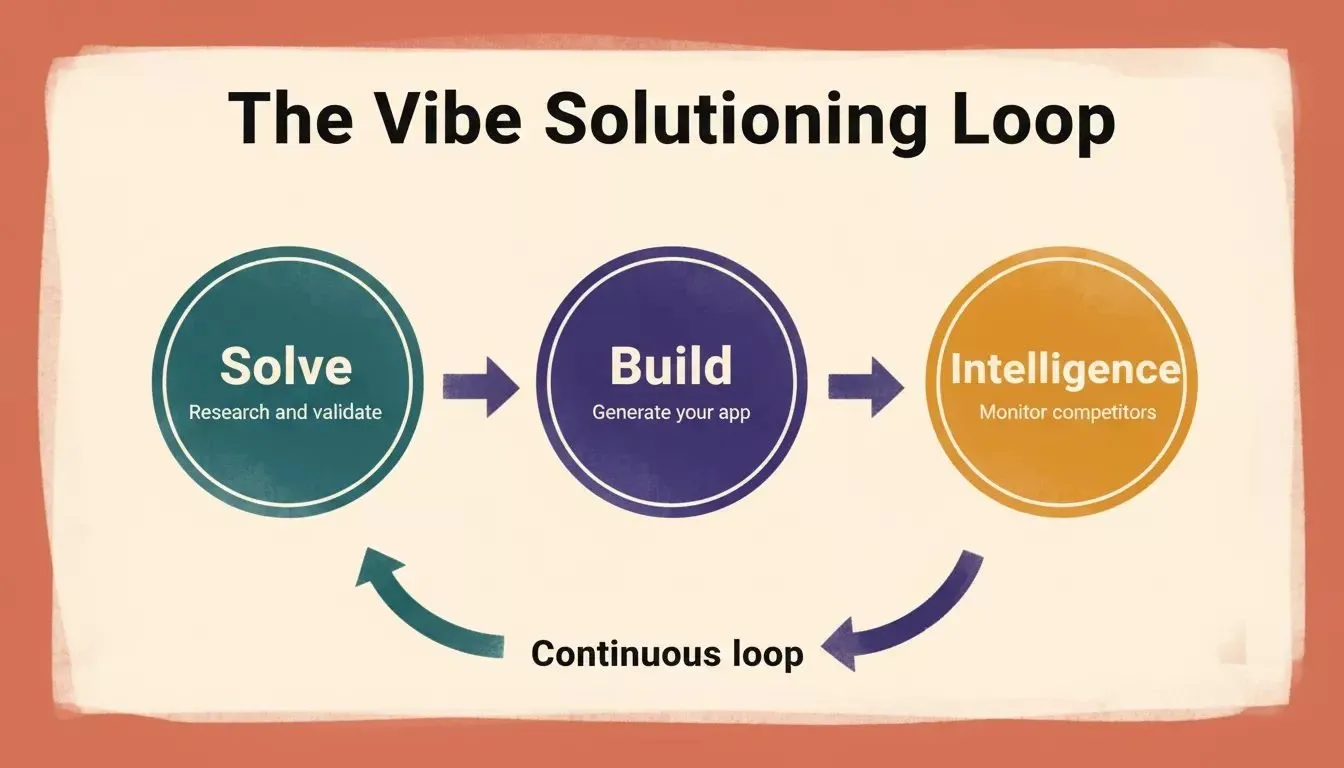
Rocket's three-pillar loop: Solve validates the idea, Build generates the app, and Intelligence monitors the market continuously.
Where other platforms limit you to frontend code with no clear path to production, Rocket generates full stack applications with built-in database support via Supabase, real authentication, and one-click deployment. Here is what sets it apart:
-
Full code ownership and full code export: every line of generated code belongs to you. Download it, host it anywhere, modify it freely. No vendor lock-in.
-
GitHub two-way sync: your code stays in your repository. Track changes, collaborate with developers, and maintain complete code ownership across teams. Two-way Git Sync shipped in March 2026.
-
Credit-based plans, unlimited team members: all paid plans include unlimited team members. The Pro plan is $25/month (100 credits/month); the Rocket plan is $50/month (250 credits/month) and adds Solve and Intelligence.
-
Built-in database with Supabase: real persistent storage, not a demo-only state. Your data lives in production-grade PostgreSQL with row-level security, edge functions, and file storage.
-
26+ named connectors: Stripe, Supabase, Twilio, HubSpot, Jira, Linear, Figma, Airtable, Notion, Mixpanel, Resend, SendGrid, Mailchimp, Calendly, Typeform, and more, all wired up from chat.
-
Next.js for web, Flutter for mobile: Rocket generates Next.js TypeScript for web apps and Flutter for iOS and Android mobile apps. React was deprecated in March 2026 in favor of Next.js as the default web framework.
The table below shows current Rocket pricing as of July 2026, per Rocket.new docs:
| Plan | Price | Credits per Month | Key Capabilities |
|---|---|---|---|
| Free | $0 | 20 (one-time) | Build web apps, mobile apps, landing pages |
| Pro | $25/mo | 100 | Build (all types) + add credits on demand |
| Rocket | $50/mo | 250 | Build + Solve (research) + Intelligence (competitor monitoring) |
| Booster | $250/mo | 1,500 | All above + SSO, data localisation, premium support |
Annual billing saves 20% across all paid plans. All plans include unlimited team members.
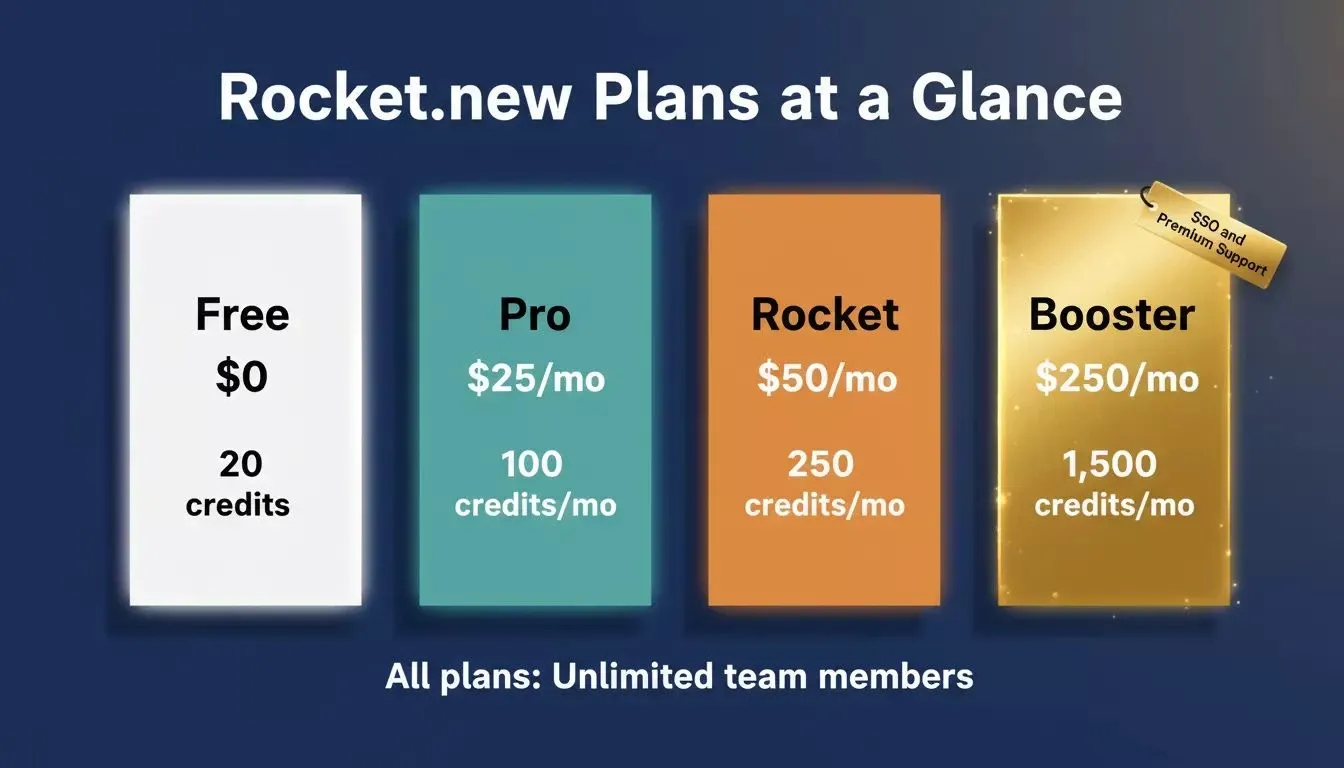
Rocket.new's four plans: Free for prototyping, Pro for solo builders, Rocket for teams needing research and intelligence, Booster for power users.
Try pasting any prompt from this article into Rocket.new and watch it generate a deployable application in under two minutes.
Enterprise Prompts With Governance and Security Built In
Enterprise app building adds layers of compliance, access control, and audit requirements. These prompts address the security and governance patterns that technical users and product teams demand at scale.
Before deploying any AI-generated app to production, review Rocket's security checklist documentation; it covers API key management, authentication patterns, row-level security in Supabase, and privacy controls. Understanding how AI app builders save development costs is also worth reading before scoping enterprise projects.
"Add 'Ask me clarifying questions first' to complex requests. Specify the audience. Break prompts into role, context, and constraints. That alone changed my AI output quality more than any framework." — r/PromptEngineering community thread, 2026
Enterprise and Governance Prompts (81–90):
-
"Build an employee access request system with multi-level approval chains, audit logs for every decision, role-based permissions, and automatic access expiration after 90 days."
-
"Create a compliance documentation portal with version-controlled policies, mandatory read acknowledgment, quiz verification, and reporting dashboards for compliance officers."
-
"Generate a change management tool. Submit change requests with impact assessments, route through CAB approval, track implementation, and log rollback procedures."
-
"Build a data classification tool where teams tag documents by sensitivity level, control sharing permissions, and generate reports on data exposure across departments."
-
"Create an incident response platform with severity-based escalation, communication templates, timeline tracking, post-mortem generation, and editable code runbooks."
-
"Generate a vendor risk assessment portal. Rate third-party vendors on security criteria, track questionnaire responses, and flag vendors needing review."
-
"Build a development environment provisioning tool. Developers request environments with specific configurations, approvals route to DevOps, and spin-up happens automatically."
-
"Create a code review workflow app. Pull requests get assigned reviewers based on file ownership, reviewers leave structured feedback, and metrics track review velocity."
-
"Generate a data retention management app. Define retention policies by data category, automate deletion schedules, and maintain audit logs of every purge action."
-
"Build an enterprise security training platform with role-specific content, phishing simulation scheduling, completion tracking, and executive risk score dashboards."
Enterprise prompts need to specify error handling, audit trail requirements, and user account management upfront. The generated app then includes those patterns throughout rather than bolting them on later.
Prompts for Rapid Prototyping and Idea Validation
The fastest path from idea to validation is a working prototype in front of real users. These prompts are designed to produce functional apps fast enough to test a concept before committing to full development.
According to JetBrains research, 90% of developers regularly use AI tools at work as of early 2026. That adoption rate is driven largely by how fast prototyping has become. Use these when you need to validate ideas quickly, test market assumptions, or demonstrate a concept to investors.
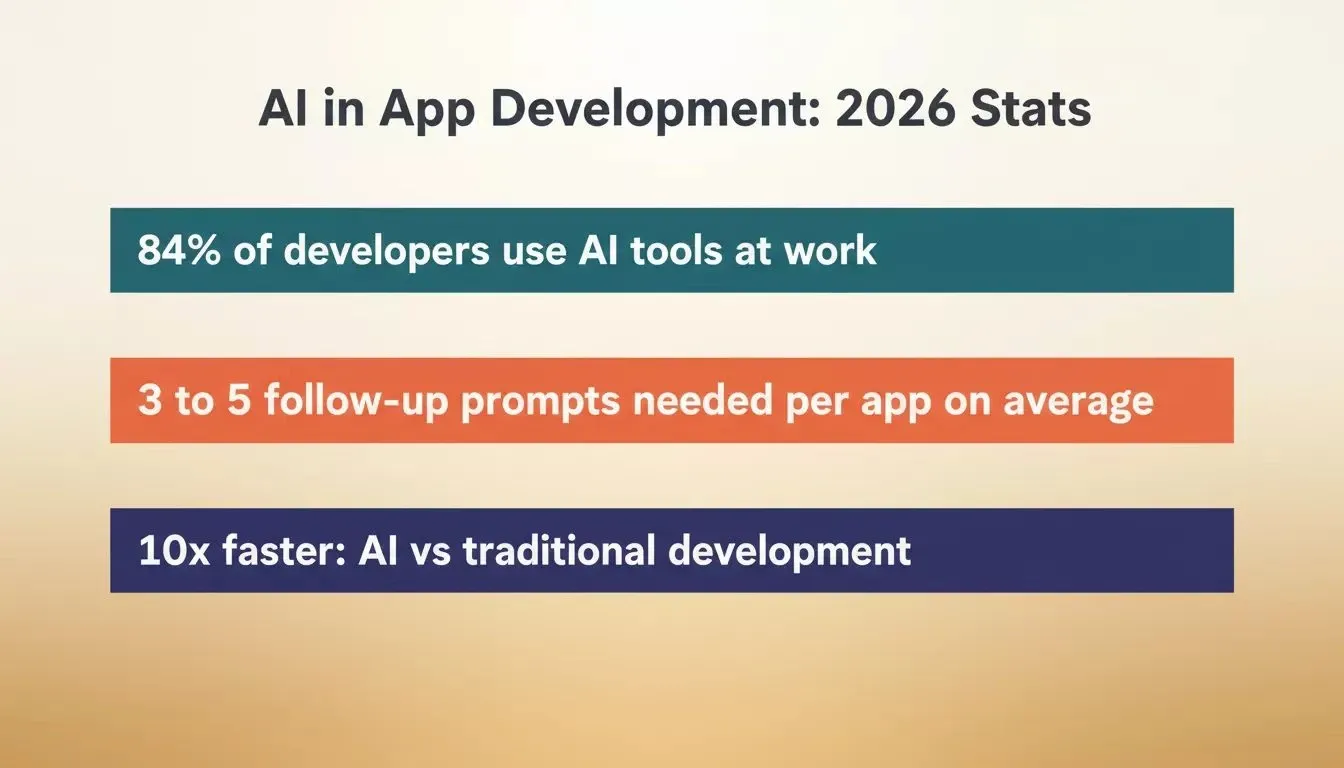
AI tool adoption among developers has reached a tipping point. Structured prompts are now the primary input in modern app development.
Prototyping and Validation Prompts (91–100):
-
"Build a landing page with email waitlist signup, feature preview sections, testimonial carousel, and a countdown timer. Include conversion tracking via Google Analytics."
-
"Create a quick MVP for a peer-to-peer tutoring marketplace. Student posts request, tutor accepts, video call link generates, and rating happens after session."
-
"Generate a one-page product demo with an interactive walkthrough. Users click through screens simulating the full product experience. Collect feedback at the end."
-
"Build a first prompt prototype for a subscription snack box. Users take a taste quiz, see personalized box previews, and enter payment details for a trial."
-
"Create a simple two-sided marketplace prototype. Sellers list items, buyers browse and purchase, and both parties leave reviews. Focus on the first version of the core loop."
-
"Generate a rapid prototyping demo for a fitness coaching app. Clients fill out goals; AI suggests weekly plans; coaches adjust and approve. Ship in under an hour."
-
"Build a smoke test page for a B2B procurement tool. Company pain points, feature promises, pricing tiers, and a 'Request Demo' form that logs to a spreadsheet."
-
"Create an initial prompt prototype for a community events platform. Users post local events, others RSVP, organizers get headcounts, and everyone gets reminders."
-
"Generate a clickable prototype for a healthcare appointment booking system. Patients search by specialty, see available slots, book and get confirmation, and receive pre-visit forms."
-
"Build a code-free prototype for a food delivery comparison app. Users enter their address, see menus from multiple services side by side, and get the best price highlighted."
Rapid prototyping prompts should describe the minimum viable experience. Skip the edge cases on the first prompt. Once you have something working in front of users, add complexity through follow-up prompts and iteration.
Your Next App Starts With the Right Words
The pattern across all 100 prompts is the same: specificity wins. The more context, constraints, and user details you provide, the closer the generated app matches your vision. Natural language app building is not about writing code anymore. It is about describing outcomes clearly.
Whether you are a solo founder validating an idea or an enterprise team building internal tools at scale, the right prompt turns days of development into minutes of generation.
Note:* Pick any prompt from this list, paste it into Rocket, and see a working application generated in real time. No credit card needed. No setup required.*
Ready to turn your idea into a production-ready app? Rocket is the only vibe solutioning platform that combines natural language prompts with full code ownership, GitHub two-way sync, and 26+ connectors, all on a credit-based system starting for free.
Start building for free on Rocket and see your first app live in minutes.
Table of contents
- -What Makes a Good AI Prompt for App Generation?
- -Prompt anti-patterns to avoid
- -How Do Web App Prompts Differ From Website Prompts?
- -Web App Prompts (1–20):
- -Which Prompts Work for Internal Tools and Dashboards?
- -Internal Tools and Dashboard Prompts (21–40):
- -Can You Build Mobile Apps With Natural Language Prompts?
- -Mobile App Prompts (41–60):
- -Prompts for SaaS Products and Full Stack Applications
- -SaaS and Full Stack Prompts (61–80):
- -Why Rocket Delivers Production Apps From a Single Prompt
- -Enterprise Prompts With Governance and Security Built In
- -Enterprise and Governance Prompts (81–90):
- -Prompts for Rapid Prototyping and Idea Validation
- -Prototyping and Validation Prompts (91–100):
- -Your Next App Starts With the Right Words