
Cline alternatives are multiplying fast. This blog compares ten options across pricing, agent capability, IDE support, and deployment so you pick the right tool for your workflow, not just the most popular one.
Why are developers with over 5 million Cline installs still searching for something different?
In 2026, 85% of developers use AI assistants regularly. The tool you choose shapes everything from daily velocity to monthly costs.
Cline is a solid open-source AI coding agent. It runs as a VS Code sidebar and supports any LLM through bring-your-own-key. But it has real trade-offs: no tab completions, unpredictable API bills, and a single-extension architecture that limits what it can do. The real question is which tools cover those gaps and which ones go further.
Why Do Developers Look for Options Other Than Cline?
Cline earned its reputation for good reasons. It is Apache 2.0-licensed, supports Plan/Act modes, and works with Claude, GPT, Gemini, and local models through Ollama.
-
Unpredictable API costs are the most common complaint. BYOK means you pay per token. A heavy Claude Sonnet session can run $5 to $20 per task. Monthly bills of $50 to $200 are common for power users.
-
Cline offers no inline tab completions. It is an agentic tool, not an autocomplete engine. Developers who rely on fast sub-second suggestions need a separate tool alongside it.
-
The single VS Code extension architecture limits deeper IDE connectivity. Some teams want standalone terminal agents or full IDE replacements with tighter context handling.
-
No deployment, no design, and no project memory. Cline generates code but does not research what to build, manage infrastructure, or ship a production app.
For teams curious about how Rocket handles the gap where Cline stops, the missing pieces are exactly where a full-stack platform adds real value.
How Do These AI Coding Tools Compare at a Glance?
Before going deeper on each option, here is a side-by-side snapshot of the field.
| Tool | Type | Agent Mode | Tab Completions | Open Source |
|---|---|---|---|---|
| Cline | VS Code Extension | Yes | No | Yes |
| Claude Code | Terminal CLI | Yes | No | No |
| Cursor | IDE (VS Code Fork) | Yes | Yes | No |
| GitHub Copilot | Multi-IDE Plugin | Yes | Yes | No |
| Windsurf (Devin Desktop) | IDE (VS Code Fork) | Yes | Yes | No |
| Roo Code | VS Code Extension | Yes | No | Yes |
| Kilo Code | VS Code Extension | Yes | Yes | Yes |
| Continue.dev | VS Code / JetBrains | Configurable | Yes | Yes |
| Aider | Terminal CLI | Yes | No | Yes |
| Goose | CLI + Desktop App | Yes | No | Yes |
Cursor and Kilo Code are the only options that combine agentic workflows with inline completions. GitHub Copilot sits in the middle with broad IDE support and predictable pricing at $10/month.
What Does Each Tool Actually Cost?
Pricing pages tell one story. Real monthly bills tell another. Here is what developers typically spend based on usage patterns.
| Tool | Light User (1-2 hrs/day) | Power User (4-6 hrs/day) | Team of 5 |
|---|---|---|---|
| Cline (BYOK, Claude Sonnet) | $10-30 | $80-200 | $400-1,000 |
| Claude Code | $20 flat | $20-60 | $100-300 |
| Cursor | $20 flat | $20 flat | $100 |
| GitHub Copilot | $0-10 | $10 | $50 |
| Kilo Code (BYOK) | $5-20 | $60-150 | $300-750 |
| Roo Code (BYOK) | $5-20 | $60-150 | $300-750 |
| Continue.dev (local Ollama) | $0 | $0 | $0 |
| Aider (BYOK) | $5-15 | $40-100 | $200-500 |
Once monthly BYOK token spend crosses $100, a flat-rate subscription typically delivers more predictable value. A single complex multi-file refactor with Claude Sonnet can cost $5 to $15 on its own.
Which Terminal-Based Agents Rival Cline?
Terminal-first tools operate differently from IDE extensions. You run them alongside any editor, describe a goal in natural language, and the agent handles file edits, testing, and commits autonomously.
Claude Code is the standout in this category. Built by Anthropic, it scores 80.8% on SWE-bench Verified with Opus 4.6. It also offers a 1M token context window in beta. Agent Teams coordinate sub-agents for complex multi-step tasks. The trade-off is that it only works with Claude models and starts at $20/month.
Aider is an open-source terminal tool that treats Git as a first-class citizen. Every AI-generated change becomes an automatic commit with a meaningful message. It supports Claude, GPT, DeepSeek, and local models. It also auto-lints and auto-tests after every change.
OpenAI Codex takes a sandbox-first approach. Each task runs in an isolated cloud container with network access disabled. The Rust-based CLI plus desktop app let you manage multiple agents in parallel. A ChatGPT subscription ($20/month or more) is required. The isolation guarantees are valuable for security-conscious teams.
Terminal agents trade IDE convenience for deeper reasoning and autonomy. Pairing one of these with an IDE-based tool is a pattern many developers follow.
What are the Strongest IDE-Based Options?
IDE-native tools keep you inside your familiar editor while layering AI on top. They tend to be faster for daily coding tasks, though less autonomous than terminal agents.
Developers already familiar with top AI tools for coding workflows often pair Cursor for daily work with Claude Code for deep architectural sessions.
Cursor has become the default for developers who want tab completions and agentic workflows in one place. It is a VS Code fork, so extensions and keybindings carry over. Parallel sub-agents (up to 8), background agents in cloud VMs, and multi-model support make it a complete IDE package at $20/month.
Windsurf (now Devin Desktop after Cognition's $250M acquisition) keeps persistent codebase context across sessions through Cascade. SWE-grep retrieves context at 2,800 tokens per second. At $15/month, it is the most affordable full AI IDE. The ownership transition has caused some user churn.
Roo Code forked from Cline and added custom modes: Architect (read-only planning), Coder (code writing), and Debugger (diagnostics). SOC 2 compliance and Roo Cloud ($5/hour hosted agents) position it as the enterprise-ready Cline fork.
Kilo Code forked both Cline and Roo Code, raised $8M in seed funding, and claims 1.5M users. Its Orchestrator mode breaks tasks into subtasks and routes each to the right specialist mode automatically. It is the only Cline-family tool with inline autocomplete.
Are There Open-Source Picks Worth Trying?
Cost control matters, especially for solo developers and small teams. Several strong options cost nothing above your own model usage.
Continue.dev is a fully open-source assistant for VS Code and JetBrains. It supports any model (local or API) including Ollama for completely offline use. AI Checks run as GitHub status checks on every pull request. This catches quality issues directly in your CI/CD pipeline.
Goose by Block (the company behind Square and Cash App) runs as a CLI or desktop app under Apache 2.0. It works with 25+ model providers and has over 26,000 GitHub stars. It also joined the Linux Foundation's Agentic AI Foundation for governance.
How Rocket Fits When You Want to Ship, Not Just Code
Every tool listed above does one thing well: it helps you write code faster. But writing code is only one part of shipping a product. What happens before the first line? What happens after the last commit?
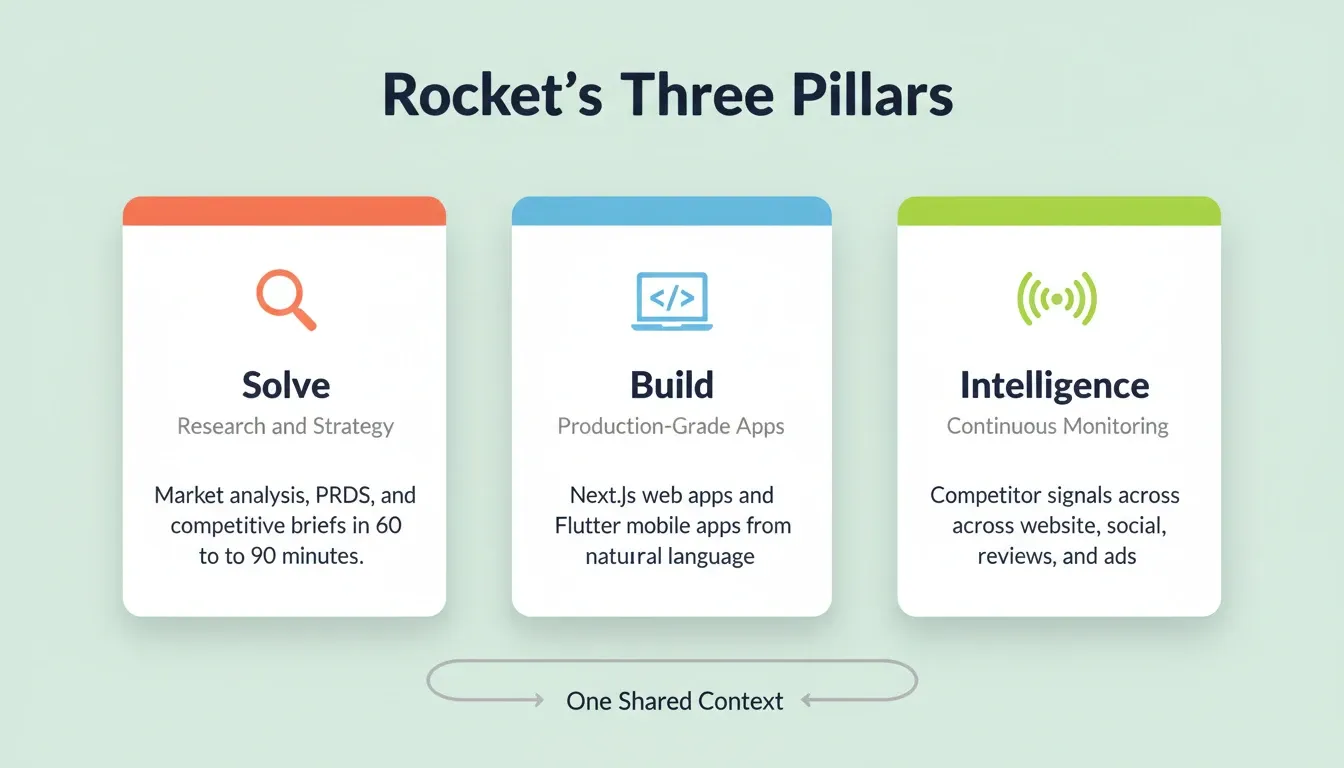
Rocket is a different category entirely. It is the world's first Vibe Solutioning platform. Research, building, and competitive monitoring happen in the same place, connected through shared context. 1.5 million people have tried Rocket across 180 countries.
Solve
Solve takes any business question and delivers a complete structured solution. This includes market sizing, competitive analysis, PRD generation, pricing strategy, and risk matrix. Output arrives within 60 to 90 minutes. You can export it as a PDF or PPT.
The Solve output does not disappear after export. It becomes the foundation of everything that follows in the project. The PRD is present when the Build task opens. The competitive brief is present when the landing page is written. Nothing gets re-explained. Everything compounds.
Build
Build generates production-grade web apps (Next.js) and mobile apps (Flutter) from natural language descriptions, Figma files, or existing GitHub repositories. Every app ships with real design systems, dark/light theming, SEO-ready structure, WCAG accessibility compliance, and GDPR coverage by default.
You can start from a Figma file, an existing Next.js codebase via Codebase Pickup, or an existing website using Redesign's eight slash commands. After generation, iterate through Chat, Visual Edit, or direct Code access with no change limit. Over 25 integrations including Stripe, Supabase, Google Analytics, Notion, and Linear connect through a single authentication step.
Intelligence
Intelligence monitors every public platform a competitor operates on. This includes website changes, pricing shifts, social activity, review sentiment, hiring signals, and ad strategy. It also interprets what those signals mean for your business. Set it up once and it runs automatically. Briefs arrive daily, weekly, or monthly to your sidebar.
No other AI coding tool in this list offers built-in competitive intelligence.
What Should You Prioritize When Choosing a Tool?
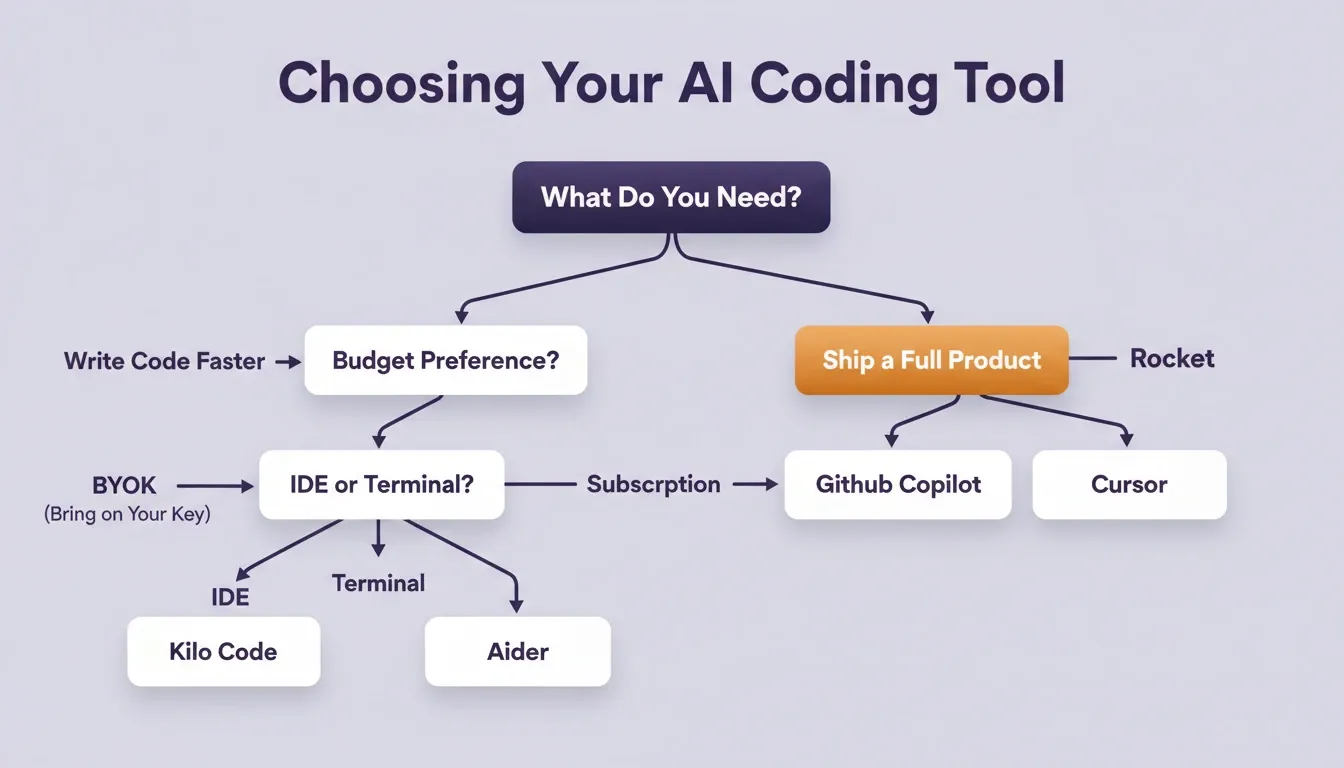
The right tool depends on your workflow, budget, and what stage of the build process matters most to you.
Choosing Your AI Coding Tool
A few practical guidelines to keep in mind:
-
If your monthly AI spend exceeds \$100 on BYOK tokens, a flat-rate subscription tool like Cursor or Claude Code often delivers more predictable value.
-
If you work across both web and mobile, coding tools only get you halfway. Deployment, design, and backend still need a separate solution.
-
If privacy is non-negotiable, Continue.dev with local Ollama models keeps your code entirely on your own infrastructure.
There is no rule that says you pick one tool and stick with it. Many builders run Cursor for daily work, Claude Code for architecture sessions, and Rocket when they need to ship full products. See a complete side-by-side breakdown of Rocket vs Claude Code vs Cline to understand where each fits in a real workflow.
The Right Cline Alternative Starts With the Right Question
The AI coding tool space moves fast. Each Cline alternative on this list solves a specific part of the problem. Claude Code leads on reasoning depth. Cursor leads on IDE polish. Kilo Code brings orchestration to the Cline family. Open-source tools like Continue.dev and Aider prove you do not need a subscription to write strong code.
The bigger question is whether writing code faster is your actual bottleneck. As AI coding tools continue to evolve, the gap between teams that only build faster and teams that also research smarter, deploy reliably, and monitor continuously will widen. For teams that need to go from idea to deployed product with competitive intelligence built in, the answer sits outside the coding tool category.
Type your idea into Rocket and see what research-first building looks like.
Table of contents
- -Why Do Developers Look for Options Other Than Cline?
- -How Do These AI Coding Tools Compare at a Glance?
- -What Does Each Tool Actually Cost?
- -Which Terminal-Based Agents Rival Cline?
- -What are the Strongest IDE-Based Options?
- -Are There Open-Source Picks Worth Trying?
- -How Rocket Fits When You Want to Ship, Not Just Code
- -Solve
- -Build
- -Intelligence
- -What Should You Prioritize When Choosing a Tool?
- -The Right Cline Alternative Starts With the Right Question