
The best productivity apps help you manage tasks, track time, and stay focused. This guide covers top tools like Notion, Todoist, TickTick, and more, with a comparison table and tips on choosing what fits your workflow.
The best productivity apps help you take control of tasks, manage time effectively, and stay focused without feeling overwhelmed. From habit tracking to project planning, the right tools streamline your workflow, reduce burnout, and keep everything organized in one place.
Why Productivity Apps Matter
So, what does a productivity app really do?
At the simplest level, it helps you track tasks, manage time, jot notes, or coordinate with a team. But today's best productivity apps go way beyond that.
They combine calendars, time tracking, and organization into one place, meaning fewer "where did I put that note?" moments. Studies show that millions of people download top productivity tools worldwide, underscoring how much they have become part of daily work.
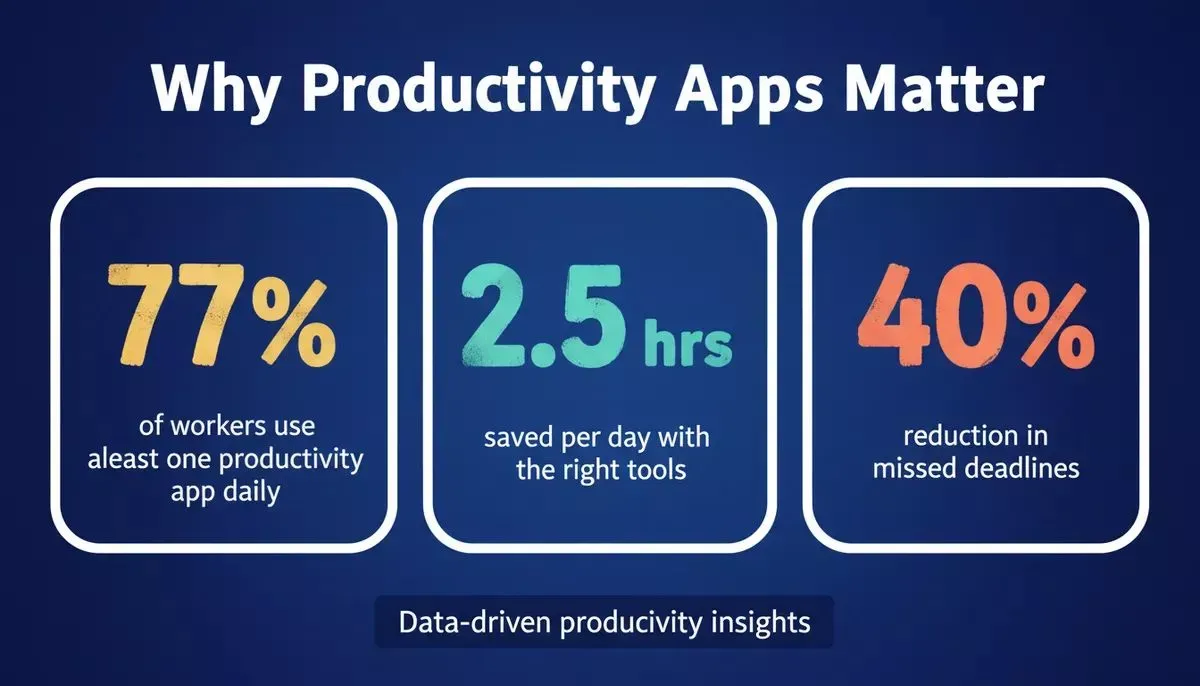
Data-driven snapshot: productivity app adoption rates and time-saving impact across daily work.
A well-organized workflow makes life easier. Apps that sync across your devices help you focus, minimize burnout, and actually get things done. Whether it is habit tracking, project planning, or keeping notes, there is an app out there for you.
How to Choose the Right Productivity Tools
Not every productivity app is made for you.
Some folks just need a simple to-do list, while others want a full-blown productivity system to juggle tasks, calendars, and projects. Choosing the right tools can save time, reduce stress, and make your workday significantly more manageable.
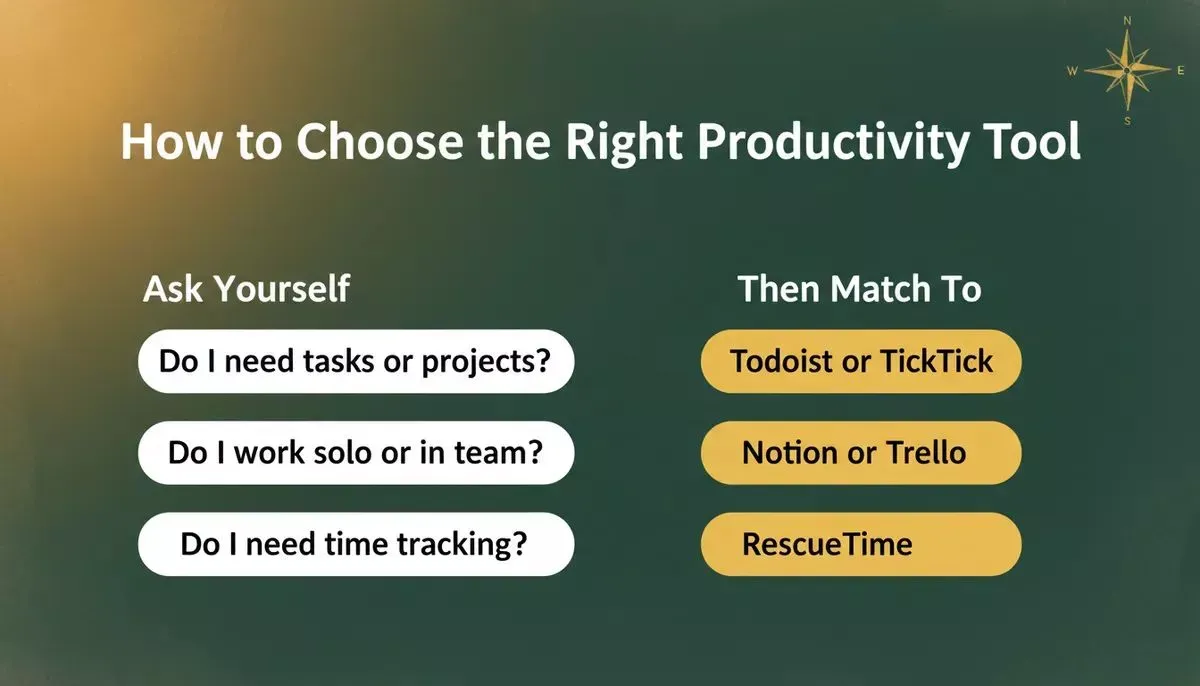
Match your needs to the right app category before committing to any tool.
Ask yourself:
- Do you want a simple to-do list or a full project management system?
- Do you need time tracking for billable hours, or just reminders?
- Do you want a free plan to test before paying?
Picking the right productivity tool is not about the shiniest features. It is about what fits your day-to-day habits. Start small, test a free plan, and see which apps keep you on track. The right choice actually makes managing tasks, dare we say it, fun-ish.
Top Productivity Apps Worth Trying
These apps are crowd favorites. But like everything, they have their quirks.
Here is a breakdown to help you choose what works best for your style.
Notion
Notion is like a digital Swiss Army knife for productivity. Whether it is notes, databases, or to-do lists, it can handle almost anything you throw at it.
It works well for both personal organization and team collaboration, letting you bring all your tasks and ideas into one place.
Best For:
- Creating dashboards and workflows
- Managing tasks across projects
- Keeping notes, docs, and calendars in one place
Limitations:
- Can feel overwhelming with too many options
- Offline access is limited
- Steeper learning curve for beginners
Plans:
- Free plan available
- Paid plan adds advanced features like unlimited blocks, version history, and team collaboration
Notion works best if you want full control over your workflow and are comfortable with a learning curve.
Todoist
Todoist keeps things simple and reliable. It is perfect for people who want to add tasks fast and check them off just as quickly. With reminders, recurring tasks, and easy organization, it is a favorite for everyday task management.
Best For:
- Daily task tracking
- Recurring reminders
- Simple team collaboration
Limitations:
- Limited project management features in the free version
- No native calendar view (requires integration with Google Calendar)
- Lacks advanced team collaboration features
Plans:
- Free plan for basic task management
- Paid plan unlocks labels, filters, productivity trends, and reminders
Todoist is excellent for personal task tracking, but may require additional productivity apps for larger projects.
Google Calendar
Google Calendar is more than just a calendar. It is a productivity tool that helps plan your day, sync events across devices, and manage meetings seamlessly. Its simplicity and integrations make it a backbone for both personal and professional scheduling.
Best For:
- Planning daily schedules
- Managing meetings and events
- Coordinating team calendars
Limitations:
- Can get cluttered with multiple calendars
- Limited task management beyond events
- Needs internet for syncing across devices
Plans:
- Free for personal use
- Paid versions in Google Workspace for business features
Google Calendar is the best foundation for your productivity system, especially when paired with a task manager.
TickTick
TickTick is a multitasker for your tasks and habits. It combines task management, habit tracking, and a built-in Pomodoro timer, so you can manage work, routines, and focus all in one app.
Best For:
- Tracking tasks and routines
- Building habits
- Time-focused work sessions
Limitations:
- Limited integrations in the free version
- The interface can feel busy with many habits and tasks
- Some features are only unlocked in the paid plan
Plans:
- Free plan with core features
- Paid plan for advanced reminders, calendar view, and custom filters
TickTick is well-suited if you want a single app for both tasks and habits.
RescueTime
RescueTime quietly works in the background, tracking how you spend your time on apps and websites. It is perfect for anyone who wants to see exactly where their day goes and stay focused on what matters.
Best For:
- Understanding digital habits
- Tracking billable hours
- Improving focus and reducing distractions
Limitations:
- No task addition (it tracks time only)
- Desktop app required for full tracking
- Some reports are limited in the free version
Plans:
- Free version tracks basic activities
- The paid plan gives detailed reports and goal tracking
RescueTime shines for people who want to stay focused and measure time spent on apps.
Trello
Trello uses a visual approach to project management. Its boards, lists, and cards make organizing tasks feel like playing with digital sticky notes. It is simple, colorful, and keeps teams aligned without a steep learning curve.
Best For:
- Visual project planning
- Team collaboration
- Simple workflows for projects
Limitations:
- Can be basic for complex projects
- Heavy boards can slow down performance
- Limited reporting features in the free version
Plans:
- The free plan includes basic boards and cards
- Paid plan unlocks automation, templates, and integrations
Trello is best for those who love visual planning and simplicity but may need additional tools for advanced tracking.
Top Productivity Apps at a Glance
Here is a quick snapshot of some of the best productivity apps, their primary uses, and the plans they offer. It is a handy cheat sheet to see what fits your workflow.
| App Name | Best For | Free Plan | Paid Plan | Key Strength |
|---|---|---|---|---|
| Notion | All-in-one organization | Yes | Yes | Templates and Flexibility |
| Todoist | Daily task tracking | Yes | Yes | Simple and powerful |
| Google Calendar | Event scheduling | Yes | No | Seamless syncing |
| TickTick | Habits and tasks | Yes | Yes | Includes Pomodoro |
| RescueTime | Time analytics | Yes | Yes | Automatic tracking |
| Trello | Visual projects | Yes | Yes | Kanban boards |
Start with a free plan, then move to a paid plan if you want extra features. The right app can actually make your day easier and your output measurably better.
Productivity App Adoption by Use Case
Understanding which categories of tools people actually use helps you prioritize what to try first. Task management and scheduling consistently top the charts across research on workplace productivity tools.
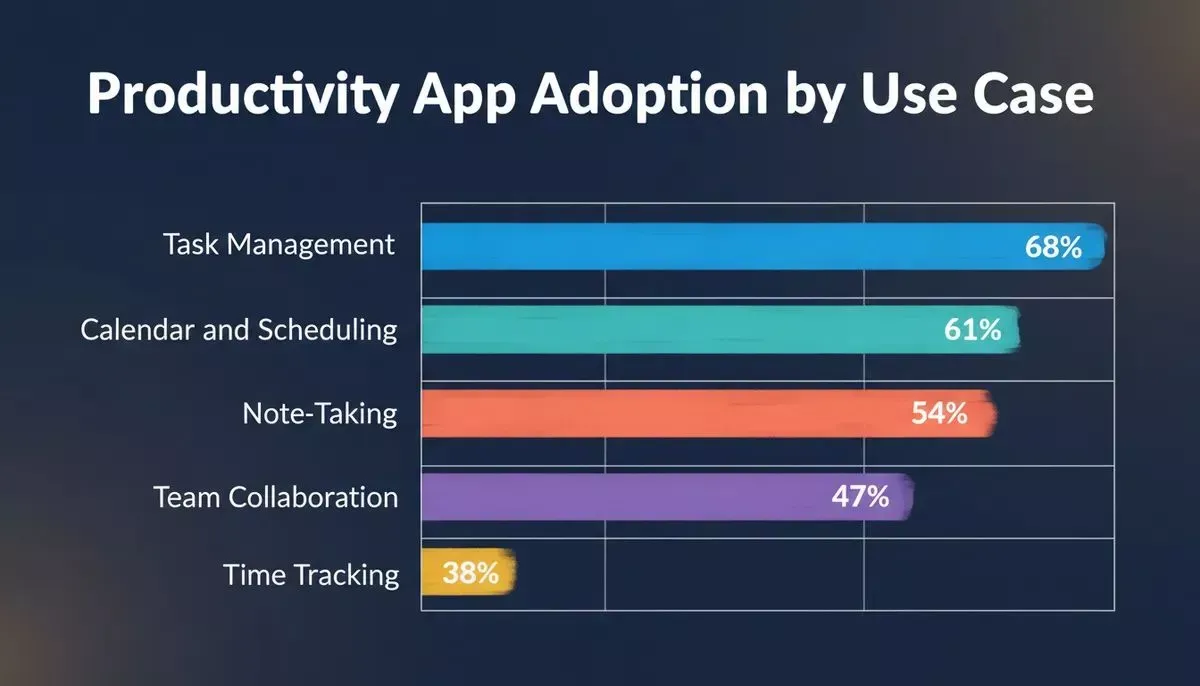
Adoption rates by use case: task management leads, followed by scheduling and note-taking.
Task management apps are the most widely adopted, with time tracking and collaboration tools growing fast as remote work becomes the norm. If you are building a custom tool for your team, exploring no-code app builders can help you ship something tailored to your exact workflow.
How Productivity Apps Fit Into Your Workflow
Understanding how these tools connect helps you build a system that actually sticks.
A simplified productivity workflow: capture, categorize, execute, track, and review.
Real Community Insight
One Reddit user shared:
"Apps like Alarmy and Breaktime helped me stay focused and productive all day. Notion boards act like digital sticky notes for planning tasks."
Community feedback consistently highlights that combining two or three focused apps outperforms relying on a single all-in-one tool. If you are managing a team, pairing a task manager with a team collaboration app can dramatically reduce communication overhead.
Productivity also extends to how you build software. Developers and founders increasingly use vibe coding tools to ship internal tools and automations faster than ever.
The Role of Rocket.new in Your Workflow
Rocket.new is not your typical to-do list or calendar. It is a full-stack vibe solutioning platform that lets you research markets, build production-ready apps, and track competitors, all from one place.
You describe what you want, and Rocket.new turns your idea into a working app with backend and frontend code. For teams that need more than off-the-shelf tools, it is the fastest path from idea to deployed product. You can also explore AI workflow builder solutions to automate repetitive tasks across your stack.
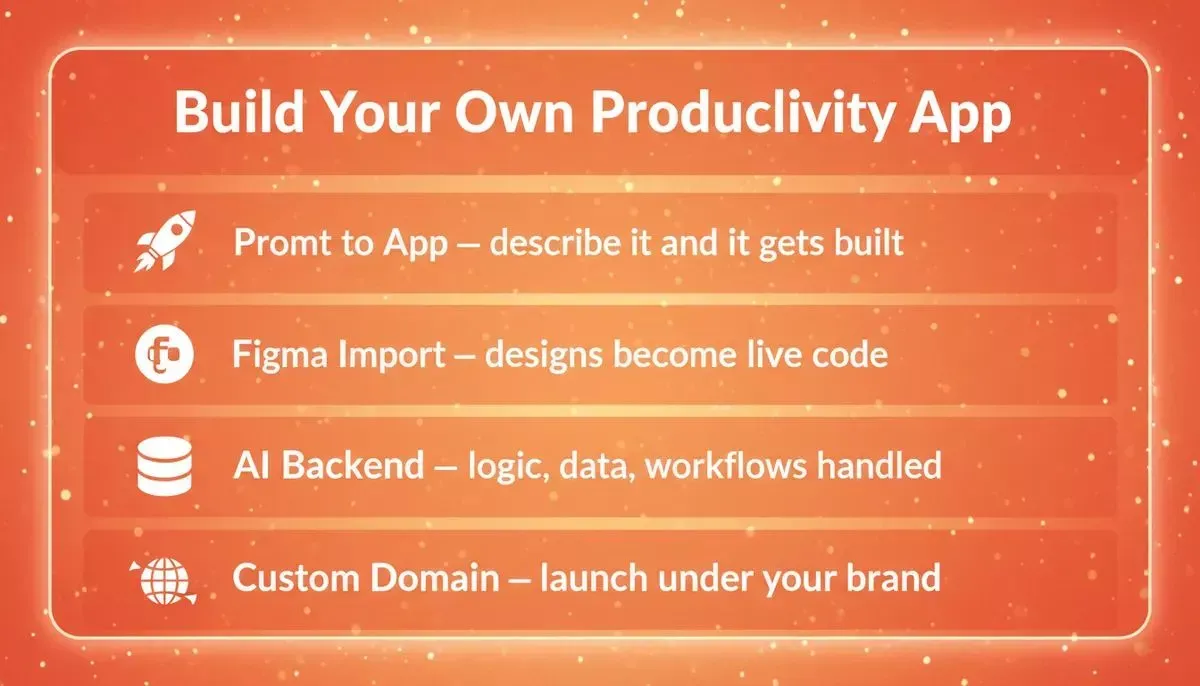
Rocket.new turns a plain-text prompt into a production-ready app, complete with backend, frontend, and custom domain.
Top Features:
- Prompt to App Creation: Describe your app in plain language, and Rocket.new generates the UI, routes, and logic
- Figma Import: Import Figma files and convert frames into production-ready React or Flutter code with pixel accuracy
- AI-Powered Backend: Scaffold a complete backend with Postgres database, user authentication, file storage, and edge functions via Supabase
- Custom Domain: Point an existing domain at your app with automatic HTTPS
- 26+ Integrations: Wire services like Stripe, HubSpot, Notion, Airtable, and more from a single prompt
- GitHub Sync: Two-way code sync so edits flow between your repo and the AI app builder
Rocket.new also ships apps with built-in SEO and performance defaults, including Core Web Vitals monitoring and WCAG accessibility compliance out of the box.
Next Steps to Stay Productive
Picking the right productivity apps is only step one. Using them consistently and iterating on your system is what actually moves the needle.
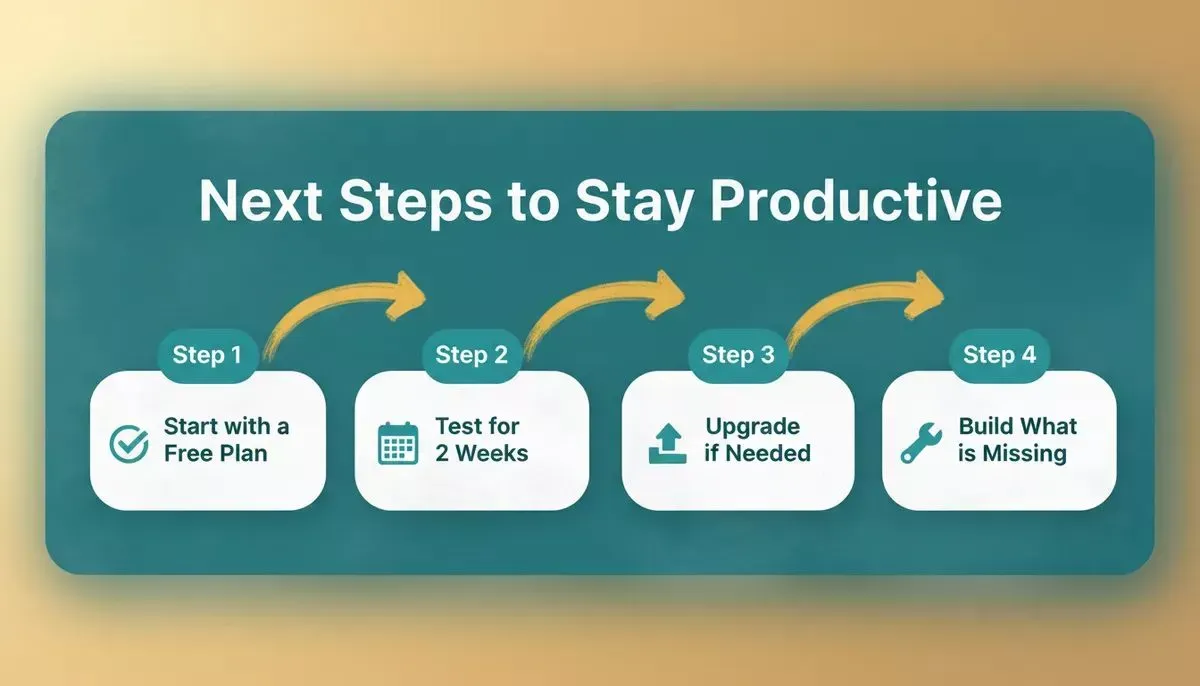
Four practical steps: start free, test thoroughly, upgrade selectively, and build what is missing.
The right apps make managing tasks less of a headache. Test free plans first, find what really works for you, and do not be afraid to build something custom when no existing tool fits.
Best Productivity Apps That Improve Your Workflow
The problem? Tasks, meetings, and notes are scattered everywhere.
The solution? Pick the best productivity apps that fit your workflow and habits. They save time, keep focus, and make life a bit more sane.
Use free plans to test, paid plans for advanced features, and pick what matches your habits. Soon, your days will feel smoother, more organized, and yes, slightly less "ugh."
When off-the-shelf tools fall short, Rocket.new lets you build exactly the productivity app your workflow demands, no code, no waiting, no compromise.
Start building your custom app today and turn your workflow ideas into reality.
Table of contents
- -Why Productivity Apps Matter
- -How to Choose the Right Productivity Tools
- -Top Productivity Apps Worth Trying
- -Notion
- -Todoist
- -Google Calendar
- -TickTick
- -RescueTime
- -Trello
- -Top Productivity Apps at a Glance
- -Productivity App Adoption by Use Case
- -How Productivity Apps Fit Into Your Workflow
- -Real Community Insight
- -The Role of Rocket.new in Your Workflow
- -Next Steps to Stay Productive
- -Best Productivity Apps That Improve Your Workflow