
This guide covers 20 vetted web development tools across 10 categories: editors, version control, frameworks, CSS, build tools, DevTools, testing, APIs, hosting, and AI builders, with pricing, honest trade-offs, and picks by project type, team size, and experience level.
The web development toolkit has never been larger, and picking from it is the real problem. This guide cuts through the noise with 20 vetted picks across 10 categories: editors, version control, frameworks, CSS, build tools, DevTools, testing, APIs, hosting, and AI builders, each with honest trade-offs, current pricing, and picks by project type and experience level.
Best Picks At A Glance
| Need | Pick |
|---|---|
| Free all-purpose code editor | VS Code |
| TypeScript-heavy large codebase | WebStorm |
| AI-native IDE with repo awareness | Cursor |
| Version control standard | Git + GitHub |
| Component-based UI | React |
| Production React with SSR/SSG | Next.js |
| Modern JavaScript framework (lighter) | Vue or Astro |
| Utility-first CSS | Tailwind CSS |
| CSS transformation pipeline | PostCSS |
| Fast frontend build tool | Vite |
| In-browser debugging and profiling | Chrome DevTools |
| JavaScript unit testing | Jest |
| Cross-browser end-to-end testing | Playwright |
| API development and testing | Postman |
| Backend-as-a-service | Supabase |
| Next.js hosting | Vercel |
| Static/JAMstack hosting | Netlify |
| Real-time app backend and hosting | Firebase |
| AI app builder (research + build + monitor) | Rocket |
| Figma-to-code and AI UI generation | Cursor / Figma AI |
Want to skip the setup? Try Rocket for free and go from idea to deployed app without stitching tools together.
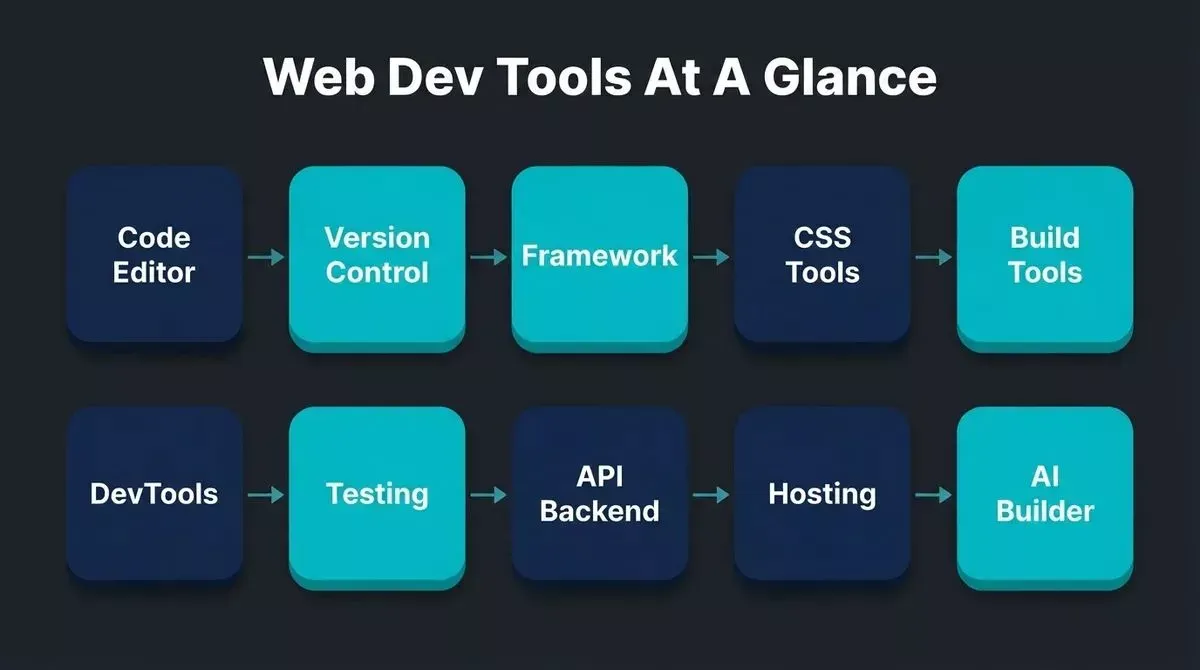
The ten categories of web development tools every developer needs, from writing the first line to shipping to production.
What Are Web Development Tools?
Web development tools are the software, frameworks, and platforms developers use to write, test, build, and ship websites and web applications. They span every stage of the workflow, from the first line of code to a live production URL.
| Category | Core problem it solves |
|---|---|
| Code editors and IDEs | Write, navigate, and debug code efficiently |
| Version control | Track changes and enable team collaboration |
| Frameworks and libraries | Structure UI and manage application state |
| CSS and styling | Consistency, preprocessing, and cross-browser compatibility |
| Build tools | Bundle, transform, and optimize code for production |
| Browser DevTools | Diagnose layout, performance, and JavaScript issues in real time |
| Testing | Catch bugs before users do |
| API and backend | Verify data flows and manage backend services |
| Hosting and deployment | Get your app live and keep it fast globally |
| AI app builders | Generate, research, and accelerate the full build cycle |
How We Chose These Tools
Every tool in this list was evaluated against five criteria: adoption (based on developer survey data and framework usage reports), free-tier availability, ecosystem health and active maintenance, pricing transparency, and fit with AI-assisted workflows in 2026. Pricing was verified in September 2026. Tools with deprecated status were excluded.
Web Development Tools At A Glance
| Tool | Category | Free tier | Starting price | Best for |
|---|---|---|---|---|
| VS Code | Code editor | Yes | Free | All-round coding, every language |
| WebStorm | IDE | No | $7.90/mo | Large JS/TS projects |
| Cursor | AI IDE | Yes (Hobby) | $20/mo | Multi-file refactoring, AI-native |
| Git + GitHub | Version control | Yes | $4/mo (Teams) | Code history, team collaboration |
| React | Framework | Yes | Free | Component-based UI |
| Next.js | Framework | Yes | Free | SSR, SSG, production React apps |
| Vue | Framework | Yes | Free | Lightweight, approachable UI |
| Astro | Framework | Yes | Free | Content-heavy, multi-framework sites |
| Tailwind CSS | CSS | Yes | Free | Utility-first rapid styling |
| PostCSS | CSS | Yes | Free | CSS transformation pipelines |
| Vite | Build tool | Yes | Free | Fast HMR, modern bundling |
| Chrome DevTools | Browser tools | Yes | Free | Debugging, Core Web Vitals |
| Jest | Testing | Yes | Free | JS/TS unit and snapshot testing |
| Playwright | Testing | Yes | Free | Cross-browser end-to-end automation |
| Postman | API | Yes | $14/mo (Basic) | API dev, testing, documentation |
| Supabase | Backend | Yes | $25/mo (Pro) | Open-source Firebase alternative |
| Vercel | Hosting | Yes | $20/mo (Pro) | Next.js, edge functions |
| Netlify | Hosting | Yes | $19/mo (Pro) | Static and JAMstack sites |
| Firebase Hosting | Hosting | Yes | Pay-as-you-go | Real-time apps with full backend |
| Rocket | AI builder | Yes | Free to start | Research, build, and monitor in one place |
How The Tools Fit Together
Every web project moves through the same sequence: write code in an editor, track it with version control, structure it with a framework, style it with CSS tools, bundle it with a build tool, debug it in the browser, test it, connect it to a backend, and deploy it to hosting. AI builders now sit at the beginning of that flow, accelerating or replacing several layers at once.
1. Code Editors And IDEs
Your editor is where you spend most of your time. A good one reduces cognitive load, catches errors early, and keeps your workflow fast. Look for: syntax highlighting across your languages, an integrated terminal, Git integration, strong extension support, and active maintenance.
1. Visual Studio Code
VS Code is the most widely used code editor in the world. According to developer survey data, it leads adoption by a wide margin. It is fast, customizable, and backed by an extension marketplace with tens of thousands of plugins covering linting, AI assistance, remote development, and virtually every language and framework.
Key strength: Zero-cost entry, GitHub Copilot support, IntelliSense autocomplete, and an integrated terminal that handles most workflows without leaving the editor.
Limitation: Relies on extensions for advanced TypeScript intelligence; configuration can accumulate complexity on large teams.
Choose it when: You want a free, all-purpose editor that works across every language and framework.
Price: Free
2. WebStorm
WebStorm is JetBrains' IDE built specifically for JavaScript and TypeScript. It ships with deep framework support for React, Next.js, Angular, and Vue, plus intelligent refactoring and built-in test runners, no plugin configuration needed.
Key strength: Out-of-the-box TypeScript intelligence, database tools, and refactoring that understands your entire codebase structure.
Limitation: Paid subscription; heavier resource usage than VS Code; overkill for small or mixed-language projects.
Choose it when: You work on a large TypeScript codebase and want built-in refactoring and test runners without configuring extensions.
Price: $7.90/month (individual), free for students
3. Cursor
Cursor is an AI-native IDE built on VS Code. It indexes your entire repository and uses that context for suggestions, multi-file edits, and refactoring, not just the file you have open.
Key strength: Repository-wide awareness means suggestions account for your existing patterns and conventions. The Composer feature edits multiple files simultaneously.
Limitation: Paid plan required for meaningful agent usage; some developers find the AI suggestions intrusive on smaller tasks.
Choose it when: You need deep multi-file refactoring and want AI that understands your whole codebase, not just the current file.
Price: Free (Hobby); $20/month (Pro); $40/user/month (Teams)
| Editor | Best for | Price |
|---|---|---|
| Sublime Text | Lightweight editing, large files | Free (nagware) |
| Neovim | Terminal-first, highly customizable | Free |
| Zed | Performance-focused, multiplayer | Free |
2. Version Control
Without version control, collaboration is dangerous. Git tracks every change so you can roll back, branch, merge, and share work safely, even on solo projects. A single accidental deletion can destroy weeks of work without it.
4. Git And GitHub
Git is the backbone of modern web development. Developer surveys consistently show Git used by over 93% of professional developers. GitHub extends Git with pull requests, code reviews, Actions for CI/CD, and a massive open-source community.
Key strength: The universal standard. Every hosting platform, CI/CD tool, and AI coding assistant integrates with GitHub. For teams that want everything in one place, GitLab offers stronger built-in DevOps pipelines. For a deeper look at how teams collaborate on code, code collaboration tools for developers covers the full landscape.
Limitation: Git's branching model has a learning curve; merge conflicts require careful resolution on active teams.
Choose it when: Always. Git is non-negotiable for any project beyond a single file.
Price: Free (public repos); $4/month (Teams)
| Tool | Best for | Price |
|---|---|---|
| GitLab | Built-in CI/CD, self-hosted option | Free tier; $29/user/mo (Ultimate) |
| Bitbucket | Jira-integrated teams on Atlassian stack | Free tier; $3/user/mo |
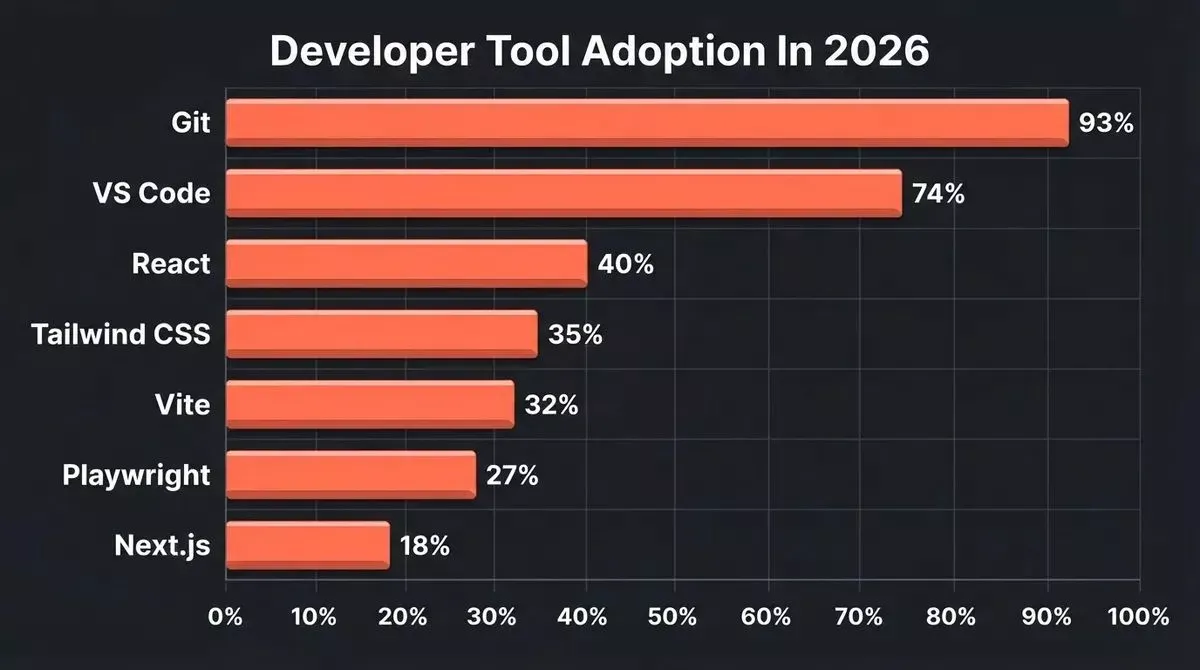
Developer tool adoption in 2026 across the most widely used web development tools.
3. Frameworks And Libraries
Frameworks provide structure, reusable components, and optimized rendering patterns. Choosing the wrong one early is expensive, as it determines your hiring pool, performance ceiling, and deployment options. Understanding your tech stack for web development before committing to a framework saves significant rework later.
5. React
React is the most popular UI library for building interactive web applications. Maintained by Meta, it uses a component-based architecture and a virtual DOM to deliver fast, predictable UIs.
Key strength: The largest ecosystem of components, libraries, and developer talent. React Router, Redux, React Query, and thousands of community packages cover nearly every frontend need.
Limitation: React alone is not a full framework; you need Next.js or Remix for routing, SSR, and production-grade structure. For a direct comparison of React against a rising alternative, HTMX vs React breaks down when each approach makes sense.
Choose it when: You are building a dynamic, data-driven UI and want access to the widest ecosystem.
Price: Free (open source)
6. Next.js
Next.js is the leading framework for production React applications. It supports server-side rendering (SSR), static site generation (SSG), incremental static regeneration (ISR), and API routes in one package. The App Router, introduced in Next.js 13 and refined through current releases, simplifies routing and data fetching with React Server Components.
Key strength: Handles frontend and backend in one codebase. Native Vercel integration means zero-configuration deployments. SEO-optimized by default.
Limitation: App Router has a steeper learning curve than Pages Router; some third-party libraries have not fully migrated.
Choose it when: You need SEO, fast initial page loads, and a full-stack framework that handles both frontend and backend.
Price: Free (open source); Vercel hosting from $20/month
7. Vue
Vue is a progressive JavaScript framework that is approachable for beginners and powerful enough for complex applications. Its single-file components and clear separation of template, script, and style make it easy to read and maintain.
Key strength: Gentle learning curve, excellent documentation, and strong adoption across global markets. Nuxt (the Vue equivalent of Next.js) adds SSR and SSG.
Limitation: Smaller ecosystem than React; fewer enterprise-scale job postings in English-speaking markets.
Choose it when: Your team is newer to frontend frameworks, or you are building a mid-complexity app where React's ecosystem depth is not needed.
Price: Free (open source)
8. Astro
Astro is a content-focused framework that ships zero JavaScript by default and supports components from React, Vue, Svelte, and others in the same project. It is built for performance on content-heavy sites.
Key strength: Island architecture delivers near-zero JavaScript to the browser. Excellent for blogs, marketing sites, and documentation where load speed is critical.
Limitation: Less suited for highly interactive applications; smaller ecosystem than React or Vue.
Choose it when: You are building a content site, blog, or marketing page where performance and SEO are the primary concerns.
Price: Free (open source)
| Framework | Best for | Price |
|---|---|---|
| Svelte / SvelteKit | Minimal bundle size, reactive UI without virtual DOM | Free |
| Angular | Enterprise teams, opinionated full framework | Free |
| Remix | Full-stack React with progressive enhancement | Free |
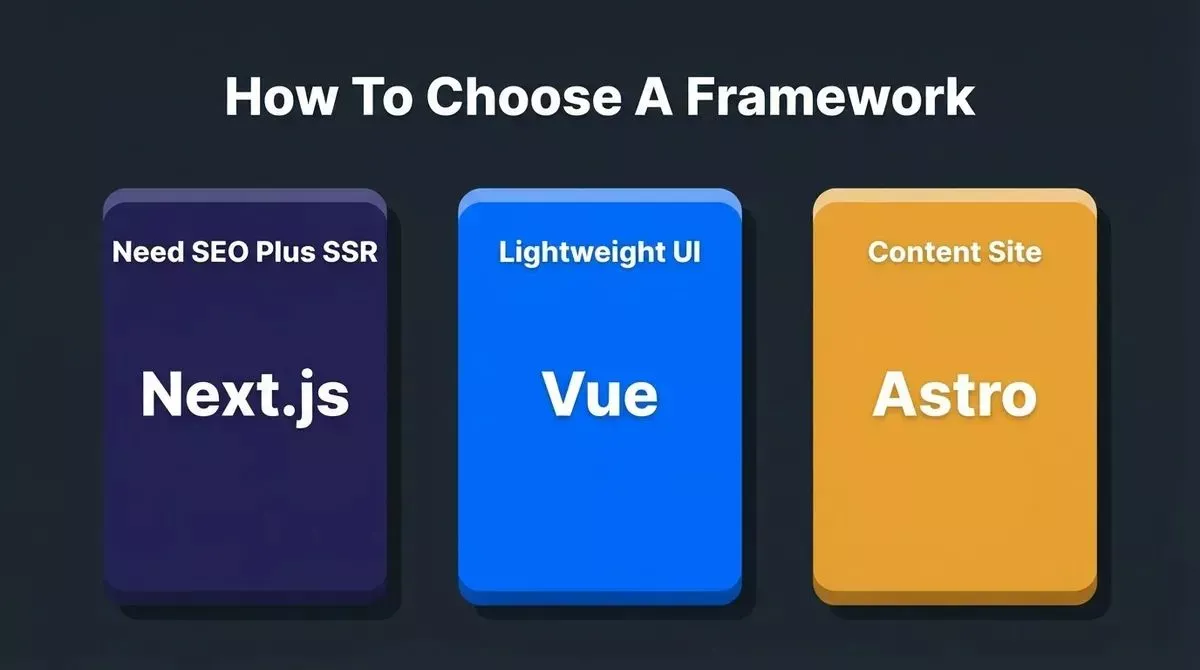
A quick framework decision guide based on your primary project requirement.
4. CSS And Styling
Modern CSS workflows go beyond writing stylesheets. CSS tools handle preprocessing, transformation, linting, and optimization, keeping styles fast, consistent, and cross-browser compatible. Without them, CSS in large projects becomes a maintenance liability.
9. Tailwind CSS
Tailwind CSS is a utility-first CSS framework that lets developers style components directly in HTML using predefined classes. Instead of writing custom CSS for every element, you compose designs from a consistent set of utilities.
Key strength: Dramatically speeds up UI development and enforces design consistency. Pairs naturally with React, Next.js, and Vue. The JIT compiler ships only the classes you use.
Limitation: HTML can become verbose with many utility classes; requires buy-in from the whole team; not ideal for teams with a strong existing CSS architecture.
Choose it when: You want to move fast on UI without maintaining a custom stylesheet, and your team is comfortable with utility-class patterns.
Price: Free (open source); Tailwind UI components from $249 one-time
10. PostCSS
PostCSS transforms CSS with JavaScript plugins. It powers Autoprefixer (vendor prefixes added automatically) and cssnano (CSS minification for production). Most modern build tools, including Webpack, Vite, and Next.js, use PostCSS under the hood.
Key strength: Runs silently in your build pipeline and ensures your CSS works everywhere. You rarely configure it directly; it just works.
Limitation: Plugin ecosystem quality varies; debugging PostCSS pipelines can be opaque.
Choose it when: Always, as it is already in your build tool. Add plugins as your project needs them.
Price: Free (open source)
| Tool | Best for | Price |
|---|---|---|
| Sass (SCSS) | Large design systems, programmatic CSS generation | Free |
| CSS Modules | Scoped styles in component-based projects | Free (built into most frameworks) |
| Styled Components | CSS-in-JS for React | Free |
5. Build Tools
Build tools bundle, transform, and optimize your code for production. A fast build tool meaningfully improves developer experience on large projects, as near-instant server starts versus 30-second waits change how you work.
11. Vite
Vite is the modern build tool that has largely replaced older bundlers for new projects. It uses native ES modules in development for near-instant server starts and HMR, and Rollup for production builds.
Key strength: Dramatically faster development server than Webpack. First-class support for React, Vue, Svelte, and vanilla JS. Simple configuration.
Limitation: Rollup-based production builds can behave differently from development in edge cases; some legacy Webpack plugins require migration.
Choose it when: Starting any new frontend project. Vite is the current default for React, Vue, and Svelte projects.
Price: Free (open source)
| Tool | Best for | Price |
|---|---|---|
| Webpack | Legacy projects, complex custom configurations | Free |
| esbuild | Extremely fast builds, used inside Vite and other tools | Free |
| Turbopack | Next.js projects (built-in, replaces Webpack) | Free |
| Parcel | Zero-config bundling for simple projects | Free |
6. Browser DevTools And Performance
Browsers are not just for viewing websites. Built-in DevTools let you inspect elements, tweak CSS live, debug JavaScript, analyze network requests, and measure performance, all without leaving the browser. Mastering DevTools is one of the highest-leverage skills any developer can develop.
12. Chrome DevTools
Chrome DevTools is the most comprehensive browser-based web development tool available. It covers element inspection, live CSS editing, JavaScript debugging with breakpoints, network request analysis, performance profiling, and Core Web Vitals measurement.
Key strength: The Performance panel and Lighthouse integration make it essential for any developer optimizing for speed and user experience. Extending Chrome with the right plugins can further accelerate your workflow, and best Chrome extensions for developers covers the most useful ones.
Limitation: Chrome-specific; some rendering differences require testing in Firefox and Safari too.
Choose it when: Always. Chrome DevTools is the default starting point for debugging and performance work.
| Browser | DevTools strength | Price |
|---|---|---|
| Firefox DevTools | CSS grid and flexbox inspectors | Free |
| Safari Web Inspector | iOS/macOS rendering, accessibility checks | Free |
| Edge DevTools | Chromium-based with Microsoft-specific additions | Free |
7. Testing
Shipping quality code requires a testing strategy that covers three layers: unit tests (individual functions and components), integration tests (how pieces work together), and end-to-end tests (full user flows in a real browser). Retrofitting tests is always harder than building them in from the start.
13. Jest
Jest is the most widely used JavaScript testing framework, created by Meta. It runs fast, supports snapshot testing, and integrates seamlessly with React and TypeScript projects. Zero-configuration setup and built-in code coverage make it the standard unit testing tool.
Key strength: Works out of the box with Next.js and Vite projects. Snapshot testing catches unintended UI changes automatically.
Limitation: Slower than Vitest for large test suites; some ESM compatibility issues with newer packages.
Choose it when: Unit testing JavaScript and TypeScript functions, React component logic, and API handlers.
Price: Free (open source)
14. Playwright
Playwright is Microsoft's end-to-end testing framework. It supports Chromium, Firefox, and WebKit, allowing you to test across all major browsers from a single test suite. Auto-wait, network interception, and visual comparison make it one of the most capable testing tools available.
Key strength: Cross-browser coverage from one test suite. The auto-wait mechanism eliminates most flaky test issues. See Playwright's official documentation for getting started.
Limitation: Slower than unit tests; requires a running application; setup is more involved than Cypress for simple cases.
Choose it when: End-to-end testing of user flows across multiple browsers. Use alongside Jest, not instead of it.
Price: Free (open source)
| Tool | Best for | Price |
|---|---|---|
| Vitest | Vite-native unit testing, faster than Jest for Vite projects | Free |
| Cypress | Developer-friendly E2E with time-travel debugging | Free tier; $67/mo (Cloud) |
| React Testing Library | Component integration tests with accessible queries | Free |
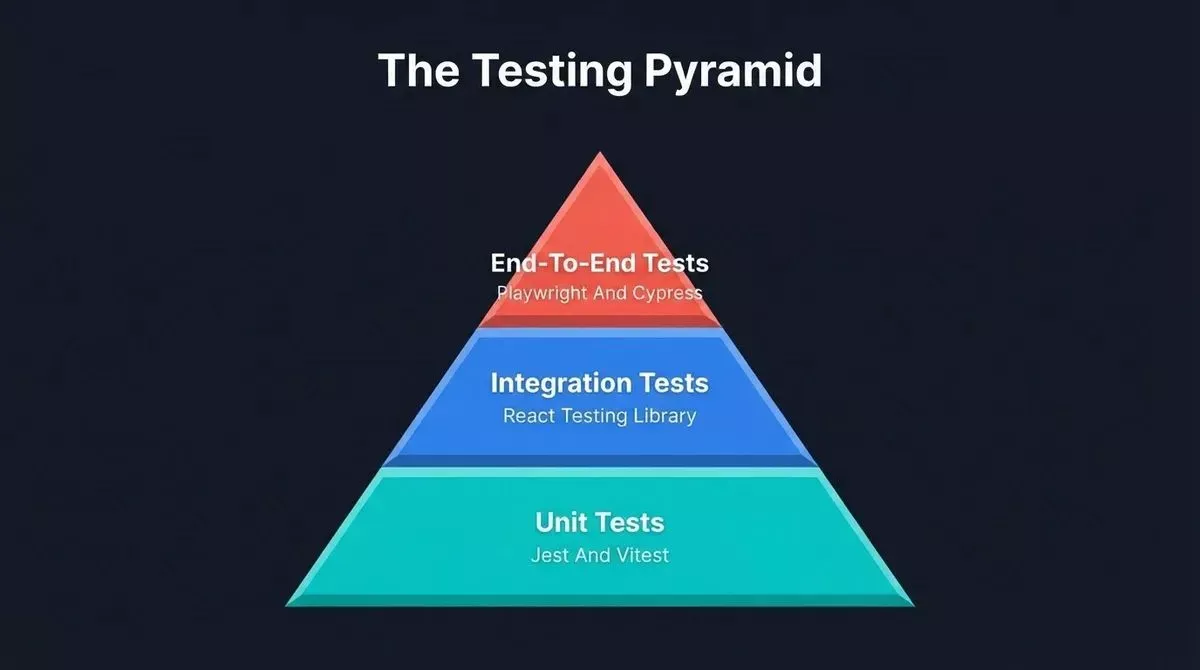
The three-layer testing pyramid: unit tests form the base, integration tests sit in the middle, and end-to-end tests sit at the top.
8. API And Backend
Every web application that does anything useful talks to a backend. API testing tools let you verify those connections before and after deployment. Backend-as-a-service platforms let you skip building the backend entirely.
15. Postman
Postman is the industry-standard tool for API development and testing. It lets you send HTTP requests, inspect responses, write automated test scripts, and document APIs from a visual interface.
Key strength: Collections let teams share and version-control API definitions. Mock servers enable frontend development before the backend is ready.
Limitation: The free tier has become more restricted over time; the desktop app is resource-heavy.
Choose it when: You need to test, document, and share API definitions across a team.
Price: Free (Basic); $14/month (Basic paid); $29/month (Professional)
16. Supabase
Supabase is an open-source Firebase alternative built on PostgreSQL. It provides a hosted database, authentication, real-time subscriptions, storage, and edge functions, with a dashboard and auto-generated APIs.
Key strength: Full SQL power with a developer-friendly dashboard. Row-level security, real-time, and auth in one place. Open source and self-hostable. For a detailed comparison of the two most popular backend platforms, Firebase vs Supabase covers the key differences developers should know.
Limitation: PostgreSQL knowledge helps; some Firebase-style real-time patterns require a different mental model.
Choose it when: You need a backend with a real relational database, authentication, and real-time capabilities without managing infrastructure.
Price: Free (up to 500MB database); $25/month (Pro)
| Tool | Best for | Price |
|---|---|---|
| Insomnia | Lightweight API client, cleaner UI than Postman | Free tier; $16/mo |
| Firebase Realtime DB | Simple real-time data, Google ecosystem | Free tier; pay-as-you-go |
| PlanetScale | Serverless MySQL, branching for schema changes | Free tier; $39/mo |
9. Hosting And Deployment
Modern hosting platforms handle CI/CD, global CDN distribution, and serverless functions so you can focus on code, not infrastructure. The right platform can cut deployment time from hours to seconds. For a broader look at deployment options, best app deployment tools for faster releases covers the full spectrum.
17. Vercel
Vercel is the official deployment platform for Next.js and one of the fastest hosting options for any frontend project. Zero-configuration deployments from Git, automatic preview URLs for every pull request, and edge functions that run close to your users.
Key strength: Native Next.js integration. Every push to main automatically deploys. The global edge network ensures fast load times worldwide.
Limitation: Costs can escalate on high-traffic sites; some advanced features are Pro-only; vendor lock-in risk for Next.js-specific features.
Choose it when: You are deploying a Next.js app and want zero-configuration deployments, instant preview URLs, and edge function support.
Price: Free (Hobby); $20/month (Pro); custom (Enterprise)
18. Netlify
Netlify pioneered the JAMstack deployment model and remains a leading platform for static sites, serverless functions, and full-stack web applications. Git-based workflow, form handling, identity management, and split testing make it versatile.
Key strength: Automatic HTTPS, instant rollbacks, and branch-based previews reduce deployment risk. Form handling and identity features are particularly useful for marketing sites.
Limitation: Build minutes on the free tier are limited; large sites with many dependencies can hit build time limits.
Choose it when: You are deploying a static site, JAMstack application, or any frontend project not tightly coupled to Next.js.
Price: Free (Starter); $19/month (Pro); custom (Enterprise)
19. Firebase Hosting
Firebase Hosting from Google supports both static and dynamic builds. Combined with Firestore, authentication, and Cloud Functions, it provides a complete backend-and-hosting solution in one place.
Key strength: Full Google ecosystem integration. Particularly strong for real-time applications: chat, live dashboards, and collaborative tools.
Limitation: Vendor lock-in to Google Cloud; pricing can be unpredictable at scale; Firestore's NoSQL model requires careful data modeling.
Choose it when: You are building a real-time app and want the entire backend from one provider.
Price: Free (Spark plan); pay-as-you-go (Blaze plan)
| Platform | Best for | Price |
|---|---|---|
| Cloudflare Pages | Global edge, generous free tier | Free tier; $20/mo |
| Railway | Full-stack apps with databases, Docker support | Free tier; $5/mo |
| Render | Simple deployments, background workers | Free tier; $7/mo |
10. AI App Builders: Where Rocket Fits
How AI Is Changing The Web Development Toolkit
AI has entered every layer of the web development workflow. Code editors now suggest entire functions. Testing tools generate test cases from descriptions. Build tools use AI to optimize bundles. According to developer survey data, 76% of developers are using or planning to use AI tools in their development process.
The shift is not about replacing the tools above. It is about adding an intelligent layer that accelerates them. For a deep look at the full landscape of AI coding assistants, the best AI software development tools for developers guide covers seven leading options with pricing and workflow fit. For those exploring the difference between vibe coding and traditional prompt engineering, vibe coding vs prompt engineering explains the key distinctions.
AI builders occupy a specific position in this shift: they generate production-ready code from descriptions, Figma files, or existing repositories, compressing the time from idea to working app from weeks to hours.
20. Rocket
Rocket is the world's first Vibe Solutioning platform. Unlike code assistants that help you write code faster, Rocket covers the step before the build (research and validation), the build itself, and the monitoring that follows. It sits alongside your stack, not instead of it. The code it generates is Next.js (web) or Flutter (mobile), lives in your repository via two-way GitHub sync, and can be exported and continued in any editor.
What Rocket builds: Production-grade Next.js web apps, Flutter mobile apps, landing pages, multi-page websites, internal tools, and customer portals. Every build ships with SEO structure, WCAG accessibility, and GDPR compliance as a baseline.
| Starting point | Best for |
|---|---|
| Plain-language prompt | New ideas from scratch |
| Figma file import | Design-to-code with preserved tokens |
| GitHub repository | Continue an existing Next.js TypeScript project |
| Image or PDF attachment | Build from a mockup or document |
| Template (zero credits) | Fast start from a category template |
| URL redesign | Reimagine an existing website |
The three pillars: Solve turns any business question into a structured research report before you build. Build generates production-grade apps from any of the six starting points above. Intelligence monitors competitors continuously after you launch, surfacing pricing changes, product updates, and signals across their full public presence.
What makes it different: Shared context architecture means the research from Solve flows into Build automatically. Nothing is re-explained. 1.5 million people have tried Rocket across 180 countries.
"I gave an AI builder just one sentence, and it built a complete, working app. No setup. No coding. It just worked." — LinkedIn
Best for: Founders validating MVPs, designers who want to ship without a developer handoff, solo builders who need to go from idea to deployed product fast, and enterprise teams consolidating tool sprawl.
Not ideal for: Projects requiring a framework other than Next.js or Flutter; teams that need to stay entirely within a specific existing infrastructure.
| Plan | Price | Credits/month | Best for |
|---|---|---|---|
| Free | $0 | 20 (one-time) | Exploring the platform |
| Pro | $25/mo | 100 | Individuals building regularly |
| Rocket | $50/mo | 250 | Individuals and teams with frequent use |
| Booster | $250/mo | 1,500 | Power users and fast-moving teams |
All paid plans include unlimited team members. Annual billing saves 20%. No credit card required to start.
Generate a Next.js app and deploy it in minutes — start building with Rocket
For no-code and low-code alternatives that do not require any development knowledge, see the low-code and no-code development guide.
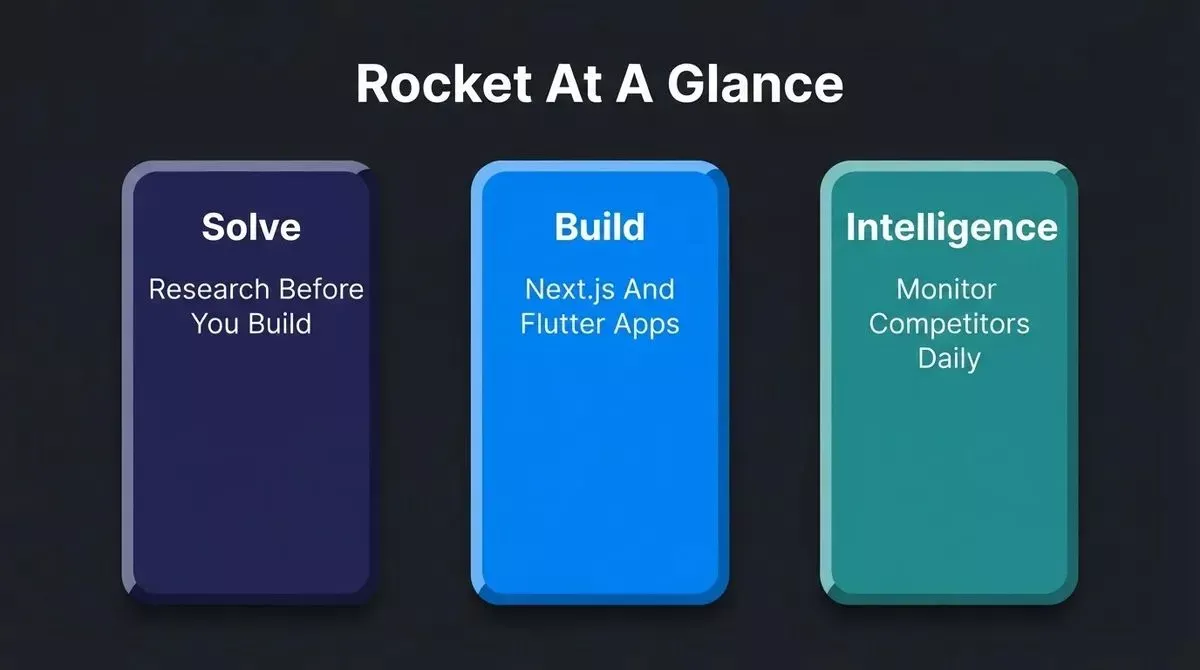
Rocket combines Solve, Build, and Intelligence in one platform with shared context, so research informs every build.
How To Choose The Right Web Development Tools
By Project Type
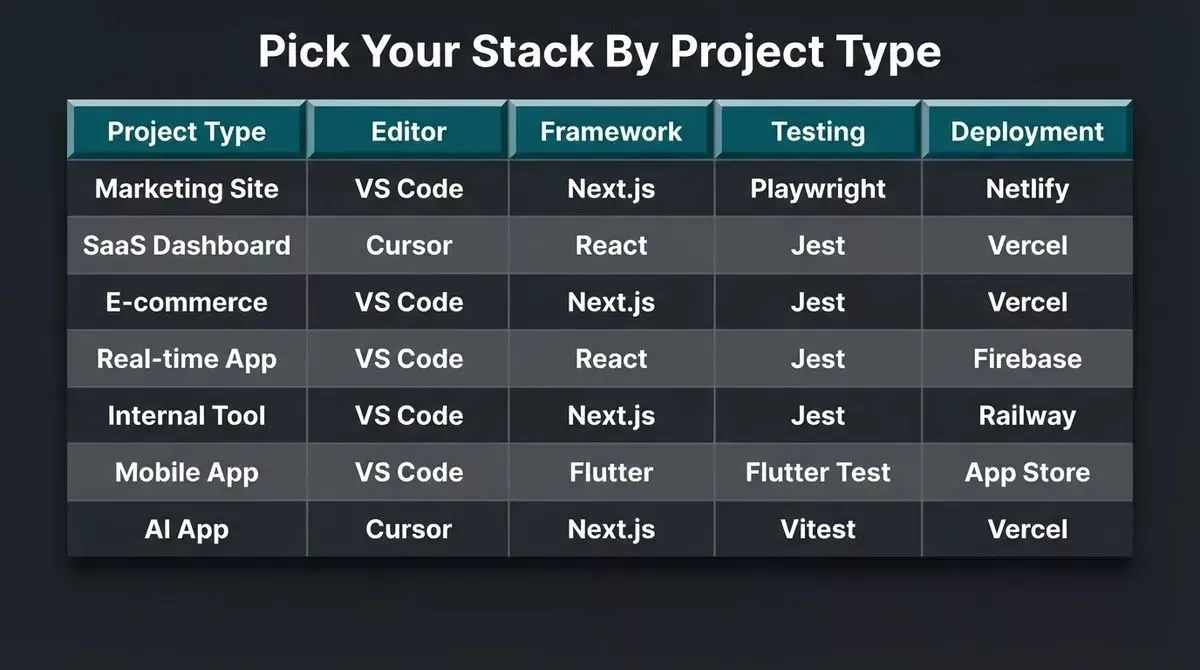
Recommended stacks by project type: match your editor, framework, testing approach, and deployment platform to what you are building.
| Project type | Editor | Framework | Testing | Deployment |
|---|---|---|---|---|
| Marketing site | VS Code | Astro or Next.js | Playwright | Netlify or Vercel |
| SaaS dashboard | VS Code or Cursor | React + Next.js | Jest + Playwright | Vercel |
| E-commerce store | VS Code | Next.js + Stripe | Jest + Playwright | Vercel |
| Real-time app | VS Code | React + Supabase | Jest | Firebase or Railway |
| Internal tool | VS Code | Next.js + Supabase | Jest | Vercel or Railway |
| Mobile app | VS Code | Flutter (via Rocket) | Flutter test | App stores via Rocket |
| AI-powered app | Cursor or VS Code | Next.js | Vitest + Playwright | Vercel + Rocket |
By Team Size
Solo developer: VS Code + React + Next.js + Vercel + Git. Add Rocket to skip scaffolding and go from idea to deployed app without stitching tools together.
Small team (2 to 5): Add GitHub Actions for CI/CD, Jest for unit tests, and Playwright for end-to-end testing. Establish a shared linting and formatting config (ESLint + Prettier) early.
Growing team (5 to 20): Add WebStorm or Cursor for TypeScript-heavy work, Postman for API documentation, Supabase for a shared backend, and a shared Rocket workspace for compound context across research and builds.
By Experience Level
Beginner starter stack (free): VS Code + Git + GitHub + React + Vite + Tailwind CSS + Netlify. This covers every fundamental skill without any paid tools.
Intermediate: Add Next.js for full-stack capability, Jest for testing, Postman for API work, and Vercel for deployment. Start exploring Playwright for end-to-end tests.
Advanced: Add Cursor for AI-native editing, Vitest for faster test runs, Supabase for backend, and Rocket for research-to-build workflows on new projects.
Free Vs Paid: When It Is Worth It
The $0 stack: VS Code + Git + GitHub (public) + React + Vite + Tailwind CSS + Netlify free tier + Jest + Playwright. This is a complete, production-capable stack at zero cost.
When paying is worth it: WebStorm pays off on TypeScript-heavy teams of three or more. Vercel Pro pays off when you need preview URLs and edge functions for a commercial product. GitHub Teams pays off when you need private repos and Actions minutes. Rocket Pro pays off when you are building multiple projects and want to skip the research and scaffolding phases.
A Five-Step Decision Framework
- Start with your language and framework. Your IDE and tooling choices flow from this. VS Code works for everything. WebStorm shines for TypeScript-heavy projects. Cursor adds AI depth.
- Match your hosting to your framework. Next.js projects deploy best on Vercel. Static sites thrive on Netlify. Real-time apps fit Firebase or Railway.
- Add testing early. Jest for unit tests, Playwright for end-to-end. Retrofitting tests is always harder than building them in from the start.
- Use CSS tools that match your team's scale. Tailwind CSS for speed and consistency. PostCSS for transformation pipelines. Sass for large design systems.
- Evaluate AI tools for your workflow stage. Code assistants (Cursor, Copilot) for writing faster. AI builders (Rocket) for going from idea to deployed product.
Skip the Tool Sprawl: Take Your Idea Live Faster
The best web development tools are the ones that remove friction from the work that matters. Start with the fundamentals: a good editor, Git, a framework that fits your project, and a testing strategy. Then layer in the tools that solve real problems you are actually hitting.
AI has changed what is possible at every layer of this stack. The developers shipping fastest in 2026 are not using more tools. They are using the right tools at the right stage, and letting AI handle the scaffolding so they can focus on the decisions that only they can make.
Ready to go from idea to live app without stitching together a dozen tools? Start building with Rocket for free and validate your idea with Solve, generate your app with Build, and monitor what matters with Intelligence, all in one place.
Table of contents
- -Best Picks At A Glance
- -What Are Web Development Tools?
- -How We Chose These Tools
- -Web Development Tools At A Glance
- -How The Tools Fit Together
- -1. Code Editors And IDEs
- -1. Visual Studio Code
- -2. WebStorm
- -3. Cursor
- -2. Version Control
- -4. Git And GitHub
- -3. Frameworks And Libraries
- -5. React
- -6. Next.js
- -7. Vue
- -8. Astro
- -4. CSS And Styling
- -9. Tailwind CSS
- -10. PostCSS
- -5. Build Tools
- -11. Vite
- -6. Browser DevTools And Performance
- -12. Chrome DevTools
- -7. Testing
- -13. Jest
- -14. Playwright
- -8. API And Backend
- -15. Postman
- -16. Supabase
- -9. Hosting And Deployment
- -17. Vercel
- -18. Netlify
- -19. Firebase Hosting
- -10. AI App Builders: Where Rocket Fits
- -How AI Is Changing The Web Development Toolkit
- -20. Rocket
- -How To Choose The Right Web Development Tools
- -By Project Type
- -By Team Size
- -By Experience Level
- -Free Vs Paid: When It Is Worth It
- -A Five-Step Decision Framework
- -Skip the Tool Sprawl: Take Your Idea Live Faster