
Build a production MCP server in TypeScript using the official SDK, Zod schemas, and stdio or HTTP transport. This tutorial covers JSON-RPC messaging, tool registration, error handling, auth middleware, and shared context patterns from an empty directory.
Build a production MCP server in TypeScript with the official SDK, Zod-validated schemas, and your choice of stdio or HTTP transport. This TypeScript MCP server from scratch tutorial walks every step from an empty directory to a deployed, multi-tool server with authentication.
Key takeaways
-
MCP uses a three-actor model: host, client, and server communicating over JSON-RPC 2.0
-
The @modelcontextprotocol/server npm package (v2 SDK) is the correct install target, not the older @modelcontextprotocol/sdk
-
stdio transport is best for local/IDE use; Streamable HTTP is best for production multi-client deployments
-
Zod schemas validate tool inputs at runtime before your handler executes
-
Every production handler needs a try/catch that returns isError: true; unhandled throws crash the server process
Typescript MCP Server From Scratch Tutorial: What Does the MCP Message Layer Look Like?
The Model Context Protocol defines three actors that communicate over JSON-RPC 2.0. Every MCP session involves all three.
-
The MCP host is the AI application your user interacts with: Claude Desktop, ChatGPT, Cursor IDE, or VS Code. The host spawns one or more MCP clients inside itself.
-
The MCP client is a lightweight connector that maintains a stateful, one-to-one session with a single MCP server. Each client handles JSON-RPC message routing for its connected server.
-
The MCP server is the service you build. It exposes tools, resources, and prompts through a standardized interface that any MCP client can discover and call.
All communication between an MCP client and MCP server uses JSON-RPC 2.0. Every message follows one of three shapes:
| Message Type | Direction | Example |
|---|---|---|
| Request | Client to Server | tools/call with tool name and arguments |
| Response | Server to Client | Structured result or error object |
| Notification | Either direction | notifications/tools/list_changed |
The JSON-RPC Message Format
The MCP host coordinates everything. In the Model Context Protocol (MCP), it helps AI models connect to external tools and data sources so they can perform real-world tasks beyond text generation. When an AI agent decides to invoke a tool, the host routes that request through the correct MCP client.
The client forwards it to the connected MCP server as a JSON-RPC request, using the server to connect AI agents to those tools or data sources; the server validates the input against its schema, runs the handler, and returns structured data back through the same path.
This three-layer architecture is what powers MCP and how it drives AI apps. Once you see it, the code clicks.
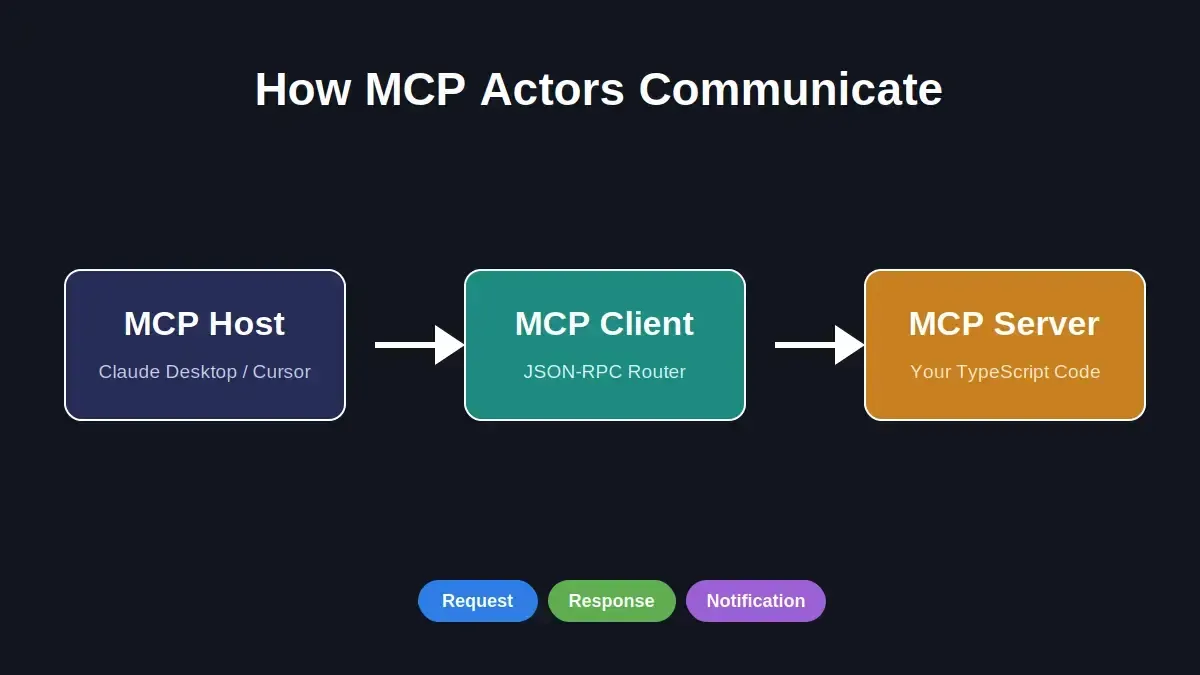
The three MCP actors: Host spawns the Client, which maintains a one-to-one session with your Server
MCP has already crossed 97 million monthly SDK downloads across TypeScript and Python. Claude, ChatGPT, Gemini, VS Code, and Cursor all support it natively. Understanding the message layer is what separates developers who build reliable MCP servers from those who debug mysterious timeouts.
How Does the Handshake and Capability Negotiation Work?
Every MCP session starts with the mcp protocol handshake. The MCP client and MCP server exchange their capabilities before any tool call can happen; this is what separates MCP from a plain REST API.
The Initialize-Ready Sequence
-
Step 1: The client sends initialize with its protocol version and supported capabilities.
-
Step 2: The server responds with its own capabilities, listing support for tools, resources, and prompts.
-
Step 3: The client confirms with notifications/initialized. The session is live.
-
Step 4: The client calls tools/list to get the full catalog with Zod-validated input schemas.
-
Step 5: When the AI agent needs to act, it sends tools/call with the tool name and validated arguments.
-
Step 6: The server returns a structured result or a typed error object.
The MCP developer guide for TypeScript walks through the full negotiation in production scenarios. For the authoritative protocol reference, see the official MCP specification.
Setting Up Your Project From an Empty Directory
Time to write code. Start by using an empty directory to create a new project, then install dependencies and configure TypeScript for your first MCP server.
1mkdir weather-mcp-server
2cd weather-mcp-server
3npm init -y
This project setup creates the foundation for a new MCP server.
Next, install dependencies. The Model Context Protocol SDK now ships as @modelcontextprotocol/server; the v1 package @modelcontextprotocol/sdk is the older name:
1npm install @modelcontextprotocol/server zod
2npm install -D typescript @types/node tsx
Configure TypeScript and Build Scripts
1{
2 "compilerOptions": {
3 "target": "ES2022",
4 "module": "NodeNext",
5 "moduleResolution": "NodeNext",
6 "outDir": "./dist",
7 "strict": true,
8 "esModuleInterop": true,
9 "skipLibCheck": true
10 },
11 "include": ["src"]
12}
1{
2 "type": "module",
3 "scripts": {
4 "build": "tsc",
5 "start": "node dist/index.js",
6 "dev": "tsx src/index.ts"
7 }
8}
src/index.tsis the main file for the server setup.
The@modelcontextprotocol/servernpm package bundles the MCP server class, transport adapters, and type definitions, supporting a typescript mcp server and giving you the core pieces for an mcp server implementation.
Zod handles input schema validation. The SDK works on Node.js, Bun, and Deno. Understanding how AI integrates into backend development gives useful context for the architecture decisions ahead.
Which Transport Should You Pick: stdio or Streamable HTTP?
Your MCP server needs a transport layer to send and receive JSON-RPC messages. In a typescript mcp setup, this transport choice depends on where your server runs: stdio transport is the local option, while Streamable HTTP fits remote or production use.
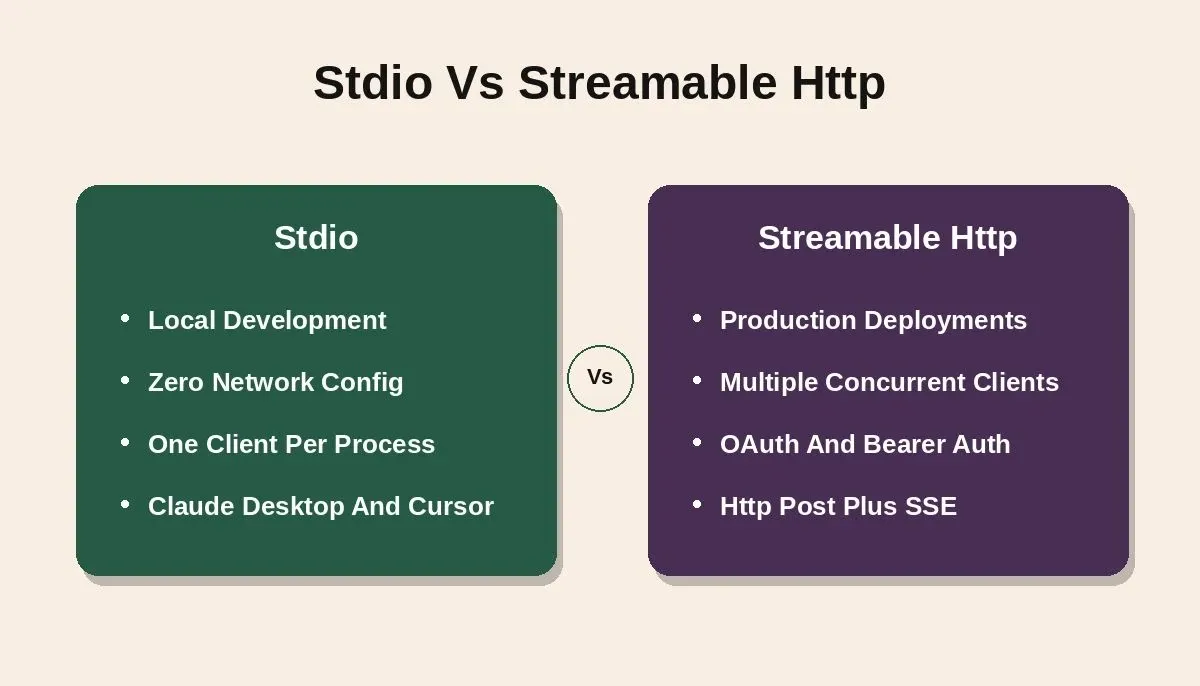
stdio is zero-config for local use; Streamable HTTP handles multi-client production deployments
| Factor | stdio | Streamable HTTP |
|---|---|---|
| Best for | Local development, IDE plugins, Claude Desktop | Production, cloud, multi-tenant |
| Connection | stdin/stdout between processes | HTTP POST + Server-Sent Events |
| Client limit | One client per process | Multiple concurrent clients |
| Auth support | Not needed (same machine) | OAuth, bearer tokens, API key headers |
| Network | None (local only) | Works across network boundaries |
| Setup complexity | Zero config | Requires Express, Fastify, or Hono |
-
Use stdio transport for local development. The MCP client launches your server as a subprocess and communicates through stdin/stdout. This is how Claude Desktop and Cursor IDE connect to local MCP servers.
-
Use Streamable HTTP for production. Clients send HTTP POST requests with JSON-RPC payloads. The server can stream results with SSE. This replaces the older HTTP+SSE transport from the 2024 protocol version.
-
Switching transports is cheap. The SDK abstracts the transport layer cleanly, so your tool handlers stay identical and only the transport initialization line changes.
Minimal stdio Server Loop
1import { McpServer } from '@modelcontextprotocol/server';
2import { StdioServerTransport } from '@modelcontextprotocol/server/stdio';
3
4const server = new McpServer({ name: 'my-weather-server', version: '1.0.0' });
5
6async function main() {
7 const transport = new StdioServerTransport();
8 await server.connect(transport);
9 console.error('MCP server running on stdio');
10}
11
12main();
This import setup uses the package paths from the modelcontextprotocol sdk server docs, including @modelcontextprotocol/server/stdio. The following code creates a new server instance and connects it over stdio. It mirrors the modelcontextprotocol sdk server stdio.js transport pattern while keeping the example minimal.
For local development, stdio is the fastest path to a working MCP server. Swap to Streamable HTTP when you are ready to deploy remotely. Understanding MCP vs standard API calls helps clarify why the transport abstraction matters.
Defining Tools With Zod-Validated Input Schemas
Tools are what make mcp tools useful to an AI model. Each tool definition tells the AI agent what the tool does, what arguments it needs, and what it returns, and these endpoints can expose custom tools backed by APIs or other integrations.
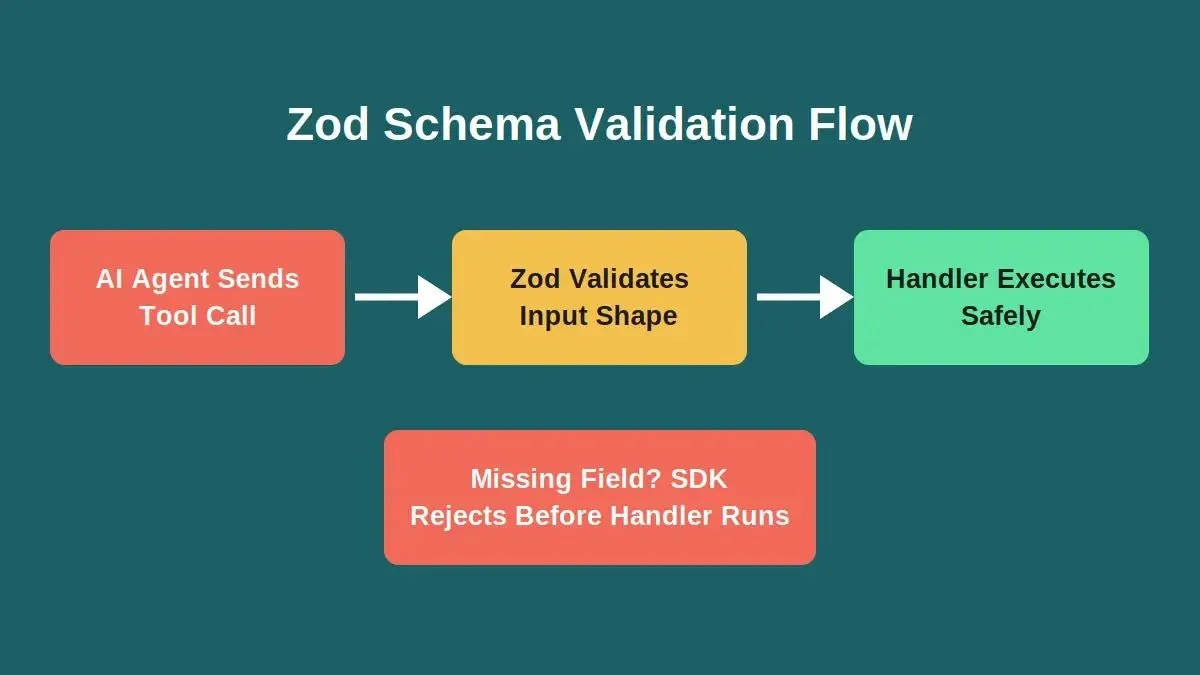
Zod validation runs before your handler; a missing required field is rejected before any code executes
The Tool Registration Pattern
1import { McpServer } from '@modelcontextprotocol/server';
2import { StdioServerTransport } from '@modelcontextprotocol/server/stdio';
3import * as z from 'zod/v4';
4
5const server = new McpServer({ name: 'my-weather-server', version: '1.0.0' });
6
7server.registerTool(
8 'get_weather',
9 {
10 description: 'Get current weather data for a city including temperature and humidity.',
11 inputSchema: z.object({
12 city: z.string().describe('City name'),
13 country: z.string().optional().describe('ISO country code')
14 })
15 },
16 async ({ city, country }) => {
17 const location = country ? `${city},${country}` : city;
18 const response = await fetch(
19 `https://api.weather.example/current?q=${encodeURIComponent(location)}&key=${process.env.WEATHER_API_KEY}`
20 );
21 if (!response.ok) throw new Error(`Weather API returned ${response.status}`);
22 const data = await response.json();
23 return {
24 content: [{
25 type: 'text' as const,
26 text: JSON.stringify({
27 temperature: data.current.temp_c,
28 condition: data.current.condition.text,
29 humidity: data.current.humidity
30 }, null, 2)
31 }]
32 };
33 }
34);
35
36// This pattern is useful when a tool should return real data from an external API instead of a hardcoded response.
37
38server.registerTool(
39 'get_weather_alerts',
40 {
41 description: 'Get active weather alerts for a location.',
42 inputSchema: z.object({ city: z.string().describe('City name') })
43 },
44 async ({ city }) => {
45 const response = await fetch(
46 `https://api.weather.example/alerts?q=${encodeURIComponent(city)}&key=${process.env.WEATHER_API_KEY}`
47 );
48 if (!response.ok) throw new Error(`Weather alerts request failed: ${response.status}`);
49 const data = await response.json();
50 return {
51 content: [{ type: 'text' as const, text: JSON.stringify(data.alerts, null, 2) }]
52 };
53 }
54);
55
56// The same registration approach also works when exposing capabilities tied to file systems or database access.
57
58async function main() {
59 const transport = new StdioServerTransport();
60 await server.connect(transport);
61}
62
63main();
Why the Description Field Matters
-
The description drives discoverability. The AI model reads this text to decide which tool to call. Write it like you would write a function docstring for a colleague.
-
Zod schemas validate at runtime. If the AI agent sends a tool call with a missing city field, the SDK rejects it before your handler executes.
-
Each tool returns structured content. The content array uses typed blocks (text, image, resource). AI agents parse structured data more reliably than free-form strings.
The weather server above is copy-paste ready. Save it assrc/index.ts,run npx``tsx src/index.ts, and connect it to any MCP client. The TypeScript SDK repository has runnable examples for more tool definition patterns. Two tools, one server, validated inputs; your weather server is now a simple MCP server that any AI agent can connect to.
Error Handling in Tool Call Errors and Structured Responses
A tool call can fail. The weather API might be down, user input might be malicious, or the response might arrive malformed.
-
Return isError: true instead of throwing. Unhandled exceptions crash the server process. The AI agent gets no response and may retry indefinitely. Wrap every handler in try/catch and return a structured error.
-
Distinguish fatal errors from recoverable ones. A 404 from the weather API is recoverable; an invalid API key is a fatal error that requires human action.
-
Validate more than the schema. Zod checks data shape, not intent. A valid string field could still contain injection payloads; sanitize user input inside the handler.
For repeated validation or fetch steps, helper functions can keep those checks consistent before the try/catch example below.
1server.registerTool(
2 'safe_weather_lookup',
3 {
4 description: 'Fetch weather data with timeout protection and error handling.',
5 inputSchema: z.object({
6 city: z.string().min(1).max(100),
7 timeout: z.number().optional().default(5000)
8 })
9 },
10 async ({ city, timeout }) => {
11 try {
12 const controller = new AbortController();
13 const timer = setTimeout(() => controller.abort(), timeout);
14 const response = await fetch(
15 `https://api.weather.example/current?q=${encodeURIComponent(city)}&key=${process.env.WEATHER_API_KEY}`,
16 { signal: controller.signal }
17 );
18 clearTimeout(timer);
19 if (!response.ok) throw new Error(`HTTP error: ${response.status}`);
20 const data = await response.json();
21 return {
22 content: [{ type: 'text' as const, text: JSON.stringify(data.current, null, 2) }]
23 };
24 } catch (err) {
25 const message = err instanceof Error ? err.message : 'Unknown error';
26 return {
27 content: [{ type: 'text' as const, text: `Error: ${message}` }],
28 isError: true
29 };
30 }
31 }
32);
Add unit tests for tool handlers and helper functions to verify both successful responses and error paths.
This pattern keeps your server running when external APIs fail. The AI agent gets a clear error message it can relay to the user, instead of silence or an infinite retry loop. Skipping this step is one of the most common ways AI-generated code breaks in production; unhandled throws, missing auth checks, and exposed secrets follow the same root cause: defensive patterns were never added.
Scaling to Multi-Tool Servers With Shared Context
Most production MCP servers expose more than two tools. When those tools share state like a database connection or an authenticated API client, you need a pattern for shared context.
The Shared Context Pattern
-
Create a shared context object. Store your database client, API credentials, cached data, and shared access details for backend data sources in one place. Pass it to tool handlers through closure scope.
-
Register multiple tools on the same server. Your MCP server can expose as many available tools as needed. The AI agent receives the full list during the handshake and picks the right one per task.
-
Keep each tool focused on specific tasks. A good working MCP server gives each tool a single responsibility. One queries users. Another creates tickets. The AI agent chains them together.
1const ctx = {
2 dbUrl: process.env.DATABASE_URL!,
3 apiKey: process.env.API_KEY!,
4 cache: new Map< string, { data: unknown; expires: number }>()
5};
6
7server.registerTool(
8 'query_users',
9 {
10 description: 'Query the user database by name or email for matching records.',
11 inputSchema: z.object({ search: z.string().describe('Name or email to search') })
12 },
13 async ({ search }) => {
14 const response = await fetch(`${ctx.dbUrl}/users?q=${encodeURIComponent(search)}`, {
15 headers: { 'Authorization': `Bearer ${ctx.apiKey}` }
16 });
17 const data = await response.json();
18 return { content: [{ type: 'text' as const, text: JSON.stringify(data) }] };
19 }
20);
21
22server.registerTool(
23 'create_ticket',
24 {
25 description: 'Create a support ticket in the tracking system with priority level.',
26 inputSchema: z.object({
27 title: z.string(),
28 body: z.string(),
29 priority: z.enum(['low', 'medium', 'high'])
30 })
31 },
32 async ({ title, body, priority }) => {
33 const response = await fetch(`${ctx.dbUrl}/tickets`, {
34 method: 'POST',
35 headers: { 'Authorization': `Bearer ${ctx.apiKey}`, 'Content-Type': 'application/json' },
36 body: JSON.stringify({ title, body, priority })
37 });
38 const result = await response.json();
39 return { content: [{ type: 'text' as const, text: `Ticket created: ${result.id}` }] };
40 }
41);
Both tools read credentials from the same context object instead of loading environment variables separately. This keeps your MCP server consistent across tool calls and avoids duplicated setup code. This pattern is also useful when a user sends related requests across multiple tools and the server needs consistent shared state. For a broader view of what you can build once your server is live, see real-world MCP use cases in full-stack development.
Adding Authentication Middleware to Your Endpoint
When you deploy an MCP server over Streamable HTTP, anyone with your URL can send tool calls. You need to handle authentication before any request reaches your tools.
-
Use bearer tokens for simple API key auth. Read the token from environment variables and validate it on every incoming request.
-
Add Express middleware for the HTTP transport. The SDK works with Express, Fastify, and Hono. Drop your auth check in as middleware before the MCP route handler.
-
Keep secrets in environment variables. Hard-coding tokens in source code leads to credential leaks in version control. Use .env files for local development and platform-level secrets for production.
1import { McpServer } from '@modelcontextprotocol/server';
2import { StreamableHTTPServerTransport } from '@modelcontextprotocol/server/streamableHttp';
3import express from 'express';
4
5const app = express();
6app.use(express.json());
7
8app.use('/mcp', (req, res, next) => {
9 const token = req.headers.authorization?.replace('Bearer ', '');
10 if (token !== process.env.MCP_AUTH_TOKEN) {
11 res.status(401).json({ error: 'Unauthorized' });
12 return;
13 }
14 next();
15});
16
17const server = new McpServer({ name: 'secure-server', version: '1.0.0' });
18const transport = new StreamableHTTPServerTransport({ sessionIdGenerator: undefined });
19await server.connect(transport);
20
21app.post('/mcp', (req, res) => transport.handleRequest(req, res, req.body));
22app.get('/mcp', (req, res) => transport.handleRequest(req, res));
23app.delete('/mcp', (req, res) => transport.handleRequest(req, res));
24
25app.listen(3001, () => console.error('Secure MCP server running on port 3001'));
This middleware blocks unauthorized tool calls before they reach your handlers. For production, swap bearer tokens for OAuth 2.0 using the SDK's built-in auth helpers. Securing your endpoints is also covered in depth in web application security best practices.
MCP SDK Adoption: By the Numbers
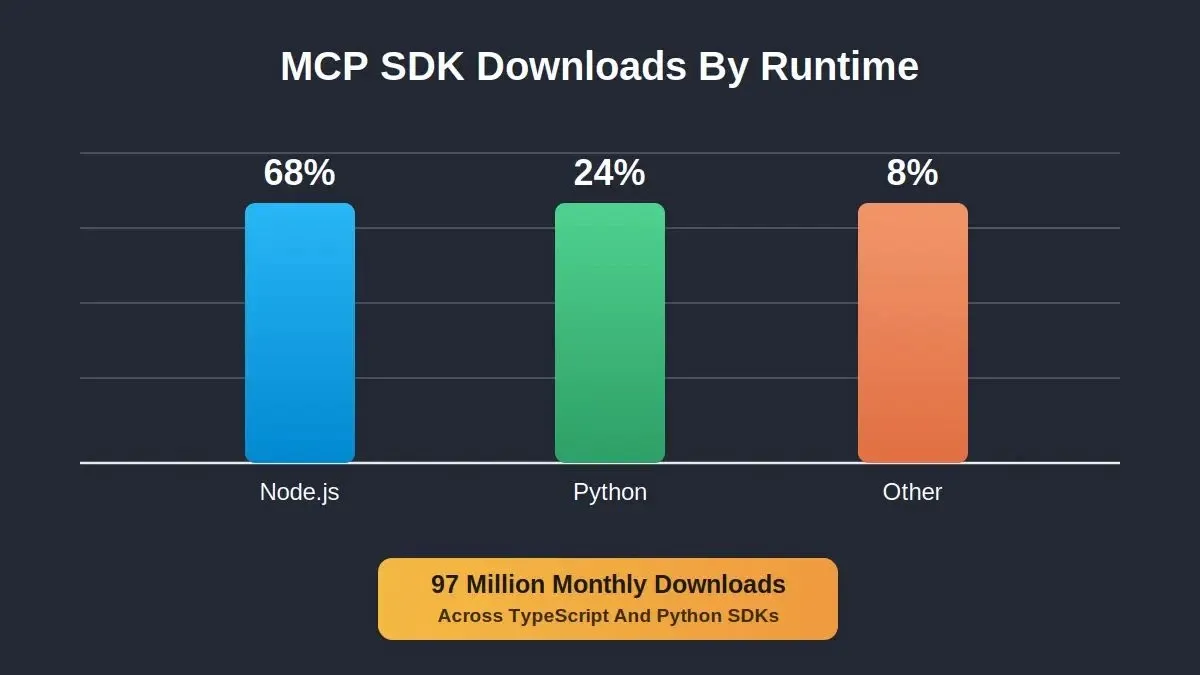
MCP SDK download distribution across runtimes, based on publicly available package registry data
The MCP ecosystem has grown rapidly since Anthropic introduced the protocol in late 2024. 97 million monthly SDK downloads signal that TypeScript remains the dominant implementation language. The TypeScript SDK repository is the canonical reference for version-specific APIs and breaking changes; always check it when upgrading.
Understanding how AI agents are used in full-stack development shows why MCP has become the standard connection layer between AI models and external tools.
From Empty Directory to Production-Ready MCP Server Implementation
You started with a TypeScript MCP server from scratch tutorial that began in an empty folder and now have a multi-tool MCP server with validated schemas, error handling, authentication middleware, and production-ready deployment patterns. The Model Context Protocol gives TypeScript developers a single standard for connecting AI agents to external tools and data sources. Every line of code in this guide works today with Claude, ChatGPT, VS Code, and Cursor.
Once the server works locally and in deployment, it can be packaged or shared more confidently. The gap between a local server and a deployed product is where most teams lose time. Rocket closes that gap by generating the frontend, backend, and connection layer from a single prompt.
Describe what you want to build in chat, connect your services from the Connectors panel (open via the ... menu in the preview toolbar), and ship to production in minutes. Start a Build session on Rocket.new.
Table of contents
- -
- -
- -How Does the Handshake and Capability Negotiation Work?
- -The Initialize-Ready Sequence
- -Setting Up Your Project From an Empty Directory
- -Configure TypeScript and Build Scripts
- -Which Transport Should You Pick: stdio or Streamable HTTP?
- -Minimal stdio Server Loop
- -Defining Tools With Zod-Validated Input Schemas
- -The Tool Registration Pattern
- -Error Handling in Tool Call Errors and Structured Responses
- -Scaling to Multi-Tool Servers With Shared Context
- -The Shared Context Pattern
- -Adding Authentication Middleware to Your Endpoint
- -MCP SDK Adoption: By the Numbers
- -From Empty Directory to Production-Ready MCP Server Implementation