
Describe your polyhouse setup to Rocket.new and get a production-ready scheduling app with zone controls, soil moisture alerts, and water reports in days, not months, no developer needed.
Build an automated irrigation scheduling app for your polyhouse with zone controls, soil moisture alerts, and water usage reports. Rocket.new turns a plain-language description into a production-ready Next.js or Flutter app, no developer required.
Key takeaways
-
A custom irrigation scheduling app replaces fixed timers with real-time soil and weather data, cutting water waste by 20-40%.
-
Core features: zone-wise scheduling, soil moisture threshold alerts, weather API integration, irrigation logs, and weekly water usage reports.
-
Rocket.new generates production-ready Next.js web apps and native Flutter mobile apps from a single prompt, with a Supabase backend scaffolded automatically.
-
Use Rocket's Solve pillar first to validate the market and scope features before building, then Build to ship in days, not months.
What Does an Irrigation Scheduling System Actually Do?
An irrigation scheduling system is the software layer between your sensors and your valves. It collects real-time data from the fields, compares it against thresholds and crop coefficients, and then triggers irrigation events at the right time for each zone.
-
Zone-wise control: each section of your polyhouse gets its own schedule based on crop type, soil conditions, and sun exposure
-
Sensor input processing: soil moisture sensors, temperature probes, and humidity readers feed field data into the system continuously
-
Weather-aware adjustments: the app pulls weather forecasts and adjusts irrigation timing before rain or temperature shifts
-
Alerting and logging: push notifications fire when moisture drops below a set point, and every irrigation event gets a timestamp in the log
-
Reporting dashboard: weekly water usage reports show consumption by zone, making it easier to spot waste and improve water management
The system replaces your manual spreadsheet-and-timer approach with a single application that monitors, decides, and acts. Think of it as the software brain your polyhouse operation has been missing. You can build this kind of app with AI in minutes using the right platform.
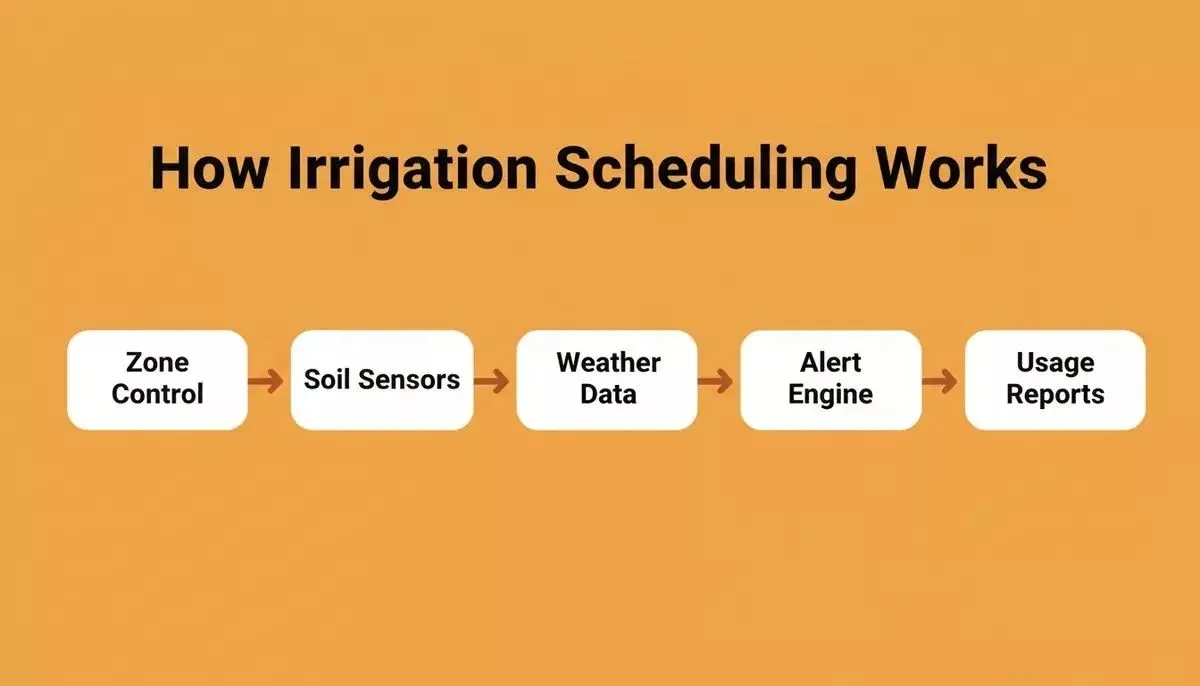
The five core components of a polyhouse irrigation scheduling system
Why Your Polyhouse Needs Automated Irrigation Scheduling Software
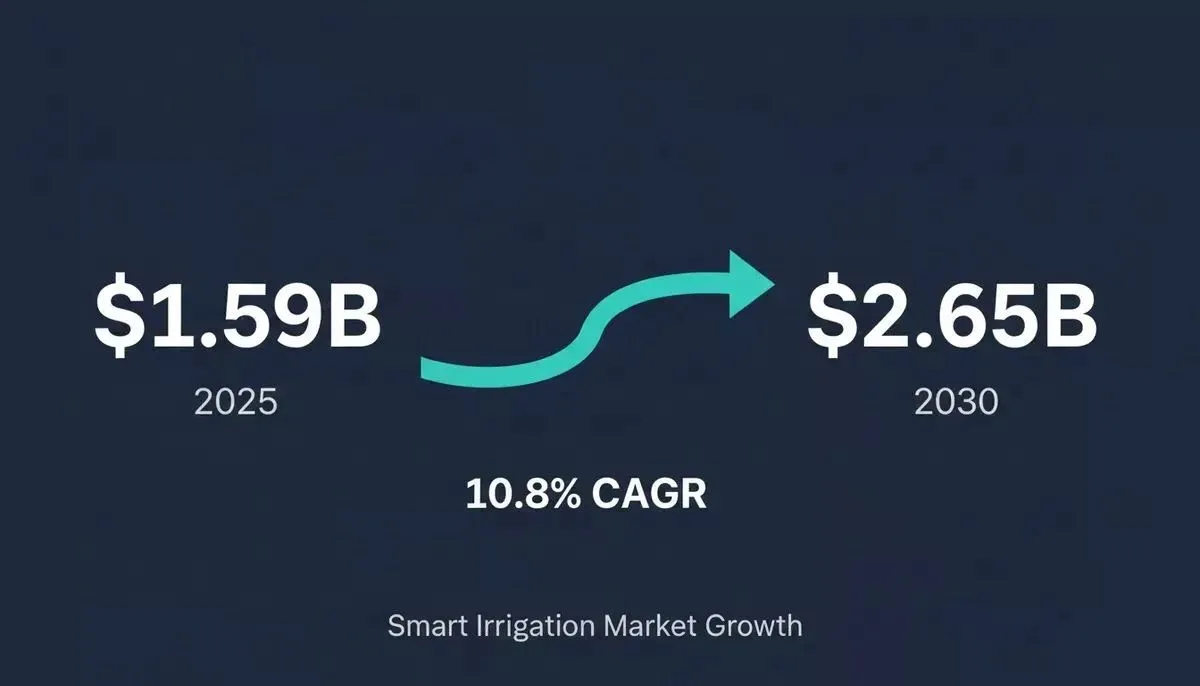
The global smart irrigation market is projected to grow from $1.59 billion in 2025 to $2.65 billion by 2030, at a CAGR of 10.8%. That growth signals one thing clearly: farms that lack scheduling software for their irrigation system fall behind on yield, water use efficiency, and crop performance.
A custom app that reads soil moisture, pulls weather data, and adjusts irrigation timing per zone can meaningfully reduce water waste each season. Farms using weather-based scheduling consistently report 20-40% reductions compared to fixed timer methods. The good news? You do not need to hire a development team to get one running.
Agriculture accounts for 69% of all freshwater withdrawals globally. Even a small improvement in scheduling accuracy inside a polyhouse operation translates to meaningful savings in water and input costs.
Smart irrigation market growth: $1.59B in 2025 to $2.65B by 2030
Should You Validate Before You Build?
Before writing a single line of code, use Rocket's Solve pillar to validate your irrigation app idea against real market data. Solve turns a business question such as "Is there a paid SaaS market for polyhouse irrigation scheduling in South Asia?" into a structured, evidence-backed research report in minutes.
Solve can map the competitive landscape of commercial ag-irrigation platforms, identify pricing benchmarks, and recommend which features to prioritize for your specific crop type and region. You get a decision-ready brief before committing to a build, which is exactly how Rocket's research-to-launch workflow is designed to work.
Once Solve confirms the market opportunity and scopes the feature set, you move to Build with a clear prompt rather than a vague idea. This is also how non-developers build production-grade apps without a developer on Rocket.
Which Features Should Your Polyhouse App Include?
The difference between a basic scheduling tool and an effective irrigation scheduling software comes down to feature depth. Your app needs to handle the full cycle from data collection to action to reporting.
Here is what a well-designed polyhouse irrigation scheduling software should include:
| Feature | What It Does | Why It Matters |
|---|---|---|
| Zone configuration | Map each polyhouse section with its own crop type and schedule | Different crops need different water volumes per season |
| Soil moisture threshold alerts | Send push notifications when readings fall below set levels | Prevents underwatering without daily manual checks |
| Weather API connection | Pull forecast and evapotranspiration data via API import | Adjusts schedules before rain, reducing waste |
| Irrigation log with timestamps | Record every irrigation event with zone, duration, and volume | Creates an audit trail for crop performance analysis |
| Weekly water usage report | Summarize consumption trends across all zones | Identifies leaks, inefficiencies, and cost savings |
| Remote monitoring (web or mobile) | Access schedules and sensor readings from a responsive web dashboard or a native Flutter app | Reduces labor on-site for small farm teams |
| Crop coefficient library | Store evapotranspiration multipliers by crop type and growth stage | Powers accurate scheduling decisions per the FAO-56 Penman-Monteith methodology |
The tools you choose should connect to your existing database layer for storing historical irrigation data. Rocket's AI app builder with database integration handles this automatically through Supabase, giving you a managed Postgres backend from day one.
How Do Soil Moisture Sensors Feed Scheduling Decisions?
This is where the IoT layer meets your irrigation scheduling software. Soil moisture sensors are the first input in a chain that determines when, where, and how much water each zone receives.
-
Sensor placement: probes sit at root depth in each zone, reading volumetric water content at intervals you configure (every 5, 15, or 30 minutes)
-
Data transmission: readings travel via an IoT gateway (WiFi, LoRa, or cellular) to your app's API endpoint
-
Threshold comparison: the scheduling engine compares each reading against the crop-specific moisture threshold stored in your connected system
-
Trigger or hold: if moisture drops below the threshold, the app queues an irrigation event for that zone; if a rain forecast exists, it holds and rechecks later
-
Valve control signal: once the scheduling engine confirms the trigger, it sends an API call to the relay controller that opens the solenoid valve for the scheduled duration
The entire process runs without human input. No worker is walking between zones with a moisture meter. No guessing based on how the soil looks.
The collected field data also feeds long-term crop performance models. Over multiple seasons, the app learns which threshold settings produce the best yield for each crop type in your specific environment.
Why Rocket Is the Fastest Path to Your Farm Software
Rocket removes the bottleneck between your irrigation idea and a working application.
Most polyhouse operators face a frustrating reality: commercial irrigation scheduling tools are either too generic or too expensive. Building from scratch means hiring developers who understand both agriculture and software architecture, a process that can run into the tens of thousands of dollars and take months.
Here is what Rocket does for your irrigation app:
-
Describe your polyhouse setup in plain language: tell Rocket you need zone-wise scheduling, soil moisture alerts, a weekly water usage report, and an irrigation log; it generates the full application
-
Production Next.js web app or native Flutter mobile app: not a prototype or mockup, but a deployable application with real database connections, API routes, and responsive UI; if your farm team needs a native iOS or Android app, Rocket generates Flutter code ready for App Store and Google Play submission
-
Supabase backend scaffolded automatically: your sensor data, irrigation events, and reports all flow into a managed Postgres database with user authentication, file storage, and edge functions, without configuring infrastructure yourself
-
26+ connectors spanning payments, databases, AI models, email, analytics, CRM, and hosting: connect notification services (Twilio for SMS, SendGrid for email), analytics tools, and more from the first build
-
Connect any REST API via Postman, cURL, or Swagger: weather data services like OpenWeather, IoT gateway endpoints, and MQTT broker APIs connect through Rocket's API import feature; paste a Postman collection, cURL command, or Swagger spec and Rocket binds the responses to UI components automatically
Rocket also ships apps with built-in SEO optimization, WCAG accessibility, and GDPR compliance as defaults, so your irrigation dashboard is production-ready from the first build.
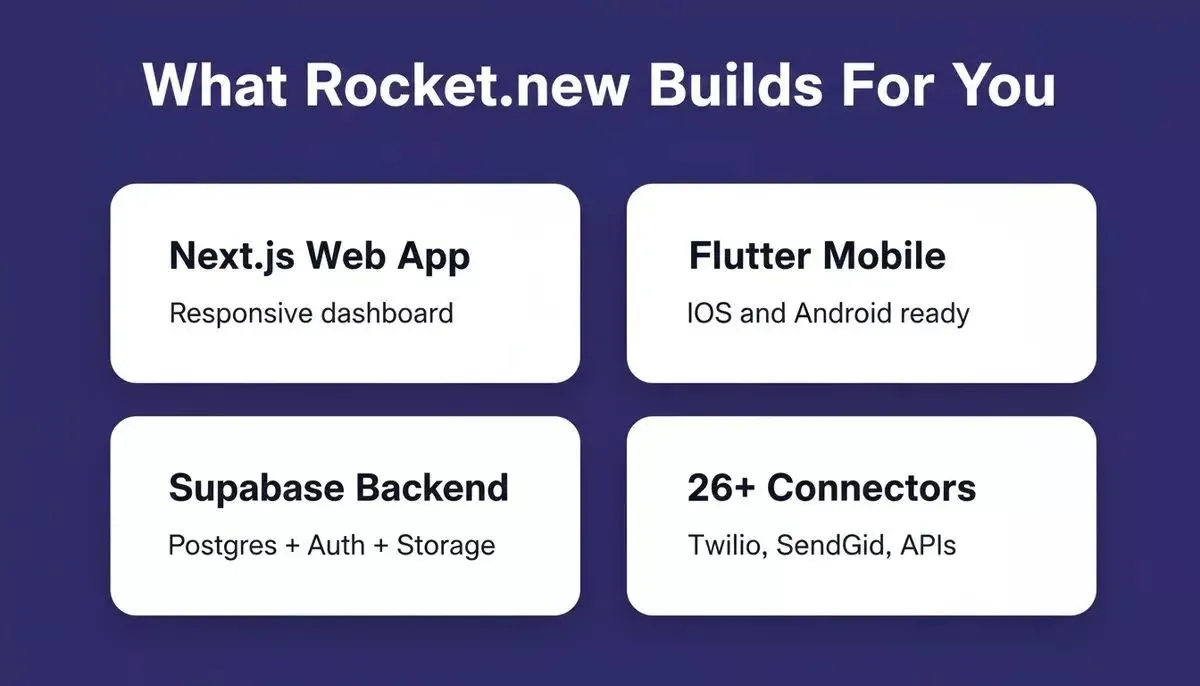
Rocket.new generates the full stack: web app, mobile app, backend, and integrations from a single prompt
*"Who is going to maintain it, long-term? Even if the business needs aren't very dynamic, the software is. This is the biggest problem I've seen with any software in any business. Buying and installing is only the beginning."- *CaptTom, Home Assistant Community
That maintenance concern is exactly why Rocket matters for farms. You do not need a developer on staff. When your requirements shift next season, you describe the change, and Rocket handles the update.
Rocket vs. Commercial Ag-Tech vs. Custom Development
| Criteria | Rocket | Off-the-shelf Ag SaaS | Custom Development |
|---|---|---|---|
| Time to working app | Days | Immediate, but rigid | Months (3-6, industry estimates) |
| Customization | Full: describe any feature | Limited to the vendor roadmap | Full |
| Cost | Subscription | Subscription + per-zone fees | Tens of thousands in labor |
| Mobile output | Next.js web + Flutter native | Vendor-defined | Depends on the team |
| API integrations | 26+ connectors + any REST API | Vendor-defined | Custom-built |
| Source code access | Full ownership | None | Full ownership |
| Maintenance | Describe changes in chat | Vendor-managed | Requires developer |
| Polyhouse-specific logic | You define it | Generic field-crop defaults | You define it |
Rocket is the only option that gives you full ownership, full customization, and a working app in days. For teams that want to build a full-stack app from a single AI prompt, this is the fastest path from idea to production.
How Can Weather Data Improve Water Use Efficiency?
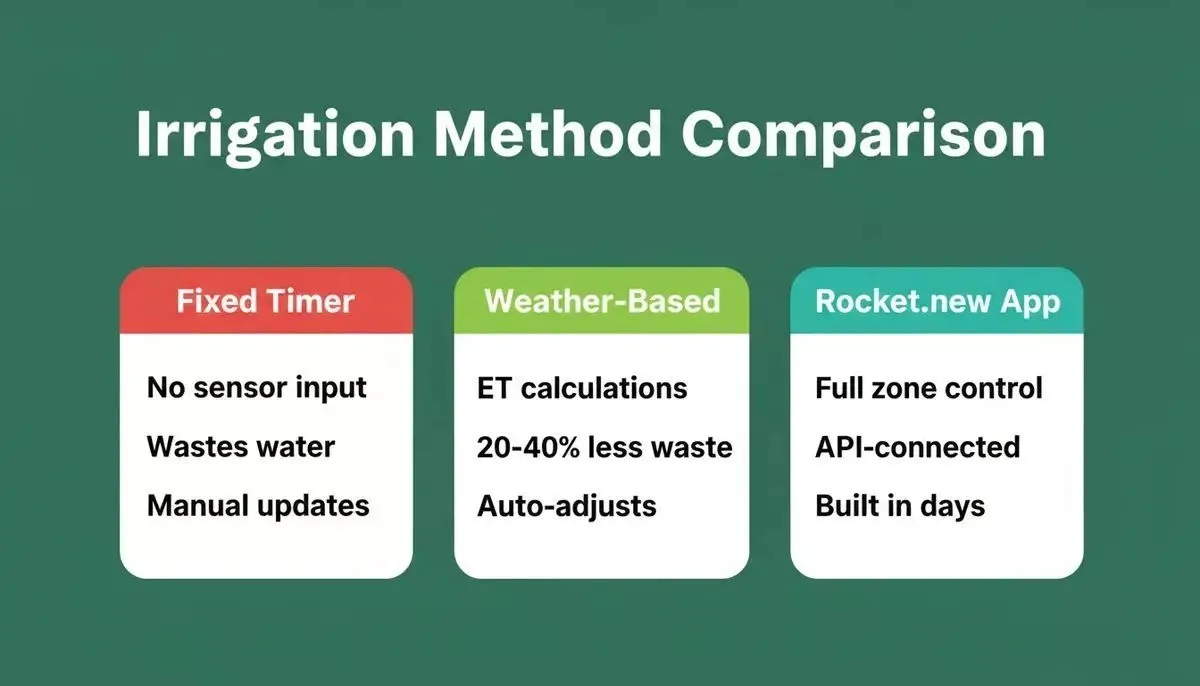
Weather data is the second critical input for irrigation scheduling software, right after soil moisture. Farms using weather-based scheduling consistently report 20-40% reductions in water waste compared to fixed timer methods.
Fixed timer irrigation vs weather-based scheduling vs a custom Rocket.new app
In Rocket, you connect a weather data service such as OpenWeather using the API import feature: paste the endpoint as a cURL command or Postman collection, and Rocket binds the response data to your scheduling logic automatically. There is no pre-built weather connector to search for; the API importer handles any REST endpoint.
-
Evapotranspiration calculations: the app pulls daily ET rates from a weather API and calculates how much water each crop type actually loses to the atmosphere using the FAO-56 Penman-Monteith method; this determines the precise volume needed per zone
-
Rainfall predictions: if rain is forecast within the next 24 hours, the system delays scheduled irrigation events automatically, preventing waste
-
Temperature and humidity adjustments: hot, dry days increase evapotranspiration; the scheduling software compensates by extending irrigation duration or moving events to early morning when efficiency peaks
-
Water budget tracking: your weekly report shows actual usage against the weather-adjusted target, making it simple to find zones that consistently over-deliver
The combination of real-time weather data and soil moisture readings creates a feedback loop that makes your irrigation recommendations more accurate over time. This is the same principle behind best-in-class AI workflow automation that adapts based on live data rather than fixed rules.
What Steps Take You from Idea to Running App?
Getting your irrigation scheduling application from concept to a live, working system does not require months of planning. Here is the process, start to finish.
-
Validate with Solve: run a Rocket Solve query on your target market to confirm demand, scope features, and identify competitive gaps before building
-
Map your polyhouse zones: list each section, its crop type, soil composition, and current irrigation method; this becomes your input to the app builder
-
Define scheduling rules: decide on moisture thresholds per zone, preferred irrigation timing, maximum daily water budget, and alert conditions
-
Describe the app to Rocket: write a natural language prompt covering your zones, schedules, alerts, reports, and any requirements like multi-user access or native mobile app
-
Connect your APIs: import your IoT gateway endpoint, weather API (e.g., OpenWeather via cURL import), and notification service credentials using environment variables
-
Test with real sensor data: run irrigation events on a small zone, verify the log captures timestamps correctly, and confirm alerts fire when moisture drops below your threshold
-
Launch and automate: deploy to production, set up daily data sync schedules, and train your farm team on the dashboard
The entire journey from idea to a running irrigation management application takes days rather than months. Rocket's AI-powered development workflow is built specifically for this kind of rapid, iterative deployment.
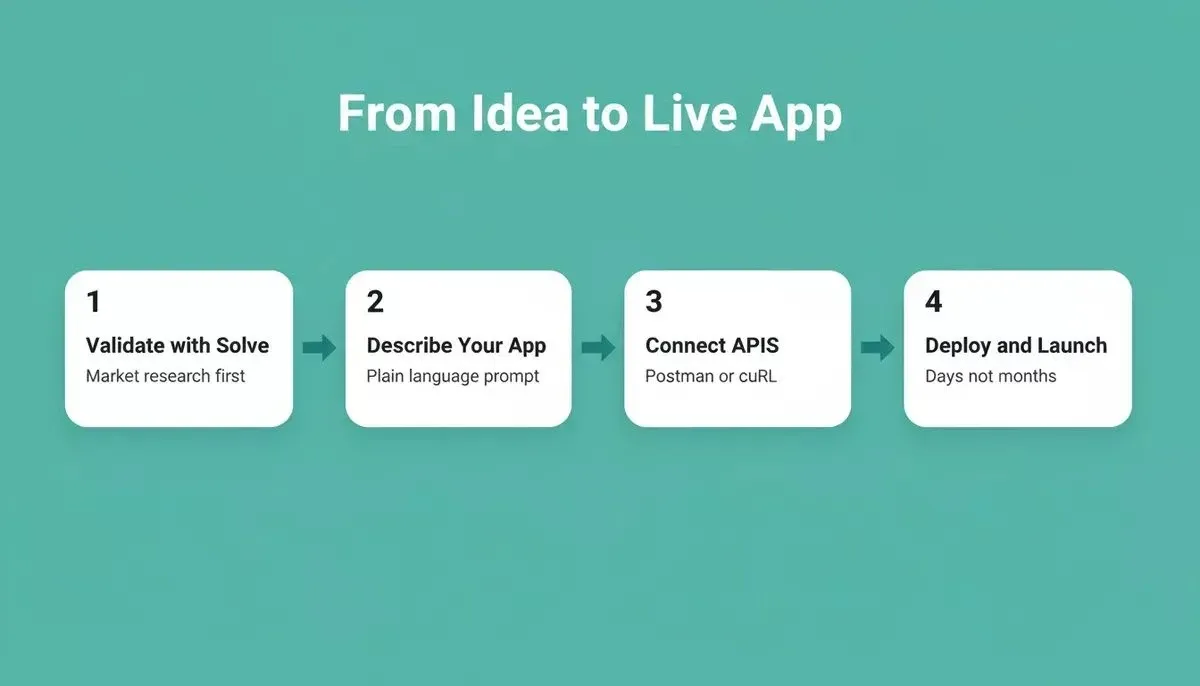
Four steps from idea to a live irrigation scheduling app using Rocket.new
Your Polyhouse Deserves a Software Brain
The farms that win in the next decade will not rely on guesswork or basic scheduling alone. They will run on real-time data from their fields, accurate weather-based recommendations, and apps designed specifically for their operation.
Your polyhouse is already generating the data. Soil moisture sensors are affordable, weather APIs are free, and the scheduling logic is well understood. The only missing piece is the software that ties it all together into a single pane of control, and that is something you can describe in a sentence and have running by tomorrow.
Stop relying on fixed timers and guesswork for your polyhouse irrigation. Rocket gives you a production-ready scheduling app, either a Next.js web dashboard or a native Flutter mobile app, with zone controls, soil moisture alerts, and weekly water reports, built from a plain-language description in minutes.
Table of contents
- -What Does an Irrigation Scheduling System Actually Do?
- -Why Your Polyhouse Needs Automated Irrigation Scheduling Software
- -Should You Validate Before You Build?
- -Which Features Should Your Polyhouse App Include?
- -How Do Soil Moisture Sensors Feed Scheduling Decisions?
- -Why Rocket Is the Fastest Path to Your Farm Software
- -Rocket vs. Commercial Ag-Tech vs. Custom Development
- -How Can Weather Data Improve Water Use Efficiency?
- -What Steps Take You from Idea to Running App?
- -Your Polyhouse Deserves a Software Brain