
Learn how to create landing pages that convert using Rocket.new. This guide covers anatomy, design principles, step-by-step setup, campaign types, and common mistakes, with AI-powered tools that take you from prompt to published in under 30 minutes.
Most landing pages fail before a visitor even reads the headline. The design looks fine. The copy sounds reasonable. But the page has no clear purpose, no focused message, and no reason for the visitor to act.
That is the real problem.
Learning how to create landing pages that convert is not about picking the right color scheme. It is about structure, intent, and the right tools.
Rocket removes the technical barriers so you can focus entirely on what your audience needs and what action you want them to take.
Why Landing Pages Are Vital for Marketing Efforts
Landing pages differ from regular web pages because they are single-purpose, focused pages. Unlike a homepage that serves multiple goals, a dedicated landing page targets one specific offer or campaign.
Every element on the page, from the headline to the form to the button, exists to move one visitor toward one action. That single-minded focus is what makes landing pages the highest-converting asset in digital marketing.
Benefits of creating landing pages include:
- Targeted audience engagement: Speak directly to your target audience with content that matches their intent.
- Lead generation: Collect email addresses or form submissions without the noise of a full website.
- Improved conversions: High-converting landing pages reduce distractions and keep visitors focused on the desired action.
- Trackable performance: Use Google Analytics and built-in analytics to monitor traffic, engagement, and conversion rates.
- Campaign-specific messaging: Match your ad copy to your landing page copy for a seamless experience that builds trust.
What Makes a Landing Page Different From a Website
A website answers many questions. A landing page answers one. Your homepage introduces your brand, product, team, pricing, and blog. A landing page says: here is the offer, here is why it matters to you, here is what to do next.
Companies with more than 40 landing pages generate 12 times more leads than those with fewer than five. More targeted pages mean more matched intent, and matched intent converts.
The Anatomy of a High-Converting Landing Page
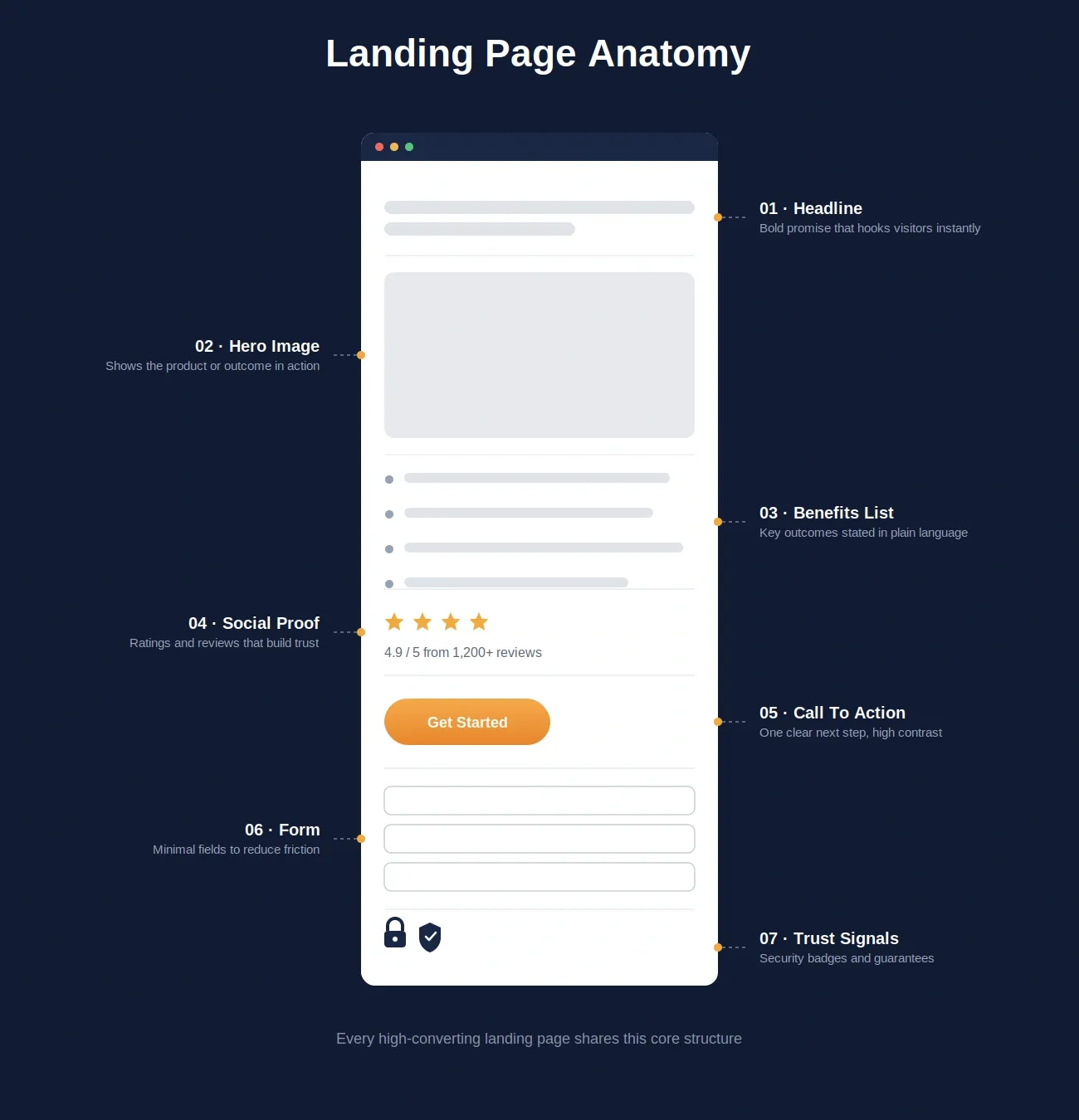
Every high-converting landing page shares the same core structure. Understand it before you build.
Before you build anything, it helps to understand what every high-converting landing page has in common:
| Element | Purpose | Best Practice |
|---|---|---|
| Headline | Communicate the core value immediately | Match the ad or link the visitor clicked |
| Subheadline | Expand on the headline with specifics | One sentence, benefit-focused |
| Hero image or video | Build visual context and trust | Show the product or outcome, not a stock photo |
| Benefits list | Answer "what do I get?" | Three to five points, outcome-oriented |
| Social proof | Reduce risk and build credibility | Testimonials, logos, review counts |
| Call to action (CTA) | Drive the single desired action | One CTA per page, verb-led, specific |
| Form | Capture lead information | Ask for only what you need |
| Trust signals | Remove final objections | Privacy policy, security badges, guarantees |
Features of Rocket That Make Landing Page Creation Faster
Rocket simplifies the entire process of designing, publishing, and tracking landing pages, from the first prompt to the final analytics report.
Every Rocket build starts with a solid baseline: semantic HTML, clean page titles, basic meta descriptions, and mobile-responsive layouts. From there, you ask Rocket in chat to go further. Run /Improve Accessibility Audit to reach WCAG 2.1 AA compliance, /Implement Privacy Compliance to add GDPR and CCPA consent flows, and /Improve SEO to add optimized meta tags, structured data, and sitemaps. This is the product working in front of you, not a black box.
- Natural Language Prompt: Describe your offer in plain language and Rocket builds the structure, copy, and layout.
- Figma Import: Convert your design files into live, editable landing pages without developer handoff.
- AI-Powered Backend: Automatically handles logic, data, and workflows so your forms work on launch day.
- Custom Domain: Connect your own domain with automatic HTTPS setup on Pro and above.
- Code Download and 2-Way GitHub Sync: Developers can download, edit, and sync the output. Note this applies to Next.js and TypeScript projects.
- Visual Editor: Click any element to change text, style, spacing, or images without writing code.
- Theme Editor: Change fonts, colors, and logo across your entire page from one panel.
- Slash Commands: Use / commands to run precise edits or apply changes instantly.
- Staging and Production Environments: Test in staging before pushing to production.
- Built-in Analytics: Monitor visits, traffic sources, and performance from day one.
- Version Control and Rollback: Every build saves a version. Compare diffs and roll back with one click.
Together, these features make Rocket a complete AI landing page builder for both simple lead capture pages and complex, multi-channel campaigns. To go deeper on design decisions, see what makes a good landing page.
How to Create Landing Pages: A Step-by-Step Guide
The core landing page workflow in Rocket: from first prompt to live production page.
Step 1: Sign Up and Set Up Your Workspace
The free plan gives you 20 credits with no credit card required. That is enough to build and test your first landing pages before committing to a paid plan. Account creation takes under a minute at Rocket.new with quick sign up.
Once inside, create a new project and give it a descriptive name like "Product Launch Campaign" or "Lead Generation Pages." Your workspace becomes the hub for all your landing pages, templates, connected tools, and analytics. Everything stays in one place, so no context is lost between sessions.
Step 2: Select a Landing Page Template or Start From a Prompt
You have two paths: start from a template or start from a prompt. Both work well. The right choice depends on how clearly defined your vision is.
Start from a template when you have a clear campaign type, want a professional structure quickly, or need to move fast. Start from a prompt when your offer is unusual, highly specific, or you want Rocket's AI to generate a structure matched to your exact use case.
Rocket's template library covers every major campaign type, with over 25,000 free templates:
- Portfolio landing pages: Showcase work, case studies, or credentials.
- Blog landing pages: Highlight articles, featured content, and newsletter sign-ups.
- Offers landing pages: Promote discounts, freebies, or lead magnets.
- Online store landing pages: Display products, shopping carts, and checkout flows.
Pro Tip: Choose mobile-responsive templates. Over 60 percent of web traffic comes from mobile devices. A page that breaks on mobile loses more than half its potential conversions.
Step 3: Add Content Using AI Assistance
Rocket's AI builder generates content for every section of your landing page. You describe the offer and it produces the structure, copy, and layout.
Hero Section and Headline
The hero section is the most important real estate on your landing page. Visitors decide within three seconds whether to stay or leave, so your headline needs to communicate the core value immediately.
Offer Details and Body Copy
For multi-section landing pages, the body copy handles the objections your visitor has before they reach the CTA. The goal is to reduce skepticism at every scroll depth, not just at the CTA.
Media Integration
Visuals do work that words cannot. Keep media file sizes optimized, because every additional second of load time directly reduces your conversion rate.
Step 4: Customize Landing Page Design
A landing page that looks like a template converts less than one that looks like your brand. Customization is not cosmetic. It is a trust signal.
| Design Decision | Conversion Impact |
|---|---|
| Single CTA color contrasting with the page | Increases click-through rate |
| White space around the CTA button | Draws the eye and reduces visual noise |
| Headline font size above 32px | Improves readability on mobile |
| Form fields reduced to the minimum | Reduces abandonment rate |
| Trust badges placed near the CTA | Reduces final-moment hesitation |
Step 5: Connect Analytics and Marketing Tools
A landing page without tracking is a guess. Integrating analytics and email marketing turns your landing page from a static page into a measurable, self-improving marketing asset.
For more on this, see landing page optimization for more leads.
Step 6: Publish Your Landing Page
Once content, design, and integrations are in place, push to staging first. Aim for a load speed under two seconds on mobile, since speed is both a ranking factor and a conversion factor.
Step 7: Monitor and Improve
High-converting landing pages are built through iteration, not inspiration. The first version is a hypothesis, and every visitor interaction is evidence.
According to Unbounce's Conversion Benchmark Report, the median conversion rate across all industries is 6.6 percent. Top-performing landing pages written at a 5th to 7th grade reading level convert at 11.1 percent or higher.
Landing Page Performance by the Numbers
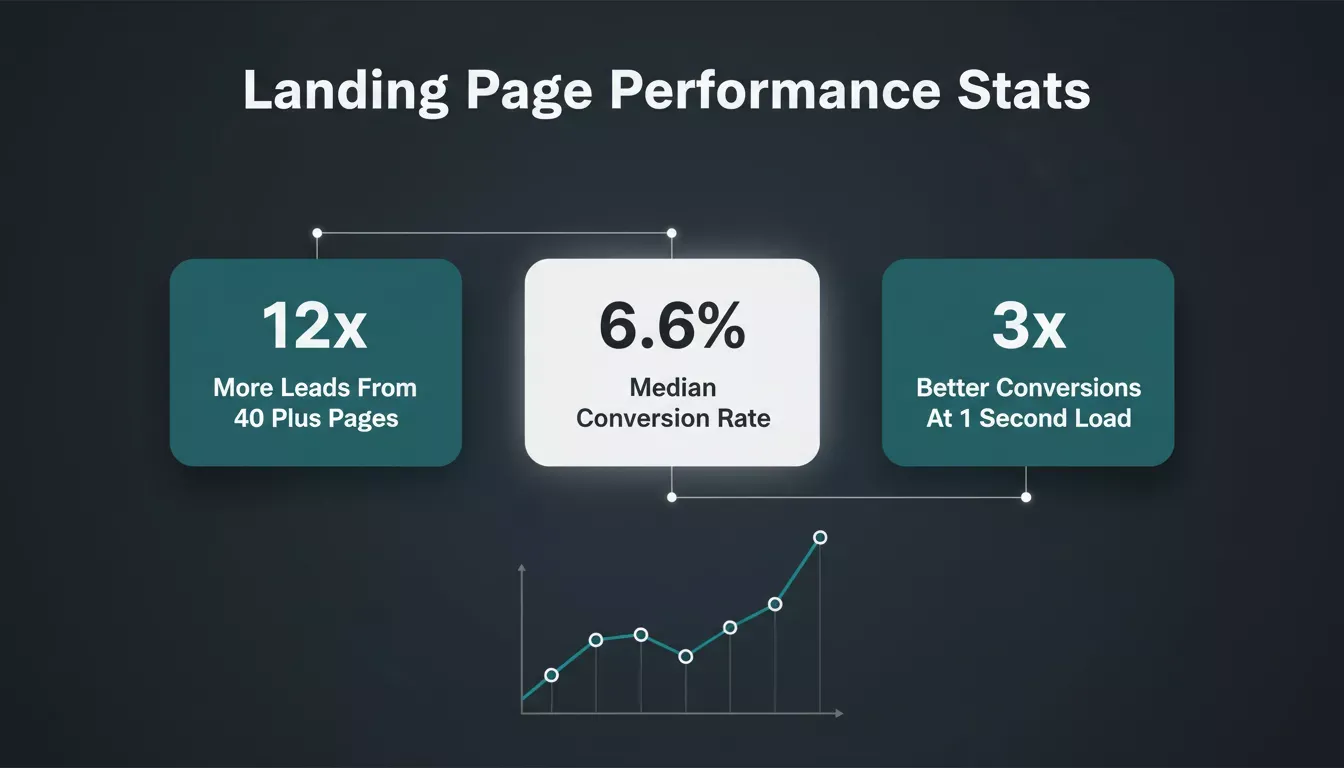
Key benchmarks every marketer building landing pages should know.
Understanding the data behind landing page performance helps you set realistic targets. The numbers consistently show that structure, speed, and focus drive results more than visual polish.
Organic search drives roughly 53% of all website traffic, making well-optimized landing pages one of the highest-ROI assets in any digital marketing strategy. Pages that load in one second convert three times better than pages that take five seconds.
Landing Page Design Principles That Drive Conversions
A good landing page focuses on clarity, simplicity, and guiding visitors toward a single action without distractions.
The Clarity Principle
Clarity is not about minimalism. It is about intent. Every element should answer: What is the offer? Why does it matter? What do I do next?
The Friction Principle
Reducing friction at every step improves conversions automatically, without changing a single word of copy.
The Trust Principle
Social proof, trust signals, and specific numbers all reduce skepticism faster than any design choice.
The Mobile-First Principle
Over 60 percent of web traffic now comes from mobile devices. Build every section assuming the visitor is on a small screen with one thumb and limited patience.
Common Landing Page Mistakes and How to Avoid Them
| Mistake | Why It Hurts Conversions | Fix |
|---|---|---|
| Multiple CTAs on one page | Splits attention and creates decision paralysis | One CTA per page, always |
| Headline that matches the brand, not the ad | Breaks message match and increases bounce rate | Mirror the language of the traffic source |
| No social proof above the fold | Visitors leave before reaching testimonials | Add a trust bar or review count near the headline |
| Form asking for too much information | Increases abandonment | Start with email only; collect more later |
| No mobile optimization | Loses 60%+ of potential conversions | Test on multiple devices before launch |
| Slow load speed | Every second of delay costs conversions | Compress images and minimize scripts |
| Vague CTA copy | Reduces click-through rate | Use specific, action-oriented language |
If you are evaluating whether to build these pages yourself or use a dedicated tool, see how AI app builders compare on ROI for a breakdown of the tradeoffs.
Landing Page Use Cases by Campaign Type
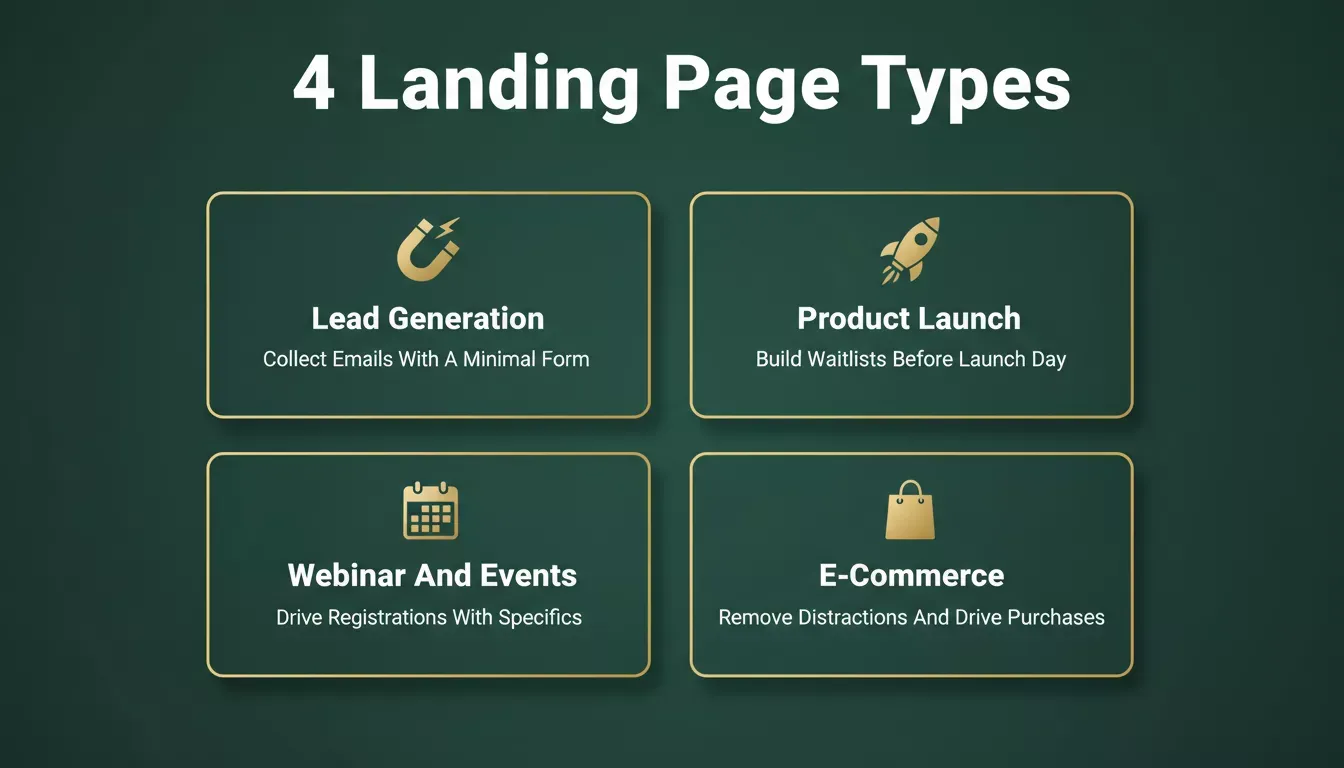
Match your landing page structure to your campaign goal. The right structure for the right intent converts better.
Lead Generation Landing Pages
Goal: Collect email addresses or contact information. The fewer fields on the form, the higher the submission rate.
Product Launch Landing Pages
Goal: Build anticipation and capture early sign-ups before launch. Urgency and exclusivity are the two most effective conversion drivers on pre-launch pages.
Webinar and Event Landing Pages
Goal: Drive registrations for a specific event. Specificity converts on event pages.
E-Commerce Product Landing Pages
Goal: Drive purchases for a specific product or offer. Remove every navigation link from e-commerce landing pages.
If you want to create a landing page specifically for course enrollment, see how to create a landing page for course enrollment for a focused walkthrough.
How Rocket Compares to Traditional Landing Page Builders
Most landing page builders give you a canvas and expect you to fill it. Rocket starts from your intent. You can also read how landing page design can increase conversions for a deeper look at the principles behind conversion-focused design.
Where an AI-powered builder differs from traditional landing page builders across every stage of the build.
| Feature | Traditional Builders | Rocket.new |
|---|---|---|
| Content generation | Manual: you write everything | AI generates from your natural language prompt |
| Design starting point | Template or blank canvas | 25,000+ templates or AI-generated structure |
| Backend logic | Requires integrations or code | Handled automatically |
| Figma import | Not available in most tools | Native Figma-to-code pipeline |
| Analytics | Requires third-party setup | Built-in analytics plus connectors |
| Custom domain | Available with paid plans | Available on Pro and above |
| Code access | Rarely available | Download, edit, and 2-way GitHub sync (Next.js/TypeScript) |
| SEO, accessibility, GDPR | Manual setup required | Baseline included; full compliance via slash commands |
| Staging environment | Rarely available | Staging and production environments included |
| Market research before build | Not available | Solve handles research before you build |
For a side-by-side look at how Rocket.new stacks up against a specific competitor, see Rocket.new vs Webflow for business websites.
Rocket Pricing
Rocket uses a credit-based system with no per-seat fees. All paid plans include unlimited team members. Subscription credits roll over month to month while your plan stays active. On yearly plans, credits roll over within the year and reset at renewal. If you cancel, unused credits expire at the end of your billing cycle. Credit add-ons do not expire while your subscription is active.
| Plan | Monthly Price | Monthly Credits | Best For |
|---|---|---|---|
| Free | $0 | 20 (one-time) | Light, exploratory, and personal use |
| Pro | $25 | 100 | Production-ready websites, landing pages, and web apps |
| Rocket | $50 | 250 | Full Rocket suite for individuals and teams |
| Booster | $250 | 1,500 | Power users and fast-moving teams |
A 20 percent discount applies to all yearly plans. For enterprise pricing, contact support@rocket.new. For the full breakdown, visit the Rocket pricing page.
Next Steps for Landing Page Success
Learning how to create landing pages with Rocket gives you a practical, repeatable system for growing your brand, capturing leads, and increasing conversions across every campaign.
- Sign up and create your workspace. Free, no credit card needed.
- Start from one of 25,000+ templates or a natural language prompt matched to your campaign.
- Add AI-generated content for every section.
- Customize design using the Visual Editor and Theme Editor.
- Connect Google Analytics, Mixpanel, and your email marketing tool.
- Run /Improve SEO, /Improve Accessibility Audit, and /Implement Privacy Compliance before launch.
- Push to staging, test on all devices, then launch to production.
- Monitor performance data using built-in analytics.
- Iterate based on what the data tells you, not what you assume.
For more on the full build process, see how to build a landing page without coding and a quick landing page setup guide.
Start Building Landing Pages That Convert
Most pages fail because they try to do too much. One page. One offer. One action. That is the formula. The tools that used to make this hard, including design, copy, backend logic, and analytics, are handled by Rocket from the first prompt.
Landing pages are not a one-time project. They are a continuous system: build, publish, measure, improve. 1.5 million people across 180 countries have tried Rocket. Start with your first landing page. Sign up for free and go from prompt to published in under 30 minutes.
Table of contents
- -Why Landing Pages Are Vital for Marketing Efforts
- -What Makes a Landing Page Different From a Website
- -The Anatomy of a High-Converting Landing Page
- -Features of Rocket That Make Landing Page Creation Faster
- -How to Create Landing Pages: A Step-by-Step Guide
- -Step 1: Sign Up and Set Up Your Workspace
- -Step 2: Select a Landing Page Template or Start From a Prompt
- -Step 3: Add Content Using AI Assistance
- -Hero Section and Headline
- -Offer Details and Body Copy
- -Media Integration
- -Step 4: Customize Landing Page Design
- -Step 5: Connect Analytics and Marketing Tools
- -Step 6: Publish Your Landing Page
- -Step 7: Monitor and Improve
- -Landing Page Performance by the Numbers
- -Landing Page Design Principles That Drive Conversions
- -The Clarity Principle
- -The Friction Principle
- -The Trust Principle
- -The Mobile-First Principle
- -Common Landing Page Mistakes and How to Avoid Them
- -Landing Page Use Cases by Campaign Type
- -Lead Generation Landing Pages
- -Product Launch Landing Pages
- -Webinar and Event Landing Pages
- -E-Commerce Product Landing Pages
- -How Rocket Compares to Traditional Landing Page Builders
- -Rocket Pricing
- -Next Steps for Landing Page Success
- -Start Building Landing Pages That Convert