

An ideal customer profile is the data-backed foundation that keeps sales, marketing, and customer success teams focused on the same type of account. This guide explains what an ICP is, how it differs from a buyer persona, which firmographic, technographic, and behavioral data inputs matter most, and how to build one step by step with a ready-to-fill template.
Are your sales teams spending too much time chasing leads that never convert or customers who never stay?
That is the core idea behind ICP-based selling.
According to Salesforce's State of Sales research, 86% of business buyers are more likely to buy when a company genuinely understands their goals. The closer your pitch maps to the right customer profile, the stronger your conversion and retention will be.
An ICP is a detailed description of the organization that gets the most value from your product or service. It captures which customers convert fastest, churn least, and tend to refer others. Sales and marketing teams that build one-stop, chase dead-end leads, and start spending their time on the customers most worth winning.
This blog covers the full process, including a ready-to-fill template.
What is an ICP, and how is it different from a buyer persona?
What is an ICP?
An ICP is a data-backed description of the organization type that benefits most from your product or service. Think of it as a profile of your ideal customer account: the one that closes at a reasonable pace, sticks around for the long term, and refers other companies your way.
The ICP is primarily a B2B tool. It describes a company, not a person. Common ICP characteristics include:
-
Industry vertical and market segment
-
Company size by headcount or annual revenue
-
Geographic location and regional focus
-
Specific pain points your product addresses
-
Technology stack currently in use
-
Buying process structure and how many decision makers are typically involved
Your ICP acts as a north star for go-to-market teams. When the sales team, marketing team, and customer success team all work from the same customer profile, everyone targets the same type of company. Most companies that struggle with inconsistent lead quality are either operating without an ICP or working from one too vague to act on.
Teams that invest in CRM app development alongside their ICP work find that lead scoring and pipeline prioritization become significantly more precise from day one.
ICP vs. buyer persona: the key differences
These two tools often get confused. They serve related purposes but operate at different levels.
A buyer persona is a semi-fictional representation of an individual inside a target company. It captures job title, goals, objections, and daily frustrations. In B2B, a buyer persona might be "Head of Revenue Ops at a 200-person SaaS company who needs better pipeline data and is skeptical of new tooling."
An ideal customer profile, on the other hand, describes the organization itself. It answers: "What type of company should we be selling to?" rather than "Who do we reach first inside that company?" The two work together. You build the ICP first, then develop a buyer persona for each key decision maker at your target accounts.
Here is a quick comparison:
| Dimension | ICP | Buyer Persona |
|---|---|---|
| Level | Organization | Individual person |
| Describes | The company type that is your best-fit customer | A fictional representation of the buyer at that company |
| Used for | Account targeting, lead scoring, pipeline prioritization | Messaging, content personalization, outreach copy |
| Context | Primarily B2B | Both B2B and B2C |
| Built from | CRM data, revenue, and retention metrics | Customer interviews, surveys, behavioral patterns |
Once you have a solid ICP, your customer profiles for each segment become sharper and far easier to act on. Sales can score inbound leads against them. Marketing can target the right audience with the right message. And your product team gets clearer signals about what features matter most to the customers most likely to convert and stay long term.
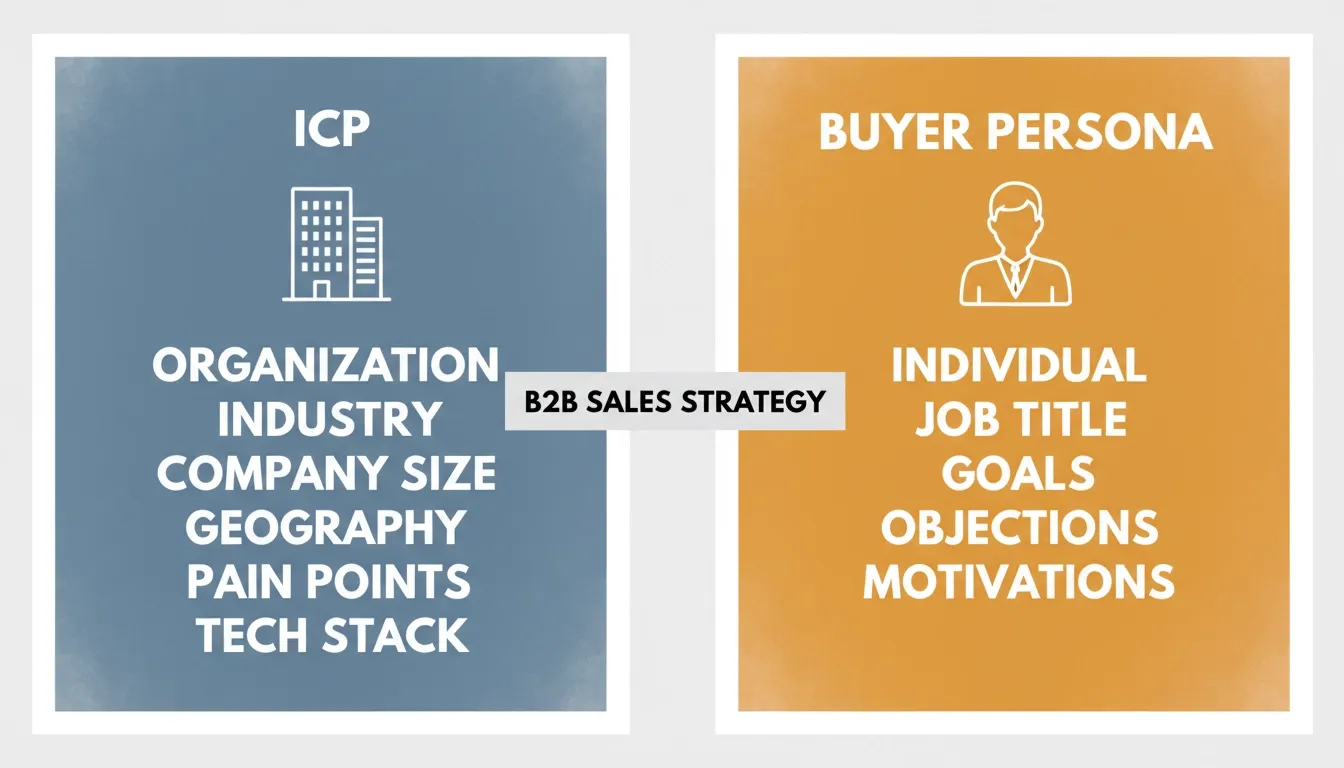 ICP targets the organization; buyer persona targets the individual decision maker within it.
What firmographic, technographic, and behavioral data goes into your ICP?
An ICP is only as good as the data behind it. The inputs that matter most sit at the intersection of "filterable at entry" and "predictive of long-term customer value." Here is how the three main data layers break down.
Firmographic data
Firmographic data describes the structural characteristics of a company, the way demographics describe a person. These are the foundational inputs for most customer profiles:
-
Industry: Which sector does the company operate in? B2B software, logistics, healthcare, and financial services each carry different pain points, budget cycles, and decision-making structures.
-
Company size: Headcount bands (e.g., 50-500 employees) make a fast first filter. Annual revenue is often a better proxy for actual budget authority.
-
Geography: Country, region, or time zone. Some products serve specific regulatory environments or language markets.
-
Business stage and growth rate: A seed-stage startup and a Series C company have very different needs and pain points, even if they share the same industry vertical.
Firmographic data is where most ICP efforts start because it is the most accessible. Your CRM likely already holds it for all your existing customers.
Technographic data
Technographic data captures the technology stack your target companies currently run. It is one of the most reliable fit signals in B2B software, because it tells you whether a company is primed to adopt your category or whether you would be fighting for budget and behavior change simultaneously.
Key technographic inputs include:
-
Current CRM or sales platform (Salesforce, HubSpot, etc.)
-
Marketing automation and data tools
-
Cloud infrastructure provider
-
Specific integrations your product connects with
-
Stack maturity indicators, such as advanced analytics versus manual spreadsheets
Understanding your prospects' tech stack for web development and infrastructure choices gives you a strong signal of whether a company is ready to adopt your solution or still building foundational capabilities. Sourcing technographic data typically means using third-party intelligence tools or reviewing public job listings and company documentation.
Behavioral and psychographic data
Behavioral data captures what your target companies actually do: buying patterns, content engagement, intent signals, and typical sales cycle length. Psychographic data goes a layer deeper into values and culture. Does this company prioritize speed over caution? Are their leaders early adopters? Do they attend industry events?
Together, these signals help you understand not just who the company is, but how it makes purchase decisions. Most of this comes from customer interviews, CRM notes, and feedback gathered during and after the sales process. It is harder to scale than firmographic data but often the most predictive layer of all.
Why all three data layers matter
Account-based marketing programs that combine all three layers consistently outperform single-dimension targeting. A TOPO/Gartner benchmark cited by Pipedrive found that companies with well-developed customer profiles had 68% higher account win rates than those without. Firmographic data tells you size and industry but says nothing about intent.
Technographic data confirms the stack but many customers run the same stack and never buy. Behavioral signals tell you someone is searching, but without firmographic filters you chase the wrong customers. All three layers together is what makes customer profiles both accurate and actionable.
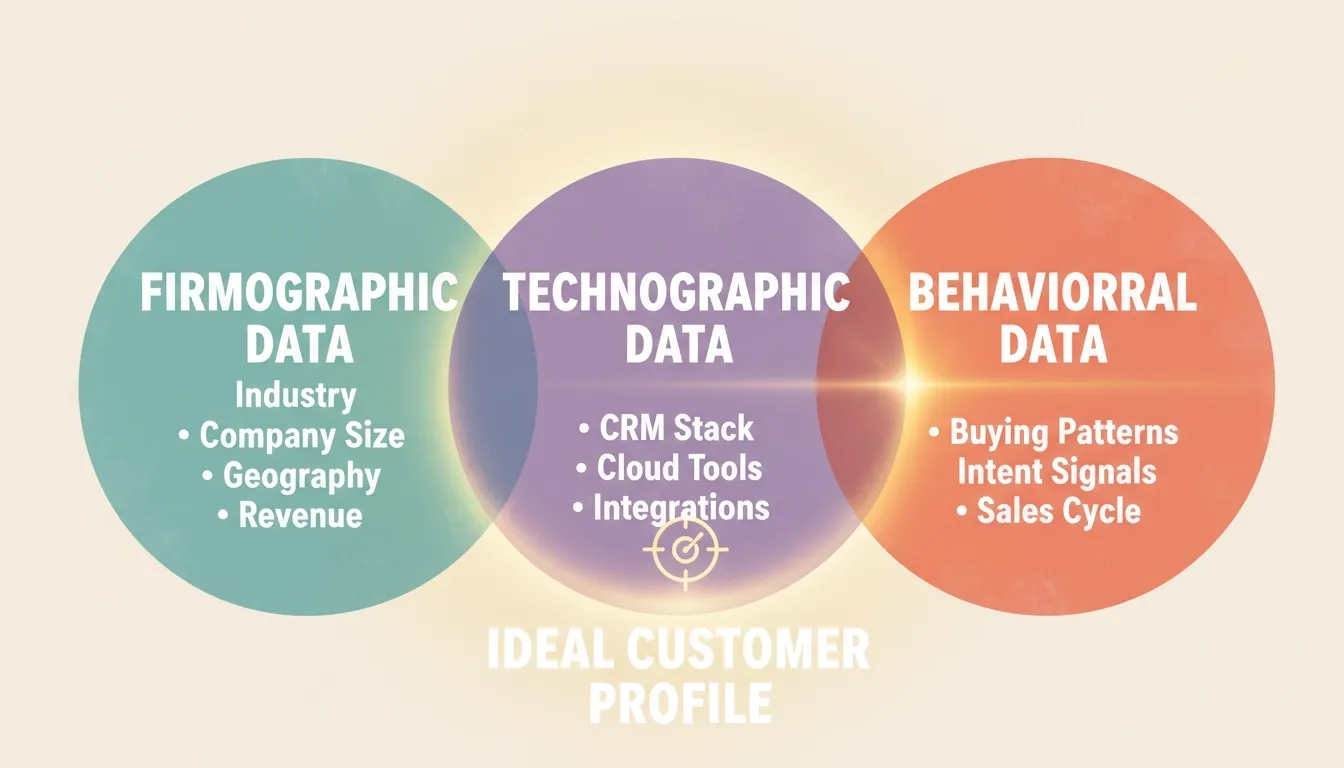 Combining all three data layers produces customer profiles that are both accurate and actionable.
How do you build your ICP, step by step?
There are dozens of ICP-building frameworks out there. Most reduce to four repeatable steps that work regardless of company size or market. Here is the process that consistently produces accurate customer profiles.
Step 1: Identify your best current customers
Pull your existing customers from the CRM and score them against objective criteria:
-
Total and recurring revenue generated
-
Customer lifetime value relative to acquisition cost
-
Sales cycle length at close
-
Support ticket volume per account
-
Referrals generated by these customers
-
Renewal and expansion rates
The goal is to find your top 10-20 accounts: the customers that bring in real revenue, rarely churn, and cost relatively little to serve. These are your best customers, and they contain the pattern you are looking for. If you are early-stage with fewer than ten closed deals, start with the accounts that have the strongest outcome stories. You can refine the profile as more data comes in.
Step 2: Find what they have in common
Look at your top customers and ask: what do these companies share? Look for patterns across industry, company size, geographic location, technology stack, the specific pain points that drove the purchase, and who the decision maker was at each account.
Build your ideal customer pattern across at least eight to ten accounts before concluding. A single data point is a coincidence. A consistent pattern across most of your best customers is the signal worth acting on.
Before committing to a direction, it is worth taking time to validate your business idea before coding — the same evidence-first discipline that sharpens your ICP also prevents you from building for the wrong customer segment.
Step 3: Validate with your sales and customer success teams
Your data tells one part of the story. Your people complete it.
Run your draft list of shared characteristics by sales reps, your customer success team, and your product team. Sales reps know which customers feel right from the first call. Your customer success team sees which customers get value fast and which ones churn despite good onboarding. Collecting feedback from cross-functional teams keeps customer profiles grounded in real behavior, not assumptions. Refine based on what you hear.
Step 4: Document, share, and refine
An ICP only creates value once it is shared and used. Write it in a single accessible document, share it across sales, marketing, customer success, and product, and build it into your lead scoring and targeting filters.
Plan to review the profile every six months, or sooner if close rates drop or churn spikes in a specific customer segment. As your business grows and your current customer base expands, the profile of your most valuable customers will sharpen. Treat it as a living reference that gets better over time, not a one-time exercise.
Here is a visual overview of how these four steps connect:
According to Salesforce's State of Sales research, 86% of business buyers are more likely to buy when a company genuinely understands their goals. The closer your pitch maps to the right customer profile, the stronger your conversion and retention will be.
The ICP template: what to fill in and share with your whole team
A well-built ICP is only useful if it is documented and accessible to everyone who needs it. Here is a standard ICP template that gives your sales, marketing, customer success, and product teams a single shared reference.
Core ICP fields
Use this as a starting point. Fill in each row based on your data and customer research, then make the document available to all relevant teams. When every team works from the same customer profile, targeting decisions, content strategy, and onboarding flows all point toward the same type of customer.
| Field | Description | Example |
|---|---|---|
| Industry | Which vertical does the company operate in? | B2B SaaS, cybersecurity, logistics |
| Company size | Headcount range or revenue band | 50-500 employees, $5M-$50M ARR |
| Geography | Country, region, or regulatory zone | US and Canada, or EU only |
| Primary pain points | The 2-3 core problems your product solves | Manual reporting, poor pipeline visibility |
| Technology stack | Tools already in use that signal fit | Salesforce, HubSpot, Slack, AWS |
| Decision makers | Who initiates and who approves the purchase | VP of Sales initiates, CFO approves |
| Buying triggers | Events that make a company ready to buy | Funding round, leadership change, team growth |
| Sales cycle length | Typical time from first touch to close | 30-90 days |
| Disqualifiers | Traits that signal a bad-fit customer | Single-person teams, no dedicated ops role |
| Customer lifetime value | Expected revenue over the full relationship | $24K-$60K LTV |
Once complete, store this document somewhere your sales team and marketing team can find and update it. A shared Notion page, a Google Doc, or pinned fields in your CRM all work. What matters is that the ICP template stays current and gets used in real lead qualification decisions.
Share it with your customer success team as well. When CS knows the profile of your best-fit customers, they catch at-risk accounts earlier and run more targeted content and expansion plays.
For teams building a product around a defined ICP, how to build a B2B SaaS product with AI covers how to align product decisions with the customer segments your ICP defines.
How Rocket Intelligence turns your target customers into a prospect pipeline
You have defined your ICP. Now comes the harder part: finding the companies that match it and reaching them before your competitors do.
What Rocket Intelligence tracks
Rocket Intelligence gives you a live, browseable directory of companies with signal tracking built in. Rather than building prospect lists by hand or running static filters through LinkedIn Sales Navigator, Rocket tracks what actually changes at the companies you follow:
-
Pricing page updates: Companies revising their pricing are often renegotiating vendor relationships or expanding their budgets.
-
Hiring signals: A new VP of RevOps or Head of Procurement signals readiness to buy tools like yours.
-
Product changes: New features or announcements show the company is moving in a direction that may align with your solution.
-
News and funding events: A Series B close or a new strategic partnership can be a strong buying trigger for customers that match your ICP.
All of this is publicly browseable. When you follow your target customers on Rocket Intelligence, personalized intel arrives directly in your inbox or Slack, timed to the signals that actually matter.
Better than manual list-building
Most teams building prospect lists start with LinkedIn Sales Navigator or a static data export. Those tools give you a snapshot. Rocket gives you motion.
LinkedIn Sales Navigator does a reasonable job filtering by firmographic criteria, but signal freshness is inconsistent, exports start aging the moment you download them, and there is no automatic alerting when a customer in your ICP triggers a real buying event. The result: your sales team ends up manually checking company pages, re-exporting the same lists, and missing the moments that matter.
With Rocket Intelligence, you follow accounts that fit your customer profile and let the platform surface the most active ones. The result is a pipeline of high value customers showing buying intent, not just companies that pass a firmographic filter. That is the difference between a static list and a live prospect pipeline. See how competitive intelligence for enterprise sales turns signal tracking into closed deals.
How to get started with Rocket Intelligence
Start with five to ten companies that represent your ideal target customer. Follow them on Rocket Intelligence and watch the signal layer fill in. Free to start, no credit card required. The first match you identify could be your next best customer.
How to Build Ideal Customer Profile
Building a clear picture of your best customers is not just a marketing exercise. It is a business-wide operating standard that keeps sales, marketing, and customer success teams focused on the same type of account. When every team works from the same customer profile, targeting sharpens, messaging improves, and the customers who convert are far more likely to stay.
Start with your data. Pull your top accounts, find what they share, validate with your teams, and document the result. Then put it to work in lead scoring, content strategy, and the conversations your sales team has every single day. Your ICP is only as valuable as the action it drives.
Ready to put your ICP to work? Start building on Rocket and turn your ideal customer profile into a live prospect pipeline, free to start, no credit card required.
Table of contents
- -What is an ICP, and how is it different from a buyer persona?
- -What is an ICP?
- -ICP vs. buyer persona: the key differences
- -What firmographic, technographic, and behavioral data goes into your ICP?
- -Firmographic data
- -Technographic data
- -Behavioral and psychographic data
- -Why all three data layers matter
- -How do you build your ICP, step by step?
- -Step 1: Identify your best current customers
- -Step 2: Find what they have in common
- -Step 3: Validate with your sales and customer success teams
- -Step 4: Document, share, and refine
- -The ICP template: what to fill in and share with your whole team
- -Core ICP fields
- -How Rocket Intelligence turns your target customers into a prospect pipeline
- -What Rocket Intelligence tracks
- -Better than manual list-building
- -How to get started with Rocket Intelligence
- -How to Build Ideal Customer Profile


