
Offline-first Flutter apps store data locally first and sync in the background. This guide covers local databases (Drift, Hive, Isar), sync strategies, conflict resolution, and how to build without a dev team using AI tools.
Building an offline-first Flutter app no longer requires writing sync logic, database schemas, or conflict resolution code from scratch. This guide covers the architecture patterns, local database options, and sync strategies you need, plus how AI app builders let you skip weeks of manual setup.
Who this guide is for: Flutter developers who want to understand offline-first architecture, product managers evaluating mobile app tooling, and non-technical founders who want to ship a reliable offline-capable mobile app without a dev team.
Why Does Offline Performance Matter for Mobile Users?
An app truly works offline when its local database serves as the primary source of truth. All reads and writes happen on-device first, with the server syncing in the background when connectivity returns. Without this, your app is one subway tunnel away from a broken experience.
According to the ITU, approximately 2.2 billion people remain without reliable internet access globally. That is roughly 25% of the world's population still offline. For app developers, this data translates into a simple reality: if your app depends on an active internet connection for every interaction, you are excluding a massive user base.
Poor connectivity is not limited to remote villages. Subway tunnels, airplane mode, basement offices, and spotty rural coverage all produce the same result. The offline-first approach flips the traditional model by treating network availability as an enhancement, not a requirement.
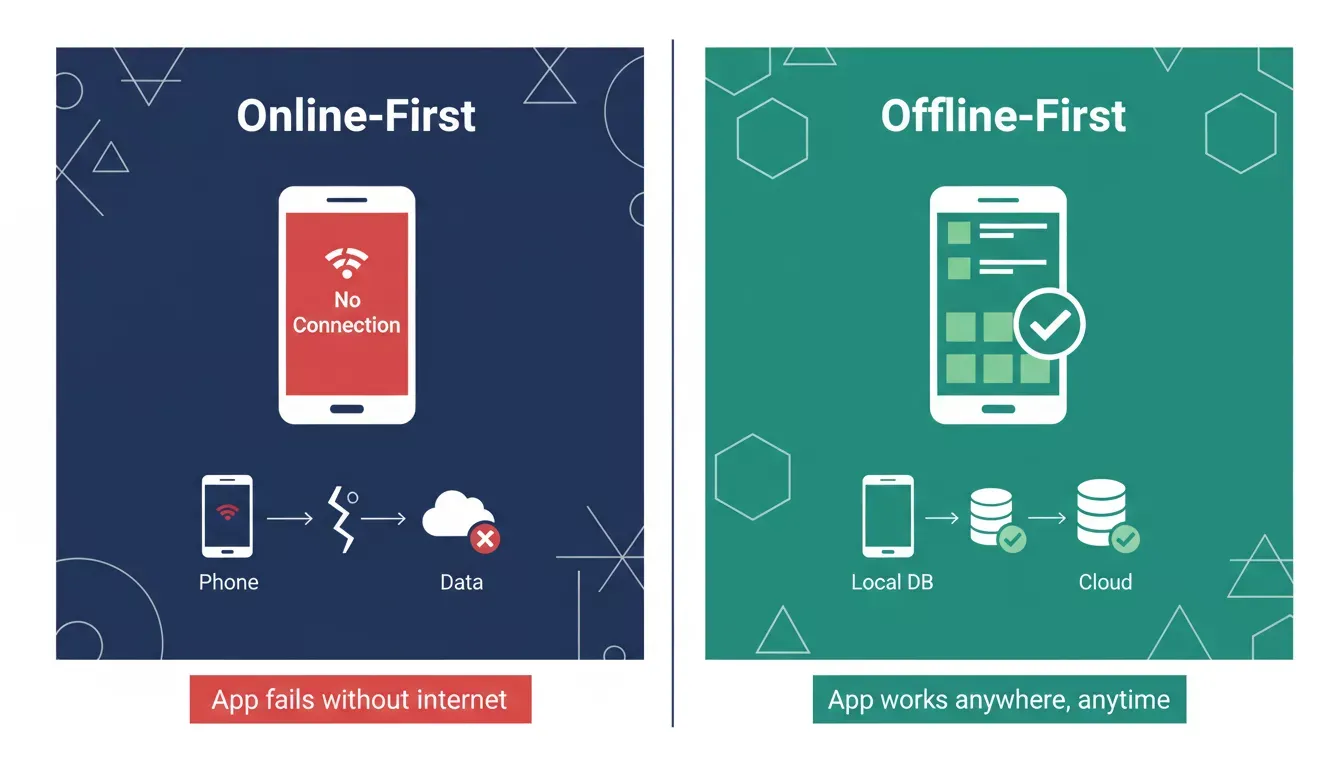
Offline-first apps keep working when the network drops. Online-first apps break.
What Makes an App Truly Work Without Internet?
Offline first architecture is not just caching a few screens. It is a fundamentally different approach to how data flows through your application. The three core principles are: a local database as the single source of truth, background synchronization instead of blocking network calls, and a defined conflict resolution strategy.
Here is how offline-first apps differ from the traditional online-dependent approach:
| Aspect | Online-First App | Offline First App |
|---|---|---|
| Data source | Remote server | Local database |
| Poor connectivity UX | Spinners, errors, data loss | Instant response, stored locally |
| Sync behavior | Every action needs a network | Background queue |
| Reliability | Requires an active internet | Works anywhere, anytime |
Key characteristics of a properly built offline-first Flutter app:
-
The local database becomes the single source of truth. Every read and write operation happens against on-device storage first, making the app feel instant.
-
Network requests become background synchronization tasks. The user never waits for a server response to complete their action.
-
Data integrity is maintained through conflict resolution strategies. When two devices modify the same record, the system knows how to reconcile differences.
-
Cached data persists across app restarts, so users return to exactly where they left off.
Understanding why Flutter is the preferred framework for cross-platform mobile development helps explain why it pairs so well with offline-first patterns. Flutter compiles to native ARM code, giving your local database operations the performance ceiling they need. According to Stack Overflow's developer survey, Flutter remains one of the most used cross-platform mobile frameworks globally.
How Does the Local Database Serve as a Source of Truth?
The local database is the foundation of every offline-first Flutter application. It stores all user data, queued operations, and application state directly on the device. The three main options are Drift (SQLite), Hive, and Isar, each suited to different data complexity needs.
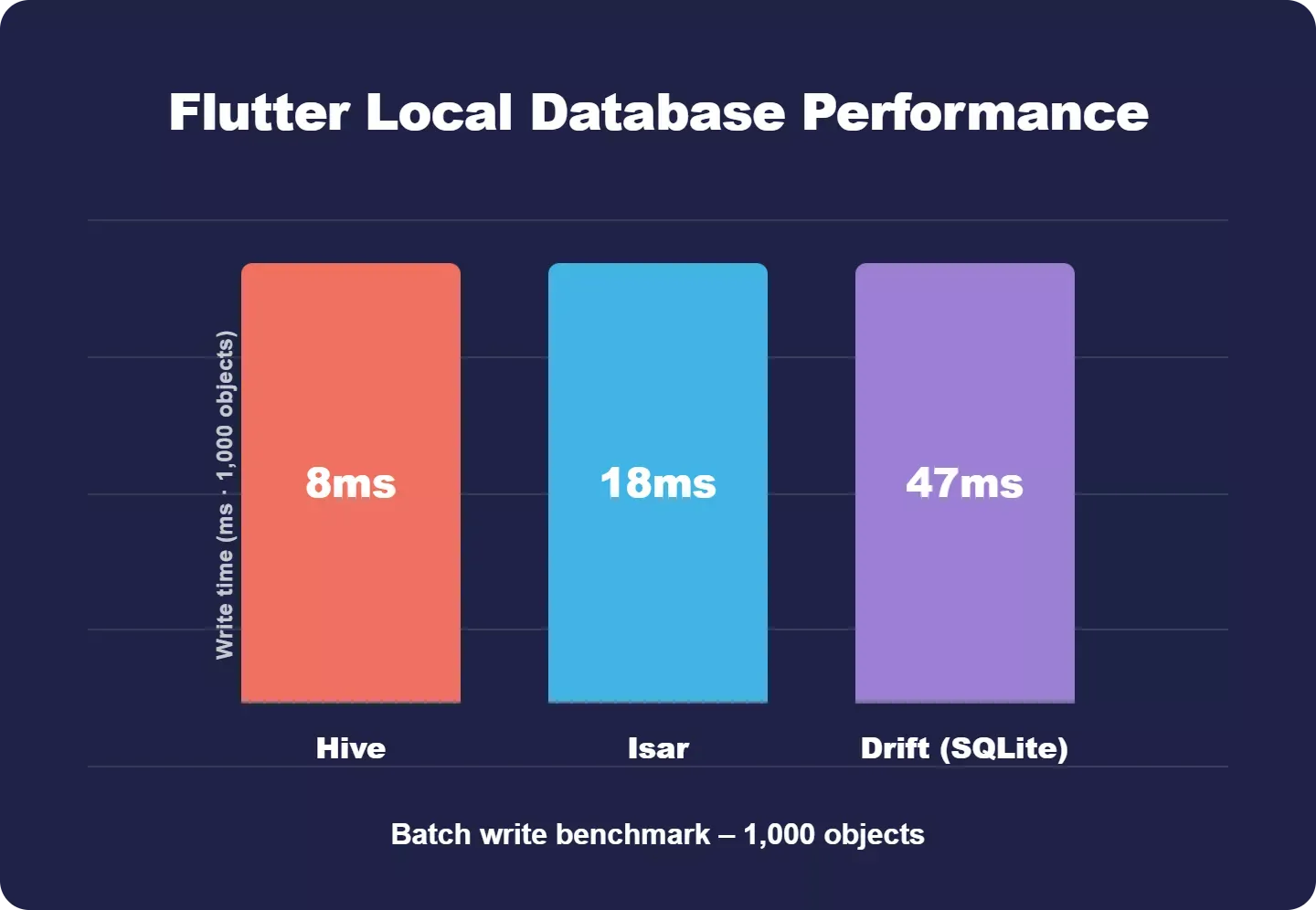
Batch write benchmarks across Flutter local databases: Hive is fastest for simple data, Drift handles complex relational queries.
| Database | Type | Best For | Query Support | Reactive Streams |
|---|---|---|---|---|
| Drift (SQLite) | Relational | Complex queries, relational data | Full SQL, type-safe | Yes |
| Hive | NoSQL key-value | Simple data, fast reads | Basic key lookup | Yes |
| Isar | NoSQL document | Mid-complexity, multi-isolate | Rich query API | Yes |
-
SQLite via Drift provides relational data modeling with type-safe queries, complex query support, and reactive streams that notify the UI whenever data changes.
-
Hive and Isar offer NoSQL alternatives for simpler data structures where speed matters more than relational data integrity.
-
The repository pattern abstracts your data layer, so business logic never knows whether data came from local storage or remote data sources.
According to GeekyAnts' implementation blueprint, the repository pattern serves as a data gatekeeper, providing a clean API for the entire data model. A typical offline first Flutter setup looks like this:
1// Repository reads from local database first.
2// Stream emits new data whenever local DB changes.
3// UI shows latest local state instantly, no network wait.
4
5Future<void> syncPendingTasks() async {
6 final db = AppDatabase();
7 final pendingItems = await db.select(db.syncQueue).get();
8 for (final item in pendingItems) {
9 try {
10 await remoteApi.push(item);
11 await db.markSynced(item.id);
12 } catch (e) {
13 // Exponential backoff handled by background worker
14 await db.markFailed(item.id);
15 }
16 }
17}
This is what developers write manually. Every class, every dependency injection setup, every data flow path requires careful engineering. For teams without deep Flutter expertise, this complexity becomes a significant barrier to shipping. A no-code app builder for startups can dramatically reduce this overhead.
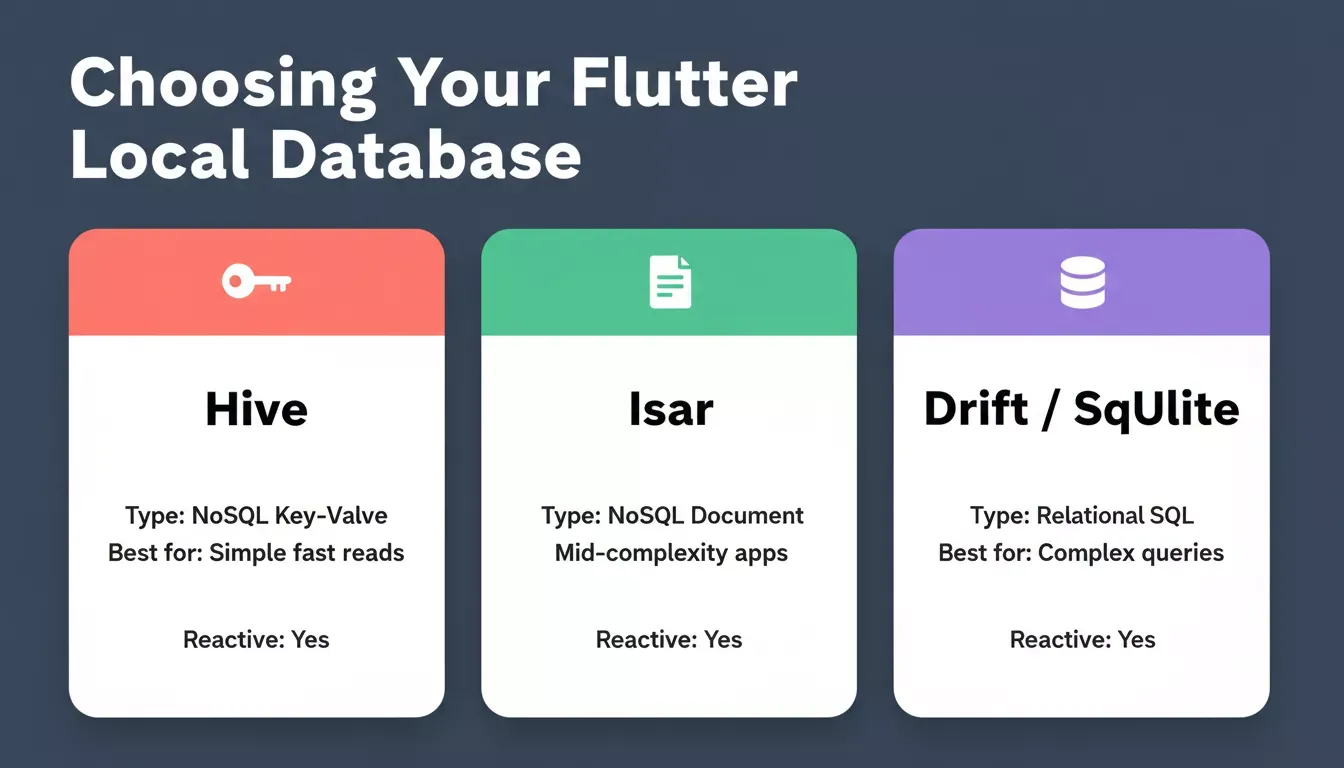
Choosing the right Flutter local database depends on your data structure and query complexity.
Which Sync Strategies Keep Data Safe Across Devices?
Synchronization is where the offline-first architecture gets genuinely complex. The sync engine must handle queued changes, retry failed operations, and resolve conflicts when the same record is modified on multiple devices. The three primary sync strategies are: transactional outbox, optimistic UI with rollback, and CRDT-based merging.
-
The transactional outbox pattern guarantees no data loss. Writing data to the local database and sync queue happens in one atomic operation.
-
Background process workers poll the queue on a schedule, using exponential backoff when the network fails to prevent server overload.
-
Reactive streams propagate local changes to the UI instantly, while synchronization happens silently in the background.
State management solutions like BLoC or Riverpod subscribe to database streams, so the UI state updates automatically. When a stream emits new data from a completed sync, the widget tree rebuilds only what changed. Learning how to build a mobile app with AI can help you implement these patterns faster.
Offline sync flow: local write, queue, network check, server push.
Integrating backend services like Supabase can handle the remote data layer, but the offline sync logic still needs to be built on the Flutter side.
Can You Handle Conflicts Without Writing Custom Logic?
Conflict resolution is one of the hardest problems in distributed systems. When two users modify the same record while both are offline, the app must decide which version wins or how to merge changes.
-
The last write wins approach uses timestamps to pick the most recent change, but risks silent data loss when a user's careful edits get overwritten.
-
Field-level merging preserves non-overlapping changes from multiple clients but requires granular API design.
-
Optimistic UI patterns show changes immediately and roll back only if the server rejects the update during sync.
-
Common strategies include CRDTs for collaborative editing and version vectors for ordering distributed write operations.
"In 2025, 'Offline-First' is no longer a feature - it's a user expectation."— Almas Memon, LinkedIn
This sentiment captures the market shift. Users do not tolerate apps that break when the network breaks. The demand for offline-first apps is growing across logistics, healthcare, field services, and education.
How to Build an Offline-First Flutter App Without a Dev Team
So what if you could skip the weeks of manual architecture work? Rocket is a vibe solutioning platform covering research (Solve), app building (Build), and competitive intelligence. Its Build pillar generates production-ready mobile apps from a plain language description.
Rocket's documented Flutter capabilities include:
-
Natural language to Flutter code: Describe your app, and Rocket generates screens, navigation, and logic without writing a line of code.
-
State management is built in: Choose BLoC, Riverpod, Provider, GetX, or no state management at setup. Rocket scaffolds the correct pattern throughout the generated code.
-
Supabase integration: Connect a full backend (database, auth, file storage, edge functions) with a single prompt, giving your app a remote data layer to sync against.
-
APK and App Store deployment: Download an Android APK directly or submit to Google Play and the Apple App Store from within Rocket.
-
Iterate through the conversation: Adjust screens, add features, or modify data models by chatting with Rocket after the initial build.
For offline-first specifically, Rocket gives you the Flutter foundation and the Supabase backend. You can then prompt Rocket to add local caching patterns, offline state handling, and sync logic, the same way you would direct a developer. The platform generates clean Dart code you can inspect, download, and extend.
Traditional approaches require weeks of architecture decisions. FlutterFlow alternatives offer drag-and-drop interfaces but typically provide limited offline database configuration out of the box. Manual Flutter development demands expertise in Drift, state management, dependency injection, and sync engine design. Rocket collapses the initial build phase into a guided, AI-powered process, giving you a working Flutter codebase to iterate from in minutes rather than weeks.
Rocket's Flutter app builder generates clean, production-grade Dart code with your chosen state management pattern already wired in. You can download the source, extend it locally, or keep iterating inside Rocket through chat. For a deeper look at what the platform generates, see what a Flutter mobile app looks like when built with Rocket.
What Should You Test Before Releasing an Offline App?
Even with a well-architected codebase, testing is non-negotiable. Offline-first apps behave differently across network conditions, and edge cases can surprise you.
-
Toggle airplane mode during active data entry. Verify that write operations queue correctly and no user input is lost.
-
Simulate poor connectivity with throttled network speeds. Confirm the app remains responsive when API calls time out.
-
Force app restarts mid-sync to validate data persistence and queue recovery.
-
Test conflict scenarios where the same record is modified on two separate devices simultaneously.
-
Verify push notification delivery resumes correctly after extended offline periods.
-
Check that pull-to-refresh triggers proper synchronization without duplicating data.
Network fails at unpredictable moments, and only what survives real-world conditions matters. These six steps are the minimum bar before any offline-capable app goes to production.
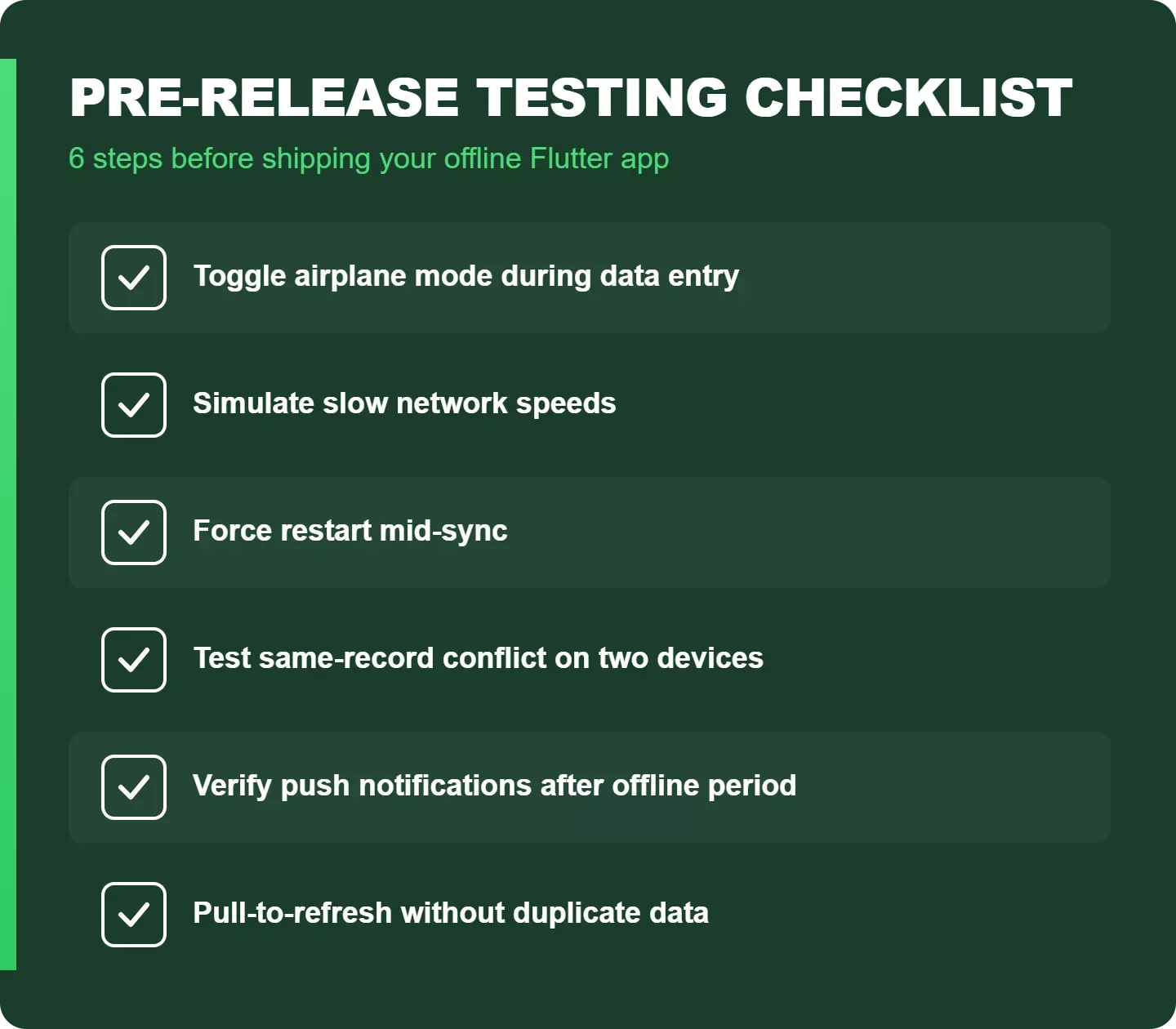
Run all six checks before shipping. Skipping even one can result in data loss in production.
Your Next Flutter App Can Work Anywhere
Building reliable offline-first Flutter apps is no longer reserved for teams with distributed systems expertise. The architecture patterns are well-documented, the Flutter local database options are mature, and the tooling has caught up to the demand.
Whether you are building for field workers in areas without internet access or creating consumer apps that simply feel faster, offline first is the right foundation.
If you want to skip the weeks of manual setup and start from a working Flutter codebase, describe your app idea on Rocket.new and get a production-ready Flutter app with state management, Supabase backend, and clean Dart code, ready to extend with the offline patterns covered in this guide.
Table of contents
- -Why Does Offline Performance Matter for Mobile Users?
- -What Makes an App Truly Work Without Internet?
- -How Does the Local Database Serve as a Source of Truth?
- -Which Sync Strategies Keep Data Safe Across Devices?
- -Can You Handle Conflicts Without Writing Custom Logic?
- -How to Build an Offline-First Flutter App Without a Dev Team
- -What Should You Test Before Releasing an Offline App?
- -Your Next Flutter App Can Work Anywhere