
WordPress is a content engine being asked to do application work. Rocket.new is an application engine that happens to handle content. For app builders in 2026, that distinction determines whether you spend your time shipping a product or managing a software stack.
WordPress powers 40.3% of all websites. So why are app builders leaving?
The answer is not about missing features. WordPress can technically do almost anything with enough plugins, enough themes, enough hosting provider configuration, and enough developer hours. The real question is whether managing that software stack is the best use of your time when you are trying to ship a product.
According to W3Techs, WordPress dropped from 43.5% to 40.3% market share in just twelve months, the first sustained decline in its twenty-year history. That signal matters for anyone building on the internet today.
What Does the WordPress Plugin Ecosystem Look Like Today?
WordPress runs on plugins. That is both its greatest strength and its most expensive dependency.
A typical WordPress website needs six to eight baseline plugins just to reach basic functionality: a page builder, a caching plugin, a security plugin, an SEO plugin, a forms plugin, and a backup plugin. Most sites run between twenty and thirty active plugins in production.
The stale plugin problem is growing fast: Patchstack reported 827 abandoned plugins and themes in 2023 alone, up from 147 the prior year. Of those, 481 were permanently removed from the WordPress repository. Nulled plugins introduce unpatched vulnerabilities that no security tool can reliably catch.
Security patches create a maintenance treadmill: In 2023, Patchstack added 5,948 new vulnerabilities to its database, and 97% came from plugins. That means every update, every migration, every new plugin added carries a risk window that someone has to monitor.
The plugin ecosystem that once made WordPress the most flexible CMS on the internet now functions as a dependency chain. Each plugin you add introduces a point of failure, a maintenance cost, and a compatibility question. A WordPress website that needs reliable performance, solid SEO, and strong security typically requires a developer on retainer and consultants costing $2,000 to $15,000 per month.
If you are a non-technical founder trying to get an app live, this plugin dependency is not flexible. It is overhead.
For founders moving away from WordPress landing pages, the pattern is clear: the setup tax outweighs the free price tag.
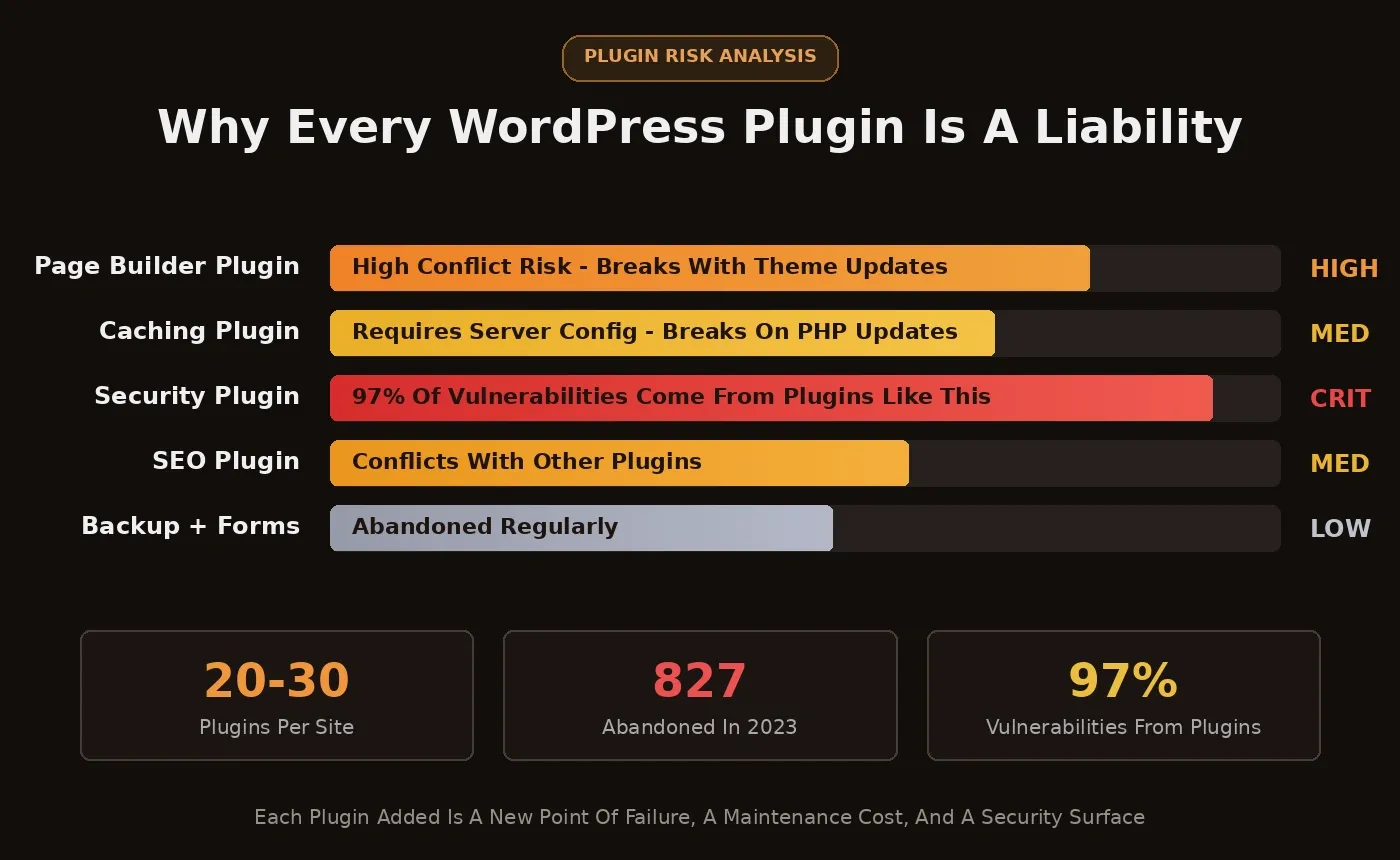
WordPress plugin risk analysis: risk meter bars showing Page Builder as HIGH, Security Plugin as CRITICAL, with stats showing 20-30 plugins per site, 827 abandoned in 2023, and 97 percent of vulnerabilities from plugins
Every plugin category carries a different risk level. Security plugins are the most critical: 97% of all WordPress vulnerabilities originate from the plugin layer.
How Does WordPress Performance Hold Up Under Real Load?
Performance is where the complexity tax becomes measurable. Google's Core Web Vitals directly influence search rankings, and WordPress has a documented problem here.
Only 46% of WordPress sites pass all three Core Web Vitals on mobile, according to the CWV Technology Report. That means more than half of all WordPress websites fail the performance thresholds Google uses for ranking.
The median WordPress page ships 655 KB of JavaScript, up from 459 KB in early 2020, a 43% increase in five years driven by plugin and theme bloat. A caching plugin like WP Rocket improves scores, but it sits on top of a slow foundation. It addresses symptoms without changing the underlying architecture.
The performance loop for a typical WordPress site: choose a host, install WordPress, add a page builder, configure caching, run PageSpeed Insights, find issues, hire a consultant, fix, repeat. Rocket ships production-ready Next.js code with built-in SEO and performance defaults from the first deploy, no caching layer needed.
The WordPress performance loop: most sites cycle between audit and consultant multiple times before passing Core Web Vitals.
Sites that fail Core Web Vitals get ranked lower. A WordPress site running a standard theme with five to ten plugins and shared hosting typically scores between 30 and 50 on PageSpeed Insights for mobile. A Rocket build scores 90+ on Lighthouse out of the box.
The Hidden Cost of Managing a WordPress Software Stack
WordPress itself is free. Everything around it costs money, time, and constant attention.
Here is what a production WordPress app actually costs when you add up the full stack:
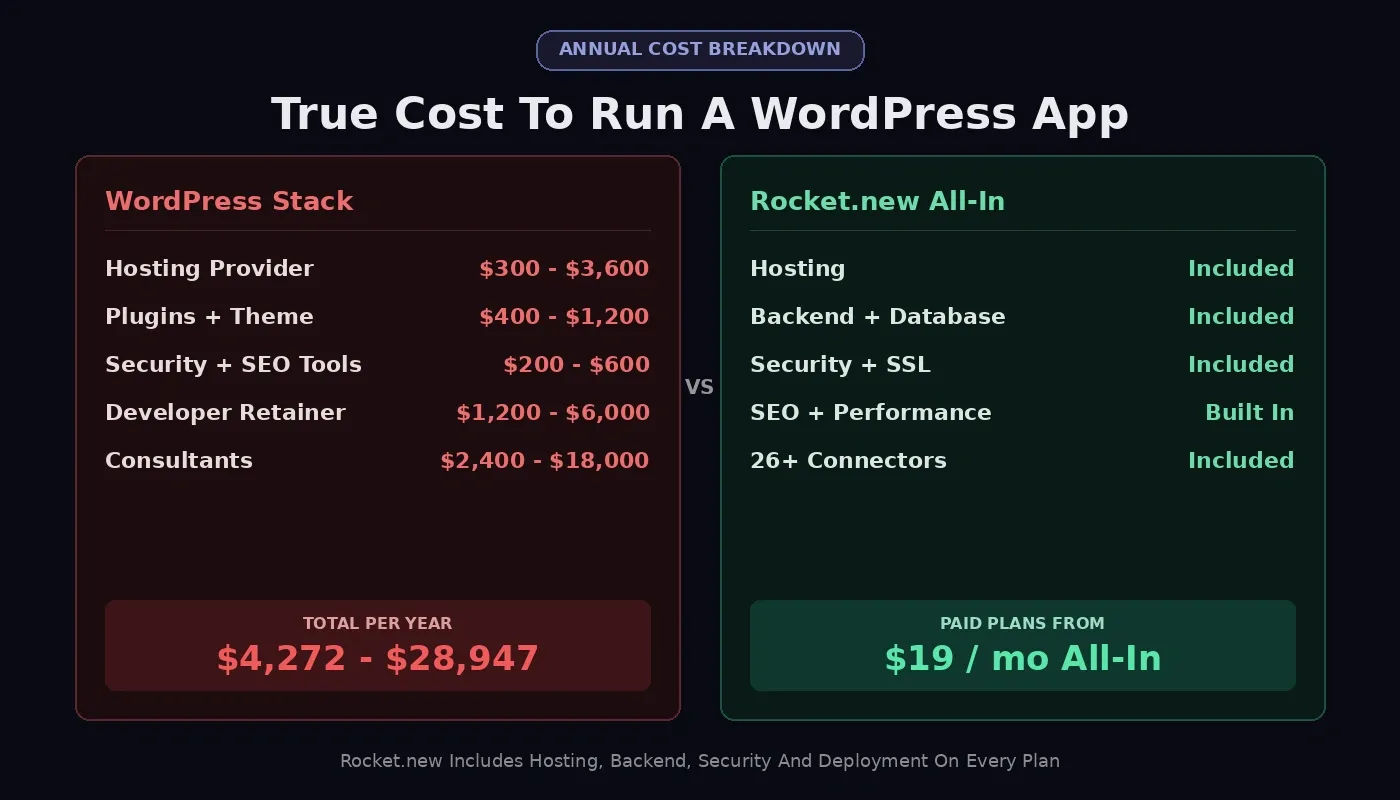
Annual cost breakdown comparing WordPress stack at $4,272 to $28,947 per year versus Rocket.new all-in from $19 per month, with line items showing hosting, plugins, security, developer retainer, and consultants
The "free" WordPress platform becomes expensive fast once you account for the full stack required to run a production app.
| Cost Category | WordPress (Annual) | Rocket.new (Annual) |
|---|---|---|
| Hosting provider | $300 to $3,600 | Included |
| Custom domain + SSL | $15 to $50 | Included |
| Premium theme | $50 to $200 | Not needed |
| Caching plugin | $59 to $299 | Not needed |
| SEO plugin (premium) | $99 to $299 | Built into every build |
| Security plugin + monitoring | $100 to $300 | Platform-managed |
| Page builder plugin | $49 to $199 | Not needed |
| Developer on retainer | $1,200 to $6,000 | Not needed for most builds |
| Consultants | $2,400 to $18,000 | Not needed |
| Total estimated range | $4,272 to $28,947 | Free tier available; paid plans from $19/mo |
The vendor lock-in risk compounds this. Your WordPress site depends on a specific host, a specific set of plugins, and a specific theme. If your host raises prices, if WP Engine changes its terms, if a critical plugin gets abandoned, each dependency becomes a migration project.
Every plugin that connects to an external API or loads third-party scripts is a dependency you manage instead of building your product.
Rocket eliminates this stack entirely. No host to choose, no caching to configure, no security patches to apply, no themes to maintain. You describe what you want to build, Rocket generates production-ready code, and you deploy with one click.
Why Rocket Was Built for the App-First Era
WordPress was designed as a blogging platform in 2003 and evolved into a CMS. Rocket.new was designed as an AI-powered application builder from day one. That difference in origin changes everything about the builder experience.
Describe and generate; no code required: Tell Rocket what you want in natural language: "Build a SaaS dashboard with user authentication and Stripe payments." It generates a complete, working application. Web apps ship as Next.js; mobile apps ship as Flutter. No template selection, no plugin assembly, no design skills needed.
Every build ships production-ready by default: SEO-ready structure, WCAG accessibility compliance, GDPR coverage, performance optimization, considered typography, and visual identity specific to your product. The design quality looks like a professional team touched it, not a template.
26+ connectors ship with every build: Stripe, Google Analytics, Supabase, Mailchimp, Mixpanel, and more. Authenticate once, and they flow into every build. You can see the full platform in action in the Lovable vs Bolt vs v0 vs Rocket.new comparison, where the same brief was run through all four platforms.
1.5 million people across 180 countries have tried Rocket, from solo founders to enterprise teams. No credit card required to start. The platform generates everything from quick landing pages to full SaaS products with real authentication, database schema, and payment processing, all from a conversation that takes minutes.
Rocket.new collapses 7 manual WordPress setup steps into 3: describe, generate, deploy. Auth, payments, SEO, and hosting are included by default.
Full Platform Comparison: Rocket.new vs WordPress
Here is how the two platforms compare across the dimensions that matter most for app builders:
| Capability | Rocket.new | WordPress |
|---|---|---|
| Tech stack | Next.js (web), Flutter (mobile) | PHP, MySQL |
| App generation | Natural language prompt | Manual setup + plugins |
| Backend | Supabase integration built in | Requires separate setup |
| Authentication | Built into every build | Plugin required |
| Payments | Stripe, Razorpay, PayPal via connectors | WooCommerce or plugin required |
| Native mobile apps | Flutter generation included | No native mobile path |
| Deployment | One-click, hosting included | A separate hosting provider is required |
| Code ownership | Full Next.js or Flutter source download | Full PHP codebase (self-hosted) |
| SEO defaults | Automatic meta, schema, sitemap, Core Web Vitals | Plugin required (Yoast, RankMath) |
| E-commerce | Stripe-powered store generation | WooCommerce (strongest option) |
| Content editing | Chat-based iteration | wp-admin (most mature editor) |
| Pre-build intelligence | Solve: market research before you build | No equivalent |
| Competitive monitoring | Intelligence: 9-pillar continuous monitoring | No equivalent |
| Security patches | Platform-managed | Manual, ongoing |
| Performance baseline | 90+ Lighthouse out of the box | Varies widely by setup |
The two rows with no WordPress equivalent matter most for app builders.
Rocket's Solve feature runs market research and competitive analysis before a single line of code is written. Intelligence monitors competitors across nine signal pillars continuously. For teams building SaaS products, the guide to building a B2B SaaS product with AI covers the full workflow from idea to deployed product.
Which Platform Should You Pick for Your Next Project?
Pick WordPress if you are running a large content publishing operation, need WooCommerce for complex product catalogs, have an established site with years of SEO equity you cannot migrate, or already have a developer team comfortable with the PHP ecosystem.
Pick Rocket if you are building a web app, SaaS product, mobile app, or internal tool and want to go from idea to live product without assembling a plugin stack. If you are a non-technical founder or a developer who wants production-ready code without the maintenance burden, Rocket is the faster path.
The final verdict comes down to a simple question: do you want to spend your time managing a software stack or building a product?
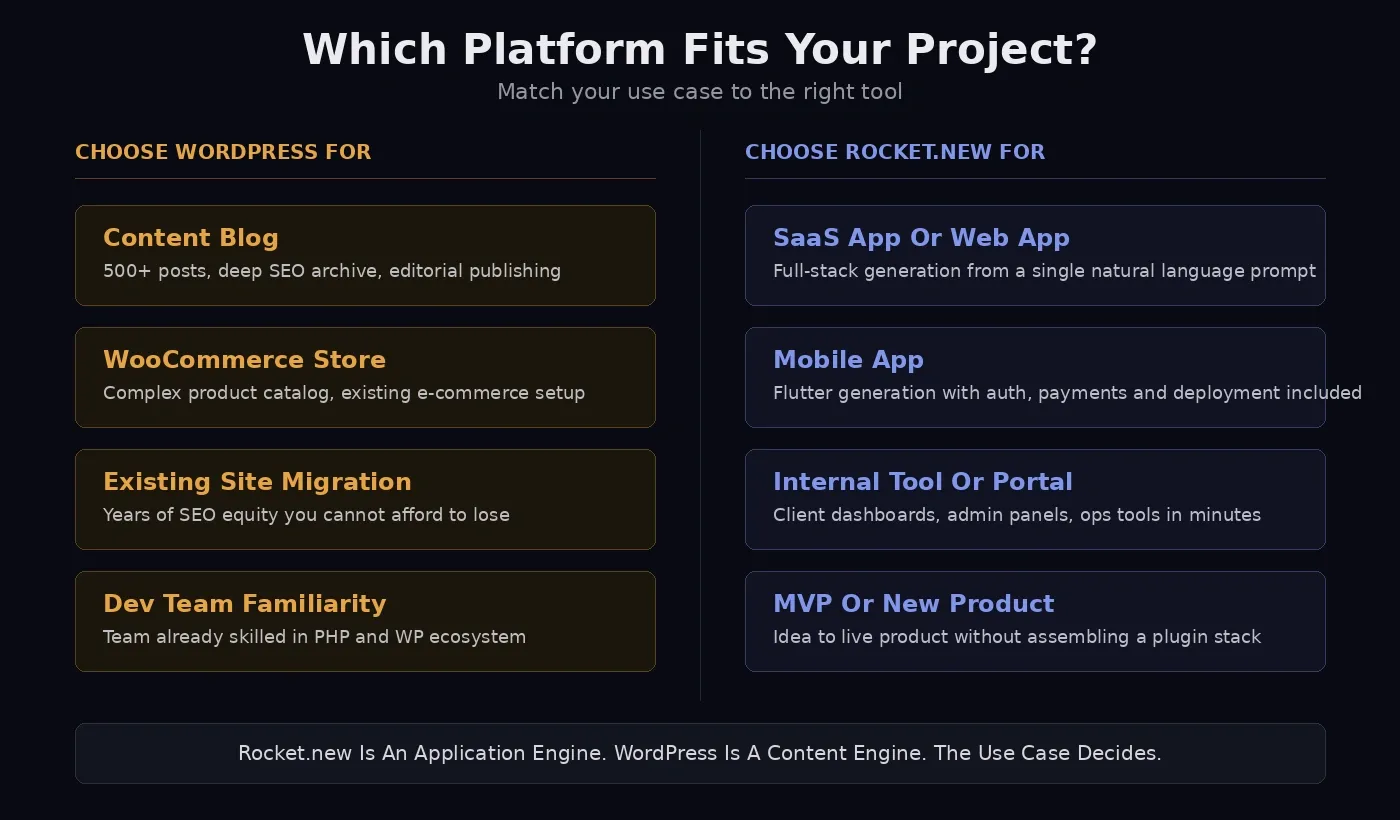
Decision guide showing two columns: Choose WordPress For with content blog, WooCommerce store, existing site migration, and dev team familiarity; Choose Rocket.new For with SaaS app, mobile app, internal tool, and MVP
WordPress carries real value for content-heavy sites with large archives. But for app builders in 2026, the plugin compatibility testing, consultant fees, speed audits, and security patches are all time and money spent on infrastructure instead of your product. For how Rocket.new handles internal tools and admin panels, the contrast with WordPress becomes even sharper.
Rocket is an AI builder that treats every first impression as a product decision. It is an application engine built for builders who want to ship, not maintain.
Decision guide showing two columns: Choose WordPress For with content blog, WooCommerce store, existing site migration, and dev team familiarity; Choose Rocket.new For with SaaS app, mobile app, internal tool, and MVP
Match your use case to the right platform. Neither is universally better; the project type determines the answer.
When the Plugin Stack Stops Making Sense
For millions of content publishers, the WordPress trade-off still works. For app builders, it stopped making sense the moment AI-first platforms arrived.
Rocket gives you back the hours WordPress takes. Describe what you want to build, generate it in minutes, and deploy it instantly. The code is yours, the hosting is included, and the performance is built in. Your next project starts with a sentence, not a setup.
For founders evaluating the broader builder landscape, the website builders vs Rocket.new overview covers the full competitive picture. If you are considering migrating an existing site, the Rocket.new website builder guide explains the no-template approach.
If you are ready to stop managing a software stack and start shipping products, sign up for Rocket and describe your first project. Most apps generate in one to three minutes, with production-ready code, built-in hosting, and zero plugin dependency.
Table of contents
- -What Does the WordPress Plugin Ecosystem Look Like Today?
- -How Does WordPress Performance Hold Up Under Real Load?
- -The Hidden Cost of Managing a WordPress Software Stack
- -Why Rocket Was Built for the App-First Era
- -Full Platform Comparison: Rocket.new vs WordPress
- -Which Platform Should You Pick for Your Next Project?
- -When the Plugin Stack Stops Making Sense

