
A workflow orchestration platform coordinates automated tasks across systems so work runs in the right order, with dependencies and retries handled automatically. For data, operations, finance, and cross-functional teams running multi-step workflows that need auditability and dependable execution, this guide explains what it is, how to choose the right tool, and when you need an app instead of a pipeline.
A workflow orchestration platform coordinates automated tasks across business processes so work runs in the right order, with dependencies, retries, and failures managed automatically instead of being handled through scripts, cron jobs, or manual checks. That matters when workflows run frequently across multiple systems and need clear visibility, audit trails, and reliable recovery when something breaks.
This guide covers what workflow orchestration is, how teams actually use it, where it differs from basic scheduling, which tools fit which situations, the benefits and trade-offs to weigh, and what to watch out for when you're implementing, monitoring, and scaling it, including when building an app makes more sense than extending a pipeline.
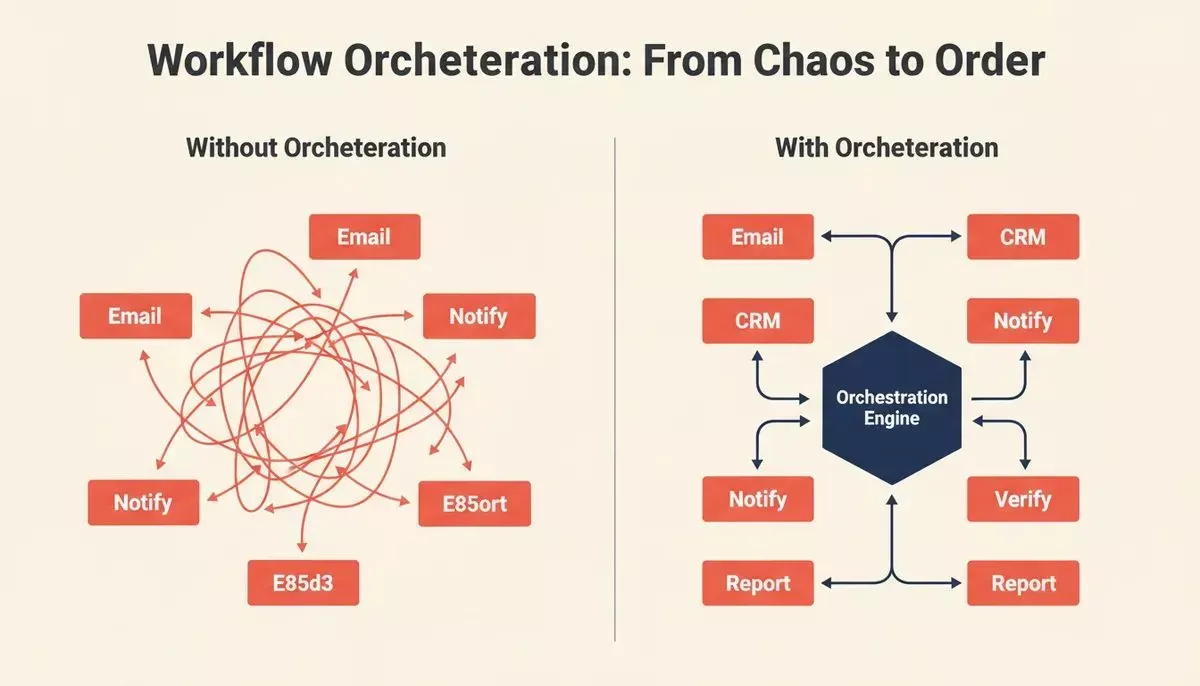
Workflow orchestration replaces ad hoc task execution with a managed, observable system where every step knows what came before it.
What is Workflow Orchestration?
Workflow orchestration coordinates automated tasks so work happens in the right order, at the right time, with dependencies handled for you. It's more than a cron job with extra steps. The difference shows up the moment a step fails, and something downstream needs to know about it.
A scheduler runs a task at a set time and moves on. An orchestration system tracks what happened, decides what runs next, handles retries when something breaks, and gives you a view of the whole process as a unit. That distinction sounds minor until you're debugging a pipeline that silently dropped records at step four of twelve.
What's actually inside an orchestration system
Most platforms share the same core pieces: a way to define task order (usually directed acyclic graphs, or DAGs), an execution engine that runs tasks and manages retries, workflow execution and error handling, a metadata store that tracks what ran and when, and a UI or API for monitoring.
The differences between platforms are mostly in how opinionated they are about each of these. Airflow gives you Python and full control; Azure Logic Apps gives you a visual connector library and less flexibility. Key workflow orchestration tools often support workflow design and workflow creation through intuitive interfaces, robust APIs, and role-based access.
Process orchestration manages end-to-end business workflows across departments, coordinating multiple automated tasks into a cohesive process, whereas workflow automation usually targets individual tasks or routine tasks. Think of a procurement approval that touches finance, legal, and ops before anything gets purchased.
Data orchestration coordinates pipelines: ingestion, transformation, loading, validation, and teams often use it for managing data pipelines and complex data pipelines. This is where Airflow built its reputation.
Service orchestration manages calls between microservices or APIs, often with timeouts and circuit breakers baked in.
Most teams end up needing more than one of these, which is part of why the platform decision matters.
How Teams Actually Use It
Customer onboarding is the example that comes up most. A new account triggers identity verification, CRM record creation, welcome emails, provisioning in three internal systems, and a Slack notification to the account manager, in a specific order, with each step dependent on the previous one succeeding. Before orchestration, this was a mix of Zapier automations, cron jobs, and someone manually checking a spreadsheet on Mondays.
The same pattern shows up in finance (month-end close processes), data engineering (nightly ETL runs), and supply chain (purchase order workflows that touch suppliers, inventory systems, and shipping providers). The common thread is multi-step processes where the order matters and failures need to be caught, not silently swallowed.
What orchestration actually buys you isn't speed. It's visibility and reliability. You know what ran, what failed, and why. That's worth more than the automation itself once you're running anything at scale.
Benefits Worth Being Honest About
Orchestration reduces manual coordination, cutting down on manual effort and human error by automating routine tasks that would otherwise rely on people to manage repetitive tasks across systems. It creates an audit trail. It handles retries so your on-call engineer isn't woken up at 3 am because a third-party API returned a 429 and nobody caught it.
But it also adds complexity. You're now maintaining workflow definitions as code, debugging DAG serialization errors, and explaining to a new engineer why the scheduler UI is showing a task as "queued" when it's clearly running. None of that is insurmountable, but anyone who tells you orchestration is pure upside has probably never had to migrate a 200-task Airflow deployment to a new version.
The honest case for it: for processes that run more than a few times a week, span more than two systems, and need to be auditable, orchestration pays for itself. For a one-off script that runs monthly, it's probably overkill. Teams looking to automate repetitive processes often find that orchestration is the missing layer between individual scripts and a reliable system.
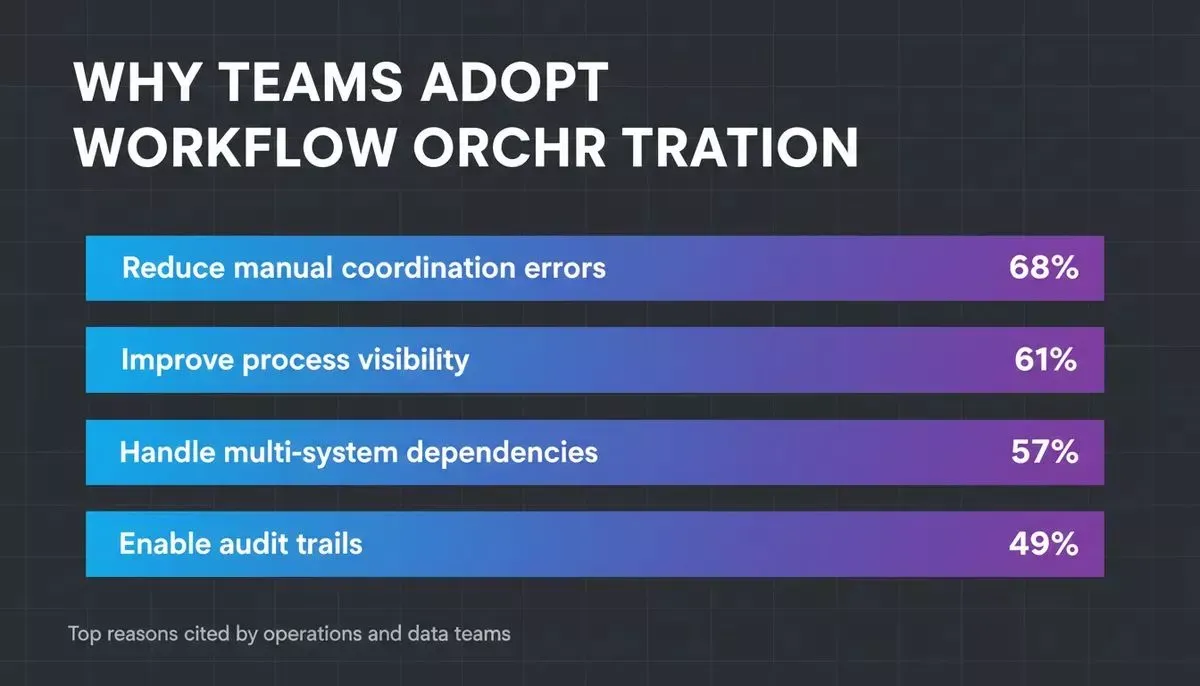
What orchestration actually buys you isn't speed. It's visibility and reliability. The business value is that it acts as a productivity multiplier, helping teams adapt to market changes with more speed and precision. Operations and data teams consistently cite visibility and dependency management as the primary drivers for adopting orchestration, and at scale, intelligent automation powered by AI and machine learning can enhance performance through more adaptive decisions.
That combination is why orchestration becomes a durable operating advantage, not just another layer in the stack. Platforms can increase operational efficiency by up to 40% and reduce total process time by 60-95%.
Orchestration vs Scheduling: The Real Difference
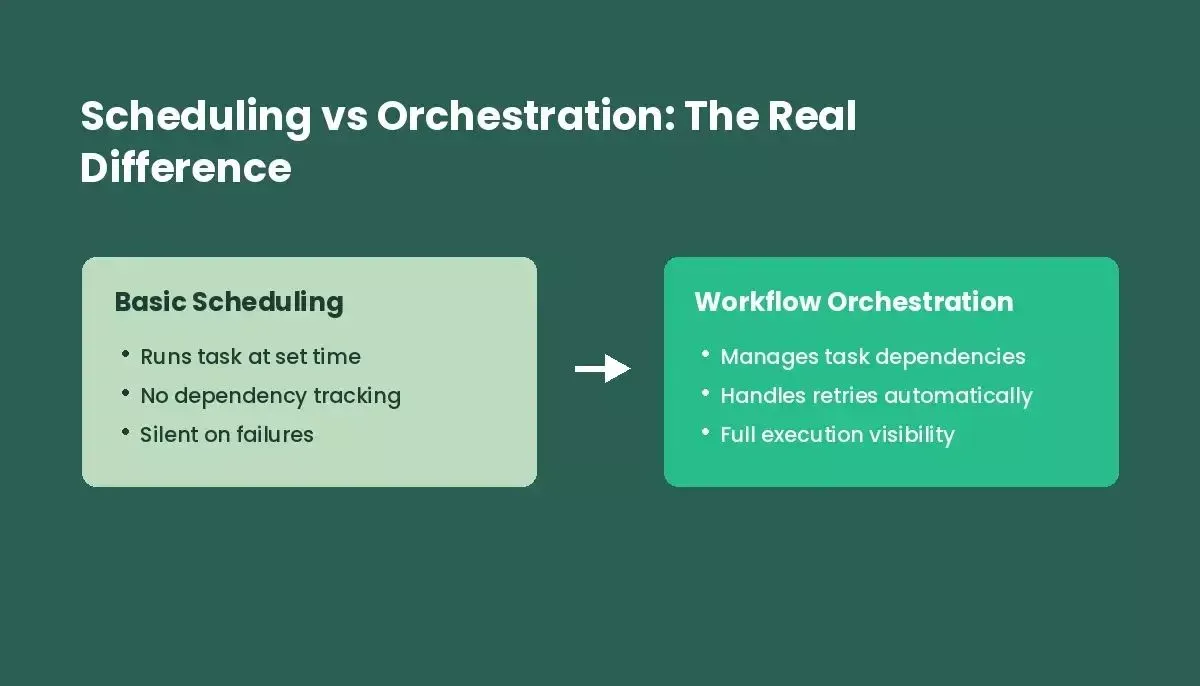
A scheduler runs tasks. An orchestration system manages the relationships between them, handles failures, and gives you the full picture.
The gap between a scheduler and an orchestration platform, or workflow orchestration software, is most visible when things go wrong. A cron job that fails just stops. An orchestration system records the failure, detects performance bottlenecks, retries with backoff, alerts the right person, and blocks downstream tasks from running on bad data. That failure handling is where most of the operational value lives. Automating task execution across dependent systems is what helps streamline operations in more complex environments. For teams building business process automation, this distinction becomes critical at scale.
Comparing the Main Workflow Orchestration Tools
The table below is opinionated. Every platform has defenders, and the right choice genuinely depends on your stack and team.
| Platform | Best For | Honest Downside | Choose When |
|---|---|---|---|
| Apache Airflow | Data engineering teams needing Python-native DAG control | Scheduler can be slow; version upgrades are painful | Your team writes Python and needs fine-grained pipeline control |
| Microsoft Azure Logic Apps | Cloud-first teams needing fast integrations | Expensive at scale; debugging complex flows is awkward | You're already in Azure and need connectors fast without custom code |
| Camunda | Enterprise workflows with human-in-the-loop approval steps | Steep learning curve; heavy for simple use cases | You need formal BPMN process modeling and human approvals |
| n8n | Teams wanting open-source, self-hosted flexibility | Less mature for heavy data engineering workloads | You want data privacy, self-hosting, and no per-execution pricing |
| Prefect / Dagster | Teams wanting Airflow's power with a better developer experience | Smaller community than Airflow; Prefect cloud adds cost | You want modern Python-native orchestration without Airflow's rough edges |
Cloud services such as AWS Step Functions and Microsoft Azure Logic Apps are managed workflow orchestration solutions that scale automatically, and they fit teams comparing broader software solutions for modern orchestration. Modern orchestration tools increasingly add AI, ML, and low-code features, but the useful question is whether those capabilities match your business needs rather than the hype.
One thing the table can't capture: Airflow 2.x is meaningfully better than Airflow 1.x, and a lot of the horror stories online are from teams running old versions. If you're evaluating Airflow now, read the 2.x docs, not a 2019 blog post.
Implementing It Without Breaking Things
The teams that have the worst time with orchestration rollouts are the ones that tried to migrate everything at once. Pick one of your critical workflows, ideally one that's currently a mess of cron jobs and manual steps, with a clear owner and measurable output. Get that working well before touching anything else.
Before writing a single DAG, map the existing process on paper. Use that review of existing processes to keep the rollout aligned with business objectives. Every step, every system it touches, every person who currently does something manually. You will find dependencies that nobody documented. You will find a step that only works because someone checks a Slack message every morning. Find those now, not after you've deployed.
Data integration and seamless integration across connected systems help keep real-time, accurate data available throughout the workflow.
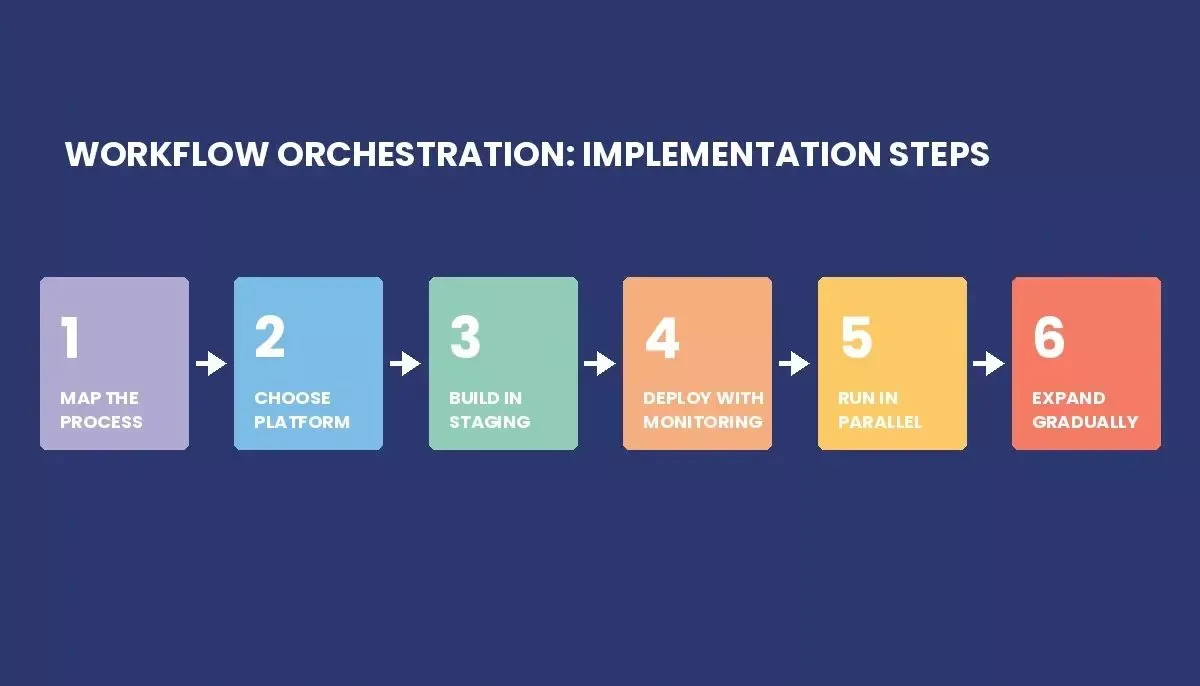
Start with one workflow, prove the pattern, then expand. Teams that skip the parallel-run step in particular tend to regret it.
A practical sequence that works:
- Map the process. All of it, including the manual parts.
- Pick the platform that fits your stack and supports your business operations (see the table above).
- Build in staging with synthetic data. Test failure paths, not just the happy path.
- Deploy with monitoring from day one. Set alerts on failure rate and execution time before the workflow handles real traffic.
- Run the old process in parallel for at least two weeks. Don't turn off the cron job until you're confident.
- Only then expand to the next workflow.
Step five is the one team skips. It's also the one that saves you from a 2 am incident.
Managing Dependencies and Data Pipelines
Dependencies are where orchestration earns its keep. The DAG isn't just documentation. It's the contract that says Task B cannot start until Task A has a successful exit code, which is what makes orchestrated workflows reliable in production. When Task A fails, Task B doesn't run, and the orchestration system records exactly what happened and why.
For data pipelines specifically, Airflow's DAG model maps well to the way data engineers already think about data processing work. The official Airflow documentation on DAGs is worth reading before you design your first production pipeline, particularly the sections on idempotency and the depends_on_past parameter, which trips up almost everyone the first time.
One thing that bites teams: not making tasks idempotent. If a task runs twice because of a retry, a backfill, or an accidental trigger, it should produce the same result both times. A task that inserts a row without checking for duplicates will cause problems. A task that upserts won't. Design for this from the start. Trying to manage this kind of dependency-heavy work manually does not scale across multiple platforms. Teams building software development automation at scale face this exact challenge when moving from scripts to orchestrated pipelines.
Best Practices
Map before you build. Name an owner for every system boundary in the workflow. Make tasks idempotent. Set up monitoring before you go live, not after something breaks. Teams should also be able to create workflows without adding process overhead.
The ownership point deserves more than a bullet. The most common failure mode isn't technical. It's that nobody owns the seams. A workflow that touches sales, ops, and finance will break at exactly the handoff point where none of those teams thinks it's their job to fix it. Name an owner for each boundary before launch, or you'll be doing it during an incident instead. Good workflow orchestration platforms should also support intuitive interfaces, robust APIs, and role-based access.
On the tooling side: treat your DAG files and workflow configs as code. Version control, code review, and the same deployment practices you'd use for application code. Effective tools should also support workflow creation across integrated software and hardware components so teams can collaborate and communicate more easily. Workflows that live in a shared folder on a server and get edited directly are a maintenance problem waiting to happen. The Airflow best practices documentation covers idempotency, retry logic, and task isolation in more depth than most blog posts do.
Monitoring
You want to know three things: did the workflow run, did it succeed, and how long did it take compared to last week to gauge workflow performance over time.
Failure rate and execution time are the two metrics that matter most in practice. They give you a practical read on process performance and help identify bottlenecks before small delays turn into bigger failures. Retry count is a leading indicator. If retries are climbing, something upstream is degrading before it fails outright. Queue depth tells you whether the system is keeping up with incoming work.
Most orchestration platforms have built-in dashboards that support monitoring workflows. Airflow is functional. For anything serious, you'll want to push metrics to whatever observability stack your team already uses. The built-in UI is fine for debugging individual runs; it's not great for trend analysis across hundreds of workflows.
One thing worth setting up early: SLA alerts. If a workflow that normally completes in 20 minutes is still running at 45, you want to know before the downstream system notices. Teams managing application deployment automation face similar monitoring challenges and often apply the same alerting patterns.
Scaling Across Teams
Single-team orchestration is manageable. Multi-team orchestration is a governance problem, especially when workflows must span legacy systems and multiple platforms.
When multiple teams are writing DAGs in the same Airflow instance, you need naming conventions, folder structure, and access controls before the second team onboards, not after. Without them, you end up with 400 DAGs named things like final_v3_ACTUAL_USE_THIS and no way to tell which ones are still running.
Role-based access matters here. Not every engineer needs to be able to pause or delete another team's workflows. Most platforms support this; most teams don't configure it until something goes wrong. Effective orchestration can also connect software solutions across teams, enabling organizations to support digital transformation.
Resource limits are the other scaling concern. Data pipelines and big data workloads can saturate a shared Airflow cluster fast, and cloud environments dynamically allocate computing resources to improve performance for shared workloads. Set task-level CPU and memory limits. Use priority queues if you have workflows with different SLA requirements. The teams that skip this end up with a low-priority backfill job consuming all available workers while a time-sensitive pipeline sits queued. Teams that also need to build internal tools for operations teams often find that orchestration and internal tooling solve different layers of the same problem.
When the Problem Is Actually an App, Not a Pipeline
Some teams come to workflow orchestration looking for something different. They don't need DAG-based pipeline scheduling. They need a working application that wraps a business process in a UI their team can actually use.
A customer onboarding portal. An internal approval dashboard. A tool that shows the ops team the status of every active workflow without making them read Airflow logs.
Orchestration engines and app builders solve different problems. Knowing which one you actually need saves weeks of misdirected effort.
That's a different problem. Rocket's Build pillar generates production-ready web and mobile apps from natural language. Describe the process, the screens, the integrations, and you get a deployable Next.js or Flutter app. Rocket's Solve pillar can validate whether the process is worth building first: market sizing, competitive analysis, and structured recommendations before a line of code gets written.
If you need Airflow, use Airflow. But if what you actually need is an app that your team can use to manage a workflow, Rocket handles that part. Teams that have gone through the process of validating an idea before building often find that what they thought was an orchestration problem was really a product problem.
Common Failure Modes
Nobody owns the seams. Covered above. Name owners before launch.
Workflows that do too much. A task that does five things is five times harder to retry cleanly than a task that does one. Keep tasks small, especially in complex processes. If a task takes more than a few minutes, it's probably doing too much.
No parallel testing period. Teams turn off the old cron job on the day the new workflow goes live. Then the new workflow has a bug on day three, and there's no fallback. Run both in parallel until you're confident.
Ignoring dead workflows. After six months, you'll have workflows that nobody's sure are still needed. They're still running, consuming resources, and occasionally failing in ways that page someone, which is especially risky for business-critical automated workflows that no one maintains. Audit your workflows quarterly. If nobody can explain what a workflow does or who depends on it, it's probably safe to retire.
Takeaways
Workflow orchestration is worth the investment when your processes span multiple systems, run frequently, and need to be auditable. The platform choice matters less than most people think. Airflow, Camunda, and n8n all work well for the right use case. The implementation approach matters more: start with one workflow, map before you build, test failure paths, and run old and new in parallel before cutting over.
The governance problems show up later than the technical ones. Set up naming conventions and access controls before the second team onboards. Name owners for every system boundary. Treat workflow definitions as code.
And if what you're actually trying to build is an app that wraps a business process, that's a different tool for a different problem.
Managing complex workflows is the foundation of operational efficiency. For pipeline scheduling and dependency management, tools like Airflow, Camunda, and n8n each solve the problem well in the right context. Pick the tool that fits your stack, start with one workflow, and expand from there.
And if you realize the problem is less "orchestrate this pipeline" and more "build an app that manages this process," start building with Rocket.new. Describe what you need in plain language, and you'll have a working app to show your team before the day is out.
Table of contents
- -What is Workflow Orchestration?
- -What's actually inside an orchestration system
- -How Teams Actually Use It
- -Benefits Worth Being Honest About
- -Orchestration vs Scheduling: The Real Difference
- -Comparing the Main Workflow Orchestration Tools
- -Implementing It Without Breaking Things
- -Managing Dependencies and Data Pipelines
- -Best Practices
- -Monitoring
- -Scaling Across Teams
- -When the Problem Is Actually an App, Not a Pipeline
- -Common Failure Modes
- -Takeaways