
20 structured AI prompts to build supply chain platform modules covering procurement, inventory, shipments, and reporting. Run them in order on Rocket to ship a deployed, multi-role platform in 3-4 hours.
Use these 20 AI prompts to build supply chain platform modules covering procurement, inventory, shipments, and reporting, and ship a working, multi-role system in a single day. Each prompt includes expected output, a QA checklist, and a follow-up refinement prompt.
Quick answer: This guide gives you 20 structured prompts arranged across five build phases. Run them in order on Rocket to generate a fully deployed, multi-role supply chain platform in roughly 3-4 hours of active work. No DevOps. No assembly required.
What Makes a Supply Chain Prompt Effective?
Effective AI prompts to build supply chain platform modules share four qualities: role specificity, embedded business rules, a named data model, and a defined success condition. Generic prompts produce generic outputs; structured, context-rich prompts produce apps that handle real supply chain work from day one.
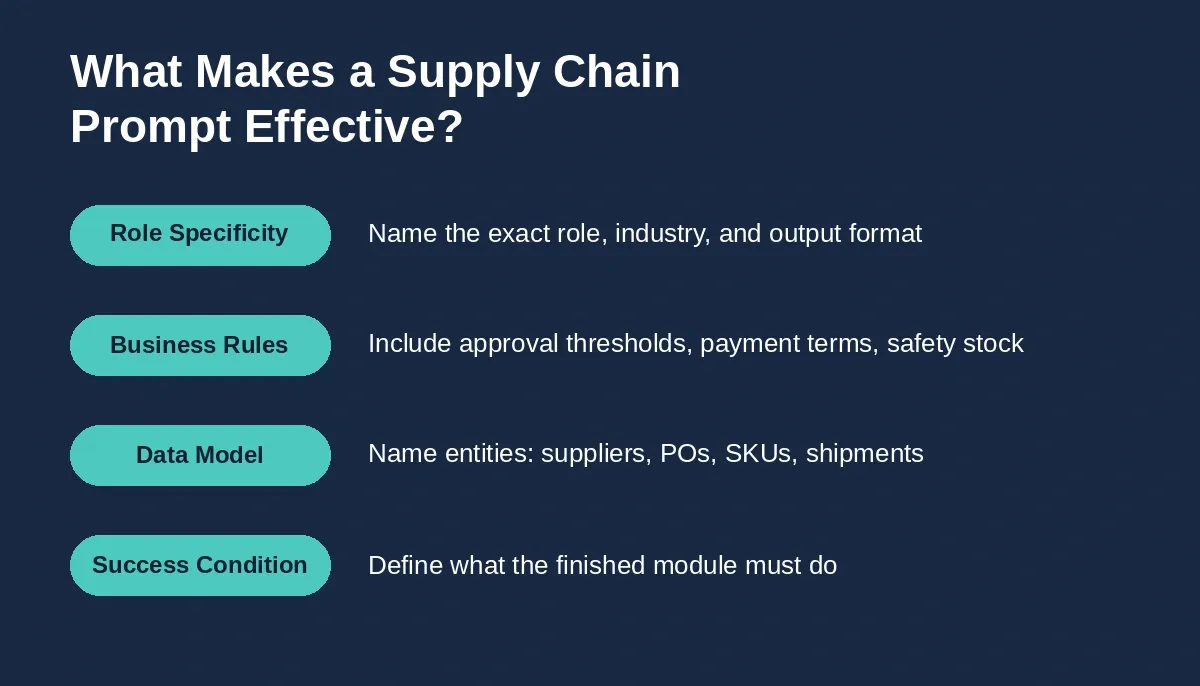
Four qualities that separate effective supply chain prompts from generic ones.
- Context specificity matters most. Tell the AI exactly what industry, what role (procurement specialist, logistics manager, warehouse operator), and what output format you expect. A prompt that says build a dashboard fails. A prompt that says build a real-time inventory dashboard for a warehouse operations manager showing current stock levels, reorder points, and supplier lead time data produces something usable.
- Include business rules in the prompt. Approval thresholds, payment terms, safety stock formulas, service level targets. The more rules you feed in, the fewer corrections you run later.
- Define the data model upfront. Name your entities: suppliers, purchase orders, SKUs, shipments. When AI tools receive structured context, they generate apps with proper database schemas from the start.
- State what success looks like. The procurement specialist should be able to compare three supplier quotes side by side, ranked by total cost including freight is far better than make a comparison page.
Solid prompt engineering best practices turn a generic idea into a production-grade module. Now, let us walk through all five phases.
The supply chain management software market hit USD 36.39 billion in 2026 and is growing at 9.01% CAGR through 2031. That growth tells you one thing: companies everywhere need supply chain platforms, and they need them fast.
Phase Overview: Five-Phase Build Process
Building a full supply chain platform takes 20 prompts across 5 phases and roughly 3-4 hours of active work on Rocket.
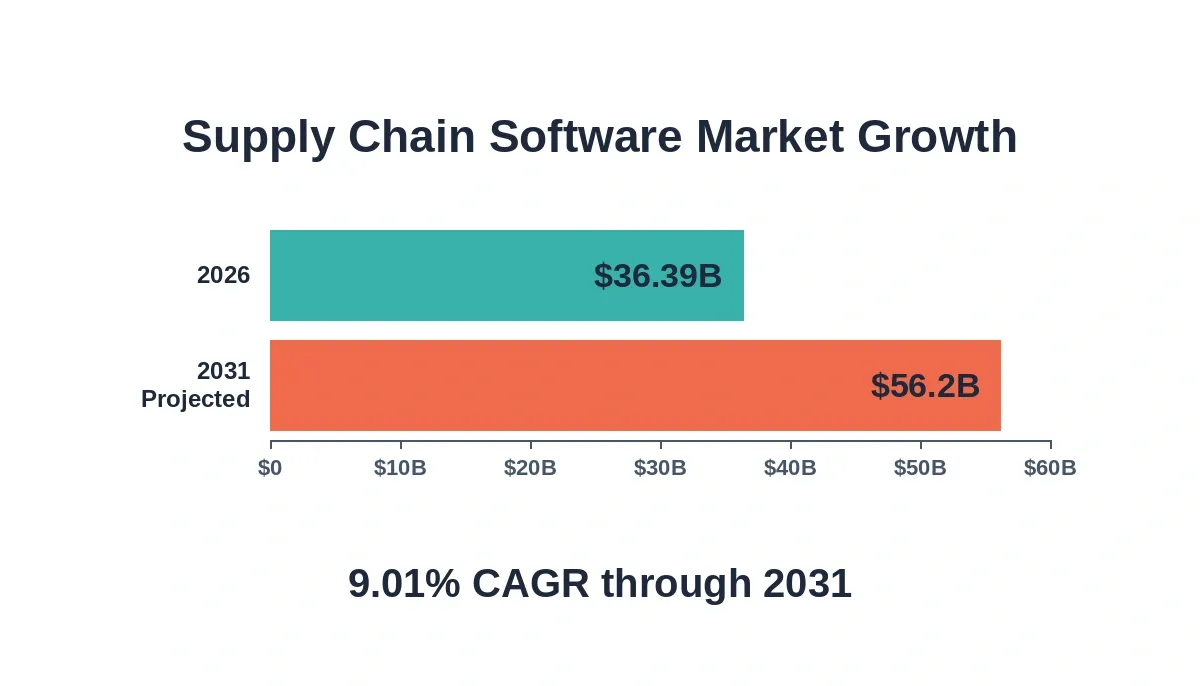
Supply chain software market growth: USD 36.39B in 2026 is projected to exceed USD 56B by 2031 at 9.01% CAGR.
| Phase | Prompts | Key Modules Built | Build Time on Rocket |
|---|---|---|---|
| Foundation | 1-4 | Auth, Supplier Portal, Warehouses, Product Catalog | 30-45 min |
| Procurement | 5-9 | PO Creation, Quote Comparison, Tracking, Spend Analysis, Contracts | 45-60 min |
| Inventory | 10-13 | Stock Dashboard, Alerts, SKU Detail, Demand Forecast | 30-45 min |
| Shipment | 14-17 | Inbound/Outbound Tracker, Receiving, Exceptions, Route Planning | 30-45 min |
| Reporting | 18-20 | Supplier Scorecard, Inventory Health, Performance Audit | 20-30 min |
Each phase produces modules that the next phase depends on. The practical difference between teams that ship working procurement and logistics tools in days versus those stuck in months-long development cycles often comes down to prompt quality.
How Do Foundation Phase Prompts Set Up Multi-Role Access?
Foundation prompts set up multi-role access by defining roles, permissions, and dashboard views before any procurement or inventory logic exists, typically Admin, Procurement Specialist, Warehouse Manager, and Logistics Coordinator. Each role gets a scoped dashboard; the data model established here carries into every subsequent phase.
Prompt 1: Multi-Role Authentication System
Build a role-based authentication system for a supply chain platform with four roles: Admin, Procurement Specialist, Warehouse Manager, and Logistics Coordinator. Each role should have a unique dashboard view. Admin sees all modules. Procurement sees supplier management and purchase orders. Warehouse Manager sees inventory levels, safety stock alerts, and receiving. Logistics Coordinator sees shipment tracking and route planning. Use email-password login with session management.
Expected output: Login page, role-specific routing, four dashboard shells, session handling.
What to check: Verify that each role only accesses its permitted modules. Test switching between roles to confirm data isolation.
Follow-up prompt: Add a password reset flow via email and an activity log that records every login with timestamp, role, and IP address.
Prompt 2: Supplier Onboarding Portal
Create a supplier onboarding portal where new suppliers submit company name, contact details, product categories they supply, annual volume capacity, average lead time in days, payment terms they accept, and certifications held. Include a status workflow: Submitted, Under Review, Approved, Rejected. The Admin reviews submissions and can request additional documents. Store supplier relationships linked to product categories for later use in procurement.
Expected output: Supplier registration form, admin review queue, status tracking, document upload.
What to check: Confirm the workflow transitions correctly. Verify that approved suppliers appear in the procurement module supplier list.
Follow-up prompt: Add a supplier risk assessment section that captures financial stability score, geographic risk, ethical sourcing certifications, and quality control audit history. Display a risk matrix summary on the admin dashboard.
Prompt 3: Warehouse Location Setup
Build a warehouse configuration module where the Admin defines warehouse locations with a name, address, total capacity in cubic meters, storage zones (ambient, cold chain, hazardous), and an assigned Warehouse Manager. Each warehouse should track current inventory value and available capacity percentage. Allow multiple warehouses per organization.
Expected output: Warehouse CRUD interface, zone configuration, capacity tracking, manager assignment.
What to check: Verify capacity calculations update when inventory is added. Test zone assignment for products with storage requirements.
Prompt 4: Product Catalog with SKU Management
Create a product catalog module with SKU-level detail. Each product has: SKU code, product name, category, unit price, weight, dimensions, primary supplier linked from the supplier database, alternative suppliers list, minimum order quantity, and lead time from each supplier. Include bulk CSV import for products and a search with filters by category, supplier, and stock status.
Expected output: Product CRUD, supplier linking, CSV import, filtered search interface.
What to check: Verify CSV import handles missing data gracefully. Confirm supplier links resolve correctly.
With foundation prompts complete, you have a full-stack application base ready for the procurement layer. Rocket generates this in Next.js for web and Flutter for mobile, with Supabase handling the database, auth, and storage layer automatically.
Which Procurement Prompts Handle Approval Workflows?
Procurement prompts handle approval workflows by encoding threshold rules directly into the prompt. The AI generates routing logic that auto-approves below a threshold, escalates to the manager between thresholds, and requires Director sign-off above the ceiling. This eliminates manual routing configuration after generation.
Prompt 5: Purchase Order Creation with Approval Workflow
Build a purchase order creation module where a Procurement Specialist selects a supplier, adds line items from the product catalog with quantities and negotiated unit prices, and submits for approval. Approval rules: orders under $5,000 auto-approve, orders $5,000-$25,000 require Manager approval, orders over $25,000 require Director approval. Show order total cost, including estimated freight. Track PO status: Draft, Pending Approval, Approved, Sent to Supplier, Partially Received, Complete.
Expected output: PO form with line items, approval routing logic, status workflow, cost calculations.
What to check: Test each approval threshold. Verify that total cost calculations include freight estimates. Confirm status transitions follow the defined workflow.
Follow-up prompt: Add email notifications to approvers when a PO awaits their review. Include an approval history showing who approved, when, and any comments. Add a reject-with-reason option that sends the PO back to the creator.
Prompt 6: Supplier Quote Comparison Tool
Create a supplier quote comparison module. The Procurement Specialist enters an RFQ with required items, quantities, and delivery timelines. Up to five suppliers can submit quotes with unit price, minimum order quantity, lead time in days, payment terms, and warranty period. Generate a side-by-side comparison table ranked by total cost of ownership (unit price times quantity plus freight plus handling). Highlight the best value option and flag any supplier with a lead time risk exceeding 30 days.
Expected output: RFQ creation form, supplier quote entry, comparison table, ranking algorithm, risk flags.
What to check: Verify total cost of ownership calculations. Confirm ranking updates when quotes change. Check that lead time risk flags appear correctly.
Prompt 7: PO Status Tracking Dashboard
Build a purchase order tracking dashboard showing all active POs with columns: PO number, supplier name, order date, expected delivery date, total value, and current status. Add filters for status, supplier, and date range. Include overdue highlighting for POs past their expected delivery date. Show a summary bar with counts per status category and total spend data for the current month and quarter.
Expected output: Filterable PO list, status indicators, overdue alerts, spend summary.
What to check: Verify overdue logic fires correctly based on dates. Test all filter combinations. Confirm spend totals match individual PO values.
Prompt 8: Spend Analysis Module
Create a spend analysis dashboard that pulls data from all completed purchase orders. Show: total spend by supplier (bar chart), spend by product category (donut chart), month-over-month spend trend (line chart), and top 10 items by annual spend. Include drill-down capability. Flag categories where spend increased by more than 15% compared to the previous quarter. Identify alternative suppliers for the highest-spend categories using the supplier database.
Expected output: Multi-chart analytics dashboard, trend detection, supplier alternatives, drill-down navigation.
What to check: Verify chart data matches underlying PO data. Test drill-down links. Confirm percentage change calculations are accurate.
Prompt 9: Contract Management and Renewal Alerts
Build a supplier contract management module. Store contracts with: supplier name, contract start and end dates, agreed unit prices per product, volume commitments, payment terms, penalty clauses, service level agreements, and renewal terms. Generate alerts 90, 60, and 30 days before contract expiration. Show a contracts calendar view and a list of contracts expiring next quarter with total annual spend under each contract.
Expected output: Contract CRUD, alert scheduling, calendar view, expiration reporting.
What to check: Verify alert timing is accurate. Confirm contract terms display correctly. Test the relationship between contracts and purchase order pricing.
Organizations with AI-mature supply chains achieve 23% greater profitability than peers, according to Accenture research across 1,148 companies. The procurement phase is where that gap is most visible; teams with automated PO approval and spend analysis respond to supplier disruptions in hours, not days. For teams building internal tools without a developer, these procurement prompts are a strong starting point.
How Should Inventory Management Prompts Handle Stock Alerts?
Inventory management prompts handle stock alerts by encoding threshold logic directly in the prompt, reorder point, and safety stock level, so the generated system fires email alerts at the reorder threshold and SMS escalation at the safety stock, with no manual configuration after generation.
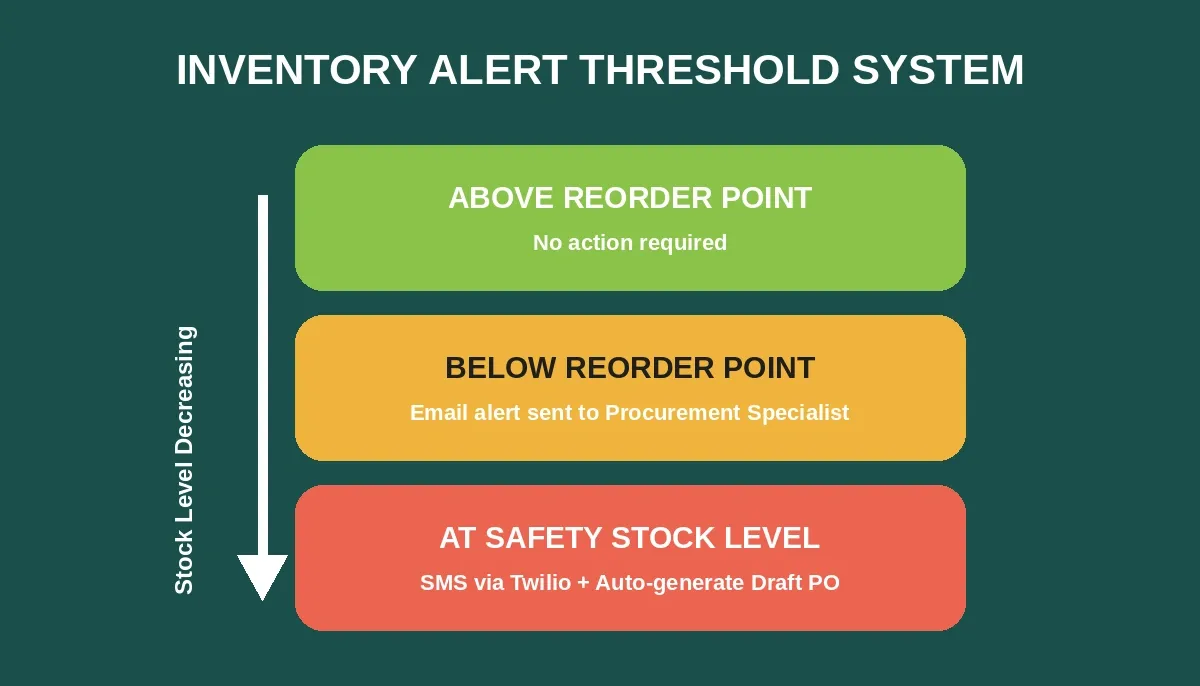
Three-zone alert system: above reorder point requires no action; below reorder point triggers email; at safety stock level triggers SMS and auto-generates a draft PO.
Prompt 10: Real-Time Inventory Dashboard
Build a real-time inventory dashboard for the Warehouse Manager showing: total SKU count, total inventory value, items below reorder point (flagged red), items at safety stock level (flagged orange), and items with excess stock over 90 days, noting that more accurate demand signals can reduce holding costs and help manage inventory costs. Include a search bar for SKU lookup, filters by warehouse location and product category, and a sortable table with columns: SKU, product name, current inventory quantity, reorder point, safety stock level, days of supply remaining, and last received date.
Expected output: Dashboard with metrics cards, color-coded alerts, searchable inventory table, multi-filter interface.
What to check: Verify color-coding triggers at correct thresholds. Test calculations for days of supply based on weekly demand averages. Confirm current inventory totals match across all views.
Follow-up prompt: Add an inventory aging report showing stock grouped by days since receipt (0-30, 31-60, 61-90, 90+ days). Include a dead stock identifier for items with zero movement in 60+ days and calculate the carrying cost impact.
Prompt 11: Low-Stock Alert System via SMS and Email
Create an automated low-stock alert system. The alert logic should help calculate safety stock and suggested reorder quantities from historical demand patterns. When current inventory drops below the reorder point, send an email alert to the assigned Procurement Specialist with the product name, current quantity, reorder point, suggested order quantity based on historical sales data and average lead time, and recommended supplier. When stock hits the safety stock level, escalate with SMS via Twilio to the Warehouse Manager and auto-generate a draft purchase order. Configure alert frequency to prevent duplicate notifications within 24 hours.
Expected output: Threshold monitoring, email alerts, SMS escalation, auto-PO draft generation, deduplication logic.
What to check: Verify threshold detection accuracy. Test the 24-hour deduplication window. Confirm suggested order quantities reflect actual demand patterns and lead time calculations.
Follow-up prompt: Add a safety stock formula that uses average daily demand times average lead time in days, and also uses demand variability, average lead time, and desired service level (95% or 99%) to determine buffer stock while balancing service targets against inventory costs. Allow the Warehouse Manager to override calculated values.
Prompt 12: SKU Detail View with Movement History
Build a SKU detail page showing: product image, description, current inventory across all warehouse locations, incoming POs with expected arrival dates, outgoing shipments, and a 12-month movement history chart (received vs. shipped per month). Include: average monthly consumption, inventory turnover rate, days of supply at current consumption rate, all linked suppliers with their pricing and lead time, and a notes section for the warehouse team.
Expected output: Comprehensive SKU profile page, movement chart, supplier details, calculated metrics.
What to check: Verify turnover rate calculation (cost of goods sold divided by average inventory). Confirm movement history pulls from actual transaction records. Test multi-warehouse aggregation.
Prompt 13: Demand Forecasting Model
Create a demand forecasting prompt module that analyzes historical sales data (minimum 12 months) for each product category. Apply weighted moving average considering seasonality, trend direction, and external factors like economic indicators and market trends, with teams able to factor in a 5% annual growth rate when relevant. Generate a forecast for the next quarter showing anticipated demand by week, recommended reorder quantities, and optimal order timing based on supplier lead times. Display forecast accuracy scores against actual results from previous periods so the output is practical for a supply chain analyst reviewing assumptions and accuracy.
Expected output: Forecasting engine, weekly predictions, reorder recommendations, accuracy tracking.
What to check: Validate forecast accuracy against held-out historical data. Verify seasonal adjustment logic. Confirm reorder timing accounts for actual supplier lead times. Ensure the model works from the company’s own data, not generic market assumptions alone.
These inventory prompts cut stockouts and reduce carrying costs. For teams running logistics applications at scale, the alert system alone can recoup platform costs within weeks. Teams building deeper inventory-specific modules will also find the AI prompts to build an inventory management system resource useful for additional prompt patterns.
Why Operations Teams Choose Rocket for Platform Builds
Running these 20 prompts through a standard AI chatbot gives you code snippets. Running them through Rocket gives you a deployed, connected supply chain platform — because Rocket is not a code generator. It is a three-pillar platform: Solve (validate the idea, generate a PRD, map the competitive landscape before a line of code is written), Build (generate the production app), and Intelligence (monitor competitors continuously after launch).
Rocket.new is the only option in this comparison that covers pre-build validation, mobile app generation, and post-launch competitive monitoring.
Before you build: Use Rocket's Solve pillar to validate your specific supply chain requirements. Describe your situation, and Solve returns a structured analysis covering market alternatives, build-vs-buy tradeoffs, risk matrix, and a recommended feature scope. That output flows directly into your Build tasks automatically, through shared project context.
When you build: Rocket's Build pillar generates production-grade web apps in Next.js and mobile apps in Flutter, not prototypes. Every build ships with SEO-ready structure, WCAG accessibility compliance, GDPR coverage, and performance optimization by default. After generation, you can download the source code, connect a custom domain, push to GitHub, and deploy to staging or production environments with one-click rollback and full version history.
After you launch: Rocket's Intelligence pillar monitors every public platform your supply-chain software competitors operate on and delivers daily or weekly briefs with interpreted signals, not just raw data.
| Capability | Rocket.new | Retool | Bubble | Generic AI chatbot |
|---|---|---|---|---|
| Pre-build Validation | Solve pillar | None | None | Partial |
| Web App Output | Next.js production | Drag-drop | Visual builder | Code snippets |
| Mobile App | Flutter iOS + Android | None | None | None |
| Competitive Monitoring | Intelligence pillar | None | None | None |
| Context Across Prompts | Shared project memory | None | None | None |
| Source Code Ownership | Full download + GitHub | Partial | Locked | Full |
| Deployment | One-click, staging + prod | Self-managed | Managed | Self-managed |
The 25+ built-in integrations, including Twilio (for the SMS alerts in Prompt 11), Supabase (database, auth, storage), and Stripe, authenticate once and flow into every build. Context carries between prompts through Rocket's shared project memory architecture. To understand how this compares to building with traditional tools, see the AI app builder vs hiring a developer ROI breakdown.
What Shipment and Logistics Prompts Track Delivery Exceptions?
Shipment and logistics prompts track delivery exceptions by encoding severity thresholds and escalation paths in the prompt: minor delays route to the Logistics Coordinator, major delays (48+ hours) escalate to the logistics manager and trigger alternative carrier evaluation, and damage reports trigger a quality control inspection workflow.
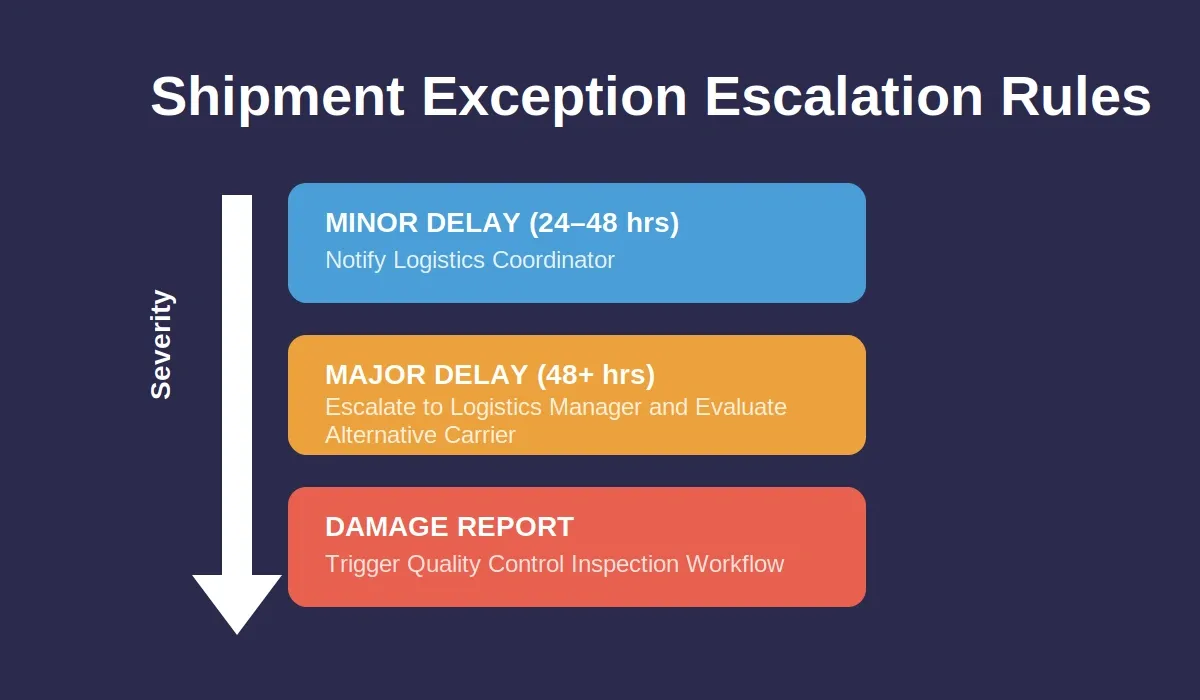
Three escalation levels: minor delays notify the Logistics Coordinator; major delays escalate to the logistics manager; damage reports trigger quality control inspection.
Prompt 14: Inbound and Outbound Shipment Tracker
Build a shipment tracking module with two views: Inbound (linked to purchase orders, showing supplier shipments arriving at our warehouses) and Outbound (customer orders leaving our warehouses). Each shipment record includes: tracking number, carrier name, origin, destination, ship date, expected delivery date, actual delivery date, status (In Transit, Delayed, Delivered, Exception), and linked PO or sales order number. Show a map view for active shipments and a timeline of status updates.
Expected output: Dual-view tracker, carrier integration, map visualization, status timeline.
What to check: Verify shipment-to-PO linking works correctly. Test status transition logic. Confirm the map plots the origin and destination accurately.
Prompt 15: Delivery Confirmation and Receiving
Create a delivery confirmation workflow for inbound shipments. When goods arrive, the Warehouse Manager scans or enters the PO number and records: actual quantities received per line item, any damaged items with photo uploads, temperature readings for cold chain products, and delivery time versus scheduled delivery window. Auto-update inventory levels upon confirmation. Flag discrepancies between ordered and received quantities for the Procurement Specialist to review.
Expected output: Receiving form, discrepancy detection, photo documentation, inventory auto-update.
What to check: Verify inventory updates reflect actual received quantities, not ordered quantities. Test discrepancy flagging logic. Confirm photo uploads are stored correctly and linked to the shipment record.
Prompt 16: Shipment Exception Alerts and Escalation
Build a shipment exception management system. Expand this into broader risk management by monitoring supply chain risk across lanes, suppliers, and carriers, since geopolitical issues can significantly disrupt supply chains, and common threats like political instability and natural disasters should be tracked with clear mitigation strategies, and the dashboard should suggest mitigation strategies for high-severity risks. Detect exceptions automatically: delays exceeding 24 hours past expected delivery, temperature excursions for cold chain shipments, damage reports from receiving, and carrier-reported incidents. For each exception type, define escalation rules: minor delays notify the Logistics Coordinator, major delays (48+ hours) escalate to the logistics manager and trigger alternative carrier evaluation, and damage triggers a quality control inspection workflow. Show an exceptions dashboard with open items sorted by severity and age.
Expected output: Auto-detection engine, severity classification, escalation routing, exceptions dashboard.
What to check: Verify that detection thresholds trigger correctly. Test escalation routing sends to the right roles. Confirm dashboard sorting and filtering work across exception types.
Prompt 17: Route Planning and Cost Comparison
Create a route optimization module for outbound shipments. Input: pickup warehouse, delivery destination, package weight and dimensions, required delivery window, and shipment priority. Compare available carriers based on: estimated transit time, transportation costs, reliability score from historical data, and carbon footprint estimate. In many scenarios, optimizing delivery routes can reduce transportation costs by 10-30%. Logistics optimization can improve delivery times by 20-50%, which supports timely delivery. Suggest the optimal route that balances cost and timely delivery within the specified window as part of ongoing supply chain optimization. Allow the Logistics Coordinator to override and select manually with a reason.
Expected output: Route comparison engine, carrier scoring, cost calculator, override workflow.
What to check: Verify that carrier comparison uses real historical performance data. Test cost calculations with different weight and destination combinations. Confirm override reasons are stored for audit purposes.
Organizations with mature supply chain capabilities are 23% more profitable and six times more likely to use AI widely across operations. The companies that automate shipment exceptions and spend analysis first free their teams for strategic supplier relationship management instead of firefighting, and better routing can also improve customer satisfaction. For a deeper look, see how AI apps for operations teams scale fast.
How Do Reporting Prompts Generate Demand Forecasts and Scorecards?
Reporting prompts generate demand forecasts and scorecards by pulling from the transaction data built across all previous phases, PO records, delivery confirmations, inventory movements, and exception logs, and surfacing them as weighted scores, trend lines, and benchmark comparisons in a single dashboard.
Prompt 18: Supplier Scorecard Generator
Build a vendor scorecard system that evaluates each supplier monthly across five dimensions and supports supplier performance monitoring across monthly KPIs: on-time delivery rate (weight 30%), quality rejection rate (weight 25%), price competitiveness versus market average (weight 20%), responsiveness to communication within 24 hours (weight 15%), and compliance with contractual terms (weight 10%). Calculate a weighted composite score out of 100. Require the system to analyze customer feedback alongside delivery and quality metrics, since effective logistics management can significantly improve satisfaction. Flag suppliers scoring below 60 for review. Show trend lines over the past 6 months and generate recommended actions: renegotiate terms, identify potential risks, seek alternative suppliers, or increase volume with high performers, with customer feedback trends influencing supplier reviews where service issues appear.
Expected output: Multi-dimensional scoring engine, weighted calculation, trend visualization, action recommendations.
What to check: Verify that weight calculations sum correctly. Test scoring against known good and bad scenarios. Confirm trend data pulls from actual delivery and quality records.
Prompt 19: Inventory Turnover and Health Report
Create an inventory health report showing: turnover ratio by product category and warehouse, days of inventory on hand, carrying cost as a percentage of inventory value, dead stock value (items with zero movement in 90+ days), and stockout frequency over the past quarter. Compare actual performance against industry benchmarks. Generate an action plan: liquidate dead stock, adjust reorder points for slow movers, increase safety stock for items with frequent stockouts, and flag items where current safety stock levels do not match demand patterns.
Expected output: Health metrics dashboard, benchmark comparison, automated action plan generation.
What to check: Verify turnover calculations use consistent time periods. Test dead stock identification logic. Confirm the action plan references specific SKUs with quantities.
Prompt 20: Performance and Web Vitals Audit Dashboard
Build a platform performance dashboard showing: page load times for each module, API response times for critical operations (PO creation, inventory lookup, shipment status), error rates by endpoint, and user session counts by role. Include a Core Web Vitals section showing LCP, FID, and CLS scores. Flag any module with a load time exceeding 3 seconds or an error rate above 1%. Track improvements over time and suggest process improvements for underperforming modules.
Expected output: Performance monitoring dashboard, Web Vitals tracking, threshold alerting, improvement suggestions.
Rocket's built-in analytics tracks visitors, conversions, accessibility, and Core Web Vitals after launch, so the data feeding Prompt 20's dashboard is already being collected without additional tooling. Teams that want to understand how AI app builders save development costs will find the reporting phase is where the ROI becomes most visible, since manual reporting typically consumes 20-30% of a supply chain team's weekly hours.
Your Next Supply Chain Build Starts With the Right Prompt
These 20 prompts represent a complete implementation plan for a multi-role supply chain platform covering supplier relationship management, procurement workflows, inventory monitoring, logistics coordination, and operational reporting. The structure works because each phase builds on the data models and workflows established in the previous one.
Before you run Prompt 1, consider using Rocket's Solve pillar to validate your specific supply chain requirements. Describe your team size, current pain points, and existing tools, and Solve returns a structured PRD and feature scope tailored to your context. That output flows directly into your Build tasks, so the first prompt you run already knows what you are building and why.
Pick your first prompt, paste it into Rocket's prompt-to-app builder, and watch your supply chain platform take shape in real time.
Ready to turn these prompts into a live supply chain platform? Start with Prompt 1 and build your first module in under 5 minutes, no setup, no DevOps, no waiting. Sign up for Rocket.new and start building today.
Table of contents
- -What Makes a Supply Chain Prompt Effective?
- -Phase Overview: Five-Phase Build Process
- -How Do Foundation Phase Prompts Set Up Multi-Role Access?
- -Prompt 1: Multi-Role Authentication System
- -Prompt 2: Supplier Onboarding Portal
- -Prompt 3: Warehouse Location Setup
- -Prompt 4: Product Catalog with SKU Management
- -Which Procurement Prompts Handle Approval Workflows?
- -Prompt 5: Purchase Order Creation with Approval Workflow
- -Prompt 6: Supplier Quote Comparison Tool
- -Prompt 7: PO Status Tracking Dashboard
- -Prompt 8: Spend Analysis Module
- -Prompt 9: Contract Management and Renewal Alerts
- -How Should Inventory Management Prompts Handle Stock Alerts?
- -Prompt 10: Real-Time Inventory Dashboard
- -Prompt 11: Low-Stock Alert System via SMS and Email
- -Prompt 12: SKU Detail View with Movement History
- -Prompt 13: Demand Forecasting Model
- -Why Operations Teams Choose Rocket for Platform Builds
- -What Shipment and Logistics Prompts Track Delivery Exceptions?
- -Prompt 14: Inbound and Outbound Shipment Tracker
- -Prompt 15: Delivery Confirmation and Receiving
- -Prompt 16: Shipment Exception Alerts and Escalation
- -Prompt 17: Route Planning and Cost Comparison
- -How Do Reporting Prompts Generate Demand Forecasts and Scorecards?
- -Prompt 18: Supplier Scorecard Generator
- -Prompt 19: Inventory Turnover and Health Report
- -Prompt 20: Performance and Web Vitals Audit Dashboard
- -Your Next Supply Chain Build Starts With the Right Prompt