Rocket.new generates a full app lockdown mode for any Flutter app from one prompt, with biometric gates, API whitelisting, and restricted state management included. No security expertise needed. This guide covers the exact prompt, architecture, and plan details.
Rocket.new adds a user-triggered lockdown mode to any Flutter app, disabling link previews, restricting APIs to a whitelist, and requiring biometric re-auth for every sensitive action. This is a prompt-driven architecture pattern, not a built-in Rocket.new feature. Any team can generate it using the no-code builder workflow described in this guide.
What is app-level Lockdown Mode?
It is a custom security state, inspired by but distinct from Apple's OS-level Lockdown Mode, that you generate inside your own Flutter app. When active, it suspends non-essential features to shrink the attack surface without deleting any functionality.
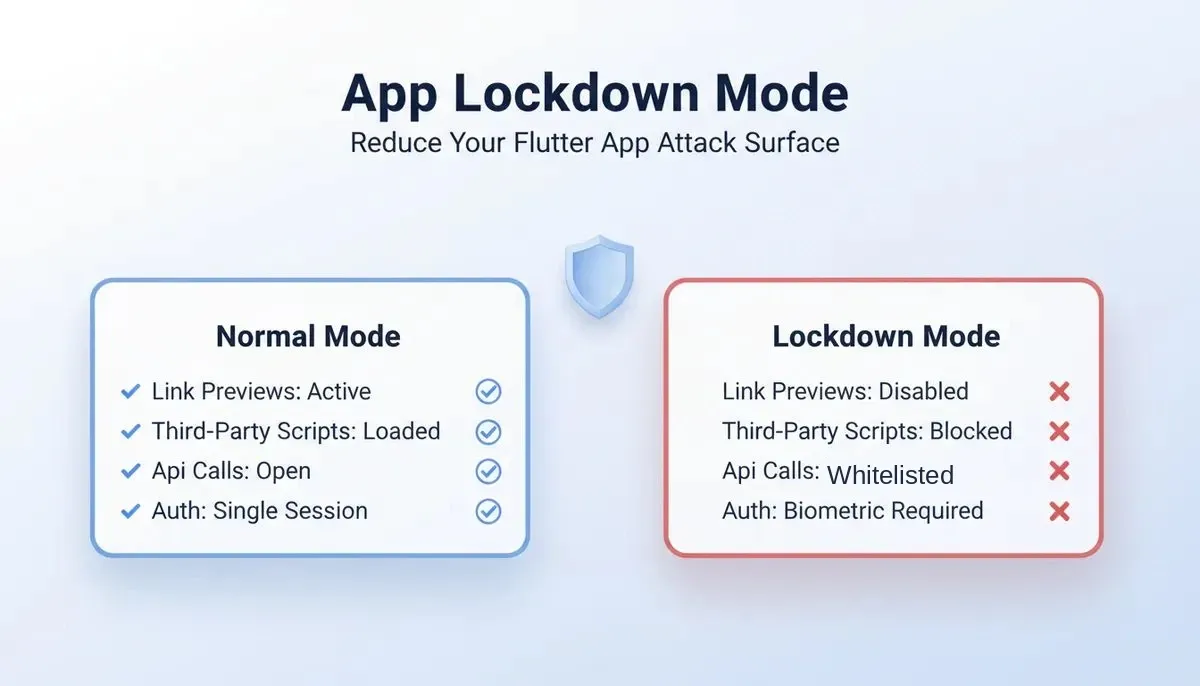
Normal mode vs. Lockdown mode: how a Flutter app's attack surface changes when restricted state is activated.
What Is Lockdown Mode And Why Does It Matter For Mobile Apps?
Why are mobile attacks rising faster than any other threat category? The 2026 Verizon Data Breach Investigations Report found that mobile devices now face 40% higher phishing click rates than desktop, making them the preferred target for attackers who have shifted away from traditional email. For Flutter apps handling sensitive data like financial records, health information, or authentication tokens, the standard security configuration leaves too many doors open.
Apple proved a radical idea works: shut down non-essential features under threat, and the attack surface drops to near zero. The same principle applies to every mobile app you build today.
Apple introduced Lockdown Mode in iOS 16 as an extreme security layer for users at high risk of targeted spyware. The concept is straightforward: when a user activates it, the device disables features that attackers commonly target.
Citizen Lab confirmed in September 2023 that Lockdown Mode blocked NSO Group's BLASTPASS zero-click exploit, a chain capable of compromising iPhones running the latest iOS without any interaction from the victim. Apple's Security Engineering and Architecture team verified this finding.
So what does this mean for app builders working with no-code platforms? The principle translates directly: give your app users a way to enter a restricted security state that shuts off every non-critical feature path an attacker could use.
For native mobile apps handling sensitive data, this security pattern moves from nice-to-have to non-negotiable. No-code app builders that generate Flutter code make this pattern accessible to teams without dedicated security engineers on staff.
How Does Reducing Attack Surface Protect Your App Users?
Every feature in a mobile app is a potential entry point. The OWASP Mobile Top 10 (2024 release) ranks Insecure Authentication/Authorization as the third most common vulnerability in mobile apps, and Security Misconfiguration sits at number eight. Both categories shrink dramatically when you disable features that do not serve the user's current task.
Attack surface reduction works by limiting what the app can do at any given moment. The fewer active features, the fewer things that can be exploited.
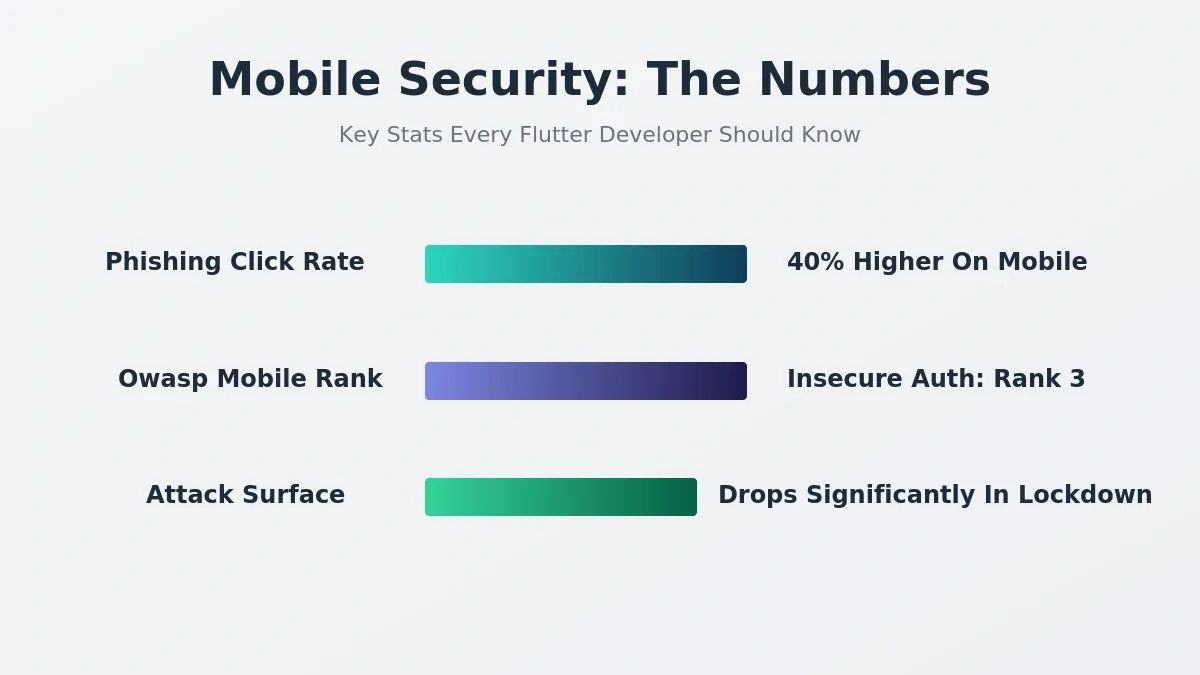
Key mobile security statistics that make the case for implementing lockdown mode in sensitive Flutter apps.
Here is how the two states compare for a typical Flutter app built with no-code tools:
| Feature | Normal State | Lockdown State |
|---|---|---|
| Link previews | Active, renders external URLs inline | Disabled, no external content loaded |
| Third-party scripts | All loaded (analytics, ads, widgets) | Blocked entirely |
| API calls | Any endpoint callable | Whitelist only, pre-approved endpoints |
| User authentication | Single login session persists | Biometric required per sensitive action |
| Push notifications | Content visible on lock screen | Content hidden until device unlocked |
| File downloads | Any file type permitted | Restricted to verified sources only |
| Background sync | Runs continuously | Paused until user triggers manually |
For no-code app builders generating production apps, this pattern does not require writing code from scratch. The restricted state is a configuration layer on top of existing app development logic. You define what stays active and what gets disabled, and the security rules apply at the API level.
What Features Should A Restricted Security State Disable?
Not every feature needs to be shut off. The goal is to disable features that create external connections or load untrusted content while keeping core functionality intact.
- Link previews and URL rendering: these fetch external content that could contain malicious payloads; disable them completely in lockdown
- Third-party content loading: advertising SDKs, social widgets, and analytics scripts all create attack vectors; block all external services from loading
- Unrestricted API access: limit outbound API calls to a whitelist of pre-approved endpoints; reject any call to domains not on the list; this is the core of API whitelisting
- Session persistence without re-verification: require biometric or PIN user authentication before every action that touches sensitive data, financial transactions, or account settings
- Notification content exposure: hide push notification body text until the device is unlocked with biometrics; show only "New notification" as placeholder
- Background data sync: pause all background network activity; only sync when the user actively triggers it
- Clipboard access: prevent the app from reading clipboard content that might contain passwords or tokens from other apps
The key distinction: lockdown does not delete features. It suspends them. When the user toggles back to normal state, everything returns to full functionality. This makes it practical for app users who need full features most of the time but want protection during travel, public Wi-Fi usage, or when handling particularly sensitive data.
For no-code app builder platforms that output Flutter source code, this configuration maps directly to state management. A single boolean flag controls which features are active, and the app checks that flag before executing any restricted action.
The Exact Prompt That Adds Lockdown Configuration
Copy this prompt into a Rocket.new Build task after your initial app generation. Rocket.new will generate the architecture described below.
“Add a user-triggered Lockdown Mode toggle to my Flutter app. When activated: disable all link preview rendering, block loading of third-party content and external scripts, restrict outbound API calls to only these whitelisted endpoints [list your endpoints], require biometric authentication (Face ID or fingerprint) before every action that reads or writes sensitive data, hide push notification content on the lock screen until biometric unlock, pause all background data sync. Store the lockdown state in secure local storage so it persists across app restarts. Include a visible status indicator in the app header showing current security state.”
Note on push notifications: Rocket.new does not have a native OneSignal connector. If you want a push notification confirming lockdown activation, add this line to the prompt:
"Wire a push notification via my push provider's REST API, and I will supply the endpoint and auth token as environment variables."
You can then import your push provider's API spec using Rocket.new's API importer (Postman collection, cURL, or Swagger), the same way the community connects services not in the native connector list.
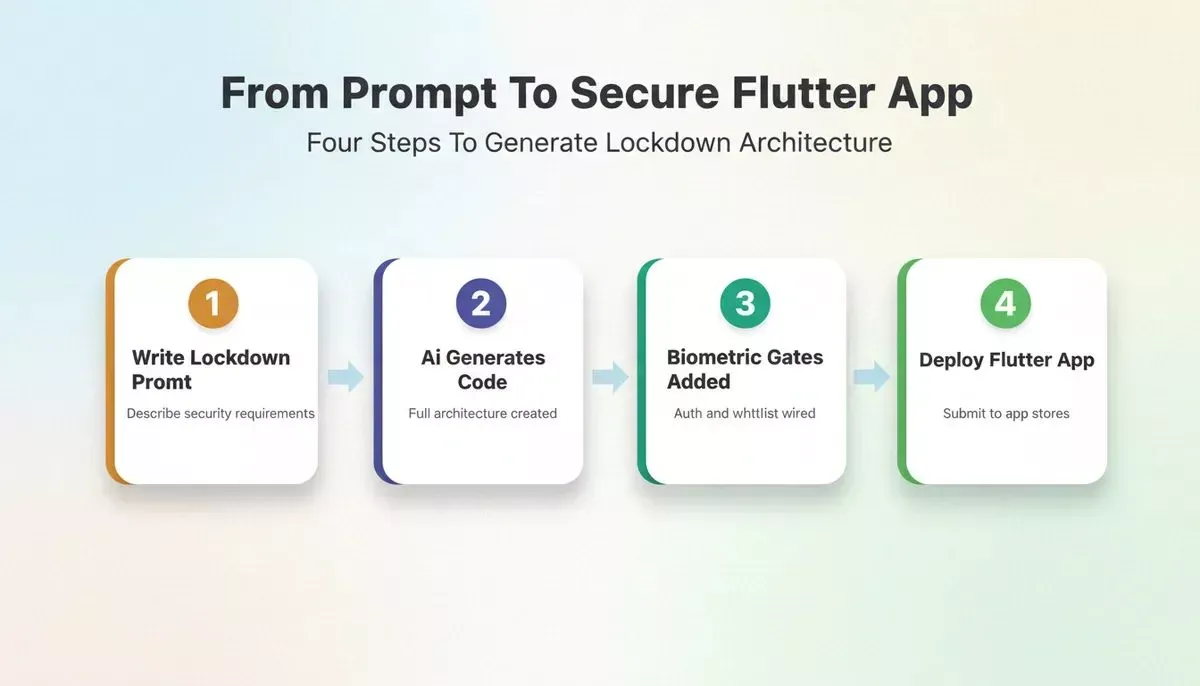
The four-step journey from writing a lockdown prompt to deploying a production Flutter app.
After Rocket.new generates the code, you will have:
- A lockdown toggle accessible from your app's settings screen
- State management that checks security mode before every restricted action
- API middleware that validates each outbound call against your whitelist
- Biometric authentication gates on all sensitive data operations (using Flutter's standard
local_authpackage; verify the generated implementation matches your app's requirements before shipping) - Persistent storage so the mode survives app restarts and device reboots
Flutter lockdown mode activation flow: from user toggle through biometric verification to full restricted state.
The generated Flutter code gives you full code export and GitHub push (one-way manual sync for Flutter projects; push your code to GitHub anytime with one click). Two-way auto-PR sync is available for Next.js TypeScript projects only, and requires a paid plan. You can self-host the final build on your own infrastructure with no ongoing platform dependency after download.
Why Rocket.new Is The Fastest Path To Production Security
Most no-code platforms and traditional app builders treat security as an afterthought. You build the app first, then bolt on security later, often discovering gaps only after deployment. Rocket.new flips this by generating production-grade Flutter code from a single prompt, with security patterns baked into the architecture from the first build.
- One prompt generates the full lockdown architecture: describe what you want disabled in restricted state, and Rocket.new generates the state management, UI toggle, API whitelist logic, and biometric gates across your entire Flutter app
- Full source code ownership: unlike most no-code app builders that lock you into their platform, Rocket.new gives you complete code export and code ownership; download your Flutter codebase and push to GitHub anytime
- No vendor lock-in: you own every line of generated code; self-host it, modify it, or hand it to your development team without platform dependency
- Visual editor for rapid iteration: after the initial generation, refine security screens, lockdown toggle placement, and notification behavior through the visual editor or natural language chat
- Native iOS and Android from one codebase: Rocket.new builds Flutter apps that compile to native mobile on both platforms; one security configuration covers both app store submissions
- Vibe coding with security context: describe your security requirements in plain language, and the AI understands lockdown patterns, biometric flows, and API restriction logic without you writing code manually
Where other no-code tools give you drag-and-drop interfaces for basic app building, Rocket.new generates working app code with proper architecture. The lockdown pattern is not a plugin or third-party add-on. It is generated as native Flutter state management that lives inside your source code.
As one developer noted on Reddit's r/FlutterDev community: "The difference between bolting security on after the fact versus generating it as part of the initial architecture is night and day. You catch things at the design level that would slip through as bugs in production."
For teams shipping business apps or native apps that handle financial data, healthcare records, or authentication tokens, the time savings compound fast. Traditional development takes weeks to add a proper lockdown mode. With Rocket.new, you describe it once and submit your build the same day. App store review timelines are controlled by Apple and Google, not by your build tool.
You can also start from a Flutter mobile app template to accelerate the initial generation before layering in the lockdown architecture, which is especially useful for teams new to Rocket.new's mobile build workflow.
Plan And GitHub Sync Reference
| Plan | Monthly Credits | Build Flutter Apps | GitHub Sync (Flutter) | GitHub Sync (Next.js TS) |
|---|---|---|---|---|
| Free | 20 (one-time) | Yes | One-way manual push | One-way manual push |
| Pro ($25/mo) | 100/month | Yes | One-way manual push | Two-way auto-PR (paid plan required) |
| Rocket ($50/mo) | 250/month | Yes | One-way manual push | Two-way auto-PR |
| Booster ($250/mo) | 1,500/month | Yes | One-way manual push | Two-way auto-PR |
Code export is available on all plans, including Free. Credits gate build volume, not export. Two-way GitHub sync (auto PR + pull from GitHub) requires a paid plan and is available for Next.js TypeScript projects only. For Flutter projects on all plans, sync is one-way manual push.
For teams evaluating build tools, understanding how Rocket.new generates Next.js and Flutter helps clarify why the framework choice matters for sync behavior and deployment options.
Can Traditional Builders Match This Security Standard?
Traditional app development and most no-code platforms approach mobile app security differently. The gap becomes clear when you compare what it takes to add lockdown mode across different approaches.
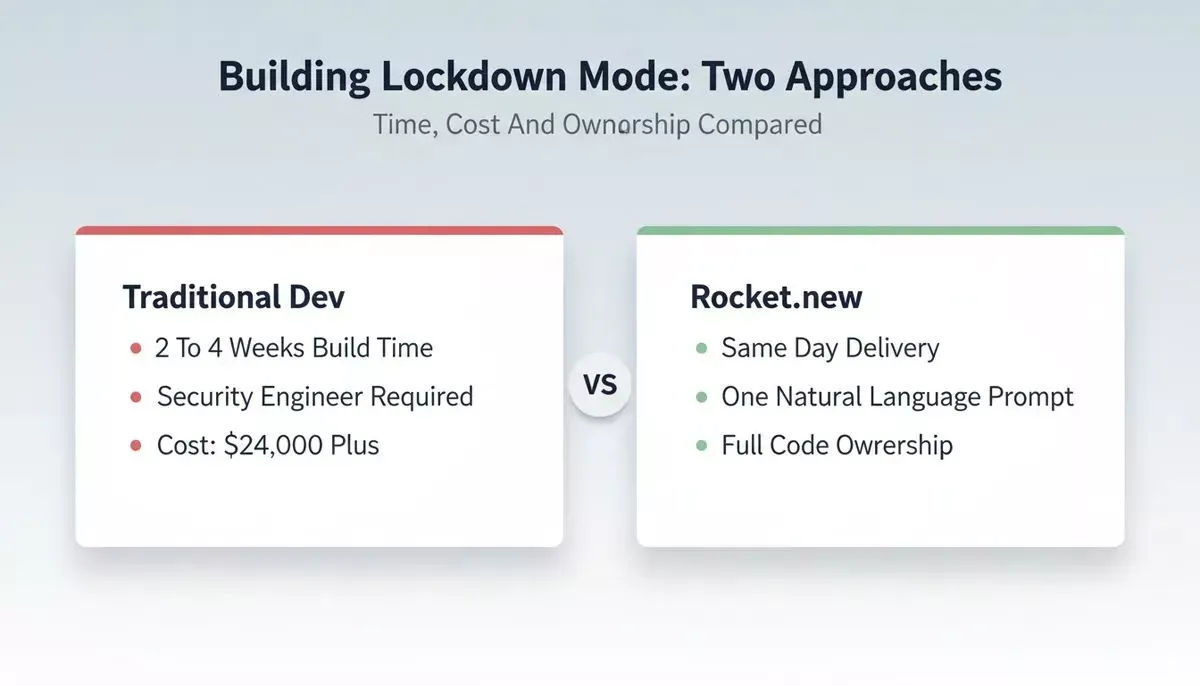
Cost and time comparison between traditional Flutter development and using Rocket.new for the same lockdown architecture.
- Traditional development (manual coding): requires a security architect to design the state machine, a Flutter developer to build the toggle and middleware, QA testing across both platforms, and typically two to four weeks of development time; the learning curve for biometric APIs alone adds days
- Drag-and-drop no-code tools (Glide, Adalo, Bubble): most no-code platforms do not offer native mobile app generation in Flutter; they produce progressive web apps or web-only experiences that lack access to device-level biometrics and secure storage; vendor lock-in means you cannot export and self-host
- Low-code platforms (FlutterFlow, Buildship): closer to native but still limited; paid plans often restrict code export, and complex backend logic like API whitelisting requires custom code blocks that defeat the no-code purpose
- Rocket.new (AI-powered Flutter generation): generates the complete lockdown architecture from a natural language prompt; full source code export on all plans; no vendor lock-in; generate and submit your build the same day
The cost difference matters for startups and small teams. Hiring a security-focused Flutter developer runs $150-250 per hour. A four-week lockdown feature sprint costs $24,000-40,000 at agency rates. Rocket.new generates the same architecture from a prompt in minutes, and you own every line of the resulting code.
For internal tools and business apps handling sensitive data, the traditional development timeline simply does not match the threat velocity. Mobile attacks are accelerating. Your security features need to ship at the same speed as your product features.
If your team is also evaluating whether to use an AI builder vs. hiring a developer for this kind of work, the AI app builder vs. hiring developer ROI breakdown covers the numbers in detail.
Security That Ships With Your Next Build
The lockdown mode pattern works because it borrows from a proven approach: reduce what is available, and you reduce what can be attacked. Apple demonstrated this at the device level. Now you can apply it at the app level for any Flutter project, regardless of your team's security background.
Before you ship, run Rocket.new's security checklist, which covers API key management, authentication, row-level security, and environment variables for every production build. For the lockdown pattern specifically, verify the generated biometric implementation and API whitelist logic against your app's actual requirements before submitting to the app stores.
Your next sensitive-data app does not need to launch without this protection. Paste the lockdown prompt into Rocket.new's Build interface, generate the security architecture, and submit your production Flutter app with user-controlled lockdown mode built in from day one.
Teams building apps that handle user authentication alongside lockdown mode should also review how Rocket.new generates authentication systems. The two patterns work together and can be prompted in the same build task.
For teams shipping healthcare or financial apps where security compliance is non-negotiable, the secure AI platform guide covers the broader architecture decisions that complement the lockdown pattern.
Ready to ship a Flutter app with production-grade security built in from the first prompt? Start building on Rocket.new and add lockdown mode to your next mobile app today. No security expertise required.
Table of contents
- -What Is Lockdown Mode And Why Does It Matter For Mobile Apps?
- -How Does Reducing Attack Surface Protect Your App Users?
- -What Features Should A Restricted Security State Disable?
- -The Exact Prompt That Adds Lockdown Configuration
- -Why Rocket.new Is The Fastest Path To Production Security
- -Plan And GitHub Sync Reference
- -Can Traditional Builders Match This Security Standard?
- -Security That Ships With Your Next Build