

Looking for a smarter platform than Vibeflow? Modern businesses need scalable, secure AI-powered tools that enhance collaboration, streamline workflows, and support sustainable growth while aligning with long-term operational goals and evolving development demands.
What makes a Vibeflow alternative truly fit modern business needs?
As businesses scale, the tools they rely on must keep pace. Speed and automation matter, but so do collaboration, security, and long-term flexibility.
A 2025 Statista survey found that a growing number of developers rely on AI tools in their workflows, signaling a major shift in how apps are designed and deployed.
Choosing a Vibeflow alternative is not just about features. It is about finding a platform that aligns with your operational goals and supports sustainable progress.
In this blog, we explore options built to meet today’s dynamic business expectations.
Why People Look Beyond Vibeflow?
Let’s be honest. Vibeflow gave a fresh start for many. But when business needs stretch beyond simple tools, teams start thinking, “What else is out there?”
Some common reasons:
- Teams want more control over generated code.
- They need better deployment support without deep dev ops skills.
- Businesses prioritize the security of your connection and the verification of successful waiting screens over the actual delivered performance.
- Designers and builders want tools that support user interfaces and coding tools equally well.
So, if you search for a Vibeflow alternative, you’ll see options that aim to balance speed with governance.
What Makes a Modern Tool Worth Your Time?
Before diving into specific platforms, it helps to understand what modern teams actually look for.
Tools are no longer just about writing code. They need to support real workflows, real people, and real business goals.
- Clarity and Control: Modern teams want platforms that show the actual source code. Not hidden layers. Not black boxes. The ability to view, edit, and control code builds confidence and long-term flexibility.
- Clean UI and UX Workflow: A smart user interface keeps things moving. Designers, founders, and product owners should feel comfortable working inside the platform. No unnecessary friction. No technical roadblocks are getting in the way of ideas.
- Strong Security Signals: In real-world environments, teams review the security of your connection before proceeding. They expect clear verification steps and fewer interruptions, such as waiting for confirmation messages. Clear security indicators build trust and reduce confusion during critical moments.
- Works Well With Other Tools: Great platforms do not exist in isolation. Coding tools, AI agents, and user interfaces must integrate seamlessly with existing tools and workflows. When systems connect well, teams move faster and avoid rework.
With these basics covered, it becomes easier to spot tools that truly support modern business needs.
Modern Vibeflow Alternatives
Here’s a quick side-by-side look at four modern Vibeflow alternatives. It highlights differences that matter for teams and projects.
| Platform | No-Code Friendly | AI Assistance Type | Deployment / Export | Focus |
|---|---|---|---|---|
| Rocket.new | High | Prompts → full app creation, backend automation | Full, exportable | Web & mobile |
| Replit AI | Medium | Code suggestions, fixes, full-stack setup | Full, exportable | Web & mobile |
| Bubble.io | High | Workflow automation plugins | Integrated | Web |
| Adalo | High | Database + logic generation | Integrated (mobile) | Mobile |
Here’s a quick side-by-side look at four modern Vibeflow alternatives. It highlights differences that matter for teams and projects.
Rocket.new: A Top Contender in Today’s Stack
One interesting name gaining buzz is Rocket.new. Think of it like an AI-friendly app builder that goes beyond basic blocks.
Rocket.new lets you type your idea once and get a working application with backend, frontend, and deployment tools ready to go. Many users see it as a strong vibe coding option compared to older no-code builders.
Top Features
- Prompt to App Creation: Builds apps directly from single prompts
- Figma Import: Converts design files into live, editable layouts
- AI-Powered Backend: Automatically handles logic, data, and workflows
- Custom Domain Support: Publishes projects with a branded domain
- Code Export: Allows developers to extend or customize later
Overall, Rocket.new supports a wide range of use cases, making it a flexible option for teams focused on practical outcomes rather than setup complexity.
Best For: MVPs, team tools, side projects.
Pricing: Free starter, ~$25–$100/month plans.
This makes Rocket.new more than a Vibeflow alternative. It’s a platform where you feel less stuck in verification successful waiting loops and more focused on real creation.
2. Replit AI: Code and Prototype Fast
Replit AI focuses on rapid prototyping and easy code generation, especially for indie developers and non-technical users. It’s ideal if you want both coding flexibility and AI guidance.
Top Features:
- Full-stack support with automated backend setups
- AI assistant for code suggestions and fixes
- Integrated hosting and version control
- Supports web and mobile apps
Best For: Solo devs, hackathons, and learning.
Limitations: AI is sometimes inconsistent and lacks visual design focus.
Pricing: Free starter, $20–$35/user/month, Enterprise custom.
Replit AI combines the speed of AI code generation with control over your source code. It also integrates smoothly with other coding tools, making team collaboration easier.
3. Bubble.io: Build Visual Apps Without Code
Bubble.io is one of the most established no-code platforms with AI add-ons. It emphasizes visual programming but now integrates AI-assisted workflows for modern projects.
Top Features:
- Drag-and-drop UI builder with dynamic content
- Custom workflows and logic without coding
- AI plugins for automating backend tasks
- Full deployment with custom domains
Best For: SaaS, multi-user web apps.
Limitations: Steep learning curve, mobile support is limited.
Pricing: Free, $32–$349/month, Enterprise custom.
Bubble gives designers and product owners control over both UI and backend logic, with fewer technical roadblocks. Its ecosystem of plugins adds extra AI-assisted capabilities.
4. Adalo: Mobile-First App Building
Adalo specializes in creating mobile apps quickly with AI assistance, bridging the gap between design and deployment. Perfect for teams focusing on mobile-first strategies.
Top Features:
- Drag-and-drop interface for UI/UX
- AI-generated database and logic structures
- Instant previews on mobile devices
- Integration with external APIs
Best For: Mobile-first apps, small businesses.
Limitations: Free-tier limits; less complex backend support.
Pricing: Free, $36–$200/month depending on plan.
Adalo balances simplicity with real app functionality. Its mobile focus and API integrations make it a practical alternative for teams who need speed without sacrificing flexibility.
Real Voices From the Community
Reddit threads show mixed feedback from users who have actually tried these tools.
“Basically, I use GPT to create a PRD, then feed that into Rocket.new. It does a solid job analyzing everything, then generates a to-do list where you pick the screens.”
How to Choose the Right Modern Alternative?
Picking the right tool is less about chasing trends and more about matching it to how a team actually works. With so many vibe coding and AI agent options floating around, a simple checklist helps cut through the noise.
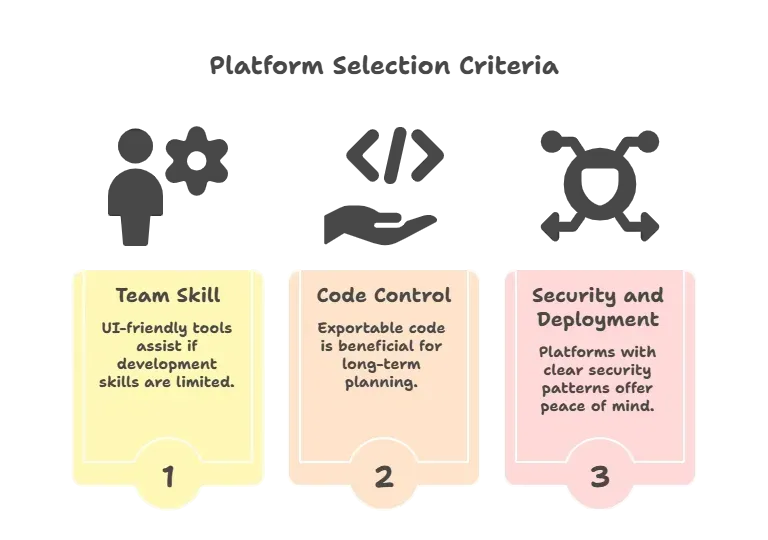
Remember to review the security of your connection before proceeding with sign-up. That phrase might sound odd, but it’s what you’ll encounter in real tool onboarding flows, a reminder to check settings before jumping in.
Find What Works for Your Team
Traditional no-code tools and older Vibeflow alternatives often reach their limits. Teams face partial features, unclear output, or tooling that doesn’t scale.
Platforms like Rocket.new bring a mix of vibe coding, AI assistance, exportable code, and integrated deployment. They ask you to focus on what matters: product and users. Just don’t forget to review the security of your connection before proceeding when starting out.
The right tool should feel intuitive. It should provide clarity for your project’s future while enabling you to respond quickly to changes. And the good ones let you keep control of your project long after you first start building.
Table of contents
- -Why People Look Beyond Vibeflow?
- -What Makes a Modern Tool Worth Your Time?
- -Modern Vibeflow Alternatives
- -Rocket.new: A Top Contender in Today’s Stack
- -Top Features
- -2. Replit AI: Code and Prototype Fast
- -3. Bubble.io: Build Visual Apps Without Code
- -4. Adalo: Mobile-First App Building
- -Real Voices From the Community
- -How to Choose the Right Modern Alternative?
- -Find What Works for Your Team

