
Build a full AI research tool with AI prompts in five phases on Rocket.new: auth, query engine, reports, collaboration, and dashboards. Each prompt generates a working feature in minutes with zero coding required.
Building an AI research tool from scratch used to mean months of development, a backend team, and stitching together a dozen disconnected services. With the right AI prompts and Rocket.new's Build feature, you can generate a production-ready research platform across five connected phases in a single afternoon.
This guide gives you the exact prompts, in build order, to create a full AI research tool with AI prompts covering authentication, query decomposition, report generation, team collaboration, and analytics dashboards.
Why Research Teams Struggle With Generic AI Assistants
An AI research tool is a purpose-built platform that decomposes complex questions into parallel sub-queries, scores sources for credibility, and produces structured reports with inline citations as opposed to a general chatbot that answers one question at a time and forgets context between sessions.
How many hours does your research team burn just organizing sources before the actual analysis begins? 72% of organizations have adopted AI in at least one business function, yet most researchers still toggle between disconnected AI tools that forget context between sessions. The deep research that matters most, the kind that requires multiple sources, credibility scoring, and structured output, gets shortcut because the tools were not designed for it.
This article gives you the exact prompts, in build order, to create a complete AI research platform using Rocket.new's Build feature. Five phases cover everything from multi-role authentication and project workspaces to AI-powered query decomposition, structured report generation, team collaboration, and performance dashboards.
Most AI tools treat every research question as a single-turn conversation. You ask, you get a response, and the context disappears the moment you close the tab. That approach falls apart when you need deep research across multiple sources with citations, credibility scores, and structured output that other team members can review.
How is an AI research platform different from manual research? The core difference is automation of the collection layer. An AI research platform runs parallel sub-queries, scores each source on a credibility scale, synthesizes findings into a structured report with citations, and stores everything in a persistent project workspace.
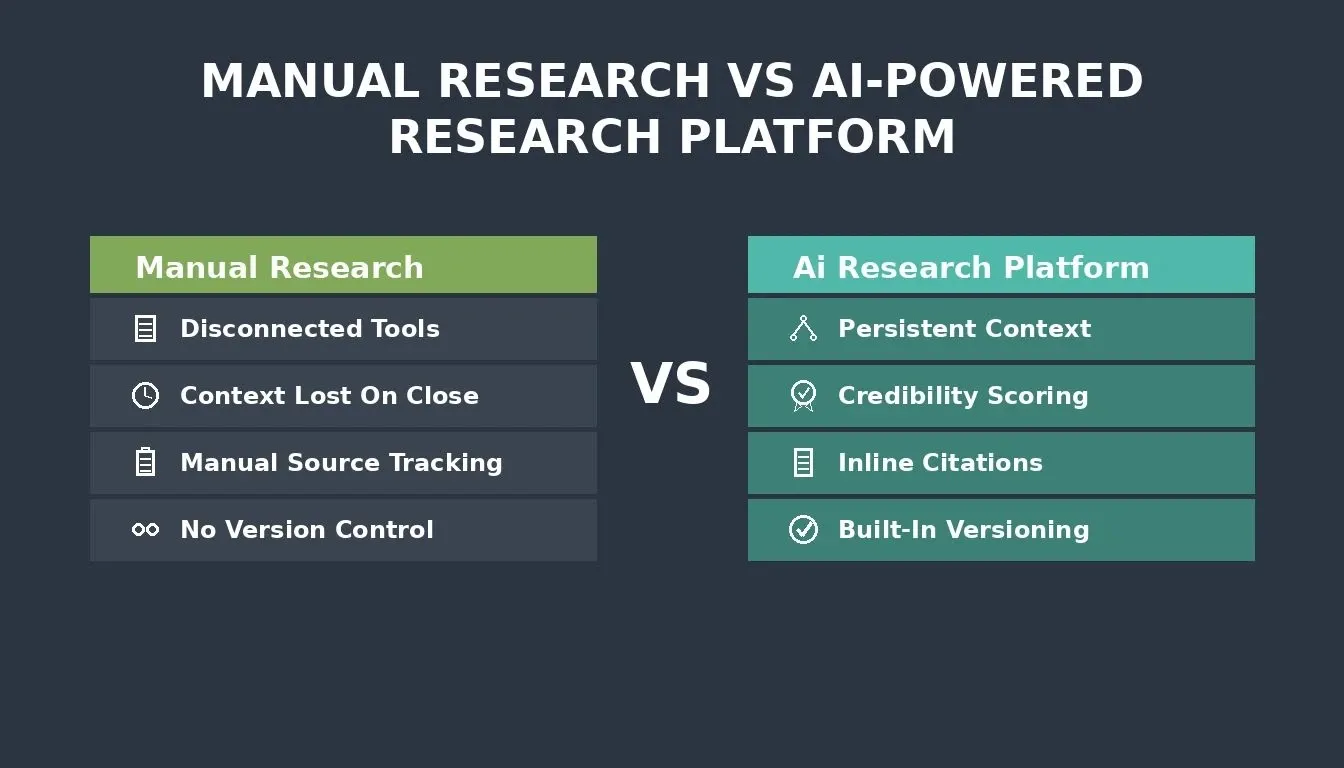
Manual research relies on scattered tools and manual effort. An AI research platform automates collection, scoring, and synthesis in one connected workspace.
| Challenge | Manual Research | AI-Powered Research Platform |
|---|---|---|
| Source tracking | Spreadsheets and bookmarks | Automated with credibility scores |
| Query decomposition | One question at a time | Parallel research streams from a single prompt |
| Report format | Copy-paste into documents | Structured reports with inline citations |
| Version control | Final_v3_REAL.docx | Built-in versioning with diff view |
| Team collaboration | Email threads and shared drives | Shared workspace with role-based access |
| Data persistence | Lost between sessions | Query history log with full context |
97% of developers report using AI coding tools both in and outside of work, and the time saved is being reinvested into system design, collaboration, and deeper analysis. The same pattern applies to deep research: when the right AI tools handle the repetitive collection work, researchers focus on what the data actually means.
Five-Phase Architecture Overview
Before pasting your first prompt, it helps to understand how all five phases connect. Each phase produces a data layer that the next one depends on, so the build order matters.
Each phase feeds the next: auth roles inform query access, query data powers reports, reports enable collaboration, and collaboration events drive analytics.
Data source types this platform supports:
| Source Type | Examples | How It Connects |
|---|---|---|
| Live web search | News, company pages, blog posts | Perplexity connector via Rocket.new |
| Internal documents | PDFs, spreadsheets, research briefs | Rocket.new project file uploads |
| Academic databases | arXiv, PubMed, SSRN | Web search with domain filters |
| Connected services | Notion pages, Google Drive files | Rocket.new Notion and Google connectors |
Phase One: Foundation - Auth, Workspace, and Data Layer
Phase one sets the data layer that every other feature depends on. Without multi-role authentication, a clean workspace structure, and a persistent query history, later prompts will not have relevant information to work with.
Multi-Role Auth Prompt
Row Level Security (RLS) means each user type sees only the data and views their role permits, enforced at the database row level in Supabase, not just at the UI level.
Supabase connects to your Rocket.new Build project as a workspace-level connector via OAuth. You authorize it once from Settings and it is available across all tasks. It is not bundled by default; it is a one-step connection you initiate.
Prompt: "Create an AI research platform with role-based authentication supporting three user types: researcher (can create projects, run queries, save sources, generate reports), reviewer (can view shared research, add annotations, approve reports, leave comments), and admin (full workspace configuration, user management, API key settings). Use Supabase for auth with Row Level Security. Each role sees only their permitted views on login."
Expected output: Login page, role detection logic, three dashboard layouts, RLS policies in the database.
What to check: Can a researcher see another researcher's private projects? If yes, refine the RLS policies with a follow-up prompt specifying row-level filters on the owner_id field.
Follow-up refinement: "Add an onboarding wizard that asks new users their name, department, research focus area, and preferred citation format, then auto-assigns them to the correct workspace view based on their role."
Research Workspace Prompt
This prompt generates project folders where researchers organize their deep research by topic, with tagging and search built in.
Prompt: "Create a research workspace with project folders. Each project has a title, description, tags, creation date, and status (active, archived, completed). Researchers can create, rename, and archive projects. Each project contains sub-folders for queries, saved sources, and generated reports. Add a global search bar that finds projects by title, tag, or content across all folders. Display projects as cards on the dashboard sorted by last activity."
Expected output: Project dashboard with card view, folder structure inside each project, global search, tag filtering.
What to check: Does the search index content inside saved sources, or only project titles? For deep research workflows, content-level search saves users significant time.
Query History Log Prompt
A query history log is a persistent database table that records every research query, including query text, timestamp, source count, and key findings, so researchers can re-run past queries and compare results over time.
Prompt: "Build a query history log that records every research query a user runs. Store: query text, timestamp, number of sources found, number of sources saved, project association, and a summary of key findings. Display the log as a searchable, sortable table inside each project. Let users re-run any past query with one click. Add filters for date range and source count."
Expected output: Query history table with search, sort, filters, one-click re-run, and project association.
What to check: Does the re-run feature preserve the original query parameters or start fresh? It should offer both options so researchers can compare results over time.
The foundation phase gives you a working research workspace in minutes. If you want to understand how Rocket.new handles authentication system generation with AI, that guide covers the same Supabase RLS patterns in more depth.
Phase Two: Query Engine and Source Credibility Scoring
The query engine is where your AI research platform does its most important work. When a researcher types a broad question, the AI agent breaks it into focused sub-queries, runs them in parallel, scores each source for credibility, and produces a synthesized summary with inline citations.
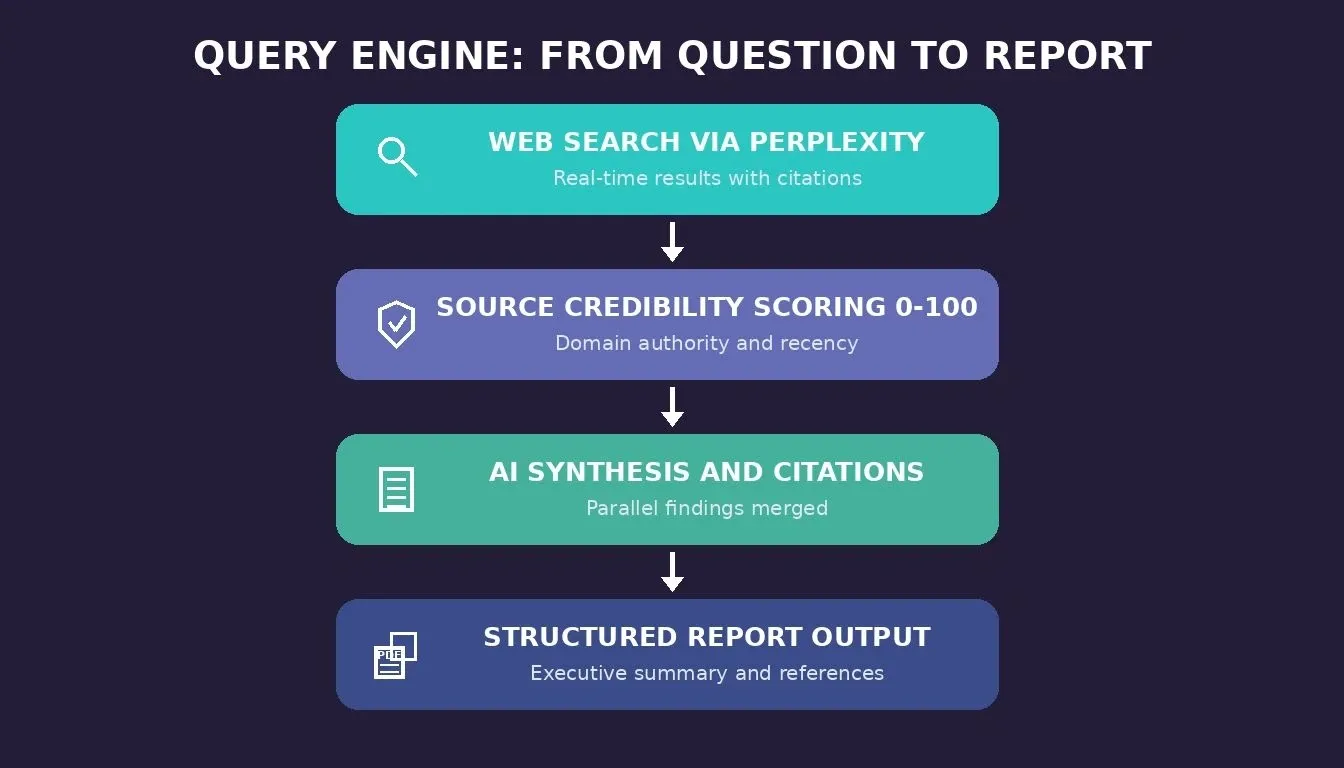
The query engine processes a single research question through four layers: web search, credibility scoring, AI synthesis, and structured report output.
Multi-Query Decomposition Prompt
Query decomposition means splitting one broad research question into 3-5 narrower sub-queries so the AI agent can search each angle in parallel, rather than running a single broad search that returns shallow results.
Prompt: "When a user submits a research query, the AI agent should decompose it into 3-5 focused sub-queries covering different angles. For example, if the input is 'What is the market size for AI research tools in 2026?', generate sub-queries like: (1) global AI market revenue data 2025-2026, (2) AI productivity tools segment size and growth rate, (3) deep research tool adoption statistics among researchers, (4) competitive analysis of top AI research assistant tools. Display each sub-query as a card that shows status (queued, running, complete) and results count."
Expected output: Query decomposition view with sub-query cards, status indicators, parallel processing, and results aggregation.
What to check: Are the sub-queries too similar? The decomposition should cover different angles of the original question. Refine by adding clear instructions about coverage diversity in your prompt.
On rate limits and credit cost: Running 5 parallel sub-queries via Perplexity consumes one API call per sub-query. Add a user-facing "estimated cost" indicator and a per-project query budget cap in your follow-up prompt to prevent runaway usage.
Web Search API Connector Prompt
Perplexity is a confirmed connector in Rocket.new's Build feature and returns real-time answers with cited sources, which makes it the right choice for a research platform that needs live data with attribution.
Prompt: "Connect the Perplexity connector (already authorized in Rocket.new's connector settings) to the query engine. For each sub-query, run a Perplexity search that returns the top 10 results with title, URL, snippet, and publication date. Store all results in Supabase linked to the parent query. Display results as a sortable list with relevance scores. Let researchers save specific results to their project's sources folder with one click."
Expected output: Search results list with save-to-project functionality, relevance ranking, and Supabase storage for all retrieved results.
Follow-up refinement: "Add a filter that excludes results older than 12 months by default, with an option to include older sources when the deep research topic requires historical context and a literature review."
Source Credibility Scoring Prompt
Source credibility scoring is a 0-100 scale applied to every source the platform collects, based on domain authority, publication recency, citation count, and whether the source provides original data, displayed as a color-coded badge so researchers can instantly assess reliability.
Prompt: "Add a credibility scoring system for every source the platform collects. Score each source on a 0-100 scale based on: domain authority (is it a .gov, .edu, peer-reviewed journal, or established publication?), publication recency (newer scores higher), citation count if available, and whether the source provides original data or references other parameters. Display the score as a color-coded badge on each source card. Flag any source below 40 as 'low confidence' with a warning icon."
Expected output: Credibility score badges on all source cards, color-coded thresholds, low-confidence warnings.
What to check: Does the scoring formula handle sources without a publication date? It should assign a neutral score rather than penalizing, since many pages with public information lack clear dates.
AI-Synthesised Summary Prompt
Prompt: "After all sub-queries return results, generate an AI-powered summary that synthesizes key findings across all sources. The summary should: (1) answer the original research question directly in the first paragraph, (2) present key insights as bullet points with inline citations linking to the specific source, (3) note any conflicting data between sources and describe the difference with important context, (4) end with a confidence assessment (high, medium, low) based on source credibility scores. Store the summary in the project with a version timestamp."
Expected output: AI-generated summary with inline citations, conflict detection, confidence rating, and version tracking.
Follow-up refinement: "Add follow-up questions at the bottom of each summary. The AI agent should suggest 3 related questions the researcher might want to investigate next, based on gaps or themes found in the current results."
A note on RAG and semantic search: If your research platform needs to search across internal documents alongside live web results, add a vector search layer. Prompt: "Add a vector search index using Supabase pgvector. When a user uploads a PDF to a project, chunk it into 500-token segments, generate embeddings using OpenAI's text-embedding-3-small model, and store them in a pgvector table. When a query runs, retrieve the top-5 semantically similar chunks from internal documents alongside the Perplexity web results, and include them in the synthesis step with a 'From your documents' label." This is the RAG (Retrieval-Augmented Generation) pattern, where your AI agent retrieves relevant chunks from your own data before generating the summary.
Phase Three: Structured Report Generation With Inline Citations
Raw research findings become useful when they are organized into reports that stakeholders can read, review, and act on. This phase turns synthesized deep research into structured documents with executive summaries, key findings, recommendations, and full citation lists.
Structured Report Builder Prompt
Prompt: "Create a report builder that generates structured research reports from project data. Each report includes: (1) Executive summary (200 words max, written by the AI agent based on all project summaries), (2) Research methodology describing queries run and sources analyzed, (3) Key findings section with numbered items and inline citations, (4) Data tables summarizing numerical findings with detailed information, (5) Recommendations section with main objectives and actionable next steps, (6) Full reference list in APA format. Let users edit any section before finalizing. Auto-save drafts every 30 seconds."
Expected output: Report editor with pre-generated sections, inline editing, auto-save, and citation management.
What to check: Does the report builder pull from all project summaries or only the most recent? For literature review and deep research workflows, it should aggregate key findings across the entire project history.
Follow-up refinement: "Add a 'key insights' sidebar that highlights the three most important findings from the report, with the option to export them as a standalone briefing document for stakeholders who need a quick read."
PDF Export and Versioning Prompt
Prompt: "Add PDF export to the report builder. The exported PDF should match the on-screen layout with proper formatting, page numbers, headers, and a clickable table of contents. Add report versioning that saves a snapshot every time a user clicks 'Save Version.' Create a version history page showing all saved versions with timestamps and who saved them. Add a diff view that highlights changes between any two versions in red (removed) and green (added). Let users write a brief note describing what changed with each version."
Expected output: PDF download button, version history table, side-by-side diff view with change highlighting.
What to check: Does the PDF export preserve inline citation links as clickable URLs? Also verify that large amounts of data in tables render correctly across page breaks.
For teams already building prompt-driven apps, the AI sales assistant prompt guide follows the same five-phase pattern with a different use case. The structure transfers directly: define your data model first, then layer on AI automation features.
How Rocket.new Converts Research Prompts Into Production Apps
You now have prompts covering three complete phases of a deep research platform. The natural question is where you paste them and what happens after you hit enter.
Most AI tools treat each prompt as an isolated request. You describe a login page in one tool, set up a database in another, wire a search API in a third, and manually stitch them together. That process breaks the moment your research platform needs all the pieces connected.
Rocket.new takes a single prompt and generates auth, database schema, UI, and API routes together. Rocket.new's Build feature reads your description once, plans the architecture, and ships production-grade Next.js code. Supabase is added as a workspace-level connector via OAuth and handles your Postgres database, user authentication, file storage, and RLS policies. Users start for free with 20 credits.
-
Shared context across prompts means no re-explaining. The query engine prompt knows about the auth roles you defined in phase one. The report builder knows about the source credibility scores from phase two. In Rocket.new, you can use @-mentions to pull findings from previous tasks directly into a new prompt without copying content by hand.
-
25+ services wire into your research stack from a chat message. Supabase for the database, OpenAI or Anthropic for AI models, Perplexity for web search, Resend for email notifications. Connect once via the Launchpad and every subsequent prompt inherits the connection.
-
Production defaults ship on the first generation. Accessibility compliance (WCAG 2.1 AA), dark and light theming, SEO-ready structure, and Core Web Vitals performance come standard. Rocket.new handles the full stack so users focus on the research features, not the infrastructure.
-
You own the code with zero lock-in. Download the Next.js source, sync with GitHub via two-way code sync, or continue building directly in the platform.
For teams exploring how AI agent workflows fit into larger systems, the AI agent prompt workflow guide covers the same approach applied to automating workflows across multiple steps. You can also explore how Rocket.new's Build feature compares to traditional development approaches for research platform projects.
Ready to turn your research prompts into a working platform? Start on Rocket.new with 20 free credits. That is enough to generate your foundation phase and see the output quality before committing to the full build.
Phase Four: Collaboration Features for Research Teams
A research platform becomes valuable to an organization when multiple users can contribute to, review, and approve findings. This phase adds shared workspaces, role-based collaboration, an annotation layer, and a stakeholder approval workflow.
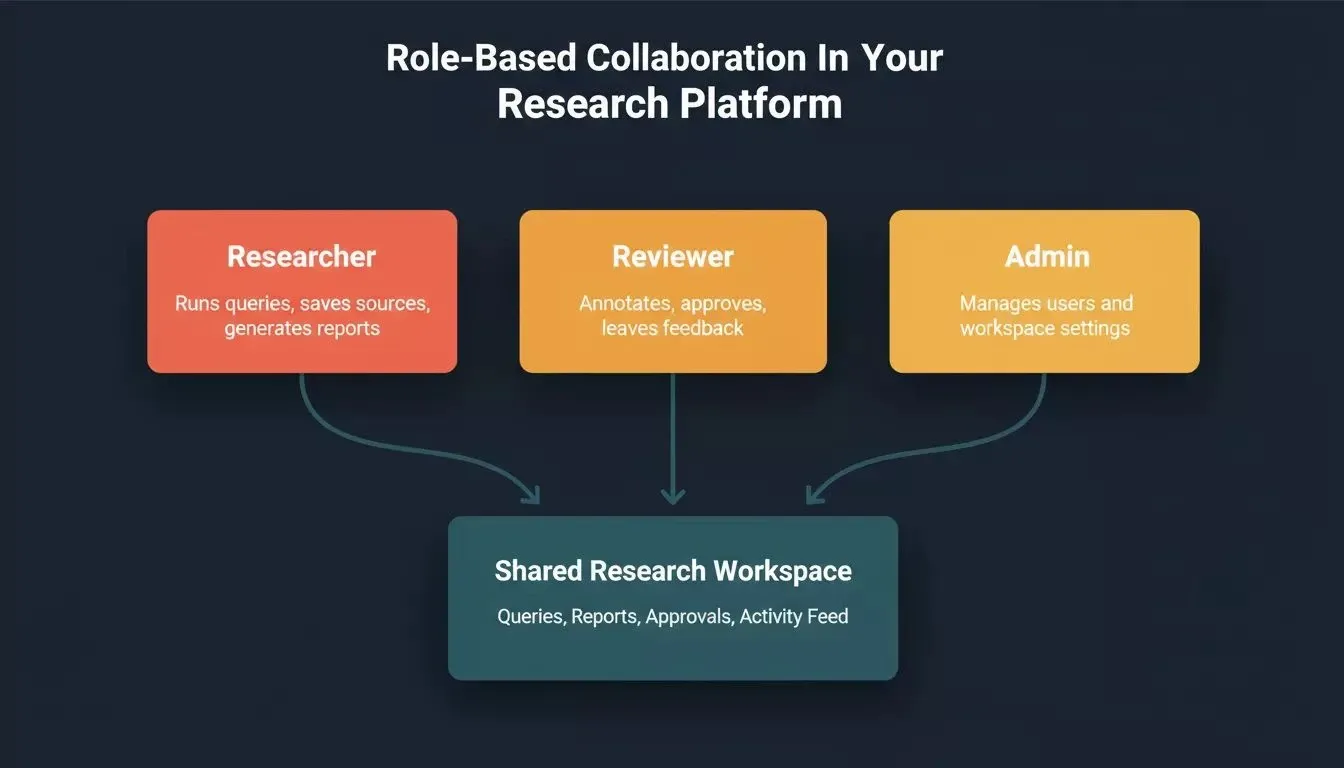
Three user roles, Researcher, Reviewer, and Admin, each with distinct permissions, all connected to a shared research workspace.
Shared Workspace Setup Prompt
Prompt: "Add shared workspace functionality to the research platform. Project owners can invite team members as editors (can run queries, save sources, edit reports) or commenters (can view everything, add annotations, leave feedback, but cannot modify research data). Display a team panel on each project showing all members with their roles and last activity timestamp. Add a notification system that alerts users when new research, important information, or updated reports land in a shared project."
Expected output: Team invite modal, role assignment, member panel with activity feed, notification triggers.
What to check: Can a commenter accidentally edit a report draft? Verify that the row-level security policies restrict write access correctly based on the collaboration role, not just the platform role.
Follow-up refinement: "Add an activity feed to each shared project that logs every action: query runs, source saves, report edits, annotations, and approvals. Display the feed as a chronological timeline with filters by team member and action type."
Annotation and Approval Workflow Prompt
Prompt: "Create an annotation layer for research reports. Reviewers can highlight any text in a report and leave a comment attached to that specific highlight. Comments support threads so researchers can respond and give feedback directly. Add an approval workflow: when a report is ready for review, the researcher clicks 'Submit for Approval.' The designated reviewer receives a notification, reviews the report with annotations, and clicks 'Approve' or 'Request Changes.' Track approval status on the report card with a badge (draft, in review, approved, changes requested)."
Expected output: Text highlight annotations, threaded comments with feedback support, approval status badges, and notification flow for reviewers.
What to check: Can multiple reviewers annotate the same report at the same time without overwriting each other? The annotation system should support concurrent users with real-time updates.
Phase four transforms a single-user deep research tool into a team platform. For teams building similar collaborative tools, the team collaboration app development guide covers real-time sync patterns and role management in more detail.
Phase Five: Reporting Dashboards and Performance Monitoring
The final phase adds analytics dashboards that help research leads understand how their team uses the platform, which topics generate the most deep research activity, and whether the application meets performance standards.
Query Volume Dashboard Prompt
Prompt: "Create a query volume dashboard showing: total queries run today, this week, and this month with trend sparklines. Add a bar chart breaking down queries by project and research topic. Show the top 5 most active researchers by query count. Include a time-series line chart showing daily query volume for the past 30 days. Let admins filter all views by date range, project, and team. Add an empty state that reads 'No queries logged yet. Run your first deep research query to start seeing data here.'"
Expected output: Dashboard with sparkline metrics, bar chart by project, researcher leaderboard, time-series chart, and date filters with a helpful empty state.
What to check: Does the dashboard load quickly with large amounts of data? If the query history table grows past 10,000 rows, add pagination or a date-range default of the past 30 days to keep load times under 2 seconds.
Topic Trend Charts Prompt
Prompt: "Add a topic trend chart that analyzes data from all queries run across the platform and groups them by subject area. Use the AI agent to categorize each query into one of these topics: market analysis, competitive research, technical deep research, academic literature review, financial analysis, or custom tags. Display a horizontal bar chart ranking topics by frequency. Add a trend line showing how topic distribution changes week over week. Flag any topic with a sudden spike using an alert badge."
Expected output: Topic categorization engine, horizontal bar chart, weekly trend comparison, spike detection alerts.
Follow-up refinement: "Add a 'topic deep research' shortcut. When a user clicks on any topic bar in the chart, auto-generate a new query that synthesizes the top findings across all queries in that topic category for the selected time period."
Core Web Vitals Audit Prompt
Prompt: "Add a Core Web Vitals monitoring page that tracks your research platform's performance. Display: Largest Contentful Paint (LCP) target under 2.5 seconds, First Input Delay (FID) target under 100 milliseconds, and Cumulative Layout Shift (CLS) target under 0.1. Show each metric with a pass or fail indicator and a 7-day trend chart. Add an empty state for new installations that reads 'Performance data will appear after 24 hours of usage.' Include a mobile performance tab that tracks the same metrics for mobile users."
Expected output: Core Web Vitals dashboard with pass/fail badges, trend charts, empty states for new users, and a mobile performance tab.
What to check: Are the performance metrics updating on a schedule or in real time? For most research platforms, hourly updates give users enough data to spot problems without adding server load.
The global artificial intelligence market reached $900 billion in 2026 (as of early 2026 estimates), growing at a CAGR of 18.73% through 2035. The demand for specialized AI tools that handle deep research, data analysis, and structured reporting is a major driver of that growth.
For teams that need the reporting dashboard pattern applied to business intelligence, the BI dashboard prompt guide covers similar chart types and filter configurations that help users analyze data across tools.
Use Cases by Vertical
The five-phase prompt library above is generic by design. Here is how to adapt it for four high-value research verticals, each with a tailored prompt tweak.
VC and Market Research
VCs run the same research workflow repeatedly: size a market, map the competitive landscape, identify key players, and assess growth signals. Tailored tweak: In the source credibility scoring prompt, add a rule that weights Crunchbase, PitchBook, and SEC filings at 90+ on the credibility scale, and flags any source without a stated data vintage as "unverified."
Academic Literature Review
Literature review requires searching peer-reviewed sources, tracking citation counts, and generating APA/MLA-formatted reference lists. Tailored tweak: In the web search connector prompt, add domain filters to restrict results to .edu, arxiv.org, pubmed.ncbi.nlm.nih.gov, and ssrn.com. In the credibility scoring prompt, weight citation count and journal impact factor as the primary scoring signals above domain authority.
Legal Research
Legal teams need jurisdiction-specific sources, regulatory databases, and case law. Confidentiality is critical. Tailored tweak: In the auth prompt, add a "matter" layer above projects so all research is scoped to a client matter with its own RLS policy. Add a data retention prompt: "Add a configurable data retention policy to each matter. When a matter is closed, automatically archive all queries, sources, and reports to a separate Supabase storage bucket and remove them from the active workspace."
Competitive Intelligence and Journalism
Journalists and CI analysts need real-time signals, source diversity, and fact-checking workflows. Tailored tweak: In the AI-synthesised summary prompt, add a conflict-detection rule: "If two sources contradict each other on a factual claim, surface both claims side by side with their credibility scores and publication dates, and flag the section as 'Disputed, requires verification' before the report can be approved."
Solve vs. Build: Which Rocket.new Feature Should You Use?
Before you start building a custom research platform with the prompts above, it is worth understanding when to use Rocket.new's native Solve feature instead.
Solve is Rocket.new's built-in research engine. It decomposes your question, runs parallel research streams, and delivers a structured report with an executive summary, evidence, and recommendations, exported as PDF, PPT, HTML, or PRD. Full Solve (available on Rocket and Booster plans) takes about 45 minutes for a deep report. Light Solve (available on all plans including Free and Pro) gives fast, conversational answers.
The prompts in this guide build a custom research platform inside Rocket.new's Build feature, a full-stack Next.js app with its own database, auth, and UI. You would choose Build over Solve when you need a persistent, multi-user tool that your team logs into every day, with custom workflows, approval processes, and embedded analytics.
| Scenario | Use Solve | Use Build |
|---|---|---|
| One-time structured research report | Yes | No |
| Persistent multi-user research platform | No | Yes |
| PDF, PPT, or HTML export of a single deliverable | Yes | No |
| Custom credibility scoring and approval workflows | No | Yes |
| Embed research into a larger app | No | Yes |
| Ongoing competitor and market monitoring | Use Intelligence | No |
Security and Compliance for Research Platforms
Research platforms often handle proprietary data, confidential client information, or regulated content. Here are the key security prompts to add after Phase One.
Data Encryption and Residency Prompt
Prompt: "Add data encryption for all stored research data. Ensure all Supabase data is encrypted at rest using AES-256 (Supabase default) and in transit via TLS 1.3. Add a data residency setting in the admin panel that displays the current Supabase region and allows admins to document their data residency policy. Add a privacy settings page that shows users what data is stored about them and includes a 'Delete my data' button that removes all their queries, sources, and reports."
Access Logging Prompt
Prompt: "Add an access log to the admin panel that records every login, query run, report export, and user invitation with a timestamp and IP address. Store logs in a separate Supabase table with read-only access for admins. Add a log export button that downloads the last 90 days of activity as a CSV. This log is required for SOC 2 and enterprise security audits."
For teams handling HIPAA, GDPR, or SOC 2 requirements: Supabase offers dedicated infrastructure options for data residency. Your Rocket.new-generated app inherits Supabase's security model, but you are responsible for configuring RLS policies, disabling public schema access, and enabling point-in-time recovery. The Rocket.new security checklist covers the key steps.
Cost, Maintenance, and Iteration After Launch
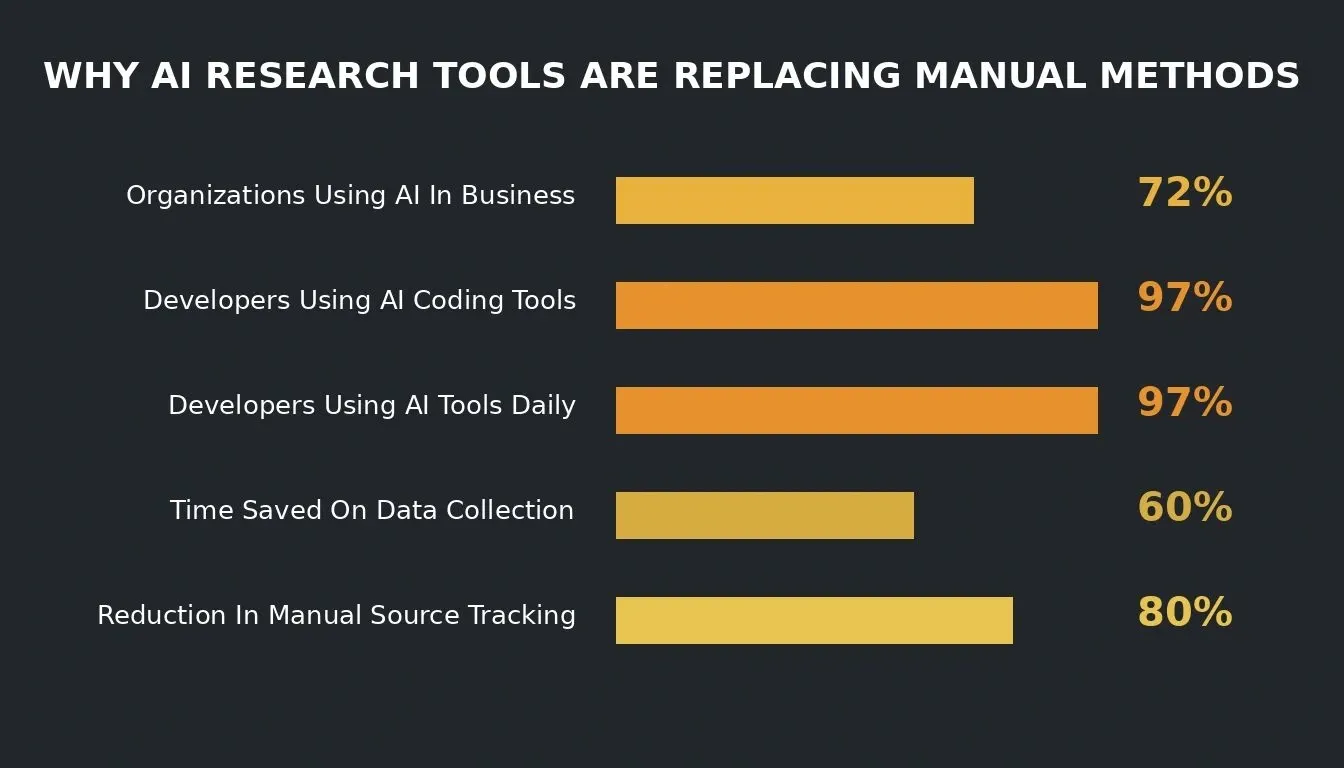
Key data points behind the shift from manual research workflows to AI-powered research platforms.
How Many Credits Does It Cost To Build This Platform?
The five-phase build consumes approximately 15-25 Rocket.new credits in total, depending on how many refinement iterations you run per phase. Each phase generates a working feature in one to three prompts. On the free plan (20 credits), you can complete Phase One and most of Phase Two before needing to top up.
Adding New Source Connectors After Launch
When a new data source becomes relevant (e.g., a Bloomberg API or a proprietary industry database), add it with a single prompt: "Add a new source connector for [API name]. Authenticate via API key stored in environment variables. For each sub-query, call the [endpoint] and return results in the same format as the Perplexity connector: title, URL, snippet, publication date, and relevance score. Merge results into the existing source list with a 'Source: [API name]' label."
Handling API Deprecations
Perplexity and OpenAI update their APIs periodically. When a breaking change occurs, open the Rocket.new Build editor and prompt: "The [connector] API has updated its response format. The old field [field_name] is now [new_field_name]. Update all references in the codebase." Rocket.new's two-way GitHub sync means you can also make this change directly in your repo and push it back.
Retraining Topic Categorization
As your team's research focus evolves, the categories may need updating. Prompt: "Update the topic categorization model to include two new categories: [category_1] and [category_2]. Recategorize the last 30 days of query history using the updated category list and update the trend charts."
Your Research Stack Starts With The Right Prompt
These five phases give you a complete, connected research platform where every prompt builds on the one before it. The foundation captures users and queries. The query engine runs deep research with credibility scoring. The report builder structures key findings for stakeholders. Collaboration keeps teams aligned. And the dashboards show what the platform is actually doing across the entire organization.
The gap between "we need better research tools" and "our team uses this daily" is shorter than most people expect when every component generates from a single description. Start with the multi-role auth prompt from Phase One on Rocket.new and have your research foundation live in minutes. Twenty free credits, no backend setup, no stitching tools together.
Rocket.new is the fastest way to build an AI research tool with AI prompts across five production-ready phases. Unlike tools that generate disconnected screens, Rocket.new carries full context from your first auth prompt through to your final reporting dashboard, so every feature you add knows about the data layer that came before it. Start your deep research platform today and ship a working app with 20 free credits. Sign up and start building on Rocket.new.
Table of contents
- -Why Research Teams Struggle With Generic AI Assistants
- -Five-Phase Architecture Overview
- -Phase One: Foundation - Auth, Workspace, and Data Layer
- -Multi-Role Auth Prompt
- -Research Workspace Prompt
- -Query History Log Prompt
- -Phase Two: Query Engine and Source Credibility Scoring
- -Multi-Query Decomposition Prompt
- -Web Search API Connector Prompt
- -Source Credibility Scoring Prompt
- -AI-Synthesised Summary Prompt
- -Phase Three: Structured Report Generation With Inline Citations
- -Structured Report Builder Prompt
- -PDF Export and Versioning Prompt
- -How Rocket.new Converts Research Prompts Into Production Apps
- -Phase Four: Collaboration Features for Research Teams
- -Shared Workspace Setup Prompt
- -Annotation and Approval Workflow Prompt
- -Phase Five: Reporting Dashboards and Performance Monitoring
- -Query Volume Dashboard Prompt
- -Topic Trend Charts Prompt
- -Core Web Vitals Audit Prompt
- -Use Cases by Vertical
- -VC and Market Research
- -Academic Literature Review
- -Legal Research
- -Competitive Intelligence and Journalism
- -Solve vs. Build: Which Rocket.new Feature Should You Use?
- -Security and Compliance for Research Platforms
- -Data Encryption and Residency Prompt
- -Access Logging Prompt
- -Cost, Maintenance, and Iteration After Launch
- -How Many Credits Does It Cost To Build This Platform?
- -Adding New Source Connectors After Launch
- -Handling API Deprecations
- -Retraining Topic Categorization
- -Your Research Stack Starts With The Right Prompt