Prompt quality determines auth quality. Vague instructions produce vulnerable login systems. This blog shows how to write structured prompts that generate production-grade authentication, and where AI-generated auth code still needs human review.
Login and signup are the first things your users interact with, and the first things attackers probe.
A social network once exposed 1.5 million authentication tokens within three days of going live. It was built almost entirely with AI-generated code and shipped without input validation, rate limiting, or secure session handling.
Getting authentication systems with AI prompts right starts long before the first line of code appears.
This blog covers what to include in your prompts, where AI-generated auth falls short, and how to close the gap before your app reaches real users.
Why Prompt-Driven Login Development Matters Right Now
How did that social network ship broken auth? The AI produced functional-looking code. The prompt never asked for the security layer underneath.
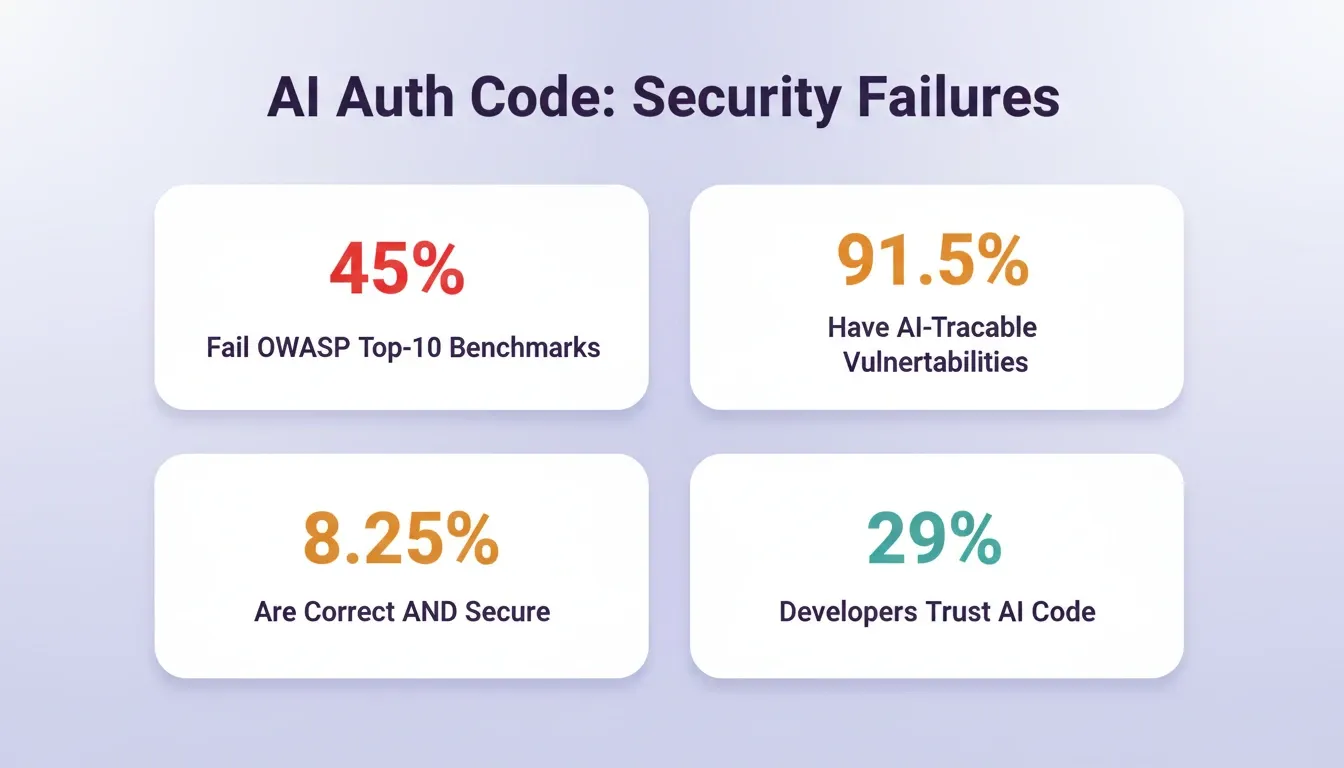
According to a Keyhole Software report on vibe coding trends, 91.5% of AI-coded applications contain at least one vulnerability traceable to the AI itself. That number signals one thing: the quality of your prompt directly shapes the security of your auth layer.
The market for identity verification is growing fast, and AI tools are changing how teams approach it.
-
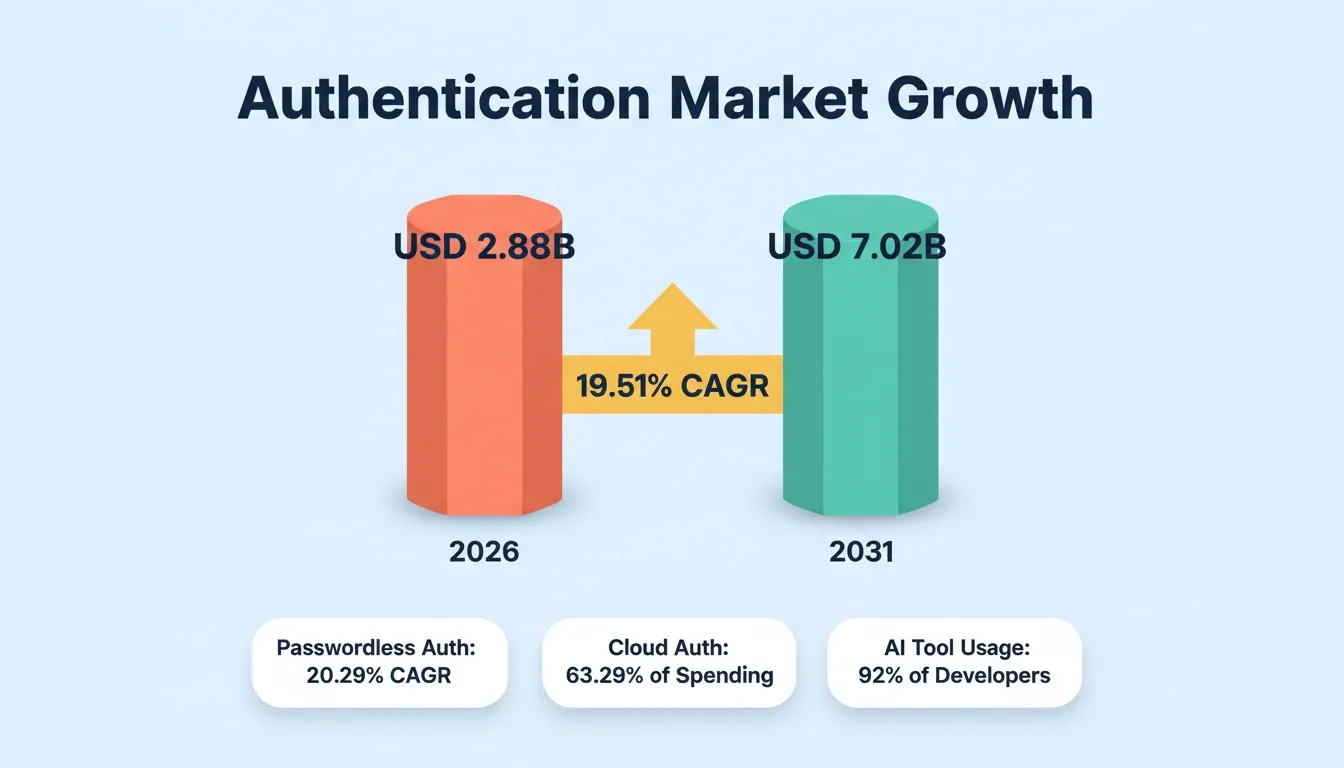
The authentication services market reached USD 2.88 billion in 2026 and is projected to hit USD 7.02 billion by 2031, growing at a 19.51% CAGR (Mordor Intelligence).
-
Passwordless login is the fastest-growing method, projected to expand at a 20.29% CAGR through 2031.
-
92% of U.S. developers now use AI coding tools daily, but only 29% trust the output those tools produce.
| Metric | 2026 Value | Projection |
|---|---|---|
| Auth services market | USD 2.88 billion | USD 7.02 billion by 2031 |
| Passwordless auth CAGR | 20.29% | Through 2031 |
| Public cloud auth deployment | 63.29% of spending | Fastest-growing segment |
| BFSI sector share | 32.44% | Retail catching up at 21.36% CAGR |
Teams that generate an authentication system using AI can ship login flows in minutes instead of weeks. The question is whether those flows hold up under real traffic and real attacks.
How AI Code Generators Handle Signup and Login Flows
When you type build a signup page with email and password into an AI builder, quite a lot happens under the surface.
The AI parses your intent and maps it to known patterns: form fields, validation logic, password hashing, and database storage. Session management gets scaffolded automatically in most tools. JWT tokens, cookie handling, or OAuth flows get added depending on the framework. The output looks functional and often compiles on the first try.
The invisible parts, such as rate limiting, CSRF protection, and token expiry, depend entirely on how specific your prompt was. Most AI code generators default to the simplest path. You get a login page that works, but not one that resists brute-force attacks or handles edge cases like expired sessions.
What Should a Good Auth Prompt Include?
A strong auth prompt is more than add login and signup. It should specify the security requirements, data model, and user experience you need.
-
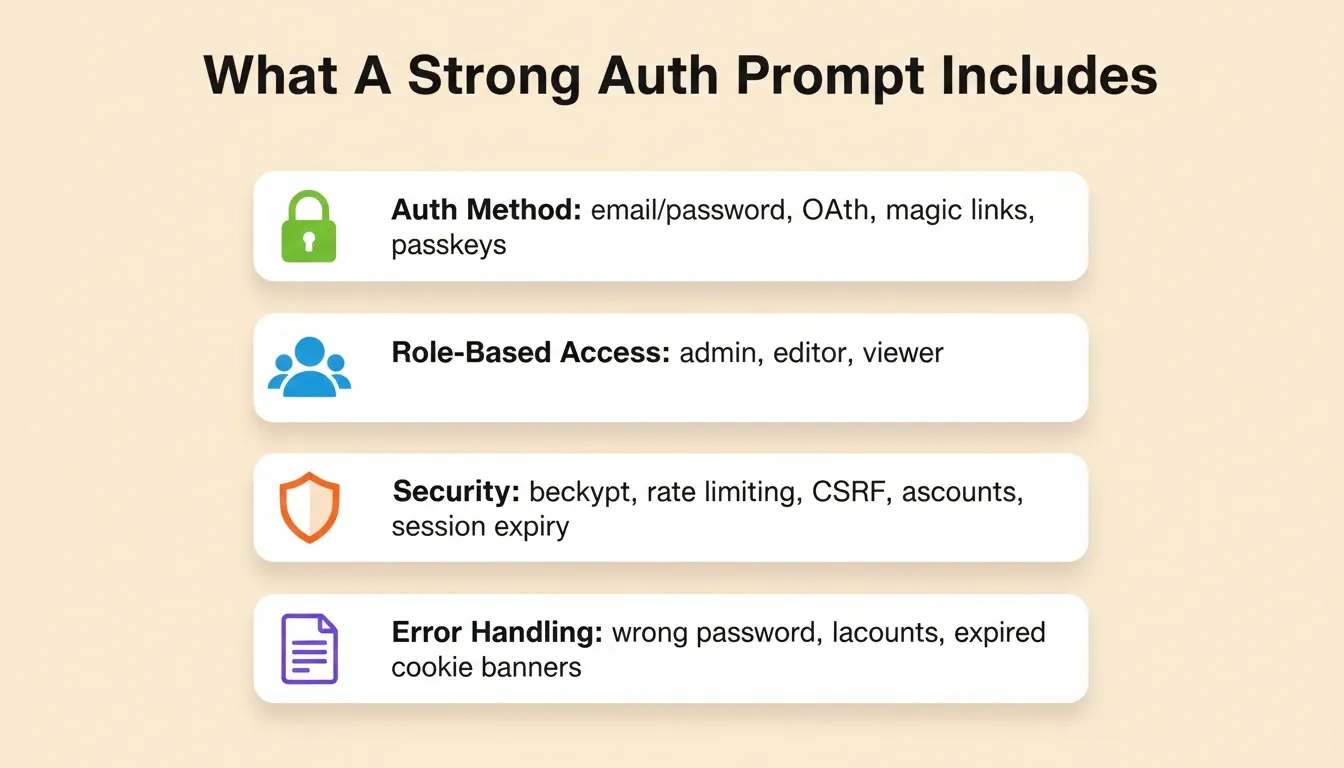
Specify the auth method clearly: email/password, OAuth providers (Google, GitHub, Apple), magic links, or passkeys.
-
Define role-based access: admin, editor, viewer, each with different permissions and dashboard views.
-
Name the security requirements explicitly: password hashing with bcrypt, rate limiting on login attempts, CSRF token validation, and secure session expiry.
-
Include error handling instructions: what happens on wrong password, locked accounts, or expired tokens.
-
Mention compliance needs: GDPR consent flows, cookie banners, data residency if applicable.
Here is the difference in practice:
Weak: Add login to my app
Structured: Generate an email/password signup and login system with bcrypt password hashing, JWT session tokens with 24-hour expiry, rate limiting to 5 failed attempts per 15 minutes, CSRF protection on all forms, and role-based access control for admin and user roles. Use Supabase Auth as the backend.
The second prompt produces code that is meaningfully closer to production-ready.
Auth Methods Compared: Which Should Your Prompt Specify?
Not all login methods carry the same security profile or user experience. Choose the right method before writing your prompt.
| Auth Method | Best For | Key Security Requirement |
|---|---|---|
| Email + Password | SaaS, internal tools | bcrypt hashing, account lockout, rate limiting |
| Magic Link | Consumer apps, low-friction onboarding | Single-use tokens, 15-min expiry |
| OAuth (Google/GitHub/Apple) | Developer tools, B2C apps | Provider-delegated credentials, profile sync |
| Passkeys (WebAuthn) | High-security, modern apps | Device-bound, phishing-resistant |
| SMS OTP | Mobile-first, regulated industries | Use as MFA only; SIM-swap risk as primary |
| Biometric | Flutter mobile apps | Face ID / Touch ID with device keychain storage |
Step-by-Step: Creating Secure Login Through Natural Language
Building authentication systems with AI prompts works best as a layered process. Rushing all requirements into one massive prompt often results in the AI dropping security features silently.
-
Start with the data model prompt: describe your users table, roles, and relationships before asking for UI.
-
Generate the signup flow second: email validation, password strength requirements, and confirmation emails.
-
Add login with session handling third: token generation, storage method (httpOnly cookies vs localStorage), and auto-refresh logic.
-
Layer security prompts on top: rate limiting, account lockout, input sanitization, and HTTPS enforcement.
-
Test with attack-scenario prompts: ask the AI to simulate SQL injection attempts, brute-force login, and session hijacking, then fix what breaks.
Teams that follow best prompts for app building consistently produce more secure first-generation code than those who write ad-hoc instructions.
Three-phase workflow for building secure authentication systems with AI prompts.
Prompt Templates for Common Auth Scenarios
Copy and adapt these directly into your AI builder:
**SaaS with role-based access:**Build a signup and login system using Supabase Auth with email/password and Google OAuth. Create a profiles table with name, avatar, and role fields. Roles: admin, editor, viewer. Apply row-level security so users only access their own data. Add rate limiting to 5 failed attempts per 15 minutes and a WCAG-accessible login form.
**Mobile app with biometric login:**Generate a Flutter login screen with email OTP and optional Face ID / Touch ID enrollment after first login. Store tokens securely in device keychain. Add a logout flow that clears all stored tokens and deregisters push notifications.
**Consumer app with magic links:**Build a passwordless login flow using magic links sent via SendGrid. Links expire after 15 minutes and are single-use. Show a clear link-expired screen with a resend option. Add CSRF protection on the email submission form.
Where AI-Generated Auth Code Falls Short on Security
The data paints a clear picture. AI tools scaffold login systems quickly, but the code carries measurable security risks.
-
45% of AI-generated code fails OWASP Top-10 benchmarks, with broken access control and injection flaws leading the list.
-
91.5% of applications built through prompt-driven workflows contained at least one vulnerability traceable to AI hallucination, per a Q1 2026 assessment of over 200 apps.
-
Only 8.25% of AI code outputs are both functionally correct and secure, roughly one in every twelve generated blocks.
The problems are not exotic. They are the basics: unvalidated inputs, hardcoded credentials, missing rate limiting, and broken session management.
Development is not as simple as the prompt that creates the first version. What works for an initial build does not automatically translate into a system that can evolve and operate reliably under real-world conditions. — Keyhole Software, Vibe Coding Trends 2026
The Stack Overflow 2025 Developer Survey found that developer trust in AI code accuracy dropped from 40% to just 29%, while 46% actively distrust the output. Senior engineers are the most skeptical, with only 2.6% expressing high trust.
For auth specifically, the stakes are higher than any other part of your application. A buggy dashboard is annoying. A broken login system leaks user data.
The Most Common AI Auth Failures and How to Prevent Them
| Failure Type | What Goes Wrong | Prevention Prompt |
|---|---|---|
| Hardcoded credentials | API keys in source code | Store all secrets as environment variables, never in source |
| Missing rate limiting | Brute-force attacks succeed | Add rate limiting: 5 attempts per 15 min, exponential backoff |
| Insecure token storage | JWTs in localStorage (XSS-vulnerable) | Store tokens in httpOnly cookies, not localStorage |
| Broken session expiry | Sessions never expire | JWT expiry: 24h access token, 7-day refresh token |
| No input sanitization | SQL injection, XSS attacks | Sanitize all form inputs, use parameterized queries |
| Missing CSRF protection | Cross-site request forgery | Add CSRF tokens to all state-changing forms |
| Weak password policy | Easily guessable passwords | Enforce min 8 chars, 1 uppercase, 1 number, 1 special char |
| Unverified email signup | Fake accounts, spam | Require email verification before account activation |
How Rocket Handles Auth Development Differently
Most AI builders treat login as an afterthought, a checkbox feature generated from a vague prompt. Rocket approaches it as a core architectural decision.
Rocket is a vibe solutioning platform that combines Solve (strategic research), Build (production-grade app generation), and Intelligence (continuous competitive monitoring) in one platform. The Build pillar generates production-ready Next.js web apps and Flutter mobile apps from natural language, with auth as a first-class concern, not a plugin.
Here is what makes the approach different:
-
Supabase connects via OAuth as a workspace connector. When you connect Supabase to Rocket, the Supabase integration handles schema creation, auth configuration, and queries within your build. Supabase provides built-in user authentication (email, Google, GitHub, magic links), PostgreSQL, file storage, and edge functions, all accessible from a single Rocket prompt.
-
The Advisor Agent catches auth bugs before they ship. Rocket includes a senior architect sub-agent running on Claude Opus that operates in read-only mode. When the coding agent hits an auth error loop, for example a GoTrue versioning mismatch in Supabase causing invalid login credentials, the Advisor Agent traces the actual root cause in the codebase and provides numbered fix steps.
-
The prompt carries project context. Rocket does not start from a blank slate. If you ran a Solve session researching your user base and compliance needs, that context flows directly into the Build. Your auth system reflects the thinking that preceded it.
-
Production defaults ship as the baseline. Every Rocket build includes SEO-ready structure, WCAG accessibility compliance, GDPR coverage, and performance optimization by default. HTTPS is automatic for all custom domains.
-
Role-based access works out of the box. Admin, editor, and viewer roles with appropriate permission boundaries, set up through conversational prompts.
1.5 million people have tried Rocket across 180 countries, from solopreneurs shipping MVPs to enterprise teams rethinking their entire stack.
AI-Built Auth vs Traditional Manual Coding
The choice between AI-generated and hand-coded auth is not binary. Each approach carries trade-offs worth measuring.
| Factor | AI-Built Auth | Traditional Manual Coding |
|---|---|---|
| Time to first working login | Minutes to hours | Days to weeks |
| Security baseline | Varies by prompt quality; ~45% fail OWASP | Higher when built by senior devs |
| Maintenance burden | Lower for simple apps; higher complexity at scale | Predictable with established patterns |
| Customization depth | Limited by prompt specificity | Unlimited with direct code access |
| Best suited for | MVPs, prototypes, internal tools | Regulated industries, complex enterprise |
The most effective teams combine both. AI-powered tools scaffold the security foundation quickly, then human review applies at every production boundary. The prompt gets you to 80%. The engineering review gets you to production.
After Auth Is Built: What to Do Before You Ship
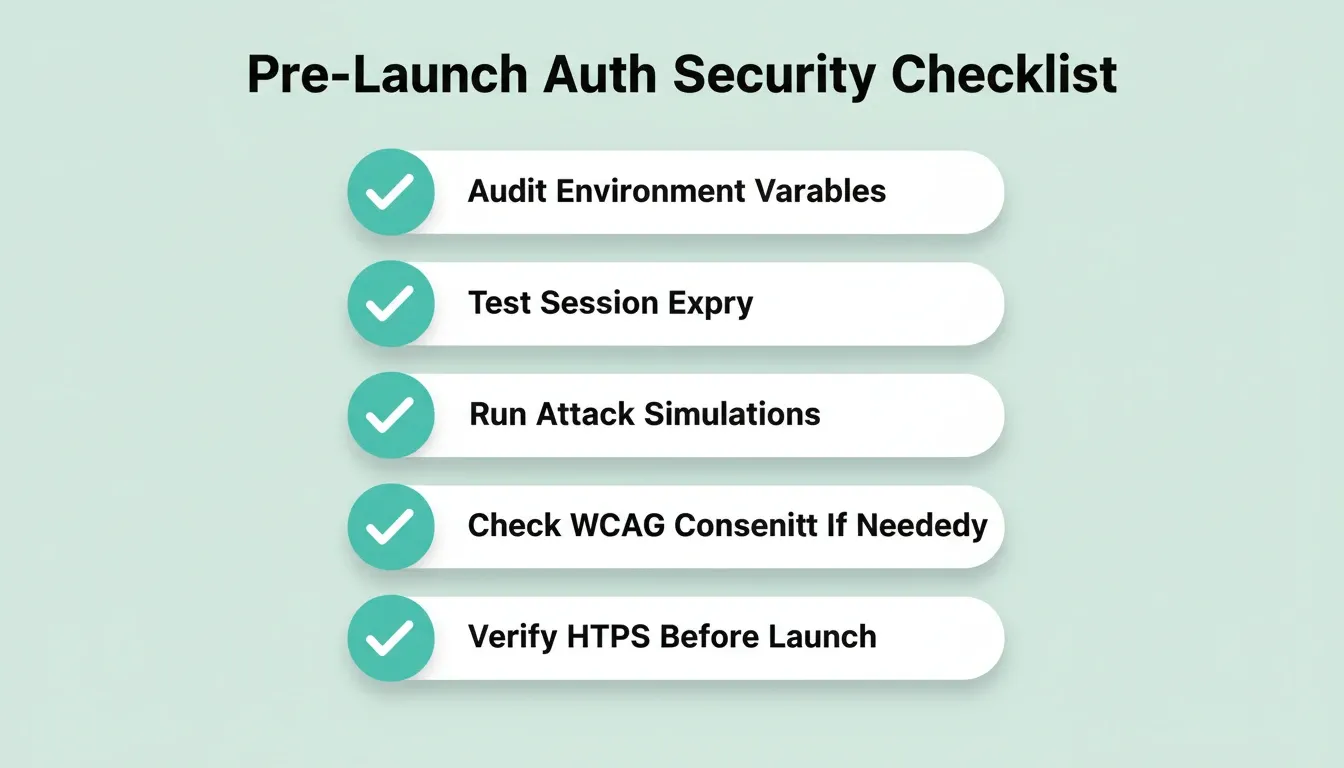
Generating a working auth system is step one. Before users see your login screen, run through this checklist.
-
Audit environment variables: confirm no secrets are hardcoded in source files. In Rocket, environment variables are managed per-task and handled at server level, never exposed in client code.
-
Test session expiry: manually expire tokens and confirm the app redirects correctly to login.
-
Run attack simulations: prompt your AI builder to simulate SQL injection, brute-force login, and session hijacking, then review and fix what surfaces.
-
Check WCAG accessibility: Rocket includes a
/Generate Accessibility Reportcommand that produces a WCAG 2.1 AA compliance report. Run it on your login and signup forms. -
Add GDPR consent if needed: for EU users, use
/Implement Privacy Compliancein Rocket to add cookie consent banners and a privacy policy page. This is not added automatically; it requires an explicit request. -
Verify HTTPS: automatic for all Rocket custom domains. Confirm SSL certificates are active on other platforms before launch.
Following web application security best practices before launch is what separates apps that hold up from apps that leak.
Build Auth That Holds Up in Production
Authentication systems with AI prompts are only as secure as the instructions behind them. Market data, developer surveys, and real-world failure cases all point to the same conclusion: structured prompts with explicit security requirements produce measurably safer applications than vague one-liners.
As AI builders mature and more teams ship auth-enabled products without traditional development cycles, the gap between what gets generated and what survives production will only widen for teams that skip the security layer in their prompts. The teams that get this right start with context, specify requirements upfront, and review what the AI generates before users see a login screen. You describe the app. Rocket handles the auth, database, and deployment, with the security defaults already in place.
Table of contents
- -Why Prompt-Driven Login Development Matters Right Now
- -How AI Code Generators Handle Signup and Login Flows
- -What Should a Good Auth Prompt Include?
- -Auth Methods Compared: Which Should Your Prompt Specify?
- -Step-by-Step: Creating Secure Login Through Natural Language
- -Prompt Templates for Common Auth Scenarios
- -Where AI-Generated Auth Code Falls Short on Security
- -The Most Common AI Auth Failures and How to Prevent Them
- -How Rocket Handles Auth Development Differently
- -AI-Built Auth vs Traditional Manual Coding
- -After Auth Is Built: What to Do Before You Ship
- -Build Auth That Holds Up in Production