
Choosing the best AI platform for production apps requires evaluating scalability, backend logic, code ownership, deployment reliability, and whether the platform covers research, building, and monitoring in one place.
Does your AI app builder stop at the prototype?
The low-code development platform market is projected to reach $45.5 billion by 2025, growing at 28.1% CAGR according to MarketsandMarkets. That growth signals a clear shift: businesses want to build apps faster without sacrificing quality.
Many AI app builders promise rapid app creation. However, few deliver the backend logic, scalable infrastructure, and code ownership that production apps demand.
This blog walks through what actually matters when you want to build and deploy functional apps for real users.
What Makes an AI App Builder Production-Ready?
Most AI app builders generate a working prototype in minutes. The real question is whether that prototype handles thousands of users, connects to real data sources, and stays secure under pressure.
Production readiness is not a single feature. It is a combination of infrastructure, code quality, compliance defaults, and deployment reliability working together. Here is what to look for:
-
Scalable infrastructure: You need managed hosting, auto-scaling, and reliable uptime without manual server setup
-
Backend logic support: The platform must handle databases, authentication systems, and API routes, not just frontend UI
-
Compliance defaults: WCAG 2.1 AA accessibility, GDPR coverage, and CCPA support should ship on every build, not as paid add-ons
-
Custom domains and deployment: Look for staging and production environments, automatic HTTPS, and one-click deployment to branded URLs
-
Code ownership and export: You should get full source code export and GitHub sync, so you never get locked into a proprietary system
-
Built-in analytics: The platform should track visitors, conversions, and Core Web Vitals without requiring separate tools
These criteria separate production-ready platforms from tools that stop at the prototype stage. For teams evaluating options early, no-code app builder options for startups cover a range of use cases worth comparing before committing.
| Criteria | Prototype-Only Builders | Production-Ready Builders |
|---|---|---|
| Manual setup required | Built-in managed hosting with staging and production | |
| Limited or none | Full server-side support with databases and auth | |
| Breaks under load | Auto-scales with traffic | |
| Locked in to platform | Full code ownership with GitHub sync | |
| Basic auth only | WCAG 2.1 AA, GDPR, CCPA built in by default | |
| Paid add-on | Custom domains with automatic HTTPS included | |
| Requires third-party tools | Built-in visitors, conversions, Core Web Vitals |
What Are the Three Pillars a Production AI Platform Needs?
The most overlooked failure mode in AI app development is building the wrong thing. Teams spend weeks iterating on a product, then discover the market does not want it, or a competitor already owns the space.
A production-grade AI platform should address all three phases of the product lifecycle: research before you build, production-grade generation when you build, and continuous monitoring after you ship. Most tools handle only one phase. As a result, teams stitch together separate tools and lose context at every handoff.
Research before you build prevents the most expensive mistake in product development: executing well on the wrong idea. Build with production-grade output means deployable Next.js web apps and Flutter mobile apps with real design systems, not wireframes. Monitor after you ship means competitive intelligence that does not require a separate tool.
1graph TD
2 A[Validate Idea with Market Research] --> B[Build Full Stack App from Prompt]
3 B --> C[Connect 25+ Integrations]
4 C --> D[Deploy to Staging and Production]
5 D --> E[Monitor Analytics and Core Web Vitals]
6 E --> F[Track Competitors and Market Signals]
7 F --> A
8
9 classDef researchNode fill:#EEF2FF,stroke:#4F46E5,color:#1E293B
10 classDef buildNode fill:#FFF7ED,stroke:#F97316,color:#1E293B
11 classDef deployNode fill:#F0FDF4,stroke:#22C55E,color:#1E293B
12
13 class A,F researchNode
14 class B,C buildNode
15 class D,E deployNode
The complete production app lifecycle: research, build, deploy, and monitor in a single connected workflow.
How Do AI Tools Handle Complex Apps and Workflows?
Building simple apps is one thing. But what happens when you need automated workflows, complex logic, multiple data sources, and AI agents working together inside a single product?
-
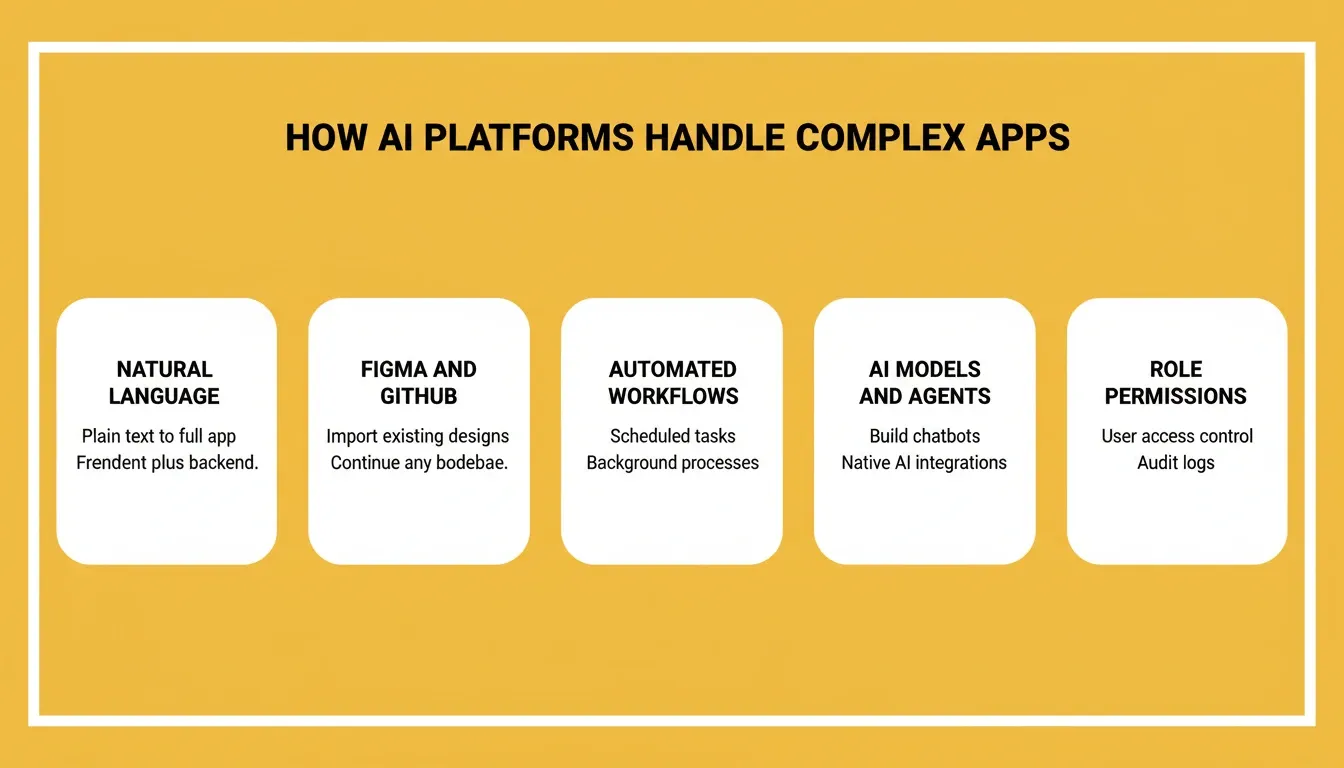
Natural language prompts vs drag and drop: Some AI tools accept plain language and generate both frontend and backend code. Others rely on visual editors that limit what you can build for complex apps
-
Multiple starting points: Production platforms should let you start from a plain language prompt, a Figma design, an existing GitHub repository, a screenshot, or a URL, not just a blank text box
-
Data source connections: Connecting to databases, third-party APIs, and existing tools determines whether the app fits into real business operations or stays isolated
-
AI models and agents: Platforms that support AI agents, custom AI models, and natural language processing let you build intelligent features and AI assistants directly inside your app
-
Complex logic handling: For data-driven apps and internal tools, the platform needs conditional rules, user management, role-based permissions, and multi-step automated workflows
A 2023 GitHub survey found that 92% of developers already use AI coding tools at work. The shift toward AI-powered development is not theoretical. It is the standard workflow for building complex apps at enterprises of every size.
Many AI app builders handle simple apps well but struggle when complexity rises. Client portals needing user accounts, internal business tools with custom workflows, and AI apps requiring backend logic all demand more than a visual editor alone can deliver.
Furthermore, teams already tackling this problem can find practical patterns in how to build internal tools with AI without a developer. It is a useful reference for understanding what production-grade internal tooling actually requires.
Which Platforms Work for Non-Technical Users?
Not everyone selecting an AI platform has a coding background. Product managers, marketers, entrepreneurs, and operations teams increasingly need to build functional apps without writing code.
-
Learning curve: The best platforms let non-technical users start building immediately using everyday language, with no prior coding knowledge required
-
Visual editors: Drag-and-drop interfaces help when you need granular design control over layouts and app appearance without touching the underlying code
-
Templates: Ready-to-use templates and pre-built components reduce time from idea to working app. Look for platforms where templates consume zero credits so you can explore before committing
-
Plain language input: Platforms that accept natural language prompts allow non-technical users to describe what they want and receive functional apps without any coding experience
-
Free tier: A free plan with no credit card required lets users test the platform with a real project before committing to paid plans
The gap between coding knowledge and app creation is closing fast. Whether you prefer drag-and-drop or natural language prompts, the right platform adapts to your skill level rather than forcing you into a single workflow.
Can You Build Full Stack Web Apps Without Writing Code?
Full stack web apps require both frontend UI and backend processing: databases, API routes, authentication, and server logic. Today, AI app builders are closing that gap quickly.
-
Frontend and backend in one place: The best platforms generate full stack apps from a single prompt. They handle client portals and server-side operations together without requiring separate coding for each layer
-
Database generation with Supabase integration: AI tools now create data models, tables, and relationships automatically. Native Supabase integration handles schema, authentication, and queries without manual configuration
-
Deployment pipelines with version history: Full stack apps need staging environments, production environments, full version history, and one-click rollback, not just a "publish" button
-
GitHub sync and codebase pickup: Production teams need version control. They also need the ability to import existing Next.js codebases to continue building without starting over
Building full stack apps with AI is now possible for both non-technical users and developers who want to move faster. The key is selecting a platform that generates clean, production-ready code you can maintain and scale as your user base grows.
The workflow typically follows this pattern:
-
Describe your app in plain language, from a Figma file, or from an existing GitHub repository
-
The platform generates production-ready Next.js or Flutter code with architecture planned automatically
-
Connect integrations: payments, databases, analytics, and email with one authentication step
-
Iterate through chat, visual editing, or direct code editing
-
Deploy to staging for testing, then push to production with a custom domain
-
Monitor analytics, Core Web Vitals, and competitor signals from the same workspace
Why Rocket Stands Out for Shipping AI-Powered Apps
While many AI app builders focus on quick prototypes, Rocket is the world's first Vibe Solutioning platform. It combines strategic research, AI app building, and competitive intelligence into a single product with shared context across all three. 1.5 million people have tried Rocket across 180 countries. It is backed by Salesforce Ventures and Accel.
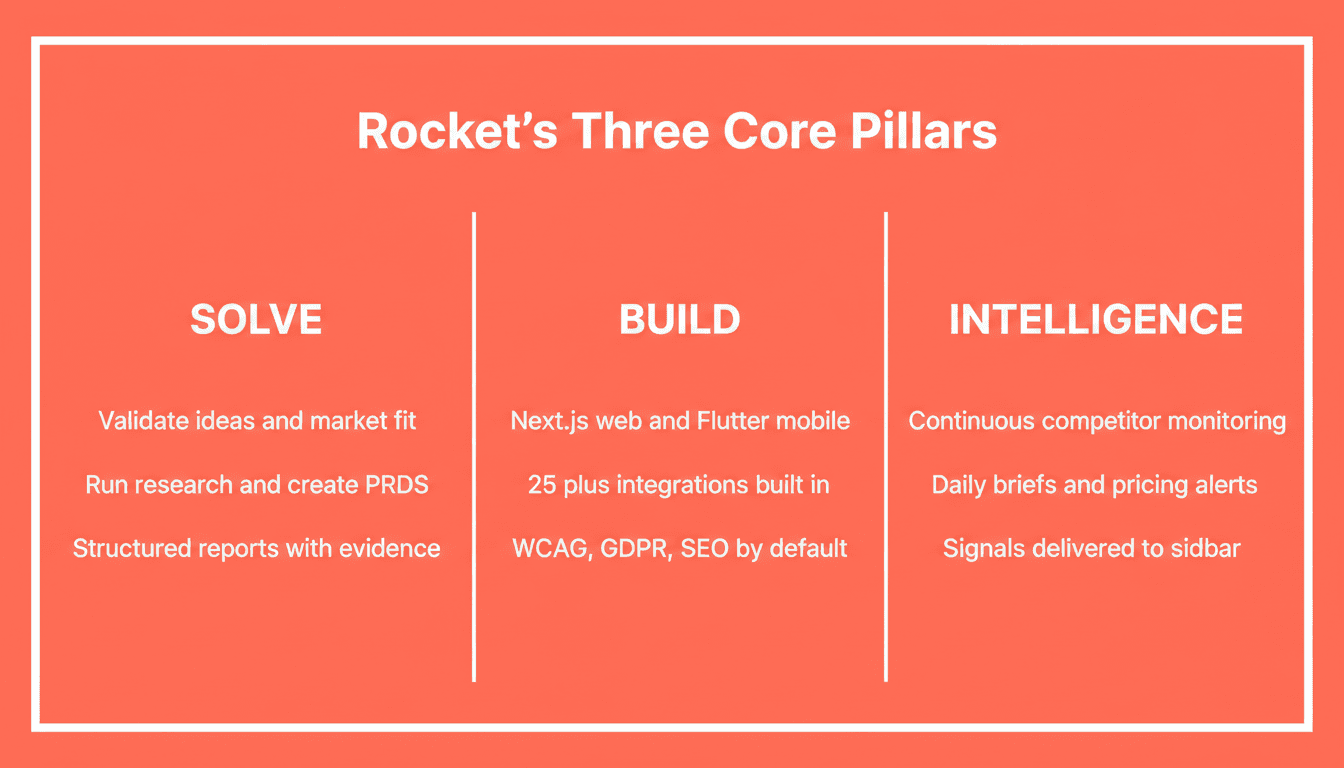
Rocket ships with three core pillars:
-
Solve: Validate ideas, run market research, create PRDs, and get structured reports with data, insights, and recommendations before you write a line of code. Solve outputs feed directly into Build tasks, so the first generation reflects genuine product thinking
-
Build: Generate production-grade Next.js web apps and Flutter mobile apps from natural language, Figma designs, screenshots, or existing GitHub repositories. Every build ships with SEO-ready structure, WCAG 2.1 AA accessibility compliance, GDPR coverage, and Core Web Vitals optimization as defaults
-
Intelligence: Monitor competitors continuously across every public platform they operate on. Get automated daily briefs, pricing change alerts, and trend signals delivered to your sidebar without switching tools
What makes Rocket's Build capability production-grade:
-
25+ integrations authenticate once and flow into every build: Stripe, Supabase, Google Analytics, Notion, Linear, Airtable, Mailchimp, Mixpanel, OpenAI, Anthropic, Gemini, PayPal, Twilio, SendGrid, and more
-
Staging and production environments with full version history and one-click rollback
-
Built-in analytics tracking visitors, conversions, accessibility, and Core Web Vitals after launch
-
Codebase Pickup: Import any existing Next.js TypeScript repository and continue building without losing what is already built
-
Redesign capability: Point Rocket at any live URL and reimagine it using eight slash commands across three categories
Additionally, for teams looking to grow beyond the MVP stage, how to scale SaaS products built with AI tools covers the infrastructure and product decisions that matter most after launch.
What Should You Compare Before Selecting a Platform?
With so many options on the market, teams need a clear framework before committing. According to Stack Overflow's 2024 Developer Survey, 76% of developers are using or planning to use AI tools. However, only 43% trust their accuracy for complex tasks. Platform reliability and output quality matter more than marketing claims when selecting a tool for production workloads.
| Evaluation Factor | Questions to Ask |
|---|---|
| Free tier | Is there a free plan with no credit card required? |
| Code quality | Can you export editable code? Is the output production-ready? |
| Deployment | Is staging included? Can you use custom domains? Is there one-click rollback? |
| Backend support | Does it handle databases, APIs, authentication, and Supabase integration? |
| Scalability | Can it handle thousands of concurrent users without breaking? |
| Compliance defaults | Do WCAG 2.1 AA, GDPR, and CCPA ship by default or require manual setup? |
| Integration depth | How many native integrations? Do they authenticate once or per task? |
| Research capability | Can you validate your idea before building? |
| Mobile support | Can it generate native Flutter apps for iOS and Android? |
For a broader look at how platforms compare across these factors, the best AI app builders for non-developers breaks down the current landscape with feature-by-feature comparisons.
Pricing structures vary significantly across platforms. Most use credit-based models where different task types consume different amounts. Here is how to evaluate credit-based pricing before you commit:
| Pricing Factor | What to Check |
|---|---|
| Free credits | One-time starter credits vs. recurring monthly credits |
| Credit rollover | Do unused credits carry forward month to month? |
| Per-task cost | What actions consume credits? (builds, research, monitoring) |
| Add-on packs | Can you buy additional credits without upgrading your plan? |
| Team billing | Is there unified billing with per-user credit allocation? |
| Annual discount | Is there a discount for annual plans vs. monthly? |
Your Next Step Toward Production-Grade AI Apps
The right AI platform saves months of development time and gets your product in front of real users faster. What matters most is picking a tool that handles the full stack, deploys reliably, and gives you ownership of the code you ship.
Start by defining what you need: a simple landing page, a complex data-driven application, or a native mobile app with backend processing. Then test your shortlisted platforms with a real project to see which one actually delivers on its promises.
The platforms that win at production treat research, building, and monitoring as a single connected workflow, not three separate problems requiring three separate tools.
The Best AI Platform for Production Apps: What to Decide Next
The best AI platform for production apps in 2026 covers the full arc: research, build, deploy, and monitor. As AI-generated code quality continues to improve and more teams move from prototyping to shipping, the platforms that compound context across every task will pull further ahead. The question is no longer whether AI can build production apps. It is whether your platform is built for the whole problem or just part of it.
You described the problem. Now build the product. Start with Rocket
Table of contents
- -What Makes an AI App Builder Production-Ready?
- -What Are the Three Pillars a Production AI Platform Needs?
- -How Do AI Tools Handle Complex Apps and Workflows?
- -Which Platforms Work for Non-Technical Users?
- -Can You Build Full Stack Web Apps Without Writing Code?
- -Why Rocket Stands Out for Shipping AI-Powered Apps
- -What Should You Compare Before Selecting a Platform?
- -Your Next Step Toward Production-Grade AI Apps
- -The Best AI Platform for Production Apps: What to Decide Next