
One-Click App Deployment replaces multi-step release rituals with a single automated action, so teams ship production-ready software faster, with fewer errors and no manual pipeline configuration.
Why does shipping code still take longer than writing it?
For most teams, the answer lives in their deployment pipeline. According to recent DevOps adoption data, 83% of developers now perform DevOps activities daily, yet release queues remain one of the biggest time sinks in software delivery.
The gap between finishing a feature and getting it live costs real money. Generative AI tools have dramatically increased coding velocity, but downstream infrastructure has not kept pace. That mismatch creates a bottleneck where finished code sits idle, waiting for manual approvals, environment configuration, and release scripts to catch up.
This blog breaks down what automated deployment looks like, why it matters for your release cadence, and how to implement it without rebuilding your entire stack.
Why Do Teams Still Struggle with Deployment Pipelines?
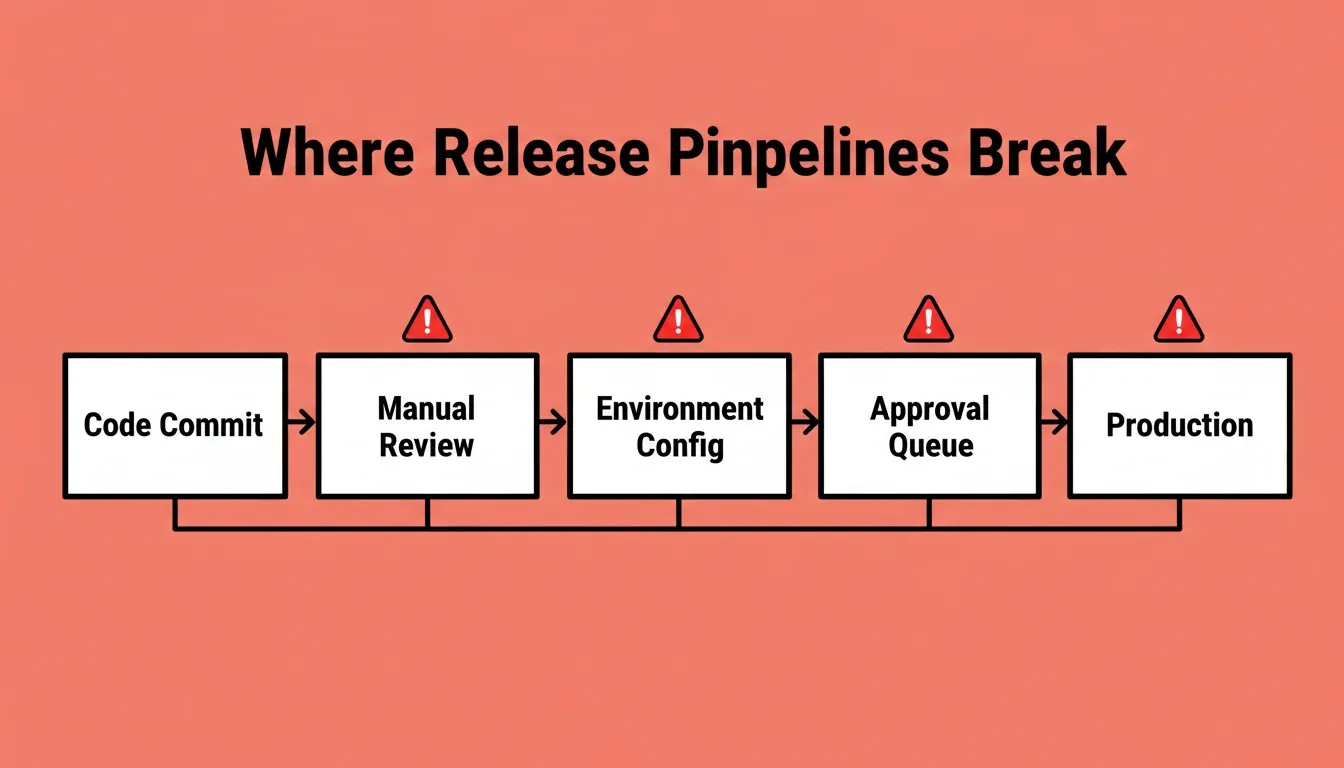
Even with mature CI/CD tooling available, most teams hit the same friction points when pushing code to production. The problem is rarely the tools themselves. More often, it is how they are stitched together.
- Manual environment configuration eats hours every sprint. Setting up staging, QA, and production environments by hand introduces drift and inconsistency that compound over time.
- Approval bottlenecks stack up when multiple teams share a single release train. One blocked pull request can delay an entire batch of features that are otherwise production-ready.
- Fragile scripts and tribal knowledge make pipelines brittle. When the one person who owns the deployment YAML is unavailable, nothing moves forward.
- Security checks bolted on at the end create last-minute surprises. Teams discover compliance gaps days before a planned release, pushing dates out while patches are rushed through.
- Context loss between build and deploy compounds all the problems above. When the tool that builds your app is disconnected from the tool that ships it, you spend more time re-explaining than executing.
A developer on Reddit's r/dotnet community put it plainly:
"I think many people would appreciate something like Vercel/Netlify that can one-click deploy a .NET app." — r/dotnet discussion on deployment complexity
The frustration is universal. Teams that want to move faster need to look at how the entire path from commit to production can become a single, automated action. If you are working with AI tools, this guide on deploying full-stack applications with AI assistance covers the modern approach.
How Does Automated Deployment Actually Work?
At its core, automated deployment replaces manual steps with a programmatic pipeline. Code moves from version control to production without human intervention at each stage.
- Trigger: A code commit or merge to the main branch automatically kicks off the pipeline.
- Build and test: The system compiles the application, runs unit and end-to-end tests, and flags failures before they reach staging.
- Security and quality gates: Static analysis, dependency scanning, and compliance checks run in parallel with the build step.
- Progressive delivery: Code moves through staging, canary, or blue-green environments before full production rollout.
The entire flow can finish in under five minutes for well-configured pipelines. For teams building operations apps, the path from idea to production follows this same pattern with less manual setup.
Key Benefits of Streamlined Deployment Workflows
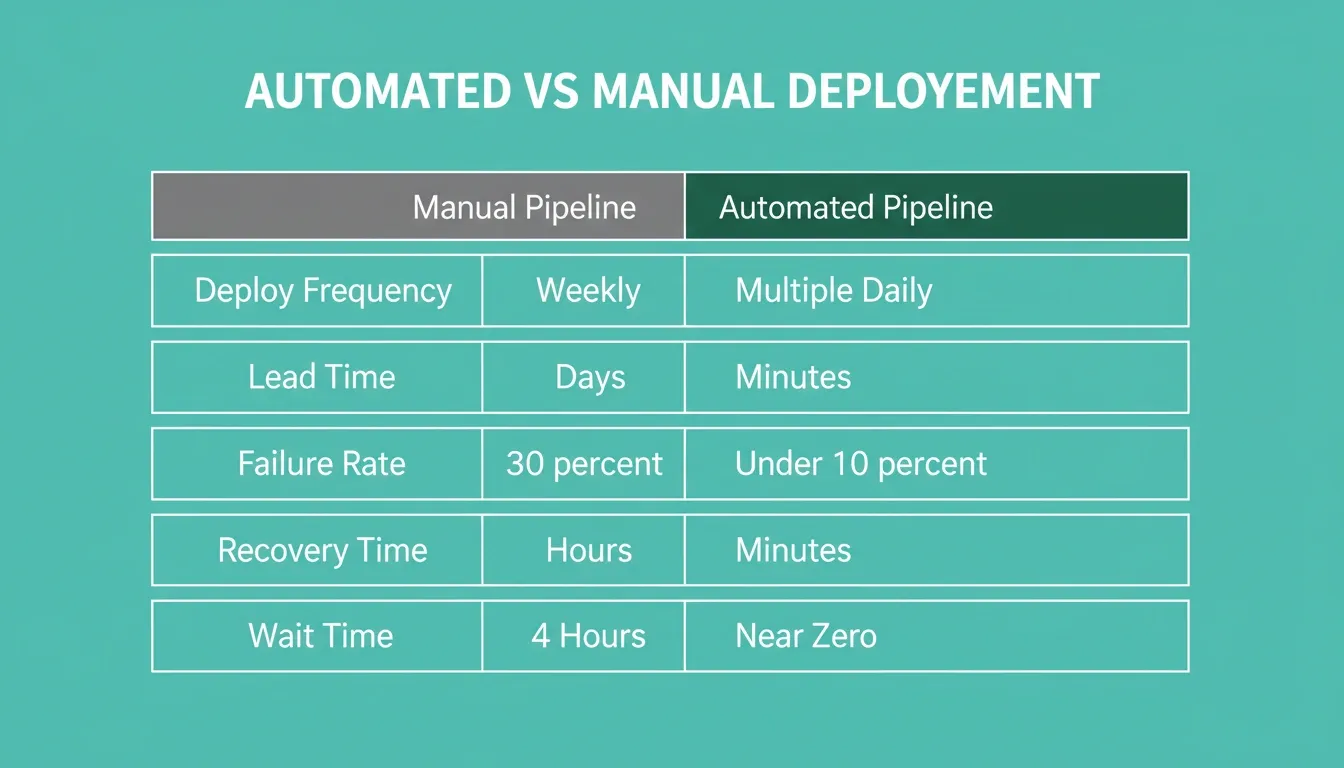
When deployment becomes a single action rather than a multi-day ritual, the effects ripple across the entire engineering organization.
| Metric | Manual Pipeline | Automated Pipeline |
|---|---|---|
| Deploy frequency | Weekly or biweekly | Multiple times per day |
| Lead time for changes | Days to weeks | Minutes to hours |
| Change failure rate | 15-30% | Under 10% |
| Recovery time | Hours to days | Minutes |
| Developer wait time | 2-4 hours per deploy | Near zero |
- Faster feedback loops mean bugs are caught closer to the moment they are introduced. According to DORA's software delivery performance research, top-performing teams deploy multiple times per day while maintaining lower failure rates than teams that deploy weekly.
- Developer satisfaction improves when engineers spend time on features instead of fighting release processes. Organizations that prioritize developer experience are expected to achieve twice the retention rate by 2027.
- Business agility increases because product teams can respond to market shifts in days instead of quarters. A 49% reduction in time-to-market is reported by companies that fully adopt DevOps practices.
The numbers tell a consistent story: speed and stability are not trade-offs. Teams that adopt application deployment automation best practices often see these benefits compound because AI handles both code generation and deployment configuration in a single workflow.
What Makes a Great Deployment Pipeline in Practice?
Not every automated pipeline delivers the same results. The difference between a good pipeline and a great one comes down to a few critical characteristics.
- Self-service access for every developer on the team. Platform engineering trends show that over 55% of global organizations have adopted internal developer platforms (IDPs) to give teams single-action deployment without waiting on dedicated ops staff.
- Built-in observability from the first deploy. Metrics, logs, and traces should surface automatically so teams know when something breaks before users notice.
- Progressive rollout controls like canary releases or feature flags let you ship confidently without an all-or-nothing gamble.
- Security as a first-class step, not an afterthought. DevSecOps pipelines with inline automated security checks reduce compliance surprises to near zero.
- Zero-config environments that match production exactly. Container orchestration with Kubernetes now underpins 84% of cloud-native deployments, standardizing what "production-like" actually means.
- Compliance defaults baked in at generation. WCAG accessibility, GDPR coverage, and SEO-ready structure should ship as the baseline, not as optional add-ons configured after launch.
When a pipeline meets these criteria, deployment stops being an event that requires coordination. It becomes a routine action any developer can take with confidence.
How Rocket Takes You From Code to Production
Most deployment tools still expect you to configure pipelines, manage infrastructure, and connect services manually. Rocket removes all of that. It connects the build and deploy steps inside a single shared-context workspace, and 1.5 million people have tried Rocket across 180 countries, from solopreneurs to enterprise teams.
Web App Deployment
Rocket deploys web applications, built in Next.js, through two environments.
Staging: Click Launch in the top-right corner, select the Staging tab, and publish. Rocket provisions a staging URL backed by Netlify. Share it with teammates for feedback before anything goes live. Push updates to the same URL with one click, and unpublish instantly when you are done.
Production: From the Launch panel, select the Production tab, choose your version, enter your custom domain, and authorize Rocket to configure DNS automatically. Rocket logs into your domain provider once, sets all records, and monitors propagation. HTTPS is automatic for every custom domain. You can also buy a domain directly through Rocket without leaving the platform.
Version control and rollback: Every build creates a versioned snapshot with full version history. To revert, unpublish your current version and republish from any earlier snapshot. Nothing built is ever gone.
Built-in analytics after launch: Every deployed Rocket project includes zero-setup analytics. It tracks visits, unique visitors, pageviews, visit duration, and bounce rate, plus Core Web Vitals monitoring (LCP, INP, CLS) graded A through F. No additional tools required.
Mobile App Deployment
Rocket builds mobile apps in Flutter, a single codebase that targets both iOS and Android. Three distribution paths are available:
| Distribution Method | Speed | Audience | Cost |
|---|---|---|---|
| Web preview link | Instant | Anyone with the link | Free |
| APK download | Minutes | Android testers | Included with paid plan |
| Google Play Store | Days to weeks | Public | $25 one-time developer account |
| Apple App Store | Days to weeks | Public | $99/year Apple Developer account |
What Ships With Every Build
Every Rocket build, web or mobile, includes production defaults that most teams spend weeks configuring manually:
- SEO-ready structure: Clean semantic HTML, meta tags, Open Graph, XML sitemap, and robots.txt
- WCAG 2.1 AA accessibility compliance: Semantic markup, heading hierarchy, ARIA labels, keyboard navigation
- GDPR and CCPA coverage: Cookie consent banners, privacy policy pages, geo-based consent flows
- Performance optimization: Core Web Vitals tuned, images compressed, lazy loading configured
- 25+ integrations: Stripe, Supabase, Google Analytics, Mailchimp, Mixpanel, Notion, Linear, Airtable, and more. Authenticate once and they flow into every build.
Traditional deployment platforms like Heroku and Railway still require you to write Dockerfiles, set environment variables, and debug build failures. Vercel simplifies frontend deploys but is primarily optimized for its own edge network. Rocket handles the full stack, from natural language description through production release, with compliance, analytics, and integrations included.
For teams comparing options, the breakdown of best AI builders with one-click deployment shows where different platforms fit in the current market.
Rocket's Build, Solve, and Intelligence capabilities each work independently, or together through a shared context architecture where the research that validated your idea flows directly into the product that gets built and deployed.
Common Pitfalls When Adopting Deployment Automation
Automating deployment is not an overnight switch. Teams that rush the transition often run into predictable problems.
- Automating a broken process just makes it break faster. If your current pipeline has unclear ownership or inconsistent environments, automating it will surface those issues immediately.
- Ignoring cultural resistance stalls adoption. Research shows 45% of DevOps leaders encounter cultural pushback as a major barrier. Teams need buy-in from leadership and developers alike.
- Skipping security from the start creates risk. When security checks are not part of the automated flow, teams discover vulnerabilities only after code reaches production.
- Over-engineering the pipeline adds complexity without value. Start with a simple commit-to-deploy flow and add stages only when the team outgrows the basic setup.
- Separating build from deploy reintroduces the coordination overhead you were trying to eliminate. The most effective teams use platforms where generation and deployment share the same context.
The goal is progress, not perfection on day one. Start with a single application, prove the value, and expand from there.
The Future of One-Click App Deployment
One-Click App Deployment is not a trend. It is the direction the entire industry is moving. As AI-generated code becomes the norm, the bottleneck shifts permanently from writing to shipping. Teams that invest in automated, single-action deployment today recover time that compounds into faster iteration, better products, and a structural advantage over teams still running manual release processes.
The path from code to production does not have to involve manual checklists, environment debugging, or week-long release cycles. You type what you want to build. Rocket researches it, builds it, and deploys it, with compliance, analytics, and integrations already in place. Start building and deploying for free and see your app live without configuring a single pipeline.
Table of contents
- -Why Do Teams Still Struggle with Deployment Pipelines?
- -How Does Automated Deployment Actually Work?
- -Key Benefits of Streamlined Deployment Workflows
- -What Makes a Great Deployment Pipeline in Practice?
- -How Rocket Takes You From Code to Production
- -Web App Deployment
- -Mobile App Deployment
- -What Ships With Every Build
- -Common Pitfalls When Adopting Deployment Automation
- -The Future of One-Click App Deployment