
Building a HIPAA-compliant healthcare app requires encryption, access controls, audit logs, and signed BAAs before writing a single line of code. Compliance is a process, not a feature. Rocket.new accelerates the technical scaffolding; the compliance layer is your team's responsibility.
Key takeaways:
-
HIPAA compliance is a legal obligation, not a feature you add at launch
-
Three safeguard categories apply to every app that handles ePHI: administrative, physical, and technical
-
BAAs are required with every vendor that touches PHI, including your hosting provider and analytics tools
-
Audit logs must be retained for at least six years under 45 CFR §164.316(b)(2)(i)
-
AI app builders accelerate technical scaffolding; BAAs, risk analysis, and staff training remain your responsibility
Disclaimer:* This article is for informational purposes only and does not constitute legal advice. HIPAA compliance involves complex legal obligations. Consult a qualified healthcare attorney or compliance specialist before processing protected health information in any application.*
Why Do So Many Healthcare App Projects Stall at Compliance?
Most healthcare app projects stall at compliance because teams underestimate how deeply HIPAA requirements shape every layer of their data architecture. Building HIPAA-compliant means meeting non-negotiable HIPAA obligations and broader compliance requirements across infrastructure, vendors, and internal processes, not just shipping the right features or documentation.
In 2025, 772 large healthcare data breaches were reported to the HHS Office for Civil Rights, affecting over 138 million individuals. That number keeps climbing year after year.
The problem is not a lack of good ideas. Getting this right from the start saves a healthcare organization, such as a clinic or hospital, months of rework, avoids penalties that run into millions of dollars, and protects the people your app is meant to serve.
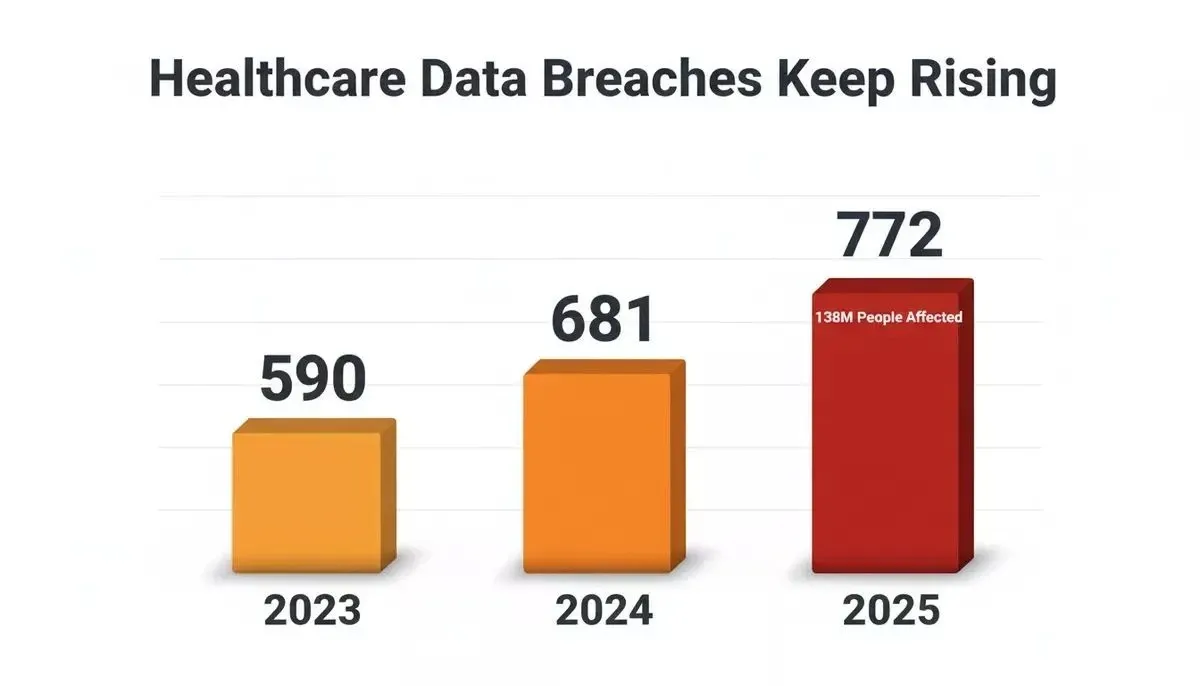
Healthcare data breaches have risen consistently, with 772 large breaches reported in 2025 alone.
What Does HIPAA Actually Require for Healthcare Apps?
HIPAA requires covered entities and their business associates to implement administrative, physical, and technical safeguards to protect ePHI, and to document, test, and maintain those safeguards continuously in line with HIPAA standards.
HIPAA, the Health Insurance Portability and Accountability Act, is a federal law governing how protected health information (PHI) is handled by covered entities and their business associates. If your healthcare app collects, stores, processes, or transmits PHI in any form, including regulated health data, HIPAA applies to you.
The HIPAA Security Rule specifically addresses electronic protected health information (ePHI) and requires organizations to put reasonable and appropriate safeguards in place to protect ePHI and other sensitive data handled by the app. The full text is codified at 45 CFR Parts 160 and 164.
PHI* (Protected Health Information): any individually identifiable health information created, received, maintained, or transmitted by a covered entity or business associate.*
ePHI* (Electronic Protected Health Information): PHI maintained or transmitted in electronic form, governed by the Security Rule.*
BAA* (Business Associate Agreement): a legally required contract with any third party that creates, receives, maintains, or transmits ePHI on your behalf.*
HIPAA defines PHI using 18 identifiers.
Three core HIPAA rules apply to app development:
-
The Privacy Rule governs who can access PHI and under what conditions, defining permitted uses and disclosures across covered entities and business associates.
-
The Security Rule sets standards for technical, physical, and administrative safeguards, covering encryption, access controls, and audit requirements.
-
The Breach Notification Rule requires organizations to notify affected individuals, HHS, and sometimes media when unsecured PHI has been compromised, following Department of Health and Human Services requirements.
There is no official HIPAA certification. Compliance is an ongoing process, not a one-time checklist.
The Three Safeguard Categories You Need to Know
Every HIPAA-compliant app must address three safeguard categories. Here is how they break down in practice.
| Safeguard Type | What It Covers | Key Requirements |
|---|---|---|
| Administrative | Policies, procedures, workforce training | Risk analysis, security officer designation, workforce access management, security awareness training |
| Physical | Facility access, device controls | Facility access controls, workstation security, device and media disposal protocols |
| Technical | System-level protections | Access controls, audit controls, integrity controls, transmission security, authentication |
Technical safeguards get the most attention from app developers. These include data encryption at rest and in transit using AES-256 and TLS 1.2 or higher, secure data transmission, multi-factor authentication (MFA) for all users accessing PHI, role-based access control (RBAC), audit logs, and automatic session timeouts.
Data minimization means collecting and storing only the minimum necessary PHI.
Physical safeguards matter even for cloud-hosted applications. Administrative safeguards cover written policies, staff training records, designated security responsibility, and technical security measures.
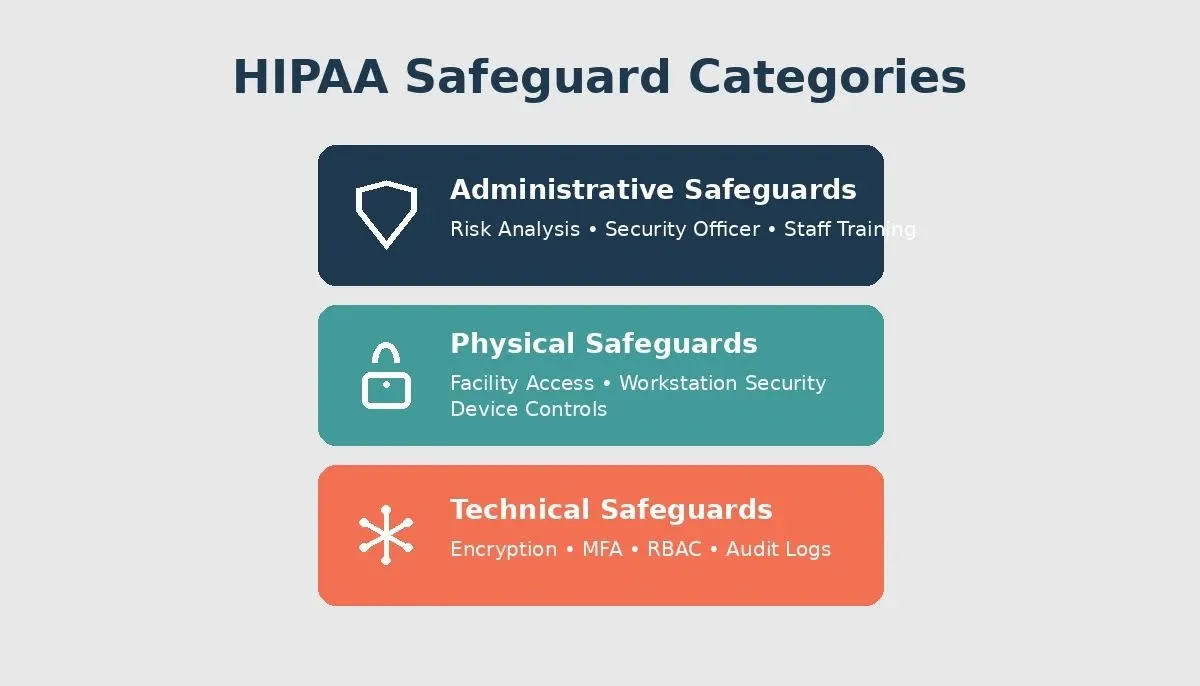
Every HIPAA-compliant healthcare app must address all three safeguard categories before launch.
How Should You Architect Your Data Layer for Compliance?
HIPAA-compliant app development maps every PHI flow before code is written, enforces encryption at rest and in transit, applies row-level access controls at the database layer, and keeps production PHI isolated from development and staging environments.
Start with your data flows. Map each point where PHI enters, moves through, and exits your system. This includes patient-facing input forms, backend databases, API connections to EHR systems and lab platforms, and integrations with existing healthcare systems, plus analytics pipelines where de-identified data might still contain identifiable information.
Your database architecture needs several compliance layers:
-
Encrypted storage for all PHI at rest, using your cloud provider's encryption services or your own key management
-
Row-level security that restricts database queries to only the records a given user or role is authorized to view
-
Separate environments for development, staging, and production; PHI should not appear in non-production environments
-
Automated backups with encrypted storage, tested disaster recovery plans, and secure data handling across backup and key-management design
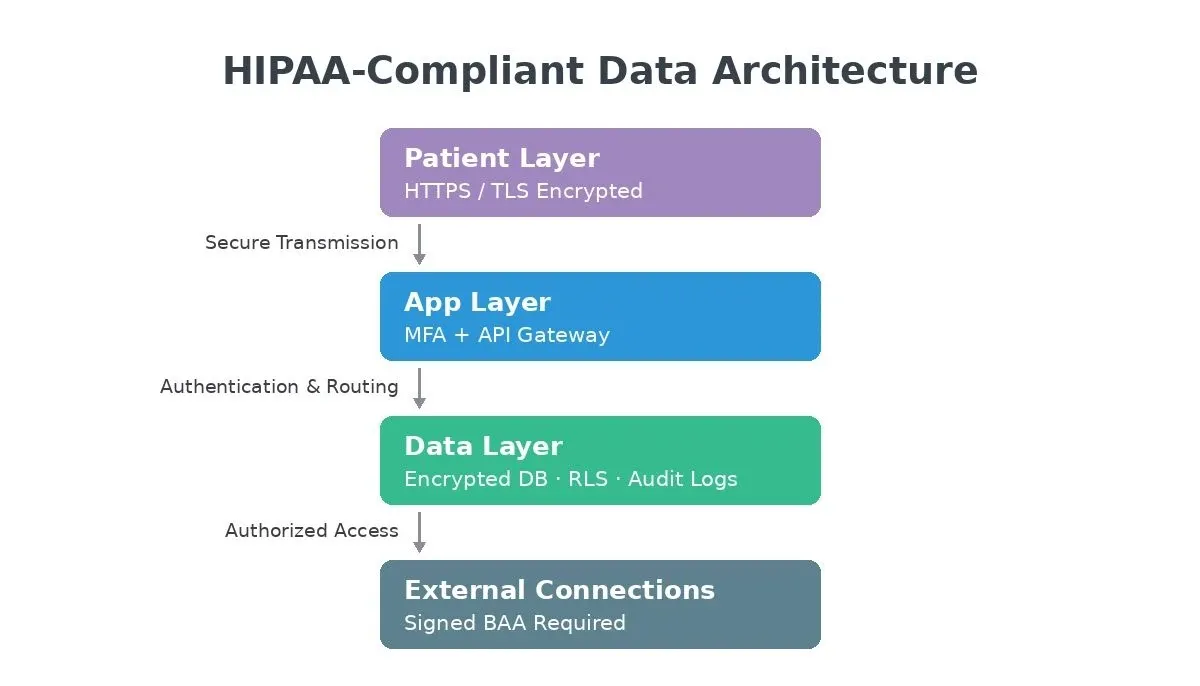
HIPAA-compliant data architecture: every layer from patient device to external connections requires deliberate security controls.
For HIPAA-compliant hosting, most teams choose cloud services that are HIPAA-eligible and will sign a BAA, then deploy them in a secure hosting environment built for regulated workloads. AWS, Google Cloud, and Microsoft Azure all provide HIPAA-eligible infrastructure options, but this model creates a HIPAA-compliant environment only when the services are configured correctly. For a practical comparison of backend options, see how Rocket.new integrates with Supabase for PostgreSQL with row-level security.
Data flow from patient device through encrypted database, audit logs, and BAA-signed external connections.
BAA Decision Tree
Use this decision tree before adding any third-party service to a healthcare app that handles PHI.
Where Do Most Teams Introduce Compliance Gaps?
The most common compliance failures are process gaps, not technical ones: missing BAAs, undocumented risk analyses, and audit logs that do not tell a complete story because required HIPAA controls were never fully implemented.
Most compliance failures do not come from a lack of awareness. They come from gaps between what teams know and what they actually build into their systems.
The most common compliance gaps include:
-
Missing or incomplete Business Associate Agreements. Each third party that touches PHI on your behalf needs a signed BAA. Without a BAA, you carry the full liability for their actions.
-
Treating encryption as a checkbox. Encryption at rest means nothing if your API endpoints transmit PHI over unencrypted connections, or if encryption keys are stored alongside the data they protect.
-
No risk analysis on record. HIPAA requires a documented risk analysis that identifies vulnerabilities and assesses the likelihood of threats. Annual risk assessments commonly cost between $5,000 and $20,000. OCR has made this their primary enforcement focus.
-
Inadequate audit logging. If you cannot prove who accessed what data and when, you cannot demonstrate compliance during a security incident or audit.
According to IBM's Cost of a Data Breach Report, the global average cost of a data breach hit a record high, with healthcare consistently ranking among the most expensive industries. Penalties from HHS OCR can reach millions of dollars per violation category.
HIMSS Healthcare Cybersecurity Survey findings and HHS OCR enforcement actions consistently show that risk analysis failures and missing BAAs are the two most-cited causes of enforcement action, not technical vulnerabilities.
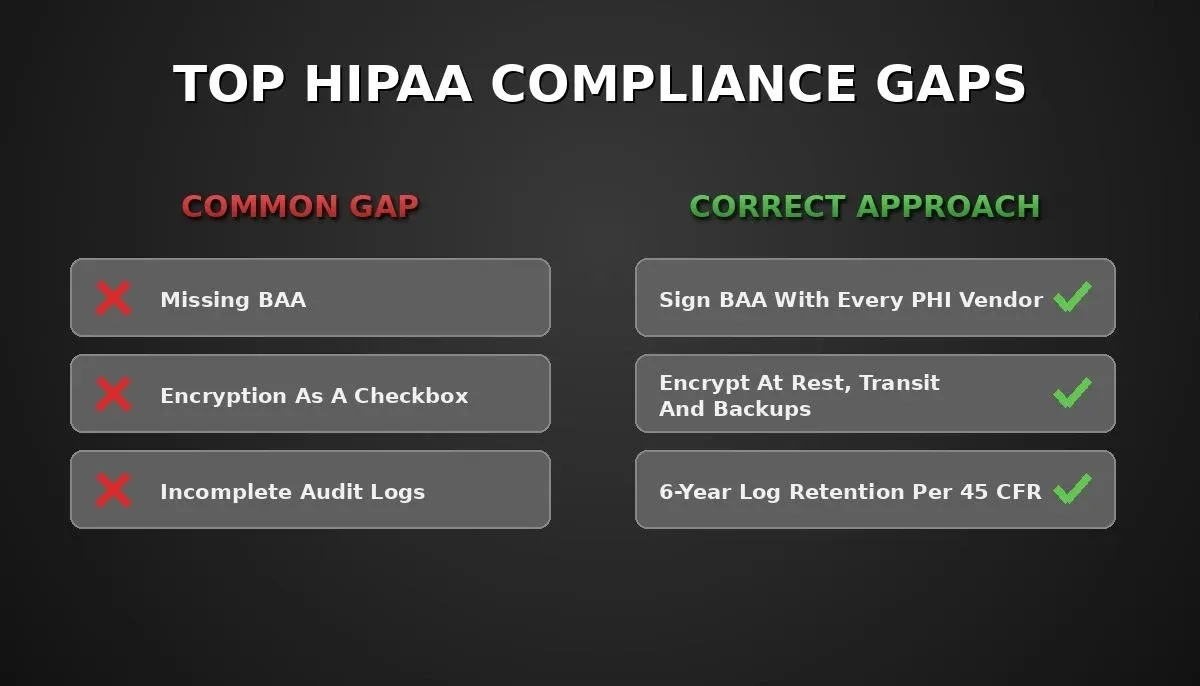
The four compliance gaps that most frequently cause healthcare app teams to fail audits, and the correct approach for each.
So the question becomes: how do you secure your application for production while still shipping at a reasonable pace? The answer starts with architecture decisions made before the first line of code.
Access Controls and Audit Trails That Pass Audits
Assign unique user IDs, enforce role-based permissions, require MFA, set session timeouts, and retain complete audit logs for at least six years. These are the technical controls OCR looks for first to protect patient data.
Strong access controls and detailed audit trails form the backbone of any HIPAA-compliant app. These are not features you add later; they need to be baked into your data architecture from the beginning.
For access controls, follow the principle of least privilege:
-
Assign unique user IDs to each person who accesses the system; shared accounts make it impossible to track individual actions
-
Set up role-based permissions so clinicians see patient records, billing staff see payment data, and administrators manage system settings
-
Require multi-factor authentication at each login; biometrics, hardware tokens, or time-based codes all meet the HIPAA security rule standard
-
Enforce automatic session timeouts after defined periods of inactivity, typically 15 to 30 minutes for applications handling PHI
-
Restrict file access based on context; a nurse viewing a patient chart should not automatically have full access to the entire database
For audit trails, capture everything:
-
Login attempts (successful and failed) with timestamps, IP addresses, and device identifiers
-
PHI access events including who accessed which records and what action they took (view, edit, export, delete)
-
Configuration changes to security settings, role assignments, and system access
-
Retain audit logs for at least six years under 45 CFR §164.316(b)(2)(i)
The difference between passing and failing an audit often comes down to whether your logs tell a complete story. Continuous monitoring helps detect suspicious access and preserve that full record over time, but if that changes your intended link target, use your existing AI-generated authentication system scaffolding to speed up auth flows and RLS policies while still verifying that each component meets HIPAA security rule standards.
Business Associate Agreements and Vendor Management
A BAA is legally required with every vendor that creates, receives, maintains, or transmits PHI on your behalf, including your cloud host, email provider, analytics platform, and any app builder you use; this is especially important for healthcare providers that rely on outside vendors.
If your healthcare app relies on any third-party service that will create, receive, maintain, or transmit PHI, you need a Business Associate Agreement with that vendor.
A BAA is a legal contract that does several things:
-
Defines how the business associate agreement (BAA) governs how the business associate will handle and protect PHI on your behalf
-
Requires the business associate to comply with the HIPAA Security Rule
-
Obligates the business associate to report any security incidents or breaches promptly
-
Extends compliance obligations to any subcontractors the business associate uses
Where teams commonly need a BAA:
| Vendor Category | Examples | BAA Required |
|---|---|---|
| Cloud hosting | AWS, Google Cloud, Microsoft Azure | Yes, if PHI is stored or processed |
| Database / backend | Supabase, Firebase, PlanetScale | Yes, if PHI is stored |
| Email / messaging | SendGrid, Twilio, Mailchimp | Yes, if PHI is transmitted |
| Analytics / monitoring | Mixpanel, Datadog, Segment | Yes, if PHI is visible in logs or events |
| Payment processors | Stripe, Razorpay | Typically no; payment data is PCI, not PHI |
| App builder / no-code platforms | Any platform used to build the app | Yes, if the platform hosts or processes PHI |
Before you commit to any tool in your tech stack, confirm that the vendor offers HIPAA-eligible services and is willing to sign a BAA. Check their compliance documentation, confirm whether they provide a HIPAA-eligible backend when evaluating database or backend vendors, request their SOC 2 Type II report, and verify they have relevant certifications.
Vendor management is an ongoing responsibility. Review BAAs annually, monitor for changes in vendor security posture, and maintain records of all agreements. For teams building web apps with AI tools, the same vendor diligence applies to every service connected to the application, and the same rule applies to any healthcare software that handles PHI through third-party vendors.
How AI App Builders Fit Into a HIPAA-Compliant Workflow
AI app builders accelerate the technical scaffolding a HIPAA-compliant app needs, but HIPAA compliance itself remains entirely your team's responsibility. No tool makes your app HIPAA-compliant automatically.
This distinction matters because it affects how you evaluate a HIPAA-compliant app builder for a healthcare use case.
Rocket.new is a vibe solutioning platform with three pillars: Solve (structured market and business research), Build (AI-powered app generation for web and mobile), and Intelligence (competitor monitoring). For healthcare app development, the Build pillar is most relevant if you want to create healthcare software for regulated use cases.
What Rocket.new's Build pillar can help with:
-
Generating Next.js web apps or Flutter mobile apps with authentication, role-based access, and database schemas from a plain-language prompt
-
Connecting to Supabase for a PostgreSQL backend with row-level security and encrypted connections
-
Generating workflow scaffolding with workflow automation for appointment scheduling, patient onboarding flows, approval steps, notification systems, and data collection forms
-
Exporting full source code to GitHub so you can deploy to your own HIPAA-eligible hosting infrastructure
What Rocket.new does not provide for HIPAA compliance:
Rocket.new's compliance documentation covers GDPR and CCPA only. The docs state explicitly: "Rocket does not add compliance features automatically." The security checklist frames security as a shared responsibility covering general practices such as API key hygiene, Supabase auth, RLS, and HTTPS; none of it is HIPAA-specific.
Rocket.new does not currently offer BAAs. Teams building HIPAA-relevant apps typically use Rocket.new to generate and iterate on application code, then deploy to their own HIPAA-eligible cloud infrastructure where they have signed BAAs with the underlying providers. Healthcare professionals still need to review app outputs against HIPAA rules before using them in medical apps.
The right framing: Rocket.new accelerates the buildout of the technical scaffolding a HIPAA-compliant app needs. The compliance layer, including BAAs, risk analysis, audit-log retention policies, and staff training, is your team's responsibility, same as with any development tool.
Rocket.new connects with 25+ services including Stripe for billing, authentication providers, and API links to EHR systems. For the full list, see the connectors overview.
Industry estimates for custom HIPAA-relevant healthcare app development commonly range from $150,000 to $500,000 and 6 to 12 months, though actual figures vary widely by scope and team. AI-powered platforms can reduce code-generation time significantly, but the compliance work itself is not shortened by the tool you use to write the code. Mendix's pricing for HIPAA-compliant apps starts at $998/month. For a broader look at how AI tools compare on cost and speed, see AI app builder vs hiring a developer.
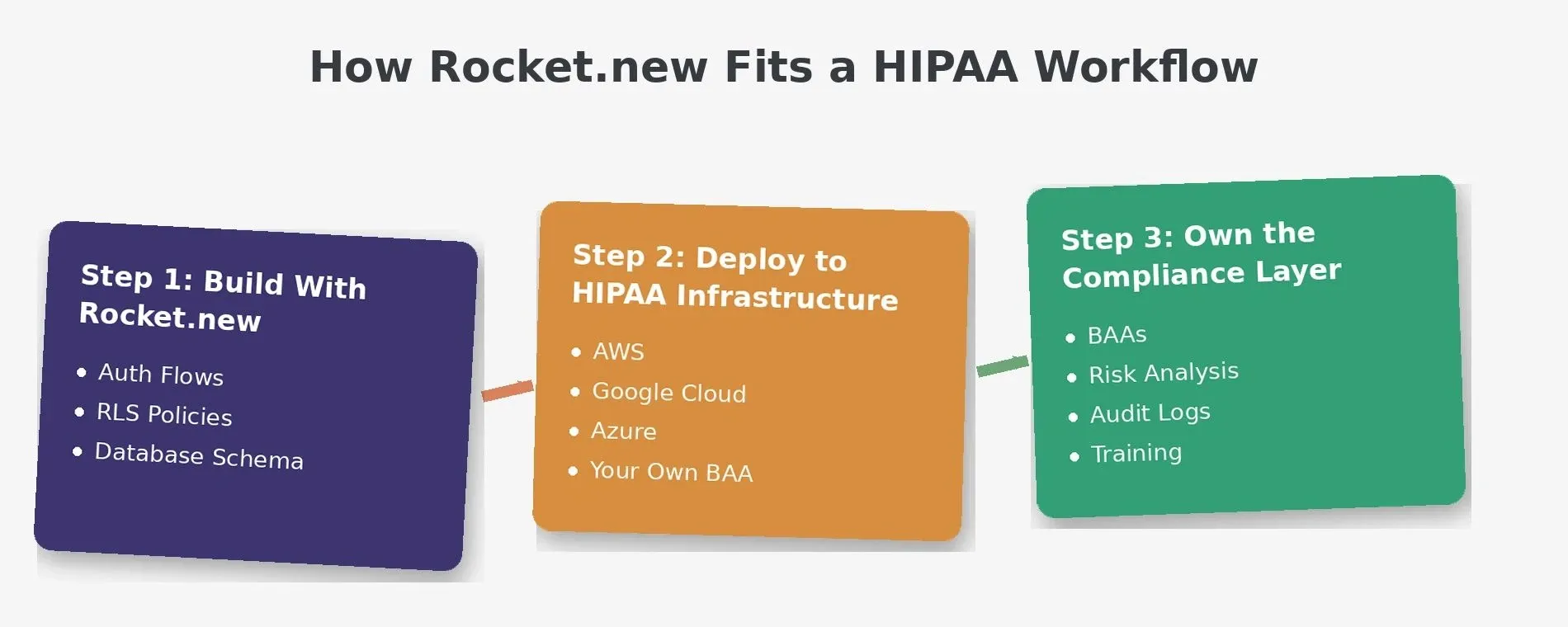
Rocket.new generates the technical scaffolding. Deploying to your own HIPAA-eligible infrastructure and owning the compliance layer is your team's job.
Testing, Documentation, and Ongoing Compliance Reviews
HIPAA compliance is a continuous process. Penetration testing, risk analysis updates, staff training records, and disaster recovery tests are recurring obligations with documentation requirements spanning at least six years.
Implementing HIPAA compliance across an organization can cost $25,000 to over $100,000. Shipping a HIPAA-compliant app is not the finish line. Compliance requires regular testing, updated documentation, data management oversight, and periodic reviews.
Your compliance maintenance cycle should include:
-
Penetration testing and vulnerability scans on a regular schedule, quarterly at minimum, testing for SQL injection, cross-site scripting, and insecure API endpoints
-
Risk analysis updates when you add new features, change vendors, or modify your data architecture
-
Written policies and procedures covering data handling, breach response, workforce training, and access management
-
Staff training records showing that each person who touches PHI has completed HIPAA awareness training at onboarding and at least annually afterward
-
Disaster recovery plan testing to confirm that encrypted backups restore correctly and your application can recover from outages without data loss
-
Compliance reviews with external auditors or internal compliance teams at least once per year
Annual maintenance costs commonly range from $4,000 to $12,000.
Under 45 CFR §164.316(b)(2)(i), HIPAA requires you to retain all security-related policies, procedures, and action records for at least six years. If OCR investigates your organization, they will ask for documented evidence of your security management process.
For additional guidance on conducting a HIPAA risk analysis, see NIST Special Publication 800-66, which HHS OCR recommends as a reference for implementing the Security Rule.
Building a medical appointment app or patient portal is just the start. The ongoing work of maintaining compliance, updating policies, and responding to new threats determines whether your healthcare app stays compliant over time. Teams that treat compliance as a design principle from day one consistently outperform those who bolt it on after launch.
For teams exploring the broader landscape of healthcare app development, the architecture and compliance decisions covered in this guide apply regardless of the stack or platform you choose.
Your Data Architecture Is Your First Line of Defense
Getting HIPAA compliance right is not about checking boxes on a regulatory form. It is about designing your data architecture so that each layer, from encryption and access controls to audit trails and vendor agreements, protects patient information by default.
The teams that succeed treat compliance as a design principle, not an afterthought. Start with your data flows, lock down access from day one, sign BAAs with each vendor, and keep testing everything.
Rocket.new helps healthcare teams go from concept to production-ready app faster, generating the authentication flows, database schemas, and role-based access scaffolding that HIPAA-compliant apps require. The compliance layer is yours to own. Start building on Rocket.new and ship your healthcare app foundation in days, not months.
Table of contents
- -Why Do So Many Healthcare App Projects Stall at Compliance?
- -What Does HIPAA Actually Require for Healthcare Apps?
- -The Three Safeguard Categories You Need to Know
- -How Should You Architect Your Data Layer for Compliance?
- -BAA Decision Tree
- -Where Do Most Teams Introduce Compliance Gaps?
- -Access Controls and Audit Trails That Pass Audits
- -Business Associate Agreements and Vendor Management
- -How AI App Builders Fit Into a HIPAA-Compliant Workflow
- -Testing, Documentation, and Ongoing Compliance Reviews
- -Your Data Architecture Is Your First Line of Defense