Rocket lets founders ship a branded screen time app for iOS and Android using Flutter with daily timers, overnight blocks, parent PIN gates, push alerts, and weekly reports, all from one prompt, no code needed.
Rocket lets any founder ship a screen time management app for both iOS and Android using Flutter, with daily usage timers, overnight blocks, parent PIN gates, push alerts, and weekly reports, all from a single prompt, no code required.
What is a screen time control app? A screen time control app lets parents set per-app daily limits, overnight access blocks, and usage alerts on their child's phone. It enforces those rules automatically, without requiring daily manual action.
Why Is the Digital Wellness Market Worth Billions?
Screen time management is not a niche idea. It is a category backed by serious capital and growing demand across platforms.
The parental control software market hit $2.84 billion in 2026 and is projected to reach $4.86 billion by 2030 at a 14.3% CAGR, according to market research. North America holds the largest share, and Asia-Pacific is the fastest-growing region.
Smartphone adoption among minors keeps climbing. GSMA data (2022-2030 forecast) shows smartphone penetration in sub-Saharan Africa alone is projected to reach 87% by 2030, up from 51% in 2022. More phones in more hands means more demand for digital wellness tools on every device.
Regulatory pressure is accelerating the market. Meta's settlement, TikTok's $400 million DOJ privacy settlement in August 2026, and YouTube's new teen-focused time controls all prove that platforms can no longer self-regulate.
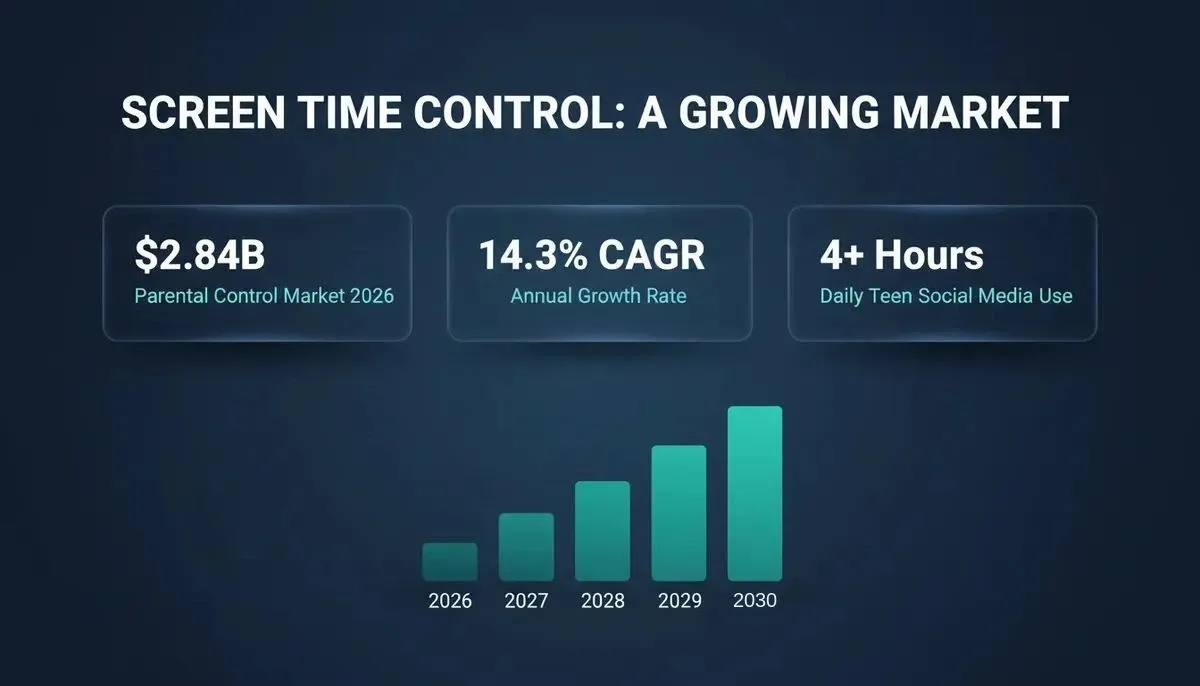
Digital wellness market data: parental control software growth, CAGR, and teen screen time statistics
Free solutions leave gaps. Apple Screen Time works only on iOS devices and gives parents limited data about app usage patterns. Google Family Link requires a Google account and does not support cross-platform use. Neither tool lets a founder customize, brand, or monetize the experience.
The gap is clear. Parents need better tools, regulators are demanding them, and the market rewards founders who ship them. If you are working on a wellness app development project, screen time is the fastest-growing category to enter in 2026.
How did we reach a point where Meta agrees to pay up to $18 billion because it could not manage teen screen time? The August 2026 settlement with 52 attorneys general forced Instagram and Facebook to set a default two-hour daily limit for all users under 18, according to CNBC. About half of US teenagers spend four or more hours per day on social media, per Gallup (2024).
That settlement proves screen time control is now a legal mandate, not a feature request. Parents are stuck choosing between Apple's built-in Screen Time (iOS only, limited customization) and costly enterprise MDM tools designed for corporate device fleets. Nothing in between lets a founder own, brand, and sell a standalone app for both iOS and Android phones.
This post covers every module a custom screen time control app requires, then shows how to ship it all from Rocket's Flutter builder without writing code.
Before You Build: Validate the Idea With Solve
Before generating a single screen, use Rocket's Solve to validate your idea and market position. A Solve task can answer: What are the top parental control apps on iOS and Android, and what do parents complain about most? The structured report Solve returns, with competitor teardowns, feature gap analysis, and pricing benchmarks, feeds directly into your Build prompt.
Once your app is live, Rocket's Intelligence pillar monitors competitors like Bark, Qustodio, Apple, and Google across nine signal pillars including website changes, hiring moves, app store reviews, and pricing shifts, so you can react to a competitor move before it affects your retention.
What Features Does a Standalone Screen Time App Need?
Before writing a single line of code, you need to map the feature set that makes your app competitive against Apple and Google's free defaults. Here is what a production-ready screen time control app requires.
-
Daily usage timer with per-app limits. The app tracks how many minutes each selected app runs on the child's device, with configurable per-app caps that the parent sets from a dashboard. When a limit hits, the app posts a warning, then applies a hard block.
-
Overnight access block between configurable hours. A scheduled mode that disables app access during set hours, typically 10 PM to 7 AM. The child's device shows a lock screen with a countdown.
-
Usage threshold alert via push notification. When the child reaches 75% or 100% of a daily limit, the app fires a push notification to the parent's device in real time.
-
Parent PIN gate to modify settings. A four- or six-digit PIN that the parent creates during setup. No settings page on the child's device opens without this PIN.
-
Weekly usage report delivered via email. At the end of each week, the app sends a formatted report to the parent's email address with per-app breakdowns, daily totals, trend comparisons, and a list of any blocked access attempts.
The five non-negotiable features that separate a production screen time app from Apple and Google's free defaults
| Feature | Apple Screen Time | Google Family Link | Custom App (Flutter) |
|---|---|---|---|
| Per-app daily limits | Yes | Yes | Yes |
| Overnight access block | Yes (Downtime) | Yes (Bedtime) | Yes (configurable hours) |
| Cross-platform iOS + Android | No (iOS only) | No (Android focus) | Yes (single Flutter codebase) |
| Push notification alerts | Limited | Limited | Yes (via Supabase Edge Function) |
| Weekly email report | No | No | Yes (Resend native connector) |
| Parent PIN gate | Yes (passcode) | Yes (parent profile) | Yes (custom PIN logic) |
| Brandable and monetizable | No | No | Yes |
| Comment and social feed control | No | Partial | Fully customizable |
For a deep technical walkthrough of the parent dashboard architecture, Rocket's blog on building a parental controls dashboard covers the full account-linking, RLS policy, and notification pipeline setup.
How Does a Daily Usage Timer With Per-App Limits Work?
The daily usage timer is the core feature that every screen time app requires. Getting the logic right determines whether your app feels reliable or falls apart when users test it on real devices.
-
App usage tracking starts at midnight. The timer resets at 12:00 AM each day. On iOS, this requires the Screen Time API and DeviceActivityMonitor framework. On Android, the UsageStatsManager API provides the same data.
-
Per-app limits are set by the parent from the dashboard. The parent assigns a daily minute cap to each app or app category. These limits sync to the child's device via the backend.
-
Threshold triggers fire at configurable checkpoints. A soft warning at 75%, a 5-minute warning, and the hard block itself. Each trigger posts a notification to both the child's screen and the parent's device.
-
The hard block requires a focus mode overlay. On Android, this uses the Device Administrator API. On iOS, the ManagedSettings framework handles the block. The child cannot dismiss this overlay without the parent PIN.
Testing on both platforms before any app store submission is non-negotiable. Rocket lets you ship a production Flutter app without a dev team, including the simulator testing workflow built directly into the builder.
Daily usage timer: from midnight reset through threshold alert to hard block and PIN override
Configuring Overnight Access Blocks
The overnight block follows a simpler version of the same timer logic, but it runs on a schedule instead of a cumulative counter.
-
The parent sets a start time and end time. A typical default is 10 PM to 7 AM. During these hours, the app activates a device-wide focus mode that blocks selected apps.
-
The block applies automatically with no daily input needed. Once the parent saves the schedule, it runs every night with no action required from the parent.
-
School-hour mode uses the same mechanism. Meta's settlement introduced a school mode that blocks notifications from 8 AM to 3 PM on weekdays. Your app can replicate this by adding a second schedule layer.
-
Schedule changes require the parent PIN. Any change request runs through the parent PIN gate, which keeps the blocking rules tamper-proof on the child's device.
Offering configurable schedules per day of the week, not just a single daily block, is what separates a custom app from the free defaults.
How Do Push Notifications and Weekly Reports Reach Parents?
The notification system is what turns your screen time app from a passive tracking tool into an active parenting aid. Without alerts, parents only see data when they open the app.
Push Notifications via Supabase Edge Functions
Rocket does not have a native push notification connector. Instead, the correct architecture uses Supabase Edge Functions, which Rocket generates and deploys from chat, to call any push notification API you choose. The Supabase integration in Rocket handles the backend scaffolding automatically, including Edge Function generation and secret management.
-
A usage threshold triggers on the child's device.
-
The app calls a Supabase Edge Function (generated by Rocket) with the event payload.
-
The Edge Function calls your chosen push provider's REST API, for example Firebase Cloud Messaging (FCM) for Android, or Apple Push Notification service (APNs) for iOS.
-
The parent's device receives the push notification with context: which app triggered it, how many minutes were used, and whether the limit was reached.
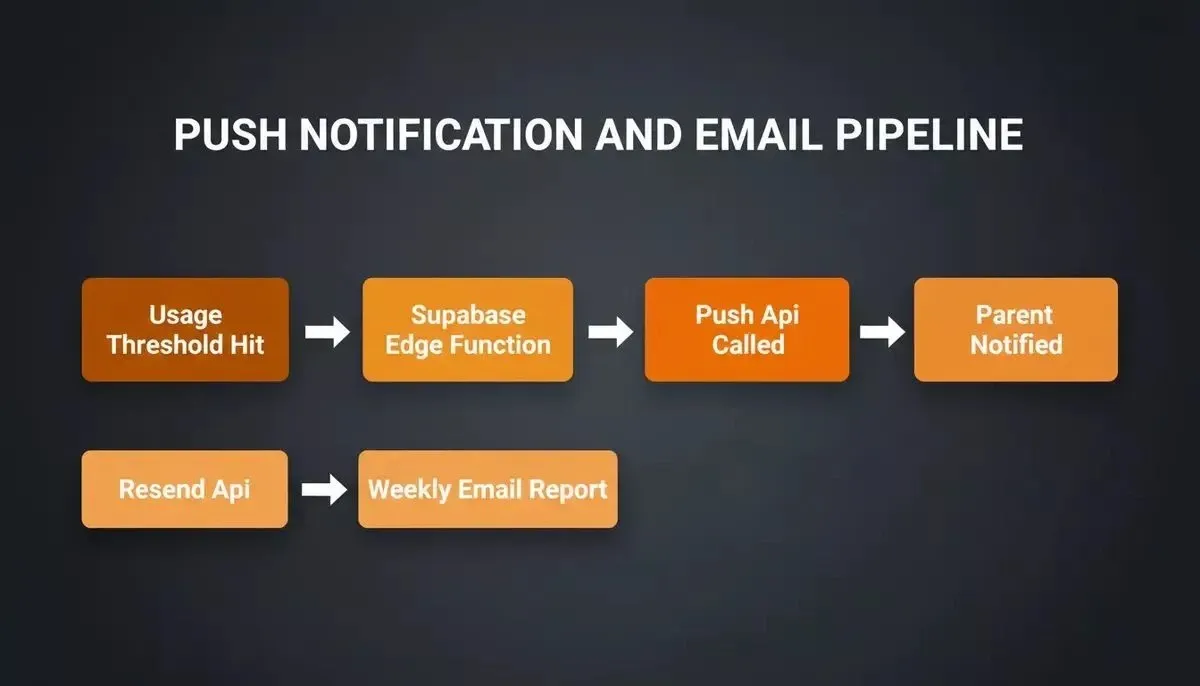
Push notification and weekly report delivery: how threshold triggers reach the parent's device via Supabase Edge Functions
Weekly Reports via Resend
Weekly reports go out via Resend, a native Rocket connector. At the end of each week, a Supabase Edge Function aggregates daily usage data into a structured summary and calls the Resend API to send a formatted HTML email to the parent's address. The email includes per-app breakdowns, total hours, daily trends, and a list of blocked attempts.
*"After trying a bunch of screen time apps my friends and I have always found they are either way too easy to bypass (Apple Screen Time) or way too hard to sustainably use. We ended up building our own." — *r/nosurf community on Reddit
That comment from the r/nosurf community captures the exact problem. A standalone app that hits the middle ground, with real-time alerts, weekly data, and a comment-free child experience, is what the market is missing. As Business Insider's coverage of the settlement put it, the changes Meta agreed to include a two-hour daily limit, overnight blocks, and the removal of reaction counts on all post types for teen accounts.
Securing the Parent PIN Gate and Permission Layer
The PIN gate is the feature that separates a toy project from a production app. If a child can open settings, change their own limits, or disable the blocking mode, the entire app loses credibility with parents. Learning how to secure your app properly is essential before any app store submission.
-
The PIN is created during the parent account setup flow. This code is hashed and stored server-side, never in plain text on the child's device.
-
Every settings screen on the child's device requires PIN entry. Failed attempts are logged and reported to the parent.
-
Row-level security on the backend protects account data. Supabase RLS policies scope all child activity data to the linked parent account. Only the parent's authenticated session has write access to the rules.
-
PIN reset flows through email verification. The child has no access to this email and cannot trigger a reset from the child's device.
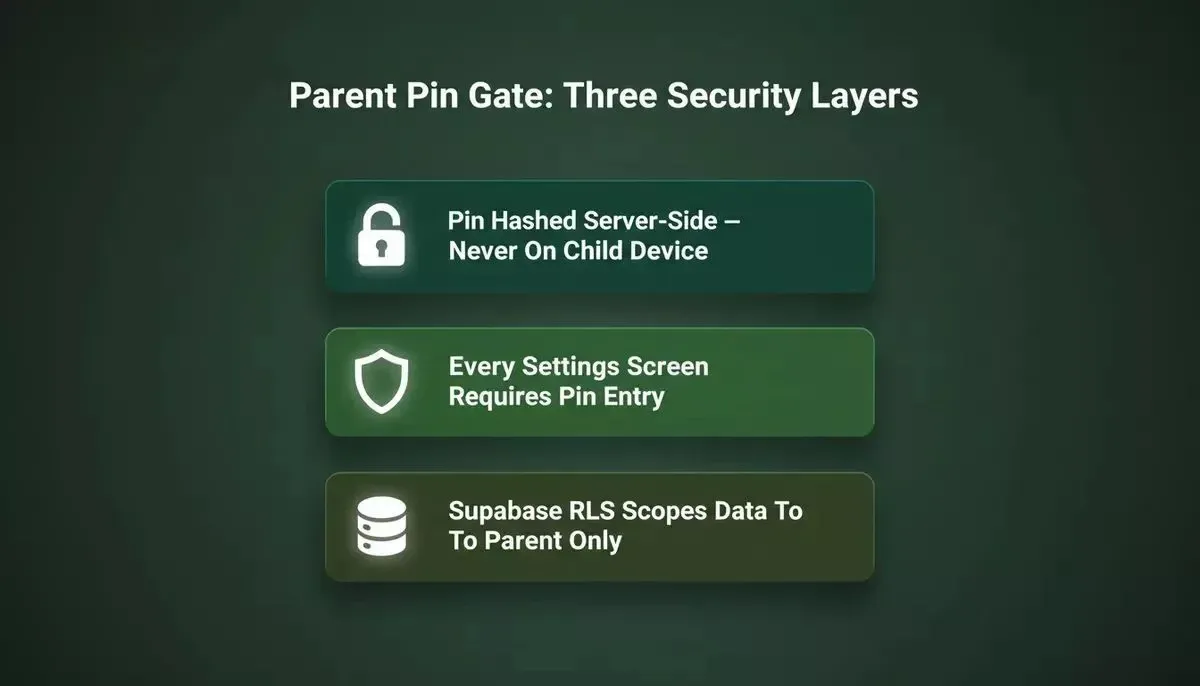
Three layers of PIN gate security: server-side hashing, entry-gate enforcement, and Supabase row-level security
Why Founders Pick Rocket for Family Safety Apps
What is Rocket.new? It is a vibe solutioning platform that combines Solve (market research), Build (AI app generation), and Intelligence (competitor monitoring) in a single workspace, so you go from idea validation to shipped app without switching tools.
-
Rocket generates production-grade Flutter apps from a single prompt. Rocket creates a complete Flutter project with all the screens, navigation, data models, and platform-specific code for both iOS and Android.
-
One Flutter codebase targets both the Apple App Store and Google Play. Dart compiles to native ARM code on both platforms, which means performance on the child's device feels native.
-
26+ connectors are ready to use, not bolted on after the fact. Resend for weekly email reports, Supabase for the backend database, authentication, and Edge Functions, Stripe to monetize your app with subscription billing.
-
Iterate through chat, not code. Add features, adjust the blocking logic, change the PIN gate flow, or redesign any screen by describing what you want in natural language.
-
Ship to app stores from the same workspace. Rocket generates a signed AAB bundle for Google Play and an IPA for Apple App Store Connect. Note: the Google Play developer account costs $25 (one-time, paid to Google) and the Apple developer program costs $99/year (paid to Apple). These are platform fees, not Rocket charges.
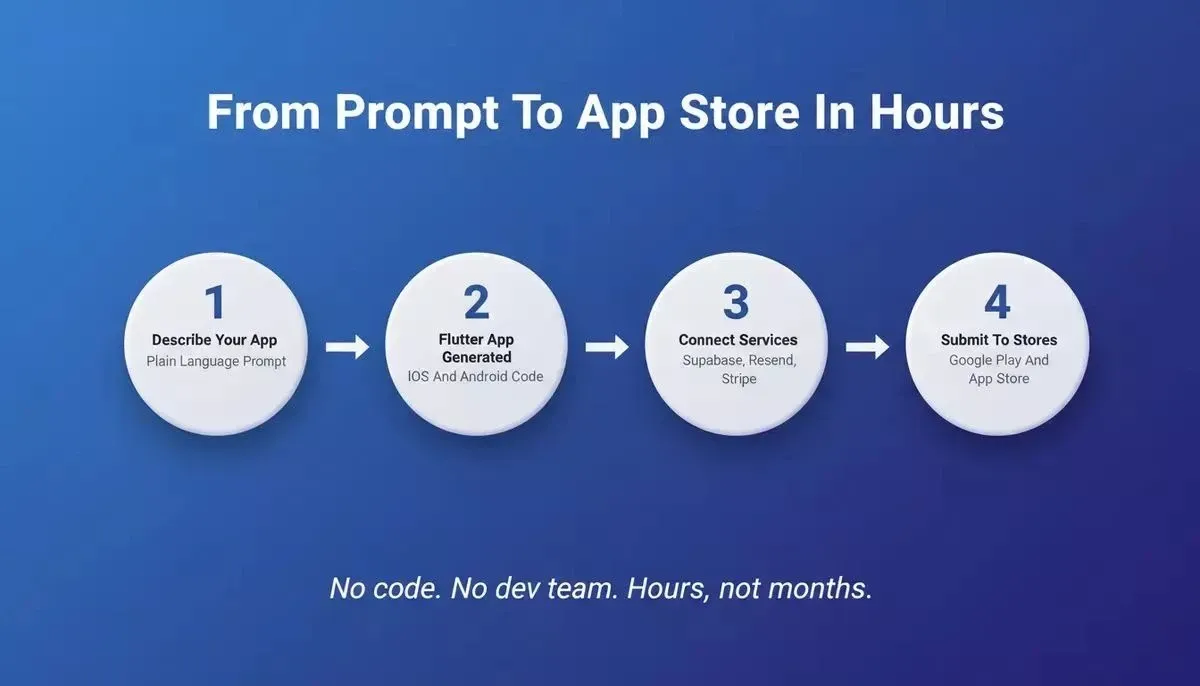
Rocket's four-step workflow: from a single plain-language prompt to a signed, store-ready Flutter build
The other tools in this space fall into two categories: platform-locked defaults (Apple Screen Time, Google Family Link) that you cannot customize or sell, and enterprise MDM solutions designed for corporate fleets. Rocket sits in the open space between them, giving founders a complete, brandable, cross-platform app they fully own.
After launch, Rocket's Intelligence pillar monitors Bark, Qustodio, Apple, and Google for pricing changes, new feature releases, app store review trends, and hiring signals, so you always know when a competitor is making a move before it reaches your users.
Your Screen Time App Starts With a Single Prompt
The digital wellness market is growing at double-digit rates, regulators are forcing the world's largest platforms to add the exact features you can now ship independently, and parents are actively searching for solutions that work on multiple devices. Every piece of infrastructure you need, from usage tracking and app blocking to push notifications and weekly email reports, is buildable in Rocket's Flutter builder without writing code.
Describe your screen time app idea in one prompt. Rocket generates the Flutter project, wires Supabase and Resend, sets up the data layer, and gives you a live preview you can test on real phones before you submit to the Apple App Store or Google Play.
Ready to ship your own screen time control app? Open Rocket, describe your app idea, and get a working Flutter prototype for iOS and Android in minutes. Sign up and start building for free.
Table of contents
- -Why Is the Digital Wellness Market Worth Billions?
- -Before You Build: Validate the Idea With Solve
- -What Features Does a Standalone Screen Time App Need?
- -How Does a Daily Usage Timer With Per-App Limits Work?
- -Configuring Overnight Access Blocks
- -How Do Push Notifications and Weekly Reports Reach Parents?
- -Push Notifications via Supabase Edge Functions
- -Weekly Reports via Resend
- -Securing the Parent PIN Gate and Permission Layer
- -Why Founders Pick Rocket for Family Safety Apps
- -Your Screen Time App Starts With a Single Prompt